



UE开发中经常会遇到加载外部图片的需求,通常是编写C++函数实现,不过使用蓝图加载可以更方便,就来看下。
蓝图实现
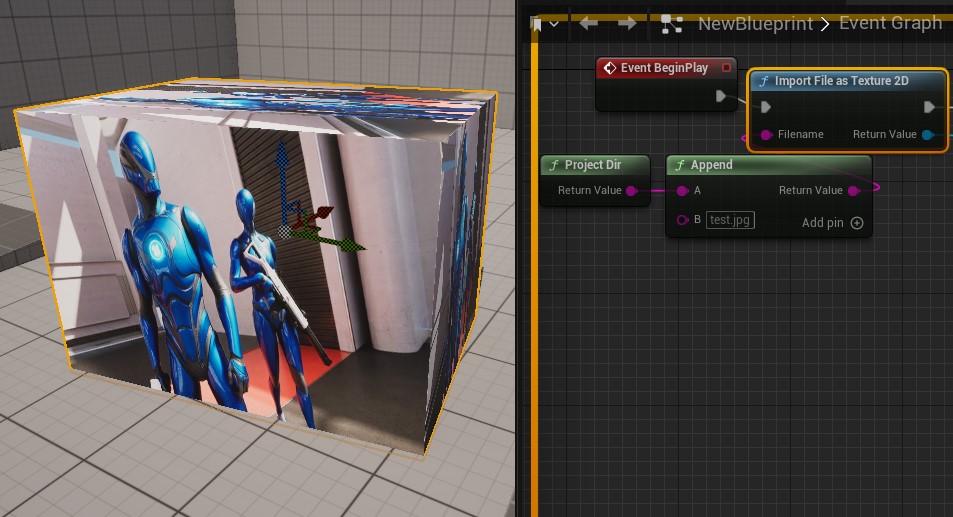
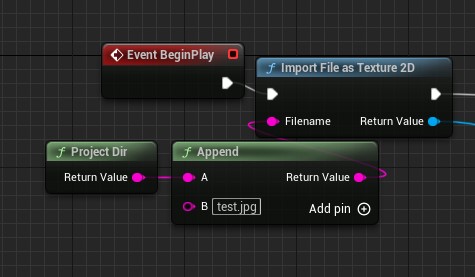
1.新建蓝图,使用节点Import File as Texture2D。传入路径使用ProjectDir,为程序的根目录,对于非打包状态即为Content外的那一级目录,对于打包后的程序为根目录。
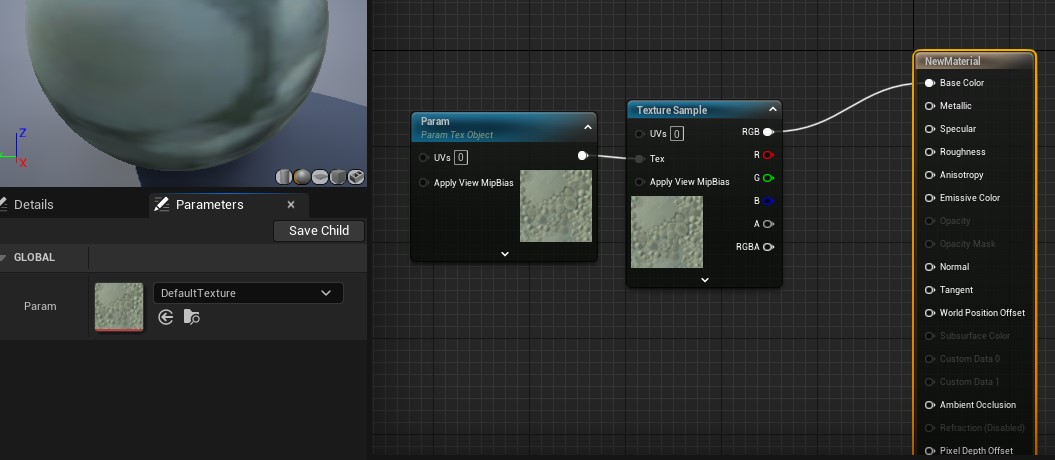
2.在蓝图中创建测试材质球,并暴露Texture参数以测试。
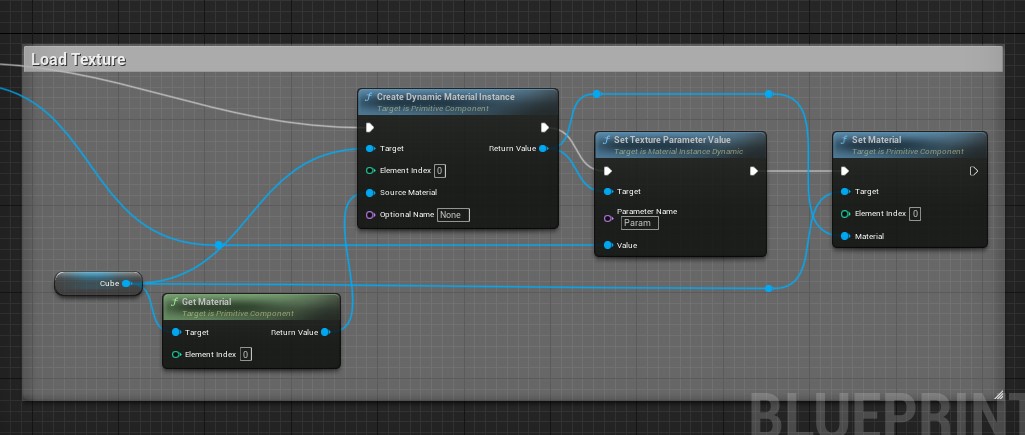
3.在蓝图中创建动态材质示例,赋值Param材质参数。
C++实现
来讲下C++实现。
UTexture2D* LoadTextureFromFile(const FString& FilePath)
{
    // 检查文件是否存在
    if (!FPaths::FileExists(FilePath))
    {
        UE_LOG(LogTemp, Error, TEXT("File does not exist: %s"), *FilePath);
        return nullptr;
    }

    // 读取文件到数组
    TArray<uint8> RawFileData;
    if (!FFileHelper::LoadFileToArray(RawFileData, *FilePath))
    {
        UE_LOG(LogTemp, Error, TEXT("Failed to load file: %s"), *FilePath);
        return nullptr;
    }

    // 使用 ImageWrapperModule 解析图片
    IImageWrapperModule& ImageWrapperModule = FModuleManager::LoadModuleChecked<IImageWrapperModule>(FName("ImageWrapper"));

    EImageFormat::Type ImageFormat = ImageWrapperModule.DetectImageFormat(RawFileData.GetData(), RawFileData.Num());
    if (ImageFormat == EImageFormat::Invalid)
    {
        UE_LOG(LogTemp, Error, TEXT("Unsupported image format for file: %s"), *FilePath);
        return nullptr;
    }

    TSharedPtr<IImageWrapper> ImageWrapper = ImageWrapperModule.CreateImageWrapper(ImageFormat);
    if (!ImageWrapper.IsValid() || !ImageWrapper->SetCompressed(RawFileData.GetData(), RawFileData.Num()))
    {
        UE_LOG(LogTemp, Error, TEXT("Failed to parse image: %s"), *FilePath);
        return nullptr;
    }

    const TArray<uint8>* RawData = nullptr;
    if (!ImageWrapper->GetRaw(ERGBFormat::BGRA, 8, RawData))
    {
        UE_LOG(LogTemp, Error, TEXT("Failed to get raw image data: %s"), *FilePath);
        return nullptr;
    }

    int32 Width = ImageWrapper->GetWidth();
    int32 Height = ImageWrapper->GetHeight();

    // 创建 UTexture2D 对象
    UTexture2D* NewTexture = UTexture2D::CreateTransient(Width, Height, PF_B8G8R8A8);
    if (!NewTexture)
    {
        UE_LOG(LogTemp, Error, TEXT("Failed to create transient texture"));
        return nullptr;
    }

    NewTexture->MipGenSettings = TMGS_NoMipmaps;
    NewTexture->CompressionSettings = TC_VectorDisplacementmap;
    NewTexture->SRGB = true;

    // 填充纹理数据
    FTexture2DMipMap& Mip = NewTexture->PlatformData->Mips[0];
    void* TextureData = Mip.BulkData.Lock(LOCK_READ_WRITE);
    FMemory::Memcpy(TextureData, RawData->GetData(), RawData->Num());
    Mip.BulkData.Unlock();

    // 更新纹理
    NewTexture->UpdateResource();

    return NewTexture;
}
用法:
FString ImagePath = FPaths::ProjectContentDir() / TEXT("Textures/Example.png");
UTexture2D* Texture = LoadTextureFromFile(ImagePath);

if (Texture)
{
    UE_LOG(LogTemp, Log, TEXT("Texture loaded successfully!"));
}






 扫一扫
扫一扫


 1905
1905

 被折叠的 条评论
为什么被折叠?
被折叠的 条评论
为什么被折叠?
 到【灌水乐园】发言





