


点击学习精彩网络技术老师:华为HCIA和HCIP数通eNSP实战视频课、华三、锐捷、WLAN、IPv6等全套视频课程
举例说明如何配置在IS-IS IPv6网络中通过动态BFD实现故障快速检测并通告给IS-IS协议,从而触发业务流量的快速切换。
组网需求
图1为IS-IS IPv6网络。DeviceS和DeviceD之间的流量主路径为DeviceS<--->Switch<--->DeviceD;备份路径为DeviceS<--->DeviceN<--->DeviceD。
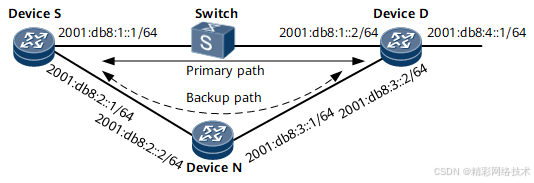
| 设备名称 |
接口 |
IP地址 |
| DeviceS |
GE0/1/0 |
2001:db8:1::1/64 |
| GE0/2/0 |
2001:db8:2::1/64 |
|
| DeviceN |
GE0/1/0 |
2001:db8:2::2/64 |
| GE0/2/0 |
2001:db8:3::1/64 |
|
| DeviceD |
GE0/1/0 |
2001:db8:1::2/64 |
| GE0/2/0 |
2001:db8:3::2/64 |
|
| GE0/3/0 |
2001:db8:4::1/64 |
要求配置BFD for IPv6 IS-IS,使得当主路径的链路故障或者Switch故障时,DeviceS和DeviceD之间的流量快速切换到备份路径上。
配置思路
采用如下思路配置BFD for IPv6 IS-IS特性:
在各NE上配置IS-IS IPv6基本功能,保证各路由的IPv6连通性。
在各NE上调整接口的IS-IS cost值,使DeviceS<--->Switch<--->DeviceD成为主路径,使DeviceS<--->DeviceN<--->DeviceD成为备份路径。
在各NE上配置全局使能BFD。
在各NE的IS-IS视图下使能BFD for IPv6 IS-IS。
数据准备
为完成此配置例,需准备如下的数据:
- IS-IS协议进程号
- IS-IS NET
- 各NE所属Level
- 各接口的IS-IS cost值
- 使能BFD for IPv6 IS-IS的接口
- BFD报文的最小发送和接收时间间隔、BFD本地检测倍数
操作步骤
- 使能IPv6转发能力,配置各接口的IPv6地址
# 以DeviceS为例,其他NE的配置类似,此不赘述。
<HUAWEI> system-view
[~HUAWEI] sysname DeviceS
[*HUAWEI] commit
[~DeviceS] interface gigabitethernet 0/1/0
[~DeviceS-GigabitEthernet0/1/0] ipv6 enable
[*DeviceS-GigabitEthernet0/1/0] ipv6 address 2001:db8:1::1/64
[*DeviceS-GigabitEthernet0/1/0] commit
[~DeviceS-GigabitEthernet0/1/0] quit
- 配置IS-IS IPv6的基本功能
# 配置DeviceS。
[~DeviceS] isis 10
[*DeviceS-isis-10] is-level level-2
[*DeviceS-isis-10] network-entity 10.0000.0000.0001.00
[*DeviceS-isis-10] ipv6 enable
[*DeviceS-isis-10] quit
[*DeviceS] interface gigabitethernet 0/1/0
[*DeviceS-GigabitEthernet0/1/0] isis ipv6 enable 10
[*DeviceS-GigabitEthernet0/1/0] quit
[*DeviceS] interface gigabitethernet 0/2/0
[*DeviceS-GigabitEthernet0/2/0] isis ipv6 enable 10
[*DeviceS-GigabitEthernet0/2/0] commit
[~DeviceS-GigabitEthernet0/2/0] quit
# 配置DeviceN。
[~DeviceN] isis 10
[*DeviceN-isis-10] is-level level-2
[*DeviceN-isis-10] network-entity 10.0000.0000.0002.00
 最低0.47元/天 解锁文章






 扫一扫
扫一扫


 708
708

 被折叠的 条评论
为什么被折叠?
被折叠的 条评论
为什么被折叠?
 到【灌水乐园】发言





