


ros2 galactic环境下适用的局部规划器。
基于frenet坐标系的规划方法
https://github.com/chan-yuu/frenet_plan 如果有用点个star吧。
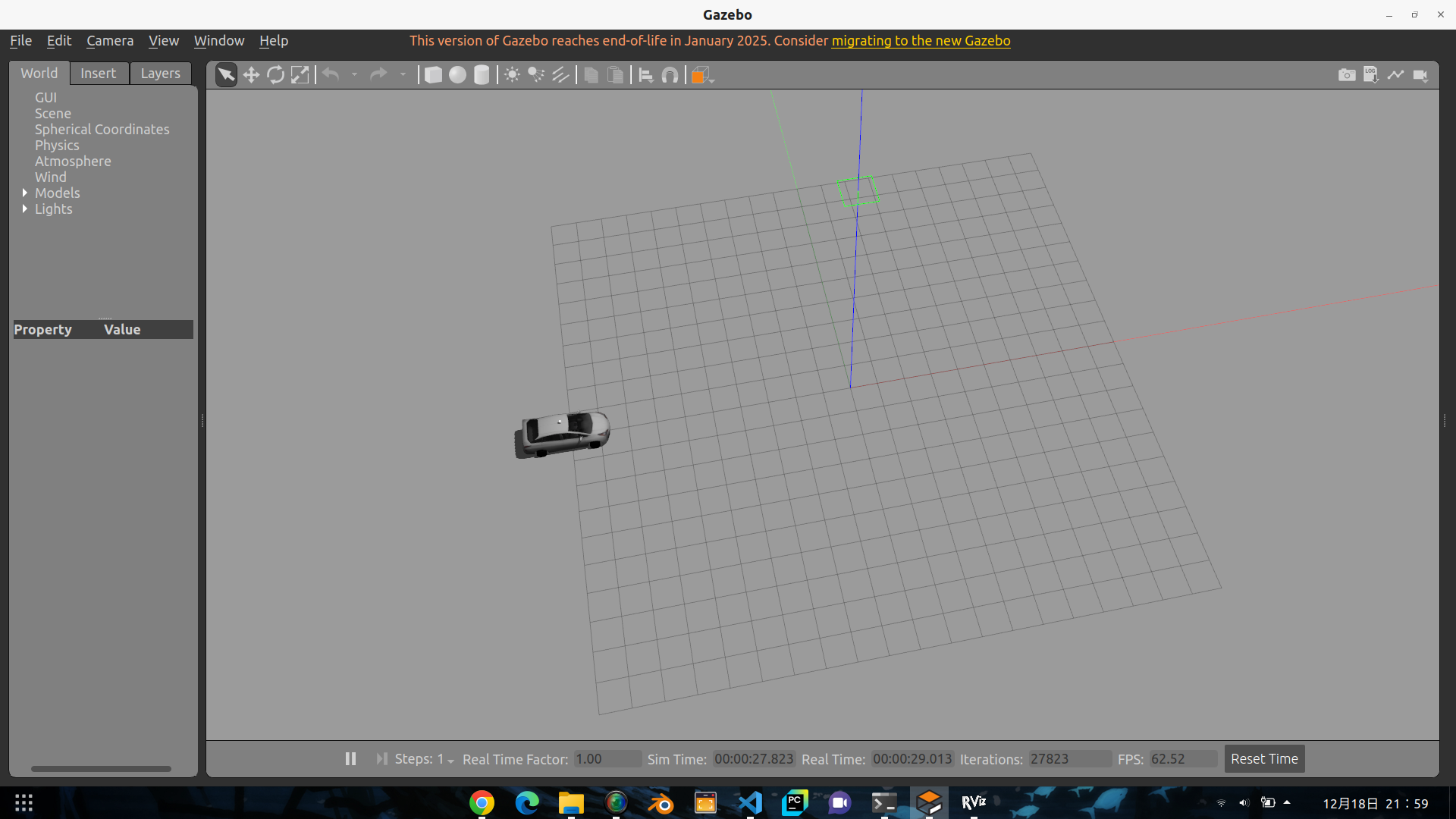
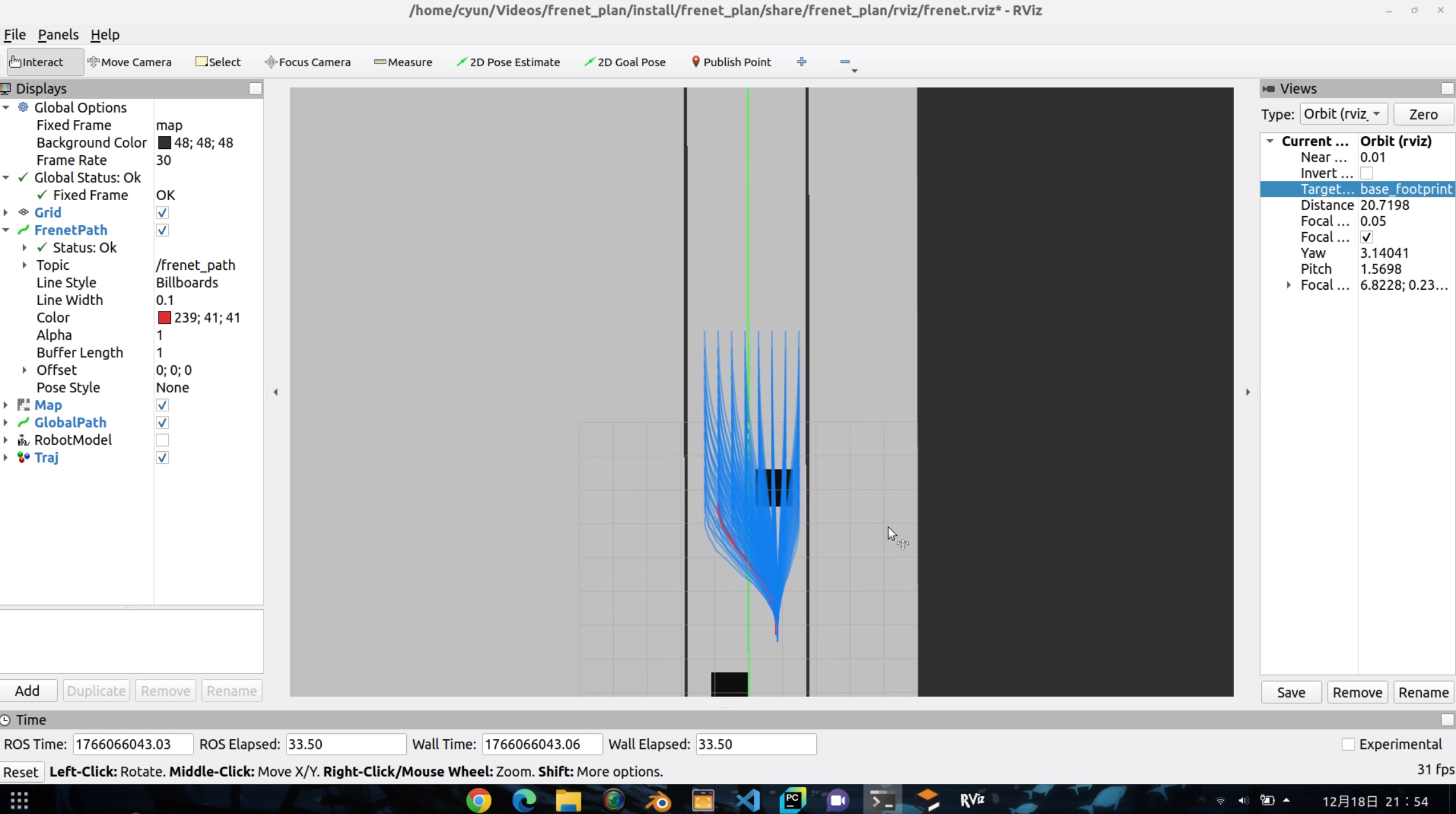
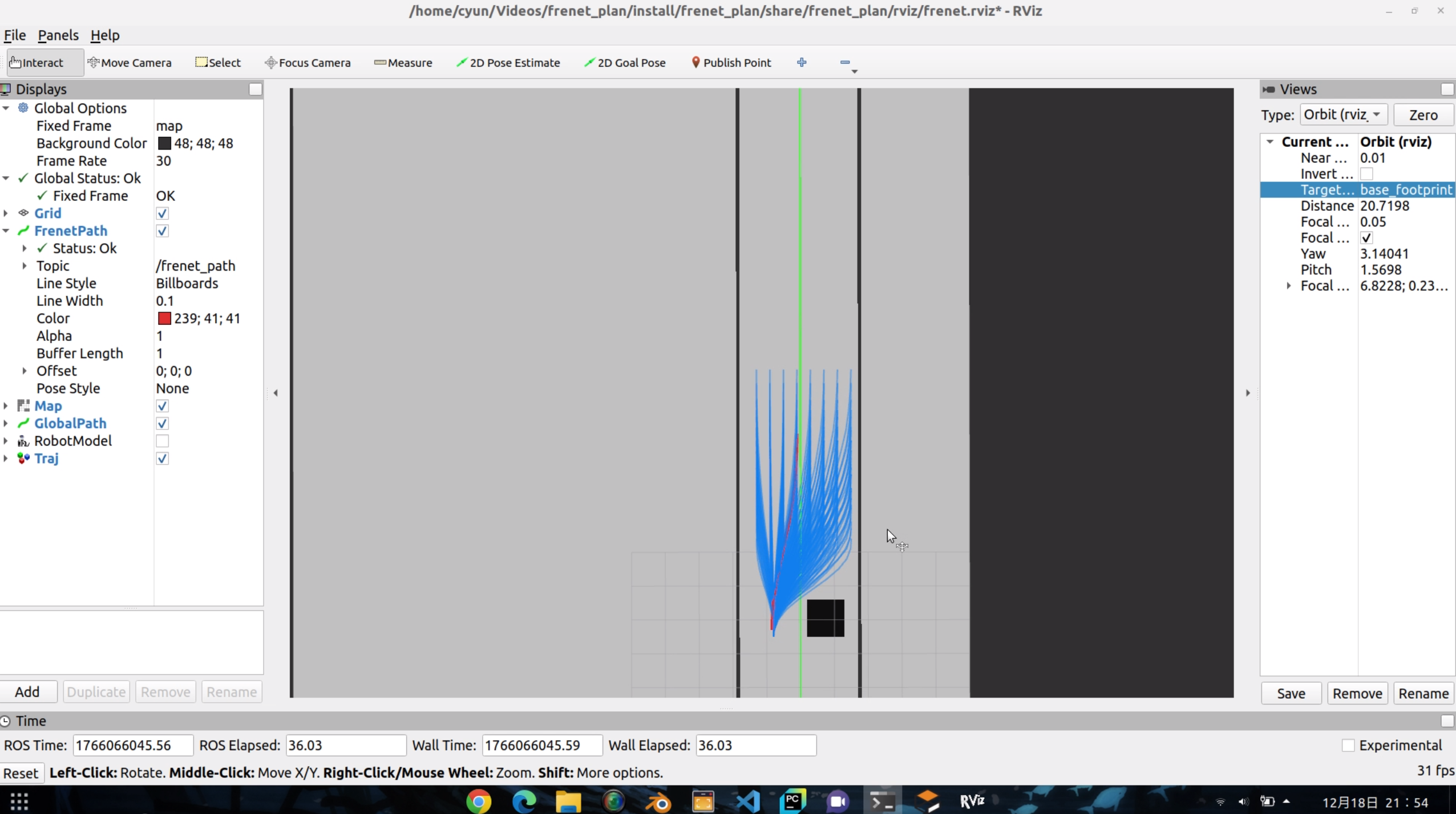
感知由车辆提供,创建一些需要的输入数据来进行规划和控制。以下是一些详细的介绍。
frenet_plan
基于frenet坐标系的规划+环境env-ros2实现
启动仿真环境.
ros2 launch niagara_model display.launch.py
启动算法
ros2 launch frenet_plan frenet_planner.launch.py
测试数据
ros2 run frenet_plan test_publisher.py
运行控制
ros2 run frenet_plan test_control.py
Frenet Planner
基于Frenet坐标系的采样规划器,用于ROS2。
功能特性
- 使用五次多项式进行横向规划
- 使用四次多项式进行纵向规划
- 生成多条候选轨迹并选择最优轨迹
- 支持动态障碍物避让
- 实时轨迹可视化
订阅话题
/local_path_plan(nav_msgs/Path): 参考线轨迹/local_vel_cmd(std_msgs/Float64MultiArray): 参考速度/odom(nav_msgs/Odometry): 当前位置和速度/costmap(nav_msgs/OccupancyGrid): 代价地图用于避障
发布话题
/frenet_path(nav_msgs/Path): 最优轨迹/frenet_vel(std_msgs/Float64MultiArray): 最优轨迹速度/frenet_trajectories(visualization_msgs/MarkerArray): 所有候选轨迹可视化
构建
cd ~/plan_ws_last
colcon build --packages-select frenet_plan
source install/setup.bash
运行
ros2 launch frenet_plan frenet_planner.launch.py
或直接运行节点:
ros2 run frenet_plan frenet_plan_node
参数配置
参数在 config/frenet_params.yaml 中配置:
max_speed: 最大速度 (m/s)max_accel: 最大加速度 (m/s²)max_curvature: 最大曲率 (1/m)max_road_width_left/right: 道路宽度 (m)d_road_sample: 横向采样间隔 (m)target_speed: 目标速度 (m/s)robot_radius: 机器人半径,用于碰撞检测 (m)costmap_obstacle_threshold: Costmap障碍物阈值 (0-100)- 代价权重:
k_jerk,k_time,k_lat,k_lon
可视化
在RViz中添加以下显示:
- Path:
/frenet_path- 最优轨迹 - MarkerArray:
/frenet_trajectories- 所有候选轨迹
基于时序栅格的局部规划
这个方案最有用的地方在于它的感知,使用了stvl作为其中的代价地图,非常适合实车的感知要求。
全局地图+全局costmap+局部costmap.costmap通过点云转换而来.
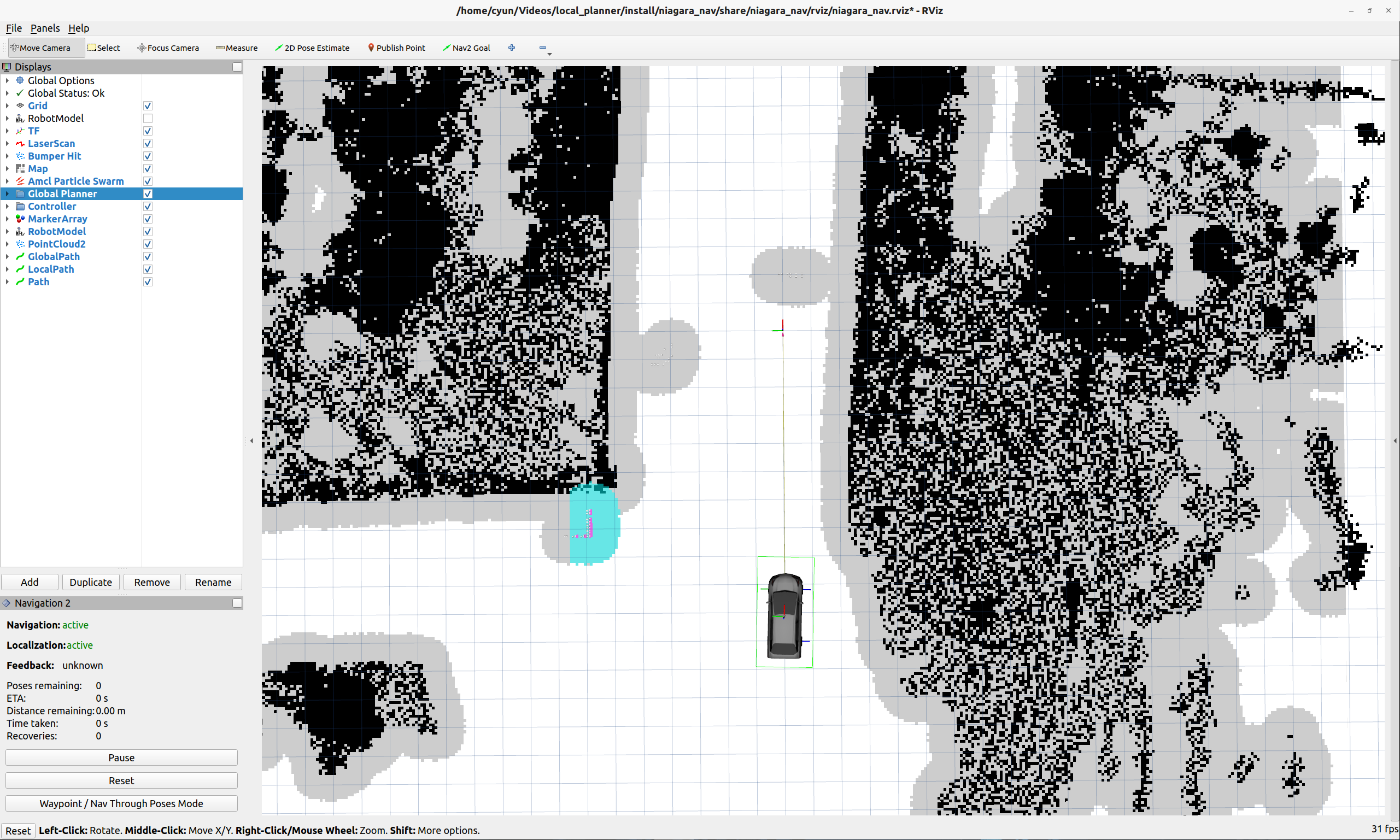
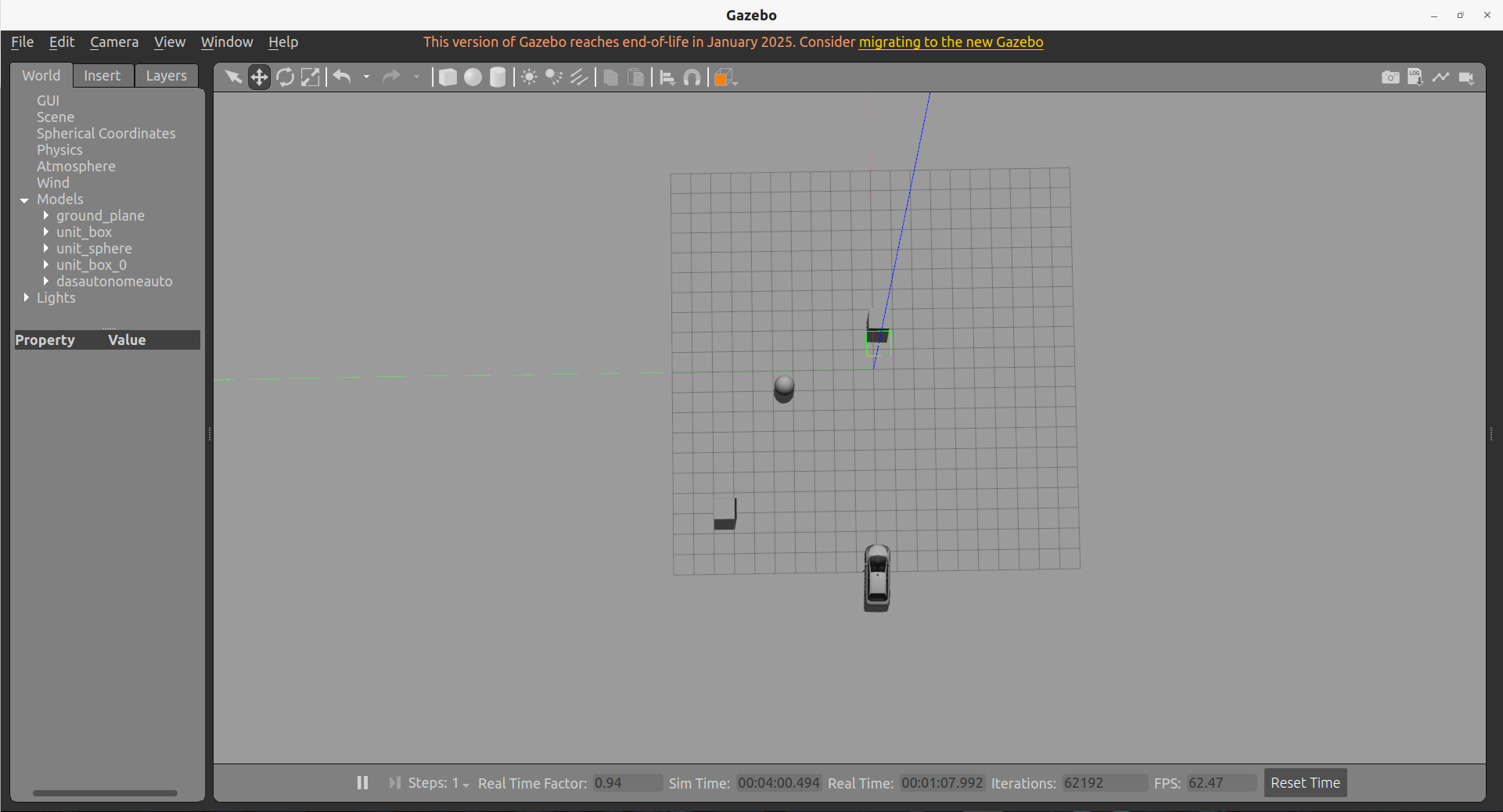
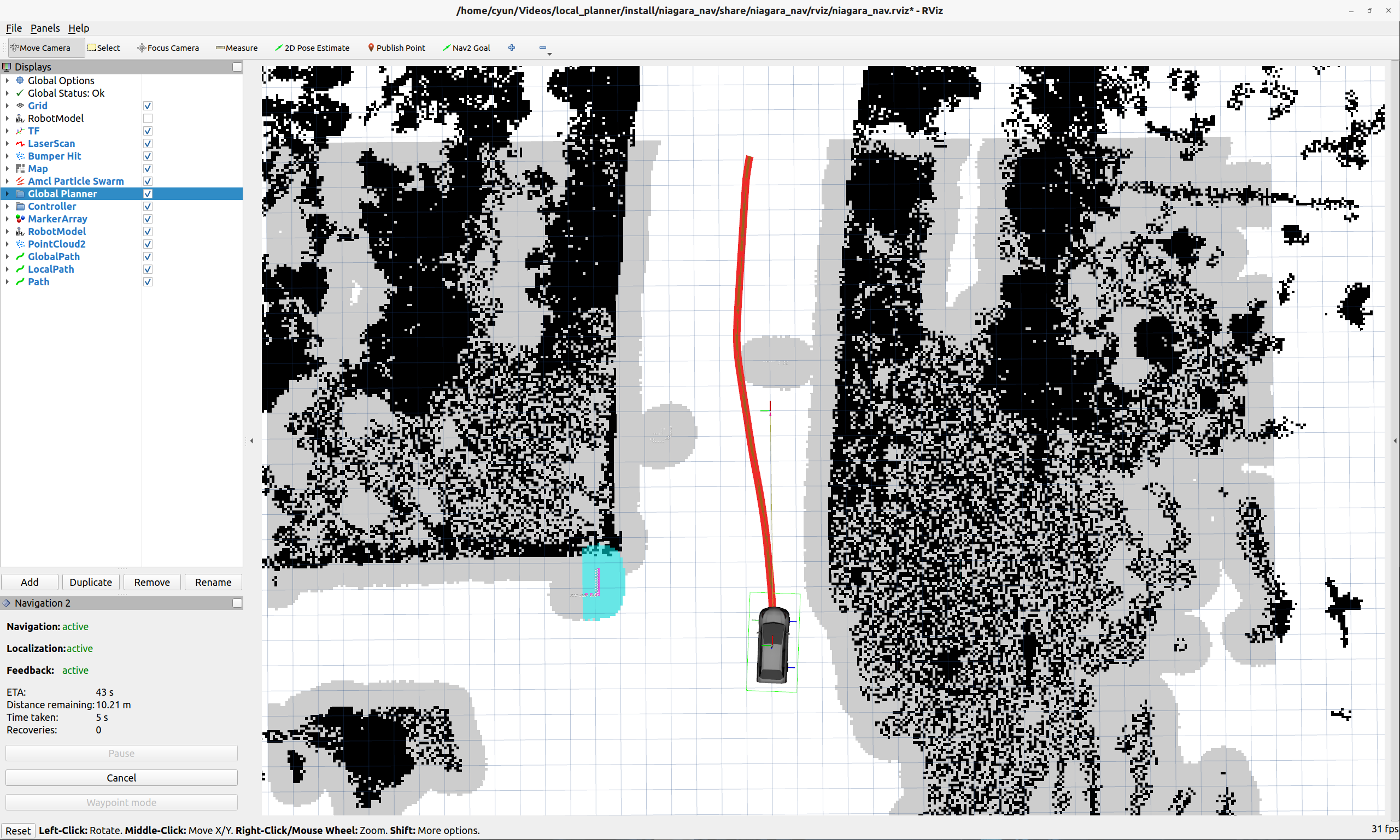
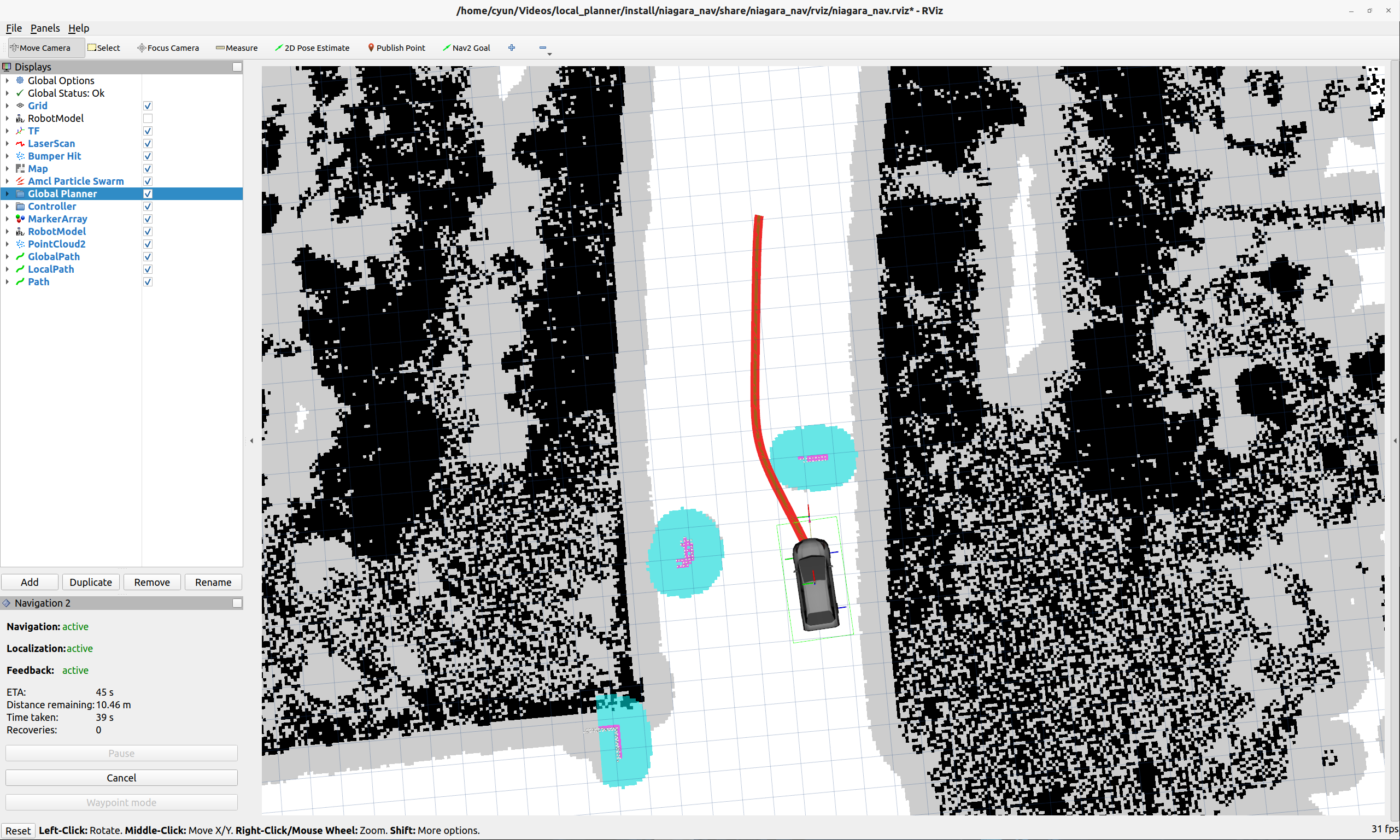
我所使用的配置如下:
# 行为树导航器 - 负责执行导航任务的状态机
bt_navigator:
  ros__parameters:
    use_sim_time: False  # 使用仿真时间
    global_frame: map   # 全局坐标系
    robot_base_frame: chassis  # 机器人基础坐标系
    odom_topic: /odom   # 里程计话题
    bt_loop_duration: 10  # 行为树循环周期(ms)
    default_server_timeout: 20  # 默认服务器超时时间(s)
    enable_groot_monitoring: True  # 启用Groot监控工具
    groot_zmq_publisher_port: 1666  # Groot发布端口
    groot_zmq_server_port: 1667     # Groot服务端口
    plugin_lib_names:
    - nav2_compute_path_to_pose_action_bt_node
    - nav2_compute_path_through_poses_action_bt_node
    - nav2_follow_path_action_bt_node
    - nav2_back_up_action_bt_node
    - nav2_spin_action_bt_node
    - nav2_wait_action_bt_node
    - nav2_clear_costmap_service_bt_node
    - nav2_is_stuck_condition_bt_node
    - nav2_goal_reached_condition_bt_node
    - nav2_goal_updated_condition_bt_node
    - nav2_initial_pose_received_condition_bt_node
    - nav2_reinitialize_global_localization_service_bt_node
    - nav2_rate_controller_bt_node
    - nav2_distance_controller_bt_node
    - nav2_speed_controller_bt_node
    - nav2_truncate_path_action_bt_node
    - nav2_goal_updater_node_bt_node
    - nav2_recovery_node_bt_node
    - nav2_pipeline_sequence_bt_node
    - nav2_round_robin_node_bt_node
    - nav2_transform_available_condition_bt_node
    - nav2_time_expired_condition_bt_node
    - nav2_distance_traveled_condition_bt_node
    - nav2_single_trigger_bt_node
    - nav2_is_battery_low_condition_bt_node
    - nav2_navigate_through_poses_action_bt_node
    - nav2_navigate_to_pose_action_bt_node
    - nav2_remove_passed_goals_action_bt_node
    - nav2_planner_selector_bt_node
    - nav2_controller_selector_bt_node
    - nav2_goal_checker_selector_bt_node

bt_navigator_rclcpp_node:
  ros__parameters:
    use_sim_time: False


controller_server:
  ros__parameters:
    use_sim_time: False
    controller_frequency: 20.0
    min_x_velocity_threshold: 0.001
    min_y_velocity_threshold: 0.5
    min_theta_velocity_threshold: 0.001
    failure_tolerance: 0.3
    progress_checker_plugin: "progress_checker"
    goal_checker_plugins: ["general_goal_checker"] # "precise_goal_checker"
    controller_plugins: ["FollowPath"]

    # Progress checker parameters
    progress_checker:
      plugin: "nav2_controller::SimpleProgressChecker"
      required_movement_radius: 0.5
      movement_time_allowance: 10.0

    # Goal checker parameters
    general_goal_checker:
      stateful: True
      plugin: "nav2_controller::SimpleGoalChecker"
      xy_goal_tolerance: 0.25
      yaw_goal_tolerance: 0.25
    # DWB parameters
    FollowPath:
      plugin: "dwb_core::DWBLocalPlanner"
      debug_trajectory_details: True
      min_vel_x: 0.0
      min_vel_y: 0.0
      max_vel_x: 0.26
      max_vel_y: 0.0
      max_vel_theta: 1.0
      min_speed_xy: 0.0
      max_speed_xy: 0.26
      min_speed_theta: 0.0
      acc_lim_x: 2.5
      acc_lim_y: 0.0
      acc_lim_theta: 3.2
      decel_lim_x: -2.5
      decel_lim_y: 0.0
      decel_lim_theta: -3.2
      vx_samples: 20
      vy_samples: 5
      vtheta_samples: 20
      sim_time: 1.7
      linear_granularity: 0.05
      angular_granularity: 0.025
      transform_tolerance: 0.2
      xy_goal_tolerance: 0.25
      trans_stopped_velocity: 0.25
      short_circuit_trajectory_evaluation: True
      stateful: True
      critics: ["RotateToGoal", "Oscillation", "BaseObstacle", "GoalAlign", "PathAlign", "PathDist", "GoalDist"]
      BaseObstacle.scale: 0.02
      PathAlign.scale: 32.0
      PathAlign.forward_point_distance: 0.1
      GoalAlign.scale: 24.0
      GoalAlign.forward_point_distance: 0.1
      PathDist.scale: 32.0
      GoalDist.scale: 24.0
      RotateToGoal.scale: 32.0
      RotateToGoal.slowing_factor: 5.0
      RotateToGoal.lookahead_time: -1.0

controller_server_rclcpp_node:
  ros__parameters:
    use_sim_time: False


#局部代价地图 - 用于局部路径规划和障碍物避障
local_costmap:
  local_costmap:
    ros__parameters:
      update_frequency: 5.0  # 更新频率(Hz) - 影响障碍物检测实时性
      publish_frequency: 5.0   # 发布频率(Hz) - 影响可视化更新率
      global_frame: odom       # 全局坐标系 - 里程计坐标系
      robot_base_frame: base_footprint  # 机器人基础坐标系
      use_sim_time: False       # 使用仿真时间
      rolling_window: true     # 滚动窗口模式 - 跟随机器人移动
      # rotate_window: true
      width: 15               # 地图宽度(格子数) - 影响计算范围
      height: 15              # 地图高度(格子数) - 影响计算范围
      resolution: 0.1         # 地图分辨率(m/格子) - 影响精度和计算量
      # ★ 机器人半径 - 需根据实际车辆外形尺寸设置,影响碰撞检测
      # robot_radius: 1.0       # 机器人半径(m) - 关键安全参数
      footprint: "[[-1.7, -0.75], [-1.7, 0.75], [1.7, 0.75], [1.7, -0.75]]"  # 长3.4m(x±0.5)、宽1.5m(y±0.25)
      footprint_padding: 0.25  # 可选:足迹外扩5cm,增加安全距离
      update_footprint_enabled: true  # 已配置,确保足迹生效
      plugins: ["stvl_layer", "inflation_layer"]  # 代价地图插件
      inflation_layer:
        plugin: "nav2_costmap_2d::InflationLayer"
        cost_scaling_factor: 3.0
        inflation_radius: 1.0
      stvl_layer:
          plugin: "spatio_temporal_voxel_layer/SpatioTemporalVoxelLayer"
          enabled: true
          voxel_decay: 1.0
          decay_model: 0
          voxel_size: 0.1
          track_unknown_space: true
          unknown_threshold: 15
          mark_threshold: 0
          update_footprint_enabled: true
          combination_method: 1
          origin_z: 0.0
          publish_voxel_map: true
          transform_tolerance: 0.2
          mapping_mode: false
          map_save_duration: 60.0
          observation_sources: rgbd1_mark rgbd1_clear
          rgbd1_mark:
            data_type: PointCloud2
            topic: /rslidar_points
            marking: true
            clearing: false
            obstacle_range: 10.0
            min_obstacle_height: 0.3
            max_obstacle_height: 3.0
            expected_update_rate: 0.0
            observation_persistence: 0.0
            inf_is_valid: false
            filter: "voxel"
            clear_after_reading: true
          rgbd1_clear:
            enabled: true
            data_type: PointCloud2
            topic: /rslidar_points
            marking: false
            clearing: true
            max_z: 8.0
            min_z: 1.0
            vertical_fov_angle: 0.6
            vertical_fov_padding: 0.05
            horizontal_fov_angle: 6.29
            decay_acceleration: 5.0
            model_type: 1
      static_layer:
        map_subscribe_transient_local: True
      always_send_full_costmap: True
  local_costmap_client:
    ros__parameters:
      use_sim_time: False
  local_costmap_rclcpp_node:
    ros__parameters:
      use_sim_time: False


global_costmap:
  global_costmap:
    ros__parameters:
      update_frequency: 8.0
      publish_frequency: 5.0
      global_frame: odom #map
      robot_base_frame: base_footprint
      use_sim_time: False
      rolling_window: true
      # robot_radius: 1.0
      footprint: "[[-1.7, -0.75], [-1.7, 0.75], [1.7, 0.75], [1.7, -0.75]]"  # 长3.4m(x±0.5)、宽1.5m(y±0.25)
      footprint_padding: 0.25  # 可选:足迹外扩10cm,增加安全距离
      update_footprint_enabled: true  # 已配置,确保足迹生效
      resolution: 0.1
      track_unknown_space: true
      width: 40
      height: 40
      origin_x: 0.0
      origin_y: 0.0
      plugins: ["static_layer", "stvl_layer", "inflation_layer"]
      stvl_layer:
          plugin: "spatio_temporal_voxel_layer/SpatioTemporalVoxelLayer"
          enabled: true
          voxel_decay: 1.0
          decay_model: 0
          voxel_size: 0.1
          track_unknown_space: true
          unknown_threshold: 15
          mark_threshold: 0
          update_footprint_enabled: true
          combination_method: 1
          origin_z: 0.0
          publish_voxel_map: true
          transform_tolerance: 0.2
          mapping_mode: false
          map_save_duration: 60.0
          observation_sources: rgbd1_mark rgbd1_clear
          rgbd1_mark:
            data_type: PointCloud2
            topic: /rslidar_points
            marking: true
            clearing: false
            obstacle_range: 20.0
            min_obstacle_height: 0.3
            max_obstacle_height: 3.0
            expected_update_rate: 0.0
            observation_persistence: 0.0
            inf_is_valid: false
            filter: "voxel"
            clear_after_reading: true
            qos:
              reliability: reliable  # 与激光雷达发布者一致
              history: keep_last
              depth: 10
          rgbd1_clear:
            enabled: true
            data_type: PointCloud2
            topic: /rslidar_points
            marking: false
            clearing: true
            max_z: 8.0
            min_z: 1.0
            vertical_fov_angle: 0.6
            vertical_fov_padding: 0.05
            horizontal_fov_angle: 6.29
            decay_acceleration: 1.0
            model_type: 1
      static_layer:
        plugin: "nav2_costmap_2d::StaticLayer"
        map_subscribe_transient_local: True
      inflation_layer:
        plugin: "nav2_costmap_2d::InflationLayer"
        cost_scaling_factor: 3.0
        inflation_radius: 1.0
      always_send_full_costmap: True
  global_costmap_client:
    ros__parameters:
      use_sim_time: False
  global_costmap_rclcpp_node:
    ros__parameters:
      use_sim_time: False

map_server:
  ros__parameters:
    use_sim_time: False
    yaml_filename: "turtlebot3_world.yaml"

# map_server and map_saver removed - not using static map

# AMCL配置已移除 - 使用外部定位源

# planner_server:
#   ros__parameters:
#     expected_planner_frequency: 10.0  # 期望规划频率(Hz) - 已优化匹配当前性能
#     use_sim_time: False  # 使用仿真时间
#     planner_plugins: ["GridBased"]  # 规划器插件列表
#     GridBased:
#       plugin: "nav2_navfn_planner/NavfnPlanner"  # Dijkstra/A*规划器
#       tolerance: 0.5      # 规划容忍度(m) - 允许的目标点偏差
#       use_astar: false    # 使用Dijkstra算法而非A*
#       allow_unknown: true # 允许通过未知区域规划
planner_server:
  ros__parameters:
    planner_plugins: ["GridBased"]

    GridBased:
      plugin: "nav2_smac_planner/SmacPlannerHybrid"  # 使用SMAC混合规划器(结合2D网格与3D状态空间搜索)
      tolerance: 3.0                      # 目标容差:当无法到达精确目标点时,允许在0.5米范围内视为成功(之前问题中可尝试增大此值)
      downsample_costmap: false           # 是否下采样代价地图:关闭时使用原始分辨率(下采样可提升速度但降低精度)
      downsampling_factor: 1              # 下采样因子:1表示不缩放(2表示分辨率减半,如5cm→10cm)
      allow_unknown: true                # 允许在未知区域规划:设为true可让机器人进入传感器未探测的区域(解决目标点被误判为障碍的问题)
      max_iterations: 1000000             # 最大搜索迭代次数:100万次后若未找到路径则失败(-1表示不限制,可能导致卡死)
      max_on_approach_iterations: 1000    # 接近目标时的最大迭代次数:在容差范围内尝试1000次到达目标
      terminal_checking_interval: 5000     # 终端检查间隔:每5000次迭代检查目标是否取消或规划超时
      max_planning_time: 3.5              # 最大规划时间(秒):包括规划、平滑和上采样的总时间(可根据计算资源调整)

      # 运动模型与搜索参数(关键影响路径平滑性和可行性)
      motion_model_for_search: "DUBIN"    # 搜索使用的运动模型:Dubin曲线(适用于差速驱动机器人),可选Reeds-Shepp
      cost_travel_multiplier: 2.0         # 代价旅行乘数:2.0表示避开高代价区域的强度(增大值使路径更居中,减小值提升速度)
      angle_quantization_bins: 64         # 角度量化 bins:64个角度离散化(值越大路径越平滑,但计算量增加)
      analytic_expansion_ratio: 3.5       # 解析扩展比例:3.5倍尝试解析扩展以优化最终路径(适用于平滑曲线需求)
      analytic_expansion_max_length: 3.0  # 解析扩展最大长度:3.0米内的解析路径视为有效(需与最小转弯半径匹配)
      analytic_expansion_max_cost: 200    # 解析扩展最大代价:路径段代价超过200则无效(可放宽此值通过轻度障碍区域)
      analytic_expansion_max_cost_override: false # 接近目标时是否覆盖最大代价:false表示在关键距离内允许高代价路径
      minimum_turning_radius: 4.0        # 最小转弯半径:0.4米(需与机器人实际转弯能力匹配,过小会导致路径不可行)

      # 代价惩罚参数(影响路径规划的偏好)
      reverse_penalty: 2.1                # 倒车惩罚:2.1倍代价(避免机器人倒车,值需≥1)
      change_penalty: 0.0                 # 方向变化惩罚:0.0表示不惩罚(增大值减少路径方向突变)
      non_straight_penalty: 1.20          # 非直线惩罚:1.2倍代价(使路径更倾向直线行驶)
      cost_penalty: 2.0                   # 高代价区域惩罚:2.0倍代价(驱动机器人避开高代价区域,值1.3-3.5较合理)
      retrospective_penalty: 0.025        # 回溯惩罚:0.025(优先扩展后续节点,节省搜索时间,值0-1)
      rotation_penalty: 5.0               # 旋转惩罚:5.0倍代价(避免原地旋转,仅适用于Lattice模型)

      # 优化与缓存参数(提升规划效率)
      lookup_table_size: 20.0              # 查找表大小:20米(缓存Dubin/Reeds-Shepp距离,加速重复规划)
      cache_obstacle_heuristic: True      # 缓存障碍启发式:启用后重复规划同目标时加速40倍(静态环境推荐开启)
      allow_reverse_expansion: False      # 允许反向扩展:false表示仅正向搜索(开启会增加计算量但可能找到更多路径)
      smooth_path: True                   # 平滑路径:启用路径平滑(必须开启,否则路径可能不连续)
      debug_visualizations: True          # 调试可视化:发布扩展点和路径足迹(调试时开启,运行时建议关闭以提升性能)

      # 路径平滑器参数(优化最终路径)
      smoother:
        max_iterations: 1000              # 最大平滑迭代次数:1000次(值越大路径越平滑,但耗时增加)
        w_smooth: 0.3                     # 平滑权重:0.3(控制路径平滑程度,越大越平滑)
        w_data: 0.2                       # 数据权重:0.2(控制路径贴近原始规划点的程度)
        tolerance: 1.0e-10                # 平滑容差:1e-10(收敛判断阈值)
        do_refinement: true               # 启用优化:true表示递归平滑3次(进一步提升路径质量)

planner_server_rclcpp_node:
  ros__parameters:
    use_sim_time: False

# 恢复行为服务器 - 处理导航失败时的恢复策略
recoveries_server:
  ros__parameters:
    costmap_topic: local_costmap/costmap_raw  # 代价地图话题
    footprint_topic: local_costmap/published_footprint  # 机器人轮廓话题
    cycle_frequency: 10.0  # 恢复行为循环频率(Hz)
    recovery_plugins: ["spin", "backup", "wait"]  # 恢复行为插件
    # 原地旋转恢复行为
    spin:
      plugin: "nav2_recoveries/Spin"
    # 后退恢复行为
    backup:
      plugin: "nav2_recoveries/BackUp"
    # 等待恢复行为
    wait:
      plugin: "nav2_recoveries/Wait"
    global_frame: odom      # 全局坐标系
    robot_base_frame: chassis  # 机器人基础坐标系
    transform_timeout: 0.1  # 坐标变换超时时间(s)
    use_sim_time: False      # 使用仿真时间
    simulate_ahead_time: 2.0  # 前瞻仿真时间(s)
    # ★ 旋转速度限制 - 需根据车辆转向系统能力调整
    max_rotational_vel: 1.0   # 最大旋转速度(rad/s) - 安全限制
    min_rotational_vel: 0.4   # 最小旋转速度(rad/s)
    # ★ 旋转加速度限制 - 需根据车辆转向系统动力学调整
    rotational_acc_lim: 3.2   # 旋转加速度限制(rad/s²) - 关键安全参数

# 机器人状态发布器
robot_state_publisher:
  ros__parameters:
    use_sim_time: False  # 使用仿真时间

# 航点跟随器 - 用于多点导航任务
waypoint_follower:
  ros__parameters:
    loop_rate: 20  # 循环频率(Hz) - 影响航点检查频率
    stop_on_failure: false  # 失败时不停止,继续下一个航点
    waypoint_task_executor_plugin: "wait_at_waypoint"  # 航点任务执行器
    # 到达航点后的等待行为
    wait_at_waypoint:
      plugin: "nav2_waypoint_follower::WaitAtWaypoint"
      enabled: True  # 启用等待行为
      waypoint_pause_duration: 200  # 航点暂停时间(ms)






 扫一扫
扫一扫


 816
816

 被折叠的 条评论
为什么被折叠?
被折叠的 条评论
为什么被折叠?
 到【灌水乐园】发言





