


这次主要记录一些官方文档的解读
一、我对机械臂的操控:
1.加载demo.launch
2.另开一个终端来规划运动(rosrun)
二、对照官方文档的Motion Planning
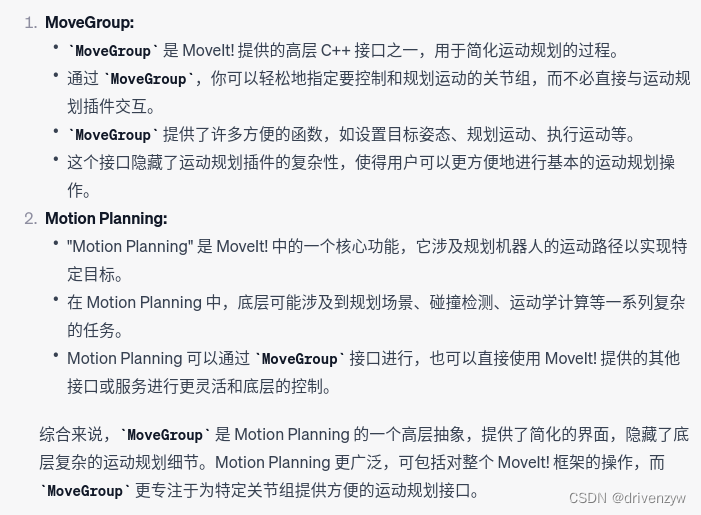
我用的是movegroup接口,gpt对两个接口的解释如下↓,可以通过我的代码和motion planning代码的对比更好的理解“高层”和“底层”这两个相对的概念,平常使用的时候使用movegroup就够了!!
我规划运动引用的头文件↓,来看看官方文档对motion planning的解读
#include <moveit/move_group_interface/move_group_interface.h>
#include <moveit/planning_scene_interface/planning_scene_interface.h>

#include <moveit_msgs/DisplayRobotState.h>
#include <moveit_msgs/DisplayTrajectory.h>

#include <moveit_msgs/AttachedCollisionObject.h>
#include <moveit_msgs/CollisionObject.h>

#include <moveit_visual_tools/moveit_visual_tools.h>
#include <motion_planning.h>
#include <iostream>
#include "kinematics.h"
#include <math.h>
Motion Planning API — moveit_tutorials Melodic documentation
官方文档的实例代码par1:
const std::string PLANNING_GROUP = "panda_arm";
robot_model_loader::RobotModelLoader robot_model_loader("robot_description");
robot_model::RobotModelPtr robot_model = robot_model_loader.getModel();
/* Create a RobotState and JointModelGroup to keep track of the current robot pose and planning group*/
robot_state::RobotStatePtr robot_state(new robot_state::RobotState(robot_model));
const robot_state::JointModelGroup* joint_model_group = robot_state->getJointModelGroup(PLANNING_GROUP);
我的代码part1
//ros初始化需要的几行代码,创建一个 ROS 节点(Node),并启动一个异步的 ROS spinner。
ros::init(argc, argv, "move_group_interface_tutorial_zyw");
ros::NodeHandle node_handle;
ros::AsyncSpinner spinner(1);
spinner.start();
//可以用rosnode list来查看运行的节点


//和上面的官方文档对应的几行代码
static const std::string PLANNING_GROUP = "arm";
const robot_state::JointModelGroup* joint_model_group =move_group.getCurrentState()->getJointModelGroup(PLANNING_GROUP);
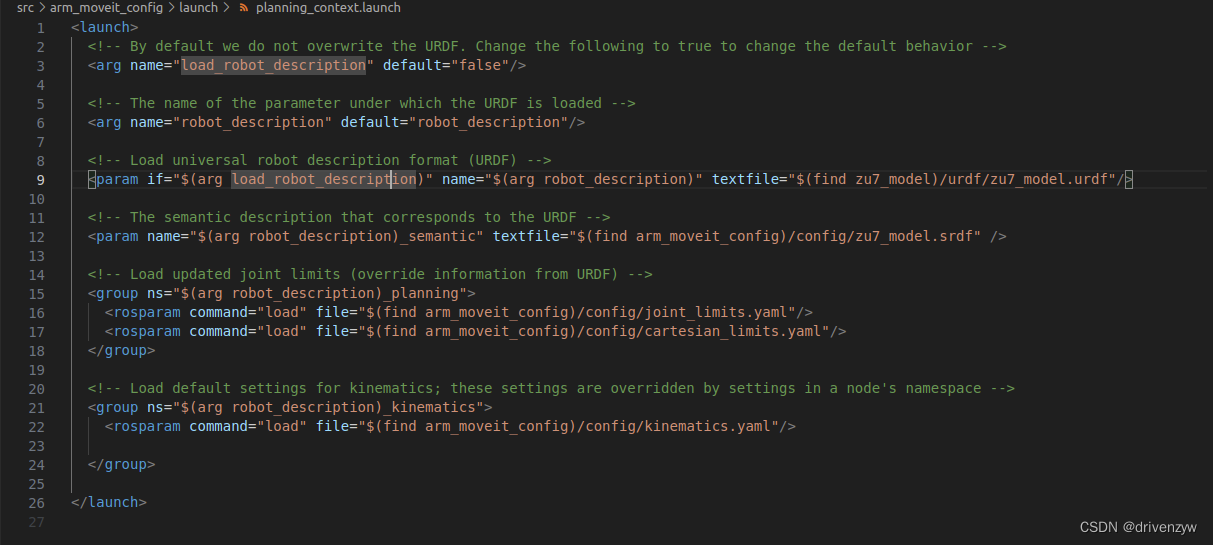
可以看到2-5行代码是没有的,因为我还运行了 一个demo.launch,里面有模型的加载
官方文档part2:
显示加载moveit的运动插件,在我的代码里面没有这一部分,我使用的是moveit提供的高层接口MoveGroupInterface,里面很多设置都是默认的
if (!node_handle.getParam("planning_plugin", planner_plugin_name))
  ROS_FATAL_STREAM("Could not find planner plugin name");
try
{
  planner_plugin_loader.reset(new pluginlib::ClassLoader<planning_interface::PlannerManager>(
      "moveit_core", "planning_interface::PlannerManager"));
}
catch (pluginlib::PluginlibException& ex)
{
  ROS_FATAL_STREAM("Exception while creating planning plugin loader " << ex.what());
}
try
{
  planner_instance.reset(planner_plugin_loader->createUnmanagedInstance(planner_plugin_name));
  if (!planner_instance->initialize(robot_model, node_handle.getNamespace()))
    ROS_FATAL_STREAM("Could not initialize planner instance");
  ROS_INFO_STREAM("Using planning interface '" << planner_instance->getDescription() << "'");
}
catch (pluginlib::PluginlibException& ex)
{
  const std::vector<std::string>& classes = planner_plugin_loader->getDeclaredClasses();
  std::stringstream ss;
  for (std::size_t i = 0; i < classes.size(); ++i)
    ss << classes[i] << " ";
  ROS_ERROR_STREAM("Exception while loading planner '" << planner_plugin_name << "': " << ex.what() << std::endl
                                                       << "Available plugins: " << ss.str());
}
官方文档part3
可视化,但是实际上也不用写到自己的代码里面,原因同上
自己的代码part3
获取机械臂现状态下的关节角,我直接用的是movegroup自带的getCurrentState函数
(moveit::planning_interface::MoveGroupInterface move_group(PLANNING_GROUP);)
const robot_state::RobotState& current_state = *move_group.getCurrentState();
std::vector<double> current_joint_values;
current_state.copyJointGroupPositions(joint_model_group, current_joint_values);

std::cout << "Current Joint Values: ";
for (const auto& value : current_joint_values)
 {
  std::cout << value << " ";
 }
std::cout << std::endl;





 扫一扫
扫一扫


 1232
1232

 被折叠的 条评论
为什么被折叠?
被折叠的 条评论
为什么被折叠?
 到【灌水乐园】发言





