


XML
XML相关类:
XmlNode、XmlDocument、XmlDeclaration、XmlElement。
后面的类都继承自第一个。
基本操作
新建Xml类:
XmlDocument xmlDocument = new XmlDocument();
读取Xml文件:
xmlDocument.Load(path);
读取节点:(相当于找到一个<XXX></XXX>)
XmlNode xmlNode= xmlDocument.SelectSingleNode(key);
xmlNode也可以执行SelectSingleNode(key);
读取节点内容:(相当于找到一个<XXX></XXX>中间的内容)
xmlNode.InnerText;
读取一组同名节点:
XmlNodeList xmlNodeList=xmlNode.SelectNodes(key);
读取节点属性:
xmlNode.Attributes[key].Value;
声明版本和编码方式:
XmlDeclaration xmlDeclaration=xmlDocument.CreateXmlDeclaration
        ("1.0","UTF-8","");
创建节点:(相当于创建一个<XXX></XXX>)
XmlElement xmlElement=xmlDocument.CreateElement(key);
写入节点值:
xmlElement.InnerText=value;
追加节点(包括追加xmlDeclaration):
追加根节点:(不执行这一步相当于前面的创建白写)
xmlDocument.AppendChild(xmlNode);
追加子节点(最后必须追加到xmlDocument才有效):
xmlNode1.AppendChild(xmlNode2);
写入节点属性:
xmlElement.SetAttribute(key,value);
保存:
xmlDocument.Save(path);
Xml序列化反序列化
序列化
using System.IO;
using System.Xml.Serialization;

using(StreamWriter streamWriter = new StreamWriter(path, false)){
    XmlSerializer xmlSerializer = new XmlSerializer(data.GetType());
    xmlSerializer.Serialize(streamWriter,data);
}
反序列化
using System.IO;
using System.Xml.Serialization;
using System;

if(File.Exists(path)){
    using(StreamReader streamReader = new StreamReader(path)){
        XmlSerializer xmlSerializer = new XmlSerializer(type);
        return xmlSerializer.Deserialize(streamReader);
    }
}
else{
    return Activator.CreateInstance(type);
}
坑
反序列化读不出来
数据结构:
[Serializable]
    public class PlaneData{
        [XmlAttribute]
        public int hp;
        [XmlAttribute]
        public int speed;
        [XmlAttribute]
        public int volume;
        [XmlAttribute]
        public string path;
        [XmlAttribute]
        public float scale;
    }
    [Serializable]
    public class AllPlaneData{
        public List<PlaneData> planeDatas=new List<PlaneData>();
    }
Xml:
<?xml version="1.0" encoding="utf-8"?>
<AllPlaneData xmlns:xsd="http://www.w3.org/2001/XMLSchema" xmlns:xsi="http://www.w3.org/2001/XMLSchema-instance">
  <planeDatas>
  	<PlaneData hp="8" speed="8" volume="4" path="飞机大战/Airplane1" scale="1"/>
  	<PlaneData hp="9" speed="7" volume="4" path="飞机大战/Airplane2" scale="1"/>
  	<PlaneData hp="6" speed="10" volume="4" path="飞机大战/Airplane3" scale="1"/>
  	<PlaneData hp="10" speed="5" volume="4" path="飞机大战/Airplane4" scale="0.6"/>
  	<PlaneData hp="7" speed="9" volume="4" path="飞机大战/Airplane5" scale="1"/>
  </planeDatas>
</AllPlaneData>
把数据结构写入Xml一份,和自己写的对比;又把自己写的内容复制进程序写的xml,能读出来;又把读取的代码改成读取程序写入的Application.persistentDataPath下的文件,能读出来。好像是Application.streamingAssetsPath路径出了问题。发现确实是程序里的文件名Plane打成了Plan。之前我在反序列化程序里判断文件是否存在后面打印,打印出来了,那个其实是其他数据的反序列化打印的。
改进:编辑器里找不到xml文件时打印一个提示。
public object XmlDeserialize(Type type,string path){
        if(File.Exists(path)){
            using(StreamReader streamReader = new StreamReader(path)){
                XmlSerializer xmlSerializer = new XmlSerializer(type);
                return xmlSerializer.Deserialize(streamReader);

            }
        }
        #if UNITY_EDITOR
        Debug.Log(path+"没有找到!!!!!!!!!!!!!!!!!!");
        #endif
        return Activator.CreateInstance(type);
    }
JSON
用于JSON序列化的类必须添加[Serializable]特性
[Serializable]
    public class ServerInfo{
        public int id;
        public string name;
        public int serverStatus;
    }
一个某种基类Base组成的List,里面的元素由它和它的各种子类组成,能序列化成json吗?
用LitJson可以:
[Serializable]
public class ItemJson{
     public int id;
}
[Serializable]
public class MagJson:ItemJson{
    public int ammo;
}
public class JsonTest:MonoBehaviour{
    public List<ItemJson> items;
    [ContextMenu("打印json")]
    void PrintJson(){
        items=new List<ItemJson>(){
            new ItemJson(){
                id = 0
            },
            new MagJson(){
                id=1,
                ammo=30
            }
        };
        Debug.Log(JsonMapper.ToJson(items));
    }
}

但是在检查器面板上只能显示基类的字段。
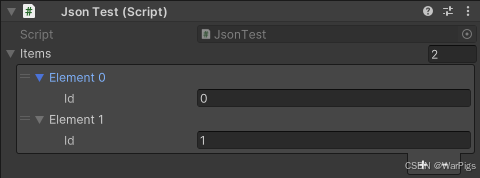
所以可以把一个背包,里面装有弹匣、药品、饮料、手榴弹等不同属性的类的List转换成Json持久存储。问题在于反序列化时,API不能识别出一个元素是哪个子类,只能全部当成基类读出,导致子类多的数据全部丢失。
枚举序列化会变成什么
[ContextMenu("枚举序列化")]
    void PrintEnum(){
        string jsonString=JsonUtility.ToJson(itemA1);
        Debug.Log(jsonString);
    }
    public ItemA itemA1;
}
public enum ItemType{
        Medicine,Grenade,Other
    }
[Serializable]
    public class ItemA{
        public ItemType itemType;
        public int id;
        public int num;
    }

二进制
二进制序列化有几个特点:
- 序列化的结果人看不懂,需要序列化后反序列化能把数据还原才能确定没问题。
- 长度可变的数据类型:字符串、列表需要先记一个长度;
序列化是写一个支持任意类的(泛用)还是每个类写一个(专用)?
写专用序列化方法时,一个个字段写BitConverter.GetBytes(),然后增加偏移量感觉很笨,但是手写泛用序列化方法,需要处理嵌套类、列表、自定义类的列表,难度较大。
C#自带的BinaryFormatter可以序列化任意类,不过据说已经过时。
public void Save(object obj,string fileName){
        if(!Directory.Exists(path)){
            Directory.CreateDirectory(path);
        }
        using(FileStream fileStream=new FileStream(path+fileName,
        FileMode.OpenOrCreate,FileAccess.Write)){
            BinaryFormatter binaryFormatter=new BinaryFormatter();
            binaryFormatter.Serialize(fileStream,obj);
            fileStream.Close();
        }
    }
    public T Load<T>(string fileName)where T:class{
        if(!File.Exists(path+fileName)){
            return default(T);
        }
        T obj;
        using(FileStream fileStream=new FileStream(path+fileName,
        FileMode.OpenOrCreate,FileAccess.Read)){
            BinaryFormatter binaryFormatter= new BinaryFormatter();
            obj=binaryFormatter.Deserialize(fileStream) as T;
            fileStream.Close();
        }
        return obj;
    }





 扫一扫
扫一扫


 324
324

 被折叠的 条评论
为什么被折叠?
被折叠的 条评论
为什么被折叠?
 到【灌水乐园】发言





