


 C++代码展示了如何使用OpenCV进行轮廓检测,并通过OpenCV原始fitEllipse、AMS方法fitEllipseAMS和Direct方法fitEllipseDirect对轮廓进行椭圆拟合。用户可通过滑动条调整阈值,直观比较不同方法的拟合效果。
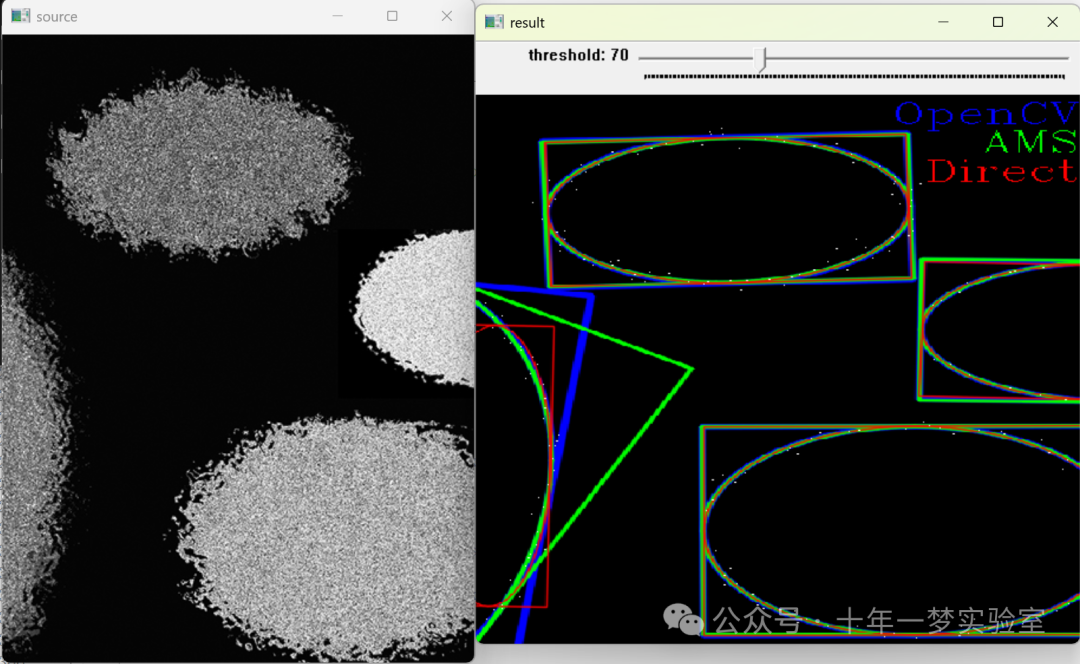
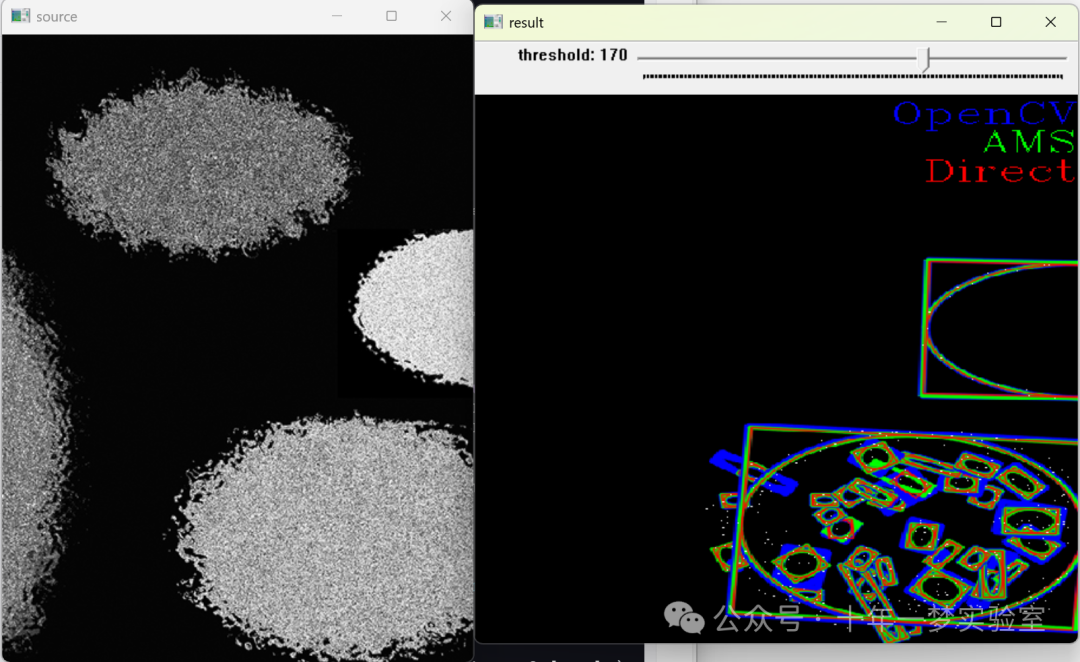
/********************************************************************************
 *
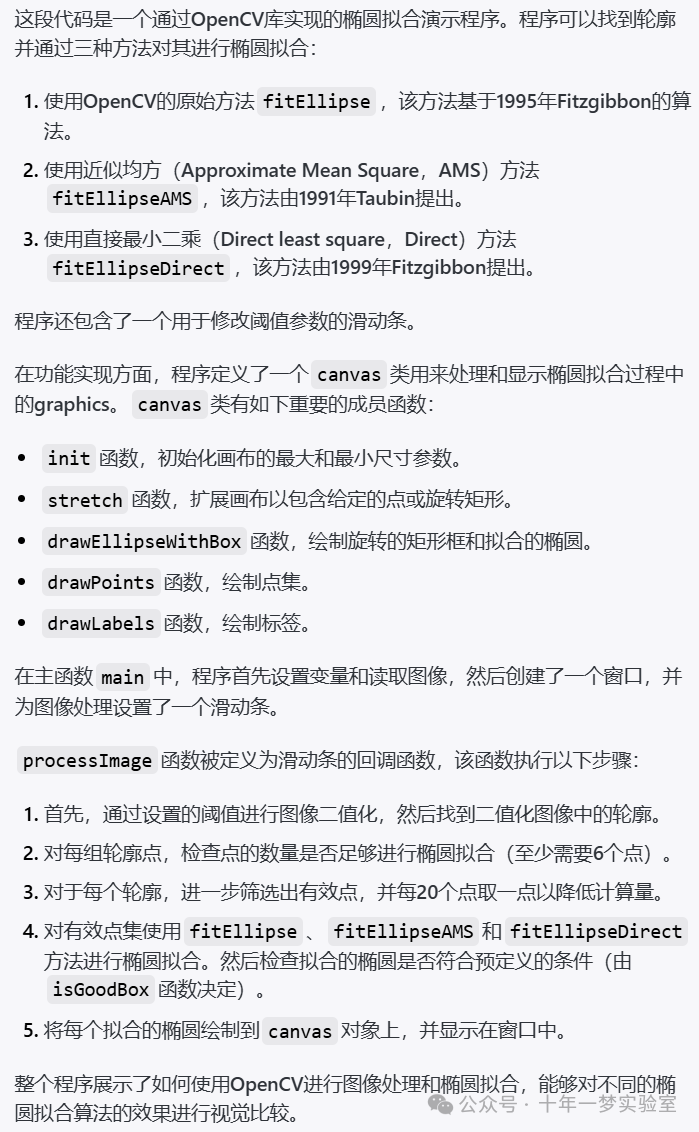
 *  本程序用于示范椭圆拟合。程序找到轮廓,并使用三种方法对其进行椭圆近似拟合。
 *  1: OpenCV原始方法fitEllipse,实现了Fitzgibbon 1995提出的方法。
 *  2: 平均平方近似(Approximate Mean Square, AMS)方法fitEllipseAMS,由Taubin 1991提出。
 *  3: 直接最小二乘(Direct Least Square,Direct)方法fitEllipseDirect,由Fitzgibbon 1999提出。
 *
 *  跟踪条用来指定阈值参数。
 *
 *  白线表示轮廓/输入点,以及用于生成数据的真实椭圆。
 *  1: 蓝线代表使用OpenCV原始方法拟合椭圆。
 *  2: 绿线代表使用AMS方法拟合椭圆。
 *  3: 红线代表使用Direct方法拟合椭圆。
 *
 *  原始作者:  Denis Burenkov
 *  AMS和Direct方法作者:  Jasper Shemilt
 *
 ********************************************************************************/
#include "opencv2/imgproc.hpp" // 包含OpenCV图像处理功能的头文件
#include "opencv2/imgcodecs.hpp" // 包含OpenCV图像编码解码功能的头文件
#include "opencv2/highgui.hpp" // 包含OpenCV高层GUI功能的头文件
#include <iostream> // 包含标准输入输出流库文件


using namespace cv; // 使用OpenCV命名空间
using namespace std; // 使用标准命名空间


class canvas{
public:
    bool setupQ; // 画布是否已经设置的标志
    cv::Point origin; // 画布的原点坐标
    cv::Point corner; // 画布的角点坐标
    int minDims,maxDims; // 画布的最小和最大维度
    double scale; // 缩放比例
    int rows, cols; // 画布的行数和列数
    cv::Mat img; // 画布对应的图像


    void init(int minD, int maxD){
        // 使用最小最大行列尺寸初始化画布
        minDims = minD; maxDims = maxD;
        origin = cv::Point(0,0); // 初始化原点为(0,0)
        corner = cv::Point(0,0); // 初始化角点为(0,0)
        scale = 1.0; // 初始化缩放比例为1
        rows = 0; // 初始化行数为0
        cols = 0; // 初始化列数为0
        setupQ = false; // 设置画布的标志为未设置
    }


    void stretch(cv::Point2f min, cv::Point2f max){
        // 拉伸画布以包括点min和max
        if(setupQ){
            if(corner.x < max.x){corner.x = (int)(max.x + 1.0);};
            if(corner.y < max.y){corner.y = (int)(max.y + 1.0);};
            if(origin.x > min.x){origin.x = (int) min.x;};
            if(origin.y > min.y){origin.y = (int) min.y;};
        } else {
            origin = cv::Point((int)min.x, (int)min.y);
            corner = cv::Point((int)(max.x + 1.0), (int)(max.y + 1.0));
        }


        // 根据新的边界调整画布尺寸和缩放比例
        int c = (int)(scale*((corner.x + 1.0) - origin.x));
        if(c<minDims){
            scale = scale * (double)minDims/(double)c;
        } else {
            if(c>maxDims){
                scale = scale * (double)maxDims/(double)c;
            }
        }
        int r = (int)(scale*((corner.y + 1.0) - origin.y));
        if(r<minDims){
            scale = scale * (double)minDims/(double)r;
        } else {
            if(r>maxDims){
                scale = scale * (double)maxDims/(double)r;
            }
        }
        cols = (int)(scale*((corner.x + 1.0) - origin.x)); // 更新列数
        rows = (int)(scale*((corner.y + 1.0) - origin.y)); // 更新行数
        setupQ = true; // 更新画布设置标志
    }


    void stretch(vector<Point2f> pts)
{   // 拉伸画布以包含所有的点pts
        cv::Point2f min = pts[0];
        cv::Point2f max = pts[0];
        for(size_t i=1; i < pts.size(); i++){
            Point2f pnt = pts[i];
            if(max.x < pnt.x){max.x = pnt.x;};
            if(max.y < pnt.y){max.y = pnt.y;};
            if(min.x > pnt.x){min.x = pnt.x;};
            if(min.y > pnt.y){min.y = pnt.y;};
        };
        stretch(min, max);
    }


    void stretch(cv::RotatedRect box)
{   // 拉伸画布以包含矩形框box
        cv::Point2f min = box.center;
        cv::Point2f max = box.center;
        cv::Point2f vtx[4];
        box.points(vtx);
        for( int i = 0; i < 4; i++ ){
            cv::Point2f pnt = vtx[i];
            if(max.x < pnt.x){max.x = pnt.x;};
            if(max.y < pnt.y){max.y = pnt.y;};
            if(min.x > pnt.x){min.x = pnt.x;};
            if(min.y > pnt.y){min.y = pnt.y;};
        }
        stretch(min, max);
    }


    void drawEllipseWithBox(cv::RotatedRect box, cv::Scalar color, int lineThickness)
{
        if(img.empty()){
            stretch(box); // 如果图像为空,则根据box拉伸画布
            img = cv::Mat::zeros(rows,cols,CV_8UC3); // 创建空图像
        }


        // 转换椭圆和它的边框到画布坐标系并缩放
        box.center = scale * cv::Point2f(box.center.x - origin.x, box.center.y - origin.y);
        box.size.width  = (float)(scale * box.size.width);
        box.size.height = (float)(scale * box.size.height);


        // 画椭圆及其边框
        ellipse(img, box, color, lineThickness, LINE_AA);


        Point2f vtx[4];
        box.points(vtx);
        for( int j = 0; j < 4; j++ ){
            line(img, vtx[j], vtx[(j+1)%4], color, lineThickness, LINE_AA); // 画边框的4条边
        }
    }


    void drawPoints(vector<Point2f> pts, cv::Scalar color)
{
        if(img.empty()){
            stretch(pts); // 如果图像为空,则根据点集pts拉伸画布
            img = cv::Mat::zeros(rows,cols,CV_8UC3); // 创建空图像
        }
        // 画点
        for(size_t i=0; i < pts.size(); i++){
            Point2f pnt = scale * cv::Point2f(pts[i].x - origin.x, pts[i].y - origin.y);
            img.at<cv::Vec3b>(int(pnt.y), int(pnt.x))[0] = (uchar)color[0];
            img.at<cv::Vec3b>(int(pnt.y), int(pnt.x))[1] = (uchar)color[1];
            img.at<cv::Vec3b>(int(pnt.y), int(pnt.x))[2] = (uchar)color[2];
        };
    }


    void drawLabels( std::vector<std::string> text, std::vector<cv::Scalar> colors)
{
        if(img.empty()){
            img = cv::Mat::zeros(rows,cols,CV_8UC3); // 如果画布图像为空,先创建一个空画布图像
        }
        // 在图像上绘制文本标签
        int vPos = 0;
        for (size_t i=0; i < text.size(); i++) {
            cv::Scalar color = colors[i];
            std::string txt = text[i];
            Size textsize = getTextSize(txt, FONT_HERSHEY_COMPLEX, 1, 1, 0);
            vPos += (int)(1.3 * textsize.height); // 计算垂直位置
            Point org((img.cols - textsize.width), vPos); // 计算文本位置
            cv::putText(img, txt, org, FONT_HERSHEY_COMPLEX, 1, color, 1, LINE_8); // 在图像上绘制文本
        }
    }


};


static void help(char** argv)
{
    // 输出帮助信息。
    cout << "\nThis program is demonstration for ellipse fitting. The program finds\n"
            "contours and approximate it by ellipses. Three methods are used to find the \n"
            "elliptical fits: fitEllipse, fitEllipseAMS and fitEllipseDirect.\n"
            "Call:\n"
        << argv[0] << " [image_name -- Default ellipses.jpg]\n" << endl;
}


int sliderPos = 70; // 滑动条的位置


Mat image; // 需要处理的图像


// 控制是否使用三种拟合椭圆的方法的标志位。
bool fitEllipseQ, fitEllipseAMSQ, fitEllipseDirectQ;
cv::Scalar fitEllipseColor       = Scalar(255,  0,  0); // OpenCV方法的颜色(蓝色)
cv::Scalar fitEllipseAMSColor    = Scalar(  0,255,  0); // AMS方法的颜色(绿色)
cv::Scalar fitEllipseDirectColor = Scalar(  0,  0,255); // Direct方法的颜色(红色)
cv::Scalar fitEllipseTrueColor   = Scalar(255,255,255); // 实际椭圆颜色(白色)


void processImage(int, void*);


int main( int argc, char** argv )
{
    // 初始化方法选择标志位。
    fitEllipseQ       = true;
    fitEllipseAMSQ    = true;
    fitEllipseDirectQ = true;


    // 处理命令行参数。
    cv::CommandLineParser parser(argc, argv,"{help h||}{@image|ellipses.jpg|}");
    if (parser.has("help"))
    {
        help(argv); // 如果有帮助选项,则显示帮助信息,并退出。
        return 0;
    }
    string filename = parser.get<string>("@image"); // 获取图像文件名。
    image = imread(samples::findFile(filename), 0); // 读取图像,0表示将图像转换为灰度。
    if( image.empty() )
    {
        cout << "Couldn't open image " << filename << "\n"; // 如果无法读取图像,则输出错误信息,并退出。
        return 0;
    }


    // 显示原始图像。
    imshow("source", image);
    namedWindow("result", WINDOW_NORMAL ); // 创建一个名为“result”的窗口。


    // 创建一个滑动条以供用户选择阈值。
    createTrackbar( "threshold", "result", &sliderPos, 255, processImage );


    processImage(0, 0); // 第一次处理图像。


    // 等待按键,并处理事件。
    waitKey();
    return 0;
}


inline static bool isGoodBox(const RotatedRect& box) {
    // 判断拟合的椭圆是否良好,例如椭圆的短轴不应过小。
    return (box.size.height <= box.size.width * 30) && (box.size.width > 0);
}


// 定义滑动条回调函数。该函数找到轮廓,绘制它们,并且通过椭圆近似拟合。
void processImage(int /*h*/, void*)
{
    RotatedRect box, boxAMS, boxDirect; // 定义三个旋转矩形,用于不同的椭圆拟合方法
    vector<vector<Point> > contours; // 定义轮廓的向量容器
    Mat bimage = image >= sliderPos; // 应用阈值,用于后续轮廓发现


    findContours(bimage, contours, RETR_LIST, CHAIN_APPROX_NONE); // 寻找轮廓


    canvas paper; // 创建画布对象
    paper.init(int(0.8*MIN(bimage.rows, bimage.cols)), int(1.2*MAX(bimage.rows, bimage.cols))); // 初始化画布大小
    paper.stretch(cv::Point2f(0.0f, 0.0f), cv::Point2f((float)(bimage.cols+2.0), (float)(bimage.rows+2.0))); // 拉伸画布以适应图像尺寸


    std::vector<std::string> text; // 用于存储标签文本的向量
    std::vector<cv::Scalar> color; // 用于存储标签颜色的向量


    // 根据用户选择添加不同的标签和对应的颜色
    if (fitEllipseQ) {
        text.push_back("OpenCV");
        color.push_back(fitEllipseColor);
    }
    if (fitEllipseAMSQ) {
        text.push_back("AMS");
        color.push_back(fitEllipseAMSColor);
    }
    if (fitEllipseDirectQ) {
        text.push_back("Direct");
        color.push_back(fitEllipseDirectColor);
    }
    paper.drawLabels(text, color); // 在画布上绘制标签


    int margin = 2; // 设置边缘留白,避免边缘的点影响拟合结果
    vector< vector<Point2f> > points; // 定义要拟合椭圆的点的向量容器
    for(size_t i = 0; i < contours.size(); i++)
    {
        size_t count = contours[i].size();
        if( count < 6 )
            continue; // 如果轮廓点太少,则不进行拟合


        Mat pointsf; // 定义存放转换后的点的矩阵
        Mat(contours[i]).convertTo(pointsf, CV_32F); // 将轮廓点的数据类型转换为浮点型


        vector<Point2f>pts; // 定义存放轮廓点的向量
        for (int j = 0; j < pointsf.rows; j++) {
            Point2f pnt = Point2f(pointsf.at<float>(j,0), pointsf.at<float>(j,1));
            if ((pnt.x > margin && pnt.y > margin && pnt.x < bimage.cols-margin && pnt.y < bimage.rows-margin)) {
                if(j%20==0){ // 对点进行采样,减少计算量
                    pts.push_back(pnt);
                }
            }
        }
        points.push_back(pts); // 将采样后的点加入到点集容器中
    }


    for(size_t i = 0; i < points.size(); i++)
    {
        vector<Point2f> pts = points[i];


        // 至少5点才能拟合一个椭圆
        if (pts.size()<5) {
            continue;
        }
        // 使用OpenCV方法拟合椭圆
        if (fitEllipseQ) {
            box = fitEllipse(pts);
            if (isGoodBox(box)) { // 判断拟合的椭圆是否良好
                paper.drawEllipseWithBox(box, fitEllipseColor, 3); // 在画布上绘制拟合的椭圆及其边框
            }
        }
        // 使用AMS方法拟合椭圆
        if (fitEllipseAMSQ) {
            boxAMS = fitEllipseAMS(pts);
            if (isGoodBox(boxAMS)) {
                paper.drawEllipseWithBox(boxAMS, fitEllipseAMSColor, 2);
            }
        }
        // 使用Direct方法拟合椭圆
        if (fitEllipseDirectQ) {
            boxDirect = fitEllipseDirect(pts);
            if (isGoodBox(boxDirect)){
                paper.drawEllipseWithBox(boxDirect, fitEllipseDirectColor, 1);
            }
        }


        // 在画布上绘制原始点
        paper.drawPoints(pts, fitEllipseTrueColor);
    }


    imshow("result", paper.img); // 显示处理后的图像
}这段代码是一个OpenCV的C++程序,用于演示如何从图像中找到轮廓,并使用三种不同的算法(OpenCV原始 fitEllipse 方法、AMS方法 fitEllipseAMS 和Direct方法 fitEllipseDirect)来拟合轮廓并近似为椭圆形状。用户可以通过滑动条来调整阈值参数以改善椭圆的拟合效果。程序读取指定的图像文件,然后对其进行处理,包括轮廓的检测、椭圆的拟合以及结果的绘制和显示。用户可以通过图形用户界面(GUI)直观地观察各种方法拟合椭圆的效果,并对比实际椭圆和拟合椭圆之间的差异,其中真实椭圆用白线表示,而拟合的椭圆则分别用蓝线(OpenCV方法)、绿线(AMS方法)和红线(Direct方法)表示。





 扫一扫
扫一扫


 618
618

 被折叠的 条评论
为什么被折叠?
被折叠的 条评论
为什么被折叠?
 到【灌水乐园】发言





