


大家好,我是阿赵。继续介绍Unity编辑器界面扩展。
在开发过程中,经常会遇到想自定义Inspector栏的内容。Inspector栏的内容都是通过Component来自定义的,比如可以自定义Unity已有的类型,比如Transform、RectTransform、Camera、Light这种,或者自定义自己写的继承MonoBehaviour的脚本的内容。
下面通过自定义Transform组件的Inspector作为例子,来说明一下应该怎样做。
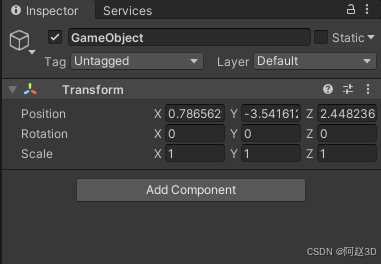
一、指定组件的自定义Inspector界面
在Editor文件夹里面新建一个C#文件,比如我这里新建了一个CustomTransformEditor 文件
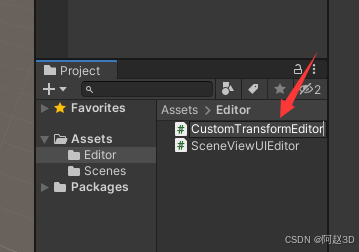
然后输入以下内容:
using UnityEditor;
using UnityEngine;
[CustomEditor(typeof(Transform)), CanEditMultipleObjects]
public class CustomTransformEditor : Editor
{


    public override void OnInspectorGUI()
    {


        //这里写需要显示的组件
    }
}
代码很简单,简单说明一下:
1. 指定修改某一种组件的Inspector界面
比如我这里是修改Transform,所以是
CustomEditor(typeof(Transform))
2. 可以同时编辑多个物体
CanEditMultipleObjects
加上了这一句之后,就可以在同时选择多个有相同Component的对象时,Inspector菜单可以同时修改这些对象的相同Component的内容。
3. 继承Editor
public class CustomTransformEditor : Editor
虽然这不是一个EditorWindow,但却是一个Editor。继承了Editor之后,才能使用它的很多方法。
4. 写需要显示的UI内容
需要显示的UI内容,要写在OnInspectorGUI方法里面。
由于现在OnInspectorGUI里面什么内容都没有,所以现在回到Unity编辑器,选择一个GameObject,会发现Transform组件里面什么都没有了。
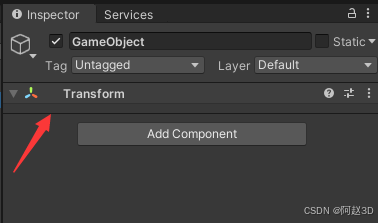
如果现在加上一句代码:
    public override void OnInspectorGUI()
    {


        //这里写需要显示的组件
        GUILayout.Label("this is a transform");
	}
这时候回去编辑器,会看到这句话显示在Transform组件里面了。
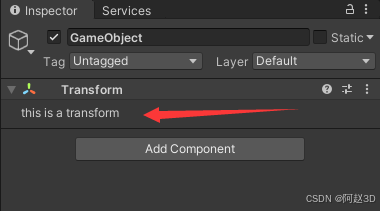
二、 需要显示原来的界面内容:
刚才的例子有一个问题,有时候我们可能并不想完全重写原来的组件的UI,而是在原有基础上加一点内容。那么怎么才能把原来的组件UI显示出来呢?
输入以下代码:
using System.Reflection;
using UnityEditor;
using UnityEngine;
[CustomEditor(typeof(Transform)), CanEditMultipleObjects]
public class CustomTransformEditor : Editor
{
private Editor instance;
private void OnEnable()
{
if(targets.Length<=0)
{
return;
}
Transform tr = target as Transform;
var editorType = Assembly.GetAssembly(typeof(Editor)).GetType("UnityEditor.TransformInspector");
instance = CreateEditor(targets, editorType);
//调用原编辑器的OnEnable方法
editorType.GetMethod("OnEnable", BindingFlags.Public | BindingFlags.Instance | BindingFlags.NonPublic)?.Invoke(instance, null);
}
public override void OnInspectorGUI()
{
if(instance!=null)
{
instance. 最低0.47元/天 解锁文章






 扫一扫
扫一扫


 7万+
7万+

 被折叠的 条评论
为什么被折叠?
被折叠的 条评论
为什么被折叠?
 到【灌水乐园】发言





