



GMSL问题测试工具
说明
GMSL 节点link查看工具使用说明
- 将
gmsl.py文件拷贝至AD10设备 - 运行
python3 gmsl.py
使用方式解析
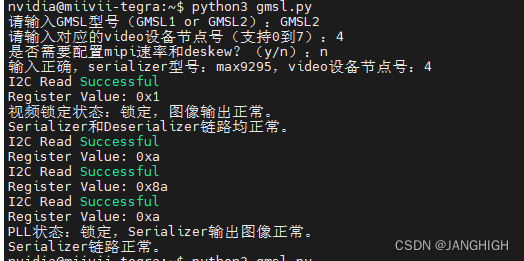
- 如下图所示,当运行程序的时候,需要输入该相机的GMSL类型,video设备节点号,以及是否要配置速率和deskew
- GMSL类型可以在相机支持列表里面找到,没有写GMSL2的就是GMSL1
- video设备节点号和websettings中的一致即可
- 配置速率和deskew是在链路一切正常的情况下,仍然无法获取图像时候(显示绿屏),可以尝试的操作,当链路异常时候,请不要执行该操作.
- 下图显示视频状态锁定说明GMSL链路正常
注意事项
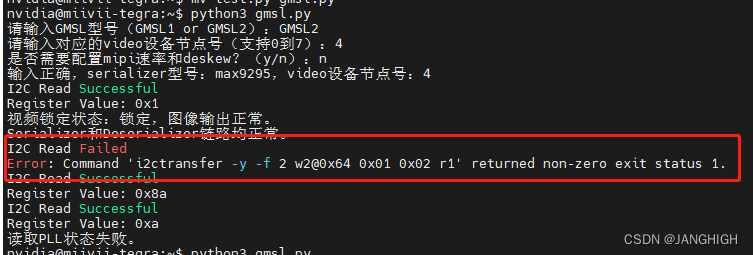
下面的错误偶现是已知问题,请再次运行脚本,确保链路正常,如果三次都有错,请进行记录
源代码
import subprocess
import time
def i2c_write_byte(address, reg_address, reg_value):
    # Split the 16-bit register address into two 8-bit bytes
    reg_address_high_byte = (reg_address >> 8) & 0xFF
    reg_address_low_byte = reg_address & 0xFF

    # Format the command for the write operation
    command = f"i2ctransfer -y -f 2 w3@0x{address:02X} 0x{reg_address_high_byte:02X} 0x{reg_address_low_byte:02X} 0x{reg_value:02X}"

    # Execute the write operation
    try:
        subprocess.run(command, shell=True, stdout=subprocess.PIPE, stderr=subprocess.PIPE, universal_newlines=True, check=True)
        print("I2C Write Successful")
    except subprocess.CalledProcessError as e:
        print("I2C Write Failed")
        print("Error:", e)

def i2c_read_byte(address, reg_address):
    # Split the 16-bit register address into two 8-bit bytes
    reg_address_high_byte = (reg_address >> 8) & 0xFF
    reg_address_low_byte = reg_address & 0xFF

    # Format the command for the read operation
    command = f"i2ctransfer -y -f 2 w2@0x{address:02X} 0x{reg_address_high_byte:02X} 0x{reg_address_low_byte:02X} r1"

    # Execute the read operation
    try:
        result = subprocess.run(command, shell=True, stdout=subprocess.PIPE, stderr=subprocess.PIPE, universal_newlines=True, check=True)
        output = result.stdout.strip()
        # Parse the read value from the output
        reg_value = int(output.split()[0], 16)
        print("I2C Read Successful")
        print("Register Value:", hex(reg_value))
        return reg_value
    except subprocess.CalledProcessError as e:
        print("I2C Read Failed")
        print("Error:", e)
        return None

def i2c_read_byte_gmsl1(address, reg_address):

    # Format the command for the read operation
    command = f"i2ctransfer -y -f 2 w1@0x{address:02X} 0x{reg_address:02X} r1"

    # Execute the read operation
    try:
        result = subprocess.run(command, shell=True, stdout=subprocess.PIPE, stderr=subprocess.PIPE, universal_newlines=True, check=True)
        output = result.stdout.strip()
        # Parse the read value from the output
        reg_value = int(output.split()[0], 16)
        print("I2C Read Successful")
        print("Register Value:", hex(reg_value))
        return reg_value
    except subprocess.CalledProcessError as e:
        print("I2C Read Failed")
        print("Error:", e)
        return None

def check_serializer_i2c_address(serializer_model, video_device):
    # 串行器i2c地址和video设备节点号的关系字典
    serializer_i2c_address_map = {
        "max9295": [0x42, 0x44, 0x22, 0x60, 0x64, 0x20, 0x24, 0x62],
        "max96705": [0x42, 0x44, 0x22, 0x60, 0x64, 0x20, 0x24, 0x62],
    }

    # 检查输入的serializer_model是否支持
    if serializer_model not in serializer_i2c_address_map:
        print("输入的serializer型号不支持或不正确。")
        return

    # 获取对应的i2c地址列表
    i2c_address_list = serializer_i2c_address_map[serializer_model]


    # 获取对应的i2c地址
    i2c_address = i2c_address_list[video_device]

    return i2c_address

def check_deserializer_i2c_address(video_device):
    # 解串器i2c地址和video设备节点号的关系字典
    deserializer_i2c_address_map = {
        0: 0x48,
        1: 0x48,
        2: 0x4a,
        3: 0x4a,
        4: 0x68,
        5: 0x68,
        6: 0x6c,
        7: 0x6c,
    }

    # 检查video_device是否在范围内
    if video_device not in deserializer_i2c_address_map:
        print("输入的video设备节点号不正确,请输入0到7。")
        return

    # 获取对应的i2c地址
    i2c_address = deserializer_i2c_address_map[video_device]

    return i2c_address

def check_Serializer_GMSL2_PLL_lock(serializer_addr):
    # 读取PLL状态
    pclkdet_x = 0x102
    pclkdet_y = 0x10a
    pclkdet_z = 0x112
    pll_status_x = i2c_read_byte(serializer_addr, pclkdet_x)
    pll_status_y = i2c_read_byte(serializer_addr, pclkdet_y)
    pll_status_z = i2c_read_byte(serializer_addr, pclkdet_z)
    if pll_status_x is None or pll_status_y is None or pll_status_z is None:
        print("读取PLL状态失败。")
        return False

    # 检查PLL状态
    if pll_status_x & 0x80 == 0x80 or pll_status_y & 0x80 == 0x80 or pll_status_z & 0x80 == 0x80:
        print("PLL状态:锁定,Serializer输出图像正常。")
        return True
    else:
        print("PLL状态:未锁定,Serializer未输出图像。")
        return False
def check_Serializer_GMSL1_PLL_lock(serializer_addr):
    pclkdet = 0x15
    pll_status = i2c_read_byte_gmsl1(serializer_addr, pclkdet)
    if pll_status is None:
        print("读取PLL状态失败。")
        return False
    # 检查PLL状态
    if pll_status & 0x01 == 1:
        print("PLL状态:锁定,Serializer输出图像正常。")
        return True
    else:
        print("PLL状态:未锁定,Serializer未输出图像。")
        return False
def check_max9296_video_lock(serializer_addr, video_device):
    # 读取视频锁定状态
    if video_device%2 == 0:
        video_lock = 0x1fc
    else:
        video_lock = 0x1dc
    video_lock_value = i2c_read_byte(serializer_addr, video_lock)
    if video_lock is None:
        print("读取视频锁定状态失败。")
        return False

    # 检查视频锁定状态
    if video_lock_value & 0x01 == 1 :
        print("视频锁定状态:锁定,图像输出正常。")
        return True
    else:
        print("视频锁定状态:未锁定,图像未输出。")
        return False

def set_mipi_speed_deskew(deserializer_addr):
    mipi_speed = [0x31d, 0x320,0x323,0x326]
    mipi_deskew = [0x403, 0x443,0x483,0x4c3]
    mipi_speed_value = 0x37
    mipi_deskew_value = 0x38
    for i in range(4):
        i2c_write_byte(deserializer_addr, mipi_speed[i], mipi_speed_value)
        i2c_write_byte(deserializer_addr, mipi_deskew[i], mipi_deskew_value)

def main():
    supported_serializers = ["max9295", "max96717f","max96705"]
    supported_gmsl_type = ["GMSL2","GMSL1"]
    supported_video_devices = [0,1,2,3,4,5,6,7]

    gmsl_model = input("请输入GMSL型号(GMSL1 or GMSL2):")
    video_device = int(input("请输入对应的video设备节点号(支持0到7):"))
    config_mipi_status = input("是否需要配置mipi速率和deskew?(y/n):")

    if gmsl_model not in supported_gmsl_type:
        print("输入的GMSL型号不正确,请输入GMSL1或GMSL2。")
    if gmsl_model == "GMSL1":
        serializer_model = "max96705"
    else:
        serializer_model = "max9295"
    if serializer_model not in supported_serializers:
        print("输入的serializer型号不正确,请输入max9295、max96717f或max96705。")
    elif video_device not in supported_video_devices:
        print("输入的video设备节点号不正确,请输入0到7。")
    else:
        print("输入正确,serializer型号:{},video设备节点号:{}".format(serializer_model, video_device))
        serializer_addr = check_serializer_i2c_address(serializer_model, video_device)
        deserializer_addr = check_deserializer_i2c_address(video_device)

        status = check_max9296_video_lock(deserializer_addr, video_device)
        if status==False:
            return
        else:
            print("Serializer和Deserializer链路均正常。")
        if serializer_model == "max9295":
            status = check_Serializer_GMSL2_PLL_lock(serializer_addr)
            if status==False:
                return
            else:
                print("Serializer链路正常。")
        elif serializer_model == "max96705":
            status = check_Serializer_GMSL1_PLL_lock(serializer_addr)
            if status==False:
                return
            else:
                print("Serializer链路正常。")

        if config_mipi_status == "y":
            set_mipi_speed_deskew(deserializer_addr)
            print("mipi速率和deskew配置成功。")


if __name__ == "__main__":
    main()
注:仅供个人学习使用,切勿用作商业用途,如有侵权,请联系删除!






 扫一扫
扫一扫


 2172
2172

 被折叠的 条评论
为什么被折叠?
被折叠的 条评论
为什么被折叠?
 到【灌水乐园】发言





