


基于Ultralytics YOLOv11模型在C++ OpenCV4.8.0/OpenCV4.10.0两个版本 DNN模块进行模型加载与推理(附源码)
yolo导出模型
test_export.py
from ultralytics import YOLO

# Load a model
model = YOLO("yolo11n.pt")  # load an official model

# Export the model
model.export(format="onnx")
opencv 4.8.0版本
opencv dnn
inference.h
#ifndef INFERENCE_H
#define INFERENCE_H

#include <fstream>
#include <vector>
#include <string>
#include <random>
#include <opencv2/opencv.hpp>
#include <opencv2/imgproc.hpp>
#include <opencv2/dnn.hpp>

// 检测结果结构体
struct Detection
{
    int class_id{0};           // 类别ID
    std::string className{};   // 类别名称
    float confidence{0.0};     // 置信度
    cv::Scalar color{};        // 显示颜色
    cv::Rect box{};            // 边界框坐标
};

class Inference
{
public:
    // 构造函数:初始化模型路径、输入尺寸、是否使用CUDA、类别文件
    Inference(const std::string &onnxModelPath, const cv::Size &modelInputShape = {640, 640}, const bool &runWithCuda = true, const std::string &classesTxtFile = "");

    // 核心推理函数:输入图像,返回检测结果向量
    std::vector<Detection> runInference(const cv::Mat &input);

private:
    // 从文件加载类别名称
    void loadClassesFromFile();

    // 加载ONNX模型并配置计算后端(CUDA/CPU)
    void loadOnnxNetwork();

    // 图像预处理:保持宽高比的方形填充
    cv::Mat formatToSquare(const cv::Mat &source, int *pad_x, int *pad_y, float *scale);

    std::string modelPath{};        // ONNX模型文件路径
    std::string classesPath{};      // 类别文件路径
    bool cudaEnabled{};             // 是否启用CUDA加速

    // COCO数据集80个类别的默认名称
    std::vector<std::string> classes{"person", "bicycle", "car", "motorcycle", "airplane", "bus", "train", "truck", "boat", "traffic light", "fire hydrant", "stop sign", "parking meter", "bench", "bird", "cat", "dog", "horse", "sheep", "cow", "elephant", "bear", "zebra", "giraffe", "backpack", "umbrella", "handbag", "tie", "suitcase", "frisbee", "skis", "snowboard", "sports ball", "kite", "baseball bat", "baseball glove", "skateboard", "surfboard", "tennis racket", "bottle", "wine glass", "cup", "fork", "knife", "spoon", "bowl", "banana", "apple", "sandwich", "orange", "broccoli", "carrot", "hot dog", "pizza", "donut", "cake", "chair", "couch", "potted plant", "bed", "dining table", "toilet", "tv", "laptop", "mouse", "remote", "keyboard", "cell phone", "microwave", "oven", "toaster", "sink", "refrigerator", "book", "clock", "vase", "scissors", "teddy bear", "hair drier", "toothbrush"};
    cv::Size2f modelShape{};                // 模型输入尺寸
    float modelConfidenceThreshold {0.25};  // 物体存在置信度阈值
    float modelScoreThreshold      {0.45};  // 类别得分阈值
    float modelNMSThreshold        {0.50};  // 非极大值抑制阈值
    bool letterBoxForSquare = true;         // 是否使用letter box预处理

    cv::dnn::Net net;                       // OpenCV DNN网络对象
};

#endif // INFERENCE_H
inference.cpp
#include "inference.h"

// 构造
Inference::Inference(const std::string &onnxModelPath, const cv::Size &modelInputShape, const bool &runWithCuda, const std::string &classesTxtFile)
{
    modelPath = onnxModelPath;
    modelShape = modelInputShape;
    cudaEnabled = runWithCuda;
    classesPath = classesTxtFile;

    loadOnnxNetwork();
    // loadClassesFromFile();
}

// 推理
std::vector<Detection> Inference::runInference(const cv::Mat &input)
{
    cv::Mat modelInput = input;
    int pad_x, pad_y;  // 填充尺寸
    float scale;       // 缩放比例

    // 如果启用letter box且输入为正方形,进行预处理
    if (letterBoxForSquare && modelShape.width == modelShape.height)
        modelInput = formatToSquare(modelInput, &pad_x, &pad_y, &scale);

    // 将图像转换为模型输入blob格式
    cv::Mat blob;
    cv::dnn::blobFromImage(modelInput, blob, 1.0/255.0, modelShape, cv::Scalar(), true, false);
    net.setInput(blob);

    // 前向传播,获取模型输出
    std::vector<cv::Mat> outputs;
    net.forward(outputs, net.getUnconnectedOutLayersNames());

    // 解析输出维度
    int rows = outputs[0].size[1];      // 检测框数量
    int dimensions = outputs[0].size[2]; // 每个检测框的维度数

    bool yolov8 = false;
    // YOLOv5: (batchSize, 25200, 85)  85 = 4坐标 + 1置信度 + 80类别
    // YOLOv8/v11: (batchSize, 84, 8400)  84 = 4坐标 + 80类别

    if (dimensions > rows) // 判断是否为YOLOv8格式
    {
        // 交换维度
        yolov8 = true;
        rows = outputs[0].size[2];
        dimensions = outputs[0].size[1];

        outputs[0] = outputs[0].reshape(1, dimensions);
        cv::transpose(outputs[0], outputs[0]);
    }
    float *data = (float *)outputs[0].data;

     // 存储原始检测结果的容器
    std::vector<int> class_ids;
    std::vector<float> confidences;
    std::vector<cv::Rect> boxes;

    // 遍历所有检测框
    for (int i = 0; i < rows; ++i)
    {
        if (yolov8)
        {
            float *classes_scores = data+4;

            cv::Mat scores(1, classes.size(), CV_32FC1, classes_scores);
            cv::Point class_id;
            double maxClassScore;

            minMaxLoc(scores, 0, &maxClassScore, 0, &class_id);

            if (maxClassScore > modelScoreThreshold)
            {
                confidences.push_back(maxClassScore);
                class_ids.push_back(class_id.x);

                float x = data[0];
                float y = data[1];
                float w = data[2];
                float h = data[3];

                int left = int((x - 0.5 * w - pad_x) / scale);
                int top = int((y - 0.5 * h - pad_y) / scale);

                int width = int(w / scale);
                int height = int(h / scale);

                boxes.push_back(cv::Rect(left, top, width, height));
            }
        }
        else // yolov5
        {
            float confidence = data[4];

            if (confidence >= modelConfidenceThreshold)
            {
                float *classes_scores = data+5;

                cv::Mat scores(1, classes.size(), CV_32FC1, classes_scores);
                cv::Point class_id;
                double max_class_score;

                minMaxLoc(scores, 0, &max_class_score, 0, &class_id);

                if (max_class_score > modelScoreThreshold)
                {
                    confidences.push_back(confidence);
                    class_ids.push_back(class_id.x);

                    float x = data[0];
                    float y = data[1];
                    float w = data[2];
                    float h = data[3];

                    int left = int((x - 0.5 * w - pad_x) / scale);
                    int top = int((y - 0.5 * h - pad_y) / scale);

                    int width = int(w / scale);
                    int height = int(h / scale);

                    boxes.push_back(cv::Rect(left, top, width, height));
                }
            }
        }

        data += dimensions;
    }

    // 应用非极大值抑制(NMS)去除重叠框
    std::vector<int> nms_result;
    cv::dnn::NMSBoxes(boxes, confidences, modelScoreThreshold, modelNMSThreshold, nms_result);

    // 构建最终检测结果
    std::vector<Detection> detections{};
    for (unsigned long i = 0; i < nms_result.size(); ++i)
    {
        int idx = nms_result[i];// NMS筛选后的索引

        Detection result;
        result.class_id = class_ids[idx];
        result.confidence = confidences[idx];

        std::random_device rd;
        std::mt19937 gen(rd());
        std::uniform_int_distribution<int> dis(100, 255);
        result.color = cv::Scalar(dis(gen), dis(gen), dis(gen));

        result.className = classes[result.class_id];
        result.box = boxes[idx];

        detections.push_back(result);
    }

    return detections;
}

void Inference::loadClassesFromFile()
{
    std::ifstream inputFile(classesPath);
    if (inputFile.is_open())
    {
        std::string classLine;
        while (std::getline(inputFile, classLine))
            classes.push_back(classLine);
        inputFile.close();
    }
}

void Inference::loadOnnxNetwork()
{
    net = cv::dnn::readNetFromONNX(modelPath);
    if (cudaEnabled)
    {
        std::cout << "\nRunning on CUDA" << std::endl;
        net.setPreferableBackend(cv::dnn::DNN_BACKEND_CUDA);
        net.setPreferableTarget(cv::dnn::DNN_TARGET_CUDA);
    }
    else
    {
        std::cout << "\nRunning on CPU" << std::endl;
        net.setPreferableBackend(cv::dnn::DNN_BACKEND_OPENCV);
        net.setPreferableTarget(cv::dnn::DNN_TARGET_CPU);
    }
}

// 图像预处理:保持宽高比的方形填充(letter box)
cv::Mat Inference::formatToSquare(const cv::Mat &source, int *pad_x, int *pad_y, float *scale)
{
    int col = source.cols;
    int row = source.rows;
    int m_inputWidth = modelShape.width;
    int m_inputHeight = modelShape.height;

    // 计算缩放比例,保持宽高比
    *scale = std::min(m_inputWidth / (float)col, m_inputHeight / (float)row);
    int resized_w = col * *scale;
    int resized_h = row * *scale;

    // 计算填充尺寸,使图像居中
    *pad_x = (m_inputWidth - resized_w) / 2;
    *pad_y = (m_inputHeight - resized_h) / 2;

    // 缩放图像并填充到目标尺寸
    cv::Mat resized;
    cv::resize(source, resized, cv::Size(resized_w, resized_h));
    // 创建目标尺寸的黑色背景
    cv::Mat result = cv::Mat::zeros(m_inputHeight, m_inputWidth, source.type());
    // 将缩放后的图像复制到中央
    resized.copyTo(result(cv::Rect(*pad_x, *pad_y, resized_w, resized_h)));
    resized.release();
    return result;
}
main.cpp
#include <iostream>
#include <vector>
#include <getopt.h>
#include <opencv2/opencv.hpp>
#include "inference.h"

int main(int argc, char **argv)
{
    std::string onnxModelPath = "../data/yolo11n.onnx";
    bool runOnGPU = true;
    cv::Size sizeTmp(640,640);
    Inference inf(onnxModelPath, sizeTmp, runOnGPU);

    std::vector<std::string> imageNames;
    imageNames.push_back("../data/bus.jpg");
    imageNames.push_back("../data/zidane.jpg");
    imageNames.push_back("../data/traffic.jpg");

    for (int i = 0; i < imageNames.size(); ++i) //遍历每一幅图像
    {
        cv::Mat frame = cv::imread(imageNames[i]);
        auto start = std::chrono::system_clock::now();
        std::vector<Detection> output = inf.runInference(frame);
        auto end = std::chrono::system_clock::now();
        std::chrono::duration<double> elapsed = end - start;
        std::cout << "------Images[" << i << "]------" << std::endl;
        std::cout << "\tInference time: " << elapsed.count() * 1000 << " ms" << std::endl;

        int detections = output.size();
        std::cout << "\tdetect " << detections << " of detections" << std::endl;

        for (int j = 0; j < detections; ++j)
        {
            Detection detection = output[j];

            cv::Rect box = detection.box;
            cv::Scalar color = detection.color;

            // 打印结果
            std::cout<<"\t\tdetections["<<j<<"]"<<std::endl;
            std::cout<< "\t\t\tclass_id:"<<detection.class_id<<std::endl;
            std::cout<< "\t\t\tclassName:"<<detection.className<<std::endl;
            std::cout<< "\t\t\tconfidence:"<<detection.confidence<<std::endl;
            std::cout<< "\t\t\tbox:"<<detection.box<<std::endl;

            // 绘制
            cv::rectangle(frame, box, color, 2);
            std::string classString = detection.className + ' ' + std::to_string(detection.confidence).substr(0, 4);
            cv::Size textSize = cv::getTextSize(classString, cv::FONT_HERSHEY_DUPLEX, 1, 2, 0);
            cv::Rect textBox(box.x, box.y - 40, textSize.width + 10, textSize.height + 20);

            cv::rectangle(frame, textBox, color, cv::FILLED);
            cv::putText(frame, classString, cv::Point(box.x + 5, box.y - 10), cv::FONT_HERSHEY_DUPLEX, 1, cv::Scalar(0, 0, 0), 2, 0);
        }

        //保存
        cv::imwrite(std::to_string(i)+".jpg",frame);

        //显示
        float scale = 1.0;
        cv::resize(frame, frame, cv::Size(frame.cols*scale, frame.rows*scale));
        cv::imshow("Inference", frame);

        cv::waitKey(-1);
    }
}
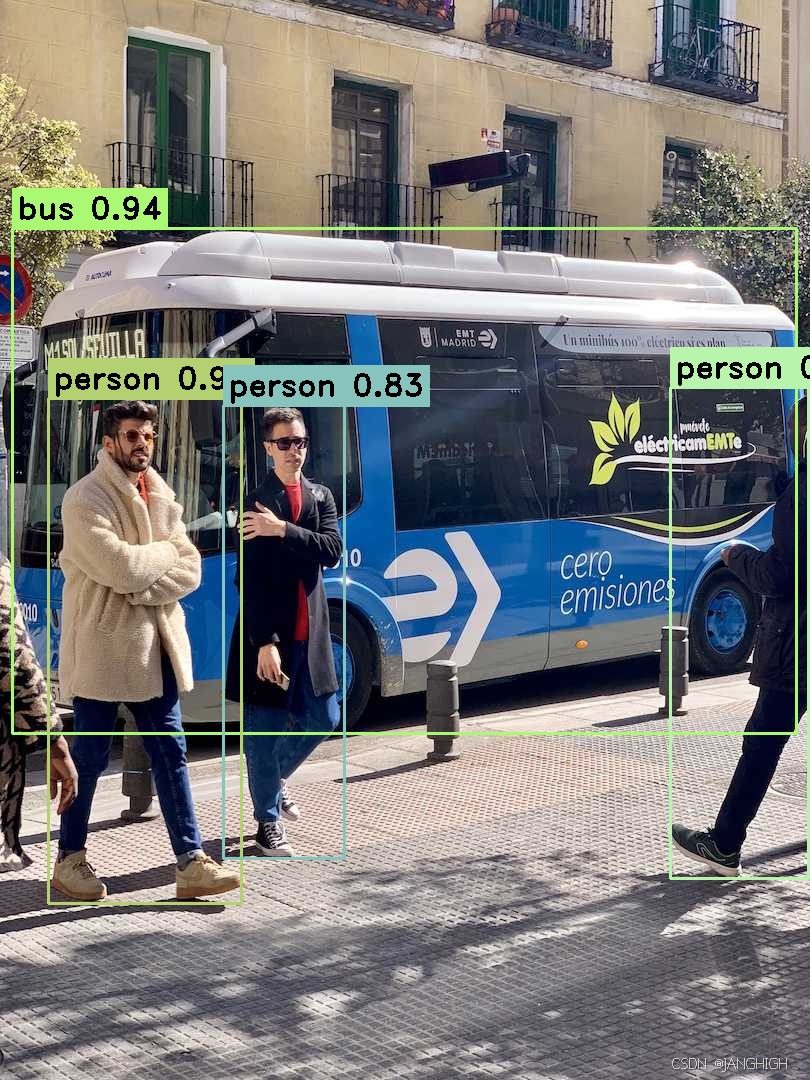
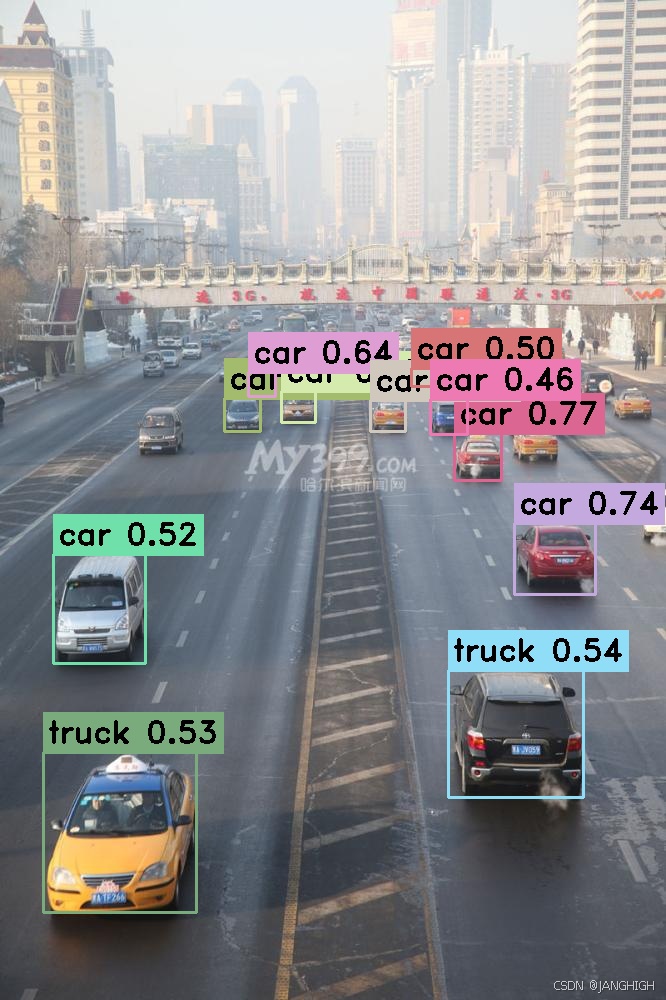
结果
------Images[0]------
        Inference time: 154.151 ms
        detect 4 of detections
                detections[0]
                        class_id:5
                        className:bus
                        confidence:0.940209
                        box:[785 x 506 from (12, 228)]
                detections[1]
                        class_id:0
                        className:person
                        confidence:0.901381
                        box:[194 x 506 from (48, 398)]
                detections[2]
                        class_id:0
                        className:person
                        confidence:0.844137
                        box:[139 x 492 from (670, 387)]
                detections[3]
                        class_id:0
                        className:person
                        confidence:0.831744
                        box:[122 x 454 from (223, 405)]
------Images[1]------
        Inference time: 125.669 ms
        detect 3 of detections
                detections[0]
                        class_id:0
                        className:person
                        confidence:0.852391
                        box:[399 x 669 from (749, 41)]
                detections[1]
                        class_id:0
                        className:person
                        confidence:0.793089
                        box:[993 x 513 from (143, 200)]
                detections[2]
                        class_id:27
                        className:tie
                        confidence:0.481717
                        box:[165 x 281 from (359, 437)]
------Images[2]------
        Inference time: 131.012 ms
        detect 11 of detections
                detections[0]
                        class_id:2
                        className:car
                        confidence:0.771447
                        box:[48 x 48 from (454, 433)]
                detections[1]
                        class_id:2
                        className:car
                        confidence:0.749929
                        box:[37 x 34 from (224, 398)]
                detections[2]
                        class_id:2
                        className:car
                        confidence:0.745018
                        box:[82 x 72 from (514, 523)]
                detections[3]
                        class_id:2
                        className:car
                        confidence:0.674062
                        box:[35 x 32 from (281, 391)]
                detections[4]
                        class_id:2
                        className:car
                        confidence:0.640642
                        box:[28 x 25 from (248, 372)]
                detections[5]
                        class_id:7
                        className:truck
                        confidence:0.547953
                        box:[136 x 128 from (448, 670)]
                detections[6]
                        class_id:7
                        className:truck
                        confidence:0.53021
                        box:[154 x 161 from (43, 752)]
                detections[7]
                        class_id:2
                        className:car
                        confidence:0.524246
                        box:[93 x 110 from (53, 554)]
                detections[8]
                        class_id:2
                        className:car
                        confidence:0.522188
                        box:[36 x 32 from (370, 400)]
                detections[9]
                        class_id:2
                        className:car
                        confidence:0.503465
                        box:[28 x 19 from (411, 368)]
                detections[10]
                        class_id:2
                        className:car
                        confidence:0.465773
                        box:[38 x 36 from (430, 399)]
opencv 4.10版本
opencv dnn
inference_test.h
#ifndef INFERENCE_TEST_H
#define INFERENCE_TEST_H

#include <fstream>
#include <vector>
#include <string>
#include <random>
#include <opencv2/opencv.hpp>
#include <opencv2/imgproc.hpp>
#include <opencv2/dnn.hpp>
#include <opencv2/core.hpp>

// 检测结果结构体
struct Detection
{
    int class_id{0};           // 类别ID
    std::string className{};   // 类别名称
    float confidence{0.0};     // 置信度
    cv::Scalar color{};        // 显示颜色
    cv::Rect box{};            // 边界框坐标
};

class Inference
{
public:
    // 构造函数:初始化模型路径、输入尺寸、是否使用CUDA、类别文件
    Inference(const std::string &onnxModelPath, const cv::Size &modelInputShape = {640, 640}, const bool &runWithCuda = true, const std::string &classesTxtFile = "");

    // 核心推理函数:输入图像,返回检测结果
    std::vector<cv::Mat> runInference(const cv::Mat &input);

    // yolo后处理
    void yoloPostProcessing(std::vector<cv::Mat>& outs,std::vector<int>& keep_classIds,std::vector<float>& keep_confidences,std::vector<cv::Rect2d>& keep_boxes,
                            const std::string& model_name,const int nc);

    // 绘制预测
    void drawPrediction(int classId, float conf, int left, int top, int right, int bottom, cv::Mat& frame);

    // 从文件加载类别名称
    void loadClassesFromFile();

    // 加载ONNX模型并配置计算后端(CUDA/CPU)
    void loadOnnxNetwork();

    // 清空结果数据
    void clearData();

    // 图像预处理:保持宽高比的方形填充
    cv::Mat formatToSquare(const cv::Mat &source, int *pad_x, int *pad_y, float *scale);

private:
    std::string modelPath{};        // ONNX模型文件路径
    cv::Size2f modelShape{};        // 模型输入尺寸
    bool cudaEnabled{};             // 是否启用CUDA加速
    std::string classesPath{};      // 类别文件路径

    // COCO数据集80个类别的默认名称
    std::vector<std::string> classes{"person", "bicycle", "car", "motorcycle", "airplane", "bus", "train", "truck", "boat", "traffic light", "fire hydrant", "stop sign", "parking meter", "bench", "bird", "cat", "dog", "horse", "sheep", "cow", "elephant", "bear", "zebra", "giraffe", "backpack", "umbrella", "handbag", "tie", "suitcase", "frisbee", "skis", "snowboard", "sports ball", "kite", "baseball bat", "baseball glove", "skateboard", "surfboard", "tennis racket", "bottle", "wine glass", "cup", "fork", "knife", "spoon", "bowl", "banana", "apple", "sandwich", "orange", "broccoli", "carrot", "hot dog", "pizza", "donut", "cake", "chair", "couch", "potted plant", "bed", "dining table", "toilet", "tv", "laptop", "mouse", "remote", "keyboard", "cell phone", "microwave", "oven", "toaster", "sink", "refrigerator", "book", "clock", "vase", "scissors", "teddy bear", "hair drier", "toothbrush"};
    float modelConfidenceThreshold {0.25};  // 物体存在置信度阈值
    float modelScoreThreshold      {0.45};  // 类别得分阈值
    float modelNMSThreshold        {0.50};  // 非极大值抑制阈值
    bool letterBoxForSquare = true;         // 是否使用letter box预处理
    cv::dnn::Net net;                       // OpenCV DNN网络对象
public:
    std::vector<int> keepClassIds;
    std::vector<float> keepConfidences;
    std::vector<cv::Rect2d> keepBoxes;
    std::vector<cv::Rect> boxes;
    const std::string modelName{"yolov11"};
    const int nc{80};
};

#endif // INFERENCE_TEST_H
inference_test.cpp
#include "inference_test.h"

/// 构造
Inference::Inference(const std::string &onnxModelPath, const cv::Size &modelInputShape, const bool &runWithCuda, const std::string &classesTxtFile)
{
    modelPath = onnxModelPath;
    modelShape = modelInputShape;
    cudaEnabled = runWithCuda;
    classesPath = classesTxtFile;

    loadOnnxNetwork();
    // loadClassesFromFile();
}

// 加载ONNX模型并配置计算后端(CUDA/CPU)
void Inference::loadOnnxNetwork()
{
    net = cv::dnn::readNetFromONNX(modelPath);
    if (cudaEnabled){
        std::cout << "\nRunning on CUDA" << std::endl;
        net.setPreferableBackend(cv::dnn::DNN_BACKEND_CUDA);
        net.setPreferableTarget(cv::dnn::DNN_TARGET_CUDA);
    }
    else{
        std::cout << "\nRunning on CPU" << std::endl;
        net.setPreferableBackend(cv::dnn::DNN_BACKEND_OPENCV);
        net.setPreferableTarget(cv::dnn::DNN_TARGET_CPU);
    }
}

// 从文件加载类别名称
void Inference::loadClassesFromFile()
{
    std::ifstream inputFile(classesPath);
    if (inputFile.is_open()){
        std::string classLine;
        while (std::getline(inputFile, classLine))
            classes.push_back(classLine);
        inputFile.close();
    }
}

/// 推理
std::vector<cv::Mat> Inference::runInference(const cv::Mat &input)
{
    cv::Mat modelInput = input;
    float paddingValue = 114;
    bool swapRB = true;
    int inpWidth = 640;
    int inpHeight = 640;
    cv::Scalar scale = cv::Scalar(1.0/255.0, 1.0/255.0, 1.0/255.0);
    cv::Scalar mean = cv::Scalar(0, 0, 0);
    cv::dnn::ImagePaddingMode paddingMode = cv::dnn::DNN_PMODE_LETTERBOX;
    cv::Size size(inpWidth, inpHeight);
    cv::dnn::Image2BlobParams imgParams(scale,size,mean,swapRB,CV_32F,cv::dnn::DNN_LAYOUT_NCHW,paddingMode,paddingValue);

    cv::Mat inp = cv::dnn::blobFromImageWithParams(modelInput, imgParams);
    net.setInput(inp);

    // 前向传播,获取模型输出
    std::vector<cv::Mat> outs;
    net.forward(outs, net.getUnconnectedOutLayersNames());

    yoloPostProcessing(outs, keepClassIds, keepConfidences, keepBoxes, modelName, nc);

    for (auto box : keepBoxes){
        boxes.push_back(cv::Rect(cvFloor(box.x), cvFloor(box.y), cvFloor(box.width - box.x), cvFloor(box.height - box.y)));
    }
    imgParams.blobRectsToImageRects(boxes, boxes, modelInput.size());

    return outs;
}

void Inference::yoloPostProcessing(std::vector<cv::Mat>& outs,std::vector<int>& keep_classIds,std::vector<float>& keep_confidences,std::vector<cv::Rect2d>& keep_boxes,
                                const std::string& model_name,const int nc)
{
    // Retrieve
    std::vector<int> classIds;
    std::vector<float> confidences;
    std::vector<cv::Rect2d> boxes;

    if (model_name == "yolov8" || model_name == "yolov10" ||
        model_name == "yolov9" || model_name == "yolov11"){
        cv::transposeND(outs[0], {0, 2, 1}, outs[0]);
    }

    if (model_name == "yolonas"){
        // outs contains 2 elements of shape [1, 8400, nc] and [1, 8400, 4]. Concat them to get [1, 8400, nc+4]
        cv::Mat concat_out;
        // squeeze the first dimension
        outs[0] = outs[0].reshape(1, outs[0].size[1]);
        outs[1] = outs[1].reshape(1, outs[1].size[1]);
        cv::hconcat(outs[1], outs[0], concat_out);
        outs[0] = concat_out;
        // remove the second element
        outs.pop_back();
        // unsqueeze the first dimension
        outs[0] = outs[0].reshape(0, std::vector<int>{1, outs[0].size[0], outs[0].size[1]});
    }

    // assert if last dim is nc+5 or nc+4
    CV_CheckEQ(outs[0].dims, 3, "Invalid output shape. The shape should be [1, #anchors, nc+5 or nc+4]");
    CV_CheckEQ((outs[0].size[2] == nc + 5 || outs[0].size[2] == nc + 4), true, "Invalid output shape: ");

    for (auto preds : outs){
        preds = preds.reshape(1, preds.size[1]); // [1, 8400, 85] -> [8400, 85]
        for (int i = 0; i < preds.rows; ++i){
            // filter out non object
            float obj_conf = (model_name == "yolov8" || model_name == "yolonas" ||
                            model_name == "yolov9" || model_name == "yolov10" ||
                            model_name == "yolov11") ? 1.0f : preds.at<float>(i, 4) ;
            if (obj_conf < modelConfidenceThreshold)
                continue;

            cv::Mat scores = preds.row(i).colRange((model_name == "yolov8" || model_name == "yolonas" || model_name == "yolov9" || model_name == "yolov10" || model_name == "yolov11") ? 4 : 5, preds.cols);
            double conf;
            cv::Point maxLoc;
            minMaxLoc(scores, 0, &conf, 0, &maxLoc);

            conf = (model_name == "yolov8" || model_name == "yolonas" || model_name == "yolov9" || model_name == "yolov10" || model_name == "yolov11") ? conf : conf * obj_conf;
            if (conf < modelConfidenceThreshold)
                continue;

            // get bbox coords
            float* det = preds.ptr<float>(i);
            double cx = det[0];
            double cy = det[1];
            double w = det[2];
            double h = det[3];

            // [x1, y1, x2, y2]
            if (model_name == "yolonas" || model_name == "yolov10"){
                boxes.push_back(cv::Rect2d(cx, cy, w, h));
            } else {
                boxes.push_back(cv::Rect2d(cx - 0.5 * w, cy - 0.5 * h,
                                        cx + 0.5 * w, cy + 0.5 * h));
            }
            classIds.push_back(maxLoc.x);
            confidences.push_back(static_cast<float>(conf));
        }
    }

    // NMS
    std::vector<int> keep_idx;
    cv::dnn::NMSBoxes(boxes, confidences, modelConfidenceThreshold, modelNMSThreshold, keep_idx);

    for (auto i : keep_idx){
        keep_classIds.push_back(classIds[i]);
        keep_confidences.push_back(confidences[i]);
        keep_boxes.push_back(boxes[i]);
    }
}

void Inference::drawPrediction(int classId, float conf, int left, int top, int right, int bottom, cv::Mat& frame)
{
    std::random_device rd;
    std::mt19937 gen(rd());
    std::uniform_int_distribution<int> dis(100, 255);
    cv::Scalar colorTmp = cv::Scalar(dis(gen), dis(gen), dis(gen));

    cv::rectangle(frame, cv::Point(left, top), cv::Point(right, bottom), colorTmp, 2);

    std::string label = cv::format("%.2f", conf);
    if (!classes.empty())
    {
        CV_Assert(classId < (int)classes.size());
        label = classes[classId] + ": " + label;
    }

    int baseLine;
    cv::Size labelSize = cv::getTextSize(label, cv::FONT_HERSHEY_SIMPLEX, 0.5, 1, &baseLine);

    top = cv::max(top, labelSize.height);
    cv::rectangle(frame, cv::Point(left, top - labelSize.height),
            cv::Point(left + labelSize.width, top + baseLine), colorTmp, cv::FILLED);
    cv::putText(frame, label, cv::Point(left, top), cv::FONT_HERSHEY_SIMPLEX, 0.5, cv::Scalar());
}

// 清空结果数据
void Inference::clearData(){
    keepClassIds.clear();
    keepConfidences.clear();
    keepBoxes.clear();
    boxes.clear();
}

// 图像预处理:保持宽高比的方形填充(letter box)
cv::Mat Inference::formatToSquare(const cv::Mat &source, int *pad_x, int *pad_y, float *scale)
{
    int col = source.cols;
    int row = source.rows;
    int inputWidth = modelShape.width;
    int inputHeight = modelShape.height;

    // 计算缩放比例,保持宽高比
    *scale = std::min(inputWidth / (float)col, inputHeight / (float)row);
    int resized_w = col * *scale;
    int resized_h = row * *scale;

    // 计算填充尺寸,使图像居中
    *pad_x = (inputWidth - resized_w) / 2;
    *pad_y = (inputHeight - resized_h) / 2;

    // 缩放图像并填充到目标尺寸
    cv::Mat resized;
    cv::resize(source, resized, cv::Size(resized_w, resized_h));
    // 创建目标尺寸的黑色背景
    cv::Mat result = cv::Mat::zeros(inputHeight, inputWidth, source.type());
    // 将缩放后的图像复制到中央
    resized.copyTo(result(cv::Rect(*pad_x, *pad_y, resized_w, resized_h)));
    resized.release();
    return result;
}
test.cpp
#include <iostream>
#include <vector>
#include <getopt.h>
#include <opencv2/opencv.hpp>
#include "inference_test.h"

int main(int argc, char **argv)
{
    std::string onnxModelPath = "../data/yolo11n.onnx";
    bool runOnGPU = true;
    cv::Size sizeTmp(640,640);
    Inference inf(onnxModelPath, sizeTmp, runOnGPU);

    std::vector<std::string> imageNames;
    imageNames.push_back("../data/bus.jpg");
    imageNames.push_back("../data/zidane.jpg");
    imageNames.push_back("../data/traffic.jpg");

    for (int i = 0; i < imageNames.size(); ++i) //遍历每一幅图像
    {
        cv::Mat imgTmp = cv::imread(imageNames[i]);
        auto start = std::chrono::system_clock::now();
        std::vector<cv::Mat> outputs = inf.runInference(imgTmp);
        auto end = std::chrono::system_clock::now();
        std::chrono::duration<double> elapsed = end - start;
        std::cout << "------Images[" << i << "]------" << std::endl;
        std::cout << "\tInference time: " << elapsed.count() * 1000 << " ms" << std::endl;

        for (size_t idx = 0; idx < inf.boxes.size(); ++idx){
            cv::Rect box = inf.boxes[idx];
            inf.drawPrediction(inf.keepClassIds[idx], inf.keepConfidences[idx], box.x, box.y,
                    box.width + box.x, box.height + box.y, imgTmp);
        }
        inf.clearData();
        cv::imwrite("opencv410_"+std::to_string(i)+".jpg", imgTmp);
        const std::string kWinName = "Yolo Object Detector";
        cv::namedWindow(kWinName, cv::WINDOW_NORMAL);
        cv::imshow(kWinName, imgTmp);
        cv::waitKey(-1);
    }
}
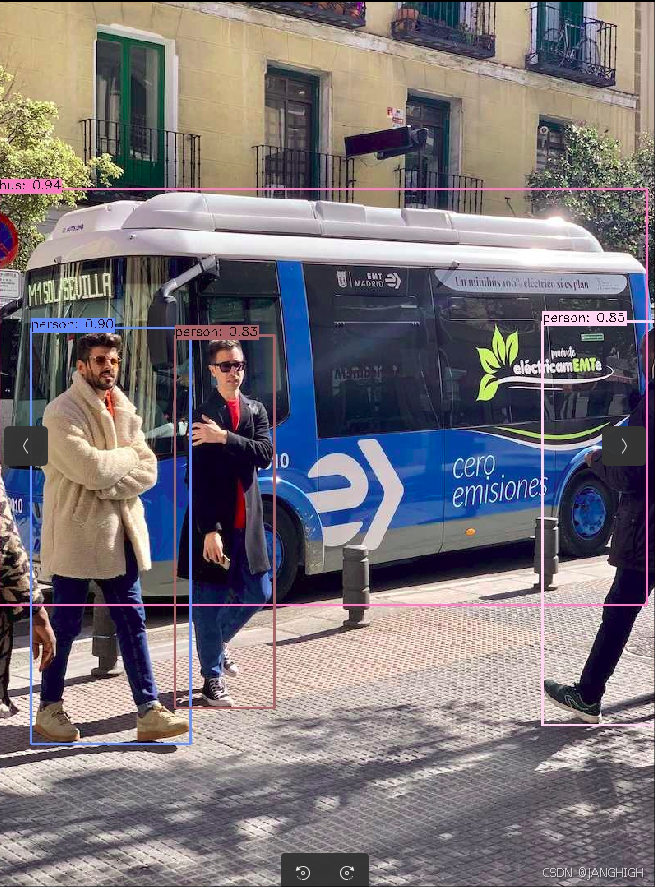
结果
------Images[0]------
        Inference time: 160.619 ms
------Images[1]------
        Inference time: 116.271 ms
------Images[2]------
        Inference time: 135.319 ms

 491


 扫一扫


 被折叠的 条评论
为什么被折叠?
 到【灌水乐园】发言


