《UnityAPI.GameObject游戏对象》(Yanlz+Unity+SteamVR+云技术+5G+AI+VR云游戏+isStatic+SendMessage+Find+立钻哥哥++OK++)

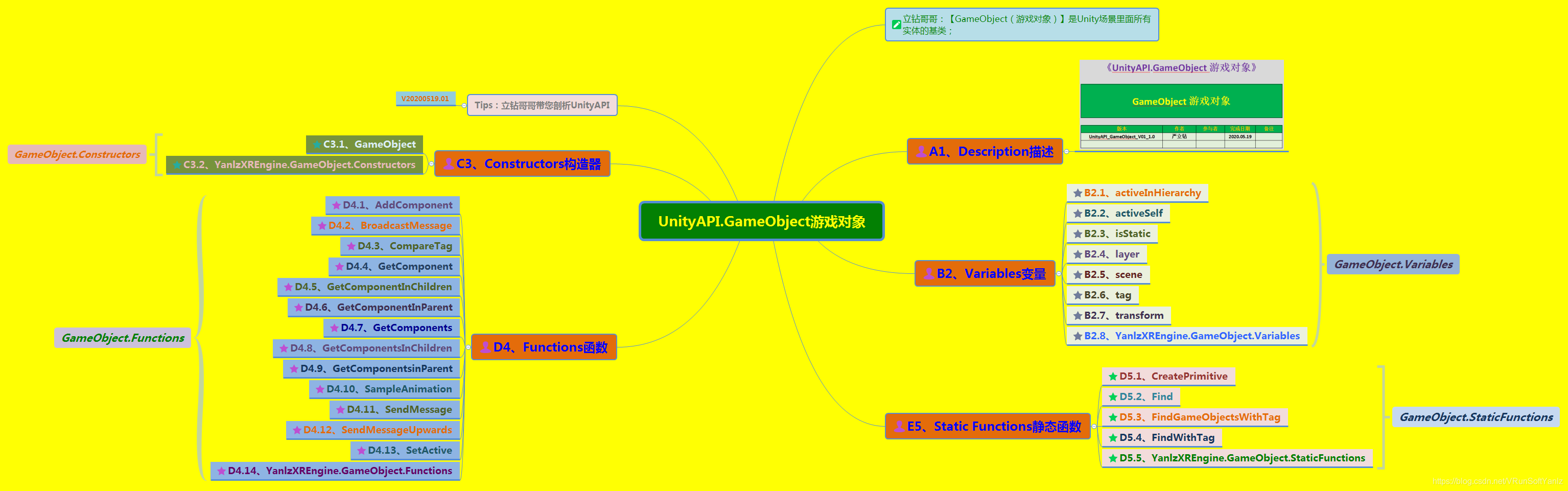
《UnityAPI.GameObject游戏对象》

版本

作者

参与者

完成日期

备注

UnityAPI_GameObject_V01_1.0

严立钻


2020.05.19


#《UnityAPI.GameObject游戏对象》发布说明:

++++“UnityAPI.GameObject游戏对象是对UnityAPIGameObject类的剖析和拓展

立钻哥哥:Unity是一个入门快、提高难的游戏引擎,想要提升能力,至少需要越过3道坎:API+Shader+综合能力

++1、API的积累:API的合理利用不仅可以减轻自己的编码负担,而且往往可以提高程序的运行效率;这也是钻哥开始“Unity API”独立打造分类的初衷

++2、Shader编程:想要做出一款精品游戏往往需要有高效的Shader的支持;Unity提供了一套改良的“Shader Lab”系统,优化了繁杂的“Open GL”编程

++3、综合能力(技术+业务+管理):一款产品的制作除了功能编程外,往往会涉及很多其他领域,例如产品架构、UI交互设计、模型制作等,作为主要的编程人员,对其他相关领域的了解程序往往会影响到产品制作直至最后的产品体验

++++立钻哥哥一直在推动【VR云游戏=Unity+SteamVR+云技术+5G+AI,这个只是一个引子,抛砖引玉让大家对整个知识体系有一个明确的落地方向,宝宝们可以根据自己的兴趣方向进行拓展:比如Unity这里是指一种“3D游戏引擎”,也可拓展至“UE4Cocos2dx”等游戏引擎;SteamVR是一种跨硬件解决方案,也可拓展至“VRTK”等第三方插件;“云技术+5G”是一种跨平台解决方案的核心技术,同样可拓展至其他平台解决方案;AI也是一种先进技术的举例,也可以拓展至任何一种前沿技术


@@提示:有些博客可能只是开了头,如果感兴趣的同学,可以“点赞”或“评论区留言”,只要关注的同学多了,那就会继续完善哟!(“++==”,表示没有写完的,如果关注度不高就不完善了;“++ok++”,表示此篇博客已经完成,是阶段性完整的!)


$$$$博客溯源:
++++VR云游戏=Unity+SteamVR+云技术+5G+AI;(说明:AI人工智能不是我们的主要研究技术,只是了解一下,领略一下有风的感觉!但是,VR是我们的研究重点

++++【Unity API】分类:https://blog.youkuaiyun.com/vrunsoftyanlz/category_7637520.html

++++【Unity开发基础】分类:https://blog.youkuaiyun.com/vrunsoftyanlz/category_7309057.html

++++【Linux系统编程】分类:https://blog.youkuaiyun.com/vrunsoftyanlz/category_9694767.html

++++【C++C铸就生存利器】分类:https://blog.youkuaiyun.com/vrunsoftyanlz/category_9325802.html

++++【人工智能AI2026】分类:https://blog.youkuaiyun.com/vrunsoftyanlz/category_9212024.html

++++【立钻哥哥优快云空间】:https://blog.youkuaiyun.com/VRunSoftYanlz/



#GameObject游戏对象

#GameObject游戏对象

#GameObject游戏对象

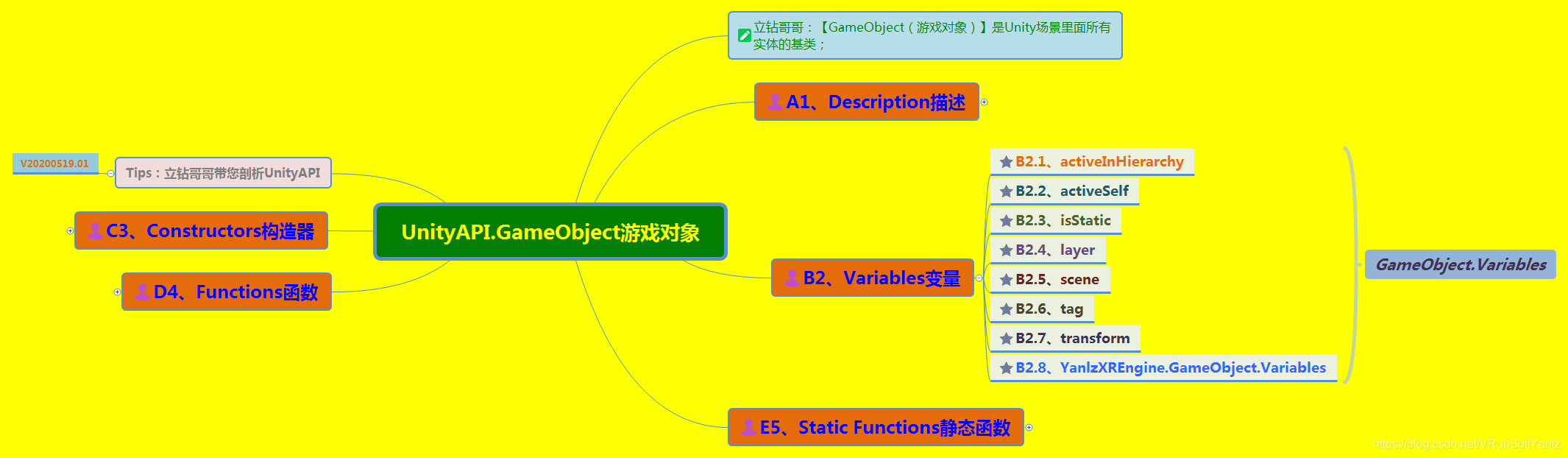
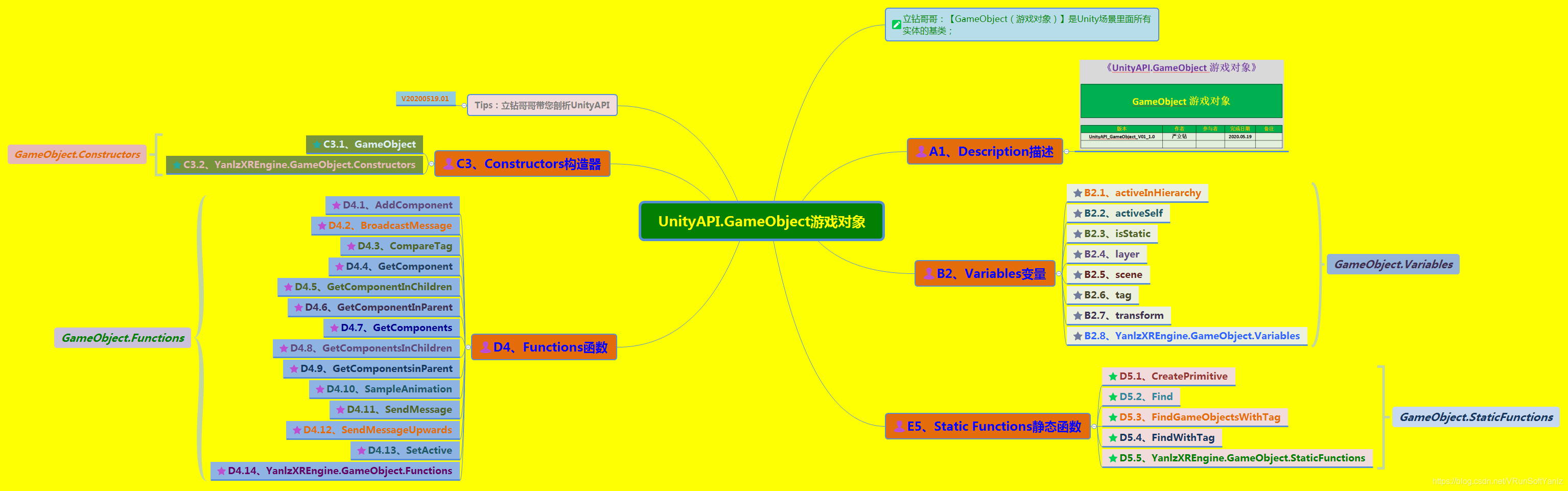
++A1、Description描述

++B2、Variables变量

++C3、Public Function共有函数

++D4、Message消息


#A1、Description描述

#A1、Description描述

++A1、Description描述

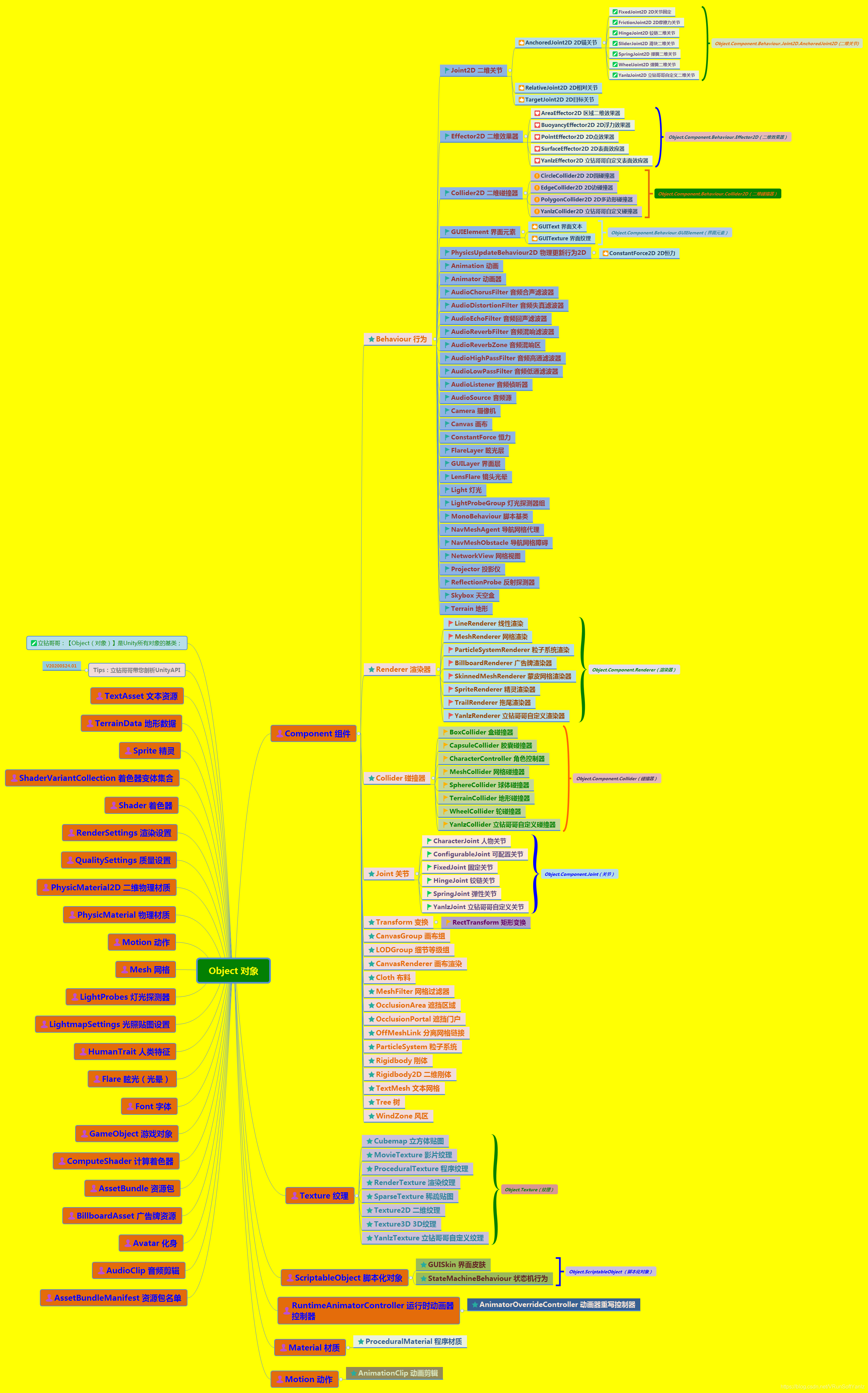
++++立钻哥哥:GameObject(游戏对象)是Unity场景里面所有实体的基类

++++[Namespace]:UnityEngine Parent class: Object;

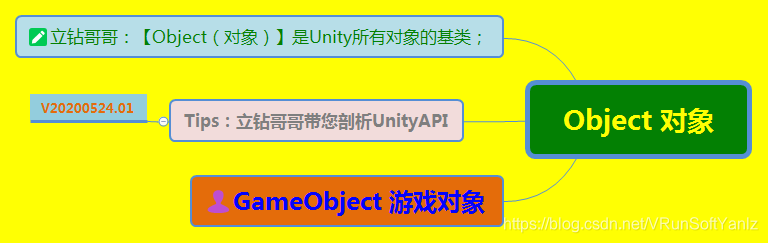
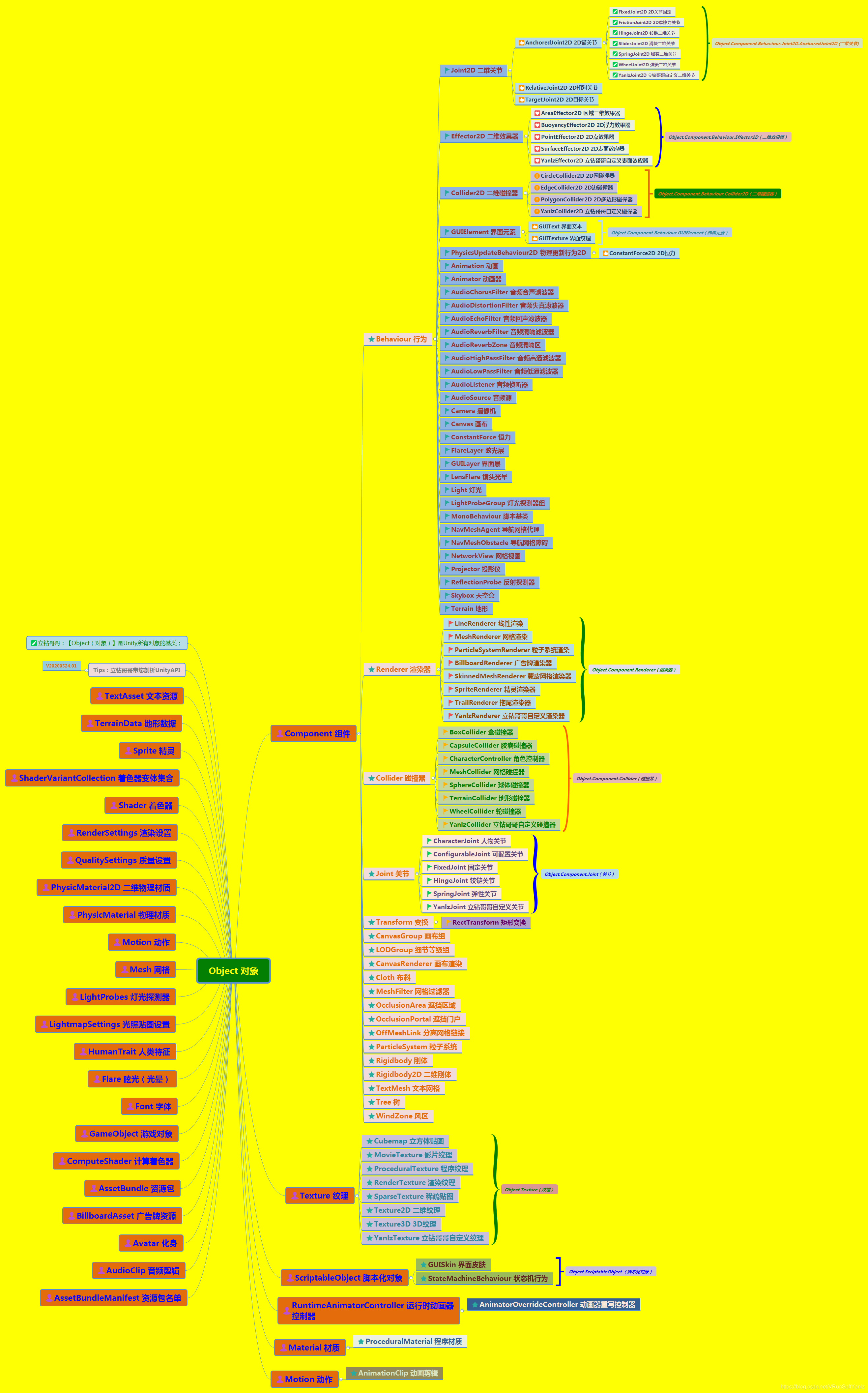
++++[Object对象]:Unity所有对象的基类

++++[Object]:https://blog.youkuaiyun.com/VRunSoftYanlz/article/details/106202194

立钻哥哥:Base class for all entities in Unity scenes;

++++【Unity API】分类:https://blog.youkuaiyun.com/vrunsoftyanlz/category_7637520.html

++++[Unity快速入门]:https://blog.youkuaiyun.com/VRunSoftYanlz/article/details/105776475

++++[UnityAPI目录]:https://blog.youkuaiyun.com/VRunSoftYanlz/article/details/106533906

++++[Application应用]:https://blog.youkuaiyun.com/VRunSoftYanlz/article/details/106086327

++++[Object对象]:https://blog.youkuaiyun.com/VRunSoftYanlz/article/details/106202194

++++[GameObject]:https://blog.youkuaiyun.com/VRunSoftYanlz/article/details/106223815

++++[MonoBehaviour]:https://blog.youkuaiyun.com/VRunSoftYanlz/article/details/106533256

++++[Component组件]:https://blog.youkuaiyun.com/VRunSoftYanlz/article/details/106367004

++++[Camera摄像机]:https://blog.youkuaiyun.com/VRunSoftYanlz/article/details/106148837

++++[Shader着色器]:https://blog.youkuaiyun.com/VRunSoftYanlz/article/details/106321040

++++[Material材质]:https://blog.youkuaiyun.com/VRunSoftYanlz/article/details/81814303

++++[Physics物理]:https://blog.youkuaiyun.com/VRunSoftYanlz/article/details/106268062

++++[RaycastHit]:https://blog.youkuaiyun.com/VRunSoftYanlz/article/details/106292370

++++[ParticleSystem]:https://blog.youkuaiyun.com/VRunSoftYanlz/article/details/106341995

++++[WWW万维网]:https://blog.youkuaiyun.com/VRunSoftYanlz/article/details/106412890

++++[LineRenerer]:https://blog.youkuaiyun.com/VRunSoftYanlz/article/details/106306388

++++[WheelCollider]:https://blog.youkuaiyun.com/VRunSoftYanlz/article/details/82356217

++++[MovieTexture]:https://blog.youkuaiyun.com/VRunSoftYanlz/article/details/106434063


#B2、Variables变量

#B2、Variables变量

++B2、Variables变量

++++B2.1、activeInHierarchy

++++B2.2、activeSelf

++++B2.3、isStatic

++++B2.4、layer

++++B2.5、scene

++++B2.6、tag

++++B2.7、transform

++++B2.8、YanlzXREngine.GameObject.Variables


++B2.1、activeInHierarchy

++B2.1、activeInHierarchy

++B2.1、activeInHierarchy

++++立钻哥哥:在层级激活

bool activeInHierarchy;

++++场景中的激活对象是否激活?

++++如果GameObject.activeSelf属性以及所有它的父级已启动:可以知道一个游戏物体在游戏中是否是激活的


++B2.2、activeSelf

++B2.2、activeSelf

++B2.2、activeSelf

++++立钻哥哥:激活自己

bool activeSelf;

++++该游戏对象的局部激活状态(只读

++++返回该游戏对象的局部激活状态,设置是使用GameObject.SetActive;注意游戏对象可以是不激活的,因为父对象没有激活,即使它返回True;这个状态将被用在当所有父对象都是激活的;使用GameObject.activeInHierarchy来检测游戏对象在场景中实际是否是激活的


++B2.3、isStatic

++B2.3、isStatic

++B2.3、isStatic

++++立钻哥哥:是否静态

bool isStatic;

++++如果一个游戏对象是静态仅在编辑器API指定

++++如果任意对象设置为静态标识返回true

++++可参考:GameObjectUtility.SetStaticEditorFlags;


++B2.4、layer

++B2.4、layer

++B2.4、layer

++++立钻哥哥:

int layer;

++++游戏对象所在的层,层的范围是在[0...31]之间

++++层可以用于摄像机的选择性渲染或者忽略光线投射

using UnityEngine;

using System.Collections;

using YanlzXREngine;


public class YanlzGameObject : MonoBehaviour{

    void MyTestFunc(){

        gameObject.layer = 2;

    }

}    //立钻哥哥:public class YanlzGameObject{}


++B2.5、scene

++B2.5、scene

++B2.5、scene

++++立钻哥哥:场景

public SceneManagement.Scene scene;

++++场景物体(Scene that the GameObject is part of.)


++B2.6、tag

++B2.6、tag

++B2.6、tag

++++立钻哥哥:标签

string tag;

++++这个游戏对象的标签

++++标签可以用于标识游戏对象;标签必须在使用之前在标签管理器里面先声明

using UnityEngine;

using System.Collections;

using YanlzXREngine;


public class YanlzGameObject : MonoBehaviour{

    void MyTestFunc(){

        gameObject.tag = YanlzPlayer;

    }

}    //立钻哥哥:public class YanlzGameObject{}


++B2.7、transform

++B2.7、transform

++B2.7、transform

++++立钻哥哥:变换

Transform transform;

++++附加于这个游戏对象上的变换(如果没有则为空)

using UnityEngine

using System.Collections;

using YanlzXREngine;


public class YanlzGameObject : MonoBehaviour{

    public GameObject other;


    void MyTestFunc(){

        other.transform.Translate(1, 1, 1);

    }    //立钻哥哥:void MyTestFunc(){}


}    //立钻哥哥:public class YanlzGameObject{}


#C3、Constructors构造器

#C3、Constructors构造器

++C3、Constructors构造器

++++C3.1、GameObject

++++C3.2、YanlzXREngine.GameObject.Constructors


++C3.1、GameObject

++C3.1、GameObject

++C3.1、GameObject

++++立钻哥哥:游戏对象

GameObject(string name);

GameObject();

GameObject(string name, params Type[] components);

++++创建一个新的游戏物体,命名为name

++++一个变换组件(Transform)总是被添加到游戏对象

++++创建一个游戏对象并且附加指定的组件

using UnityEngine;

using System.Collections;

using YanlzXREngine;


public class YanlzGameObject : MonoBehaviour{

    public GameObject player;


    void MyTestFunc(){

        //player = new GameObject();

        player = new GameObject(YanlzPlayer);


        player.AddComponent(Rigidbody);

        player.AddComponent(BoxCollider);

    }    //立钻哥哥:void MyTestFunc(){}


}    //立钻哥哥:public class YanlzGameObject : MonoBehaviour{}


#D4、Functions函数

#D4、Functions函数

++D4、Functions函数

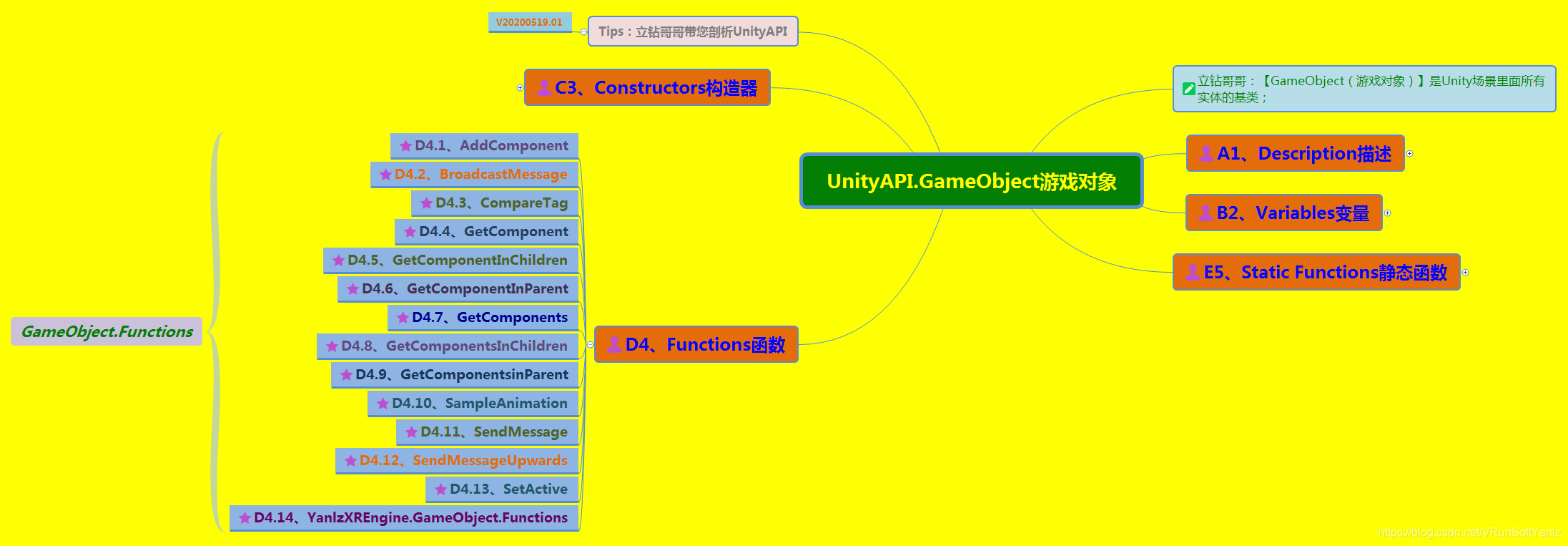
++++D4.1、AddComponent

++++D4.2、BroadcastMessage

++++D4.3、CompareTag

++++D4.4、GetComponent

++++D4.5、GetComponentInChildren

++++D4.6、GetComponentInParent

++++D4.7、GetComponents

++++D4.8、GetComponentsInChildren

++++D4.9、GetComponentsinParent

++++D4.10、SampleAnimation

++++D4.11、SendMessage

++++D4.12、SendMessageUpwards

++++D4.13、SetActive

++++D4.14、YanlzXREngine.GameObject.Functions


++D4.1、AddComponent

++D4.1、AddComponent

++D4.1、AddComponent

++++立钻哥哥:添加组件

Component AddComponent(string className);

Component AddComponent(Type componentType);

T AddComponent();

++++添加一个名称为className的组件到游戏对象

++++用这个函数改变运行中的物体的行为;可以用传递脚本名称的方法,把程序脚本加载给游戏内物体

++++有些组件也需要同一个游戏物体有其他组件;当然这个函数会自动添加那些需要的组件,比如当添加一个HingeJoint组件,这个函数会自动添加一个Rigidbody组件

++++给游戏物体添加一个名称为componentType的组件类;C#用户可以使用泛型版本

using UnityEngine;

using System.Collections;

using YanlzXREngine;


public class YanlzGameObject : MonoBehaviour{

    public SphereCollider sc;


    void MyTestFunc(){

        //sc = gameObject.AddComponent<SphereCollider>();

        sc = gameObject.AddComponent(SphereCollider) as SphereCollider;

    }    //立钻哥哥:void MyTestFunc(){}


}    //立钻哥哥:public class YanlzGameObject{}


++D4.2、BroadcastMessage

++D4.2、BroadcastMessage

++D4.2、BroadcastMessage

++++立钻哥哥:广播消息

void BroadcastMessage(string methodName, object parameter=null, SendMessageOptions options=SendMessageOptions.RequireReceiver);

++++对此游戏对象及其子对象的所有MonoBehaviour中调用名称为methodName的方法

++++接受消息的方法可以通过不要参数的方法来选择忽略参数;当选项被设置为SendMessageOptions.RequireReceiver时,如果消息没有被任何一个组件处理,则会打印一个错误

using UnityEngine;

using System.Collections;


public class YanlzGameObject : MonoBehaviour{


    void MyApplyDamage(float damage){

        Debug.Log(damage);

    }    //立钻哥哥:void MyApplyDamage(){}


    void MyTestFunc(){

        gameObject.BroadcastMessage(MyApplyDamage, 5.0F);

    }    //立钻哥哥:void MyTestFunc(){}


}    //立钻哥哥:public class YanlzGameObject{}


++D4.3、CompareTag

++D4.3、CompareTag

++D4.3、CompareTag

++++立钻哥哥:比较标签

bool CompareTag(string tag);

++++[tag]:比较的标签

++++此游戏对象是否被标记为tag标签?

using UnityEngine;

using System.Collections;


public class YanlzGameObject : MonoBehaviour{


    void OnTriggerEnter(Collider other){

        if(other.gameObject.CompareTag(YanlzPlayer)){

            Destroy(other.gameObject);

        }

    }    //立钻哥哥:void OnTriggerEnter(){}


}    //立钻哥哥:public class YanlzGameObject{}


++D4.4、GetComponent

++D4.4、GetComponent

++D4.4、GetComponent

++++立钻哥哥:获取组件

Component GetComponent(Type type);

T GetComponent();

Component GetComponent(string type);

++++[type]:检索组件的类型

++++如果这个游戏对象附件了一个类型为type的组件,则返回该组件,否则为空

++++GetComponent是访问别的组件的原始方法;通过这个函数可以访问内置组件或脚本

++++由于性能原因,最好使用TypeGetComponent,而不是用字符串;不过有时可能无法得到Type,可以通过名字而不是Type来访问组件

using UnityEngine;

using System.Collections;

using YanlzXREngine;


public class YanlzGameObject : MonoBehaviour{

    public HingeJoint hinge;


    void MyTestFunc(){

        //hinge = gameObject.GetComponent(HingeJoint) as HingeJoint;

        hinge = gameObject.GetComponent<HingeJoint>();


        hinge.useSpring = false;

    }    //立钻哥哥:void MyTestFunc(){}


}    //立钻哥哥:public class YanlzGameObject{}


++D4.5、GetComponentInChildren

++D4.5、GetComponentInChildren

++D4.5、GetComponentInChildren

++++立钻哥哥:获取子对象组件

Component GetComponentInChildren(Type type);

T GetComponentInChildren();

++++[type]:检索组件的类型

++++返回此游戏对象或者它的所有子对象上(深度优先)的类型为type的组件

++++只返回激活的组件

using UnityEngine;

using System.Collections;

using YanlzXREngine;


public class YanlzGameObject : MonoBehaviour{

    public HingeJoint hinge;


    void MyTestFunc(){

        hinge = gameObject.GetComponentInChildren<HingeJoint>();

        hinge.useSpring = false;

    }    //立钻哥哥:void MyTestFunc(){}


}    //立钻哥哥:public class YanlzGameObject{}


++D4.6、GetComponentInParent

++D4.6、GetComponentInParent

++D4.6、GetComponentInParent

++++立钻哥哥:获取父对象组件

Component GetComponentInParent(Type type);

T GetComponentInParent();

++++[type]:查找组件的类型

++++从父对象查找组件

++++向上递归直到找到一个有效的组件,否则返回空

using UnityEngine;

using System.Collections;

using YanlzXREngine;


public class YanlzGameObject : MonoBehaviour{

    public HingeJoint hinge;


    void MyTestFunc(){

        hinge = gameObject.GetComponentInParent<HingeJoint>();

        hinge.useSpring = false;

    }    //立钻哥哥:void MyTestFunc(){}


}    //立钻哥哥:public class YanlzGameObject{}


++D4.7、GetComponents

++D4.7、GetComponents

++D4.7、GetComponents

++++立钻哥哥:获取组件列表

Component[] GetComponents(Type type);

T[] GetComponents();

++++[type]:检索组件的类型

++++返回该游戏对象所有type类型的组件类表

using UnityEngine;

using System.Collections;

using YanlzXREngine;


public class YanlzGameObject : MonoBehaviour{

    public HingeJoint[] hingeJoints;


    void MyTestFunc(){

        hingeJoints = gameObject.GetComponents<HingeJoint>();

        foreach(HingeJoint joint in hingeJoints){

            joint.useSpring = false;

        }

    }    //立钻哥哥:void MyTestFunc(){}


}    //立钻哥哥:public class YanlzGameObject{}


++D4.8、GetComponentsInChildren

++D4.8、GetComponentsInChildren

++D4.8、GetComponentsInChildren

++++立钻哥哥:获取子对象组件列表

Component[] GetComponentsInChildren(Type type, bool includeInactive=false);

T[] GetComponentsInChildren(bool includeInactive);

T[] GetComponentsInChildren();

++++[type]:检索组件的类型

++++[includeInactive]:在查找集里面应该包括非激活的组件吗?

++++返回此游戏对象与其子对象所有type类型的组件

++++搜索组件进行递归子对象,所以它包括子对象的子对象等

using UnityEngine;

using System.Collections;

using YanlzXREngine;


public class YanlzGameObject : MonoBehaviour{

    public HingeJoint[] hingeJoints;


    void MyTestFunc(){

        hingeJoints = gameObject.GetComponentsInChildren<HingeJoint>();

        foreach(HingeJoint joint in hingeJoints){

            joint.useSpring = false;

        }

    }    //立钻哥哥:void MyTestFunc(){}


}    //立钻哥哥:public class YanlzGameObject{}


++D4.9、GetComponentsInParent

++D4.9、GetComponentsInParent

++D4.9、GetComponentsInParent

++++立钻哥哥:获取父对象组件列表

Component[] GetComponentsInParent(Type type, bool includeInactive=false);

T[] GetComponentsInParent(bool includeInactive);

T[] GetComponentsInParent();

++++[type]:检索组件的类型

++++[includeInactive]:在查找集里面应该包括非激活的组件吗?

++++返回此游戏对象与其父对象所有type类型的组件

++++搜索组件进行递归父对象,所以它包含父对象的父对象等

using UnityEngine;

using System.Collections;


public class YanlzGameObject : MonoBehaviour{

    public HingeJoint[] hingeJoints;


    void MyTestFunc(){

        hingeJoints = gameObject.GetComponentsInParent(typeof(HingeJoint));

        foreach(HingeJoint joint in hingeJoints){

            joint.useSpring = false;

        }

    }    //立钻哥哥:void MyTestFunc(){}


}    //立钻哥哥:public class YanlzGameObject{}


++D4.10、SampleAnimation

++D4.10、SampleAnimation

++D4.10、SampleAnimation

++++立钻哥哥:采样动画

void SampleAnimation(AnimationClip animation, float time);

++++用于任何动画剪辑在给定的时间采样动画

++++处于性能考量,推荐使用动画界面;这个用于在给定的time来采样animation;任何动画的组件属性的剪辑将被替换为采样的值;大多数可以使用Animation.Play替代;当需要在一个无序的帧或基于特定的输入时,SampleAnimation最有用

using UnityEngine;

using System.Collections;

using YanlzXREngine;


public class YanlzGameObject : MonoBehaviour{

    public AnimationClip clip;


    void Update(){

        gameObject.SampleAnimation(clip, clip.length - Time.time);

    }    //立钻哥哥:void Update(){}


}    //立钻哥哥:public class YanlzGameObject{}


++D4.11、SendMessage

++D4.11、SendMessage

++D4.11、SendMessage

++++立钻哥哥:发送消息

void SendMessage(string methodName, object value=null, SendMessageOptions options=SendMessageOptions.RequireReceiver);

++++[methodName]:调用的方法名

++++[value]:可选参数,被调用的方法传递的值

++++[options]:如果目标对象方法不存在,应该引发错误吗?

++++在此游戏对象所有MonoBehaviour上调用名称为methodName的方法

++++接收消息的方法可以通过不要参数的方法来选择忽略参数;当选项被设置为SendMessageOptions.RequireReceiver时,如果消息没有被任何一个组件处理,则会打印一个错误

++++注意:消息不会发送到非激活的对象上(如:哪些在编辑器或者通过SetActive已经关闭的对象)

using UnityEngine;

using System.Collections;

using YanlzXREngine;


public class YanlzGameObject : MonoBehaviour{


    void MyApplyDamage(float damage){

        Debug.Log(damage);

    }    //立钻哥哥:void MyApplyDamage(){}


    void MyTestFunc(){

        gameObject.SendMessage(MyApplyDamage, 5.0F);

    }    //立钻哥哥:void MyTestFunc(){}


}    //立钻哥哥:public class YanlzGameObject{}


++D4.12、SendMessageUpwards

++D4.12、SendMessageUpwards

++D4.12、SendMessageUpwards

++++立钻哥哥:向上发送消息

void SendMessageUpwards(string methodName, object value=null, SendMessageOptions options=SendMessageOptions.RequireReceiver);

++++[methodName]:调用的方法名

++++[value]:可选参数,被调用的方法传递的值

++++[options]:如果目标对象方法不存在,应该引发错误吗?

++++调用此游戏对象及其behaviour的父对象上所有MonoBehaviour名为methodName的方法

++++接收消息的方法可以通过不要参数的方法来选择忽略参数,当选项被设置为SendMessageOptions.RequireReceiver时,如果消息没有被任何一个组件处理,则会打印一个错误

++++注意:消息不会发送到非激活的对象上(如:那些在编辑器或者通过SetActive已经关闭的对象)

using UnityEngine;

using System.Collections;

using YanlzXREngine;


public class YanlzGameObject : MonoBehaviour{


    void MyApplyDamage(float damage){

        Debug.Log(damage);

    }    //立钻哥哥:void MyApplyDamage(){}


    void MyTestFunc(){

        gameObject.SendMessageUpwards(MyApplyDamage, 5.0F);

    }    //立钻哥哥:void MyTestFunc(){}


}    //立钻哥哥:public class YanlzGameObject{}


++D4.13、SetActive

++D4.13、SetActive

++D4.13、SetActive

++++立钻哥哥:设置激活

void SetActive(bool value);

++++激活/停用此游戏对象

++++注意:一个游戏对象可以是非活动状态,因为它的父对象不是激活的,这种情况下,调用SetActive()仍不能激活它,但仅能设置此游戏对象的局部状态,可以使用GameObject.activeSelf来检查;此状态用于当所有父对象都是激活状态


#E5、Static Functions静态函数

#E5、Static Functions静态函数

++E5、Static Functions静态函数

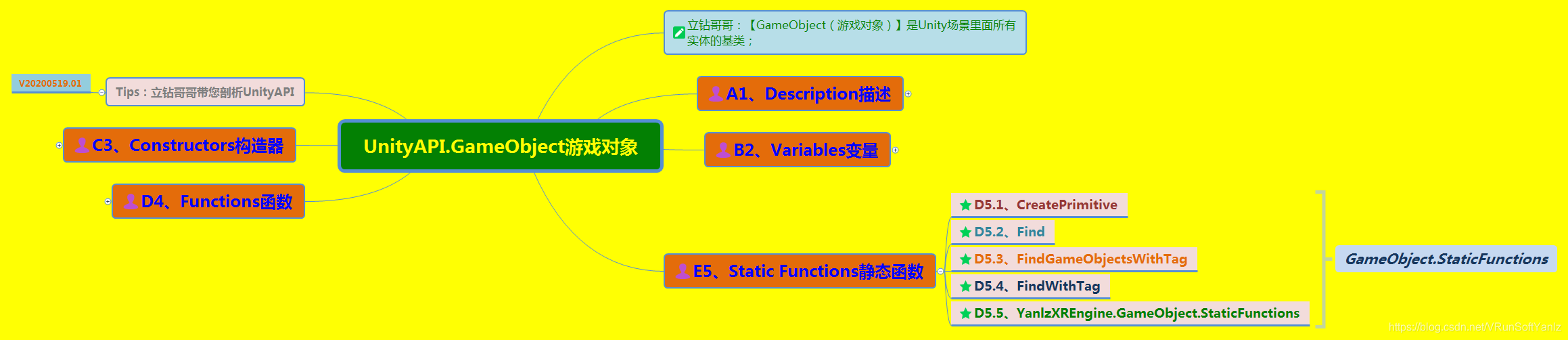
++++D5.1、CreatePrimitive

++++D5.2、Find

++++D5.3、FindGameObjectsWithTag

++++D5.4、FindWithTag

++++D5.5、YanlzXREngine.GameObject.StaticFunctions


++D5.1、CreatePrimitive

++D5.1、CreatePrimitive

++D5.1、CreatePrimitive

++++立钻哥哥:创建原型对象

static GameObject CreatePrimitive(PrimitiveType type);

++++[type]:要创建的原型对象的类型

++++创建一个带有原型网络渲染器和适当的碰撞器的游戏对象

using UnityEngine;

using System.Collections;

using YanlzXREngine;


public class YanlzGameObject : MonoBehaviour{


    void Start(){

        GameObject plane = GameObject.CreatePrimitive(PrimitiveType.Plane);


        GameObject cube = GameObject.CreatePrimitive(PrimitiveType.Cube);

        cube.transform.position = new Vector3(0, 0.5F, 0);


        GameObject sphere = GameObject.CreatePrimitive(PrimitiveType.Sphere);

        sphere.transform.position = new Vector3(0, 1.5F, 0);


        GameObject capsule = GameObject.CreatePrimitive(PrimitiveType.Capsule);

        capsule.transform.position = new Vector3(2, 1, 0);


        GameObject cylinder = GameObject.CreatePrimitive(PrimitiveType.Cylinder);

        cylinder.transform.position = new Vecto3r(-2, 1, 0);


    }    //立钻哥哥:void Start(){}


}    //立钻哥哥:public class YanlzGameObject{}


++D5.2、Find

++D5.2、Find

++D5.2、Find

++++立钻哥哥:查找

static GameObject Find(string name);

++++找到并返回一个名字为name的游戏物体

++++如果以name为名字的游戏物体没有被找到,则返回空;如果name中包含/字符,这个名称将被视作一个hierarchy中的路径名;这个函数只返回活动的游戏物体

++++除非迫不得已,建议不要在每一帧中使用这个函数;可以在开始的时候用一个成员变量来缓存结果或者使用GameObject.FindWithTag函数

using UnityEngine;

using System.Collections;

using YanlzXREngine;


public class YanlzGameObject : MonoBehaviour{

    public GameObject hand;


    void MyTestFunc(){

        hand = GameObject.Find(MyHand);

        hand = GameObject.Find(/MyHand);

        hand = GameObject.Find(/Monster/Arm/MyHand);

        hand = GameObject.Find(Monster/Arm/MyHand);

    }    //立钻哥哥:void MyTestFunc(){}


}    //立钻哥哥:public class YanlzGameObject{}


//立钻哥哥:在Start()里查找MyHand物体,并在每帧旋转它

using UnityEngine;

using System.Collections;

using YanlzXREngine;


public class YanlzGameObject : MonoBehaviour{

    private GameObject hand;


    void Start(){

        hand = GameObject.Find(/Monster/Arm/MyHand);

    }    //立钻哥哥:void Start(){}


    void Update(){

        hand.transform.Rotate(0, 100 * Time.deltaTime, 0);

    }    //立钻哥哥:void Update(){}


}    //立钻哥哥:public class YanlzGameObject{}


++D5.3、FindGameObjectsWithTag

++D5.3、FindGameObjectsWithTag

++D5.3、FindGameObjectsWithTag

++++立钻哥哥:通过标签查找游戏对象列表

static GameObject[] FindGameObjectsWithTag(string tag);

++++[tag]:用于搜索对象标签的名称

++++返回具体tag标签的激活的游戏对象列表,如果没有找到则为空

++++标签必须在使用之前到标签管理器里面声明;如果标签不存在或为空字符串或传递null作为标签,将抛出Unity异常

using UnityEngine;

using System.Collections;

using YanlzXREngine;


public class YanlzGameObject : MonoBehaviour{

    public GameObject respawnPrefab;

    public Object respawns;


    void Start(){

        if(respawns == null){

            respawns = GameObject.FindGameObjectsWithTag(MyRespawn);

        }


        foreach(Object respawn in respawns){

            Instantiate(respawnPrefab, respawn.transform.position, respawn.transform.rotation) as GameObject;

        }

    }    //立钻哥哥:void Start(){}


}    //立钻哥哥:public class YanlzGameObject{}


using UnityEngine;

using System.Collections;

using YanlzXREngine;


public class YanlzGameObject : MonoBehaviour{


    GameObject MyFindClosestEnemy(){

        GameObject[] gos;

        gos = GameObject.FindGameObjectsWithTag(MyEnemy);


        GameObject closest;

        float distance = Mathf.Infinity;

        Vector3 position = transform.position;


        foreach(GameObject go in gos){

            Vector3 diff = go.transform.position - position;

            float curDistance = diff.sqrMagnitude;


            if(curDistance < distance){

                closest = go;

                distance = curDistance;

            }

        }    //立钻哥哥:foreach(){}


        return closest;

    }    //立钻哥哥:GameObject MyFindClosestEnemy(){}


    void MyTestFunc(){

        Debug.Log(MyFindClosestEnemy().name);

    }    //立钻哥哥:void MyTestFunc(){}


}    //立钻哥哥:public class YanlzGameObject{}


using UnityEngine;

using System.Collections;

using YanlzXREngine;


public class YanlzGameObject : MonoBehaviour{


    void Start(){

        GameObject[] gos;

        gos = GameObject.FindGameObjectsWithTag(MyFred);


        if(gos.Length == 0){

            Debug.Log(立钻哥哥:No game objects are tagged with MyFred.);

        }

    }    //立钻哥哥:void Start(){}


}    //立钻哥哥:public class YanlzGameObject{}


++D5.4、FindWithTag

++D5.4、FindWithTag

++D5.4、FindWithTag

++++立钻哥哥:查找标签

static GameObject FindWithTag(string tag);

++++[tag]:要搜索的标签

++++返回标记为tag的一个游戏对象,如果没有找到对象则为空

++++标签必须在使用之前到标签管理器里面声明;如果标签不存在或为空字符串或传递null作为标签,将抛出Unity异常

using UnityEngine;

using System.Collections;

using YanlzXREngine;


public class YanlzGameObject : MonoBehaviour{

    public GameObject respawnPrefab;

    public GameObject respawn;


    void Start(){

        if(respawn == null){

            respawn = GameObject.FindWithTag(MyRespawn);

        }


        Instantiate(respawnPrefab, respawn.transform.position, respawn.transform.rotation) as GameObject;

    }    //立钻哥哥:void Start(){}


}    //立钻哥哥:public class YanlzGameObject{}


#F6、立钻哥哥对GameObject游戏物体的拓展

#F6、立钻哥哥对GameObject游戏物体的拓展

++++【Unity API】分类:https://blog.youkuaiyun.com/vrunsoftyanlz/category_7637520.html

++++[Unity快速入门]:https://blog.youkuaiyun.com/VRunSoftYanlz/article/details/105776475

++++[UnityAPI目录]:https://blog.youkuaiyun.com/VRunSoftYanlz/article/details/106533906

++++[Application应用]:https://blog.youkuaiyun.com/VRunSoftYanlz/article/details/106086327

++++[Object对象]:https://blog.youkuaiyun.com/VRunSoftYanlz/article/details/106202194

++++[GameObject]:https://blog.youkuaiyun.com/VRunSoftYanlz/article/details/106223815

++++[MonoBehaviour]:https://blog.youkuaiyun.com/VRunSoftYanlz/article/details/106533256

++++[Component组件]:https://blog.youkuaiyun.com/VRunSoftYanlz/article/details/106367004

++++[Camera摄像机]:https://blog.youkuaiyun.com/VRunSoftYanlz/article/details/106148837

++++[Shader着色器]:https://blog.youkuaiyun.com/VRunSoftYanlz/article/details/106321040

++++[Material材质]:https://blog.youkuaiyun.com/VRunSoftYanlz/article/details/81814303

++++[Physics物理]:https://blog.youkuaiyun.com/VRunSoftYanlz/article/details/106268062

++++[RaycastHit]:https://blog.youkuaiyun.com/VRunSoftYanlz/article/details/106292370

++++[ParticleSystem]:https://blog.youkuaiyun.com/VRunSoftYanlz/article/details/106341995

++++[WWW万维网]:https://blog.youkuaiyun.com/VRunSoftYanlz/article/details/106412890

++++[LineRenerer]:https://blog.youkuaiyun.com/VRunSoftYanlz/article/details/106306388

++++[WheelCollider]:https://blog.youkuaiyun.com/VRunSoftYanlz/article/details/82356217

++++[MovieTexture]:https://blog.youkuaiyun.com/VRunSoftYanlz/article/details/106434063

++++[Matrix4x4矩阵]:https://blog.youkuaiyun.com/VRunSoftYanlz/article/details/106504027

++++[Renerer渲染器]:https://blog.youkuaiyun.com/VRunSoftYanlz/article/details/106481994

++++[AudioSource]:https://blog.youkuaiyun.com/VRunSoftYanlz/article/details/106462679

++++[AudioClip]:https://blog.youkuaiyun.com/VRunSoftYanlz/article/details/106448955

++++[Texture纹理]:https://blog.youkuaiyun.com/VRunSoftYanlz/article/details/106448589

++++[AssetBundle]:https://blog.youkuaiyun.com/VRunSoftYanlz/article/details/106412190

++++[ScriptableObject]:https://blog.youkuaiyun.com/VRunSoftYanlz/article/details/106392769


@@提示:有些博客可能只是开了头,如果感兴趣的同学,可以“点赞”或“评论区留言”,只要关注的同学多了,那就会继续完善哟!(“++==”,表示没有写完的,如果关注度不高就不完善了;“++ok++”,表示此篇博客已经完成,是阶段性完整的!)


++++VR云游戏=Unity+SteamVR+云技术+5G+AI;(说明:AI人工智能不是我们的主要研究技术,只是了解一下,领略一下有风的感觉!但是,VR是我们的研究重点

++++【Unity API】分类:https://blog.youkuaiyun.com/vrunsoftyanlz/category_7637520.html

++++【Unity开发基础】分类:https://blog.youkuaiyun.com/vrunsoftyanlz/category_7309057.html

++++【Linux系统编程】分类:https://blog.youkuaiyun.com/vrunsoftyanlz/category_9694767.html

++++【C++C铸就生存利器】分类:https://blog.youkuaiyun.com/vrunsoftyanlz/category_9325802.html

++++【人工智能AI2026】分类:https://blog.youkuaiyun.com/vrunsoftyanlz/category_9212024.html

++++【立钻哥哥优快云空间】:https://blog.youkuaiyun.com/VRunSoftYanlz/



【XR游戏开发QQ群:784477094

++立钻哥哥推荐的拓展学习链接(Link_Url)

立钻哥哥推荐的拓展学习链接(Link_Url)

++++立钻哥哥Unity 学习空间: http://blog.youkuaiyun.com/VRunSoftYanlz/

++++虚拟现实VR资讯: https://blog.youkuaiyun.com/VRunSoftYanlz/article/details/89165846

++++HTC_VIVE开发基础https://blog.youkuaiyun.com/VRunSoftYanlz/article/details/81989970

++++Oculus杂谈https://blog.youkuaiyun.com/VRunSoftYanlz/article/details/82469850

++++Oculus安装使用https://blog.youkuaiyun.com/VRunSoftYanlz/article/details/82718982

++++Unity+SteamVR=>VRhttps://blog.youkuaiyun.com/VRunSoftYanlz/article/details/88809370

++++Unity减少VR晕眩症https://blog.youkuaiyun.com/VRunSoftYanlz/article/details/89115518

++++SteamVR简介https://blog.youkuaiyun.com/VRunSoftYanlz/article/details/86484254

++++SteamVR脚本功能分析https://blog.youkuaiyun.com/VRunSoftYanlz/article/details/86531480

++++SteamVR2.0开发指南https://blog.youkuaiyun.com/VRunSoftYanlz/article/details/86618187

++++SteamVR2.2.0开发指南https://blog.youkuaiyun.com/VRunSoftYanlz/article/details/88784527

++++SteamVR2.2.0快速入门https://blog.youkuaiyun.com/VRunSoftYanlz/article/details/88833579

++++SteamVR2.2.0交互系统https://blog.youkuaiyun.com/VRunSoftYanlz/article/details/89199778

++++SteamVR2.2.0传送机制https://blog.youkuaiyun.com/VRunSoftYanlz/article/details/89390866

++++SteamVR2.2.0教程(一)https://blog.youkuaiyun.com/VRunSoftYanlz/article/details/89324067

++++SteamVR2.2.0教程(二)https://blog.youkuaiyun.com/VRunSoftYanlz/article/details/89894097

++++SteamVR_Skeleton_Poserhttps://blog.youkuaiyun.com/VRunSoftYanlz/article/details/89931725

++++SteamVR实战之PMCorehttps://blog.youkuaiyun.com/VRunSoftYanlz/article/details/89463658

++++SteamVR/Extrashttps://blog.youkuaiyun.com/VRunSoftYanlz/article/details/86584108

++++SteamVR/Inputhttps://blog.youkuaiyun.com/VRunSoftYanlz/article/details/86601950

++++OpenXR简介https://blog.youkuaiyun.com/VRunSoftYanlz/article/details/85726365

++++VRTK杂谈https://blog.youkuaiyun.com/VRunSoftYanlz/article/details/82562993

++++VRTK快速入门(杂谈)https://blog.youkuaiyun.com/VRunSoftYanlz/article/details/82955267

++++VRTK官方示例(目录)https://blog.youkuaiyun.com/VRunSoftYanlz/article/details/82955410

++++VRTK代码结构(目录)https://blog.youkuaiyun.com/VRunSoftYanlz/article/details/82780085

++++VRTK(SceneResources)https://blog.youkuaiyun.com/VRunSoftYanlz/article/details/82795400

++++VRTK_ControllerEventshttps://blog.youkuaiyun.com/VRunSoftYanlz/article/details/83099512

++++VRTK_InteractTouchhttps://blog.youkuaiyun.com/VRunSoftYanlz/article/details/83120220

++++虚拟现实行业应用https://blog.youkuaiyun.com/VRunSoftYanlz/article/details/88360157

++++Steam平台上的VRhttps://blog.youkuaiyun.com/VRunSoftYanlz/article/details/88960085

++++Steam平台热销VRhttps://blog.youkuaiyun.com/VRunSoftYanlz/article/details/89007741

++++VR实验:以太网帧的构成https://blog.youkuaiyun.com/VRunSoftYanlz/article/details/82598140

++++实验四:存储器扩展实验https://blog.youkuaiyun.com/VRunSoftYanlz/article/details/87834434

++++FrameVR示例V0913https://blog.youkuaiyun.com/VRunSoftYanlz/article/details/82808498

++++FrameVR示例V1003https://blog.youkuaiyun.com/VRunSoftYanlz/article/details/83066516

++++SwitchMachineV1022https://blog.youkuaiyun.com/VRunSoftYanlz/article/details/83280886

++++PlaySceneManagerV1022https://blog.youkuaiyun.com/VRunSoftYanlz/article/details/83280886

++++Unity5.x用户手册https://blog.youkuaiyun.com/VRunSoftYanlz/article/details/81712741

++++Unity面试题ABChttps://blog.youkuaiyun.com/vrunsoftyanlz/article/details/78630687

++++Unity面试题Dhttps://blog.youkuaiyun.com/VRunSoftYanlz/article/details/78630838

++++Unity面试题Ehttps://blog.youkuaiyun.com/vrunsoftyanlz/article/details/78630913

++++Unity面试题Fhttps://blog.youkuaiyun.com/VRunSoftYanlz/article/details/78630945

++++Cocos2dx面试题https://blog.youkuaiyun.com/VRunSoftYanlz/article/details/78630967

++++禅道[zentao]https://blog.youkuaiyun.com/VRunSoftYanlz/article/details/83964057

++++Lua快速入门篇(Xlua拓展):https://blog.youkuaiyun.com/VRunSoftYanlz/article/details/81173818

++++Lua快速入门篇(XLua教程):https://blog.youkuaiyun.com/VRunSoftYanlz/article/details/81141502

++++Lua快速入门篇(基础概述)https://blog.youkuaiyun.com/VRunSoftYanlz/article/details/81041359

++++框架知识点https://blog.youkuaiyun.com/VRunSoftYanlz/article/details/80862879

++++游戏框架(UI框架夯实篇)https://blog.youkuaiyun.com/vrunsoftyanlz/article/details/80781140

++++游戏框架(初探篇)https://blog.youkuaiyun.com/VRunSoftYanlz/article/details/80630325

++++.Net框架设计https://blog.youkuaiyun.com/VRunSoftYanlz/article/details/87401225

++++从零开始学架构https://blog.youkuaiyun.com/VRunSoftYanlz/article/details/88095895

++++设计模式简单整理https://blog.youkuaiyun.com/vrunsoftyanlz/article/details/79839641

++++专题:设计模式(精华篇)https://blog.youkuaiyun.com/VRunSoftYanlz/article/details/81322678

++++U3D小项目参考https://blog.youkuaiyun.com/vrunsoftyanlz/article/details/80141811

++++Unity小游戏算法分析https://blog.youkuaiyun.com/VRunSoftYanlz/article/details/87908365

++++Unity案例(Vehicle)https://blog.youkuaiyun.com/VRunSoftYanlz/article/details/82355876

++++UML类图https://blog.youkuaiyun.com/vrunsoftyanlz/article/details/80289461

++++PowerDesigner简介https://blog.youkuaiyun.com/VRunSoftYanlz/article/details/86500084

++++Unity知识点0001https://blog.youkuaiyun.com/vrunsoftyanlz/article/details/80302012

++++Unity知识点0008https://blog.youkuaiyun.com/VRunSoftYanlz/article/details/81153606

++++U3D_Shader编程(第一篇:快速入门篇)https://blog.youkuaiyun.com/vrunsoftyanlz/article/details/80372071

++++U3D_Shader编程(第二篇:基础夯实篇)https://blog.youkuaiyun.com/vrunsoftyanlz/article/details/80372628

++++Unity引擎基础https://blog.youkuaiyun.com/vrunsoftyanlz/article/details/78881685

++++Unity面向组件开发https://blog.youkuaiyun.com/vrunsoftyanlz/article/details/78881752

++++Unity物理系统https://blog.youkuaiyun.com/vrunsoftyanlz/article/details/78881879

++++Unity2D平台开发https://blog.youkuaiyun.com/vrunsoftyanlz/article/details/78882034

++++UGUI基础https://blog.youkuaiyun.com/vrunsoftyanlz/article/details/78884693

++++UGUI进阶https://blog.youkuaiyun.com/vrunsoftyanlz/article/details/78884882

++++UGUI综合https://blog.youkuaiyun.com/vrunsoftyanlz/article/details/78885013

++++Unity动画系统基础https://blog.youkuaiyun.com/vrunsoftyanlz/article/details/78886068

++++Unity动画系统进阶https://blog.youkuaiyun.com/vrunsoftyanlz/article/details/78886198

++++Navigation导航系统https://blog.youkuaiyun.com/vrunsoftyanlz/article/details/78886281

++++Unity特效渲染https://blog.youkuaiyun.com/vrunsoftyanlz/article/details/78886403

++++Unity数据存储https://blog.youkuaiyun.com/vrunsoftyanlz/article/details/79251273

++++Unity中Sqlite数据库https://blog.youkuaiyun.com/vrunsoftyanlz/article/details/79254162

++++WWW类和协程https://blog.youkuaiyun.com/vrunsoftyanlz/article/details/79254559

++++Unity网络https://blog.youkuaiyun.com/vrunsoftyanlz/article/details/79254902

++++Unity资源加密https://blog.youkuaiyun.com/VRunSoftYanlz/article/details/87644514

++++PhotonServer简介https://blog.youkuaiyun.com/VRunSoftYanlz/article/details/86652770

++++编写Photon游戏服务器https://blog.youkuaiyun.com/VRunSoftYanlz/article/details/86682935

++++C#事件https://blog.youkuaiyun.com/vrunsoftyanlz/article/details/78631267

++++C#委托https://blog.youkuaiyun.com/vrunsoftyanlz/article/details/78631183

++++C#集合https://blog.youkuaiyun.com/vrunsoftyanlz/article/details/78631175

++++C#泛型https://blog.youkuaiyun.com/vrunsoftyanlz/article/details/78631141

++++C#接口https://blog.youkuaiyun.com/vrunsoftyanlz/article/details/78631122

++++C#静态类https://blog.youkuaiyun.com/vrunsoftyanlz/article/details/78630979

++++C#中System.String类https://blog.youkuaiyun.com/vrunsoftyanlz/article/details/78630945

++++C#数据类型https://blog.youkuaiyun.com/vrunsoftyanlz/article/details/78630913

++++Unity3D默认的快捷键https://blog.youkuaiyun.com/vrunsoftyanlz/article/details/78630838

++++游戏相关缩写https://blog.youkuaiyun.com/vrunsoftyanlz/article/details/78630687

++++UnityAPI.Rigidbody刚体https://blog.youkuaiyun.com/VRunSoftYanlz/article/details/81784053

++++UnityAPI.Material材质https://blog.youkuaiyun.com/VRunSoftYanlz/article/details/81814303

++++UnityAPI.Android安卓https://blog.youkuaiyun.com/VRunSoftYanlz/article/details/81843193

++++UnityAPI.AndroidJNI安卓JNIhttps://blog.youkuaiyun.com/VRunSoftYanlz/article/details/81879345

++++UnityAPI.Transform变换https://blog.youkuaiyun.com/VRunSoftYanlz/article/details/81916293

++++UnityAPI.WheelCollider轮碰撞器https://blog.youkuaiyun.com/VRunSoftYanlz/article/details/82356217

++++UnityAPI.Resources资源https://blog.youkuaiyun.com/VRunSoftYanlz/article/details/83155518

++++JSON数据结构https://blog.youkuaiyun.com/VRunSoftYanlz/article/details/82026644

++++CocosStudio快速入门https://blog.youkuaiyun.com/VRunSoftYanlz/article/details/82356839

++++Unity企业内训(目录)https://blog.youkuaiyun.com/VRunSoftYanlz/article/details/82634668

++++Unity企业内训(第1讲)https://blog.youkuaiyun.com/VRunSoftYanlz/article/details/82634733

++++Unity企业内训(第2讲)https://blog.youkuaiyun.com/VRunSoftYanlz/article/details/82861180

++++Unity企业内训(第3讲)https://blog.youkuaiyun.com/VRunSoftYanlz/article/details/82927699

++++Unity企业内训(第4讲)https://blog.youkuaiyun.com/VRunSoftYanlz/article/details/83479776

++++Unity企业内训(第5讲)https://blog.youkuaiyun.com/VRunSoftYanlz/article/details/83963811

++++Unity企业内训(第6讲)https://blog.youkuaiyun.com/VRunSoftYanlz/article/details/84207696

++++钻哥带您了解产品原型https://blog.youkuaiyun.com/VRunSoftYanlz/article/details/87303828

++++插件<Obi Rope>https://blog.youkuaiyun.com/VRunSoftYanlz/article/details/83963905

++++计算机组成原理(教材篇)https://blog.youkuaiyun.com/VRunSoftYanlz/article/details/82719129

++++5G接入:云计算和雾计算https://blog.youkuaiyun.com/VRunSoftYanlz/article/details/88372718

++++云计算通俗讲义https://blog.youkuaiyun.com/VRunSoftYanlz/article/details/88652803

++++立钻哥哥Unity 学习空间: http://blog.youkuaiyun.com/VRunSoftYanlz

--_--VRunSoft:lovezuanzuan--_--
//---------------------------------------------- // NGUI: Next-Gen UI kit // Copyright © 2011-2015 Tasharen Entertainment //---------------------------------------------- using UnityEngine; using System; using System.Collections.Generic; using System.IO; using System.Reflection; /// <summary> /// Helper class containing generic functions used throughout the UI library. /// </summary> static public class NGUITools { static AudioListener mListener; static bool mLoaded = false; static float mGlobalVolume = 1f; /// <summary> /// Globally accessible volume affecting all sounds played via NGUITools.PlaySound(). /// </summary> static public float soundVolume { get { if (!mLoaded) { mLoaded = true; mGlobalVolume = PlayerPrefs.GetFloat("Sound", 1f); } return mGlobalVolume; } set { if (mGlobalVolume != value) { mLoaded = true; mGlobalVolume = value; PlayerPrefs.SetFloat("Sound", value); } } } /// <summary> /// Helper function -- whether the disk access is allowed. /// </summary> static public bool fileAccess { get { return Application.platform != RuntimePlatform.WindowsWebPlayer && Application.platform != RuntimePlatform.OSXWebPlayer; } } /// <summary> /// Play the specified audio clip. /// </summary> static public AudioSource PlaySound (AudioClip clip) { return PlaySound(clip, 1f, 1f); } /// <summary> /// Play the specified audio clip with the specified volume. /// </summary> static public AudioSource PlaySound (AudioClip clip, float volume) { return PlaySound(clip, volume, 1f); } static float mLastTimestamp = 0f; static AudioClip mLastClip; /// <summary> /// Play the specified audio clip with the specified volume and pitch. /// </summary> static public AudioSource PlaySound (AudioClip clip, float volume, float pitch) { float time = Time.time; if (mLastClip == clip && mLastTimestamp + 0.1f > time) return null; mLastClip = clip; mLastTimestamp = time; volume *= soundVolume; if (clip != null && volume > 0.01f) { if (mListener == null || !NGUITools.GetActive(mListener)) { AudioListener[] listeners = GameObject.FindObjectsOfType(typeof(AudioListener)) as AudioListener[]; if (listeners != null) { for (int i = 0; i < listeners.Length; ++i) { if (NGUITools.GetActive(listeners[i])) { mListener = listeners[i]; break; } } } if (mListener == null) { Camera cam = Camera.main; if (cam == null) cam = GameObject.FindObjectOfType(typeof(Camera)) as Camera; if (cam != null) mListener = cam.gameObject.AddComponent<AudioListener>(); } } if (mListener != null && mListener.enabled && NGUITools.GetActive(mListener.gameObject)) { #if UNITY_4_3 || UNITY_4_5 || UNITY_4_6 AudioSource source = mListener.audio; #else AudioSource source = mListener.GetComponent<AudioSource>(); #endif if (source == null) source = mListener.gameObject.AddComponent<AudioSource>(); #if !UNITY_FLASH source.priority = 50; source.pitch = pitch; #endif source.PlayOneShot(clip, volume); return source; } } return null; } /// <summary> /// New WWW call can fail if the crossdomain policy doesn't check out. Exceptions suck. It's much more elegant to check for null instead. /// </summary> // static public WWW OpenURL (string url) // { //#if UNITY_FLASH // Debug.LogError("WWW is not yet implemented in Flash"); // return null; //#else // WWW www = null; // try { www = new WWW(url); } // catch (System.Exception ex) { Debug.LogError(ex.Message); } // return www; //#endif // } // /// <summary> // /// New WWW call can fail if the crossdomain policy doesn't check out. Exceptions suck. It's much more elegant to check for null instead. // /// </summary> // static public WWW OpenURL (string url, WWWForm form) // { // if (form == null) return OpenURL(url); //#if UNITY_FLASH // Debug.LogError("WWW is not yet implemented in Flash"); // return null; //#else // WWW www = null; // try { www = new WWW(url, form); } // catch (System.Exception ex) { Debug.LogError(ex != null ? ex.Message : "<null>"); } // return www; //#endif // } /// <summary> /// Same as Random.Range, but the returned value is between min and max, inclusive. /// Unity's Random.Range is less than max instead, unless min == max. /// This means Range(0,1) produces 0 instead of 0 or 1. That's unacceptable. /// </summary> static public int RandomRange (int min, int max) { if (min == max) return min; return UnityEngine.Random.Range(min, max + 1); } /// <summary> /// Returns the hierarchy of the object in a human-readable format. /// </summary> static public string GetHierarchy (GameObject obj) { if (obj == null) return ""; string path = obj.name; while (obj.transform.parent != null) { obj = obj.transform.parent.gameObject; path = obj.name + "\\" + path; } return path; } /// <summary> /// Find all active objects of specified type. /// </summary> static public T[] FindActive<T> () where T : Component { return GameObject.FindObjectsOfType(typeof(T)) as T[]; } /// <summary> /// Find the camera responsible for drawing the objects on the specified layer. /// </summary> static public Camera FindCameraForLayer (int layer) { int layerMask = 1 << layer; Camera cam; for (int i = 0; i < UICamera.list.size; ++i) { cam = UICamera.list.buffer[i].cachedCamera; if (cam && (cam.cullingMask & layerMask) != 0) return cam; } cam = Camera.main; if (cam && (cam.cullingMask & layerMask) != 0) return cam; #if UNITY_4_3 || UNITY_FLASH Camera[] cameras = NGUITools.FindActive<Camera>(); for (int i = 0, imax = cameras.Length; i < imax; ++i) #else Camera[] cameras = new Camera[Camera.allCamerasCount]; int camerasFound = Camera.GetAllCameras(cameras); for (int i = 0; i < camerasFound; ++i) #endif { cam = cameras[i]; if (cam && cam.enabled && (cam.cullingMask & layerMask) != 0) return cam; } return null; } /// <summary> /// Add a collider to the game object containing one or more widgets. /// </summary> static public void AddWidgetCollider (GameObject go) { AddWidgetCollider(go, false); } /// <summary> /// Add a collider to the game object containing one or more widgets. /// </summary> static public void AddWidgetCollider (GameObject go, bool considerInactive) { if (go != null) { // 3D collider Collider col = go.GetComponent<Collider>(); BoxCollider box = col as BoxCollider; if (box != null) { UpdateWidgetCollider(box, considerInactive); return; } // Is there already another collider present? If so, do nothing. if (col != null) return; // 2D collider BoxCollider2D box2 = go.GetComponent<BoxCollider2D>(); if (box2 != null) { UpdateWidgetCollider(box2, considerInactive); return; } UICamera ui = UICamera.FindCameraForLayer(go.layer); if (ui != null && (ui.eventType == UICamera.EventType.World_2D || ui.eventType == UICamera.EventType.UI_2D)) { box2 = go.AddComponent<BoxCollider2D>(); box2.isTrigger = true; #if UNITY_EDITOR UnityEditor.Undo.RegisterCreatedObjectUndo(box2, "Add Collider"); #endif UIWidget widget = go.GetComponent<UIWidget>(); if (widget != null) widget.autoResizeBoxCollider = true; UpdateWidgetCollider(box2, considerInactive); return; } else { box = go.AddComponent<BoxCollider>(); #if UNITY_EDITOR UnityEditor.Undo.RegisterCreatedObjectUndo(box, "Add Collider"); #endif box.isTrigger = true; UIWidget widget = go.GetComponent<UIWidget>(); if (widget != null) widget.autoResizeBoxCollider = true; UpdateWidgetCollider(box, considerInactive); } } return; } /// <summary> /// Adjust the widget's collider based on the depth of the widgets, as well as the widget's dimensions. /// </summary> static public void UpdateWidgetCollider (GameObject go) { UpdateWidgetCollider(go, false); } /// <summary> /// Adjust the widget's collider based on the depth of the widgets, as well as the widget's dimensions. /// </summary> static public void UpdateWidgetCollider (GameObject go, bool considerInactive) { if (go != null) { BoxCollider bc = go.GetComponent<BoxCollider>(); if (bc != null) { UpdateWidgetCollider(bc, considerInactive); return; } BoxCollider2D box2 = go.GetComponent<BoxCollider2D>(); if (box2 != null) UpdateWidgetCollider(box2, considerInactive); } } /// <summary> /// Adjust the widget's collider based on the depth of the widgets, as well as the widget's dimensions. /// </summary> static public void UpdateWidgetCollider (BoxCollider box, bool considerInactive) { if (box != null) { GameObject go = box.gameObject; UIWidget w = go.GetComponent<UIWidget>(); if (w != null) { Vector4 dr = w.drawRegion; if (dr.x != 0f || dr.y != 0f || dr.z != 1f || dr.w != 1f) { Vector4 region = w.drawingDimensions; box.center = new Vector3((region.x + region.z) * 0.5f, (region.y + region.w) * 0.5f); box.size = new Vector3(region.z - region.x, region.w - region.y); } else { Vector3[] corners = w.localCorners; box.center = Vector3.Lerp(corners[0], corners[2], 0.5f); box.size = corners[2] - corners[0]; } } else { Bounds b = NGUIMath.CalculateRelativeWidgetBounds(go.transform, considerInactive); box.center = b.center; box.size = new Vector3(b.size.x, b.size.y, 0f); } #if UNITY_EDITOR NGUITools.SetDirty(box); #endif } } /// <summary> /// Adjust the widget's collider based on the depth of the widgets, as well as the widget's dimensions. /// </summary> static public void UpdateWidgetCollider (BoxCollider2D box, bool considerInactive) { if (box != null) { GameObject go = box.gameObject; UIWidget w = go.GetComponent<UIWidget>(); if (w != null) { Vector3[] corners = w.localCorners; #if UNITY_4_3 || UNITY_4_5 || UNITY_4_6 box.center = Vector3.Lerp(corners[0], corners[2], 0.5f); #else box.offset = Vector3.Lerp(corners[0], corners[2], 0.5f); #endif box.size = corners[2] - corners[0]; } else { Bounds b = NGUIMath.CalculateRelativeWidgetBounds(go.transform, considerInactive); #if UNITY_4_3 || UNITY_4_5 || UNITY_4_6 box.center = b.center; #else box.offset = b.center; #endif box.size = new Vector2(b.size.x, b.size.y); } #if UNITY_EDITOR NGUITools.SetDirty(box); #endif } } /// <summary> /// Helper function that returns the string name of the type. /// </summary> static public string GetTypeName<T> () { string s = typeof(T).ToString(); if (s.StartsWith("UI")) s = s.Substring(2); else if (s.StartsWith("UnityEngine.")) s = s.Substring(12); return s; } /// <summary> /// Helper function that returns the string name of the type. /// </summary> static public string GetTypeName (UnityEngine.Object obj) { if (obj == null) return "Null"; string s = obj.GetType().ToString(); if (s.StartsWith("UI")) s = s.Substring(2); else if (s.StartsWith("UnityEngine.")) s = s.Substring(12); return s; } /// <summary> /// Convenience method that works without warnings in both Unity 3 and 4. /// </summary> static public void RegisterUndo (UnityEngine.Object obj, string name) { #if UNITY_EDITOR UnityEditor.Undo.RecordObject(obj, name); NGUITools.SetDirty(obj); #endif } /// <summary> /// Convenience function that marks the specified object as dirty in the Unity Editor. /// </summary> static public void SetDirty (UnityEngine.Object obj) { #if UNITY_EDITOR if (obj) { //if (obj is Component) Debug.Log(NGUITools.GetHierarchy((obj as Component).gameObject), obj); //else if (obj is GameObject) Debug.Log(NGUITools.GetHierarchy(obj as GameObject), obj); //else Debug.Log("Hmm... " + obj.GetType(), obj); UnityEditor.EditorUtility.SetDirty(obj); } #endif } /// <summary> /// Add a new child game object. /// </summary> static public GameObject AddChild (GameObject parent) { return AddChild(parent, true); } /// <summary> /// Add a new child game object. /// </summary> static public GameObject AddChild (GameObject parent, bool undo) { GameObject go = new GameObject(); #if UNITY_EDITOR if (undo) UnityEditor.Undo.RegisterCreatedObjectUndo(go, "Create Object"); #endif if (parent != null) { Transform t = go.transform; t.parent = parent.transform; t.localPosition = Vector3.zero; t.localRotation = Quaternion.identity; t.localScale = Vector3.one; go.layer = parent.layer; } return go; } /// <summary> /// Instantiate an object and add it to the specified parent. /// </summary> static public GameObject AddChild (GameObject parent, GameObject prefab) { GameObject go = GameObject.Instantiate(prefab) as GameObject; #if UNITY_EDITOR UnityEditor.Undo.RegisterCreatedObjectUndo(go, "Create Object"); #endif if (go != null && parent != null) { Transform t = go.transform; t.parent = parent.transform; t.localPosition = Vector3.zero; t.localRotation = Quaternion.identity; t.localScale = Vector3.one; go.layer = parent.layer; } return go; } /// <summary> /// Calculate the game object's depth based on the widgets within, and also taking panel depth into consideration. /// </summary> static public int CalculateRaycastDepth (GameObject go) { UIWidget w = go.GetComponent<UIWidget>(); if (w != null) return w.raycastDepth; UIWidget[] widgets = go.GetComponentsInChildren<UIWidget>(); if (widgets.Length == 0) return 0; int depth = int.MaxValue; for (int i = 0, imax = widgets.Length; i < imax; ++i) { if (widgets[i].enabled) depth = Mathf.Min(depth, widgets[i].raycastDepth); } return depth; } /// <summary> /// Gathers all widgets and calculates the depth for the next widget. /// </summary> static public int CalculateNextDepth (GameObject go) { int depth = -1; UIWidget[] widgets = go.GetComponentsInChildren<UIWidget>(); for (int i = 0, imax = widgets.Length; i < imax; ++i) depth = Mathf.Max(depth, widgets[i].depth); return depth + 1; } /// <summary> /// Gathers all widgets and calculates the depth for the next widget. /// </summary> static public int CalculateNextDepth (GameObject go, bool ignoreChildrenWithColliders) { if (ignoreChildrenWithColliders) { int depth = -1; UIWidget[] widgets = go.GetComponentsInChildren<UIWidget>(); for (int i = 0, imax = widgets.Length; i < imax; ++i) { UIWidget w = widgets[i]; #if UNITY_4_3 || UNITY_4_5 || UNITY_4_6 if (w.cachedGameObject != go && (w.collider != null || w.GetComponent<Collider2D>() != null)) continue; #else if (w.cachedGameObject != go && (w.GetComponent<Collider>() != null || w.GetComponent<Collider2D>() != null)) continue; #endif depth = Mathf.Max(depth, w.depth); } return depth + 1; } return CalculateNextDepth(go); } /// <summary> /// Adjust the widgets' depth by the specified value. /// Returns '0' if nothing was adjusted, '1' if panels were adjusted, and '2' if widgets were adjusted. /// </summary> static public int AdjustDepth (GameObject go, int adjustment) { if (go != null) { UIPanel panel = go.GetComponent<UIPanel>(); if (panel != null) { UIPanel[] panels = go.GetComponentsInChildren<UIPanel>(true); for (int i = 0; i < panels.Length; ++i) { UIPanel p = panels[i]; #if UNITY_EDITOR RegisterUndo(p, "Depth Change"); #endif p.depth = p.depth + adjustment; } return 1; } else { panel = FindInParents<UIPanel>(go); if (panel == null) return 0; UIWidget[] widgets = go.GetComponentsInChildren<UIWidget>(true); for (int i = 0, imax = widgets.Length; i < imax; ++i) { UIWidget w = widgets[i]; if (w.panel != panel) continue; #if UNITY_EDITOR RegisterUndo(w, "Depth Change"); #endif w.depth = w.depth + adjustment; } return 2; } } return 0; } /// <summary> /// Bring all of the widgets on the specified object forward. /// </summary> static public void BringForward (GameObject go) { int val = AdjustDepth(go, 1000); if (val == 1) NormalizePanelDepths(); else if (val == 2) NormalizeWidgetDepths(); } /// <summary> /// Push all of the widgets on the specified object back, making them appear behind everything else. /// </summary> static public void PushBack (GameObject go) { int val = AdjustDepth(go, -1000); if (val == 1) NormalizePanelDepths(); else if (val == 2) NormalizeWidgetDepths(); } /// <summary> /// Normalize the depths of all the widgets and panels in the scene, making them start from 0 and remain in order. /// </summary> static public void NormalizeDepths () { NormalizeWidgetDepths(); NormalizePanelDepths(); } /// <summary> /// Normalize the depths of all the widgets in the scene, making them start from 0 and remain in order. /// </summary> static public void NormalizeWidgetDepths () { NormalizeWidgetDepths(FindActive<UIWidget>()); } /// <summary> /// Normalize the depths of all the widgets in the scene, making them start from 0 and remain in order. /// </summary> static public void NormalizeWidgetDepths (GameObject go) { NormalizeWidgetDepths(go.GetComponentsInChildren<UIWidget>()); } /// <summary> /// Normalize the depths of all the widgets in the scene, making them start from 0 and remain in order. /// </summary> static public void NormalizeWidgetDepths (UIWidget[] list) { int size = list.Length; if (size > 0) { Array.Sort(list, UIWidget.FullCompareFunc); int start = 0; int current = list[0].depth; for (int i = 0; i < size; ++i) { UIWidget w = list[i]; if (w.depth == current) { w.depth = start; } else { current = w.depth; w.depth = ++start; } } } } /// <summary> /// Normalize the depths of all the panels in the scene, making them start from 0 and remain in order. /// </summary> static public void NormalizePanelDepths () { UIPanel[] list = FindActive<UIPanel>(); int size = list.Length; if (size > 0) { Array.Sort(list, UIPanel.CompareFunc); int start = 0; int current = list[0].depth; for (int i = 0; i < size; ++i) { UIPanel p = list[i]; if (p.depth == current) { p.depth = start; } else { current = p.depth; p.depth = ++start; } } } } /// <summary> /// Create a new UI. /// </summary> static public UIPanel CreateUI (bool advanced3D) { return CreateUI(null, advanced3D, -1); } /// <summary> /// Create a new UI. /// </summary> static public UIPanel CreateUI (bool advanced3D, int layer) { return CreateUI(null, advanced3D, layer); } /// <summary> /// Create a new UI. /// </summary> static public UIPanel CreateUI (Transform trans, bool advanced3D, int layer) { // Find the existing UI Root UIRoot root = (trans != null) ? NGUITools.FindInParents<UIRoot>(trans.gameObject) : null; if (root == null && UIRoot.list.Count > 0) { foreach (UIRoot r in UIRoot.list) { if (r.gameObject.layer == layer) { root = r; break; } } } // Try to find an existing panel if (root == null) { for (int i = 0, imax = UIPanel.list.Count; i < imax; ++i) { UIPanel p = UIPanel.list[i]; GameObject go = p.gameObject; if (go.hideFlags == HideFlags.None && go.layer == layer) { trans.parent = p.transform; trans.localScale = Vector3.one; return p; } } } // If we are working with a different UI type, we need to treat it as a brand-new one instead if (root != null) { UICamera cam = root.GetComponentInChildren<UICamera>(); #if UNITY_4_3 || UNITY_4_5 || UNITY_4_6 if (cam != null && cam.camera.isOrthoGraphic == advanced3D) #else if (cam != null && cam.GetComponent<Camera>().orthographic == advanced3D) #endif { trans = null; root = null; } } // If no root found, create one if (root == null) { GameObject go = NGUITools.AddChild(null, false); root = go.AddComponent<UIRoot>(); // Automatically find the layers if none were specified if (layer == -1) layer = LayerMask.NameToLayer("UI"); if (layer == -1) layer = LayerMask.NameToLayer("2D UI"); go.layer = layer; if (advanced3D) { go.name = "UI Root (3D)"; root.scalingStyle = UIRoot.Scaling.Constrained; } else { go.name = "UI Root"; root.scalingStyle = UIRoot.Scaling.Flexible; } } // Find the first panel UIPanel panel = root.GetComponentInChildren<UIPanel>(); if (panel == null) { // Find other active cameras in the scene Camera[] cameras = NGUITools.FindActive<Camera>(); float depth = -1f; bool colorCleared = false; int mask = (1 << root.gameObject.layer); for (int i = 0; i < cameras.Length; ++i) { Camera c = cameras[i]; // If the color is being cleared, we won't need to if (c.clearFlags == CameraClearFlags.Color || c.clearFlags == CameraClearFlags.Skybox) colorCleared = true; // Choose the maximum depth depth = Mathf.Max(depth, c.depth); // Make sure this camera can't see the UI c.cullingMask = (c.cullingMask & (~mask)); } // Create a camera that will draw the UI Camera cam = NGUITools.AddChild<Camera>(root.gameObject, false); cam.gameObject.AddComponent<UICamera>(); cam.clearFlags = colorCleared ? CameraClearFlags.Depth : CameraClearFlags.Color; cam.backgroundColor = Color.grey; cam.cullingMask = mask; cam.depth = depth + 1f; if (advanced3D) { cam.nearClipPlane = 0.1f; cam.farClipPlane = 4f; cam.transform.localPosition = new Vector3(0f, 0f, -700f); } else { cam.orthographic = true; cam.orthographicSize = 1; cam.nearClipPlane = -10; cam.farClipPlane = 10; } // Make sure there is an audio listener present AudioListener[] listeners = NGUITools.FindActive<AudioListener>(); if (listeners == null || listeners.Length == 0) cam.gameObject.AddComponent<AudioListener>(); // Add a panel to the root panel = root.gameObject.AddComponent<UIPanel>(); #if UNITY_EDITOR UnityEditor.Selection.activeGameObject = panel.gameObject; #endif } if (trans != null) { // Find the root object while (trans.parent != null) trans = trans.parent; if (NGUITools.IsChild(trans, panel.transform)) { // Odd hierarchy -- can't reparent panel = trans.gameObject.AddComponent<UIPanel>(); } else { // Reparent this root object to be a child of the panel trans.parent = panel.transform; trans.localScale = Vector3.one; trans.localPosition = Vector3.zero; SetChildLayer(panel.cachedTransform, panel.cachedGameObject.layer); } } return panel; } /// <summary> /// Helper function that recursively sets all children with widgets' game objects layers to the specified value. /// </summary> static public void SetChildLayer (Transform t, int layer) { for (int i = 0; i < t.childCount; ++i) { Transform child = t.GetChild(i); child.gameObject.layer = layer; SetChildLayer(child, layer); } } /// <summary> /// Add a child object to the specified parent and attaches the specified script to it. /// </summary> static public T AddChild<T> (GameObject parent) where T : Component { GameObject go = AddChild(parent); go.name = GetTypeName<T>(); return go.AddComponent<T>(); } /// <summary> /// Add a child object to the specified parent and attaches the specified script to it. /// </summary> static public T AddChild<T> (GameObject parent, bool undo) where T : Component { GameObject go = AddChild(parent, undo); go.name = GetTypeName<T>(); return go.AddComponent<T>(); } /// <summary> /// Add a new widget of specified type. /// </summary> static public T AddWidget<T> (GameObject go) where T : UIWidget { int depth = CalculateNextDepth(go); // Create the widget and place it above other widgets T widget = AddChild<T>(go); widget.width = 100; widget.height = 100; widget.depth = depth; return widget; } /// <summary> /// Add a new widget of specified type. /// </summary> static public T AddWidget<T> (GameObject go, int depth) where T : UIWidget { // Create the widget and place it above other widgets T widget = AddChild<T>(go); widget.width = 100; widget.height = 100; widget.depth = depth; return widget; } /// <summary> /// Add a sprite appropriate for the specified atlas sprite. /// It will be sliced if the sprite has an inner rect, and a regular sprite otherwise. /// </summary> static public UISprite AddSprite (GameObject go, UIAtlas atlas, string spriteName) { UISpriteData sp = (atlas != null) ? atlas.GetSprite(spriteName) : null; UISprite sprite = AddWidget<UISprite>(go); sprite.type = (sp == null || !sp.hasBorder) ? UISprite.Type.Simple : UISprite.Type.Sliced; sprite.atlas = atlas; sprite.spriteName = spriteName; return sprite; } /// <summary> /// Get the rootmost object of the specified game object. /// </summary> static public GameObject GetRoot (GameObject go) { Transform t = go.transform; for (; ; ) { Transform parent = t.parent; if (parent == null) break; t = parent; } return t.gameObject; } /// <summary> /// Finds the specified component on the game object or one of its parents. /// </summary> static public T FindInParents<T> (GameObject go) where T : Component { if (go == null) return null; // Commented out because apparently it causes Unity 4.5.3 to lag horribly: // http://www.tasharen.com/forum/index.php?topic=10882.0 //#if UNITY_4_3 #if UNITY_FLASH object comp = go.GetComponent<T>(); #else T comp = go.GetComponent<T>(); #endif if (comp == null) { Transform t = go.transform.parent; while (t != null && comp == null) { comp = t.gameObject.GetComponent<T>(); t = t.parent; } } #if UNITY_FLASH return (T)comp; #else return comp; #endif //#else // return go.GetComponentInParent<T>(); //#endif } /// <summary> /// Finds the specified component on the game object or one of its parents. /// </summary> static public T FindInParents<T> (Transform trans) where T : Component { if (trans == null) return null; #if UNITY_4_3 #if UNITY_FLASH object comp = trans.GetComponent<T>(); #else T comp = trans.GetComponent<T>(); #endif if (comp == null) { Transform t = trans.transform.parent; while (t != null && comp == null) { comp = t.gameObject.GetComponent<T>(); t = t.parent; } } #if UNITY_FLASH return (T)comp; #else return comp; #endif #else return trans.GetComponentInParent<T>(); #endif } /// <summary> /// Destroy the specified object, immediately if in edit mode. /// </summary> static public void Destroy (UnityEngine.Object obj) { if (obj != null) { if (obj is Transform) obj = (obj as Transform).gameObject; if (Application.isPlaying) { if (obj is GameObject) { GameObject go = obj as GameObject; go.transform.parent = null; } UnityEngine.Object.Destroy(obj); } else UnityEngine.Object.DestroyImmediate(obj); } } /// <summary> /// Destroy the specified object immediately, unless not in the editor, in which case the regular Destroy is used instead. /// </summary> static public void DestroyImmediate (UnityEngine.Object obj) { if (obj != null) { if (Application.isEditor) UnityEngine.Object.DestroyImmediate(obj); else UnityEngine.Object.Destroy(obj); } } /// <summary> /// Call the specified function on all objects in the scene. /// </summary> static public void Broadcast (string funcName) { GameObject[] gos = GameObject.FindObjectsOfType(typeof(GameObject)) as GameObject[]; for (int i = 0, imax = gos.Length; i < imax; ++i) gos[i].SendMessage(funcName, SendMessageOptions.DontRequireReceiver); } /// <summary> /// Call the specified function on all objects in the scene. /// </summary> static public void Broadcast (string funcName, object param) { GameObject[] gos = GameObject.FindObjectsOfType(typeof(GameObject)) as GameObject[]; for (int i = 0, imax = gos.Length; i < imax; ++i) gos[i].SendMessage(funcName, param, SendMessageOptions.DontRequireReceiver); } /// <summary> /// Determines whether the 'parent' contains a 'child' in its hierarchy. /// </summary> static public bool IsChild (Transform parent, Transform child) { if (parent == null || child == null) return false; while (child != null) { if (child == parent) return true; child = child.parent; } return false; } /// <summary> /// Activate the specified object and all of its children. /// </summary> static void Activate (Transform t) { Activate(t, false); } /// <summary> /// Activate the specified object and all of its children. /// </summary> static void Activate (Transform t, bool compatibilityMode) { SetActiveSelf(t.gameObject, true); if (compatibilityMode) { // If there is even a single enabled child, then we're using a Unity 4.0-based nested active state scheme. for (int i = 0, imax = t.childCount; i < imax; ++i) { Transform child = t.GetChild(i); if (child.gameObject.activeSelf) return; } // If this point is reached, then all the children are disabled, so we must be using a Unity 3.5-based active state scheme. for (int i = 0, imax = t.childCount; i < imax; ++i) { Transform child = t.GetChild(i); Activate(child, true); } } } /// <summary> /// Deactivate the specified object and all of its children. /// </summary> static void Deactivate (Transform t) { SetActiveSelf(t.gameObject, false); } /// <summary> /// SetActiveRecursively enables children before parents. This is a problem when a widget gets re-enabled /// and it tries to find a panel on its parent. /// </summary> static public void SetActive (GameObject go, bool state) { SetActive(go, state, true); } /// <summary> /// SetActiveRecursively enables children before parents. This is a problem when a widget gets re-enabled /// and it tries to find a panel on its parent. /// </summary> static public void SetActive (GameObject go, bool state, bool compatibilityMode) { if (go) { if (state) { Activate(go.transform, compatibilityMode); #if UNITY_EDITOR if (Application.isPlaying) #endif CallCreatePanel(go.transform); } else Deactivate(go.transform); } } /// <summary> /// Ensure that all widgets have had their panels created, forcing the update right away rather than on the following frame. /// </summary> [System.Diagnostics.DebuggerHidden] [System.Diagnostics.DebuggerStepThrough] static void CallCreatePanel (Transform t) { UIWidget w = t.GetComponent<UIWidget>(); if (w != null) w.CreatePanel(); for (int i = 0, imax = t.childCount; i < imax; ++i) CallCreatePanel(t.GetChild(i)); } /// <summary> /// Activate or deactivate children of the specified game object without changing the active state of the object itself. /// </summary> static public void SetActiveChildren (GameObject go, bool state) { Transform t = go.transform; if (state) { for (int i = 0, imax = t.childCount; i < imax; ++i) { Transform child = t.GetChild(i); Activate(child); } } else { for (int i = 0, imax = t.childCount; i < imax; ++i) { Transform child = t.GetChild(i); Deactivate(child); } } } /// <summary> /// Helper function that returns whether the specified MonoBehaviour is active. /// </summary> [System.Obsolete("Use NGUITools.GetActive instead")] static public bool IsActive (Behaviour mb) { return mb != null && mb.enabled && mb.gameObject.activeInHierarchy; } /// <summary> /// Helper function that returns whether the specified MonoBehaviour is active. /// </summary> [System.Diagnostics.DebuggerHidden] [System.Diagnostics.DebuggerStepThrough] static public bool GetActive (Behaviour mb) { return mb && mb.enabled && mb.gameObject.activeInHierarchy; } /// <summary> /// Unity4 has changed GameObject.active to GameObject.activeself. /// </summary> [System.Diagnostics.DebuggerHidden] [System.Diagnostics.DebuggerStepThrough] static public bool GetActive (GameObject go) { return go && go.activeInHierarchy; } /// <summary> /// Unity4 has changed GameObject.active to GameObject.SetActive. /// </summary> [System.Diagnostics.DebuggerHidden] [System.Diagnostics.DebuggerStepThrough] static public void SetActiveSelf (GameObject go, bool state) { go.SetActive(state); } /// <summary> /// Recursively set the game object's layer. /// </summary> static public void SetLayer (GameObject go, int layer) { go.layer = layer; Transform t = go.transform; for (int i = 0, imax = t.childCount; i < imax; ++i) { Transform child = t.GetChild(i); SetLayer(child.gameObject, layer); } } /// <summary> /// Helper function used to make the vector use integer numbers. /// </summary> static public Vector3 Round (Vector3 v) { v.x = Mathf.Round(v.x); v.y = Mathf.Round(v.y); v.z = Mathf.Round(v.z); return v; } /// <summary> /// Make the specified selection pixel-perfect. /// </summary> static public void MakePixelPerfect (Transform t) { UIWidget w = t.GetComponent<UIWidget>(); if (w != null) w.MakePixelPerfect(); if (t.GetComponent<UIAnchor>() == null && t.GetComponent<UIRoot>() == null) { #if UNITY_EDITOR RegisterUndo(t, "Make Pixel-Perfect"); #endif t.localPosition = Round(t.localPosition); t.localScale = Round(t.localScale); } // Recurse into children for (int i = 0, imax = t.childCount; i < imax; ++i) MakePixelPerfect(t.GetChild(i)); } /// <summary> /// Save the specified binary data into the specified file. /// </summary> static public bool Save (string fileName, byte[] bytes) { #if UNITY_WEBPLAYER || UNITY_FLASH || UNITY_METRO || UNITY_WP8 || UNITY_WP_8_1 return false; #else if (!NGUITools.fileAccess) return false; string path = ""; if (bytes == null) { if (File.Exists(path)) File.Delete(path); return true; } FileStream file = null; try { file = File.Create(path); } catch (System.Exception ex) { Debug.LogError(ex.Message); return false; } file.Write(bytes, 0, bytes.Length); file.Close(); return true; #endif } /// <summary> /// Load all binary data from the specified file. /// </summary> static public byte[] Load (string fileName) { #if UNITY_WEBPLAYER || UNITY_FLASH || UNITY_METRO || UNITY_WP8 || UNITY_WP_8_1 return null; #else if (!NGUITools.fileAccess) return null; string path = ""; if (File.Exists(path)) { return File.ReadAllBytes(path); } return null; #endif } /// <summary> /// Pre-multiply shaders result in a black outline if this operation is done in the shader. It's better to do it outside. /// </summary> static public Color ApplyPMA (Color c) { if (c.a != 1f) { c.r *= c.a; c.g *= c.a; c.b *= c.a; } return c; } /// <summary> /// Inform all widgets underneath the specified object that the parent has changed. /// </summary> static public void MarkParentAsChanged (GameObject go) { UIRect[] rects = go.GetComponentsInChildren<UIRect>(); for (int i = 0, imax = rects.Length; i < imax; ++i) rects[i].ParentHasChanged(); } /// <summary> /// Access to the clipboard via undocumented APIs. /// </summary> static public string clipboard { get { TextEditor te = new TextEditor(); te.Paste(); return te.content.text; } set { TextEditor te = new TextEditor(); te.content = new GUIContent(value); te.OnFocus(); te.Copy(); } } [System.Obsolete("Use NGUIText.EncodeColor instead")] static public string EncodeColor (Color c) { return NGUIText.EncodeColor24(c); } [System.Obsolete("Use NGUIText.ParseColor instead")] static public Color ParseColor (string text, int offset) { return NGUIText.ParseColor24(text, offset); } [System.Obsolete("Use NGUIText.StripSymbols instead")] static public string StripSymbols (string text) { return NGUIText.StripSymbols(text); } /// <summary> /// Extension for the game object that checks to see if the component already exists before adding a new one. /// If the component is already present it will be returned instead. /// </summary> static public T AddMissingComponent<T> (this GameObject go) where T : Component { #if UNITY_FLASH object comp = go.GetComponent<T>(); #else T comp = go.GetComponent<T>(); #endif if (comp == null) { #if UNITY_EDITOR if (!Application.isPlaying) RegisterUndo(go, "Add " + typeof(T)); #endif comp = go.AddComponent<T>(); } #if UNITY_FLASH return (T)comp; #else return comp; #endif } // Temporary variable to avoid GC allocation static Vector3[] mSides = new Vector3[4]; /// <summary> /// Get sides relative to the specified camera. The order is left, top, right, bottom. /// </summary> static public Vector3[] GetSides (this Camera cam) { return cam.GetSides(Mathf.Lerp(cam.nearClipPlane, cam.farClipPlane, 0.5f), null); } /// <summary> /// Get sides relative to the specified camera. The order is left, top, right, bottom. /// </summary> static public Vector3[] GetSides (this Camera cam, float depth) { return cam.GetSides(depth, null); } /// <summary> /// Get sides relative to the specified camera. The order is left, top, right, bottom. /// </summary> static public Vector3[] GetSides (this Camera cam, Transform relativeTo) { return cam.GetSides(Mathf.Lerp(cam.nearClipPlane, cam.farClipPlane, 0.5f), relativeTo); } /// <summary> /// Get sides relative to the specified camera. The order is left, top, right, bottom. /// </summary> static public Vector3[] GetSides (this Camera cam, float depth, Transform relativeTo) { #if UNITY_4_3 || UNITY_4_5 || UNITY_4_6 if (cam.isOrthoGraphic) #else if (cam.orthographic) #endif { float os = cam.orthographicSize; float x0 = -os; float x1 = os; float y0 = -os; float y1 = os; Rect rect = cam.rect; Vector2 size = screenSize; float aspect = size.x / size.y; aspect *= rect.width / rect.height; x0 *= aspect; x1 *= aspect; // We want to ignore the scale, as scale doesn't affect the camera's view region in Unity Transform t = cam.transform; Quaternion rot = t.rotation; Vector3 pos = t.position; int w = Mathf.RoundToInt(size.x); int h = Mathf.RoundToInt(size.y); if ((w & 1) == 1) pos.x -= 1f / size.x; if ((h & 1) == 1) pos.y += 1f / size.y; mSides[0] = rot * (new Vector3(x0, 0f, depth)) + pos; mSides[1] = rot * (new Vector3(0f, y1, depth)) + pos; mSides[2] = rot * (new Vector3(x1, 0f, depth)) + pos; mSides[3] = rot * (new Vector3(0f, y0, depth)) + pos; } else { mSides[0] = cam.ViewportToWorldPoint(new Vector3(0f, 0.5f, depth)); mSides[1] = cam.ViewportToWorldPoint(new Vector3(0.5f, 1f, depth)); mSides[2] = cam.ViewportToWorldPoint(new Vector3(1f, 0.5f, depth)); mSides[3] = cam.ViewportToWorldPoint(new Vector3(0.5f, 0f, depth)); } if (relativeTo != null) { for (int i = 0; i < 4; ++i) mSides[i] = relativeTo.InverseTransformPoint(mSides[i]); } return mSides; } /// <summary> /// Get the camera's world-space corners. The order is bottom-left, top-left, top-right, bottom-right. /// </summary> static public Vector3[] GetWorldCorners (this Camera cam) { float depth = Mathf.Lerp(cam.nearClipPlane, cam.farClipPlane, 0.5f); return cam.GetWorldCorners(depth, null); } /// <summary> /// Get the camera's world-space corners. The order is bottom-left, top-left, top-right, bottom-right. /// </summary> static public Vector3[] GetWorldCorners (this Camera cam, float depth) { return cam.GetWorldCorners(depth, null); } /// <summary> /// Get the camera's world-space corners. The order is bottom-left, top-left, top-right, bottom-right. /// </summary> static public Vector3[] GetWorldCorners (this Camera cam, Transform relativeTo) { return cam.GetWorldCorners(Mathf.Lerp(cam.nearClipPlane, cam.farClipPlane, 0.5f), relativeTo); } /// <summary> /// Get the camera's world-space corners. The order is bottom-left, top-left, top-right, bottom-right. /// </summary> static public Vector3[] GetWorldCorners (this Camera cam, float depth, Transform relativeTo) { #if UNITY_4_3 || UNITY_4_5 || UNITY_4_6 if (cam.isOrthoGraphic) #else if (cam.orthographic) #endif { float os = cam.orthographicSize; float x0 = -os; float x1 = os; float y0 = -os; float y1 = os; Rect rect = cam.rect; Vector2 size = screenSize; float aspect = size.x / size.y; aspect *= rect.width / rect.height; x0 *= aspect; x1 *= aspect; // We want to ignore the scale, as scale doesn't affect the camera's view region in Unity Transform t = cam.transform; Quaternion rot = t.rotation; Vector3 pos = t.position; mSides[0] = rot * (new Vector3(x0, y0, depth)) + pos; mSides[1] = rot * (new Vector3(x0, y1, depth)) + pos; mSides[2] = rot * (new Vector3(x1, y1, depth)) + pos; mSides[3] = rot * (new Vector3(x1, y0, depth)) + pos; } else { mSides[0] = cam.ViewportToWorldPoint(new Vector3(0f, 0f, depth)); mSides[1] = cam.ViewportToWorldPoint(new Vector3(0f, 1f, depth)); mSides[2] = cam.ViewportToWorldPoint(new Vector3(1f, 1f, depth)); mSides[3] = cam.ViewportToWorldPoint(new Vector3(1f, 0f, depth)); } if (relativeTo != null) { for (int i = 0; i < 4; ++i) mSides[i] = relativeTo.InverseTransformPoint(mSides[i]); } return mSides; } /// <summary> /// Convenience function that converts Class + Function combo into Class.Function representation. /// </summary> static public string GetFuncName (object obj, string method) { if (obj == null) return "<null>"; string type = obj.GetType().ToString(); int period = type.LastIndexOf('/'); if (period > 0) type = type.Substring(period + 1); return string.IsNullOrEmpty(method) ? type : type + "/" + method; } #if UNITY_EDITOR || !UNITY_FLASH /// <summary> /// Execute the specified function on the target game object. /// </summary> static public void Execute<T> (GameObject go, string funcName) where T : Component { T[] comps = go.GetComponents<T>(); foreach (T comp in comps) { #if !UNITY_EDITOR && (UNITY_WEBPLAYER || UNITY_FLASH || UNITY_METRO || UNITY_WP8 || UNITY_WP_8_1) comp.SendMessage(funcName, SendMessageOptions.DontRequireReceiver); #else MethodInfo method = comp.GetType().GetMethod(funcName, BindingFlags.Instance | BindingFlags.Public | BindingFlags.NonPublic); if (method != null) method.Invoke(comp, null); #endif } } /// <summary> /// Execute the specified function on the target game object and all of its children. /// </summary> static public void ExecuteAll<T> (GameObject root, string funcName) where T : Component { Execute<T>(root, funcName); Transform t = root.transform; for (int i = 0, imax = t.childCount; i < imax; ++i) ExecuteAll<T>(t.GetChild(i).gameObject, funcName); } /// <summary> /// Immediately start, update, and create all the draw calls from newly instantiated UI. /// This is useful if you plan on doing something like immediately taking a screenshot then destroying the UI. /// </summary> static public void ImmediatelyCreateDrawCalls (GameObject root) { ExecuteAll<UIWidget>(root, "Start"); ExecuteAll<UIPanel>(root, "Start"); ExecuteAll<UIWidget>(root, "Update"); ExecuteAll<UIPanel>(root, "Update"); ExecuteAll<UIPanel>(root, "LateUpdate"); } #endif #if UNITY_EDITOR static int mSizeFrame = -1; static System.Reflection.MethodInfo s_GetSizeOfMainGameView; static Vector2 mGameSize = Vector2.one; /// <summary> /// Size of the game view cannot be retrieved from Screen.width and Screen.height when the game view is hidden. /// </summary> static public Vector2 screenSize { get { int frame = Time.frameCount; if (mSizeFrame != frame || !Application.isPlaying) { mSizeFrame = frame; if (s_GetSizeOfMainGameView == null) { System.Type type = System.Type.GetType("UnityEditor.GameView,UnityEditor"); s_GetSizeOfMainGameView = type.GetMethod("GetSizeOfMainGameView", System.Reflection.BindingFlags.NonPublic | System.Reflection.BindingFlags.Static); } mGameSize = (Vector2)s_GetSizeOfMainGameView.Invoke(null, null); } return mGameSize; } } #else /// <summary> /// Size of the game view cannot be retrieved from Screen.width and Screen.height when the game view is hidden. /// </summary> static public Vector2 screenSize { get { return new Vector2(Screen.width, Screen.height); } } #endif } 这个代码是Unity5.3.3f1版本的,现在升级到Unity 2017.4.0f1 (64-bit)版本 以下是报错信息Assets/NGUI/Scripts/Internal/NGUITools.cs(1438,37): error CS1519: Unexpected symbol `<' in class, struct, or interface member declaration ,把修改后的完整代码给我
最新发布
07-08
评论
成就一亿技术人!
拼手气红包6.0元
还能输入1000个字符
 
红包 添加红包
表情包 插入表情
 条评论被折叠 查看
添加红包

请填写红包祝福语或标题

红包个数最小为10个

红包金额最低5元

当前余额3.43前往充值 >
需支付:10.00
成就一亿技术人!
领取后你会自动成为博主和红包主的粉丝 规则
hope_wisdom
发出的红包
实付
使用余额支付
点击重新获取
扫码支付
钱包余额 0

抵扣说明:

1.余额是钱包充值的虚拟货币,按照1:1的比例进行支付金额的抵扣。
2.余额无法直接购买下载,可以购买VIP、付费专栏及课程。

余额充值