


目录
一、常用函数
1.1 类型转换函数 Cast
目标类型* 目标指针 = Cast<目标类型>(源指针);- 如果转换成功(源指针指向的对象确实是目标类型或其派生类),返回目标类型指针。
- 如果转换失败(类型不匹配),返回 nullptr。
1.2 获取玩家控制器
我们获取玩家控制器有两种方式。
在 APawn 类及其子类时:
- GetController() 是 APawn 类的成员函数,返回 AController* 类型(这个指针指向实际控制该 Pawn 的 Controller 对象)。如果该 APawn 是玩家控制的,那么指向 APlayerController(父类指针指向子类对象)。
// 获取玩家控制器
APlayerController* PC = Cast<APlayerController>(GetController());
在其他类时:
- GetPlayerController() 是 UGameplayStatics 的静态成员函数。
- WordContextObject:通常为 this。
- PlayerIndex:玩家索引。
APlayerController* PC = UGameplayStatics::GetPlayerController(this, 0);注意:实际上就是蓝图中的 GetPlayerController。
1.3 加载资产
UPaperSprite* Sprite = LoadObject<UPaperSprite>(SpriteComponent, TEXT("/Script/Paper2D.PaperSprite'/Game/FlappyBird/Sprints/Bird/bird0_0_Sprite.bird0_0_Sprite'"));- Outer: 资源的 Outer。如果为 NULL,将被放置在临时空间中。
- Name: 资产路径
注意:我们怎么确定资产类型呢?拿上面案例举例,资产路径中类型为 PaperSprite,我们在前面加 U 即可。
二、案例实现
2.1 配置 GameMode
配置 GamePlay 框架的 关键类。
BeginPlay() 时添加管道和背景。
设置 StartBGGame() ,管理游戏初始逻辑(小鸟开启物理模拟、背景随机更换、管道开始移动)。
// Fill out your copyright notice in the Description page of Project Settings.

#pragma once

#include "CoreMinimal.h"
#include "GameFramework/GameMode.h"
#include "FBGameMode.generated.h"

class ABGActor;
class APipeActor;
/**
 *
 */
UCLASS()
class FLAPPYBIRD_API AFBGameMode : public AGameMode
{
	GENERATED_BODY()
public:
	// 创建构造函数
	AFBGameMode();

	float GetResetLocationX(int32 Index);

protected:
	virtual void BeginPlay() override;

	// 游戏开始逻辑 (区别于 BeginPlay)
	UFUNCTION(Exec)
	void StartBGGame();

protected:
	UPROPERTY()
	TArray<APipeActor*> PipeArrs; // 存储管道容器

	ABGActor* BGActor; // 背景

	int32 PipeCounter;	// 管道数量
};
// Fill out your copyright notice in the Description page of Project Settings.


#include "FlappyBird/Public/FBGameMode.h"

#include "PipeActor.h"
#include "FlappyBird/Public/BirdPawn.h"
#include "BGActor.h"


AFBGameMode::AFBGameMode()
{
	// 配置 GamePlay 框架的 Default Pawn Class
	// DefaultPawnClass 是 AFBGameMode 的成员变量(UClass*类型),StaticClass()是虚幻引擎为每个 UCLASS 生成的静态函数。返回该类的 UClass* 指针
	DefaultPawnClass = ABirdPawn::StaticClass();

	PipeCounter = 3;
}

// 获取管道重置后的位置
float AFBGameMode::GetResetLocationX(int32 Index)
{
	int32 FlowIndex = Index - 1;
	if (FlowIndex < 0)
	{
		FlowIndex = PipeArrs.Num() - 1;
	}
	return PipeArrs[FlowIndex]->GetActorLocation().X + 130;
}

void AFBGameMode::BeginPlay()
{
	Super::BeginPlay();
	// 添加管道
	for (int32 i = 0; i < PipeCounter; i++)
	{
		APipeActor* PipeActor = GetWorld()->SpawnActor<APipeActor>();
		if (PipeActor)
		{
			PipeActor->SetActorLocation(FVector(PIPE_CENTER_OFFSET + i * 130, 0, 0));
			// 设置管道编号
			PipeActor->SetPipeIndex(i);
			// 添加到容器中
			PipeArrs.Add(PipeActor);
		}
	}
	// 添加背景
	BGActor = GetWorld()->SpawnActor<ABGActor>();
	if (BGActor)
	{
		BGActor->SetActorLocation(FVector(0, -200, 0));
		// 背景随机更换
		BGActor->RandomBG();
	}
}

void AFBGameMode::StartBGGame()
{
	// 小鸟开启物理模拟
	if (ABirdPawn* BirdPawn = Cast<ABirdPawn>(GetWorld()->GetFirstPlayerController()->GetPawn()))
	{
		BirdPawn->BeginFly();
	}
	// 管道开始移动
	for (auto& PipeActor : PipeArrs)
	{
		PipeActor->SetIsMoving(true);
	}
}
2.2 角色类绑定输入事件
// Fill out your copyright notice in the Description page of Project Settings.

#pragma once

#include "CoreMinimal.h"
#include "GameFramework/Pawn.h"
#include "BirdPawn.generated.h"

class UCameraComponent;
class UPaperSpriteComponent;
class UPaperFlipbookComponent;

#define PIPE_CENTER_OFFSET 200

UCLASS()
class FLAPPYBIRD_API ABirdPawn : public APawn
{
	GENERATED_BODY()

public:
	// Sets default values for this pawn's properties
	ABirdPawn();

protected:
	// Called when the game starts or when spawned
	virtual void BeginPlay() override;

	void JumpPressed();

	void RandomFlipbookSource();

public:
	// Called every frame
	virtual void Tick(float DeltaTime) override;

	// Called to bind functionality to input
	virtual void SetupPlayerInputComponent(class UInputComponent* PlayerInputComponent) override;

	void BeginFly();

protected:
	// 声明摄像机组件(前向声明)
	UPROPERTY(VisibleAnywhere)
	UCameraComponent* CameraComponent;

	// 声明 Flipbook 组件(前向声明)
	UPROPERTY(VisibleAnywhere)
	UPaperFlipbookComponent* FlipbookComponent;
};
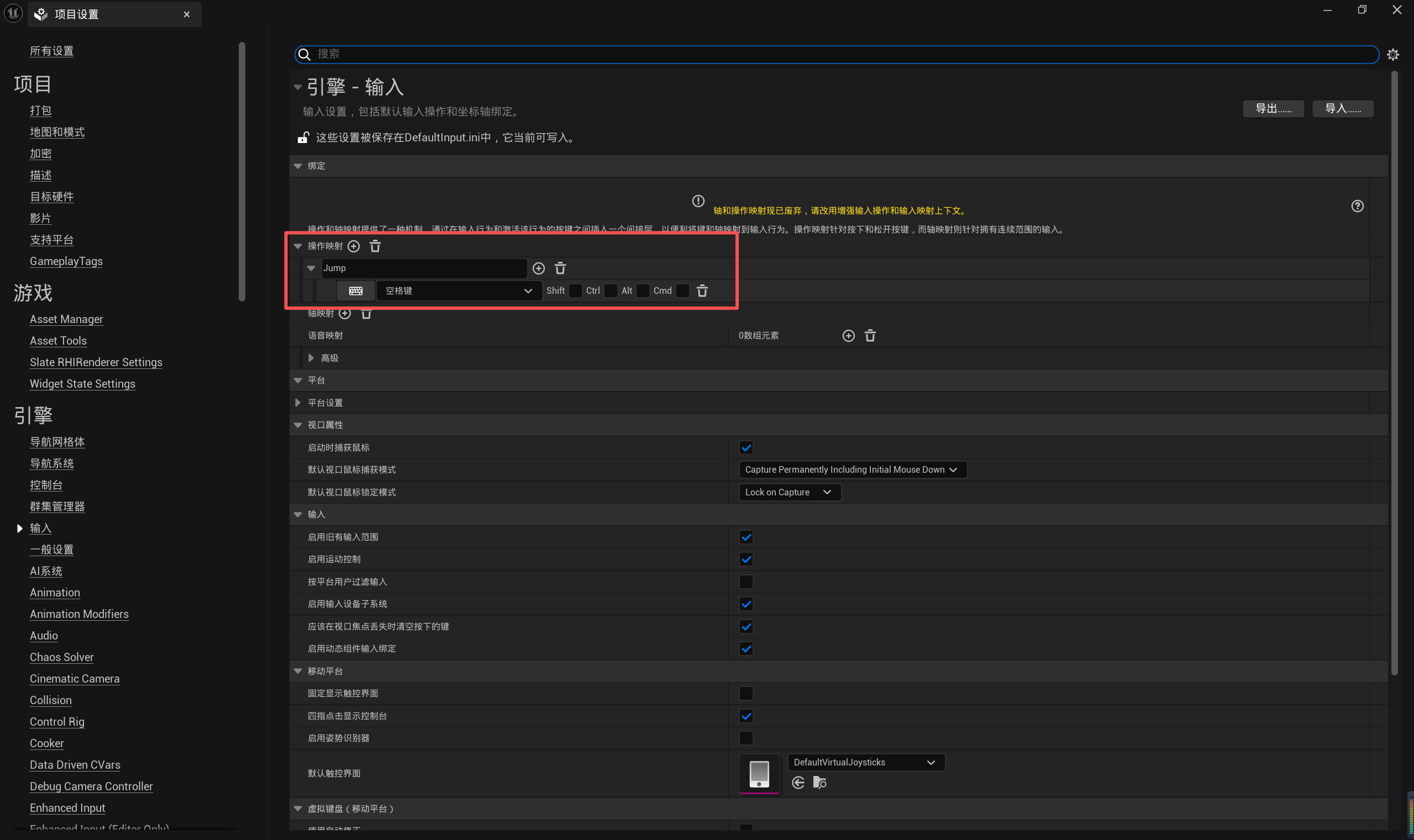
PlayerInputComponent 就是当前 Pawn 的 输入组件,用来注册各种输入事件。
- TEXT("Jump") :【项目设置】-【输入】-【操作映射】中定义。
- IE_Pressed:表示“按下键时”触发。
- this: 调用该函数的对象(当前 Pawn)。
- &ABirdPawn::JumpPressed: 当事件触发时要调用的成员函数指针。
// Fill out your copyright notice in the Description page of Project Settings.


#include "BirdPawn.h"
#include "FlappyBird/Public/BirdPawn.h"

#include "BGActor.h"
#include "PaperFlipbookComponent.h"
#include "PaperFlipbook.h"
#include "Camera/CameraComponent.h"

#include "PaperSpriteComponent.h"
#include "PaperSprite.h"
#include "PipeActor.h"

// Sets default values
ABirdPawn::ABirdPawn()
{
	// Set this pawn to call Tick() every frame.  You can turn this off to improve performance if you don't need it.
	PrimaryActorTick.bCanEverTick = true; // 是否开启 tick

	// 定义根组件
	RootComponent = CreateDefaultSubobject<USceneComponent>(TEXT("RootComponent"));
	// 定义摄像机组件
	CameraComponent = CreateDefaultSubobject<UCameraComponent>(TEXT("CameraComponent"));
	// 定义 FlipBook 组件
	FlipbookComponent = CreateDefaultSubobject<UPaperFlipbookComponent>(TEXT("FlipbookComponent"));

	// 设置层级
	CameraComponent->SetupAttachment(RootComponent);
	// SpriteComponent->SetupAttachment(RootComponent);
	FlipbookComponent->SetupAttachment(RootComponent);

	// 调整摄像机朝向和投射模式
	CameraComponent->SetRelativeRotation(FRotator(0,-90,0));
	CameraComponent->SetProjectionMode(ECameraProjectionMode::Orthographic);
	CameraComponent->SetOrthoWidth(1500.f);
}

// Called when the game starts or when spawned
void ABirdPawn::BeginPlay()
{
	Super::BeginPlay();

	RandomFlipbookSource();
}

void ABirdPawn::JumpPressed()
{
	// 清理原有速度
	FlipbookComponent->SetPhysicsLinearVelocity(FVector::Zero());
	// 添加脉冲力(瞬时力)
	// 参数3:忽略质量惯性
	FlipbookComponent->AddImpulse(FVector::UpVector * 250, NAME_None, true);
}

void ABirdPawn::RandomFlipbookSource()
{
	int32 RandomIndex = FMath::RandRange(1,3);

	UPaperFlipbook* Flipbook = LoadObject<UPaperFlipbook>(FlipbookComponent,
		*FString::Printf(TEXT("/Script/Paper2D.PaperFlipbook'/Game/FlappyBird/FlipBooks/Bird/FB_Bird0%d.FB_Bird0%d'"), RandomIndex, RandomIndex));
	if (Flipbook)
	{
		FlipbookComponent->SetFlipbook(Flipbook);
	}
}

void ABirdPawn::BeginFly()
{

	if (!FlipbookComponent->IsSimulatingPhysics())
	{
		// 开启物理模拟
		FlipbookComponent->SetSimulatePhysics(true);
		// 锁定 FlipBook 组件的物理旋转
		FlipbookComponent->BodyInstance.bLockXRotation = true;
		FlipbookComponent->BodyInstance.bLockZRotation = true;
		FlipbookComponent->BodyInstance.CreateDOFLock();
	}
}

// Called every frame
void ABirdPawn::Tick(float DeltaTime)
{
	Super::Tick(DeltaTime);
}

// Called to bind functionality to input
void ABirdPawn::SetupPlayerInputComponent(UInputComponent* PlayerInputComponent)
{
	Super::SetupPlayerInputComponent(PlayerInputComponent);
	PlayerInputComponent->BindAction(TEXT("Jump"), IE_Pressed, this, &ABirdPawn::JumpPressed);
}
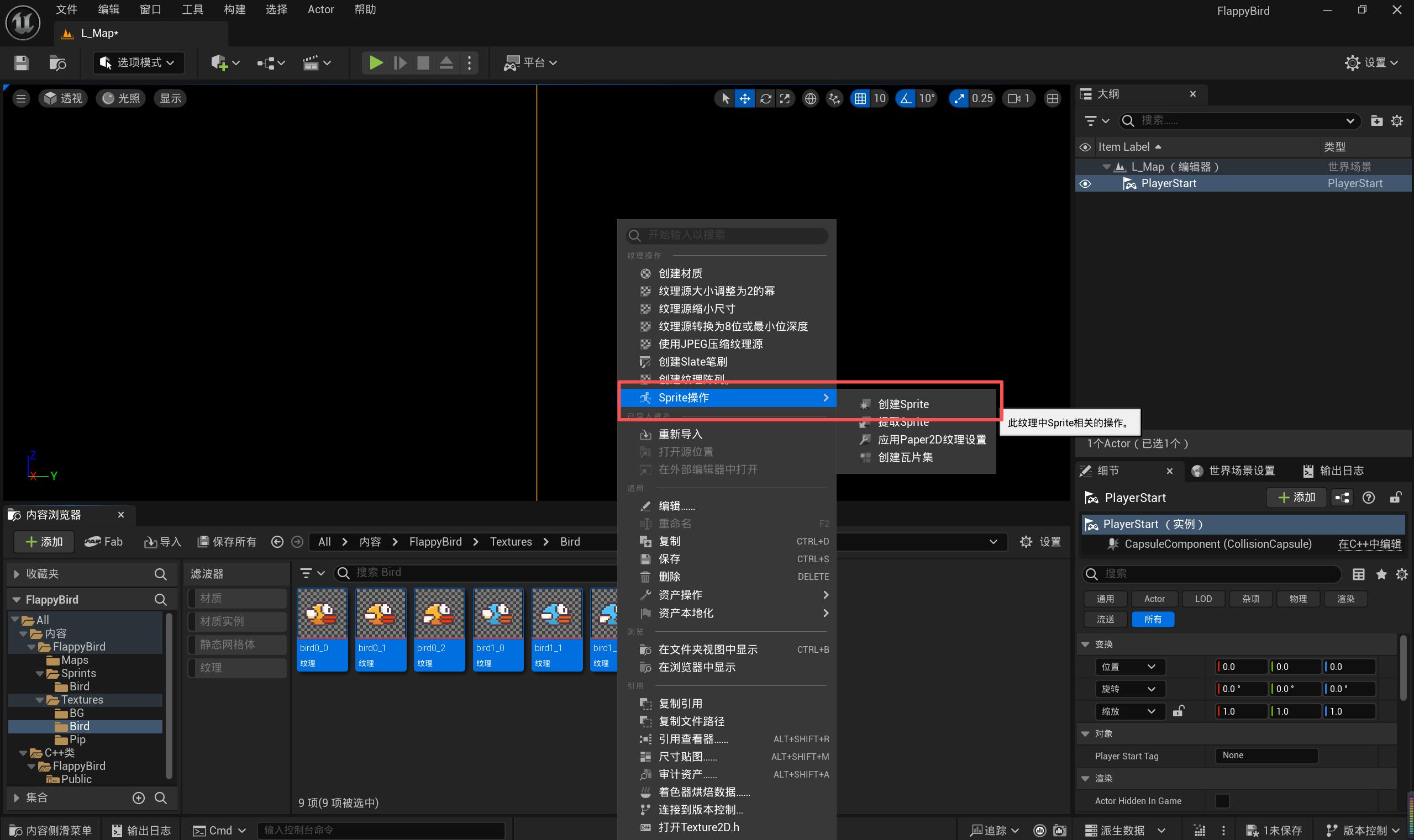
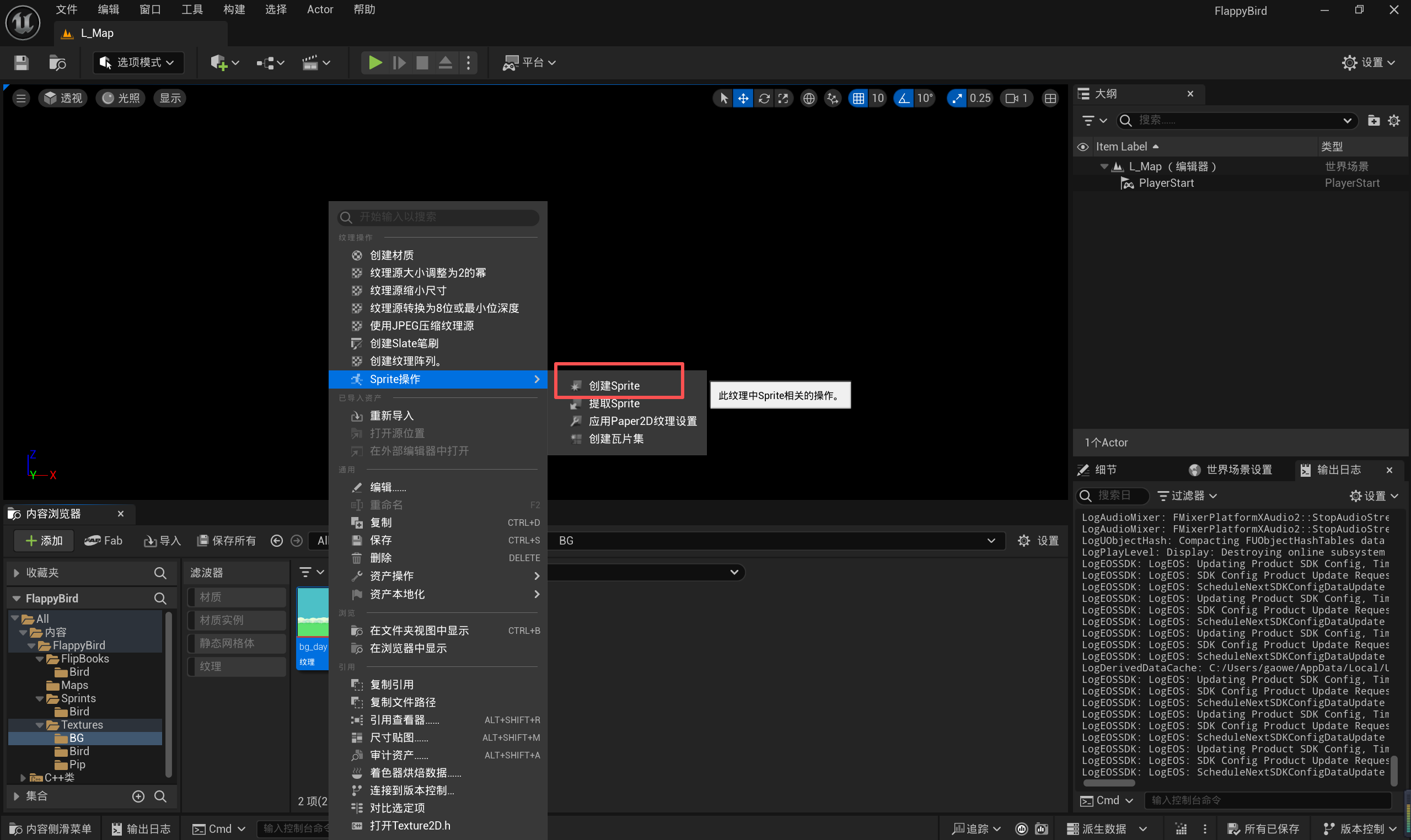
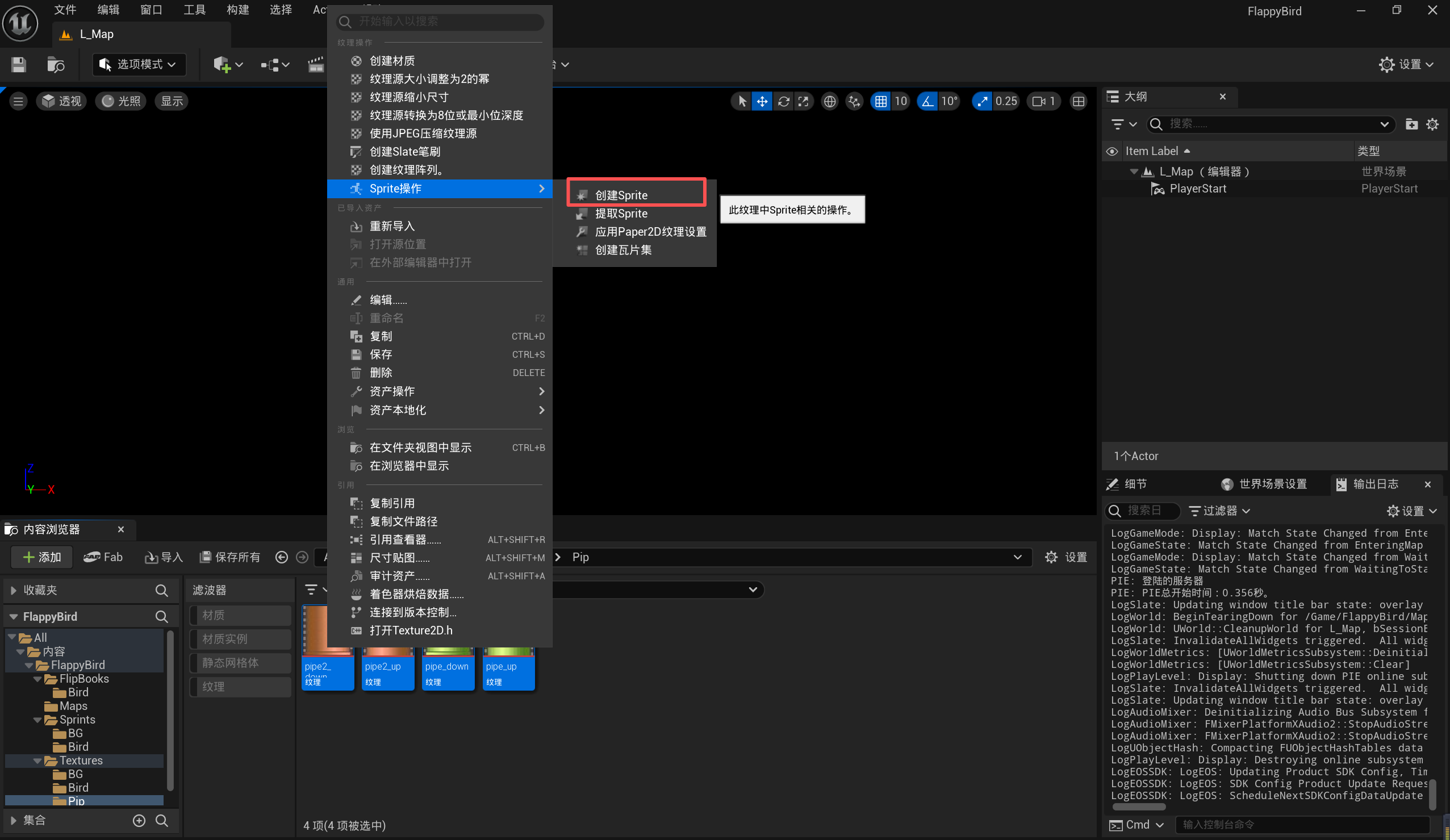
2.3 创建 Sprite
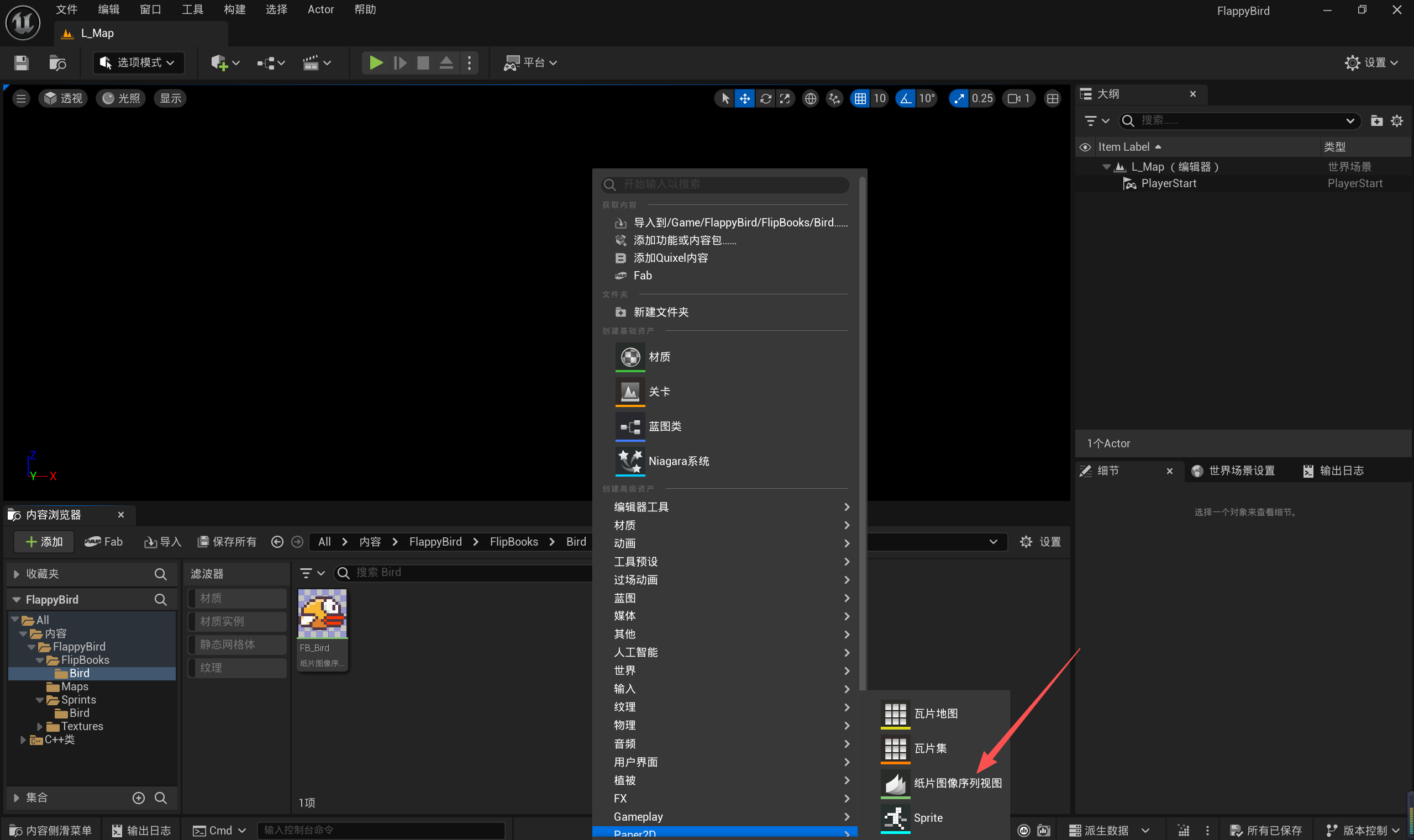
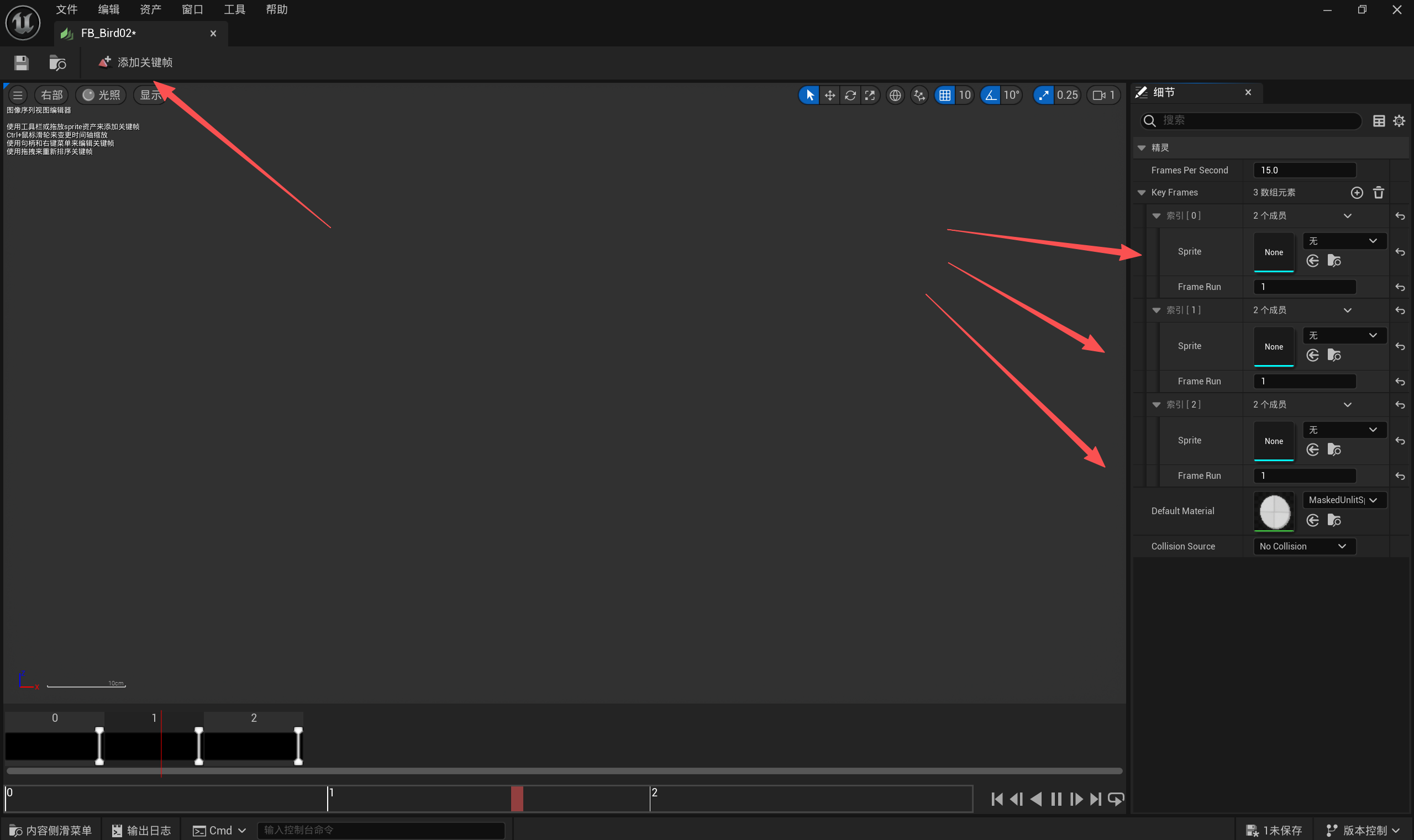
2.4 创建 FlipBook
方式一:
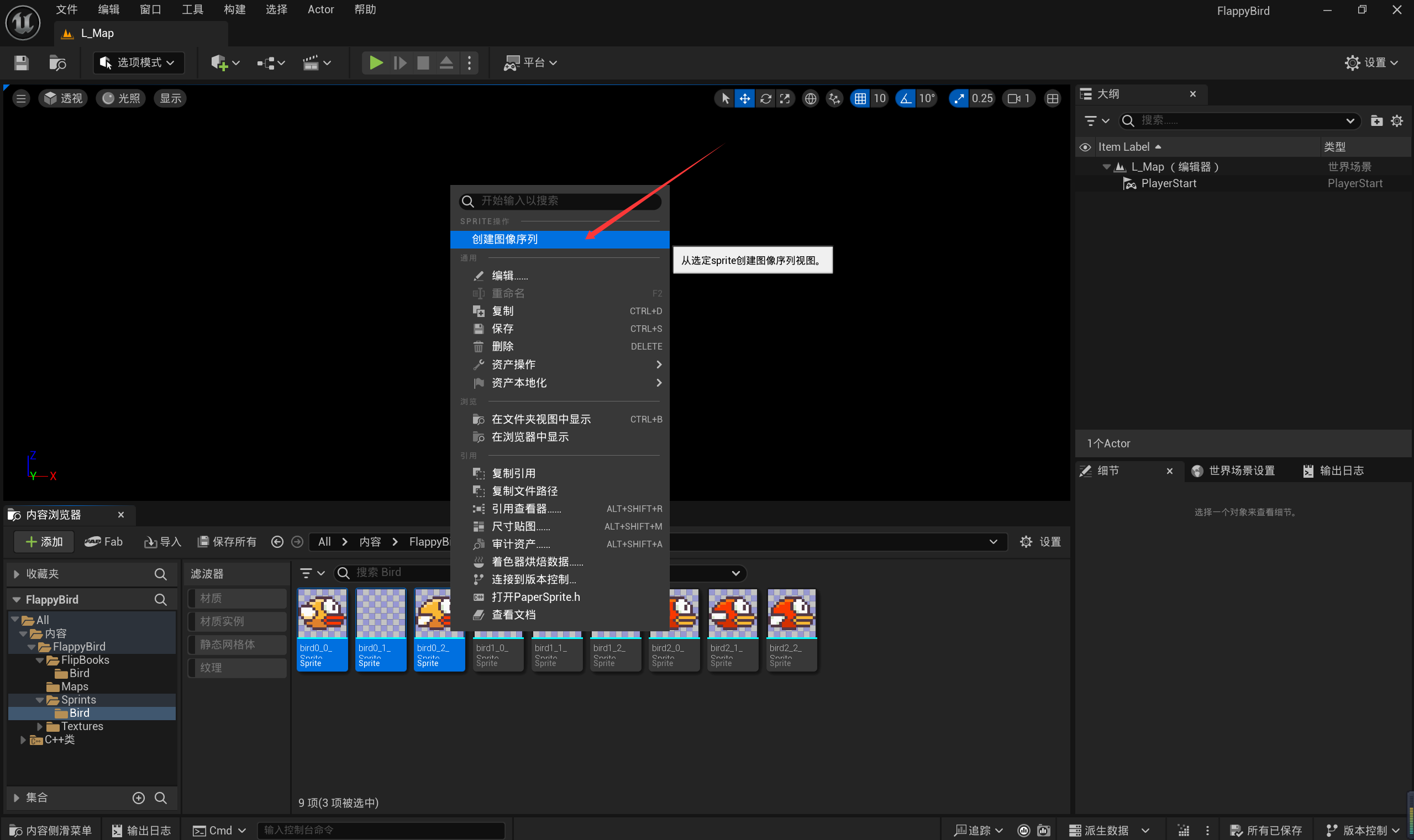
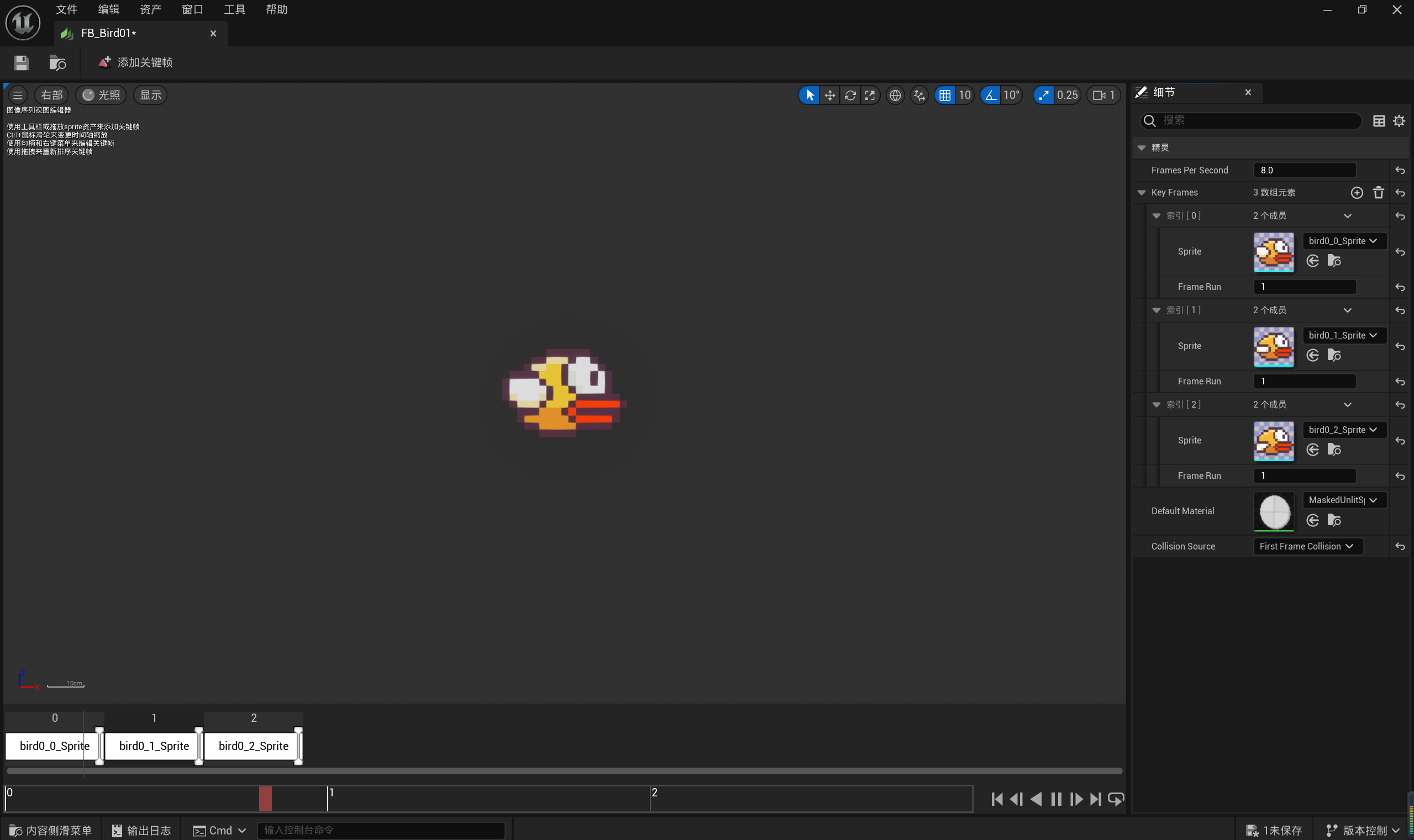
方式二:
虚幻引擎 C++ 项目带有一些默认基础模块,如下所示:
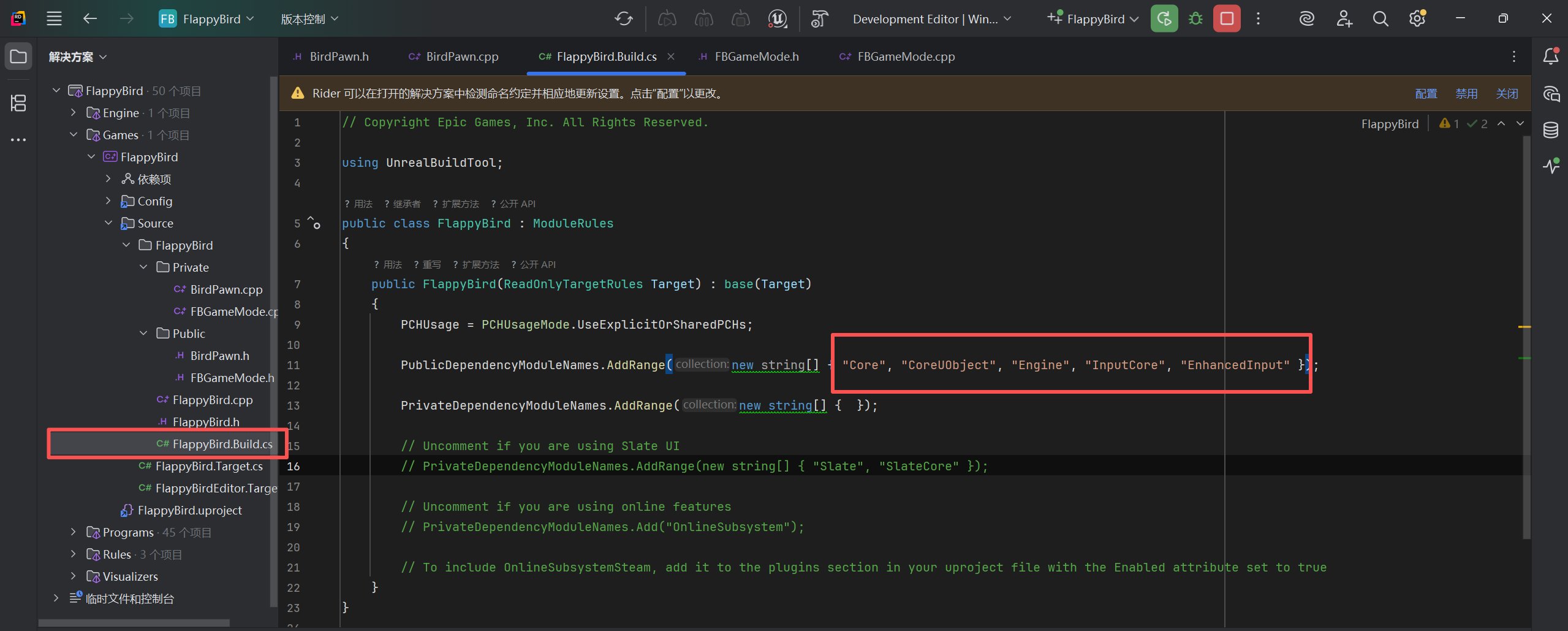
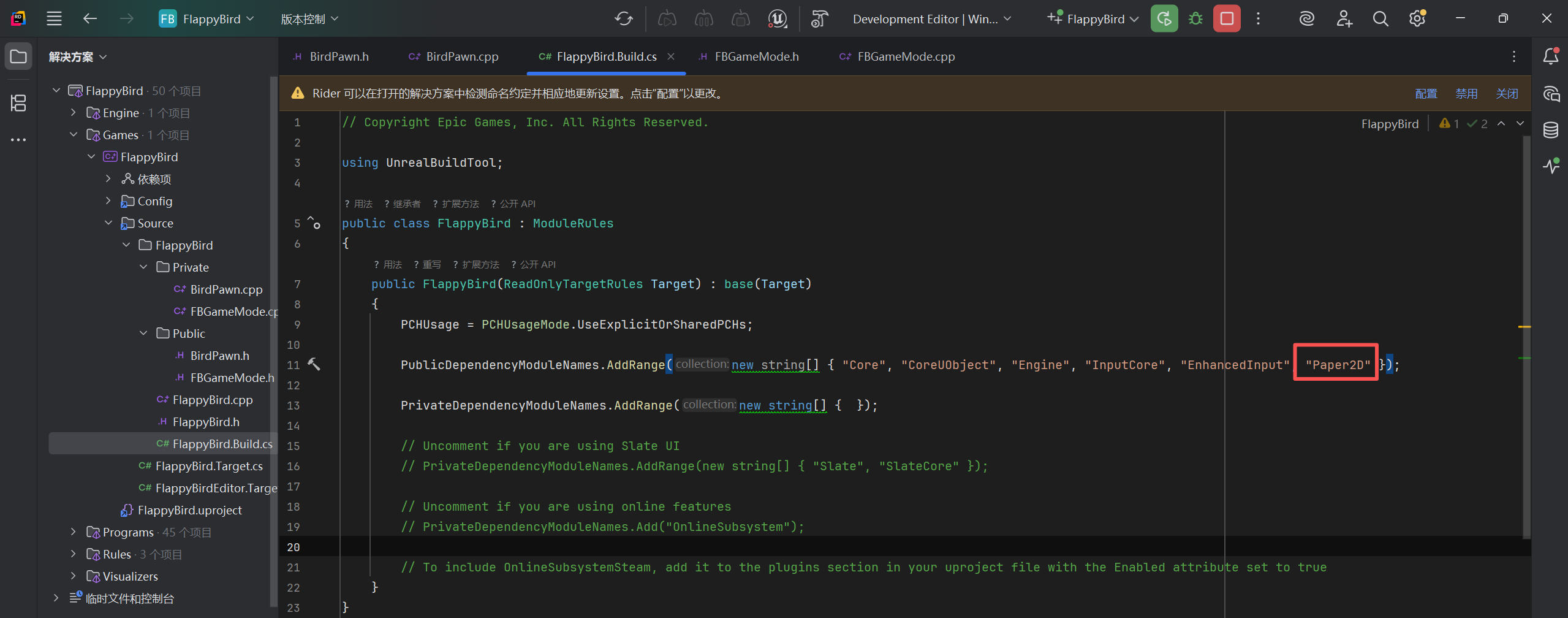
但是 FlipBook 组件所在头文件归属的模块(Paper2D)属于独立插件模块,所以我们要进行添加。
2.5 添加组件
组件类型
- 场景组件(USceneComponent 类):带有移动、旋转、缩放等信息。
- Actor 组件(UActorComponent 类):无移动、旋转、缩放等信息。例如移动组件。
Actor 的移动、旋转、缩放均来自于根组件,且 Actor 默认的根组件是空的,需要手动创建。(Character 除外)
// Fill out your copyright notice in the Description page of Project Settings.

#pragma once

#include "CoreMinimal.h"
#include "GameFramework/Pawn.h"
#include "BirdPawn.generated.h"

class UCameraComponent;
class UPaperSpriteComponent;
class UPaperFlipbookComponent;

#define PIPE_CENTER_OFFSET 200

UCLASS()
class FLAPPYBIRD_API ABirdPawn : public APawn
{
	GENERATED_BODY()

public:
	// Sets default values for this pawn's properties
	ABirdPawn();

protected:
	// Called when the game starts or when spawned
	virtual void BeginPlay() override;

	void JumpPressed();

	void RandomFlipbookSource();

public:
	// Called every frame
	virtual void Tick(float DeltaTime) override;

	// Called to bind functionality to input
	virtual void SetupPlayerInputComponent(class UInputComponent* PlayerInputComponent) override;

	void BeginFly();

protected:
	// 声明摄像机组件(前向声明)
	UPROPERTY(VisibleAnywhere)
	UCameraComponent* CameraComponent;

	// 声明 Flipbook 组件(前向声明)
	UPROPERTY(VisibleAnywhere)
	UPaperFlipbookComponent* FlipbookComponent;
};
CreateDefaultSubobject<T>():为当前 Actor 类创建默认子对象(一般是组件),并返回该子对象的指针。(只能在构造函数中使用)
- 参数:组件的“名称标识”。(注意:名称标识不要重复)
// Fill out your copyright notice in the Description page of Project Settings.


#include "BirdPawn.h"
#include "FlappyBird/Public/BirdPawn.h"

#include "BGActor.h"
#include "PaperFlipbookComponent.h"
#include "PaperFlipbook.h"
#include "Camera/CameraComponent.h"

#include "PaperSpriteComponent.h"
#include "PaperSprite.h"
#include "PipeActor.h"

// Sets default values
ABirdPawn::ABirdPawn()
{
	// Set this pawn to call Tick() every frame.  You can turn this off to improve performance if you don't need it.
	PrimaryActorTick.bCanEverTick = true; // 是否开启 tick

	// 定义根组件
	RootComponent = CreateDefaultSubobject<USceneComponent>(TEXT("RootComponent"));
	// 定义摄像机组件
	CameraComponent = CreateDefaultSubobject<UCameraComponent>(TEXT("CameraComponent"));
	// 定义 FlipBook 组件
	FlipbookComponent = CreateDefaultSubobject<UPaperFlipbookComponent>(TEXT("FlipbookComponent"));

	// 设置层级
	CameraComponent->SetupAttachment(RootComponent);
	// SpriteComponent->SetupAttachment(RootComponent);
	FlipbookComponent->SetupAttachment(RootComponent);

	// 调整摄像机朝向和投射模式
	CameraComponent->SetRelativeRotation(FRotator(0,-90,0));
	CameraComponent->SetProjectionMode(ECameraProjectionMode::Orthographic);
	CameraComponent->SetOrthoWidth(1500.f);
}

// Called when the game starts or when spawned
void ABirdPawn::BeginPlay()
{
	Super::BeginPlay();

	RandomFlipbookSource();
}

void ABirdPawn::JumpPressed()
{
	// 清理原有速度
	FlipbookComponent->SetPhysicsLinearVelocity(FVector::Zero());
	// 添加脉冲力(瞬时力)
	// 参数3:忽略质量惯性
	FlipbookComponent->AddImpulse(FVector::UpVector * 250, NAME_None, true);
}

void ABirdPawn::RandomFlipbookSource()
{
	int32 RandomIndex = FMath::RandRange(1,3);

	UPaperFlipbook* Flipbook = LoadObject<UPaperFlipbook>(FlipbookComponent,
		*FString::Printf(TEXT("/Script/Paper2D.PaperFlipbook'/Game/FlappyBird/FlipBooks/Bird/FB_Bird0%d.FB_Bird0%d'"), RandomIndex, RandomIndex));
	if (Flipbook)
	{
		FlipbookComponent->SetFlipbook(Flipbook);
	}
}

void ABirdPawn::BeginFly()
{

	if (!FlipbookComponent->IsSimulatingPhysics())
	{
		// 开启物理模拟
		FlipbookComponent->SetSimulatePhysics(true);
		// 锁定 FlipBook 组件的物理旋转
		FlipbookComponent->BodyInstance.bLockXRotation = true;
		FlipbookComponent->BodyInstance.bLockZRotation = true;
		FlipbookComponent->BodyInstance.CreateDOFLock();
	}
}

// Called every frame
void ABirdPawn::Tick(float DeltaTime)
{
	Super::Tick(DeltaTime);
}

// Called to bind functionality to input
void ABirdPawn::SetupPlayerInputComponent(UInputComponent* PlayerInputComponent)
{
	Super::SetupPlayerInputComponent(PlayerInputComponent);
	PlayerInputComponent->BindAction(TEXT("Jump"), IE_Pressed, this, &ABirdPawn::JumpPressed);
}
2.6 物理模拟
// Fill out your copyright notice in the Description page of Project Settings.


#include "BirdPawn.h"
#include "FlappyBird/Public/BirdPawn.h"

#include "BGActor.h"
#include "PaperFlipbookComponent.h"
#include "PaperFlipbook.h"
#include "Camera/CameraComponent.h"

#include "PaperSpriteComponent.h"
#include "PaperSprite.h"
#include "PipeActor.h"

// Sets default values
ABirdPawn::ABirdPawn()
{
	// Set this pawn to call Tick() every frame.  You can turn this off to improve performance if you don't need it.
	PrimaryActorTick.bCanEverTick = true; // 是否开启 tick

	// 定义根组件
	RootComponent = CreateDefaultSubobject<USceneComponent>(TEXT("RootComponent"));
	// 定义摄像机组件
	CameraComponent = CreateDefaultSubobject<UCameraComponent>(TEXT("CameraComponent"));
	// 定义 FlipBook 组件
	FlipbookComponent = CreateDefaultSubobject<UPaperFlipbookComponent>(TEXT("FlipbookComponent"));

	// 设置层级
	CameraComponent->SetupAttachment(RootComponent);
	// SpriteComponent->SetupAttachment(RootComponent);
	FlipbookComponent->SetupAttachment(RootComponent);

	// 调整摄像机朝向和投射模式
	CameraComponent->SetRelativeRotation(FRotator(0,-90,0));
	CameraComponent->SetProjectionMode(ECameraProjectionMode::Orthographic);
	CameraComponent->SetOrthoWidth(1500.f);
}

// Called when the game starts or when spawned
void ABirdPawn::BeginPlay()
{
	Super::BeginPlay();

	RandomFlipbookSource();
}

void ABirdPawn::JumpPressed()
{
	// 清理原有速度
	FlipbookComponent->SetPhysicsLinearVelocity(FVector::Zero());
	// 添加脉冲力(瞬时力)
	// 参数3:忽略质量惯性
	FlipbookComponent->AddImpulse(FVector::UpVector * 250, NAME_None, true);
}

void ABirdPawn::RandomFlipbookSource()
{
	int32 RandomIndex = FMath::RandRange(1,3);

	UPaperFlipbook* Flipbook = LoadObject<UPaperFlipbook>(FlipbookComponent,
		*FString::Printf(TEXT("/Script/Paper2D.PaperFlipbook'/Game/FlappyBird/FlipBooks/Bird/FB_Bird0%d.FB_Bird0%d'"), RandomIndex, RandomIndex));
	if (Flipbook)
	{
		FlipbookComponent->SetFlipbook(Flipbook);
	}
}

void ABirdPawn::BeginFly()
{

	if (!FlipbookComponent->IsSimulatingPhysics())
	{
		// 开启物理模拟
		FlipbookComponent->SetSimulatePhysics(true);
		// 锁定 FlipBook 组件的物理旋转
		FlipbookComponent->BodyInstance.bLockXRotation = true;
		FlipbookComponent->BodyInstance.bLockZRotation = true;
		FlipbookComponent->BodyInstance.CreateDOFLock();
	}
}

// Called every frame
void ABirdPawn::Tick(float DeltaTime)
{
	Super::Tick(DeltaTime);
}

// Called to bind functionality to input
void ABirdPawn::SetupPlayerInputComponent(UInputComponent* PlayerInputComponent)
{
	Super::SetupPlayerInputComponent(PlayerInputComponent);
	PlayerInputComponent->BindAction(TEXT("Jump"), IE_Pressed, this, &ABirdPawn::JumpPressed);
}
2.7 背景类
新建背景类。
// Fill out your copyright notice in the Description page of Project Settings.

#pragma once

#include "CoreMinimal.h"
#include "GameFramework/Actor.h"
#include "BGActor.generated.h"

class UPaperSpriteComponent;

UCLASS()
class FLAPPYBIRD_API ABGActor : public AActor
{
	GENERATED_BODY()

public:
	// Sets default values for this actor's properties
	ABGActor();

	void RandomBG();

protected:
	// Called when the game starts or when spawned
	virtual void BeginPlay() override;

	UPROPERTY(VisibleAnywhere)
	UPaperSpriteComponent* SpriteComponent;

public:
	// Called every frame
	virtual void Tick(float DeltaTime) override;
};
// Fill out your copyright notice in the Description page of Project Settings.


#include "BGActor.h"

#include "PaperSprite.h"
#include "PaperSpriteComponent.h"


// Sets default values
ABGActor::ABGActor()
{
	// Set this actor to call Tick() every frame.  You can turn this off to improve performance if you don't need it.
	PrimaryActorTick.bCanEverTick = false; // 因为我们用不到 tick,可以直接设置为 false

	SpriteComponent = CreateDefaultSubobject<UPaperSpriteComponent>(TEXT("SpriteComponent"));
	SetRootComponent(SpriteComponent); // 我们可以将其直接设置为根组件
}

// Called when the game starts or when spawned
void ABGActor::BeginPlay()
{
	Super::BeginPlay();
}

void ABGActor::RandomBG()
{
	UPaperSprite* Sprite = LoadObject<UPaperSprite>(SpriteComponent,
		FMath::RandBool() ? TEXT("/Script/Paper2D.PaperSprite'/Game/FlappyBird/Sprints/BG/bg_day_Sprite.bg_day_Sprite'") : TEXT("/Script/Paper2D.PaperSprite'/Game/FlappyBird/Sprints/BG/bg_night_Sprite.bg_night_Sprite'"));
	if (Sprite)
	{
		SpriteComponent->SetSprite(Sprite);
	}
}

// Called every frame
void ABGActor::Tick(float DeltaTime)
{
	Super::Tick(DeltaTime);
}
2.8 管道类
新建管道类。
// Fill out your copyright notice in the Description page of Project Settings.

#pragma once

#include "CoreMinimal.h"
#include "GameFramework/Actor.h"
#include "PipeActor.generated.h"

class UPaperSpriteComponent;

UCLASS()
class FLAPPYBIRD_API APipeActor : public AActor
{
	GENERATED_BODY()

public:
	// Sets default values for this actor's properties
	APipeActor();
	// 设置管道是否移动
	void SetIsMoving(bool bMovings);
	// 设置管道索引
	void SetPipeIndex(int32 Index) { PipeIndex = Index; }
	// 获取管道索引
	int32 GetPipeIndex() const { return PipeIndex; }
	// 设置管道随机上下偏移
	void SetPipeRandomOffset();

protected:
	// Called when the game starts or when spawned
	virtual void BeginPlay() override;

	UPROPERTY(visibleAnywhere)
	UPaperSpriteComponent* UpSpriteComponent;

	UPROPERTY(VisibleAnywhere)
	UPaperSpriteComponent* DownSpriteComponent;

	// 管道移动速度
	float PipeSpeed;
	// 管道是否移动
	bool bMoving;
	// 管道索引
	int32 PipeIndex;
	// 管道间距
	int32 PipeInterval;

public:
	// Called every frame
	virtual void Tick(float DeltaTime) override;
};
// Fill out your copyright notice in the Description page of Project Settings.


#include "PipeActor.h"

#include "BirdPawn.h"
#include "FBGameMode.h"
#include "PaperSprite.h"
#include "PaperSpriteComponent.h"
#include "Kismet/GameplayStatics.h"


// Sets default values
APipeActor::APipeActor()
{
	// Set this actor to call Tick() every frame.  You can turn this off to improve performance if you don't need it.
	PrimaryActorTick.bCanEverTick = true;

	RootComponent = CreateDefaultSubobject<USceneComponent>(TEXT("Root"));

	UpSpriteComponent = CreateDefaultSubobject<UPaperSpriteComponent>(TEXT("UpSpriteComponent"));
	DownSpriteComponent = CreateDefaultSubobject<UPaperSpriteComponent>(TEXT("DownSpriteComponent"));

	UpSpriteComponent->SetupAttachment(RootComponent);
	DownSpriteComponent->SetupAttachment(RootComponent);

	PipeSpeed = 50;
	PipeInterval = 260;
}

void APipeActor::SetIsMoving(bool bMovings)
{
	this->bMoving = bMovings;
}

void APipeActor::SetPipeRandomOffset()
{
	float Offset = FMath::FRandRange(-80.0f, 80.0f);
	UpSpriteComponent->SetRelativeLocation(FVector(0,0,PipeInterval + Offset));
	DownSpriteComponent->SetRelativeLocation(FVector(0,0,-PipeInterval + Offset));
}

// Called when the game starts or when spawned
void APipeActor::BeginPlay()
{
	Super::BeginPlay();
	UPaperSprite* UpSprite = LoadObject<UPaperSprite>(UpSpriteComponent, TEXT("/Script/Paper2D.PaperSprite'/Game/FlappyBird/Sprints/Pip/pipe_down_Sprite.pipe_down_Sprite'"));
	UPaperSprite* DownSprite = LoadObject<UPaperSprite>(DownSpriteComponent, TEXT("/Script/Paper2D.PaperSprite'/Game/FlappyBird/Sprints/Pip/pipe_up_Sprite.pipe_up_Sprite'"));
	if (UpSprite)
	{
		UpSpriteComponent->SetSprite(UpSprite);
	}
	if (DownSprite)
	{
		DownSpriteComponent->SetSprite(DownSprite);
	}
	SetPipeRandomOffset();
}

// Called every frame
void APipeActor::Tick(float DeltaTime)
{
	Super::Tick(DeltaTime);
	if (bMoving)
	{
		// 管道移动
		AddActorWorldOffset(FVector::ForwardVector * -1 * PipeSpeed * DeltaTime);

		if (GetActorLocation().X <= -PIPE_CENTER_OFFSET)
		{
			if (AFBGameMode* GM = Cast<AFBGameMode>(GetWorld()->GetAuthGameMode()))
			{
				float ResetX = GM->GetResetLocationX(PipeIndex);
				SetActorLocation(FVector(ResetX, 0, 0));
				SetPipeRandomOffset();
			}
		}
	}
}





 扫一扫
扫一扫


 1637
1637

 被折叠的 条评论
为什么被折叠?
被折叠的 条评论
为什么被折叠?
 到【灌水乐园】发言





