


一、实验拓扑图
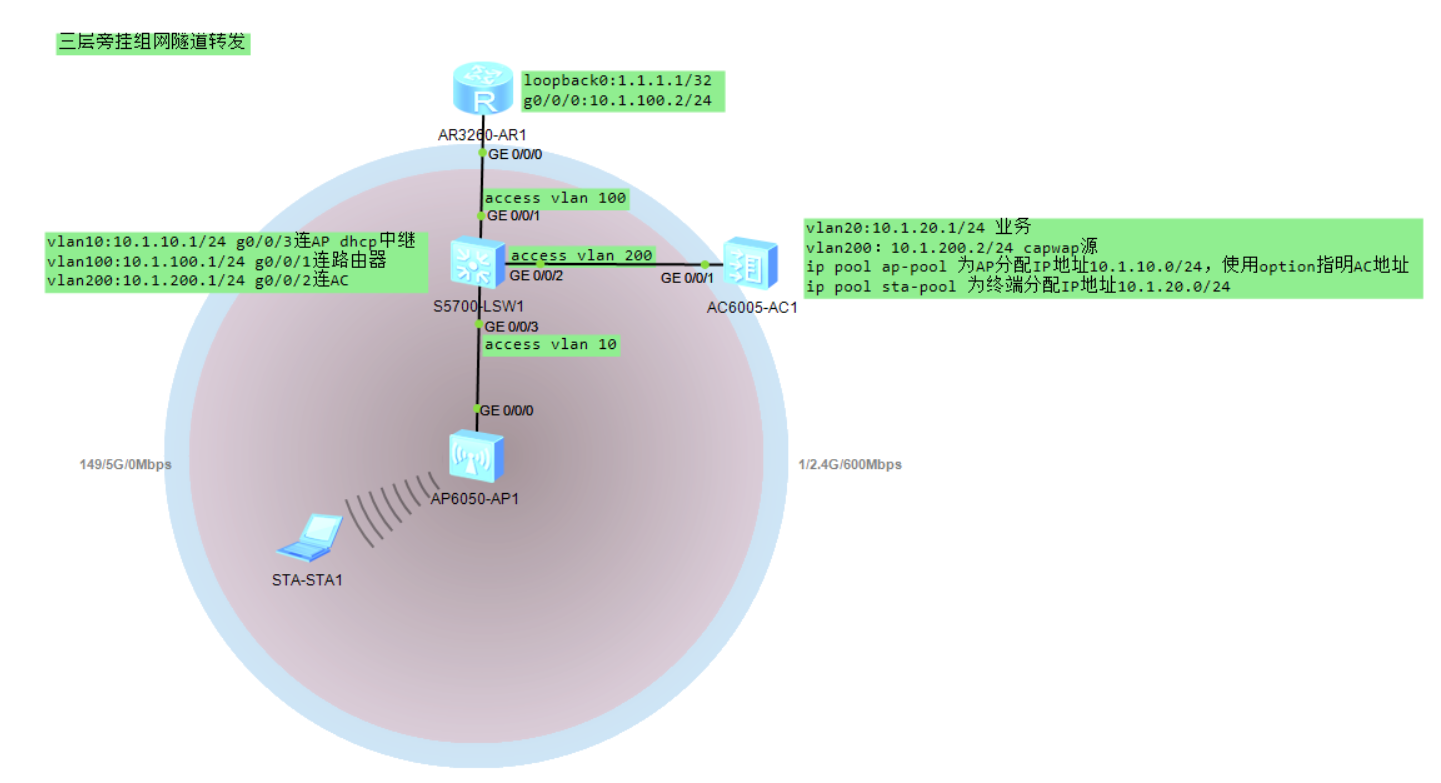
AC使用vlan200:10.1.200.2/24 作为capwap隧道源
AC作为DHCP服务器,统一为AP和终端分配IP地址,为AP分配地址时使用option 43指定capwap源IP地址,同时需在交换机上配置中继
由于使用隧道转发,SW上连AP的端口可配置为access vlan 10,或trunk allow vlan 10,trunk pvid vlan 10,能够让AP获取IP即可。无需允许vlan20。
二、配置步骤
1. 基础网络配置
路由器
#
interface GigabitEthernet0/0/0
ip address 10.1.100.2 255.255.255.0
#
interface LoopBack0
ip address 1.1.1.1 255.255.255.255
#
ip route-static 0.0.0.0 0.0.0.0 10.1.100.1
#
交换机
#
vlan batch 10 100 200
#
dhcp enable
#
interface Vlanif10
ip address 10.1.10.1 255.255.255.0
dhcp select relay
dhcp relay server-ip 10.1.200.2
#
interface Vlanif100
ip address 10.1.100.1 255.255.255.0
#
interface Vlanif200
ip address 10.1.200.1 255.255.255.0
#
interface GigabitEthernet0/0/1
port link-type access
port default vlan 100
#
interface GigabitEthernet0/0/2
port link-type access
port default vlan 200
#
interface GigabitEthernet0/0/3
port link-type access
port default vlan 10
#
ip route-static 0.0.0.0 0.0.0.0 10.1.100.2
ip route-static 10.1.20.0 255.255.255.0 10.1.200.2
#
无线控制器AC
#
vlan batch 20 200
#
dhcp enable
#
ip pool ap-pool
gateway-list 10.1.10.1
network 10.1.10.0 mask 255.255.255.0
option 43 sub-option 2 ip-address 10.1.200.2
#
ip pool sta-pool
gateway-list 10.1.20.1
network 10.1.20.0 mask 255.255.255.0
#
interface Vlanif20
ip address 10.1.20.1 255.255.255.0
dhcp select global
#
interface Vlanif200
ip address 10.1.200.2 255.255.255.0
dhcp select global
#
interface GigabitEthernet0/0/1
port link-type access
port default vlan 200
#
ip route-static 0.0.0.0 0.0.0.0 10.1.200.1
#
capwap source interface vlanif200
#
2. 无线业务配置
配置过程
为了方便测试,AP上线不认证
[AC-wlan-view]ap auth-mode no-auth
创建域配置文件
[AC-wlan-view]regulatory-domain-profile name china
[AC-wlan-regulate-domain-china]quit //默认为CN
创建AP组,绑定域模板
[AC-wlan-view]ap-group name home
[AC-wlan-ap-group-home]regulatory-domain-profile china
Warning: Modifying the country code will clear channel, power and antenna gain c
onfigurations of the radio and reset the AP. Continue?[Y/N]:y
[AC-wlan-ap-group-home]qui
创建ssid配置文件
[AC-wlan-view]ssid-profile name home
[AC-wlan-ssid-prof-home]ssid home
[AC-wlan-ssid-prof-home]quit
创建安全配置文件
[AC-wlan-view]security-profile name home
[AC-wlan-sec-prof-home]quit //默认开放认证,根据需要设置加密方式
创建vap配置文件,绑定ssid和安全配置文件
[AC-wlan-view]vap-profile name home
[AC-wlan-vap-prof-home]ssid-profile home
Warning: This action may cause service interruption. Continue?[Y/N]y
Info: This operation may take a few seconds, please wait...done.
[AC-wlan-vap-prof-home]security-profile home
[AC-wlan-vap-prof-home]service-vlan vlan-id 20
Info: This operation may take a few seconds, please wait...done.
[AC-wlan-vap-prof-home]forward-mode tunnel
将AP加入组
[AC-wlan-view]ap-id 0
[AC-wlan-ap-0]ap-name AP1 //AP名字设置
[AC-wlan-ap-0]ap-group home
Warning: This operation may cause AP reset. If the country code changes, it will
clear channel, power and antenna gain configurations of the radio, Whether to c
ontinue? [Y/N]:y
Info: This operation may take a few seconds. Please wait for a moment.. done.
将vap配置文件与组绑定,释放无线
[AC-wlan-view]ap-group name home
[AC-wlan-ap-group-home]vap-profile home wlan 1 radio all
配置完成后
#
wlan
security-profile name home
ssid-profile name home
ssid home
vap-profile name home
forward-mode tunnel
service-vlan vlan-id 20
ssid-profile home
security-profile home
regulatory-domain-profile name china
ap auth-mode no-auth
ap-group name home
regulatory-domain-profile china
radio 0
vap-profile home wlan 1
radio 1
vap-profile home wlan 1
radio 2
vap-profile home wlan 1
ap-id 0 type-id 56 ap-mac 00e0-fc68-2a70 ap-sn 2102354483106E5AA511
ap-name AP1
ap-group home
#
三、效果测试
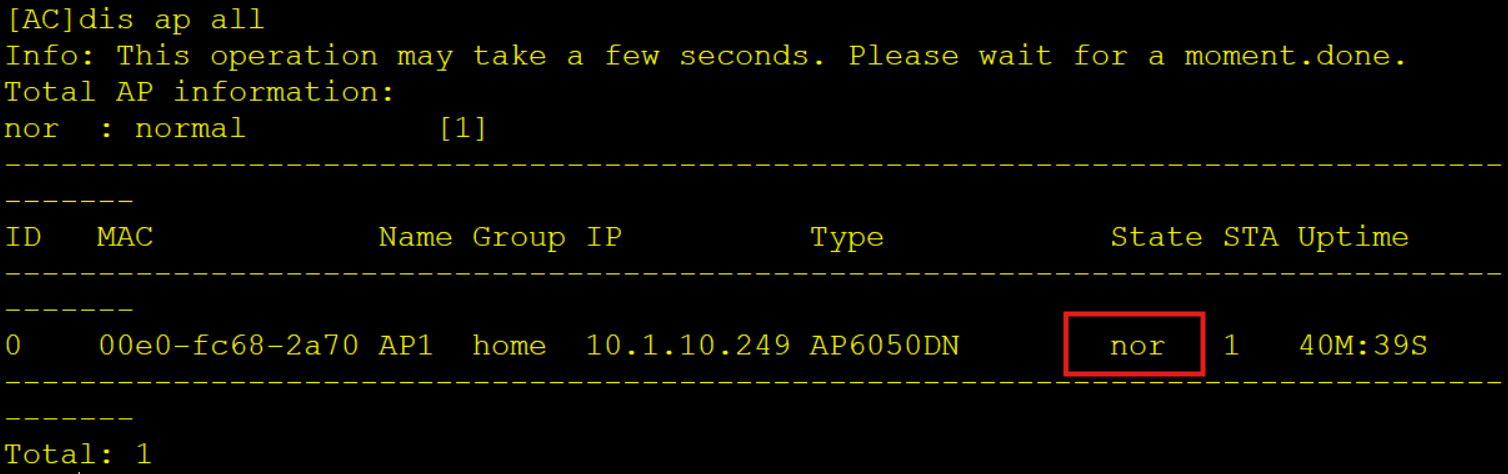
使用display ap all查看AP上线情况
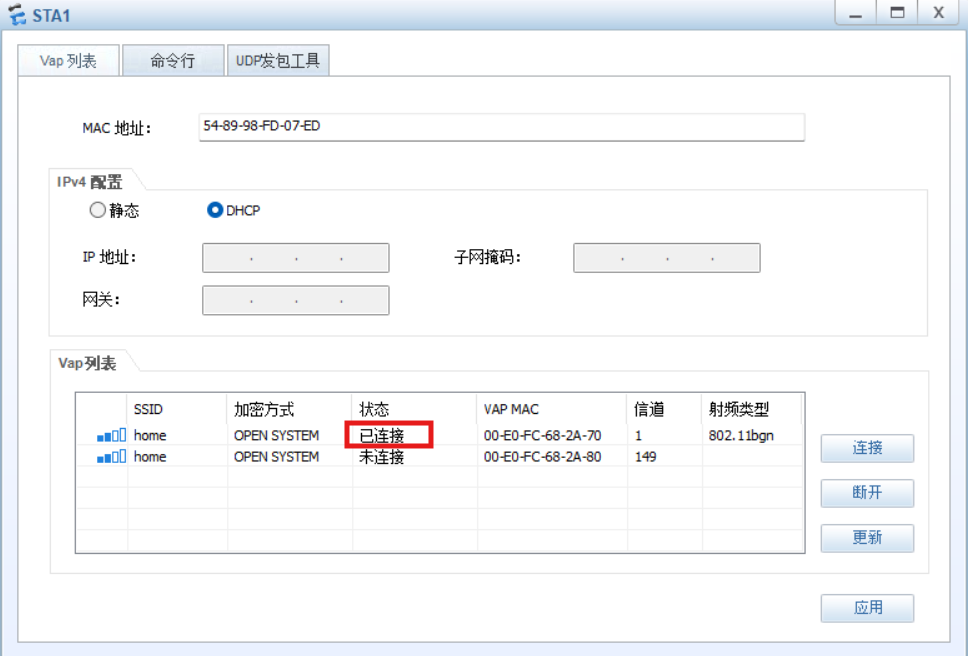
终端连接无线,测试网络
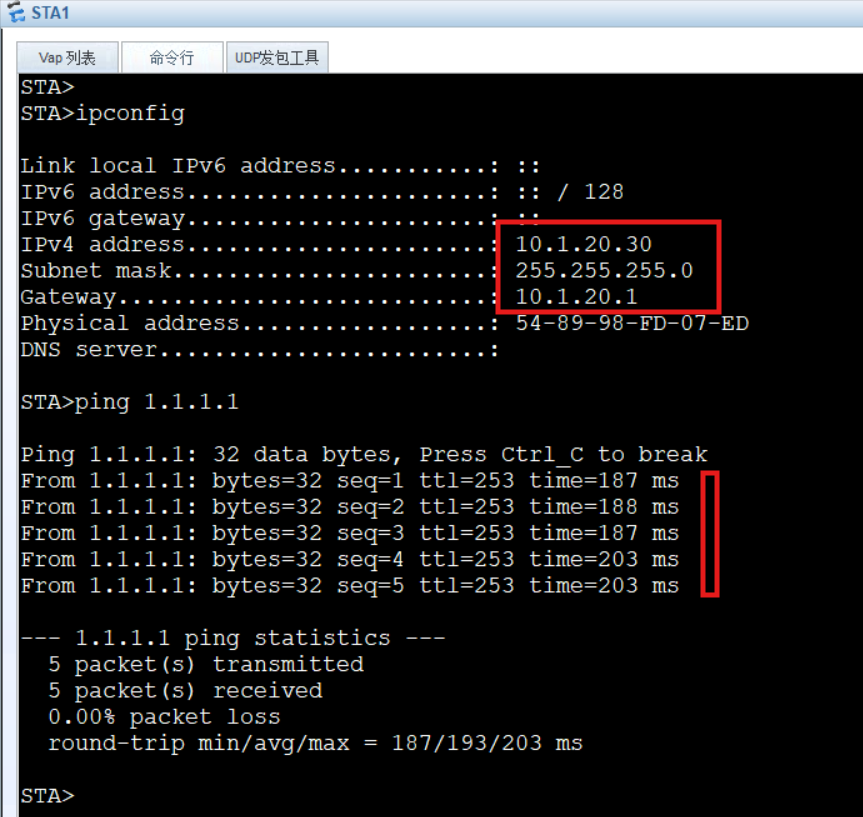
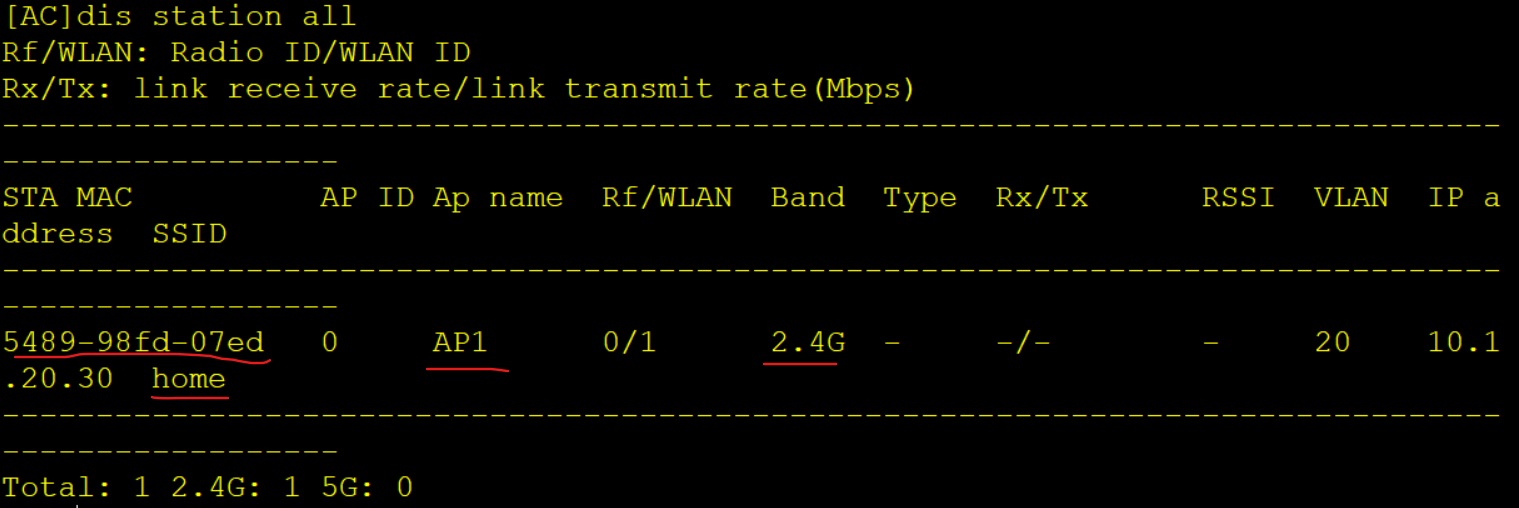
终端获取到vlan20的IP地址,通信正常
AC上查看终端,display station all
四、终端数据转发路径
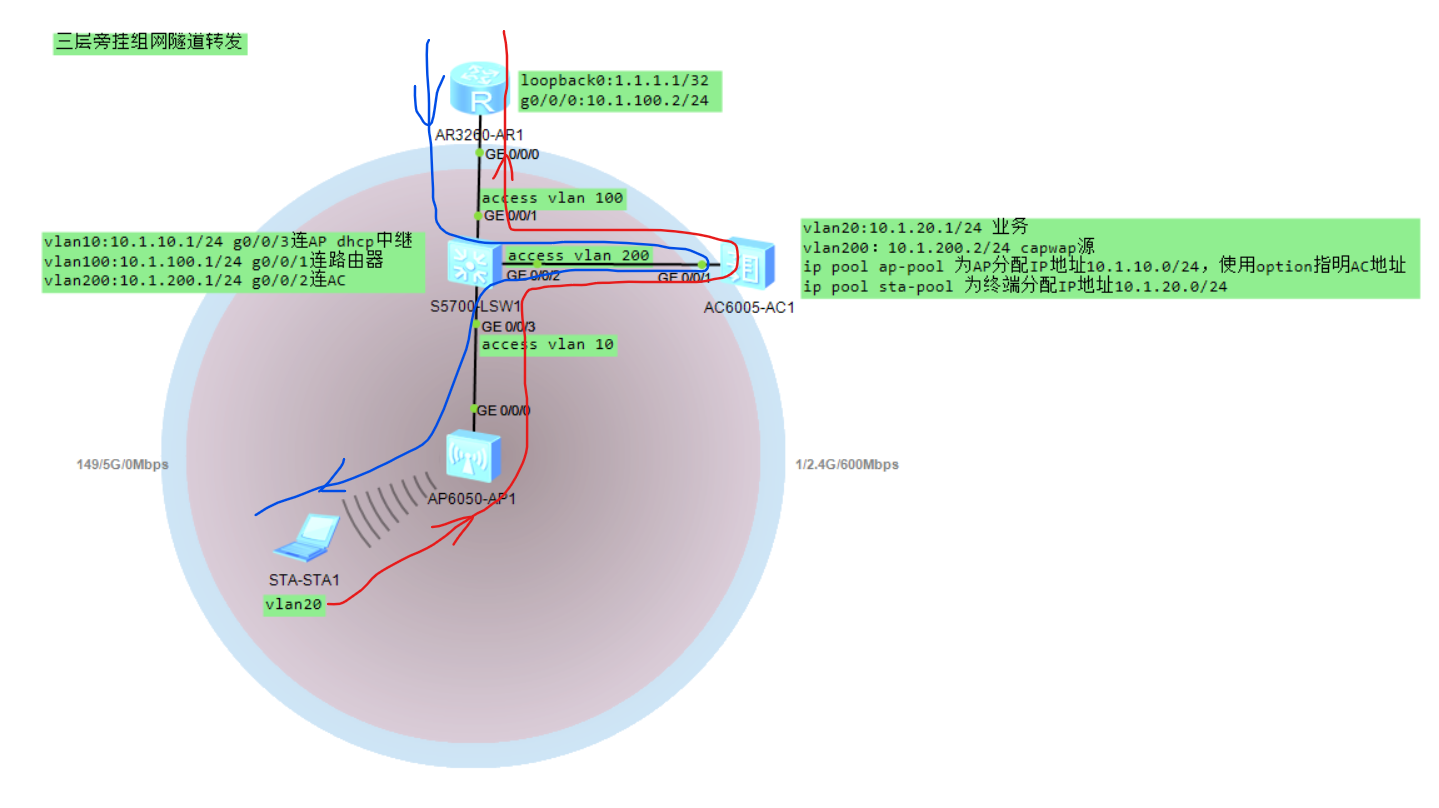
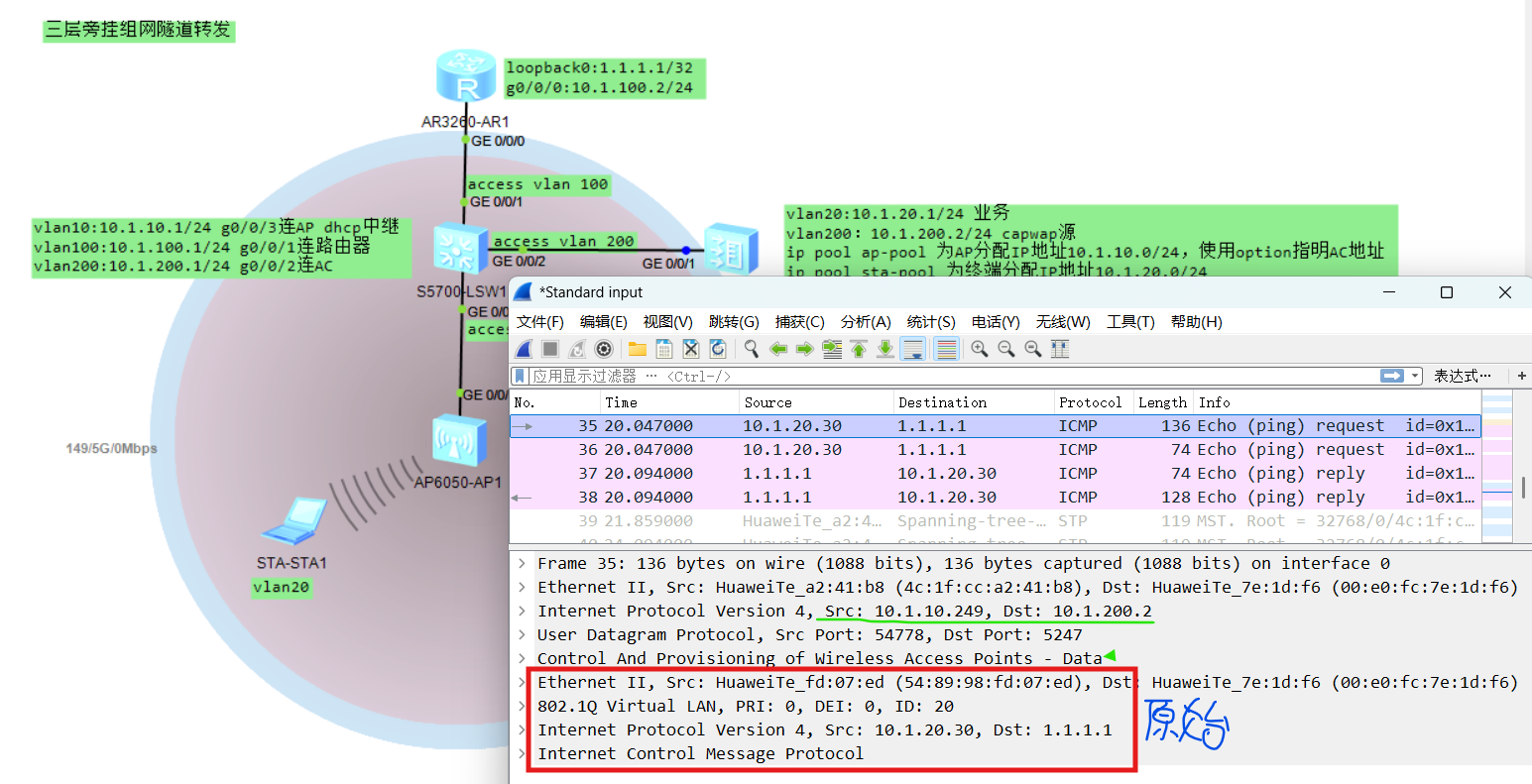
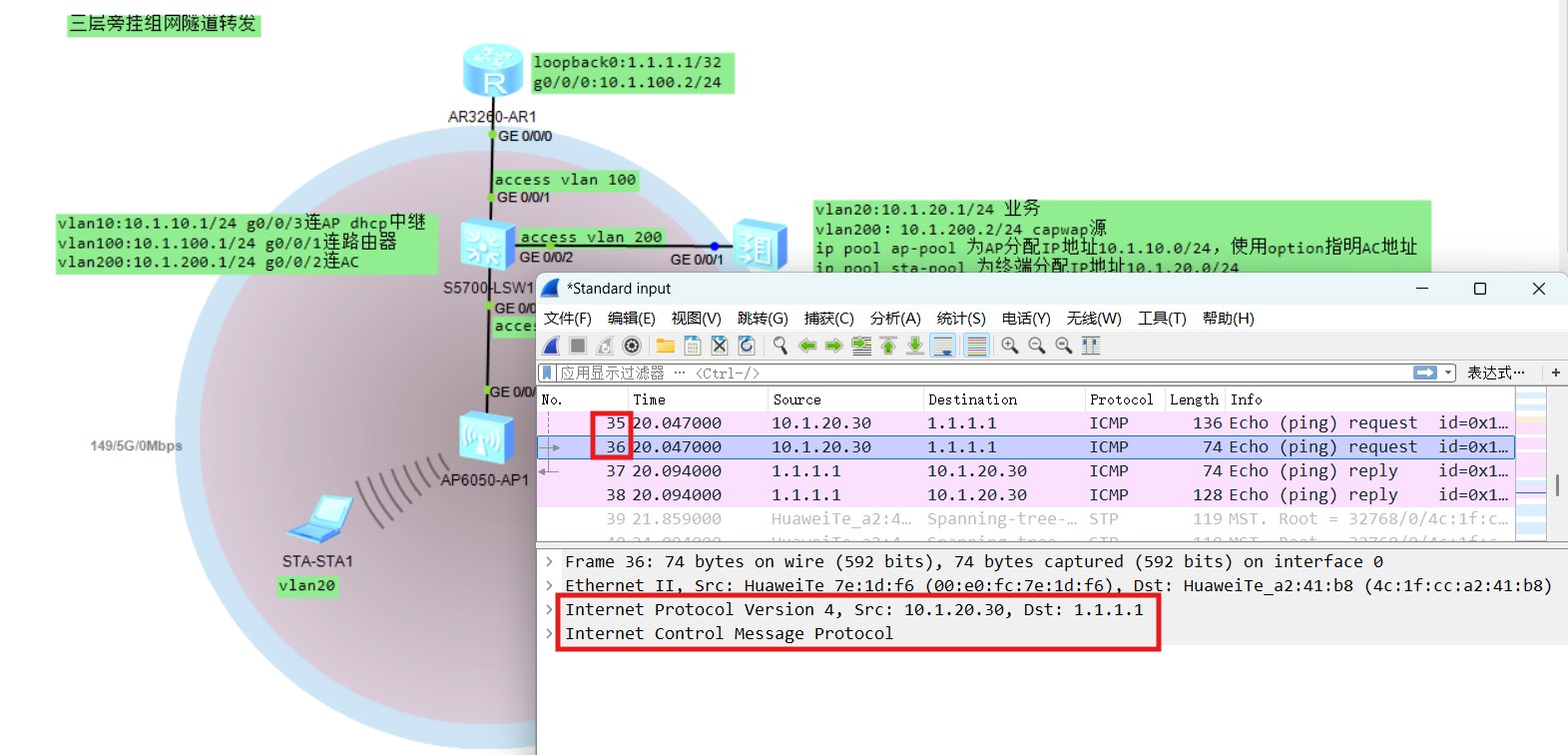
在AC接口上抓包,原始数据封装到capwap隧道里交给AC,AC解capwap封装后转发





 扫一扫
扫一扫


 377
377

 被折叠的 条评论
为什么被折叠?
被折叠的 条评论
为什么被折叠?
 到【灌水乐园】发言





