


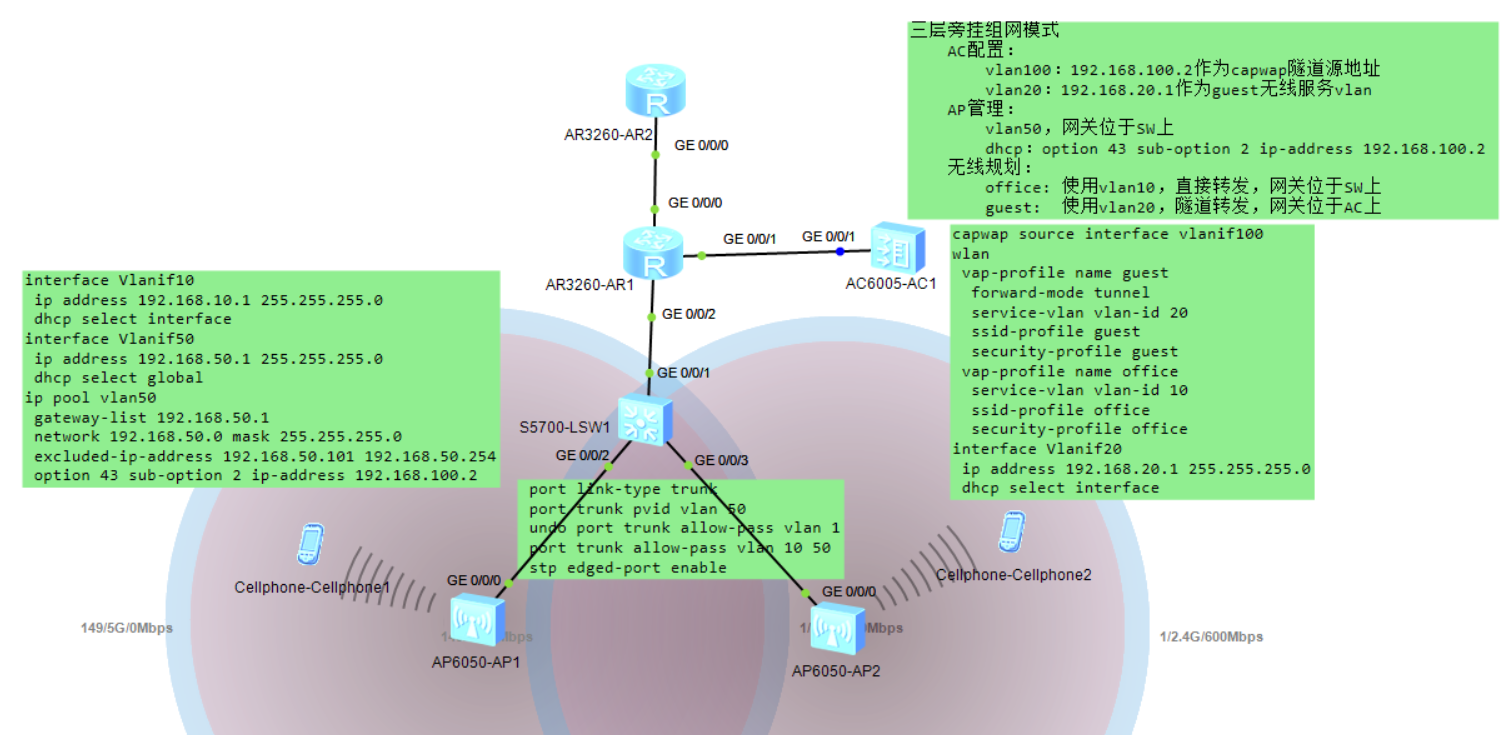
实验拓扑图
实验关键:
1. AP管理:vlan50的网关配置在SW上,dhcp分配地址时加option 43 sub-option 2 ip-address 192.168.100.2,为AP指明AC的capwap源地址
2. 直接转发模式:业务vlan10的网关配置在SW上
3. 隧道转发模式:业务vlan20的网关配置在AC上(不能设置在SW上,否则终端无法获取IP地址,因为数据直接走capwap隧道封装)
4. SW上和AP互联的接口trunk,允许10和50,PVID设置为50
5. AP上线时可先将认证改为不认证,待上线后再改为MAC认证
| R2 | R1 | AC | SW |
| # interface GigabitEthernet0/0/0 ip address 12.1.1.2 255.255.255.0 # interface LoopBack0 ip address 2.2.2.2 255.255.255.255 # ip route-static 1.2.3.4 255.255.255.255 12.1.1.1 # | # acl number 3000 rule 5 permit ip # nat address-group 0 1.2.3.4 1.2.3.4 # interface GigabitEthernet0/0/0 ip address 12.1.1.1 255.255.255.0 nat outbound 3000 address-group 0 # interface GigabitEthernet0/0/1 ip address 192.168.100.1 255.255.255.0 # interface GigabitEthernet0/0/2 ip address 192.168.200.1 255.255.255.0 # interface LoopBack0 ip address 1.1.1.1 255.255.255.255 # ospf 1 router-id 1.1.1.1 default-route-advertise area 0.0.0.0 network 1.1.1.1 0.0.0.0 network 192.168.200.1 0.0.0.0 # ip route-static 0.0.0.0 0.0.0.0 12.1.1.2 ip route-static 192.168.20.0 255.255.255.0 192.168.100.2 # | # vlan batch 20 100 # dhcp enable # interface Vlanif20 ip address 192.168.20.1 255.255.255.0 dhcp select interface # interface Vlanif100 ip address 192.168.100.2 255.255.255.0 # interface GigabitEthernet0/0/1 port link-type access port default vlan 100 # ip route-static 0.0.0.0 0.0.0.0 192.168.100.1 # capwap source interface vlanif100 # wlan security-profile name guest security wpa-wpa2 psk pass-phrase %^%#,Ce1C15)@2$7Y-F9>=q$g#G6U{B"WYXhck7Te322 %^%# aes-tkip security-profile name office security wpa-wpa2 psk pass-phrase %^%#=*lX>uZ!T--.'Q9CV6y5[H%GB`D[x>!;$Q4/k38~ %^%# aes-tkip ssid-profile name guest ssid guest ssid-profile name office ssid office vap-profile name guest forward-mode tunnel service-vlan vlan-id 20 ssid-profile guest security-profile guest vap-profile name office service-vlan vlan-id 10 ssid-profile office security-profile office regulatory-domain-profile name china ap-group name home regulatory-domain-profile china radio 0 vap-profile office wlan 1 vap-profile guest wlan 2 radio 1 vap-profile office wlan 1 vap-profile guest wlan 2 radio 2 vap-profile office wlan 1 vap-profile guest wlan 2 ap-id 0 type-id 56 ap-mac 00e0-fc96-8050 ap-sn 210235448310351ADC01 ap-name AP1 ap-group home ap-id 1 type-id 56 ap-mac 00e0-fcde-67c0 ap-sn 210235448310FB280B33 ap-name AP2 ap-group home # | # vlan batch 10 50 200 # dhcp enable # ip pool vlan50 gateway-list 192.168.50.1 network 192.168.50.0 mask 255.255.255.0 excluded-ip-address 192.168.50.101 192.168.50.254 option 43 sub-option 2 ip-address 192.168.100.2 # interface Vlanif10 ip address 192.168.10.1 255.255.255.0 dhcp select interface # interface Vlanif50 ip address 192.168.50.1 255.255.255.0 dhcp select global # interface Vlanif200 ip address 192.168.200.2 255.255.255.0 # interface GigabitEthernet0/0/1 port link-type access port default vlan 200 # interface GigabitEthernet0/0/2 port link-type trunk port trunk pvid vlan 50 undo port trunk allow-pass vlan 1 port trunk allow-pass vlan 10 50 stp edged-port enable # interface GigabitEthernet0/0/3 port link-type trunk port trunk pvid vlan 50 undo port trunk allow-pass vlan 1 port trunk allow-pass vlan 10 50 stp edged-port enable # interface LoopBack0 ip address 3.3.3.3 255.255.255.255 # ospf 1 router-id 3.3.3.3 import-route direct area 0.0.0.0 network 3.3.3.3 0.0.0.0 network 192.168.200.2 0.0.0.0 # |
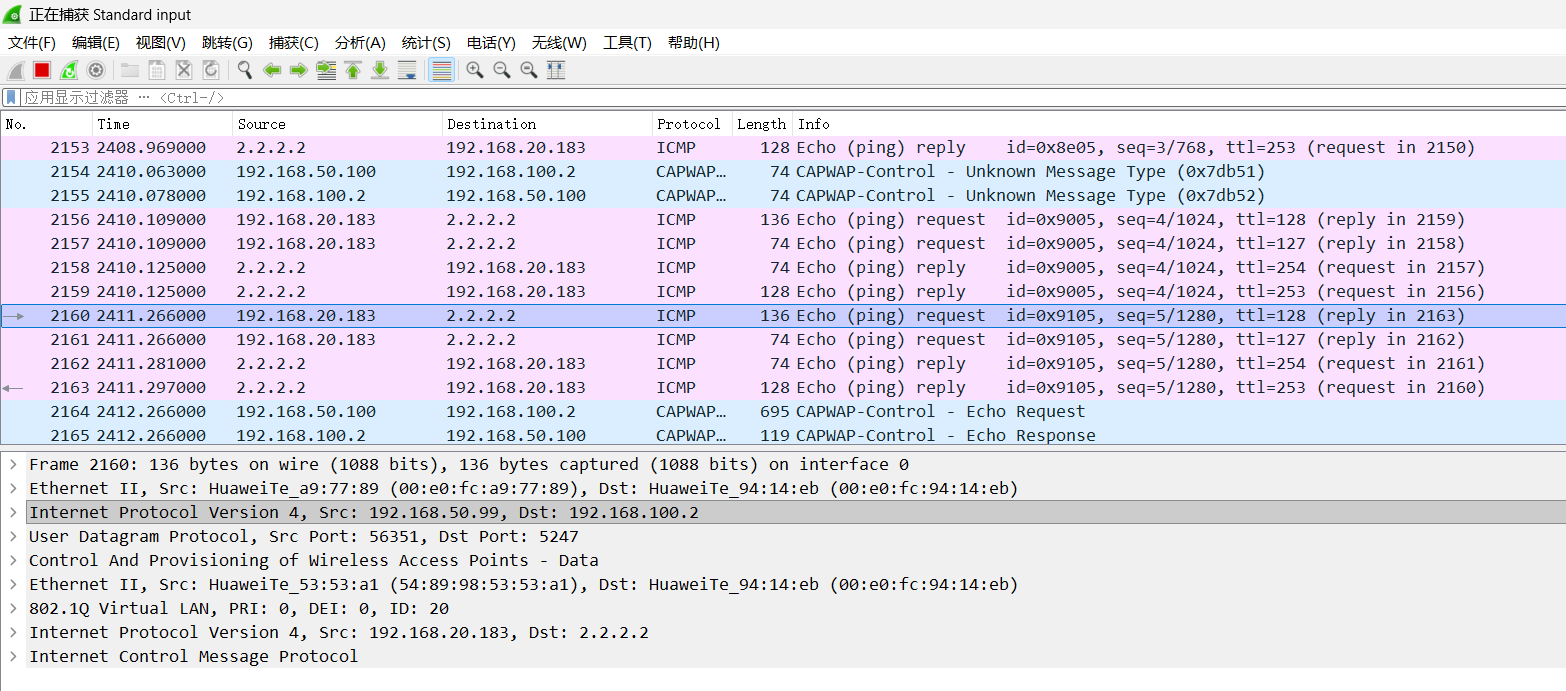
隧道转发模式下数据包封装
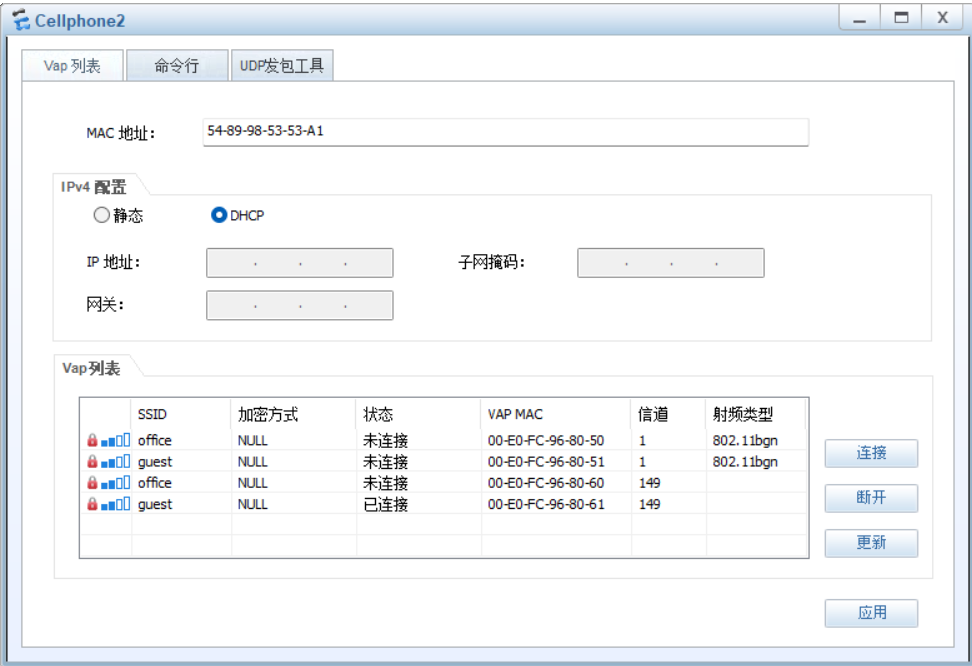
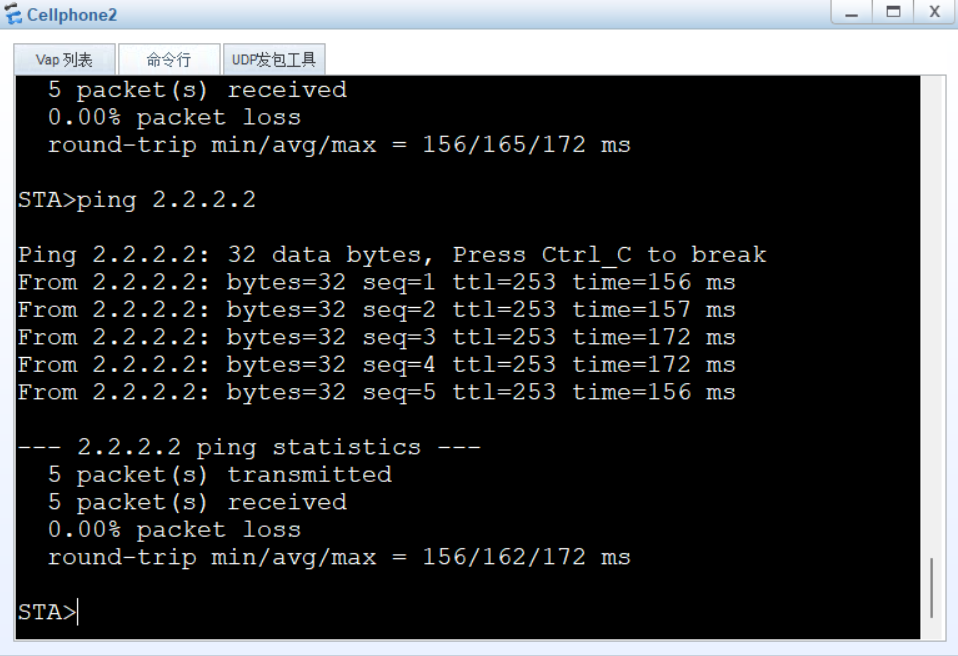
实验效果(2.2.2.2为R2上loopback 0接口地址)
实验详细配置
R1配置:
<R1>dis cur
[V200R003C00]
#
 sysname R1
#
 snmp-agent local-engineid 800007DB03000000000000
 snmp-agent
#
 clock timezone China-Standard-Time minus 08:00:00
#
portal local-server load portalpage.zip
#
 drop illegal-mac alarm
#
 set cpu-usage threshold 80 restore 75
#
acl number 3000
 rule 5 permit ip
#
aaa
 authentication-scheme default
 authorization-scheme default
 accounting-scheme default
 domain default
 domain default_admin
 local-user admin password cipher %$%$K8m.Nt84DZ}e#<0`8bmE3Uw}%$%$
 local-user admin service-type http
#
firewall zone Local
 priority 15
#
 nat address-group 0 1.2.3.4 1.2.3.4
#
interface GigabitEthernet0/0/0
 ip address 12.1.1.1 255.255.255.0
 nat outbound 3000 address-group 0
#
interface GigabitEthernet0/0/1
 ip address 192.168.100.1 255.255.255.0
#
interface GigabitEthernet0/0/2
 ip address 192.168.200.1 255.255.255.0
#
interface NULL0
#
interface LoopBack0
 ip address 1.1.1.1 255.255.255.255
#
ospf 1 router-id 1.1.1.1
 default-route-advertise
 area 0.0.0.0
  network 1.1.1.1 0.0.0.0
  network 192.168.200.1 0.0.0.0
#
ip route-static 0.0.0.0 0.0.0.0 12.1.1.2
ip route-static 192.168.20.0 255.255.255.0 192.168.100.2
#
user-interface con 0
 authentication-mode password
user-interface vty 0 4
user-interface vty 16 20
#
wlan ac
#
return
R2配置:
<R2>dis cur
[V200R003C00]
#
 sysname R2
#
 snmp-agent local-engineid 800007DB03000000000000
 snmp-agent
#
 clock timezone China-Standard-Time minus 08:00:00
#
portal local-server load portalpage.zip
#
 drop illegal-mac alarm
#
 set cpu-usage threshold 80 restore 75
#
aaa
 authentication-scheme default
 authorization-scheme default
 accounting-scheme default
 domain default
 domain default_admin
 local-user admin password cipher %$%$K8m.Nt84DZ}e#<0`8bmE3Uw}%$%$
 local-user admin service-type http
#
firewall zone Local
 priority 15
#
interface GigabitEthernet0/0/0
 ip address 12.1.1.2 255.255.255.0
#
interface GigabitEthernet0/0/1
#
interface GigabitEthernet0/0/2
#
interface NULL0
#
interface LoopBack0
 ip address 2.2.2.2 255.255.255.255
#
ip route-static 1.2.3.4 255.255.255.255 12.1.1.1
#
user-interface con 0
 authentication-mode password
user-interface vty 0 4
user-interface vty 16 20
#
wlan ac
#
return
AC配置:
<AC6005>dis cur
#
 set memory-usage threshold 0
#
ssl renegotiation-rate 1
#
vlan batch 20 100
#
authentication-profile name default_authen_profile
authentication-profile name dot1x_authen_profile
authentication-profile name mac_authen_profile
authentication-profile name portal_authen_profile
authentication-profile name macportal_authen_profile
#
dhcp enable
#
diffserv domain default
#
radius-server template default
#
pki realm default
 rsa local-key-pair default
 enrollment self-signed
#
ike proposal default
 encryption-algorithm aes-256
 dh group14
 authentication-algorithm sha2-256
 authentication-method pre-share
 integrity-algorithm hmac-sha2-256
 prf hmac-sha2-256
#
free-rule-template name default_free_rule
#
portal-access-profile name portal_access_profile
#
aaa
 authentication-scheme default
 authentication-scheme radius
  authentication-mode radius
 authorization-scheme default
 accounting-scheme default
 domain default
  authentication-scheme radius
  radius-server default
 domain default_admin
  authentication-scheme default
 local-user admin password irreversible-cipher $1a$j^g}"am6~1$@TmDZOokG1(4o6A\'X
Q3B4S-BS{@S+:,(#Y(6(C%$
 local-user admin privilege level 15
 local-user admin service-type http
#
interface Vlanif20
 ip address 192.168.20.1 255.255.255.0
 dhcp select interface
#
interface Vlanif100
 ip address 192.168.100.2 255.255.255.0
#
interface GigabitEthernet0/0/1
 port link-type access
 port default vlan 100
#
interface GigabitEthernet0/0/2
#
interface GigabitEthernet0/0/3
#
interface GigabitEthernet0/0/4
#
interface GigabitEthernet0/0/5
#
interface GigabitEthernet0/0/6
#
interface GigabitEthernet0/0/7
 undo negotiation auto
 duplex half
#
interface GigabitEthernet0/0/8
 undo negotiation auto
 duplex half
#
interface NULL0
#
 snmp-agent local-engineid 800007DB03000000000000
 snmp-agent
#
ssh server secure-algorithms cipher aes256_ctr aes128_ctr
ssh server key-exchange dh_group14_sha1
ssh client secure-algorithms cipher aes256_ctr aes128_ctr
ssh client secure-algorithms hmac sha2_256
ssh client key-exchange dh_group14_sha1
#
ip route-static 0.0.0.0 0.0.0.0 192.168.100.1
#
capwap source interface vlanif100
#
user-interface con 0
 authentication-mode password
user-interface vty 0 4
 protocol inbound all
user-interface vty 16 20
 protocol inbound all
#
wlan
 traffic-profile name default
 security-profile name guest
  security wpa-wpa2 psk pass-phrase %^%#,Ce1C15)@2$7Y-F9>=q$g#G6U{B"WYXhck7Te322
%^%# aes-tkip
 security-profile name office
  security wpa-wpa2 psk pass-phrase %^%#=*lX>uZ!T--.'Q9CV6y5[H%GB`D[x>!;$Q4/k38~
%^%# aes-tkip
 security-profile name default
 security-profile name default-wds
 security-profile name default-mesh
 ssid-profile name guest
  ssid guest
 ssid-profile name office
  ssid office
 ssid-profile name default
 vap-profile name guest
  forward-mode tunnel
  service-vlan vlan-id 20
  ssid-profile guest
  security-profile guest
 vap-profile name office
  service-vlan vlan-id 10
  ssid-profile office
  security-profile office
 vap-profile name default
 wds-profile name default
 mesh-handover-profile name default
 mesh-profile name default
 regulatory-domain-profile name china
 regulatory-domain-profile name default
 air-scan-profile name default
 rrm-profile name default
 radio-2g-profile name default
 radio-5g-profile name default
 wids-spoof-profile name default
 wids-profile name default
 wireless-access-specification
 ap-system-profile name default
 port-link-profile name default
 wired-port-profile name default
 serial-profile name preset-enjoyor-toeap
 ap-group name home
  regulatory-domain-profile china
  radio 0
   vap-profile office wlan 1
   vap-profile guest wlan 2
  radio 1
   vap-profile office wlan 1
   vap-profile guest wlan 2
  radio 2
   vap-profile office wlan 1
   vap-profile guest wlan 2
 ap-group name default
 ap-id 0 type-id 56 ap-mac 00e0-fc96-8050 ap-sn 210235448310351ADC01
  ap-name AP1
  ap-group home
 ap-id 1 type-id 56 ap-mac 00e0-fcde-67c0 ap-sn 210235448310FB280B33
  ap-name AP2
  ap-group home
 provision-ap
#
dot1x-access-profile name dot1x_access_profile
#
mac-access-profile name mac_access_profile
#
return
SW配置:
<SW>dis cur
#
sysname SW
#
vlan batch 10 50 200
#
cluster enable
ntdp enable
ndp enable
#
drop illegal-mac alarm
#
dhcp enable
#
diffserv domain default
#
drop-profile default
#
ip pool vlan50
 gateway-list 192.168.50.1
 network 192.168.50.0 mask 255.255.255.0
 excluded-ip-address 192.168.50.101 192.168.50.254
 option 43 sub-option 2 ip-address 192.168.100.2
#
aaa
 authentication-scheme default
 authorization-scheme default
 accounting-scheme default
 domain default
 domain default_admin
 local-user admin password simple admin
 local-user admin service-type http
#
interface Vlanif1
#
interface Vlanif10
 ip address 192.168.10.1 255.255.255.0
 dhcp select interface
#
interface Vlanif50
 ip address 192.168.50.1 255.255.255.0
 dhcp select global
#
interface Vlanif200
 ip address 192.168.200.2 255.255.255.0
#
interface MEth0/0/1
#
interface GigabitEthernet0/0/1
 port link-type access
 port default vlan 200
#
interface GigabitEthernet0/0/2
 port link-type trunk
 port trunk pvid vlan 50
 undo port trunk allow-pass vlan 1
 port trunk allow-pass vlan 10 50
 stp edged-port enable
#
interface GigabitEthernet0/0/3
 port link-type trunk
 port trunk pvid vlan 50
 undo port trunk allow-pass vlan 1
 port trunk allow-pass vlan 10 50
 stp edged-port enable
#
interface GigabitEthernet0/0/4
#
interface GigabitEthernet0/0/5
#
interface GigabitEthernet0/0/6
#
interface GigabitEthernet0/0/7
#
interface GigabitEthernet0/0/8
#
interface GigabitEthernet0/0/9
#
interface GigabitEthernet0/0/10
#
interface GigabitEthernet0/0/11
#
interface GigabitEthernet0/0/12
#
interface GigabitEthernet0/0/13
#
interface GigabitEthernet0/0/14
#
interface GigabitEthernet0/0/15
#
interface GigabitEthernet0/0/16
#
interface GigabitEthernet0/0/17
#
interface GigabitEthernet0/0/18
#
interface GigabitEthernet0/0/19
#
interface GigabitEthernet0/0/20
#
interface GigabitEthernet0/0/21
#
interface GigabitEthernet0/0/22
#
interface GigabitEthernet0/0/23
#
interface GigabitEthernet0/0/24
#
interface NULL0
#
interface LoopBack0
 ip address 3.3.3.3 255.255.255.255
#
ospf 1 router-id 3.3.3.3
 import-route direct
 area 0.0.0.0
  network 3.3.3.3 0.0.0.0
  network 192.168.200.2 0.0.0.0
#
user-interface con 0
user-interface vty 0 4
#
return





 扫一扫
扫一扫


 868
868

 被折叠的 条评论
为什么被折叠?
被折叠的 条评论
为什么被折叠?
 到【灌水乐园】发言





