 ENSP中AC双链路冷备份配置


拓扑图如下:
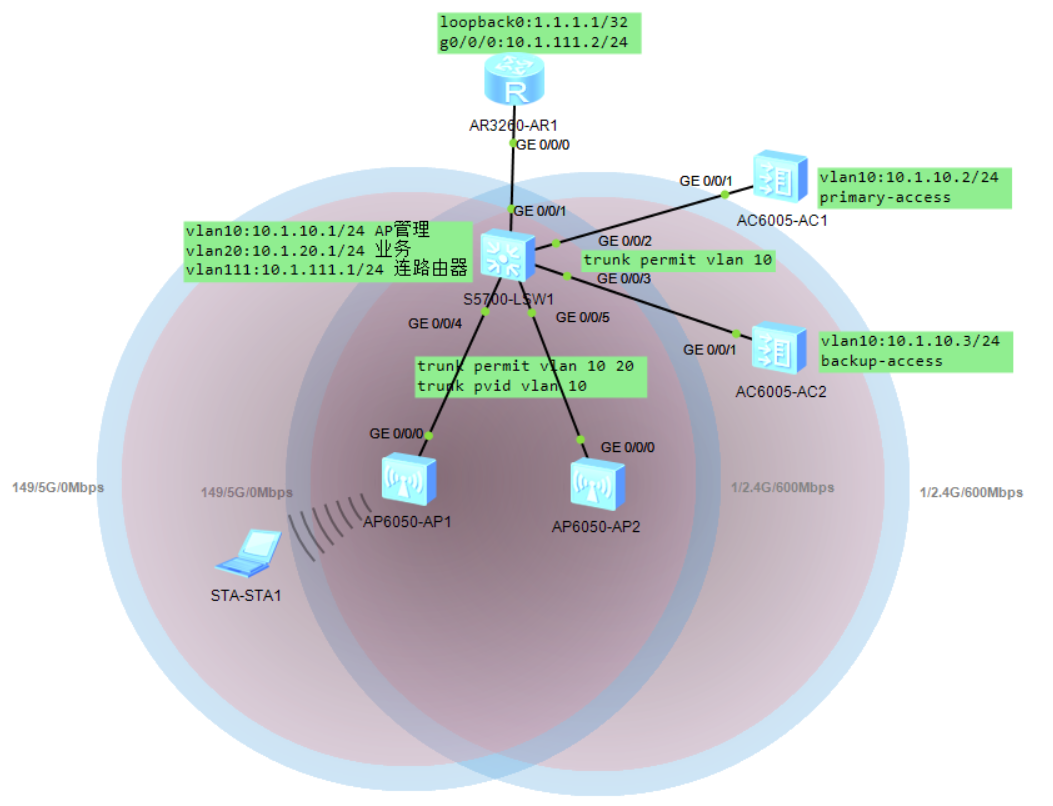
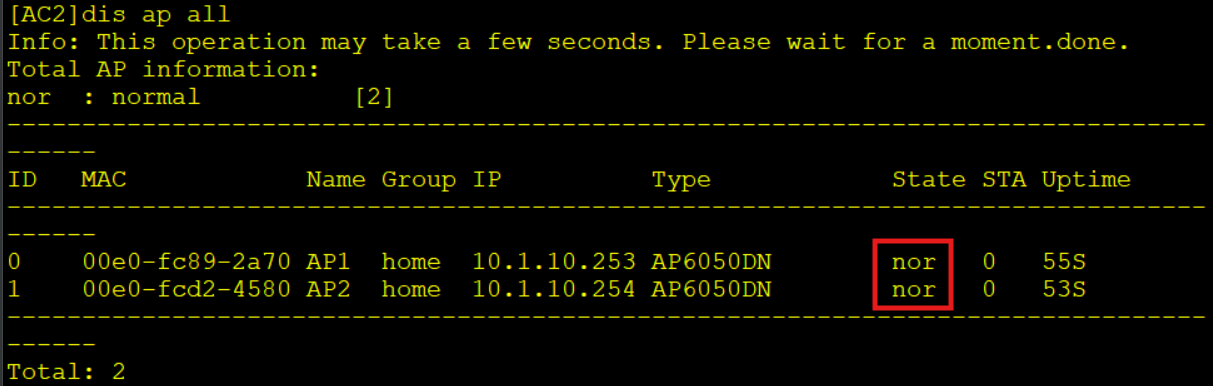
AC1为主用AC,AC2为备用AC。AC1掉线后,AP自动在AP2上线,当AC1恢复后,一段时间后会抢占回主,中间出现业务掉线,终端需要重新连接无线。
故障切换前状态:

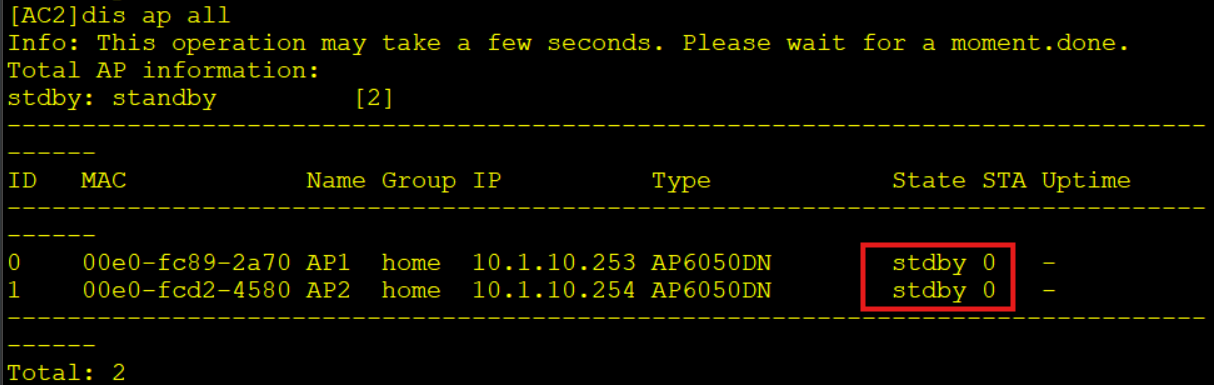
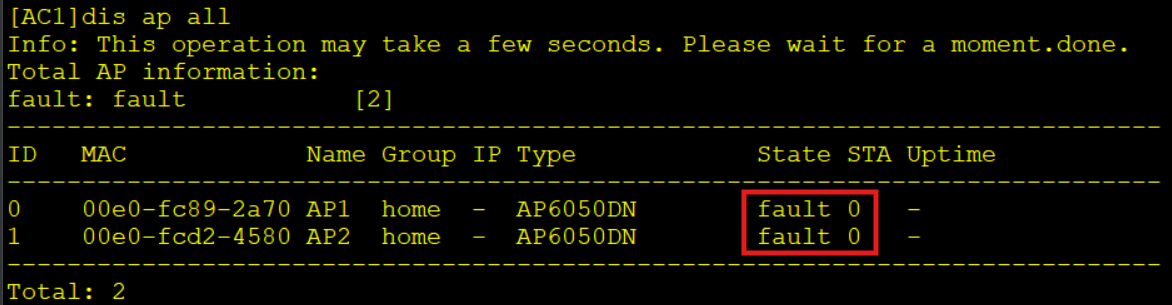
故障切换后状态(约经过1分钟):
配置如下表:
| AC1 | AC2 | SW | R1 |
|
# vlan batch 10 20 # interface Vlanif10 ip address 10.1.10.2 255.255.255.0 # interface GigabitEthernet0/0/1 port link-type trunk port trunk allow-pass vlan 10 # ip route-static 0.0.0.0 0.0.0.0 10.1.10.1 # capwap source ip-address 10.1.10.2 # wlan ac protect enable security-profile name home security wpa2 psk pass-phrase %^%#"=cQ3x(Ur'Fj-!&~(gUA97BFDE)Mo:"w;kTGW-^"%^%# aes ssid-profile name home ssid home vap-profile name home service-vlan vlan-id 20 ssid-profile home security-profile home regulatory-domain-profile name china ap-system-profile name home primary-access ip-address 10.1.10.2 backup-access ip-address 10.1.10.3 ap-group name home ap-system-profile home regulatory-domain-profile china radio 0 vap-profile home wlan 1 radio 1 vap-profile home wlan 1 radio 2 vap-profile home wlan 1 ap-id 0 type-id 56 ap-mac 00e0-fc89-2a70 ap-sn 21023544831095290713 ap-name AP1 ap-group home ap-id 1 type-id 56 ap-mac 00e0-fcd2-4580 ap-sn 210235448310CC7C536C ap-name AP2 ap-group home # |
# vlan batch 10 # interface Vlanif10 ip address 10.1.10.3 255.255.255.0 # interface GigabitEthernet0/0/1 port link-type trunk port trunk allow-pass vlan 10 # ip route-static 0.0.0.0 0.0.0.0 10.1.10.1 # capwap source ip-address 10.1.10.3 # wlan ac protect enable security-profile name home security wpa2 psk pass-phrase %^%#vyj73l>9CN1Qai9=uqUEuya}-'We>R1P@BDZFL*L%^%# aes ssid-profile name home ssid home vap-profile name home service-vlan vlan-id 20 ssid-profile home security-profile home regulatory-domain-profile name china ap-system-profile name home primary-access ip-address 10.1.10.2 backup-access ip-address 10.1.10.3 ap-group name home ap-system-profile home regulatory-domain-profile china radio 0 vap-profile home wlan 1 radio 1 vap-profile home wlan 1 radio 2 vap-profile home wlan 1 ap-group name default ap-id 0 type-id 56 ap-mac 00e0-fc89-2a70 ap-sn 21023544831095290713 ap-name AP1 ap-group home ap-id 1 type-id 56 ap-mac 00e0-fcd2-4580 ap-sn 210235448310CC7C536C ap-name AP2 ap-group home # |
# vlan batch 10 20 111 # dhcp enable # interface Vlanif10 ip address 10.1.10.1 255.255.255.0 dhcp select interface dhcp server excluded-ip-address 10.1.10.2 10.1.10.3 dhcp server option 43 sub-option 2 ip-address 10.1.10.2 10.1.10.3 # interface Vlanif20 ip address 10.1.20.1 255.255.255.0 dhcp select interface # interface Vlanif111 ip address 10.1.111.1 255.255.255.0 # interface GigabitEthernet0/0/1 port link-type access port default vlan 111 # interface GigabitEthernet0/0/2 port link-type trunk port trunk allow-pass vlan 10 # interface GigabitEthernet0/0/3 port link-type trunk port trunk allow-pass vlan 10 # interface GigabitEthernet0/0/4 port link-type trunk port trunk pvid vlan 10 port trunk allow-pass vlan 10 20 # interface GigabitEthernet0/0/5 port link-type trunk port trunk pvid vlan 10 port trunk allow-pass vlan 10 20 # ip route-static 0.0.0.0 0.0.0.0 10.1.111.2 # |
# interface GigabitEthernet0/0/0 ip address 10.1.111.2 255.255.255.0 # interface LoopBack0 ip address 1.1.1.1 255.255.255.255 # ip route-static 0.0.0.0 0.0.0.0 10.1.111.1 # |





 扫一扫
扫一扫


 2445
2445

 被折叠的 条评论
为什么被折叠?
被折叠的 条评论
为什么被折叠?
 到【灌水乐园】发言





