


实验拓扑如下图:
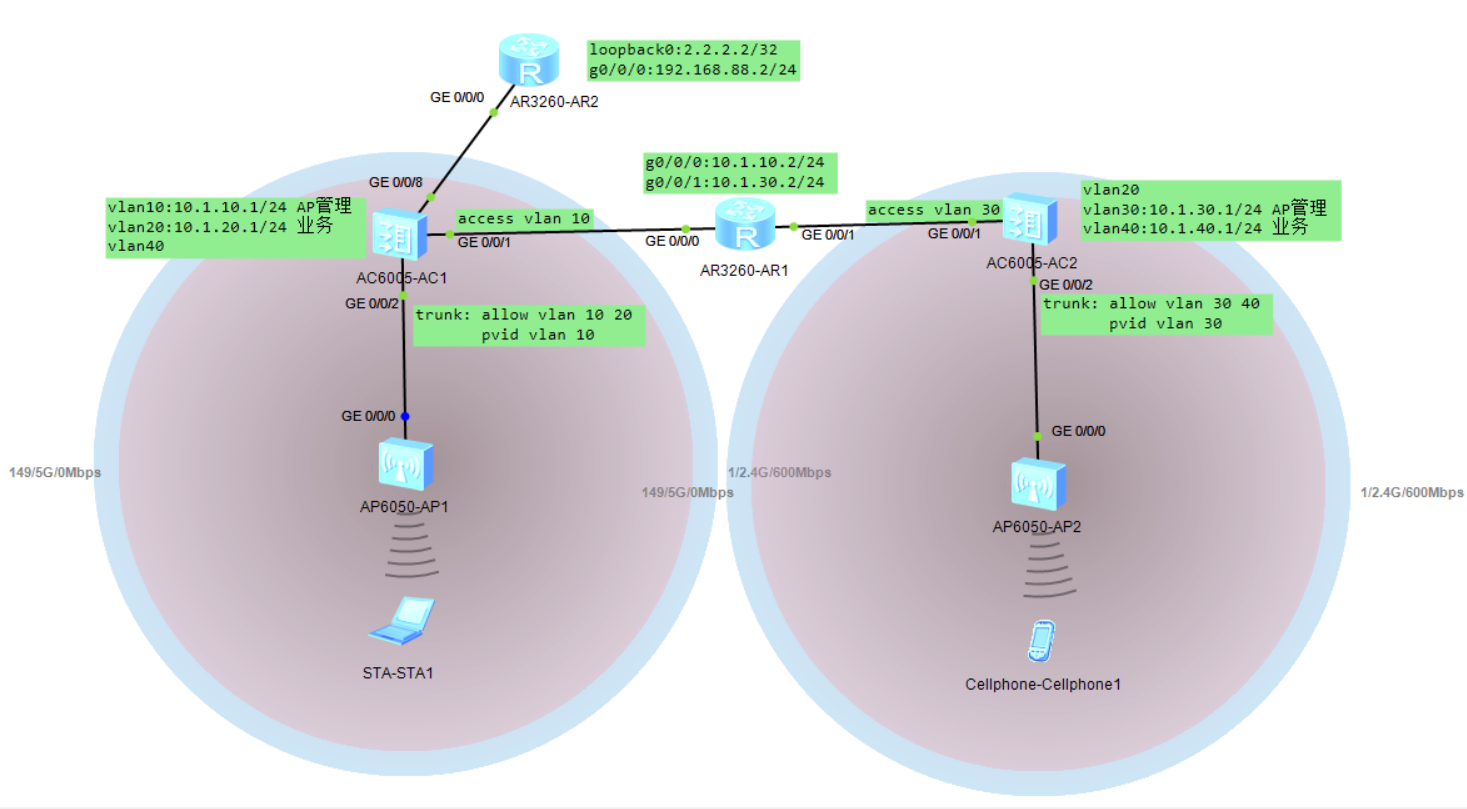
AC1和AC2属于不同的IP地址段,实现终端在不同AC间的三层漫游
效果:终端从AC1/AP1漫游到AC2/AP2后IP地址不变,业务不中断
配置如下表:
| AC1 | AC2 | R1 | R2 |
|
vlan batch 10 20 40 88 # interface GigabitEthernet0/0/8 ip route-static 0.0.0.0 0.0.0.0 10.1.10.2 wlan | vlan batch 20 30 40 # dhcp enable # interface Vlanif30 ip address 10.1.30.1 255.255.255.0 dhcp select interface # interface Vlanif40 ip address 10.1.40.1 255.255.255.0 dhcp select interface # interface GigabitEthernet0/0/1 port link-type access port default vlan 30 # interface GigabitEthernet0/0/2 port link-type trunk port trunk pvid vlan 30 port trunk allow-pass vlan 30 40 # ip route-static 0.0.0.0 0.0.0.0 10.1.30.2 # capwap source interface vlanif30 # wlan security-profile name office ssid-profile name office ssid office vap-profile name office service-vlan vlan-id 40 ssid-profile office security-profile office home-agent ac regulatory-domain-profile name china ap auth-mode no-auth mobility-group name mo member ip-address 10.1.10.1 member ip-address 10.1.30.1 ap-group name home regulatory-domain-profile china radio 0 vap-profile office wlan 1 radio 1 vap-profile office wlan 1 radio 2 vap-profile office wlan 1 ap-id 0 type-id 56 ap-mac 00e0-fca3-20c0 ap-sn 210235448310E32A704C ap-name AP2 ap-group home # | # interface GigabitEthernet0/0/0 ip address 10.1.10.2 255.255.255.0 # interface GigabitEthernet0/0/1 ip address 10.1.30.2 255.255.255.0 # ip route-static 10.1.20.0 255.255.255.0 10.1.10.1 ip route-static 10.1.40.0 255.255.255.0 10.1.30.1 # | # interface GigabitEthernet0/0/0 ip address 192.168.88.2 255.255.255.0 # interface LoopBack0 ip address 2.2.2.2 255.255.255.255 # ip route-static 0.0.0.0 0.0.0.0 192.168.88.1 # |
过程关注:
1. 配置完漫游组后,终端获取的IP地址不是业务vlan20段的地址,重启AP后正常。另外需要注意,在AC2上要增加vlan20;AC1上要增加vlan40,否则获取不到正确的IP地址。
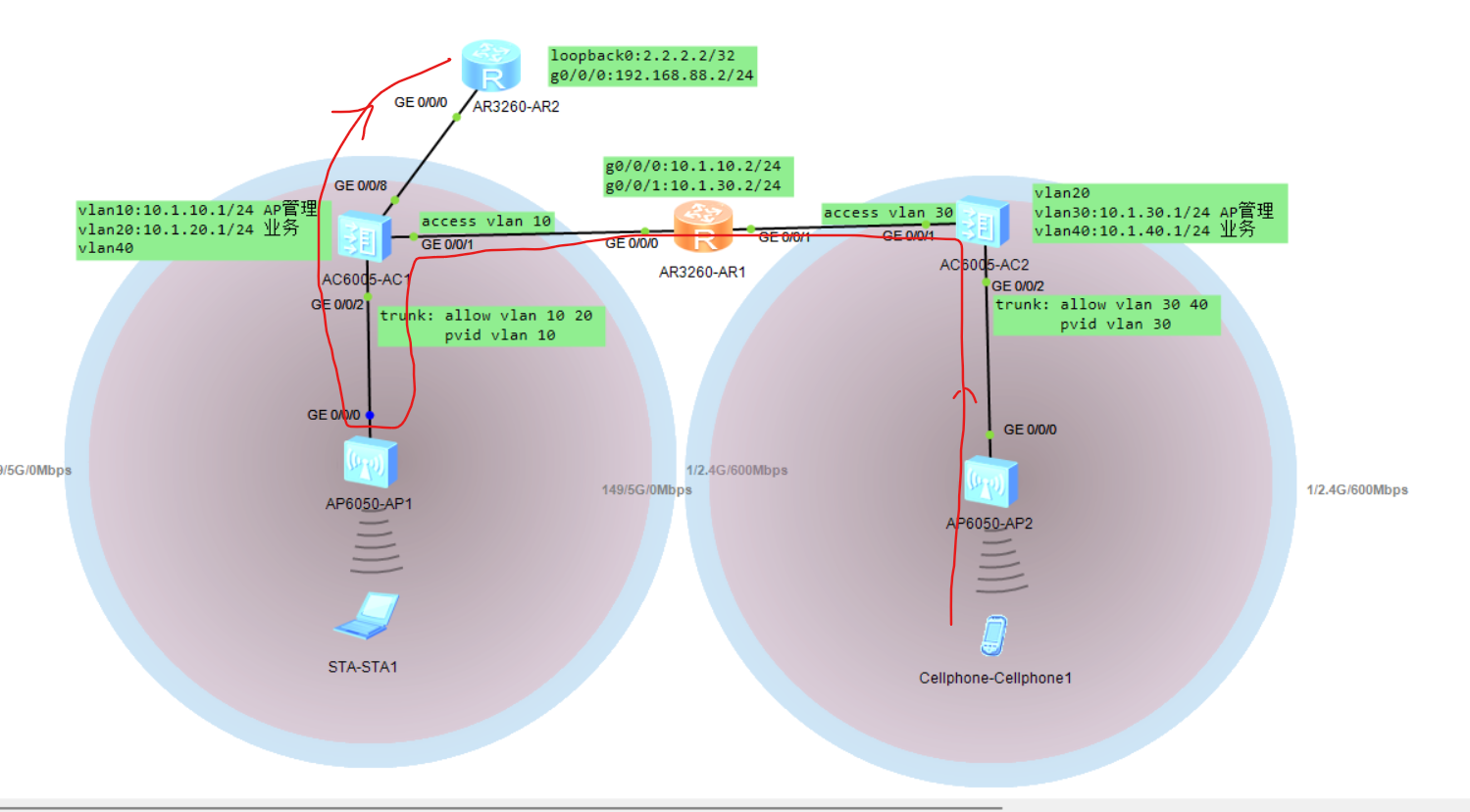
2. 默认家乡代理为AP,即终端从AC1漫游到AC2后,流量经AP转发,如下图:
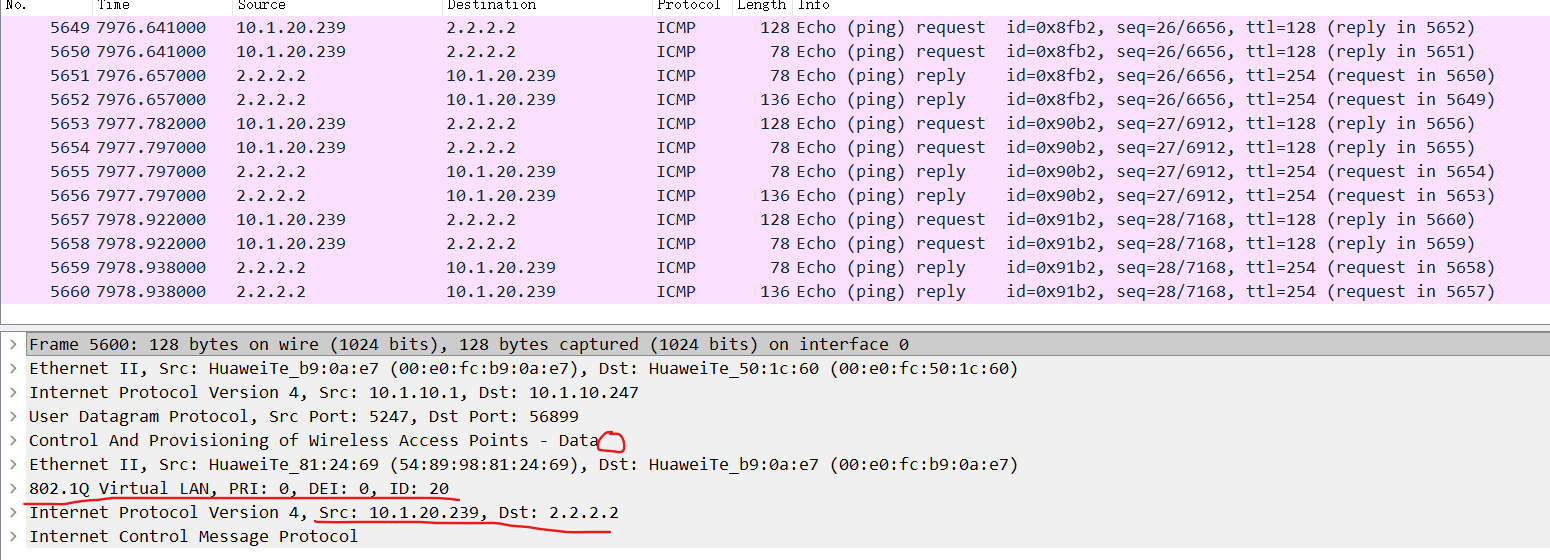
在AP1接口G0/0/0上抓包如下:
3. 修改家乡代理为AC后,流量不经过AP,直接通过AC转发。前提是AC和AP在同一二层网络中。如下图:
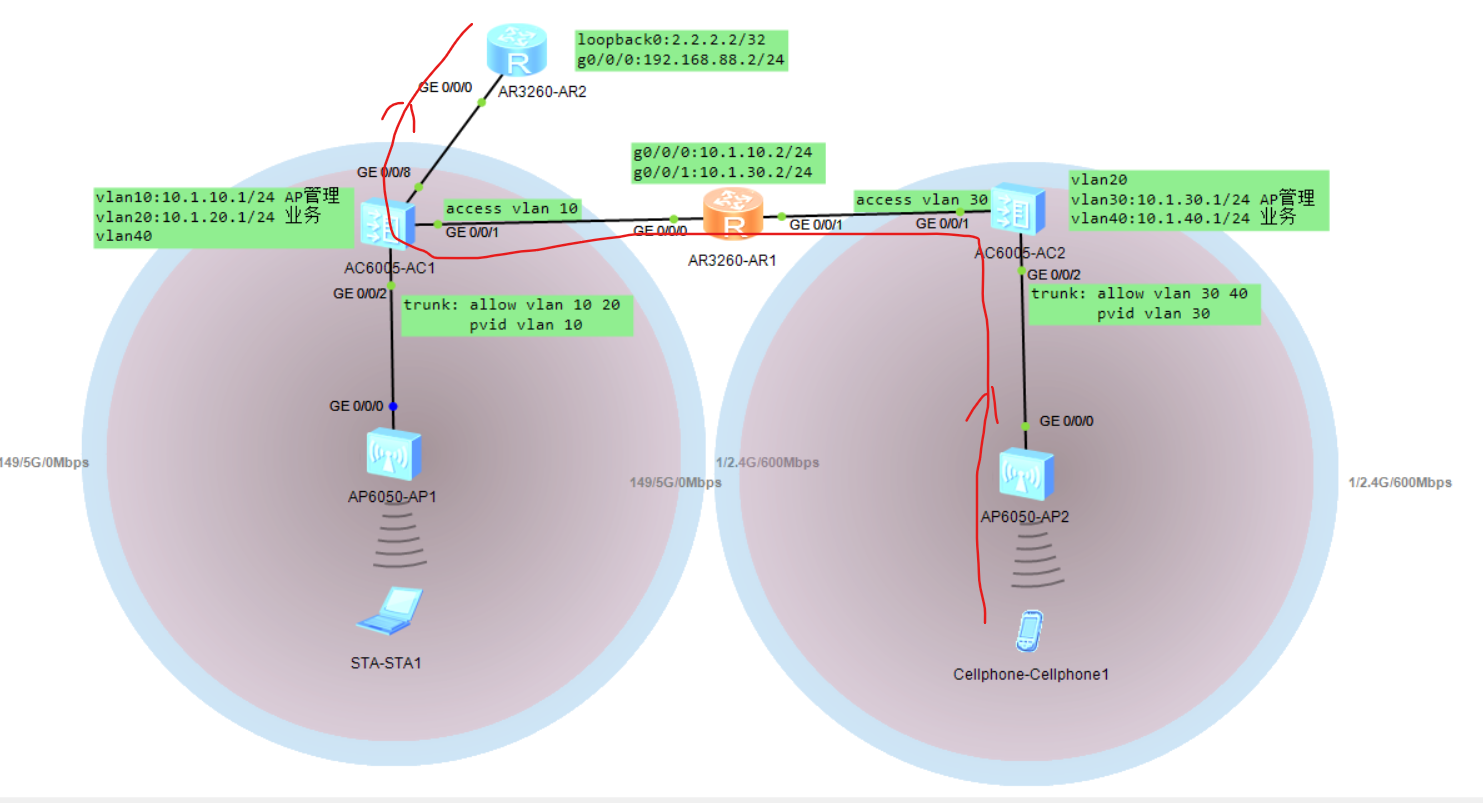
注:修改家乡代理后,终端会断线,需重连。
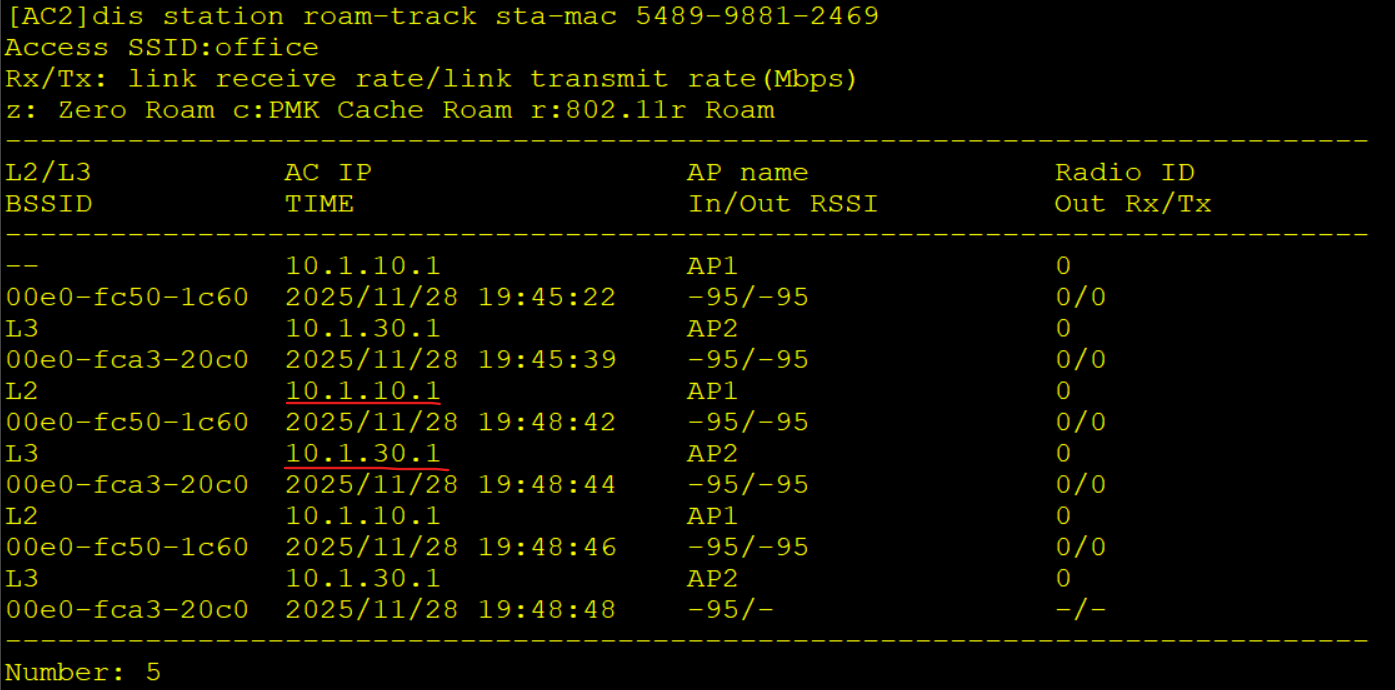
4. 通过dis station roam-track sta-mac 5489-9881-2469命令查看终端漫游记录,如下图:





 扫一扫
扫一扫


 2444
2444

 被折叠的 条评论
为什么被折叠?
被折叠的 条评论
为什么被折叠?
 到【灌水乐园】发言





