


文章目录
前言
本文介绍的是使用Unity的AI工具Sentis,结合ONNX大模型,匹配手写数字的识别结果的简单应用。
一、导入Sentis Package
新建Unity工程,Windows-PackageManager,输入以下包地址
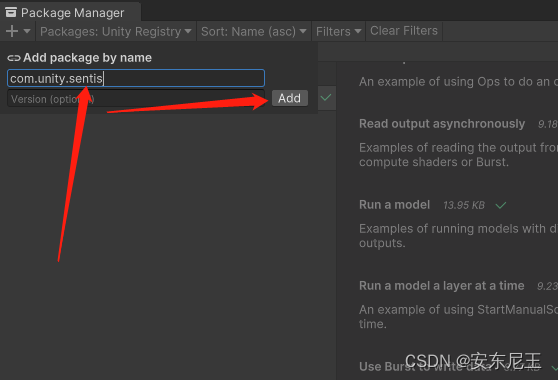
com.unity.sentis
如果下载失败,可能是没有内测资格,需要申请测试资格,点击下面链接跳转至申请界面
跳转链接
二、下载Onnx大模型
此处我们下载的是MNIST手写体识别大模型,下载链接
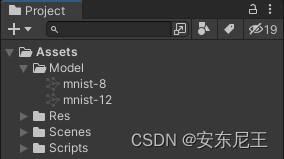
讲下载后的Onnx文件放到Unity的资源目录Assets下
三、手写数字生成图片
使用LineRender实现画笔功能
using UnityEngine;
using UnityEngine.Serialization;


//画笔
public class Paint : MonoBehaviour
{
    private GameObject _clone;
    private LineRenderer _line;
    private int _number;

    //带有LineRender物体
    [FormerlySerializedAs("Target")] [Header("LineRender预制体")]
    public GameObject target;

    [FormerlySerializedAs("PaintCamera")] public Camera paintCamera;


    private void Update()
    {
        if (Input.GetMouseButtonDown(0))
        {
            //实例化对象
            _clone = Instantiate(target, target.transform.position, Quaternion.identity);
            //获得该物体上的LineRender组件
            _line = _clone.GetComponent<LineRenderer>();
            //设置起始和结束的颜色
            _line.startColor = Color.white;
            _line.endColor = Color.white;
            //设置起始和结束的宽度
            // _Line.SetWidth(0.2f, 0.1f);
            _line.startWidth = 0.2f;
            _line.endWidth = 0.1f;
            //计数
            _number = 0;
        }

        if (Input.GetMouseButton(0))
        {
            //每一帧检测,按下鼠标的时间越长,计数越多
            _number++;
            //设置顶点数
            //_Line.SetVertexCount(_Number);
            _line.positionCount = _number;
            var screen = Input.mousePosition;
            var pos = paintCamera.ScreenToWorldPoint(screen);
            pos.z = 5;
            //设置顶点位置(顶点的索引,将鼠标点击的屏幕坐标转换为世界坐标)
            _line.SetPosition(_number - 1, pos);
        }

        //清除绘画
        if (Input.GetMouseButtonDown(1))
        {
            GameObject[] _Draw = GameObject.FindGameObjectsWithTag("DrawLine");
            for (int i = 0; i < _Draw.Length; i++)
            {
                Destroy(_Draw[i]);
            }
        }
    }

    private void OnGUI()
    {
        GUI.Label(new Rect(10, 20, 1000, 500), "【绘制】拖动鼠标左键绘制数字\n【取消绘制】点击鼠标右键 \n【识别】Space \n");
    }
}
将画完的线条通过截图的方式生成一张图片
using UnityEngine;

public class CropPicture : MonoBehaviour
{
    public Camera cropCamera; //待截图的目标摄像机
    private RenderTexture _renderTexture;
    private Texture2D _texture2D;

    public HandwrittenDigitDiscern classifyHandwritten;
    private void Start()
    {
        _renderTexture = new RenderTexture(2048, 2048, 32);
        _texture2D = new Texture2D(2048, 2048, TextureFormat.ARGB32, false);
        cropCamera.targetTexture = _renderTexture;
    }

    private void Update()
    {
        if (Input.GetKeyDown(KeyCode.Space))
        {
            RenderTexture.active = _renderTexture;
            _texture2D.ReadPixels(new Rect(0, 0, _renderTexture.width, _renderTexture.height), 0, 0);
            _texture2D.Apply();
            RenderTexture.active = null;

            classifyHandwritten.DiscernAndJudge(_texture2D);
        }
    }
}
四、手写体识别
此处使用的ModelAsset即为上述的手写体识别的大模型文件
using UnityEngine;
using Unity.Sentis;
using Unity.Sentis.Layers;

/// <summary>
/// 手写体数字 识别
/// </summary>
public class HandwrittenDigitDiscern : MonoBehaviour
{
    [Header("使用大模型")]
    public ModelAsset _ModelAsset;

    //加载模型
    Model _RuntimeModel;
    //工作流
    IWorker _Worker;

    [Header("返回 概率列表")]
    public float[] _Results;


    /// <summary>
    /// 识别于判断
    /// </summary>
    public void DiscernAndJudge(Texture2D _Texture2D)
    {
        // 创建运行时模型
        _RuntimeModel = ModelLoader.Load(_ModelAsset);

        // 将 softmax 层添加到模型的末尾,而不是非 softmax 输出
        string _SoftmaxOutputName = "Softmax_Output";
        _RuntimeModel.AddLayer(new Softmax(_SoftmaxOutputName, _RuntimeModel.outputs[0]));
        _RuntimeModel.outputs[0] = _SoftmaxOutputName;

        // 将输入数据创建为张量
        using Tensor _InputTensor = TextureConverter.ToTensor(_Texture2D, width: 28, height: 28, channels: 1);

        // 创建引擎
        //在 Sentis 中,工作线程是推理引擎。您可以创建一个工作线程以将模型分解为可执行任务,在 GPU 或 CPU 上运行任务,然后输出结果。
        //例如,创建一个使用 Sentis 计算着色器在 GPU 上运行的工作线程:
        _Worker = WorkerFactory.CreateWorker(BackendType.GPUCompute, _RuntimeModel);

        // 使用输入数据运行模型
        _Worker.Execute(_InputTensor);

        // 获得结果
        using TensorFloat _OutputTensor = _Worker.PeekOutput() as TensorFloat;

        // 在读取张量数据之前将其移动到CPU
        _OutputTensor.MakeReadable();

        //返回数据填充
        _Results = _OutputTensor.ToReadOnlyArray();

        Debug.Log("识别结果:"+ GetValue());
    }

    private int GetValue()
    {
        int index = 0;
        float value=0;
        for (int i = 0; i < _Results.Length; i++)
        {
            if (value< _Results[i])
            {
                value = _Results[i];
                index = i;
            }
        }
        return index;
    }

    /// <summary>
    /// 当前脚本处于 禁用或非活动时执行
    /// </summary>
    void OnDisable()
    {
        // 告诉GPU我们已经处理完引擎使用的内存了
        _Worker?.Dispose();
    }
}
五、手写体识别
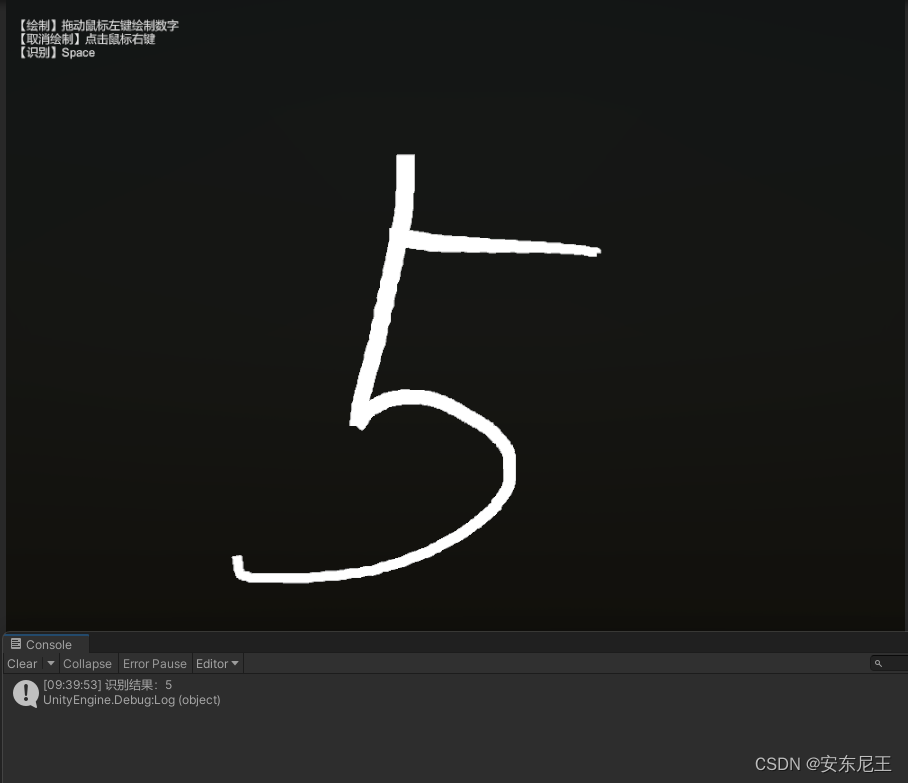
总结
Unity Sentis是一款无缝集成自定义AI模型的工具,专为Unity引擎设计。该工具可以在Unity运行的各个平台上流畅运行,无需额外的优化。Unity Sentis允许大家将神经网络嵌入到他们的构建中,从而提供实时的体验,增强游戏玩法和功能在不同平台上的表现。





 扫一扫
扫一扫


 282
282


 到【灌水乐园】发言



