 ggplot2绘制GO基因列表柱状图





1. 效果图1:标注基因名
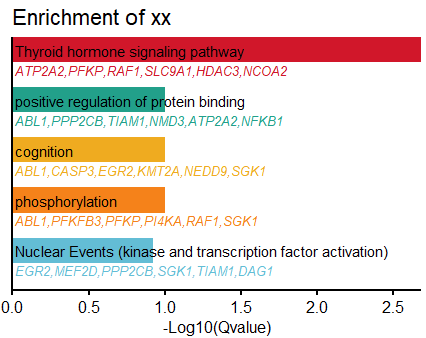
代码1
数据是GO的输出结果,本文使用的是 metascape 输出的excel挑选的若干行。
# 1. 读取数据
dat=read.csv("E:\\research\\scPolyA-seq2\\GO-APA-Timepoint\\test.csv", sep="\t")
head(dat)

# 2. 选择所需要的列
dat.use=dat[, c("LogQvalue", "Description", "GroupID", "Symbols")]
# 如果只有Qvalue,则ggplot2中使用x=log10(Qvalue);
# GroupID是分组,不是必须的。主要用于区分颜色,一个类可以有多个term。
查看中间数据:
> head(dat.use, 2)
  LogQvalue                            Description    GroupID
1    -2.685      Thyroid hormone signaling pathway  1_Summary
2    -1.003 positive regulation of protein binding 10_Summary
                                                                                                                                                   Symbols
1 ATP2A2,PFKP,RAF1,SLC9A1,HDAC3,NCOA2,MED13L,SIN3A,EGR2,NFKB1,THRAP3,CASP3,KMT2A,SLIT3,CCAR2,SLC9A3,MEF2D,TFAM,GBF1,BBS9,SGK1,TXN2,PI4KA,PEMT,PNPLA6,ACSL5
2                                               ABL1,PPP2CB,TIAM1,NMD3,ATP2A2,NFKB1,RAF1,OXSR1,NDFIP2,CCAR2,TAF3,UBLCP1,GBF1,DLC1,GLG1,STXBP3,SIN3A,JMJD1C
                             Symbols2
1 ATP2A2,PFKP,RAF1,SLC9A1,HDAC3,NCOA2
2 ABL1,PPP2CB,TIAM1,NMD3,ATP2A2,NFKB1
继续:
# set y order
#dat.use$Description=factor(dat.use$Description)

# 3.选择所需要的行 select rows to draw
cols=c("#D51F26","#00A08A","#F2AD00","#F98400","#5BBCD6")
dat.use=dat.use[1:length(cols), ]

# 4.仅显示不超过n=5个基因
n=6 #最多保留的基因个数
dat.use$Symbols2=sapply(dat.use$Symbols, function(x){
  arr=strsplit(x, ",")[[1]]
  len=ifelse(length(arr)>n, n, length(arr));
  arr=arr[1:len]
  paste0(arr, collapse = ",")
}) |> as.character()


# 5.画图
library(ggplot2)
ggplot(dat.use, aes(x=-LogQvalue, y = Description, fill = GroupID)) +
  #1. barplot of GO Q value
  geom_bar(stat ="identity", width =0.5) +
  geom_text(aes(x=0.1/5, #文字和y轴的缝隙
                y=Description, label=Description),
            size=4,
            #fontface="bold",
            hjust=0) +
  scale_fill_manual(values = cols)+ #bar plot fill color
  scale_x_continuous(expand = c(0,0))+ #bar和y轴无间隔
  #2. add gene list
  geom_text(data = dat.use,
          aes(x =0.1/5, #文字和y轴的缝隙
              y = Description,
              label = Symbols2, #基因列表
              color = GroupID),
          size =3.5,
          fontface ='italic',
          hjust =0,
          vjust =2.3) +
  scale_color_manual(values=cols) + #gene list text colors
  #3. theme and style
  theme_classic(base_size = 14)+
  theme(axis.text.y = element_blank(), #no y title, ticks, text
        axis.title.y = element_blank(),
        axis.ticks.y = element_blank(),
        axis.line = element_line(colour ='black', linewidth =1),
        axis.text.x = element_text(colour ='black', size =12),
        axis.ticks.x = element_line(colour ='black', linewidth = 1),
        axis.title.x = element_text(colour ='black', size =12),
        legend.position ="none")+ #no legend
  scale_y_discrete( #expand = c(0.2, 0), #为bar下的字符留空间,缺点是上面也有空间了
    expand=expansion(mult = c(0.2, 0)), #ggplot 3.5.1
    limits=rev( dat.use$Description)  #设置bar的顺序
  ) +
  labs(x="-Log10(Qvalue)", title="Enrichment of xx")
2. 效果图2: 不标注基因名
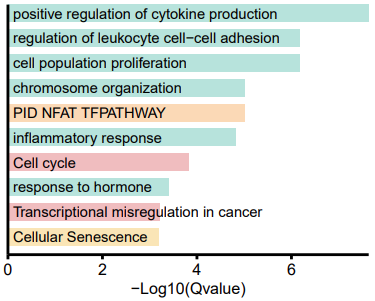
代码
loadGOfromXLS=function(fname){
  library(xlsx)
  dat = read.xlsx(fname, sheetName = "Enrichment", encoding = 'UTF-8')
  #dim(dat) #164 9
  # (1)filter by p value
  dt2=dat[which(dat$Log.q.value. < log10(0.05)),]
  head(dt2[,c(1,2,3,6)])
  #dim(dt2) #17 9
  #colnames(dt2)
  #1."GroupID"       "Category"      "Term"     "Description"   "LogP"          "Log.q.value."
  #7 "InTerm_InList" "Genes"         "Symbols"

  # (2)filter out duplicate terms
  dt3=dt2[!duplicated(dt2[,'Description']),]
  # (3) keep Summary only
  dt4=dt3[grep('Summary',dt3$GroupID),]
  return(dt4)
}
library(ggplot2)

GO_barplot_withNoGenes=function(dt0, #excel读入的数据
                                spaceToX=0.2/5, #文字和x轴的缝隙
                                spaceToY=0.1/0.2, #文字和y轴的缝隙
                                n_gene=6, #最多显示的基因个数
                                colors=NULL, #填充颜色
                                without_category=c("WikiPathways"), #去掉某些类
                                select_rows=NULL, #选择哪几行GO画图
                                debug=F, #调试模式:打印GO 编号和序号
                                bg.alpha=0.3, #背景色的不透明度
                                main="Enrichment of PC1"
){
  # 1.select columns
  dat4=dt0[, c("Log.q.value.", "Description", "Category", "Term")]
  dat.use=dat4 #[, c("LogQvalue", "Description", "GroupID")]
  dat.use$LogQvalue=dat4$Log.q.value.
  dat.use$GroupID=dat4$Category
  # 2.保留前5个基因:略过

  # 3.filter by Category
  dat.use=dat.use[which(!dat.use$GroupID %in% without_category),]
  print(table(dat.use$Category))

  # 4.set y order: as factor
  dat.use$Description=factor(dat.use$Description)

  # 5.set colors
  #cols=c("#D51F26","#00A08A","#F2AD00","#F98400","#5BBCD6")
  n_cat=length(unique(dat.use$Category))
  if(!is.null(colors)){
    if(length(colors) < n_cat)
      warning("Provide color number < needed categories! use default color set!")
    else{
      cols=colors
    }
  }else if( n_cat<=5 ){
    cols=c("KEGG Pathway"="#D51F26",
           "GO Biological Processes"="#00A08A",
           "Reactome Gene Sets"="#F2AD00",
           "Canonical Pathways"="#F98400",
           "WikiPathways"="#5BBCD6")
  }else{
    cols=scales::hue_pal()(n_cat)
  }

  # 6.combine Term and Desc: in debug mode
  if(debug==T){
    dat.use$Description=sprintf("(%s)%s", dat.use$Term, dat.use$Description)
    dat.use$Description=paste(1:nrow(dat.use), dat.use$Description)
  }

  # 7.选择所需要的行 select rows to draw
  dat.use2=dat.use;
  # select rows
  if(!is.null(select_rows)){
    dat.use=dat.use[select_rows,]
  }

  ############ Plot
  library(ggplot2)
  ggplot(dat.use, aes(x=-LogQvalue, y = Description, fill = GroupID)) +
    #1. barplot of GO Q value
    geom_bar(stat ="identity", width =0.7, alpha=bg.alpha) +
    geom_text(aes(x=spaceToY, #文字和y轴的缝隙
                  y=Description, label=Description),
              size=4,
              #fontface="bold",
              hjust=0) +
    scale_fill_manual(values = cols)+ #bar plot fill color
    scale_x_continuous(expand = c(0,0))+ #bar和y轴无间隔

    #3. theme and style
    theme_classic(base_size = 14)+
    theme(axis.text.y = element_blank(), #no y title, ticks, text
          axis.title.y = element_blank(),
          axis.ticks.y = element_blank(),
          axis.line = element_line(colour ='black', linewidth =1),
          axis.text.x = element_text(colour ='black', size =12),
          axis.ticks.x = element_line(colour ='black', linewidth = 1),
          axis.title.x = element_text(colour ='black', size =12),
          plot.title = element_text(size = 12),
          legend.position ="none")+ #no legend
    scale_y_discrete( #expand = c(0.2, 0), #为bar下的字符留空间,缺点是上面也有空间了
      expand=expansion(mult = c(spaceToX, 0)), #ggplot 3.5.1
      limits=rev( dat.use$Description)  #设置bar的顺序
    ) +
    labs(x="-Log10(Qvalue)", title=main)
}

p1=GO_barplot_withNoGenes(dt4,
                          #select_rows=setdiff(1:17, c(13,8,15) ),
                          select_rows=c(1,2,4,5,6,7,9,10,16,17), #挑选显示的行
                          debug=F, #调试模式:显示GO 编号和序号
                          spaceToX=0.2/2.5,
                          spaceToY=0.04/0.2,
                          bg.alpha = 0.3,
                          main="Genes associated with PC1(p.adj<0.01, n=1294)")
pdf( paste0(outputRoot, "withPC1-noGene.pdf"), width=4, height=3.5)
print(p1)
dev.off()
Ref
- https://mp.weixin.qq.com/s/h_x2Iz7FQdZWiT0WwY-9Eg





 扫一扫
扫一扫


 678
678

 被折叠的 条评论
为什么被折叠?
被折叠的 条评论
为什么被折叠?
 到【灌水乐园】发言





