



public class AnchorMaker : MonoBehaviour
变量声明
public WorldAnchorManager worldAnchorManager;
WorldAnchorStore store = null;
bool awaitingStore = true;
bool savedRoot;
string[] anchors;
功能实现1-加载旧锚点 并把当前游戏对象放过去
    #从磁盘初始化旧锚点信息
	void Awake()
    {
        Debug.Log("启动时加载锚点...");
        WorldAnchorStore.GetAsync(StoreLoaded);
    }

    private void StoreLoaded(WorldAnchorStore store)
    {
        this.store = store;
        awaitingStore = false;
    }
    //在其它方法中操控成员变量的方式 this.xxx
    //异步方法:通常使用与要加载半天的任务(如网络请求,IO请求)并且不会阻止主线程任务的执行
    //回调方法:函数A作为函数B的参数 然后参数B执行完后会自动调用A函数 A就是回调方法

    #打印所有锚点名称并将某一游戏对象挂载到某锚点处
    void Update()
    {
        if (!awaitingStore)
        {
            awaitingStore = true;
            anchors = this.store.GetAllIds();
            Debug.Log("锚点加载中,锚点数量: " + anchors.Length);
            for (int index = 0; index < anchors.Length; index++)
            {
                Debug.Log(anchors[index]);
            }
            LoadGame();
        }
    }

    private void LoadGame()
    {
        #将当前游戏对象挂载到某一锚点处
        this.savedRoot = this.store.Load("rootGameObject", this.gameObject);
        if (!this.savedRoot)
        {
            Debug.Log("未找到锚点");
        }
    }
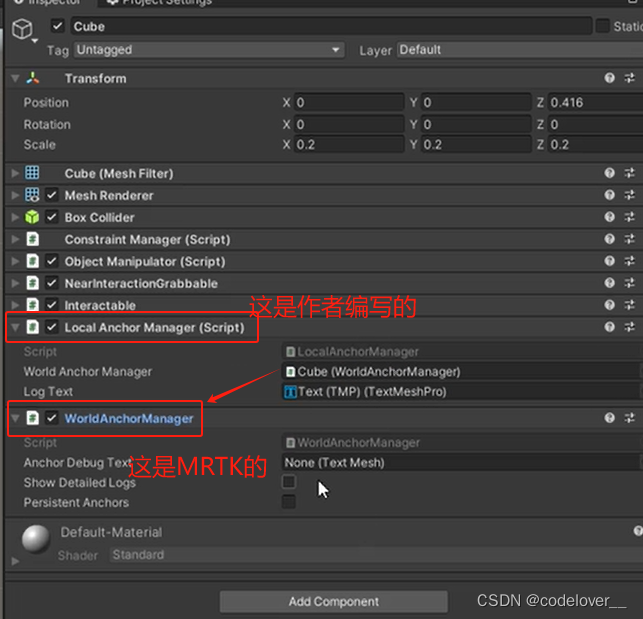
功能实现2-更新游戏对象位置 并自动删除创建相应的新锚点
    #操作前删除锚点a
    public void OnManipulationStarted()
    {
        if (anchors != null)
        {
            foreach (string a in anchors)
            {
                Debug.Log("删除锚点: " + a);
                store.Delete(a);
            }
            this.savedRoot = false;
        }
    }

	#操作后添加锚点
    public void OnManipulationEnded()
    {
        WorldAnchor anchor = this.gameObject.GetComponent<WorldAnchor>();
        if (anchor == null)
        {
            string name = worldAnchorManager.AttachAnchor(this.gameObject);
            Debug.Log("添加锚点: " + name);
        }
        else
        {
            if (anchor.name != null)
            {
                Debug.Log("更新锚点: " + anchor.name);
            }
        }
        SaveGame();
    }

    #添加后保存到本地
    private void SaveGame()
    {
        WorldAnchor anchor = this.gameObject.GetComponent<WorldAnchor>();
        if (!this.savedRoot && anchor != null)
        {
            this.savedRoot = this.store.Save("rootGameObject", anchor);
            Debug.Log("保存锚点: " + this.savedRoot);
        }
        else
        {
            Debug.Log("锚点已存储:" + this.savedRoot);
        }
    }
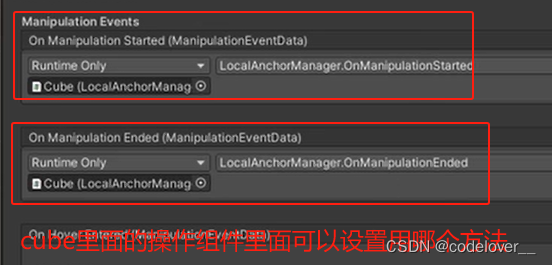
核心API
首先是 WorldAnchorStore 类用于管理旧锚点
xxx.GetAllIds() 获取存储的所有旧锚点的ID名称
xxx.Load("ID名称",游戏对象) 用于将游戏对象放置在旧锚点的位置 返回是否成功
xxx.Save("ID名称",锚点对象) 用于将创建的锚点以ID名存于store中 返回是否成功
还有 worldAnchorManager 类用于创建,删除锚点
xxx.AttachAnchor(this.gameObject) 在当前游戏对象位置创建锚点
xxx.RemoveAnchor(游戏对象)





 扫一扫
扫一扫


 13
13

 被折叠的 条评论
为什么被折叠?
被折叠的 条评论
为什么被折叠?
 到【灌水乐园】发言





