Unity3D 使用代码在动画片段中添加事件

Unity动画系统学习笔记(二)根运动、动画事件与状态机行为 在学习根运动前需要了解两个名词: 身体变换:身体变换是角色的质心。它用于 Mecanim 的重定向引擎,并提供最稳定的移位模型。身体方向是相对于 Avatar T 形姿势的下身和上身方向的平均值。身体变换和方向存储在动画剪辑中(使用 Avatar 中设置的肌肉定义)。它们是动画剪辑中存储的唯一世界空间曲线。所有其他:肌肉曲线和 IK(反向动力学)目标(手和脚)都是相对于身体变换进行存储的。 根变换:根变换是身体变换在 Y 平面上的投影,并在运行时计算。在每一帧都会计算根变换的变化。变换的此变化随后应用于游 阅读详情
AI摘要

本文介绍在Unity3D中使用代码在动画片段添加事件的方法。动画事件可在动画播放特定时间触发自定义函数,适合执行逻辑操作。文中详细说明获取动画片段、创建并添加事件、清空或删除事件的步骤,还给出示例代码、动画设置及性能优化等建议。

Unity3D 使用代码在动画片段中添加事件

在 Unity 中,动画片段(AnimationClip)可以通过添加事件(AnimationEvent)来在特定时间点触发自定义函数。这种方式非常适合在动画播放过程中执行一些逻辑操作,例如播放音效、触发粒子效果、或者控制游戏逻辑。

本文将详细介绍如何使用代码在动画片段中添加事件,并提供完整的示例代码和优化建议。
常规的在动画中添加事件的方式:
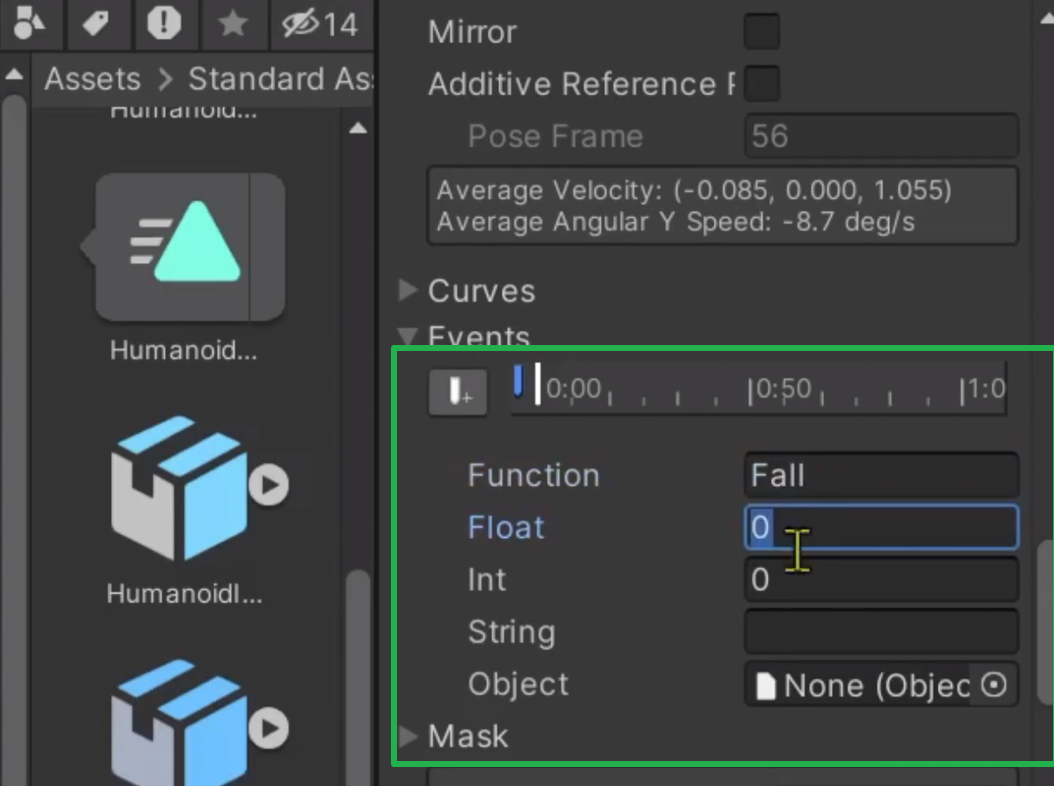
在这里插入图片描述

1. 动画事件

动画事件(AnimationEvent)是 Unity 中用于在动画播放过程中触发特定函数的一种机制。你可以在动画片段中的任意时间点添加事件,并指定事件触发时要调用的函数名称。事件可以携带参数,并且可以在动画编辑器中可视化地编辑。

2. 使用代码添加动画事件

  1. 获取动画片段:通过 Animator 组件获取对应的动画片段。
  2. 创建动画事件:创建一个 AnimationEvent 实例,并设置其触发时间和函数名称。
  3. 将事件添加到动画片段:将创建的事件添加到动画片段的事件列表中。

2.1 获取动画片段

我们需要从 Animator 组件中获取对应的动画片段。可以通过遍历 AnimatorController 中的 animationClips 来找到指定名称的动画片段。

public static AnimationClip GetClipFromAnimator(Animator animator, string stateName)
{
    if (animator == null)
    {
        Debug.LogError("Animator is null!");
        return null;
    }

    var animatorController = animator.runtimeAnimatorController;

    if (animatorController == null)
    {
        Debug.LogError("Animator Controller is null!");
        return null;
    }

    foreach (var clip in animatorController.animationClips)
    {
        if (clip.name == stateName)
        {
            return clip;
        }
    }

    Debug.Log($"没有找到名为 {stateName} 的动画片段!");
    return null;
}

2.2 创建并添加动画事件

接下来,我们可以创建一个 AnimationEvent 实例,并将其添加到动画片段中。我们可以选择使用时间(秒)或帧数来指定事件的触发时间。

public static void AddEventToClip(AnimationClip clip, float time, string functionName, bool useFrames = false)
{
    if (clip == null)
    {
        Debug.LogError("AnimationClip is null!");
        return;
    }

    float fps = clip.frameRate > 0 ? clip.frameRate : 60f; // 默认 60fps

    if (useFrames)
    {
        time = time / fps; // 将帧数转换为秒数
    }

    if (time < 0f)
    {
        time = 0f;
    }

    if (time > clip.length)
    {
        time = clip.length;
    }

    AnimationEvent animationEvent = new AnimationEvent
    {
        time = time,
        functionName = functionName
    };

    clip.AddEvent(animationEvent);
}

2.3 清空或删除动画事件

有时候我们需要清空或删除动画片段中的特定事件。可以通过以下方法实现:

public static void ClearAllEventsFromClip(AnimationClip clip)
{
    if (clip == null)
    {
        Debug.LogError("ClearAllEventsFromClip: AnimationClip is null!");
        return;
    }

    clip.events = new AnimationEvent[0];
    Debug.Log($"ClearAllEventsFromClip: All events cleared from clip '{clip.name}'.");
}

public static void RemoveEventFromClip(AnimationClip clip, string functionName)
{
    if (clip == null)
    {
        Debug.LogError("RemoveEventFromClip: AnimationClip is null!");
        return;
    }

    if (string.IsNullOrEmpty(functionName))
    {
        Debug.LogError("RemoveEventFromClip: Function name is null or empty!");
        return;
    }

    AnimationEvent[] events = clip.events;
    var filteredEvents = new System.Collections.Generic.List<AnimationEvent>();
    foreach (var evt in events)
    {
        if (evt.functionName != functionName)
        {
            filteredEvents.Add(evt);
        }
    }

    clip.events = filteredEvents.ToArray();
}

3. 示例代码

代码

使用的示例,展示了如何在动画片段中添加事件,并在事件触发时执行自定义逻辑。
将这个脚本挂在在带有Animator 组件的物体上然后就可以在动态添加事件了。

using System.Collections;
using System.Collections.Generic;
using UnityEngine;

public class ObjAni : MonoBehaviour
{
    private Animator animator;

    private void Start()
    {
        animator = gameObject.GetComponent<Animator>();

        var clip = AnimationHelper.GetClipFromAnimator(animator, "DoRotate");

        // 在第30帧添加事件
        AnimationHelper.AddEventToClip(clip, 30, nameof(AnimatorEventAdd), true);

        animator.SetBool("work", true);
        Invoke(nameof(RemoveEventClip), 3.0f);
    }

    private void AnimatorEventAdd()
    {
        animator.SetBool("work", false);
        Debug.Log("AnimatorEventAdd");
    }

    void RemoveEventClip()
    {
        var clip = AnimationHelper.GetClipFromAnimator(animator, "DoRotate");
        AnimationHelper.RemoveEventFromClip(clip, nameof(AnimatorEventAdd));
        animator.SetBool("work", true);
    }
}
  • Start 方法:在游戏开始时,获取 Animator 组件和对应的动画片段 DoRotate,并在第30帧添加一个事件,事件触发时调用 AnimatorEventAdd 方法。
  • AnimatorEventAdd 方法:当事件触发时,停止动画播放,并输出日志信息。
  • RemoveEventClip 方法:在3秒后移除动画片段中的事件,并重新开始动画播放。

Unity3D动画设置

在这里插入图片描述

在这里插入图片描述

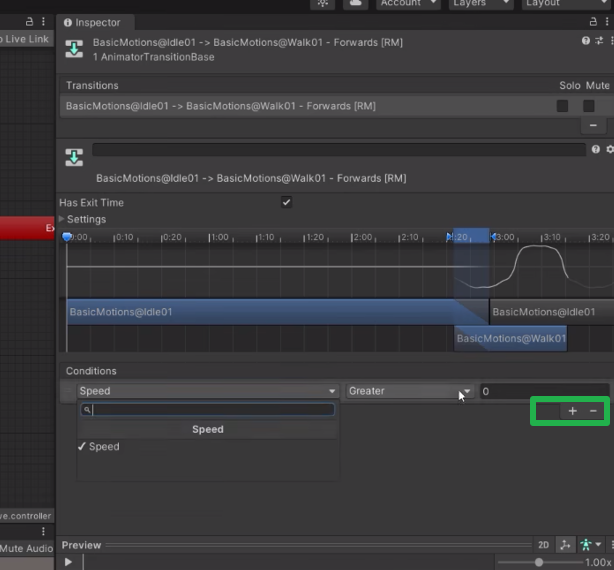
  1. 创建一个空的状态
  2. 添加一个切换条件,类型为bool类型,默认是false
  3. 添加自己要执行的动画,并修改名称为DoRotate
  4. 添加切换条件:new State -true-> DoRotate , DoRotate -false->new State
  5. 将这个动画状态机给到上面的Animator 组件

4. 其他建议

  • 性能优化:频繁地添加和删除事件可能会影响性能,建议在游戏初始化时一次性添加所有事件,并在必要时进行更新。
  • 事件参数:AnimationEvent 可以携带参数(如 int、float、string 等),可以根据需要传递更多信息给事件处理函数。
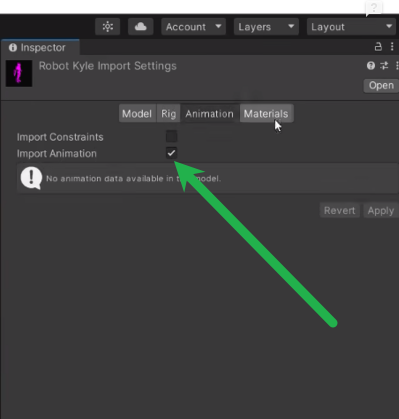
  • 没有动画:确认导入的模型上有动画,勾选inport Animation
    在这里插入图片描述

5.完整的添加事件代码

using UnityEngine;

public static class AnimationHelper
{
    /// <summary>
    /// 获取Animator状态对应的动画片段
    /// </summary>
    /// <param name="animator">Animator组件</param>
    /// <param name="stateName">状态名(动画片段名)</param>
    /// <returns>对应状态的AnimationClip</returns>
    public static AnimationClip GetClipFromAnimator(Animator animator, string stateName)
    {
        if (animator == null)
        {
            Debug.LogError("Animator is null!");
            return null;
        }

        // 获取 Animator 的 Controller
        var animatorController = animator.runtimeAnimatorController;

        if (animatorController == null)
        {
            Debug.LogError("Animator Controller is null!");
            return null;
        }

        // 获取所有动画片段
        foreach (var clip in animatorController.animationClips)
        {
            if (clip.name == stateName)
            {
                return clip;
            }
        }

        Debug.Log($"没有找到名为 {stateName} 的动画片段!");
        return null;
    }

    /// <summary>
    /// 向指定的动画剪辑添加事件
    /// </summary>
    /// <param name="clip">要添加事件的动画剪辑</param>
    /// <param name="time">事件触发的时间点(单位:秒)</param>
    /// <param name="functionName">事件触发时调用的函数名称</param>
    /// <param name="useFrames">是否使用帧数来设置事件时间(如果为 true,则 `time` 参数会被解释为帧数)</param>
    public static void AddEventToClip(AnimationClip clip, float time, string functionName, bool useFrames = false)
    {
        if (clip == null)
        {
            Debug.LogError("AnimationClip is null!");
            return;
        }

        // 获取动画的帧率
        float fps = clip.frameRate > 0 ? clip.frameRate : 60f; // 默认 60fps

        if (useFrames)
        {
            // 如果使用帧数,将帧数转换为时间(秒)
            time = time / fps; // 将帧数转换为秒数
        }

        // 如果时间小于0,则将其修正为0(动画开始时间)
        if (time < 0f)
        {
            time = 0f;
        }

        // 如果时间超过动画长度,则将其修正为动画的结束时间
        if (time > clip.length)
        {
            time = clip.length;
        }

        // 创建一个新的动画事件实例
        AnimationEvent animationEvent = new AnimationEvent
        {
            // 设置事件的触发时间
            time = time,

            // 设置事件触发时调用的函数名称
            functionName = functionName
        };

        // 将事件添加到动画剪辑中
        clip.AddEvent(animationEvent);
    }

    /// <summary>
    /// 清空动画剪辑中的所有事件
    /// </summary>
    /// <param name="clip">目标动画剪辑</param>
    public static void ClearAllEventsFromClip(AnimationClip clip)
    {
        if (clip == null)
        {
            Debug.LogError("ClearAllEventsFromClip: AnimationClip is null!");
            return;
        }

        clip.events = new AnimationEvent[0];
        Debug.Log($"ClearAllEventsFromClip: All events cleared from clip '{clip.name}'.");
    }

    /// <summary>
    /// 删除动画剪辑中指定函数名称的事件
    /// </summary>
    /// <param name="clip">目标动画剪辑</param>
    /// <param name="functionName">要删除的事件函数名称</param>
    public static void RemoveEventFromClip(AnimationClip clip, string functionName)
    {
        if (clip == null)
        {
            Debug.LogError("RemoveEventFromClip: AnimationClip is null!");
            return;
        }

        if (string.IsNullOrEmpty(functionName))
        {
            Debug.LogError("RemoveEventFromClip: Function name is null or empty!");
            return;
        }

        // 获取当前所有事件
        AnimationEvent[] events = clip.events;

        // 过滤掉指定的事件
        var filteredEvents = new System.Collections.Generic.List<AnimationEvent>();
        foreach (var evt in events)
        {
            if (evt.functionName != functionName)
            {
                filteredEvents.Add(evt);
            }
        }

        // 将过滤后的事件重新赋值给动画片段
        clip.events = filteredEvents.ToArray();
    }

}
【 unity3d 】动画播放和帧事件 前言 当使用具体模型时,可以使模型动画来触发方法,即帧事件,(类似碰撞器,触发器的触发方法)。比如说一个角色的攻击动画,可以通过播放动画到某一帧来执行某个方法 通过图添帧事件 点击人物,然后在window找到Animtaion,之后找到要执行帧事件的动画。 void Attack1(){ Debug.Log (&amp;amp;amp;amp;quot;Attack!!&amp;amp;amp;amp;quot;); } v... 阅读详情

相关推荐

unity3d动画操作以及动画实现

今天主要总结的是 unity3d 中内置动画操作,以及代码事件编写动画实现 1.如何导入、执行外部动画  在项目窗口中,首先,单击选择我们所准备的动画模型,在属性面板中选择Animations栏, 在属性中点击“+","-"可以增加和删除动画片段, 而在Start以及End中,可以分别设置每一个动画片段的开始帧数及结束帧数。 下面是我自己动画做的一个分解: Idle:表示我动画

1万+

Unity/Animation -- 添加动画事件(Animation Events)

动画事件(Animation Events)是一种附属于Animation Clips 的事件,它们在动画发展到一定程度时触发,从而实现一些特殊的功能。熟悉怎么添加动画事件可以省去很多不必要的麻烦,而且它确实非常简单。

路人王小二的博客 7万+

在Unity3D中控制动画播放

用Unity3D也算是好久了,但是每次做项目总还是能学到新的东西。这次做一个TPS的项目就遇到了这样一个问题,如何同时在上下半身播放不同的动画?解决方法其实是很简单,但由于对于动画资源的了解不足导致问题不断,最后是彻彻底底的研究了一遍Unity3D的动画系统(Legacy),虽然4.0出了新的动画控制系统,使用了一下功能相比原来确实强大不少,但还是将这次对于原先的动画系统的学习总结记录下来,毕竟这

Sparrowfc的专栏 2万+

【Unity动画】动画播放到某帧调用函数-添加事件Events

在谈论Unity动画事件之前,让我们首先了解一下它是如何工作的。动画事件允许你在动画的播放过程中,在指定的关键帧上执行脚本中的函数。这意味着你可以在动画的不同时刻触发自定义的逻辑,为角色、场景或其他元素注入更多生命力。

leoysq的博客 8907

【转】Unity3d:读取FBX中的动画

【转】Unity3d:读取FBX中的动画 从模型中获得切割好的动画clip,并且对其中设置好的动画事件进行修改方法: 1.动画模型后缀为.FBX.在Unity3d中,能够显示FBX中的动画。要加载模型中的AnimationClip,只要AssetDatabase.LoadAssetsAtPath(fbxPath,typeof(AnimationClip))就可以了。...

c1sdn19的专栏 1436

Unity引擎开发:动画系统实现_动画事件

动画事件是Unity中的一个功能,允许你在动画剪辑的特定时间点触发脚本中的方法。每当动画播放到设置了事件的时间点时,Unity会自动调用相应的脚本方法。这些方法可以用于执行各种操作,如播放音效、发射粒子系统、改变角色状态等。

chenlz2007的博客 1240

Unity3d,用代码动态添加动画事件

//绑定到宿主身上 public class AAAA : MonoBehaviour { private Animator animator;//animator组件 public AnimationClip[] clips;//动画片段 void Start() { animator = GetComponent<Anim...

QQhelphelp的博客 2808

Unity引擎开发:动画系统实现_动画事件(AnimationEvents)的触发与响应

通过动画事件,你可以在动画播放的关键帧上精确地控制游戏逻辑,提升游戏的流畅性和沉浸感。希望本节内容能够帮助你更好地理解和使用动画事件。在接下来的章节中,我们将继续探讨更高级的动画系统实现技术。

chenlz2007的博客 1265

UnityVR--组件7--动画事件&BlendTree

​上一篇(组件5--Animation动画)已经做了2个动画片段,HeroIdle和HeroJump,另外实现了简单的动画转场控制。本篇使用BlendTree来控制动画转场,并使用事件发送的方式来控制动画事件。

唐小墨同学的博客 2174

人形机器人骨骼材料选型实战:从铝合金到碳纤维的5种方案对比

本文深入探讨人形机器人骨骼材料的选型策略,对比铝合金、镁合金、钛合金、碳纤维复合材料及3D打印材料等5种方案的性能优劣。通过建立强度-重量比、疲劳寿命等核心评价维度,结合具体应用场景,提供科学的材料决策方法论,助力开发者优化机器人结构设计,实现性能与成本的平衡。

weixin_29199873的博客 437

MIC卡的OFED驱动安装

 IB网络和OFED驱动安装 IB InfiniBand是一个统一的互联结构,可以处理存储I/O、网络I/O和进程间通信(IPC)。它可以将磁盘阵列、SANs、LANs、服务器和集群服务器进行互联,也可以连接外部网络(比如WAN、VPN、互联网)。设计InfiniBand的目的主要是用于企业数据中心,大型的或小型的。目标主要是实现高的可靠性、可用性、可扩展性和高的性能。Inf

beglorious的专栏 5105

Unity3D使用心得(1):ModelImporter的使用、在代码中添加动画片段。

在使用 Unity3d 倒入Fbx模型的时候,动画的动画片段需要自己手动添加模型多了以后会是一个不小的工作量。 Unity3d支持 编辑器脚本来控制资源导入的过程。添加一个 AssetPostprocessor 监听其中的 OnPreprocessModel 方法,在其中使用 ModelImporter 的 clipAnimations 属性来为导入的动画添加动画片段。   我的项目中美术给的

秋风扶柳笛的专栏 9322

单智能体篇:Prompt工程艺术

模型在接收到 Prompt 时会自动扮演“角色”,角色定义的好坏直接影响智能体输出的风格和专业性。角色定义的重要性让智能体具备明确身份,例如“你是一位专业理财顾问”或“你是一个幽默的文案创作助手”。角色限定了模型知识输出的范围,使回答更专业、更贴合预期。实战示例模糊Prompt给我一些投资建议。你可以投资股票或者基金。优化Prompt你是一位具有10年经验的专业理财顾问,请给我针对30岁男性,年收入20万,风险偏中等的投资组合建议。

公众号:AI前沿侦探 1301

Unity3d使用心得(1):ModelImporter的使用、在代码中添加动画片段。

http://www.cnblogs.com/dongliang/archive/2012/09/25/ModelImporter.html 在使用 Unity3d 倒入Fbx模型的时候,动画的动画片段需要自己手动添加模型多了以后会是一个不小的工作量。 Unity3d支持 编辑器脚本来控制资源导入的过程。添加一个 AssetPostprocessor 监听其中的 OnPre

any 1997

喷涂机器人系列编程:ABB IRB 5500_(7).喷涂质量控制与优化

通过编程手段对ABB IRB 5500喷涂机器人进行质量控制和优化,可以显著提高喷涂的均匀性和附着力,减少涂层缺陷。具体的方法包括喷涂参数的调整、路径规划的优化、喷涂效果的检测与反馈,以及喷涂参数的动态调整。综合评估系统可以进一步确保喷涂质量的稳定性和一致性,帮助汽车制造企业提高产品质量和生产效率。

zhubeibei168的博客 851

Google Play上架:谷歌2024年5月份审核政策改动,审核强度逐步提升

Google Play上架:谷歌2024年5月份审核政策改动,审核强度逐步提升

专业解决各种上架过包问题,专业团队专业处理 3187

Unity3D 动画回调函数详解

Unity3D提供了Animator组件和Animation组件来实现动画回调函数的功能。Animator组件用于控制多个动画之间的转换,而Animation组件则用于控制单个动画的播放。通过动画回调函数,我们可以在Unity3D中实现更加精细和复杂的动画效果。Animator组件和Animation组件都提供了丰富的回调函数接口,可以满足不同场景下的需求。在使用动画回调函数时,需要注意函数名的匹配和参数类型的正确性。同时,合理的代码结构和逻辑设计也是实现高效动画效果的关键。

voidinit的专栏 1692

[Bug已解决] CUDA error 尽管 CUDA 可用且 GPU 受支持-通用排查 RuntimeError 解决方案

[Bug已解决] CUDA error 尽管 CUDA 可用且 GPU 受支持-通用排查 RuntimeError 解决方案

一键难忘的博客 2415

Unity3d 为模型动画片段设置动画事件

为模型动画片段上设置动画事件 反正麻烦,u3d有两种动画播放系统Animation\Animator, 没有办法预览 有的模型和动画是分开的,这时点击动画就没有办法播放,因为它找不到对应的模型. 只读动画片段 改 可写 大多数模型动画片段是只读的,这时候就没办法编辑动画.从而设置动画事件. 所以需要:在Project窗口上选中动画片段->按CTRL+D , 这样就会复制一个新的动画片...

绀目澄清 698

STM32 实现 4*4 矩阵键盘扫描(HAL库、标准库 都适用)

本文实现的代码是基于STM32HAL库的基础上的,不过标准库也可以用,只是调用的库函数不同,逻辑跟配置是一样的,按我这里的逻辑来配置即可。 1、键盘原理图: 原理举例:先把 F0-F7 内部拉高,这样这个8个引脚都是高电平,然后就进行列扫描。例如:假如按下3按钮,Y3 列扫描,把F4先拉低,然后读取F0-F3的状态,就会读出为1110,这就可 以知道是F3行拉低了,同时这时候是程序控制F4拉低的,这样就可以知道是F4列导致它转态变化了的,这样就可以定位出是F4列F3行的按键按下了;其他的列也是这样子扫描

lhh_qrsly的博客 7058

深度学习工具包 DeepLearningToolbox

深度学习工具包Deprecation notice.-----This toolbox is outdated and no longer maintained.There are much better tools available for deep learning than this toolbox, e.g. [Theano](http://deeplearning.net/software/theano/), [torch](http://torch.ch/) or [tensorflow](http://www.tensorflow.org/)I would suggest you use one of the tools mentioned above rather than use this toolbox.Best, Rasmus.DeepLearnToolbox================A Matlab toolbox for Deep Learning.Deep Learning is a new subfield of machine learning that focuses on learning deep hierarchical models of data.It is inspired by the human brain's apparent deep (layered, hierarchical) architecture.A good overview of the theory of Deep Learning theory is[Learning Deep Architectures for AI](http://www.iro.umontreal.ca/~bengioy/papers/ftml_book.pdf)For a more informal introduction, see the following videos by Geoffrey Hinton and Andrew Ng.* [The Next Generation of Neural Networks](http://www.youtube.com/watch?v=AyzOUbkUf3M) (Hinton, 2007)* [Recent Developments in Deep Learning](http://www.youtube.com/watch?v=VdIURAu1-aU) (Hinton, 2010)* [Unsupervised Feature Learning and Deep Learning](http://www.youtube.com/watch?v=ZmNOAtZIgIk) (Ng, 2011)If you use this toolbox in your research please cite [Prediction as a candidate for learning deep hierarchical models of data](http://www2.imm.dtu.dk/pubdb/views/publication_details.php?id=6284)```@MASTERSTHESIS\{IMM2012-06284, author = "R. B. Palm", title = "Prediction as a candidate for learning deep hierarchical models of data", year = "2012",}```Contact: rasmusbergpalm at gmail dot comDirectories included in the toolbox-----------------------------------`NN/` - A library for Feedforward Backpropagation Neural Networks`CNN/` - A library for Convolutional Neural Networks`DBN/` - A library for Deep Belief Networks`SAE/` - A library for Stacked Auto-Encoders`CAE/` - A library for Convolutional Auto-Encoders`util/` - Utility functions used by the libraries`data/` - Data used by the examples`tests/` - unit tests to verify toolbox is workingFor references on each library check REFS.mdSetup-----1. Download.2. addpath(genpath('DeepLearnToolbox'));Example: Deep Belief Network---------------------```matlabfunction test_example_DBNload mnist_uint8;train_x = double(train_x) / 255;test_x = double(test_x) / 255;train_y = double(train_y);test_y = double(test_y);%% ex1 train a 100 hidden unit RBM and visualize its weightsrand('state',0)dbn.sizes = [100];opts.numepochs = 1;opts.batchsize = 100;opts.momentum = 0;opts.alpha = 1;dbn = dbnsetup(dbn, train_x, opts);dbn = dbntrain(dbn, train_x, opts);figure; visualize(dbn.rbm{1}.W'); % Visualize the RBM weights%% ex2 train a 100-100 hidden unit DBN and use its weights to initialize a NNrand('state',0)%train dbndbn.sizes = [100 100];opts.numepochs = 1;opts.batchsize = 100;opts.momentum = 0;opts.alpha = 1;dbn = dbnsetup(dbn, train_x, opts);dbn = dbntrain(dbn, train_x, opts);%unfold dbn to nnnn = dbnunfoldtonn(dbn, 10);nn.activation_function = 'sigm';%train nnopts.numepochs = 1;opts.batchsize = 100;nn = nntrain(nn, train_x, train_y, opts);[er, bad] = nntest(nn, test_x, test_y);assert(er < 0.10, 'Too big error');```Example: Stacked Auto-Encoders---------------------```matlabfunction test_example_SAEload mnist_uint8;train_x = double(train_x)/255;test_x = double(test_x)/255;train_y = double(train_y);test_y = double(test_y);%% ex1 train a 100 hidden unit SDAE and use it to initialize a FFNN% Setup and train a stacked denoising autoencoder (SDAE)rand('state',0)sae = saesetup([784 100]);sae.ae{1}.activation_function = 'sigm';sae.ae{1}.learningRate = 1;sae.ae{1}.inputZeroMaskedFraction = 0.5;opts.numepochs = 1;opts.batchsize = 100;sae = saetrain(sae, train_x, opts);visualize(sae.ae{1}.W{1}(:,2:end)')% Use the SDAE to initialize a FFNNnn = nnsetup([784 100 10]);nn.activation_function = 'sigm';nn.learningRate = 1;nn.W{1} = sae.ae{1}.W{1};% Train the FFNNopts.numepochs = 1;opts.batchsize = 100;nn = nntrain(nn, train_x, train_y, opts);[er, bad] = nntest(nn, test_x, test_y);assert(er < 0.16, 'Too big error');```Example: Convolutional Neural Nets---------------------```matlabfunction test_example_CNNload mnist_uint8;train_x = double(reshape(train_x',28,28,60000))/255;test_x = double(reshape(test_x',28,28,10000))/255;train_y = double(train_y');test_y = double(test_y');%% ex1 Train a 6c-2s-12c-2s Convolutional neural network %will run 1 epoch in about 200 second and get around 11% error. %With 100 epochs you'll get around 1.2% errorrand('state',0)cnn.layers = { struct('type', 'i') %input layer struct('type', 'c', 'outputmaps', 6, 'kernelsize', 5) %convolution layer struct('type', 's', 'scale', 2) %sub sampling layer struct('type', 'c', 'outputmaps', 12, 'kernelsize', 5) %convolution layer struct('type', 's', 'scale', 2) %subsampling layer};cnn = cnnsetup(cnn, train_x, train_y);opts.alpha = 1;opts.batchsize = 50;opts.numepochs = 1;cnn = cnntrain(cnn, train_x, train_y, opts);[er, bad] = cnntest(cnn, test_x, test_y);%plot mean squared errorfigure; plot(cnn.rL);assert(er<0.12, 'Too big error');```Example: Neural Networks---------------------```matlabfunction test_example_NNload mnist_uint8;train_x = double(train_x) / 255;test_x = double(test_x) / 255;train_y = double(train_y);test_y = double(test_y);% normalize[train_x, mu, sigma] = zscore(train_x);test_x = normalize(test_x, mu, sigma);%% ex1 vanilla neural netrand('state',0)nn = nnsetup([784 100 10]);opts.numepochs = 1; % Number of full sweeps through dataopts.batchsize = 100; % Take a mean gradient step over this many samples[nn, L] = nntrain(nn, train_x, train_y, opts);[er, bad] = nntest(nn, test_x, test_y);assert(er < 0.08, 'Too big error');%% ex2 neural net with L2 weight decayrand('state',0)nn = nnsetup([784 100 10]);nn.weightPenaltyL2 = 1e-4; % L2 weight decayopts.numepochs = 1; % Number of full sweeps through dataopts.batchsize = 100; % Take a mean gradient step over this many samplesnn = nntrain(nn, train_x, train_y, opts);[er, bad] = nntest(nn, test_x, test_y);assert(er < 0.1, 'Too big error');%% ex3 neural net with dropoutrand('state',0)nn = nnsetup([784 100 10]);nn.dropoutFraction = 0.5; % Dropout fraction opts.numepochs = 1; % Number of full sweeps through dataopts.batchsize = 100; % Take a mean gradient step over this many samplesnn = nntrain(nn, train_x, train_y, opts);[er, bad] = nntest(nn, test_x, test_y);assert(er < 0.1, 'Too big error');%% ex4 neural net with sigmoid activation functionrand('state',0)nn = nnsetup([784 100 10]);nn.activation_function = 'sigm'; % Sigmoid activation functionnn.learningRate = 1; % Sigm require a lower learning rateopts.numepochs = 1; % Number of full sweeps through dataopts.batchsize = 100; % Take a mean gradient step over this many samplesnn = nntrain(nn, train_x, train_y, opts);[er, bad] = nntest(nn, test_x, test_y);assert(er < 0.1, 'Too big error');%% ex5 plotting functionalityrand('state',0)nn = nnsetup([784 20 10]);opts.numepochs = 5; % Number of full sweeps through datann.output = 'softmax'; % use softmax outputopts.batchsize = 1000; % Take a mean gradient step over this many samplesopts.plot = 1; % enable plottingnn = nntrain(nn, train_x, train_y, opts);[er, bad] = nntest(nn, test_x, test_y);assert(er < 0.1, 'Too big error');%% ex6 neural net with sigmoid activation and plotting of validation and training error% split training data into training and validation datavx = train_x(1:10000,:);tx = train_x(10001:end,:);vy = train_y(1:10000,:);ty = train_y(10001:end,:);rand('state',0)nn = nnsetup([784 20 10]); nn.output = 'softmax'; % use softmax outputopts.numepochs = 5; % Number of full sweeps through dataopts.batchsize = 1000; % Take a mean gradient step over this many samplesopts.plot = 1; % enable plottingnn = nntrain(nn, tx, ty, opts, vx, vy); % nntrain takes validation set as last two arguments (optionally)[er, bad] = nntest(nn, test_x, test_y);assert(er < 0.1, 'Too big error');```[![Bitdeli Badge](https://d2weczhvl823v0.cloudfront.net/rasmusbergpalm/deeplearntoolbox/trend.png)](https://bitdeli.com/free "Bitdeli Badge")

Unity3d动画播放和帧事件之美

当使用具体模型时,可以使模型动画来触发方法,即帧事件,(类似碰撞器,触发器的触发方法)。比如说一个角色的攻击动画,可以通过播放动画到某一帧来执行某个方法。 另外新动画也可以使用Animation做帧事件 帧事件一般用射线或相交球配合使用,做动画检测 通过Anmation图手动添帧事件 1. 点击人物,然后在window找到Animtaion,之后找到要执行帧事件的动画。 void...

游戏开发、游戏引擎开发、逆向破解爱好者 779

win10 跳过U8环境检测的IE WebControls.rar

win10 安装u8的时候 提示IE WebControls 不通过,这个工具可以欺骗u8的检查。 跳过U8环境检测的IE WebControls。提示导入失败后,重新检测通过。

Unity3D 动画控制器 Animator Component

Animator 组件 Controller:放置动画状态机 Avatar:放置模型的骨骼 Apply Root Motion:使用根动画,勾选此项会根据动画产生实际的位移 Update Mode:更新模式 Normal:表示使用Update进行更新 Animate Physics:表示使用FixUpdate进行更新(一般用在和物体有交互的情况下) Unscale Time:表示无视timeScale进行更新(使用timeScale暂停了游戏也能用,比如UI) Culling Mode:剔除模式 A

weixin_44098711的博客 8461

Camera2Demo

在Camera2 的基础上进行封装,使得Camera2一堆初始化逻辑与Activity分离,降低耦合度,完成预览拍照并保存的操作

android 蓝牙通讯demo

android 下蓝牙通讯demo,实现了发现蓝牙,使能蓝牙,通过蓝牙发送消息。

Unity3D--Mecanim动画系统之动画分层(Layers)

Unity3D--Mecanim动画系统之动画分层(Layers)为什么动画中会有层的概念如何使用层动画?注意点参考链接 为什么动画中会有层的概念 就目前来说:使用状态机的单一层动画就已经可以满足日常开发需要。那么为什么出现层的概念呢? 先来几张图,对比一下,你就会发现哪里好。 第一:分离动画组 第二:规范动画制作 第三:提供更丰富的动画制作 Ps:其实跟我们的动画融合树差不多。。。 如何使用层动画? 添加动画层 注意:同一时刻我们只能执行一个层的动画片段。 添加参数 注意:参数是执行动

天富儿的博客 3271
上一篇: 如何修改 DBeaver 驱动下载镜像路径_DBeaver 驱动下载失败
下一篇: Unity中使用Best MQTT v3插件实现MQTT通信功能,进行模块拆分
先生沉默先
博客等级 码龄6年 920粉丝 146原创
评论
成就一亿技术人!
拼手气红包6.0元
还能输入1000个字符
 
 条评论被折叠 查看
添加红包

请填写红包祝福语或标题

个

红包个数最小为10个

元

红包金额最低5元

当前余额3.43元 前往充值 >
需支付:10.00元
成就一亿技术人!
领取后你会自动成为博主和红包主的粉丝 规则
hope_wisdom
发出的红包
实付元
使用余额支付
点击重新获取
扫码支付
钱包余额 0

抵扣说明:

1.余额是钱包充值的虚拟货币,按照1:1的比例进行支付金额的抵扣。
2.余额无法直接购买下载,可以购买VIP、付费专栏及课程。

余额充值