


1. YOLOv8分割与部署
1.1. 实例分割测试
YOLOv8支持实例分割(图像分割),我们可以直接使用yolo命令测试:
# yolo命令传输解释:
# 第一个参数是指任务[detect, segment, classify], 测试实例分割是segment,该参数是可选的;
# 第二个参数model,设置模型,该参数必须指定;
# 其他参数,source指定要预测的图片路径或者视频等等,imgsz指定图像尺寸等等,更多参数具体参考下:https://docs.ultralytics.com/usage/cfg/

# 简单图像分割测试,下面命令将从官方仓库获取预训练模型yolov8n-seg.pt,然后推理
(yolov8) llh@anhao: yolo segment predict model=yolov8n-seg.pt source='https://ultralytics.com/images/bus.jpg'
Downloading https://github.com/ultralytics/assets/releases/download/v0.0.0/yolov8n-seg.pt to 'yolov8n-seg.pt'...
100%|███████████████████████████████████████████████████████████████████████████████████████████████████████| 6.73M/6.73M [00:00<00:00, 10.6MB/s]
Ultralytics YOLOv8.0.206 🚀 Python-3.8.18 torch-2.1.0+cu121 CUDA:0 (NVIDIA GeForce RTX 3060 Laptop GPU, 6144MiB)
YOLOv8n-seg summary (fused): 195 layers, 3404320 parameters, 0 gradients, 12.6 GFLOPs

Found https://ultralytics.com/images/bus.jpg locally at bus.jpg
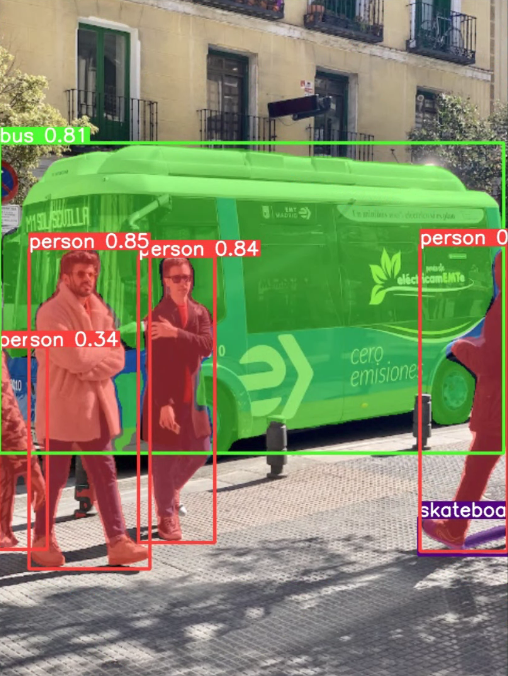
image 1/1 /mnt/f/wsl_file/wsl_ai/yolov8/bus.jpg: 640x480 4 persons, 1 bus, 1 skateboard, 90.4ms
Speed: 3.6ms preprocess, 90.4ms inference, 313.3ms postprocess per image at shape (1, 3, 640, 480)
Results saved to runs/segment/predict
💡 Learn more at https://docs.ultralytics.com/modes/predict
结果保存在当前目录下runs/segment/predict下:
1.2. 模型训练
测试训练coco128-seg.yaml,也可以自行制定数据集训练。
# 简单训练模型,基于预训练模型yolov8n-seg.pt,使用coco128
yolo segment train data=coco128-seg.yaml model=yolov8n-seg.pt epochs=100 imgsz=640

# 对刚训练的模型,进行简单评估
yolo segment val model=runs/segment/train/best.pt
1.3. 模型导出
使用 airockchip/ultralytics_yolov8 导出适合部署到rknpu上的模型,该模型在npu上获得更高的推理效率。
# 在当前目录下,拉取airockchip/ultralytics_yolov8,main分支
git clone https://github.com/airockchip/ultralytics_yolov8.git
cd ultralytics_yolov8

# 修改ultralytics/cfg/default.yaml中model文件路径,可以修改为前面训练出的模型,或者使用预训练模型yolov8n-seg.pt

    # Train settings -------------------------------------------------------------------------------------------------------
    model: ../runs/segment/train/weights/best.pt # (str, optional) path to model file, i.e. yolov8n.pt, yolov8n.yaml
    data:  # (str, optional) path to data file, i.e. coco128.yaml
    epochs: 100  # (int) number of epochs to train for

# 执行python ./ultralytics/engine/exporter.py导出模型
(yolov8) llh@anhao:~/ultralytics_yolov8$ export PYTHONPATH=./
(yolov8) llh@anhao:~/ultralytics_yolov8$ python ./ultralytics/engine/exporter.py
Ultralytics YOLOv8.0.151 🚀 Python-3.8.18 torch-2.1.0+cu121 CPU ()
YOLOv8n-seg summary (fused): 195 layers, 3404320 parameters, 0 gradients, 12.6 GFLOPs

PyTorch: starting from '../runs/segment/train4/weights/best.pt' with input shape (16, 3, 640, 640) BCHW and output shape(s) ((16, 64, 80, 80),
 (16, 80, 80, 80), (16, 1, 80, 80), (16, 32, 80, 80),(16, 64, 40, 40), (16, 80, 40, 40), (16, 1, 40, 40),(16, 32, 40, 40),
  (16, 64, 20, 20), (16, 80, 20, 20), (16, 1, 20, 20), (16, 32, 20, 20), (16, 32, 160, 160)) (6.7 MB)

RKNN: starting export with torch 2.1.0+cu121...

RKNN: feed ../runs/segment/train4/weights/best.onnx to RKNN-Toolkit or RKNN-Toolkit2 to generate RKNN model.
Refer https://github.com/airockchip/rknn_model_zoo/tree/main/models/CV/object_detection/yolo
RKNN: export success ✅ 0.5s, saved as '../runs/segment/train4/weights/best.onnx' (13.0 MB)

Export complete (4.9s)
Results saved to /mnt/f/wsl_file/wsl_ai/yolov8/runs/segment/train4/weights
Predict:         yolo predict task=segment model=../runs/segment/train4/weights/best.onnx imgsz=640
Validate:        yolo val task=segment model=../runs/segment/train4/weights/best.onnx imgsz=640 data=xxx
Visualize:       https://netron.app

# 模型保存在对应目录下(../runs/segment/train/weights/best.onnx),为了便于识别,可以重新命名为yolov8n-seg.onnx
导出的onnx模型,我们可以使用 netron 查看其网络结构。
1.4. 转换成rknn模型
导出的onnx模型,还需要通过toolkit2转换成rknn模型,这里简单编译下模型转换程序将onnx模型转换成rknn模型。
onnx2rknn.py(参考配套例程)
1 2 3 4 5 6 7 8 9 10 11 12 13 14 15 16 17 18 19 20 21 22 23 24 25 26 27 28 29 30 31 32 33 34 35 36 37 38 39 40 41 42 43 44 45 46 47 | if __name__ == '__main__':
model_path, platform, do_quant, output_path = parse_arg()
# Create RKNN object
rknn = RKNN(verbose=False)
# Pre-process config
print('--> Config model')
rknn.config(mean_values=[[0, 0, 0]], std_values=[
[255, 255, 255]], target_platform=platform)
print('done')
# Load model
print('--> Loading model')
ret = rknn.load_onnx(model=model_path)
#ret = rknn.load_pytorch(model=model_path, input_size_list=[[1, 3, 640, 640]])
if ret != 0:
print('Load model failed!')
exit(ret)
print('done')
# Build model
print('--> Building model')
ret = rknn.build(do_quantization=do_quant, dataset=DATASET_PATH)
if ret != 0:
print('Build model failed!')
exit(ret)
print('done')
# Export rknn model
print('--> Export rknn model')
ret = rknn.export_rknn(output_path)
if ret != 0:
print('Export rknn model failed!')
exit(ret)
print('done')
# 精度分析,,输出目录./snapshot
#print('--> Accuracy analysis')
#ret = rknn.accuracy_analysis(inputs=['./subset/000000052891.jpg'])
#if ret != 0:
# print('Accuracy analysis failed!')
# exit(ret)
#print('done')
# Release
rknn.release()
|
拉取配套例程,执行下面命令将onnx模型转换成rknn模型:
# 命令onnx2rknn.py 后面的参数是模型路径 输出目录 量化类型
(toolkit2_1.6) llh@YH-LONG:~/lubancat_ai_manual_code/yolov8/yolov8-seg$ python3 onnx2rknn.py
Usage: python3 onnx2rknn.py [onnx_model_path] [platform] [dtype(optional)] [output_rknn_path(optional)]
   platform choose from [rk3562,rk3566,rk3568,rk3588]
   dtype choose from    [i8, fp]
(toolkit2_1.6) llh@YH-LONG:~/lubancat_ai_manual_code/yolov8/yolov8-seg$ python3 onnx2rknn.py yolov8n_rknnopt.pt rk3588
W __init__: rknn-toolkit2 version: 1.6.0+81f21f4d
--> Config model
done
--> Loading model
W load_onnx: It is recommended onnx opset 19, but your onnx model opset is 12!
W load_onnx: Model converted from pytorch, 'opset_version' should be set 19 in torch.onnx.export for successful convert!
Loading : 100%|████████████████████████████████████████████████| 162/162 [00:00<00:00, 37982.96it/s]
done
--> Building model
W build: found outlier value, this may affect quantization accuracy
const name                        abs_mean    abs_std     outlier value
model.22.cv3.1.1.conv.weight      0.12        0.18        -12.338
GraphPreparing : 100%|██████████████████████████████████████████| 183/183 [00:00<00:00, 5341.05it/s]
Quantizating : 100%|██████████████████████████████████████████████| 183/183 [00:05<00:00, 30.75it/s]
# ....省略....
done
--> Export rknn model
done
转换成rknn模型后,我们使用toolkit2连接板卡简单测试下模型,或者进行内存、性能评估等等。
test.py(参考配套例程)
1 2 3 4 5 6 7 8 9 10 11 12 13 14 15 16 17 | if __name__ == '__main__':
rknn = RKNN()
rknn.list_devices()
# 加载rknn模型
rknn.load_rknn(path=rknn_model_path)
# 设置运行环境,目标默认是rk3588
ret = rknn.init_runtime(target=target, device_id=device_id)
# 输入图像
img_src = cv2.imread(img_path)
src_shape = img_src.shape[:2]
img, ratio, (dw, dh) = letter_box(img_src, IMG_SIZE)
img = cv2.cvtColor(img, cv2.COLOR_BGR2RGB)
#img = cv2.resize(img_src, IMG_SIZE)
|
通过usb或者网线连接板卡,确认adb连接成功,在板卡上执行rknn_server命令,开启rknn_server,在PC端运行test.py。
(toolkit2_1.6) llh@YH-LONG:~/lubancat_ai_manual_code/yolov8/yolov8-seg$ python3 test.py
W __init__: rknn-toolkit2 version: 1.6.0+81f21f4d
*************************
all device(s) with adb mode:
192.168.103.152:5555
*************************
I NPUTransfer: Starting NPU Transfer Client, Transfer version 2.1.0 (b5861e7@2020-11-23T11:50:36)
D RKNNAPI: ==============================================
D RKNNAPI: RKNN VERSION:
D RKNNAPI:   API: 1.6.0 (535b468 build@2023-12-11T09:05:46)
D RKNNAPI:   DRV: rknn_server: 1.5.0 (17e11b1 build: 2023-05-18 21:43:39)
D RKNNAPI:   DRV: rknnrt: 1.6.0 (9a7b5d24c@2023-12-13T17:31:11)
D RKNNAPI: ==============================================
D RKNNAPI: Input tensors:
D RKNNAPI:   index=0, name=images, n_dims=4, dims=[1, 640, 640, 3], n_elems=1228800, size=1228800, w_stride = 0, size_with_stride = 0, fmt=NHWC, type=INT8, qnt_type=AFFINE, zp=-128, scale=0.003922
D RKNNAPI: Output tensors:
D RKNNAPI:   index=0, name=375, n_dims=4, dims=[1, 64, 80, 80], n_elems=409600, size=409600, w_stride = 0, size_with_stride = 0, fmt=NCHW, type=INT8, qnt_type=AFFINE, zp=-61, scale=0.115401
D RKNNAPI:   index=1, name=onnx::ReduceSum_383, n_dims=4, dims=[1, 80, 80, 80], n_elems=512000, size=512000, w_stride = 0, size_with_stride = 0, fmt=NCHW, type=INT8, qnt_type=AFFINE, zp=-128, scale=0.003514
D RKNNAPI:   index=2, name=388, n_dims=4, dims=[1, 1, 80, 80], n_elems=6400, size=6400, w_stride = 0, size_with_stride = 0, fmt=NCHW, type=INT8, qnt_type=AFFINE, zp=-128, scale=0.003540
D RKNNAPI:   index=3, name=354, n_dims=4, dims=[1, 32, 80, 80], n_elems=204800, size=204800, w_stride = 0, size_with_stride = 0, fmt=NCHW, type=INT8, qnt_type=AFFINE, zp=27, scale=0.019863
D RKNNAPI:   index=4, name=395, n_dims=4, dims=[1, 64, 40, 40], n_elems=102400, size=102400, w_stride = 0, size_with_stride = 0, fmt=NCHW, type=INT8, qnt_type=AFFINE, zp=-15, scale=0.099555
D RKNNAPI:   index=5, name=onnx::ReduceSum_403, n_dims=4, dims=[1, 80, 40, 40], n_elems=128000, size=128000, w_stride = 0, size_with_stride = 0, fmt=NCHW, type=INT8, qnt_type=AFFINE, zp=-128, scale=0.003555
D RKNNAPI:   index=6, name=407, n_dims=4, dims=[1, 1, 40, 40], n_elems=1600, size=1600, w_stride = 0, size_with_stride = 0, fmt=NCHW, type=INT8, qnt_type=AFFINE, zp=-128, scale=0.003680
D RKNNAPI:   index=7, name=361, n_dims=4, dims=[1, 32, 40, 40], n_elems=51200, size=51200, w_stride = 0, size_with_stride = 0, fmt=NCHW, type=INT8, qnt_type=AFFINE, zp=30, scale=0.022367
D RKNNAPI:   index=8, name=414, n_dims=4, dims=[1, 64, 20, 20], n_elems=25600, size=25600, w_stride = 0, size_with_stride = 0, fmt=NCHW, type=INT8, qnt_type=AFFINE, zp=-55, scale=0.074253
D RKNNAPI:   index=9, name=onnx::ReduceSum_422, n_dims=4, dims=[1, 80, 20, 20], n_elems=32000, size=32000, w_stride = 0, size_with_stride = 0, fmt=NCHW, type=INT8, qnt_type=AFFINE, zp=-128, scale=0.003813
D RKNNAPI:   index=10, name=426, n_dims=4, dims=[1, 1, 20, 20], n_elems=400, size=400, w_stride = 0, size_with_stride = 0, fmt=NCHW, type=INT8, qnt_type=AFFINE, zp=-128, scale=0.003922
D RKNNAPI:   index=11, name=368, n_dims=4, dims=[1, 32, 20, 20], n_elems=12800, size=12800, w_stride = 0, size_with_stride = 0, fmt=NCHW, type=INT8, qnt_type=AFFINE, zp=43, scale=0.019919
D RKNNAPI:   index=12, name=347, n_dims=4, dims=[1, 32, 160, 160], n_elems=819200, size=819200, w_stride = 0, size_with_stride = 0, fmt=NCHW, type=INT8, qnt_type=AFFINE, zp=-119, scale=0.032336
--> Running model
W inference: The 'data_format' is not set, and its default value is 'nhwc'!
done
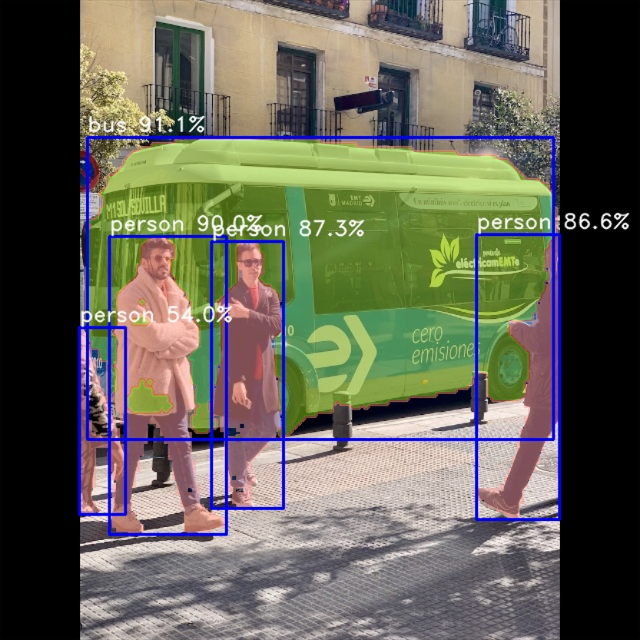
bus  @ (87 137 553 439) 0.911
person @ (108 236 228 537) 0.900
person @ (211 241 283 508) 0.873
person @ (477 232 559 519) 0.866
person @ (79 327 125 514) 0.540
tie @ (248 284 259 310) 0.274
结果保存在result.jpg中。
1.5. 部署到板卡
简单参考 rknn_model_zoo仓库 提供的部署例程,编写一个例程部署yolov8n-seg到板卡。
# 获取配套例程(该例程只支持linux平台,rk356x和rk3588)
cat@lubancat:~/$ git clone https://gitee.com/LubanCat/lubancat_ai_manual_code.git
cat@lubancat:~/$ cd lubancat_ai_manual_code/example/yolov8/yolov8_seg/cpp

# 编译例程,-t指定rk3588
cat@lubancat:~/lubancat_ai_manual_code/example/yolov8/yolov8_seg/cpp$ ./build-linux.sh -t rk3588
./build-linux.sh -t rk3588
===================================
TARGET_SOC=rk3588
INSTALL_DIR=/home/cat/lubancat_ai_manual_code/example/yolov8/yolov8_seg/cpp/install/rk3588_linux
BUILD_DIR=/home/cat/lubancat_ai_manual_code/example/yolov8/yolov8_seg/cpp/build/build_rk3588_linux
CC=aarch64-linux-gnu-gcc
CXX=aarch64-linux-gnu-g++
===================================
-- The C compiler identification is GNU 10.2.1
-- The CXX compiler identification is GNU 10.2.1
-- Detecting C compiler ABI info
-- Detecting C compiler ABI info - done
# 省略....
-- Build files have been written to: /home/cat/yolov8/rknn_model_zoo/examples/yolov8/cpp_seg/build/build_rk3588_linux
Scanning dependencies of target rknn_yolov8_seg_demo
[ 20%] Building CXX object CMakeFiles/rknn_yolov8_seg_demo.dir/rknpu2/yolov8_seg.cc.o
[100%] Built target rknn_yolov8_seg_demo
[100%] Built target rknn_yolov8_seg_demo
Install the project...
# 省略....
切换到当前目录install/rk3588_linux下,然后执行命令:
# ./rknn_yolov8_seg_demo <model_path> <image_path>
cat@lubancat:~/lubancat_ai_manual_code/example/yolov8/yolov8_seg/cpp/install/rk3588_linux$ ./rknn_yolov8_seg_demo ./model/yolov8_seg_rk3588.rknn ./model/bus.jpg
load lable ./model/coco_80_labels_list.txt
model input num: 1, output num: 13
input tensors:
index=0, name=images, n_dims=4, dims=[1, 640, 640, 3], n_elems=1228800, size=1228800, fmt=NHWC, type=INT8, qnt_type=AFFINE, zp=-128, scale=0.003922
output tensors:
index=0, name=375, n_dims=4, dims=[1, 64, 80, 80], n_elems=409600, size=409600, fmt=NCHW, type=INT8, qnt_type=AFFINE, zp=-61, scale=0.115401
index=1, name=onnx::ReduceSum_383, n_dims=4, dims=[1, 80, 80, 80], n_elems=512000, size=512000, fmt=NCHW, type=INT8, qnt_type=AFFINE, zp=-128, scale=0.003514
index=2, name=388, n_dims=4, dims=[1, 1, 80, 80], n_elems=6400, size=6400, fmt=NCHW, type=INT8, qnt_type=AFFINE, zp=-128, scale=0.003540
index=3, name=354, n_dims=4, dims=[1, 32, 80, 80], n_elems=204800, size=204800, fmt=NCHW, type=INT8, qnt_type=AFFINE, zp=27, scale=0.019863
index=4, name=395, n_dims=4, dims=[1, 64, 40, 40], n_elems=102400, size=102400, fmt=NCHW, type=INT8, qnt_type=AFFINE, zp=-15, scale=0.099555
index=5, name=onnx::ReduceSum_403, n_dims=4, dims=[1, 80, 40, 40], n_elems=128000, size=128000, fmt=NCHW, type=INT8, qnt_type=AFFINE, zp=-128, scale=0.003555
index=6, name=407, n_dims=4, dims=[1, 1, 40, 40], n_elems=1600, size=1600, fmt=NCHW, type=INT8, qnt_type=AFFINE, zp=-128, scale=0.003680
index=7, name=361, n_dims=4, dims=[1, 32, 40, 40], n_elems=51200, size=51200, fmt=NCHW, type=INT8, qnt_type=AFFINE, zp=30, scale=0.022367
index=8, name=414, n_dims=4, dims=[1, 64, 20, 20], n_elems=25600, size=25600, fmt=NCHW, type=INT8, qnt_type=AFFINE, zp=-55, scale=0.074253
index=9, name=onnx::ReduceSum_422, n_dims=4, dims=[1, 80, 20, 20], n_elems=32000, size=32000, fmt=NCHW, type=INT8, qnt_type=AFFINE, zp=-128, scale=0.003813
index=10, name=426, n_dims=4, dims=[1, 1, 20, 20], n_elems=400, size=400, fmt=NCHW, type=INT8, qnt_type=AFFINE, zp=-128, scale=0.003922
index=11, name=368, n_dims=4, dims=[1, 32, 20, 20], n_elems=12800, size=12800, fmt=NCHW, type=INT8, qnt_type=AFFINE, zp=43, scale=0.019919
index=12, name=347, n_dims=4, dims=[1, 32, 160, 160], n_elems=819200, size=819200, fmt=NCHW, type=INT8, qnt_type=AFFINE, zp=-119, scale=0.032336
model is NHWC input fmt
model input height=640, width=640, channel=3
scale=1.000000 dst_box=(0 0 639 639) allow_slight_change=1 _left_offset=0 _top_offset=0 padding_w=0 padding_h=0
src width=640 height=640 fmt=0x1 virAddr=0x0x7fa2919040 fd=0
dst width=640 height=640 fmt=0x1 virAddr=0x0x559b7a1520 fd=0
src_box=(0 0 639 639)
dst_box=(0 0 639 639)
color=0x72
rga_api version 1.10.0_[2]
rknn_run
bus @ (87 137 553 439) 0.911
person @ (109 236 226 534) 0.900
person @ (211 241 283 508) 0.873
person @ (476 234 559 519) 0.866
person @ (79 327 125 514) 0.540
rknn run and process use 65.642000 ms
测试yolov8s-seg模型的结果保存在out.jpg,结果如下图所示。







 扫一扫
扫一扫


 1957
1957

 被折叠的 条评论
为什么被折叠?
被折叠的 条评论
为什么被折叠?
 到【灌水乐园】发言





