


点击学习精彩网络技术老师:华为、华三、锐捷、WLAN、IPv6等全套视频课程
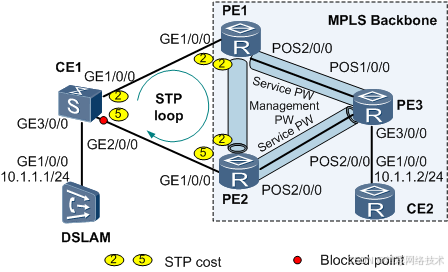
配置CE双归接入PE的E-STP时,在CE1-PE1、CE1-PE2之间的物理链路上以及PE1-PE2之间的管理PW上使能STP。
组网需求
图1是CE双归接入PE的VPLS组网。该组网存在PE3会收到双份对端CE1发送的流量问题。
可以使用以下方案解决上面的问题:
PE1和PE2之间配置管理PW。在CE1-PE1、CE1-PE2之间的物理链路上以及PE1-PE2之间的管理PW上使能STP。通过配置STP优先级和COST值,使PE1作为根桥,PE2作为备份根桥,CE1的GE2/0/0被阻断。从DSLAM过来的流量经CE1-PE1-PE3到达CE2,不会出现双份流量或环路。
| 设备 |
接口 |
IP |
| PE1 |
GE1/0/0 |
-- |
| POS2/0/0 |
192.168.1.1/24 |
|
| Loopback1 |
1.1.1.1/32 |
|
| PE2 |
GE1/0/0 |
-- |
| POS2/0/0 |
172.16.1.1/24 |
|
| Loopback1 |
2.2.2.2/32 |
|
| PE3 |
POS1/0/0 |
192.168.1.2/24 |
| POS2/0/0 |
172.16.1.2/24 |
|
| GE3/0/0 |
-- |
|
| Loopback1 |
3.3.3.3/32 |
配置思路
采用如下的思路配置CE双归的E-STP示例的基本功能:
在PE设备上运行IGP协议,使VPLS骨干网络内的各设备能互通。
在VPLS骨干网络上配置MPLS基本能力,建立LDP LSP隧道。
PE之间建立VPLS连接。包括:
-
- 创建业务VSI,负责用户业务报文的交换。
- 创建管理VSI,负责通过管理PW传递STP报文。
配置STP,包括:
-
- 在PE之间的管理PW上,启用STP。
- 在CE之间以及CE和PE之间的物理链路上,启用STP。
通过优先级配置,确保PE1为根桥,PE2为备份根桥。
数据准备
为完成此配置例,需准备如下的数据:
接口IP地址
运行IS-IS协议所需的数据
MPLS LSR-ID(作为MPLS对等体地址)
UPE和PE3的MPLS LSR-ID
VSI名称和VSI ID
STP域名、优先级
操作步骤
- 配置VPLS骨干网接口IP地址和IGP协议,使PE互通。本例IGP使用OSPF协议。配置步骤略。
- 使能MPLS,配置LDP LSP
在MPLS骨干网上配置MPLS基本能力。PE之间建立动态LDP LSP。
# 配置PE1。
[PE1] mpls lsr-id 1.1.1.1
[PE1] mpls
[PE1-mpls] quit
[PE1] mpls ldp
[PE1-mpls-ldp] quit
[PE1] interface pos 2/0/0
[PE1-Pos2/0/0] mpls
[PE1-Pos2/0/0] mpls ldp
[PE1-Pos2/0/0] quit
# 配置PE2。
[PE2] mpls lsr-id 2.2.2.2
[PE2] mpls
[PE2-mpls] quit
[PE2] mpls ldp
[PE2-mpls-ldp] quit
[PE2] interface pos 2/0/0
[PE2-Pos2/0/0] mpls
[PE2-Pos2/0/0] mpls ldp
[PE2-Pos2/0/0] quit
# 配置PE3。
[PE3] mpls lsr-id 3.3.3.3
[PE3] mpls
[PE3-mpls] quit
[PE3] mpls ldp
[PE3-mpls-ldp] quit
[PE3] interface pos 1/0/0
[PE3-Pos1/0/0] mpls
[PE3-Pos1/0/0] mpls ldp
[PE3-Pos1/0/0] quit
[PE3] interface pos 2/0/0
[PE3-Pos2/0/0] mpls
[PE3-Pos2/0/0] mpls ldp
[PE3-Pos2/0/0] quit
# PE1和PE2之间需要配置Remote Peer,以便建立管理PW。
# 配置PE1。
[PE1] mpls ldp remote-peer 2.2.2.2
[PE1-mpls-ldp-remote-2.2.2.2] remote-ip 2.2.2.2
[PE1-mpls-ldp-remote-2.2.2.2] quit
# 配置PE2。
[PE2] mpls ldp remote-peer 1.1.1.1
[PE2-mpls-ldp-remote-1.1.1.1] remote-ip 1.1.1.1
[PE2-mpls-ldp-remote-1.1.1.1] quit
以PE3为例:
<PE3> display mpls ldp session
LDP Session(s) in Public Network
Codes: LAM(Label Advertisement Mode), SsnAge Unit(DDDD:HH:MM)
A '*' before a session means the session is being deleted.
------------------------------------------------------------------------------
PeerID Status LAM SsnRole SsnAge KASent/Rcv
------------------------------------------------------------------------------
1.1.1.1:0 Operational DU Active 000:00:08 34/34
2.2.2.2:0 Operational DU Active 000:00:08 34/34
------------------------------------------------------------------------------
TOTAL: 2 session(s) Found.
- 在PE上使能MPLS L2VPN
# 配置PE1。
[PE1] mpls l2vpn
# 配置PE2。
[PE2] mpls l2vpn
# 配置PE32。
[PE3] mpls l2vpn
- 配置VPLS
配置管理VSI
# 配置PE1。
[PE1] vsi m1 static
[PE1-vsi-m1] pwsignal ldp
[PE1-vsi-m1-ldp] vsi-id 100
[PE1-vsi-m1-ldp] peer 2.2.2.2
[PE1-vsi-m1-ldp] quit
[PE1-vsi-m1] admin-vsi
[PE1-vsi-m1] quit
# 配置PE2。
 最低0.47元/天 解锁文章






 扫一扫
扫一扫


 被折叠的 条评论
为什么被折叠?
被折叠的 条评论
为什么被折叠?
 到【灌水乐园】发言





