



How to Integrate a 3rd party SDK into Plugin-X
Introduction to Plugin-x framework
The core code of plugin-x is in directory protocols.
There are four protocols : ProtocolAds, ProtocolAnalytics, ProtocolIAP, ProtocolSocial.
It will be easy if your SDK fits into one of them.
You don't need to write any C++ code. We have done it for you in the plugin-x core module. What you need to do is :
- New a android/iOS project.
- Write Java/Obj-C code to implement the interface/protocol we defined.
Plugin Folder Structure
The folder structure of a plugin looks like this:

- proj.android : The android project directory of the plugin.
-
proj.ios : The iOS project directory of the plugin.
Note : The publish tools depends on this directory structure to work.
Implementing the Plugin
Here is the guide to implementing the plugin on android and iOS
Android
Import libPluginProtocols form protocols/proj.android.
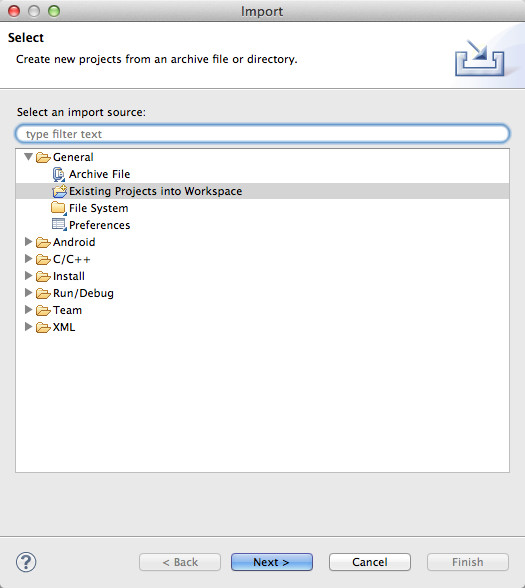
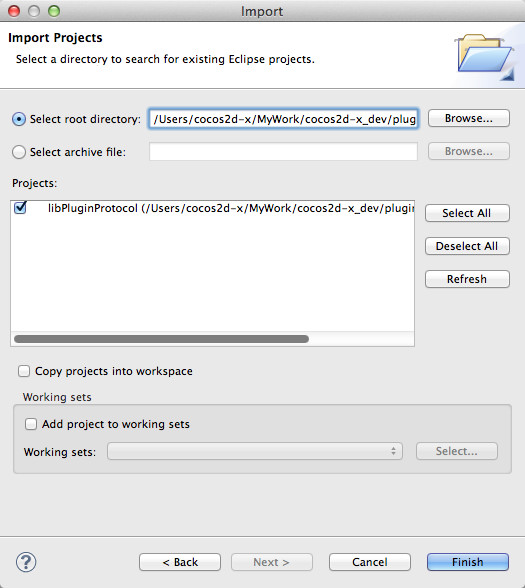
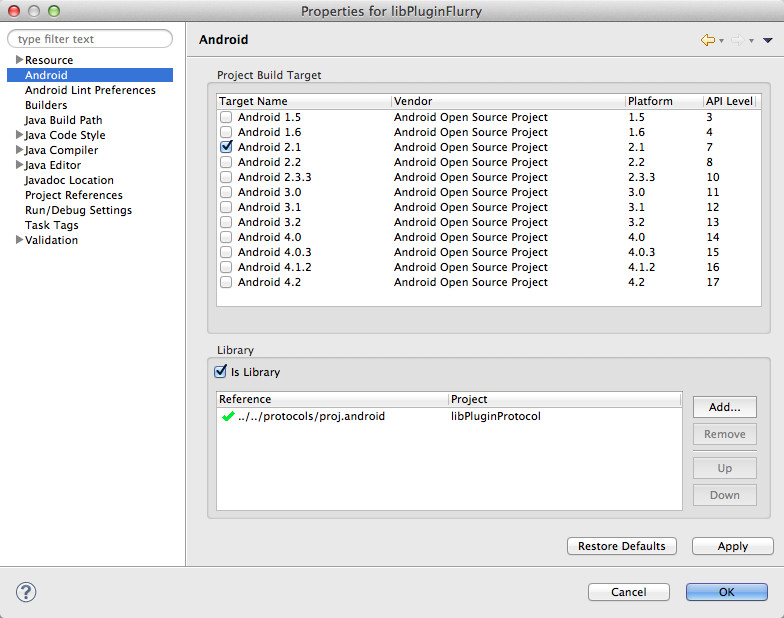
Create a new android library project
And make it depends on project libPluginProtocol.
The project directory looks like this :
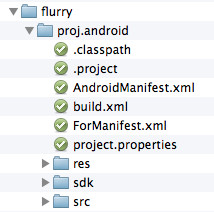
- build.xml : Used by publish tools. Can copy from other plugins, and modify the project name. For example:
1 2 3 4 | <?xml version="1.0" encoding="UTF-8"?> <project name="libPluginFlurry" default="plugin-publish"> ... </project> |
- ForManifest.xml : Used by
tools/gameDevGuide.sh. If your plugin need activity declaration or user permission inAndroidManifest.xml. Add them to this file. - sdk : Place .jar files of the third party SDK here.
- src : Place the java code here. You must write a class implement the relevant interface. It must be in package org.cocos2dx.plugin.
Note: an implementation class must not implement more than one interface.
Implementing the plugin class
The implementation class need a constructor with Context parameter. For example:
1 2 3 4 5 6 7 | package org.cocos2dx.plugin; public class AnalyticsFlurry implements InterfaceAnalytics { ... public AnalyticsFlurry(Context context) { mContext = context; } } |
Custom method
You can write your custom methods if you want.
We have implement simple reflection in C++ code. Game developers can invoke the custom methods by name.
There are some rules to follow in order to keep it working correctly:
The custom methods can have 0 or 1 parameter. Wrap the parameters into a JSONObject if you want to pass more than one parameters.
And the parameters will be passed with key "Param1", "Param2" ... You should make game developers know how to pass parameters. For example:
1 2 3 4 | // C++ code in game, developer invoke method like this: PluginParam event1("book"); PluginParam dura1(12000); g_pAnalytics->callFuncWithParam("logEventWithDuration", &event1, &dura1, NULL); |
1 2 3 4 5 6 7 8 9 10 11 12 | // Java code in plugin, the method of plugin implement like this: protected void logEventWithDuration(JSONObject eventInfo) { LogD("logEventWithDuration invoked! event : " + eventInfo.toString()); if (!isValid()) return; try{ String eventId = eventInfo.getString("Param1"); // get param eventID by key "Param1" int duration = eventInfo.getInt("Param2"); // get param duration by key "Param2" MobclickAgent.onEventDuration(mContext, eventId, duration); } catch(Exception e){ LogE("Exception in logEventWithDuration", e); } } |
Note: parameter types and return value types are limited
Supported parameter types:
int,float,boolean,String,JSONObject.Supported Return types:
int,float,boolean,String.
iOS
-
New a library project. Modify the header search path :
protocols/platform/ios -
Write a class implements the relevant protocol. For example:
@interface AnalyticsFlurry : NSObject
{

}
- You can write your custom methods if you want. Also there are some rules to keep it work all right:
- The custom methods can have 0 or 1 parameter. If the method need more than one parameter, you should use parameter with NSMutableDictionary* type.And the parameters will be passed with key “Param1”, “Param2” … You should make game developers know how to pass parameters. For example:
1 2 3 4 5 6 7 8 9 10 11 12 13 14 | // C++ code in game, developer invoke method like this: PluginParam event1("book"); PluginParam dura1(12000); g_pAnalytics->callFuncWithParam("logEventWithDuration", &event1, &dura1, NULL); // Objective-C code in plugin. The method implement like this: - (void) logEventWithDuration: (NSMutableDictionary*) params { OUTPUT_LOG(@"Umeng logEventWithDuration invoked(%@)", [params debugDescription]); NSString* eventId = (NSString*) [params objectForKey:@"Param1"]; // get param eventID by key "Param1" NSNumber* duration = (NSNumber*) [params objectForKey:@"Param2"]; // get param duration by key "Param2" long numDur = [duration longValue]; [MobClick event:eventId durations:numDur]; } |
-
Because of the reflection limited of Objective-C. Parameters of methods must be id type.
So the custom methods can only get parameters with type id. The conversion list:Developer Pass Type Custom Method get Type int NSNumber float NSNumber bool NSNumber const char* NSString* std::map<std::string, std::string> NSMutableDictionary -
You can make your custom methods return some basic type value. Now support return value with type int, float, BOOL, NSString**.
Also limited by the reflection of Objective-C. The custom methods must return value with type**id**. The conversion list:Developer get Type Plugin return Type int NSNumber float NSNumber bool NSNumber const char* NSString
Compile the Plugin
- Modify the file
tools/config.sh. Add plugin directory name into the variable $ALL_PLUGINS.
1 | export ALL_PLUGINS=(“protocols” “flurry” “umeng” “alipay” “nd91”) |
- Run the
tools/publish.shscript. Then the plugin will be compiled.
http://www.cocos2d-x.org/wiki/How_to_Integrate_a_3rd_party_SDK_into_Plugin-X





 扫一扫
扫一扫


 7349
7349

 被折叠的 条评论
为什么被折叠?
被折叠的 条评论
为什么被折叠?
 到【灌水乐园】发言





