





1.获取数据
略
2.绘图
import pandas as pd
import matplotlib.pyplot as plt
import seaborn as sns
import numpy as np

from matplotlib.ticker import MultipleLocator

# 设置中文字体
plt.rcParams['font.sans-serif'] = ['SimHei']
plt.rcParams['axes.unicode_minus'] = False


# 如果数据中有千位分隔符,需要先清理数据
def clean_numeric_column(series):
    """清理带有千位分隔符的数值列"""
    return pd.to_numeric(series.astype(str).str.replace(',', ''), errors='coerce')

def draw_amt_pe(data, year=2025):
	# 清理数据 - 去除千位分隔符并转换为数值
	data['szse_amount'] = clean_numeric_column(data['szse_amount'])
	data['sse_amount'] = clean_numeric_column(data['sse_amount'])
	data['sse_pe'] = clean_numeric_column(data['sse_pe'])
	data['szse_pe'] = clean_numeric_column(data['szse_pe'])
	data['date'] = pd.to_datetime(data['date'])
	#data['日期'] = pd.to_datetime(data['date'])
	#data.set_index('日期', inplace=True)

	# 计算总成交量
	data['total_amount'] = data['sse_amount'] + data['szse_amount']


	# 创建图表和双Y轴
	fig, ax1 = plt.subplots(figsize=(12, 6))

	# 1.绘制成交量柱状图(左侧Y轴)
	ax1.bar(data['date'], data['total_amount'], width=1, label='深证成交量(amt)', color='#000000', alpha=0.7)
	ax1.bar(data['date'], data['sse_amount'], width=1, label='上证成交量(amt)', color='#FF0000', alpha=0.7)
	#
	#ax1.bar(data['date'], data['total_amount'], width=1, label='上证成交量(amt)', color='#000000', alpha=0.7)
	#ax1.bar(data['date'], data['szse_amount'], width=1, label='深证成交量(amt)', color='#FF0000', alpha=0.7)
	#
	ax1.set_xlabel('日期')
	ax1.set_ylabel('成交量 (亿元)', color='#000000')
	ax1.tick_params(axis='y', labelcolor='#000000')
	ax1.tick_params(axis='x', labelrotation=45) #x轴日期旋转45度
	#
	# 设置x轴范围:手动
	#x_min = data["date"].min()
	x_min = pd.to_datetime(f'{year}-01-01')
	#x_max = data['date'].max()
	x_max = pd.to_datetime(f'{year}-12-31')
	ax1.set_xlim(x_min, x_max)
	#
	ax1.legend(loc='upper right')

	# 2.创建右侧Y轴用于市盈率
	ax2 = ax1.twinx()
	ax2.plot(data['date'], data['szse_pe'], label='深证市盈率(PE)', color='#aaaaaa', marker='s', linewidth=1, markersize=3)
	ax2.plot(data['date'], data['sse_pe'], label='上证市盈率(PE)', color='#ffaaaa', marker='o', linewidth=1, markersize=3)
	#
	#ax2.plot(data['date'], data['sse_pe'], label='上证市盈率(PE)', color='#aaaaaa', marker='o', linewidth=1, markersize=3)
	#ax2.plot(data['date'], data['szse_pe'], label='深证市盈率(PE)', color='#ff0000', marker='s', linewidth=1, markersize=3)
	ax2.set_ylabel('平均市盈率', color='#ff0000')
	ax2.tick_params(axis='y', labelcolor='#ff0000')
	ax2.legend(loc='upper left')

	# 设置主要刻度间隔
	ax2.yaxis.set_major_locator(MultipleLocator(2))  # 每n个单位一个主要刻度
	y_min = min(data['sse_pe'].min(), data['szse_pe'].min())
	y_max = max(data['sse_pe'].max(), data['szse_pe'].max())
	#ax2.set_ylim(y_min - 0.1, y_max + 0.1)
	#ax2.set_ylim(0, y_max + 2) #从0开始看不到波动;max增加2为显示图例
	ax2.set_ylim(y_min - 1, y_max +2)

	# 添加网格
	ax1.grid(True, alpha=0.3, axis='y')
	#ax2.grid(True, alpha=0.3, axis='y', linestyle='--')

	# 设置标题和调整布局
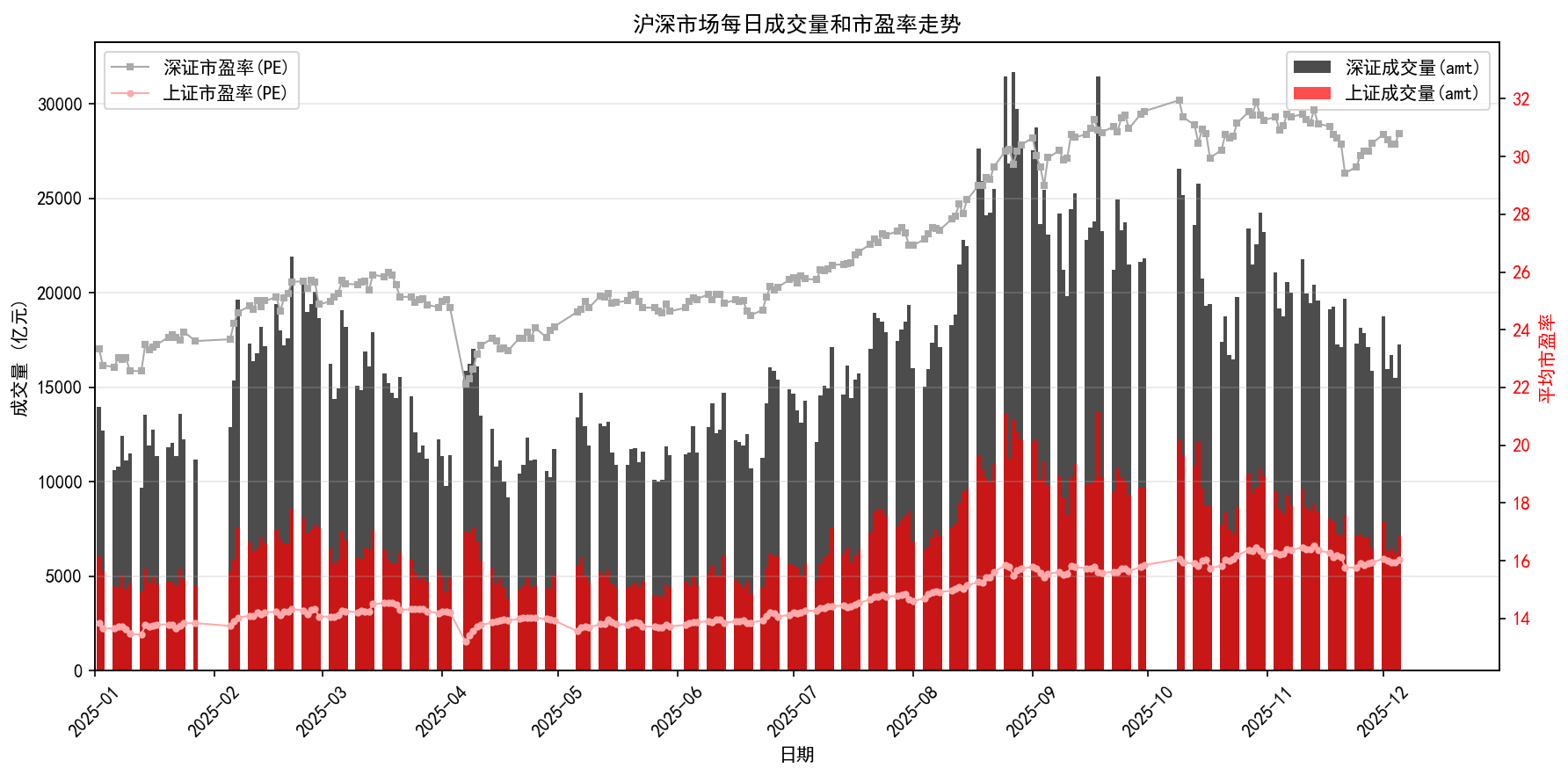
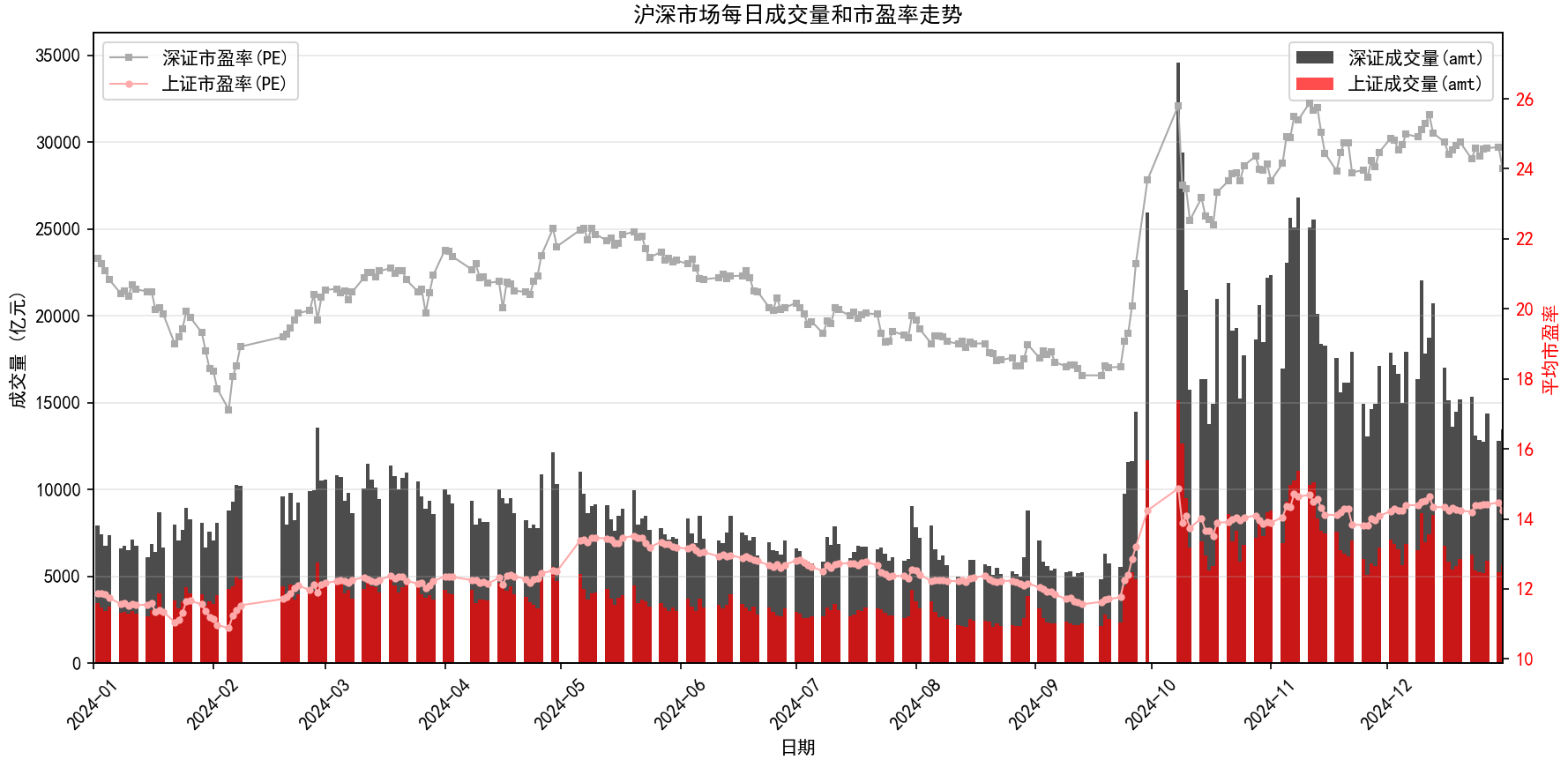
	plt.title('沪深市场每日成交量和市盈率走势')
	plt.xticks(rotation=45)
	plt.tight_layout()

	# 显示图表
	plt.show()


draw_amt_pe(dat)

df_read = pd.read_csv('D://xampp//htdocs//tradingStrategy//data//Amt_PE//stocks_amt_pe_2025.csv')
draw_amt_pe(df_read)
3.效果图





 扫一扫
扫一扫


 被折叠的 条评论
为什么被折叠?
被折叠的 条评论
为什么被折叠?
 到【灌水乐园】发言





