



 本文介绍了一种在Unity中查找特定脚本挂载位置的方法。通过编写两个辅助脚本,可以在选定的游戏对象及其子对象中搜索指定的脚本组件。
在开发中往往会遇到一个问题:不知道整个场景中究竟有哪些物体挂载了某一个脚本。如果挨个查找太麻烦了,下面有一种方法可以快速找到解决这个问题。
在unity的Window里有一项Editor tests runner 选择这个会出现一个窗口:如下图:
然后点击创建脚本会有脚本自动创建在project里的Editor下。之后我们要写两个脚本(如下图)
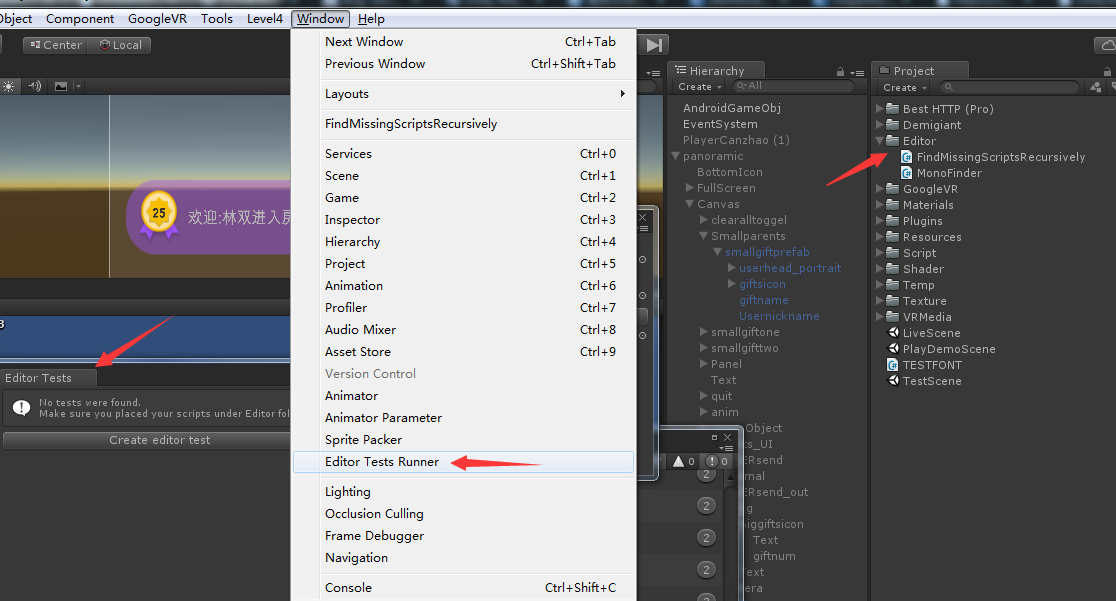
这两个脚本代码,一个是用来盛放要被找的那些物体另个是盛放你要来查找被物体挂载的脚本:
盛放物体的代码:
-
using UnityEngine; -
using UnityEditor; -
public class FindMissingScriptsRecursively : EditorWindow -
{ -
static int go_count = 0, components_count = 0, missing_count = 0; -
[MenuItem("Window/FindMissingScriptsRecursively")] -
public static void ShowWindow() -
{ -
EditorWindow.GetWindow(typeof(FindMissingScriptsRecursively)); -
} -
public void OnGUI() -
{ -
if (GUILayout.Button("Find Missing Scripts in selected GameObjects")) -
{ -
FindInSelected(); -
} -
} -
private static void FindInSelected() -
{ -
GameObject[] go = Selection.gameObjects; -
go_count = 0; -
components_count = 0; -
missing_count = 0; -
foreach (GameObject g in go) -
{ -
FindInGO(g); -
} -
Debug.Log(string.Format("Searched {0} GameObjects, {1} components, found {2} missing", go_count, components_count, missing_count)); -
} -
private static void FindInGO(GameObject g) -
{ -
go_count++; -
Component[] components = g.GetComponents<Component>(); -
for (int i = 0; i < components.Length; i++) -
{ -
components_count++; -
if (components[i] == null) -
{ -
missing_count++; -
string s = g.name; -
Transform t = g.transform; -
while (t.parent != null) -
{ -
s = t.parent.name + "/" + s; -
t = t.parent; -
} -
Debug.Log(s + " has an empty script attached in position: " + i, g); -
} -
} -
// Now recurse through each child GO (if there are any): -
foreach (Transform childT in g.transform) -
{ -
//Debug.Log("Searching " + childT.name + " " ); -
FindInGO(childT.gameObject); -
} -
} -
}
盛放脚本的代码:
-
using UnityEngine; -
using System.Collections; -
using System.Collections.Generic; -
using UnityEditor; -
///////////////////////////////////////////////////////////////////////////// -
//查找节点及所有子节点中,是否有指定的脚本组件 -
///////////////////////////////////////////////////////////////////////////// -
public class MonoFinder : EditorWindow -
{ -
Transform root = null; -
MonoScript scriptObj = null; -
int loopCount = 0; -
List<Transform> results = new List<Transform>(); -
[MenuItem("Level4/Finder/MonoFinder")] -
static void Init() -
{ -
EditorWindow.GetWindow(typeof(MonoFinder)); -
} -
void OnGUI() -
{ -
GUILayout.Label("节点:"); -
root = (Transform)EditorGUILayout.ObjectField(root, typeof(Transform), true); -
GUILayout.Label("脚本类型:"); -
scriptObj = (MonoScript)EditorGUILayout.ObjectField(scriptObj, typeof(MonoScript), true); -
if (GUILayout.Button("Find")) -
{ -
results.Clear(); -
loopCount = 0; -
Debug.Log("开始查找."); -
FindScript(root); -
} -
if (results.Count > 0) -
{ -
foreach (Transform t in results) -
{ -
EditorGUILayout.ObjectField(t, typeof(Transform), false); -
} -
} -
else -
{ -
GUILayout.Label("无数据"); -
} -
} -
void FindScript(Transform root) -
{ -
if (root != null && scriptObj != null) -
{ -
loopCount++; -
Debug.Log(".." + loopCount + ":" + root.gameObject.name); -
if (root.GetComponent(scriptObj.GetClass()) != null) -
{ -
results.Add(root); -
} -
foreach (Transform t in root) -
{ -
FindScript(t); -
} -
} -
} -
}
有了这两个脚本,会发现unity的菜单里会多出一个level4(如图)的选项,然后点击它,会出现一个弹窗。上面那个节点(如图)就是盛放物体的,下面那个脚本类型(如图)就是放脚本的。
例如下面的案例中,我要查找一个名字叫AsyncImageDownloader的脚本在panoramic这个物体里有多少被挂载了。直接把对应的东西拖进去,然后点击find就会发现在userhead_portrait这个子物体里有这个脚本。
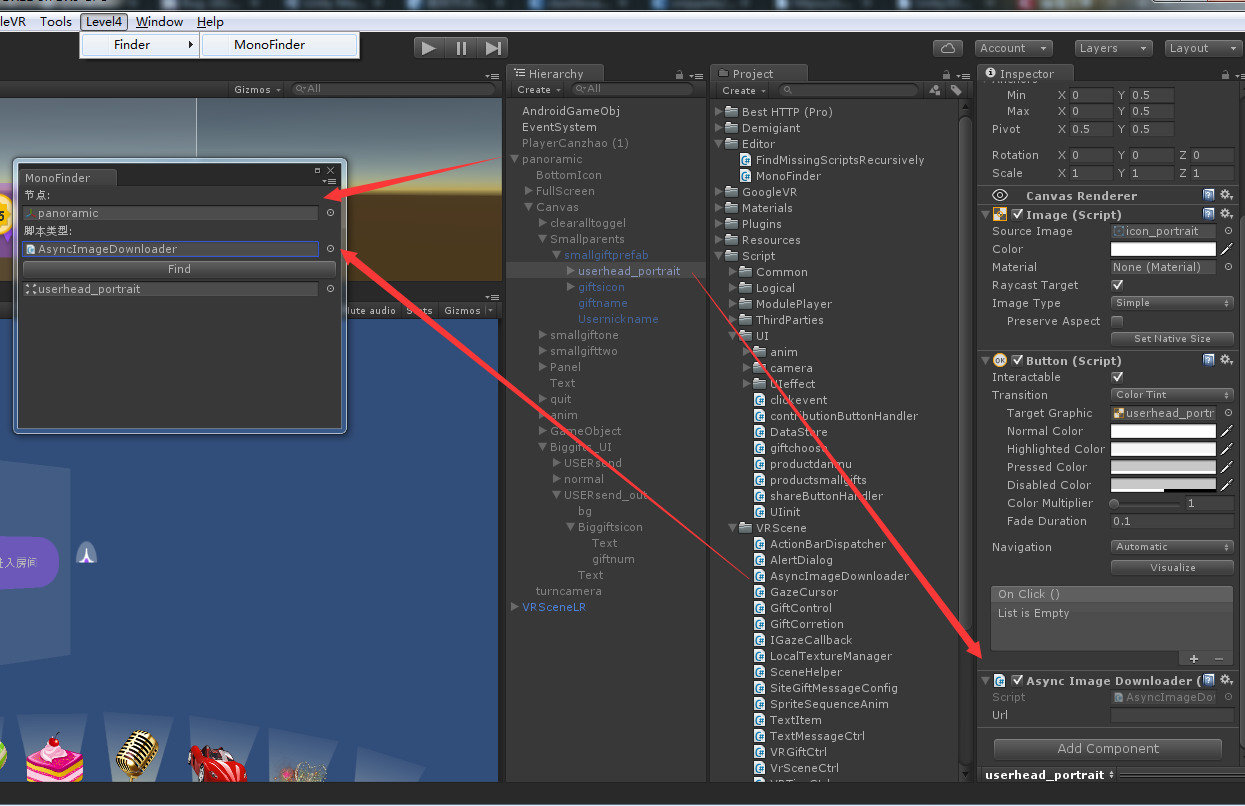
这种方法可以找到所有父物体下的子物体中所有的挂载。它会遍历整个父物体中个的子物体;
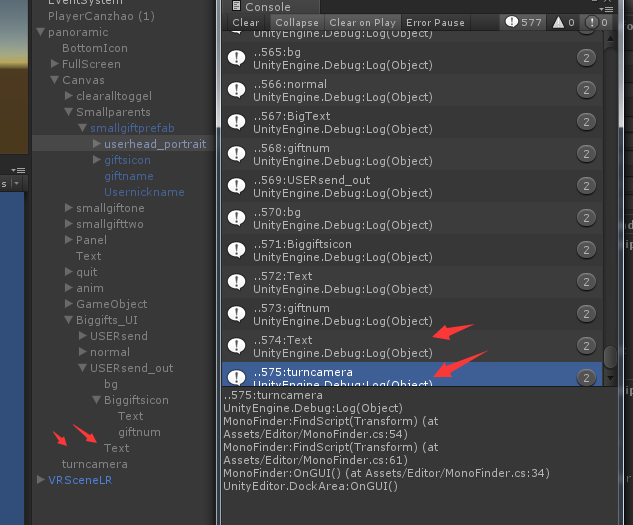
从下图中可以看出在panoramic这个父物体中有575个子物体,它们都被查找了一遍。可见刚才查到只有userhead_portrait上挂载了刚才要找的脚本。






 扫一扫
扫一扫


 578
578

 被折叠的 条评论
为什么被折叠?
被折叠的 条评论
为什么被折叠?
 到【灌水乐园】发言





