



方法1:使用 Lerp(线性插值) + Timeline(时间轴)
适合控制移动时长和曲线效果
该方法需要三个变量:
StartLocation(Vector):起始位置TargetLocation(Vector):目标位置MoveDuration(Float):移动时长(秒)
设置时间轴:
- 添加
Timeline组件,命名为MoveTimeline。 - 在时间轴中添加 浮点轨道(Float Track),命名为
Alpha。 - 编辑曲线:
0.0秒时值为0.0,MoveDuration秒时值为1.0(可调整曲线形状控制缓动效果)。
蓝图逻辑:我这里为了测试方便,直接设置了三个变量的值
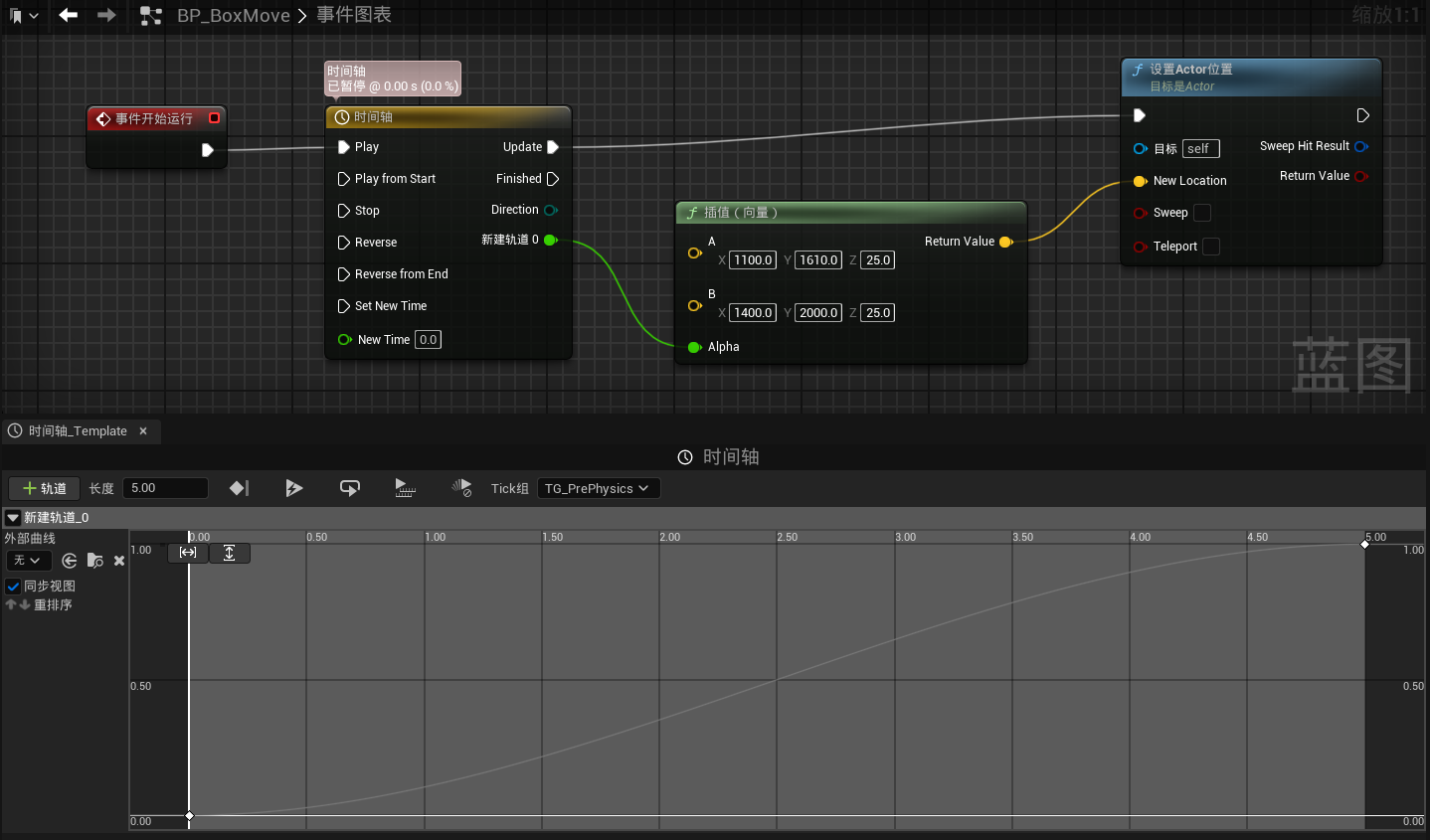
方法2:使用 VInterp To(向量插值)
适合每一帧平滑移动,无需设置时间轴,需要配合Event Tick 一起使用
需要两个变量:
TargetLocation(Vector):目标位置InterpSpeed(Float):插值速度(推荐 5-10)
蓝图逻辑:
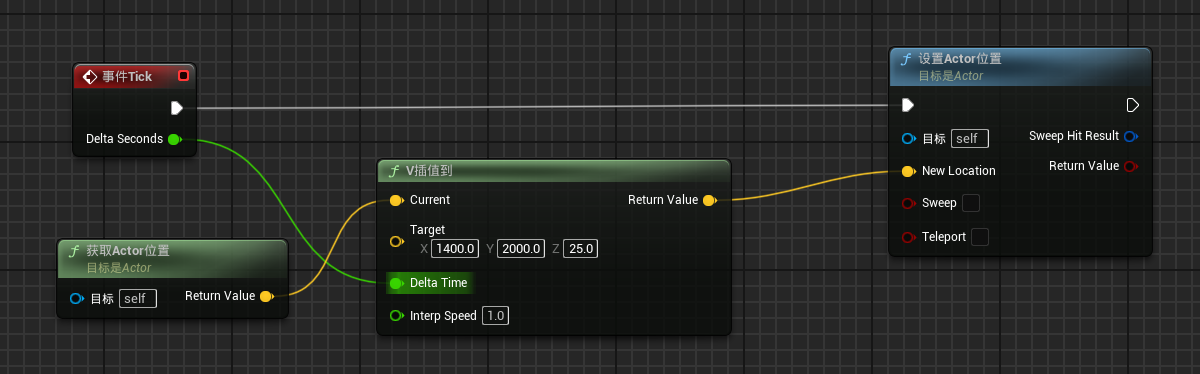
方法3:使用 MoveComponentTo(组件平滑移动)
注意使用此方法移动的是相对位置
蓝图逻辑:
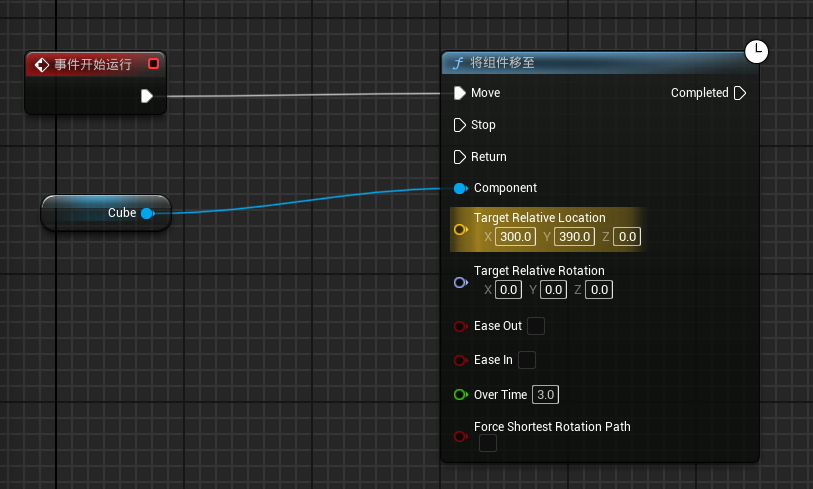
实现物体匀速到达不同长度的目的地
实际上本例子是物体按照样条线上的样条点进行移动
设置的变量:
MoveSpeed:移动速度StopThreshold:距离目的地多远可以停止TargetLocation:目的地CurrentLocation:当前位置isMoving:是否正在移动ToTarget:剩余方向向量 (TargetLocation - CurrentLocation)VTarget:单位方向向量(Normalize(ToTarget))Distance:距离目的地的距离(VSize(ToTarget))
实现步骤:
-
开始移动时,判断是否已经在目的地:若否,执行下面步骤;若是,不执行
-
根据当前位置和目的地位置,得到单位方向向量
VTarget -
计算当前帧需要移动的距离
MoveEachDeltaSeconds:MoveSpeed * DeltaSeconds- 如果当前位置和目标位置小于最小步长,则直接移动到目标位置
- 否则向目标前进一步
CurrentLocation = CurrentLocation + VTarget * MoveEachDeltaSeconds
-
回到步骤一
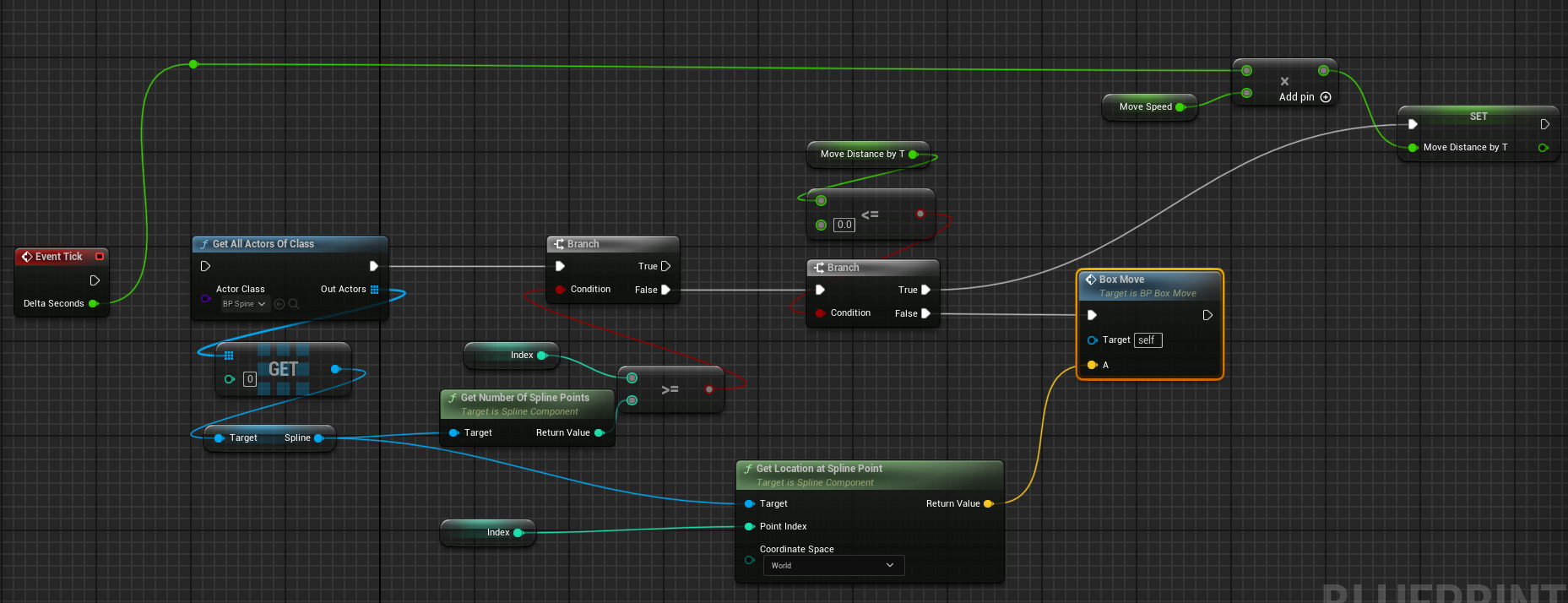
BoxMove函数
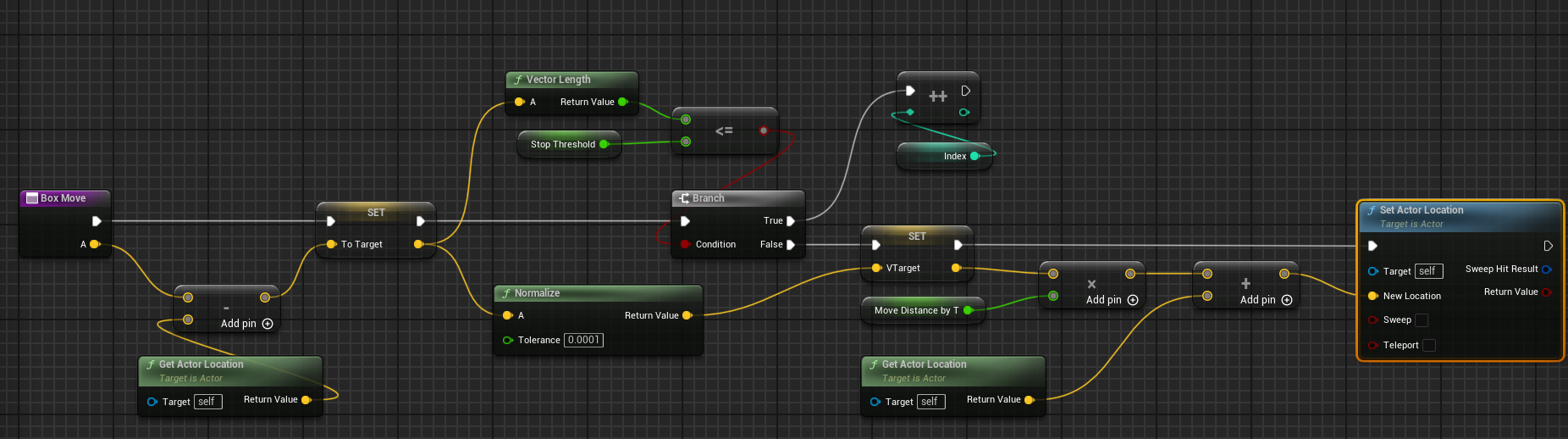
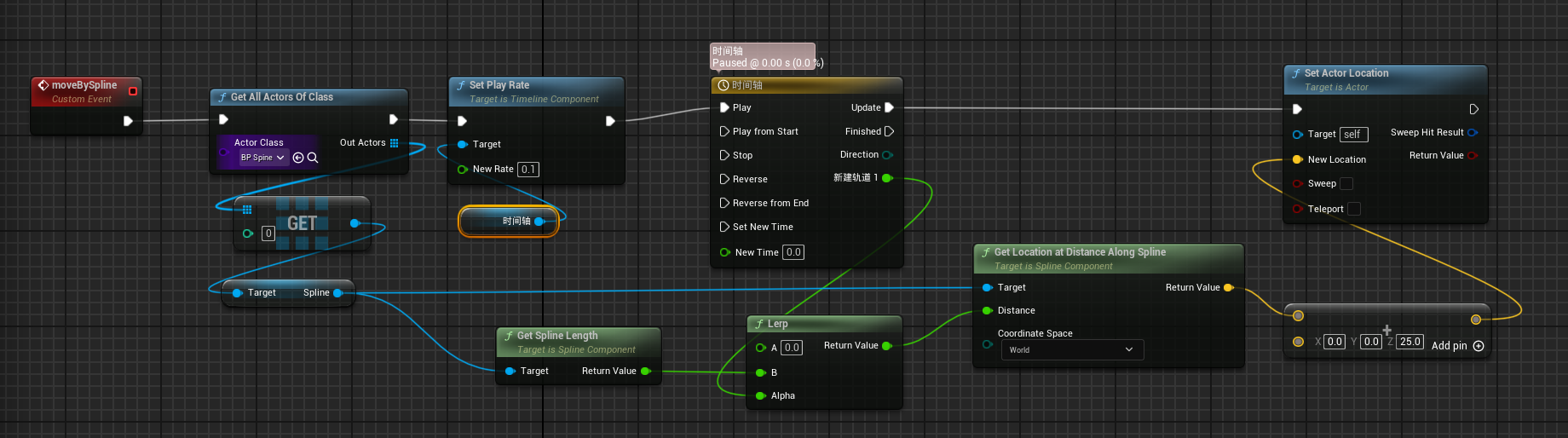
附加:实现物体按照样条线(非样条点)进行移动
蓝图逻辑:
时间轴参照上述方法1设置
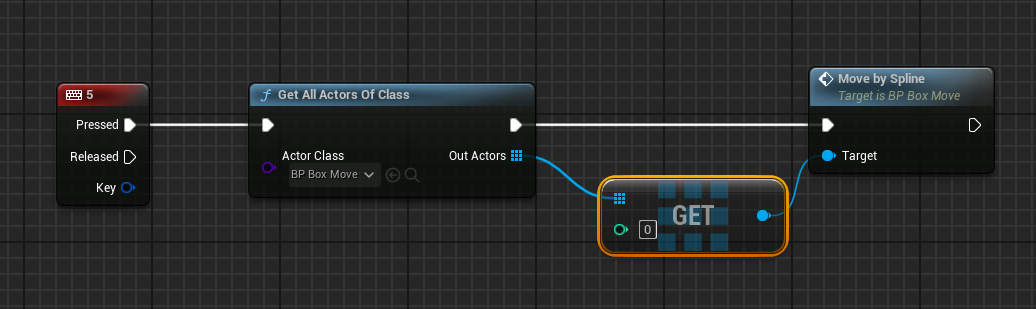
触发函数
使用UEC++实现
UEC++实现时间轴
- 创建一个时间轴组件
- 绑定一个浮点曲线(如果需要的话),用于控制时间轴的变化
- 绑定时间轴更新和结束的委托
- 实现各个函数内的不同需求
创建一个浮点曲线,内部设置同蓝图创建时间轴的浮点曲线设置
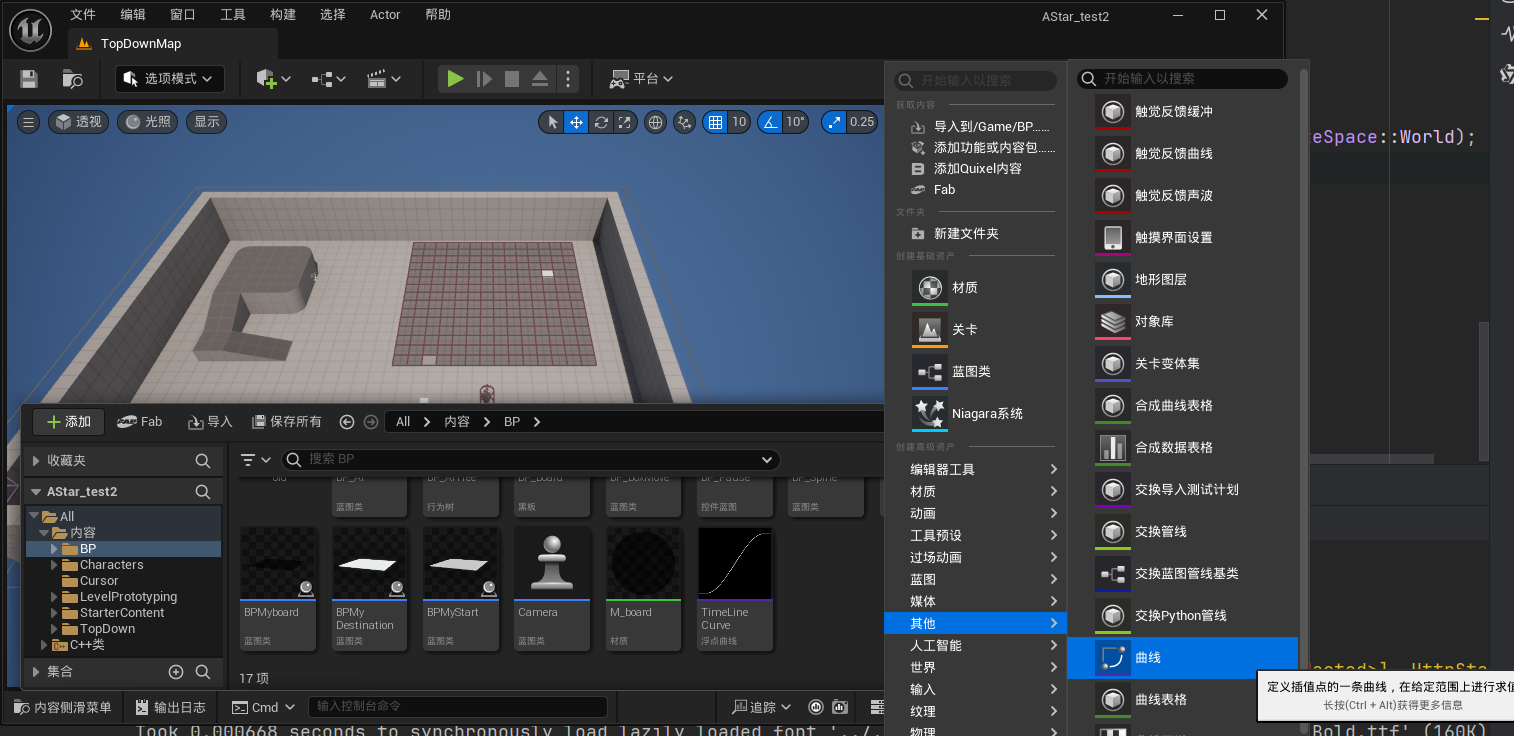
MyTimeLine.h
// Fill out your copyright notice in the Description page of Project Settings.

#pragma once

#include "CoreMinimal.h"
#include "Components/TimelineComponent.h"
#include "GameFramework/Actor.h"
#include "MyTimeLine.generated.h"

DECLARE_DYNAMIC_MULTICAST_DELEGATE_OneParam(FOnTimelineUpdateDelegate, float, Alpha);
UCLASS()
class ASTAR_TEST2_API AMyTimeLine : public AActor
{
	GENERATED_BODY()

public:
	// Sets default values for this actor's properties
	AMyTimeLine();

	// Called every frame
	virtual void Tick(float DeltaTime) override;

	// 时间轴组件
	UPROPERTY(VisibleAnywhere,BlueprintReadWrite, Category = "Timeline")
	UTimelineComponent* MyTimeline;

	// 浮点曲线(用于驱动数值变化)
	UPROPERTY(BlueprintReadWrite,EditAnywhere, Category = "Timeline")
	UCurveFloat* FloatCurve;

	// 时间轴更新事件
	UPROPERTY(BlueprintAssignable, Category = "Timeline")
	FOnTimelineUpdateDelegate FOnTimelineUpdate;

	// 时间轴更新回调
	UFUNCTION()
	void OnTimelineUpdate(float Value);

	// 时间轴完成回调
	UFUNCTION()
	void OnTimelineFinished();

	// 事件轨道回调
	UFUNCTION()
	void OnTimelineEvent();

	// 设置播放速率
	UFUNCTION(BlueprintCallable, Category = "Timeline")
	void SetPlayRate(float NewRate);

	// 控制函数
	void PlayTimeline();

protected:
	// Called when the game starts or when spawned
	virtual void BeginPlay() override;


private:

	// 委托绑定
	FOnTimelineFloat UpdateFunction;
	FOnTimelineEvent FinishedFunction;
};
MyTimeLine.cpp
// Fill out your copyright notice in the Description page of Project Settings.


#include "MyTimeLine.h"


// Sets default values
AMyTimeLine::AMyTimeLine()
{
	// Set this actor to call Tick() every frame.  You can turn this off to improve performance if you don't need it.
	PrimaryActorTick.bCanEverTick = true;

	// 创建时间轴组件
	MyTimeline = CreateDefaultSubobject<UTimelineComponent>(TEXT("MyTimelineComponent"));

	// 初始化委托
	UpdateFunction.BindUFunction(this, FName("OnTimelineUpdate"));
	FinishedFunction.BindUFunction(this, FName("OnTimelineFinished"));

	// 重点,要在此处绑定curve
	static ConstructorHelpers::FObjectFinder<UCurveFloat> CurveAsset(TEXT("CurveFloat'/Game/BP/TimeLineCurve.TimeLineCurve'"));
	if (CurveAsset.Succeeded()) FloatCurve = CurveAsset.Object;
}

// Called when the game starts or when spawned
void AMyTimeLine::BeginPlay()
{
	Super::BeginPlay();

	// 绑定时间轴曲线
	if (FloatCurve) {
		MyTimeline->AddInterpFloat(FloatCurve, UpdateFunction);
		UE_LOG(LogTemp, Warning, TEXT("FloatCurve,存在"));
	}

	// 绑定完成事件
	MyTimeline->SetTimelineFinishedFunc(FinishedFunction);

}

// Called every frame
void AMyTimeLine::Tick(float DeltaTime)
{
	Super::Tick(DeltaTime);

	// 驱动时间轴更新,OnTimelineUpdate得到执行
	if (MyTimeline->IsPlaying()) {
		MyTimeline->TickComponent(DeltaTime, LEVELTICK_TimeOnly, nullptr);
	}
}

void AMyTimeLine::OnTimelineUpdate(float Value)
{
	// 在此处实现基于曲线值的逻辑

	// 通过委托,来实现每次更新时,执行逻辑
	FOnTimelineUpdate.Broadcast(Value);
	UE_LOG(LogTemp, Warning, TEXT("Timeline Value: %f"), Value);
}

void AMyTimeLine::OnTimelineFinished()
{
	UE_LOG(LogTemp, Warning, TEXT("Timeline Finished!"));
}

void AMyTimeLine::OnTimelineEvent()
{
	UE_LOG(LogTemp, Warning, TEXT("Timeline Event Triggered!"));
}

void AMyTimeLine::SetPlayRate(float NewRate)
{
	if (MyTimeline)
	{
		MyTimeline->SetPlayRate(NewRate);
	}
}
void AMyTimeLine::PlayTimeline()
{
	if (MyTimeline) MyTimeline->Play();
}
剩余部分实现:
BoxMove.h
class ASpine;
class USplineComponent;

UCLASS()
class ASTAR_TEST2_API ABoxMove : public AActor
{
	GENERATED_BODY()

public:
	// Sets default values for this actor's properties
	ABoxMove();

	// Called every frame
	virtual void Tick(float DeltaTime) override;

	UFUNCTION()
	void MoveBySpline();

	UFUNCTION()
	void HandleTimelineUpdate(float Alpha);

	AMyTimeLine* TimelineActor;


protected:
	// Called when the game starts or when spawned
	virtual void BeginPlay() override;

private:
	USplineComponent* SplineComp ;

	ASpine* SpineRef = nullptr ;

};
BoxMove.cpp
// Sets default values
ABoxMove::ABoxMove()
{
	// Set this actor to call Tick() every frame.  You can turn this off to improve performance if you don't need it.
	PrimaryActorTick.bCanEverTick = true;
}

// Called when the game starts or when spawned
void ABoxMove::BeginPlay()
{
	Super::BeginPlay();
}

// Called every frame
void ABoxMove::Tick(float DeltaTime)
{
	Super::Tick(DeltaTime);
}

void ABoxMove::MoveBySpline()
{
	// 获取时间轴Actor引用
	TimelineActor = GetWorld()->SpawnActor<AMyTimeLine>();
	if (!TimelineActor) UE_LOG(LogTemp, Warning, TEXT("TimelineActor不存在"));
	if (TimelineActor)
	{
		// 绑定委托
		TimelineActor ->FOnTimelineUpdate.AddDynamic(this, &ABoxMove::HandleTimelineUpdate);
		// 设置播放速度
		TimelineActor->SetPlayRate(0.2f);
		// 播放时间轴
		TimelineActor->PlayTimeline();
	}
	for (TActorIterator<ASpine> It(GetWorld()); It; ++It)
	{
		SpineRef = *It;
	}
	SplineComp = SpineRef -> FindComponentByClass<USplineComponent>();
}

void ABoxMove::HandleTimelineUpdate(float Alpha)
{
	float SplineLength = SplineComp->GetSplineLength();
	double Lerp = UKismetMathLibrary::Lerp(0.0f, SplineLength, Alpha);
	FVector LocationAtDistanceAlongSpline = SplineComp -> GetLocationAtDistanceAlongSpline(Lerp, ESplineCoordinateSpace::World);
	LocationAtDistanceAlongSpline += FVector(0.0f, 0.0f, 25.0f);
	SetActorLocation(LocationAtDistanceAlongSpline);
}





 扫一扫
扫一扫


 5910
5910

 被折叠的 条评论
为什么被折叠?
被折叠的 条评论
为什么被折叠?
 到【灌水乐园】发言





