Autolabor--第三天

博主在使用Autolabor进行自动驾驶研究时遇到了多个技术问题,包括tf树错误、缺少odom到base_link的tf关系、雷达启动失败、换源失败以及rviz无法打开。通过一系列排查和解决步骤,如切换Python环境、调整硬件连接、更新源文件和查找适配驱动,部分问题得到了解决。然而,rviz问题最终被怀疑为驱动问题,但未能找到合适的解决方案。博主计划重新烧录系统镜像以继续解决这一难题。
部署运行你感兴趣的模型镜像

        这两天依旧遇到了一些令人无语的情况。rviz崩了无法启动。

        1. tf树打不开,rqt_tf_tree报错,无法打开。

        解决方法:更改python环境。

                sudo update-alternatives --config python

                选择python2版本才行。


        2. 检查话题为map->odom,baselink->laser,没有odom到base_link。

        gmapping只发布了map到odom的tf关系,导致baselink和odom断连。
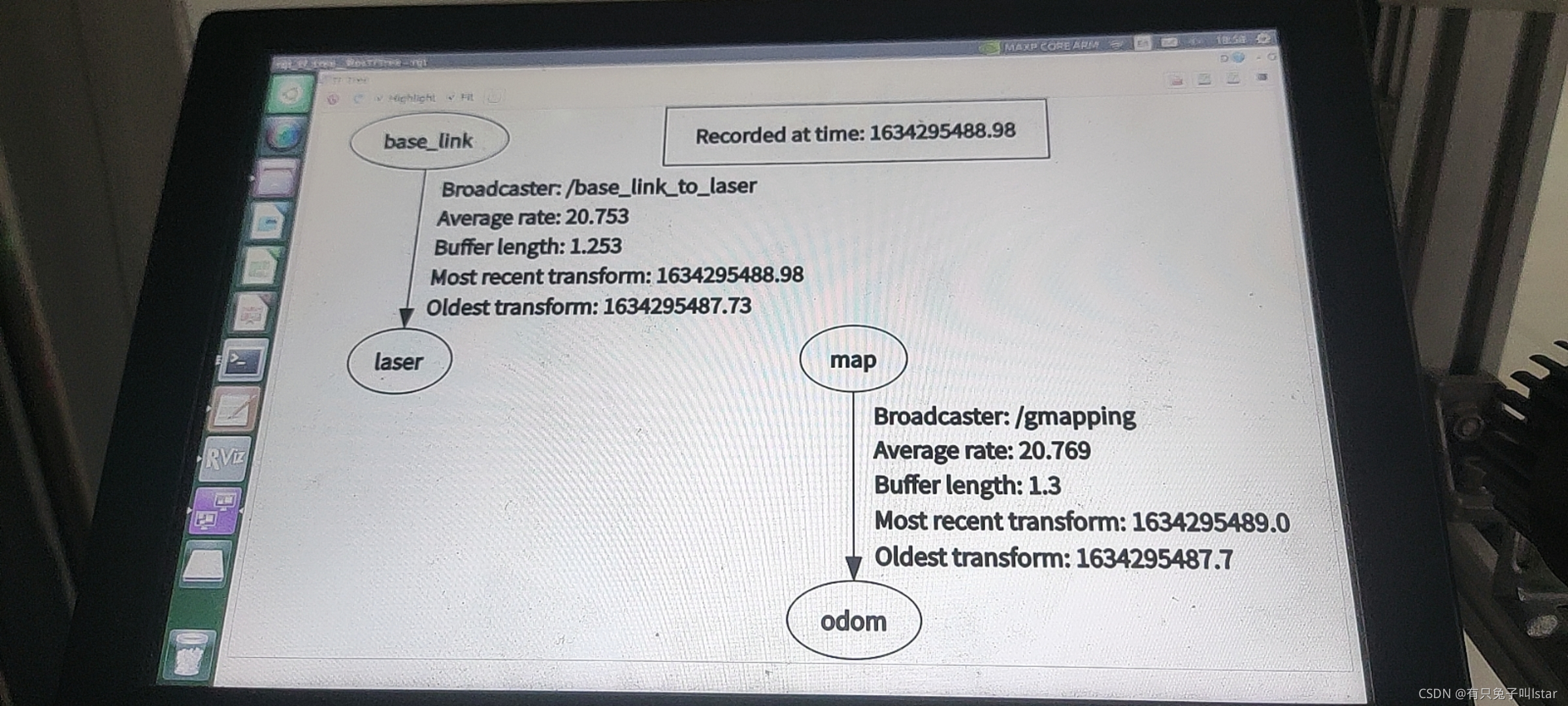
                

        可以查看这篇文章 map,odom,base_link,base_laser坐标系 - 古月居 。检查odom话题发现确实没有发送数据。但是现在因为rviz崩了所以一直没有调试出来,但是今天最后在充电的时候发现,autolabor串口线没插上。。。所以估计是这个导致的。等解决了rviz之后再看吧。

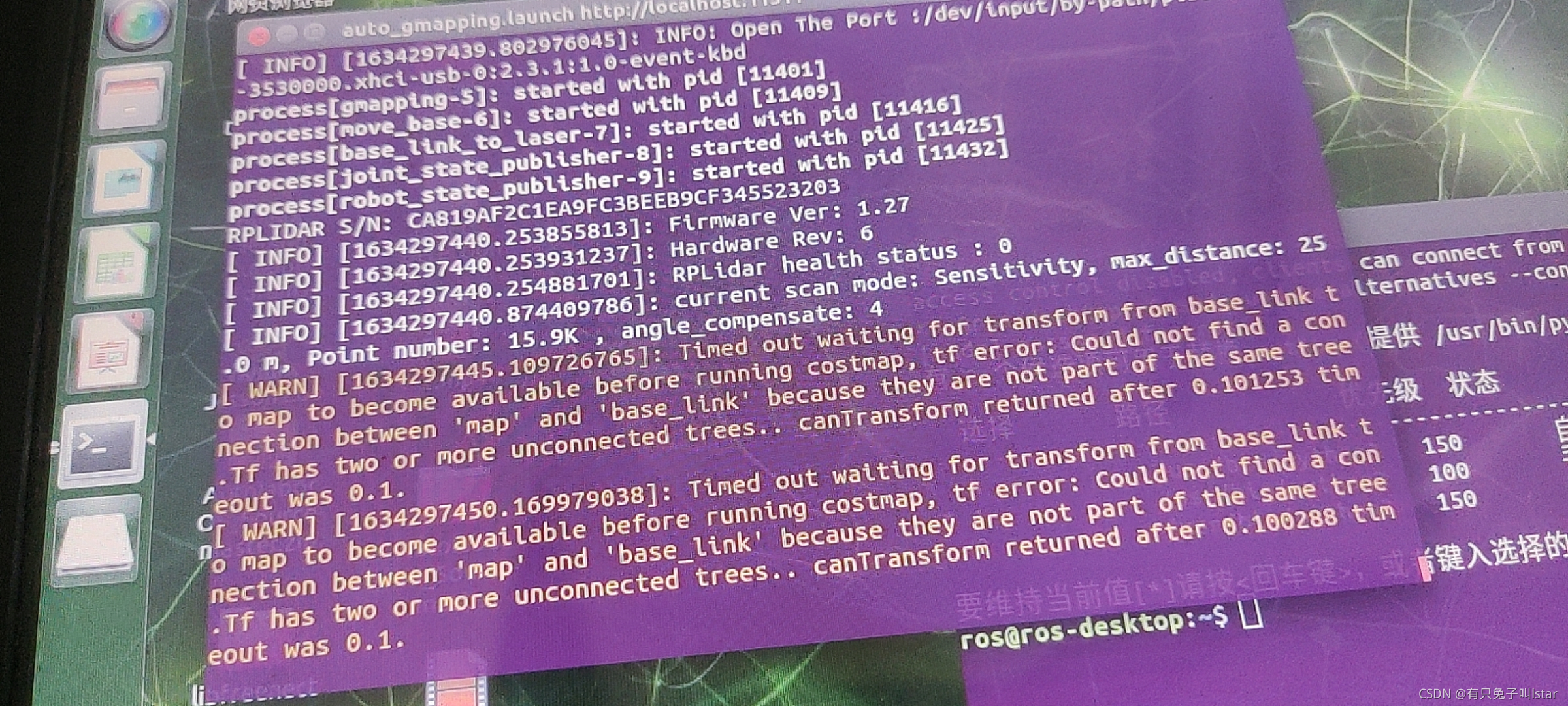
3. cannot start scan 800800,雷达启动失败。

        查了谷歌,最后猜测是布线的问题,把雷达线直接通过扩展坞接到tx2上,而不是扩展坞->扩展坞->雷达,果然解决了。确实是供电的问题。 

4. 换源一直失败,update之后一直报之前源的错误。 

查看这个文章,发现确实还有一个source文件,是ros的source文件,找到他,根据第二篇博客更新他,就好了。执行sudo apt-get update时,不再含有release文件问题解决_A little point的博客-优快云博客 ROS Melodic 版本安装+将ROS的源设置为国内的源_dckwin的博客-优快云博客

5. rviz打不开。这几天一直遇到的大问题。谷歌查了很多,总结猜测是驱动问题,但是尝试了很多方法都没有用。

        首先查看显卡型号lspci发现是空的。

        ubuntu-drivers也是空的。

sudo add-apt-repository ppa:graphics-drivers
sudo apt-get update
#sudo apt-cache search nvidia-*

       我直接apt-get install nvidia*尝试了也不行。

        最后去找additional drivers附加驱动,发现找不到software&update,于是又去查怎么下这个,安装了apt-get install software-center后依旧没有,且执行software-center说命令不存在,于是又查找,最后根据这篇解决的Can't Find the Ubuntu Software Center After upgrade to Ubuntu 18.04 - Ask Ubuntu

        安装上了后打开,发现additional drivers是空的。。。。没有办法选择其他的显卡驱动。。。

        心态崩了。

        询问了师兄师姐之前也没遇到过这个问题,问了autolabor的技术支持,给的建议是重新烧录镜像,本来准备今晚弄完的,结果系统没电了。。。明天再接着弄把。

您可能感兴趣的与本文相关的镜像

Python3.10

Python3.10

Conda
Python

Python 是一种高级、解释型、通用的编程语言,以其简洁易读的语法而闻名,适用于广泛的应用,包括Web开发、数据分析、人工智能和自动化脚本

(base) casbot@casbot:~$ sudo sh -c 'echo "deb [trusted=yes arch=amd64] http://deb.repo.autolabor.com.cn jammy main" > /etc/apt/sources.list.d/autolabor.list' (base) casbot@casbot:~$ sudo apt update Ign:1 http://deb.repo.autolabor.com.cn jammy InRelease Ign:2 http://deb.repo.autolabor.com.cn jammy Release Ign:3 http://deb.repo.autolabor.com.cn jammy/main all Packages Ign:4 http://deb.repo.autolabor.com.cn jammy/main amd64 Packages Ign:5 http://deb.repo.autolabor.com.cn jammy/main Translation-en Hit:6 http://mirrors.tuna.tsinghua.edu.cn/ubuntu-ports jammy InRelease Ign:3 http://deb.repo.autolabor.com.cn jammy/main all Packages Hit:7 http://mirrors.tuna.tsinghua.edu.cn/ubuntu-ports jammy-updates InRelease Ign:4 http://deb.repo.autolabor.com.cn jammy/main amd64 Packages Hit:8 http://mirrors.tuna.tsinghua.edu.cn/ubuntu-ports jammy-backports InRelease Ign:5 http://deb.repo.autolabor.com.cn jammy/main Translation-en Hit:9 http://mirrors.tuna.tsinghua.edu.cn/ubuntu-ports jammy-security InRelease Ign:3 http://deb.repo.autolabor.com.cn jammy/main all Packages Ign:4 http://deb.repo.autolabor.com.cn jammy/main amd64 Packages Ign:10 https://mirrors.ustc.edu.cn/ros/ubuntu jammy InRelease Ign:5 http://deb.repo.autolabor.com.cn jammy/main Translation-en Get:11 http://mirrors.tuna.tsinghua.edu.cn/ros2/ubuntu jammy InRelease [4682 B] Ign:3 http://deb.repo.autolabor.com.cn jammy/main all Packages Err:12 https://mirrors.ustc.edu.cn/ros/ubuntu jammy Release 404 Not Found [IP: 202.141.176.110 443] Hit:4 http://deb.repo.autolabor.com.cn jammy/main amd64 Packages Ign:5 http://deb.repo.autolabor.com.cn jammy/main Translation-en Hit:13 http://packages.ros.org/ros/ubuntu focal InRelease Ign:3 http://deb.repo.autolabor.com.cn jammy/main all Packages Ign:5 http://deb.repo.autolabor.com.cn jammy/main Translation-en Ign:3 http://deb.repo.autolabor.com.cn jammy/main all Packages Ign:5 http://deb.repo.autolabor.com.cn jammy/main Translation-en Ign:3 http://deb.repo.autolabor.com.cn jammy/main all Packages Ign:5 http://deb.repo.autolabor.com.cn jammy/main Translation-en Reading package lists... Done E: The repository 'https://mirrors.ustc.edu.cn/ros/ubuntu jammy Release' does not have a Release file. N: Updating from such a repository can't be done securely, and is therefore disabled by default. N: See apt-secure(8) manpage for repository creation and user configuration details. (base) casbot@casbot:~$ # 临时禁用问题源 sudo mv /etc/apt/sources.list.d/autolabor.list /tmp/ sudo apt update # 重新添加源(使用备用地址) sudo sh -c 'echo "deb [trusted=yes] https://mirror.autolabor.com.cn/ros-noetic jammy main" > /etc/apt/sources.list.d/autolabor.list' Hit:1 http://mirrors.tuna.tsinghua.edu.cn/ubuntu-ports jammy InRelease Hit:2 http://mirrors.tuna.tsinghua.edu.cn/ubuntu-ports jammy-updates InRelease Hit:3 http://mirrors.tuna.tsinghua.edu.cn/ubuntu-ports jammy-backports InRelease Hit:4 http://mirrors.tuna.tsinghua.edu.cn/ubuntu-ports jammy-security InRelease Ign:5 https://mirrors.ustc.edu.cn/ros/ubuntu jammy InRelease Get:6 http://mirrors.tuna.tsinghua.edu.cn/ros2/ubuntu jammy InRelease [4682 B] Err:7 https://mirrors.ustc.edu.cn/ros/ubuntu jammy Release 404 Not Found [IP: 202.141.176.110 443] Hit:8 http://packages.ros.org/ros/ubuntu focal InRelease Reading package lists... Done E: The repository 'https://mirrors.ustc.edu.cn/ros/ubuntu jammy Release' does not have a Release file. N: Updating from such a repository can't be done securely, and is therefore disabled by default. N: See apt-secure(8) manpage for repository creation and user configuration details. (base) casbot@casbot:~$ sudo apt install ros-noetic-autolabor -y Reading package lists... Done Building dependency tree... Done Reading state information... Done E: Unable to locate package ros-noetic-autolabor (base) casbot@casbot:~$ sudo apt update && sudo apt install -y \ python3 python3-pip git cmake build-essential \ libboost-all-dev libeigen3-dev Ign:1 https://mirror.autolabor.com.cn/ros-noetic jammy InRelease Hit:2 http://mirrors.tuna.tsinghua.edu.cn/ubuntu-ports jammy InRelease Hit:3 http://mirrors.tuna.tsinghua.edu.cn/ubuntu-ports jammy-updates InRelease Hit:4 http://mirrors.tuna.tsinghua.edu.cn/ubuntu-ports jammy-backports InRelease Ign:5 https://mirrors.ustc.edu.cn/ros/ubuntu jammy InRelease Hit:6 http://mirrors.tuna.tsinghua.edu.cn/ubuntu-ports jammy-security InRelease Err:7 https://mirrors.ustc.edu.cn/ros/ubuntu jammy Release 404 Not Found [IP: 202.141.176.110 443] Get:8 http://mirrors.tuna.tsinghua.edu.cn/ros2/ubuntu jammy InRelease [4682 B] Hit:9 http://packages.ros.org/ros/ubuntu focal InRelease Ign:1 https://mirror.autolabor.com.cn/ros-noetic jammy InRelease Ign:1 https://mirror.autolabor.com.cn/ros-noetic jammy InRelease Err:1 https://mirror.autolabor.com.cn/ros-noetic jammy InRelease Could not resolve 'mirror.autolabor.com.cn' Reading package lists... Done E: The repository 'https://mirrors.ustc.edu.cn/ros/ubuntu jammy Release' does not have a Release file. N: Updating from such a repository can't be done securely, and is therefore disabled by default. N: See apt-secure(8) manpage for repository creation and user configuration details.
最新发布
07-23
评论
添加红包

请填写红包祝福语或标题

红包个数最小为10个

红包金额最低5元

当前余额3.43前往充值 >
需支付:10.00
成就一亿技术人!
领取后你会自动成为博主和红包主的粉丝 规则
hope_wisdom
发出的红包
实付
使用余额支付
点击重新获取
扫码支付
钱包余额 0

抵扣说明:

1.余额是钱包充值的虚拟货币,按照1:1的比例进行支付金额的抵扣。
2.余额无法直接购买下载,可以购买VIP、付费专栏及课程。

余额充值