



1 简介
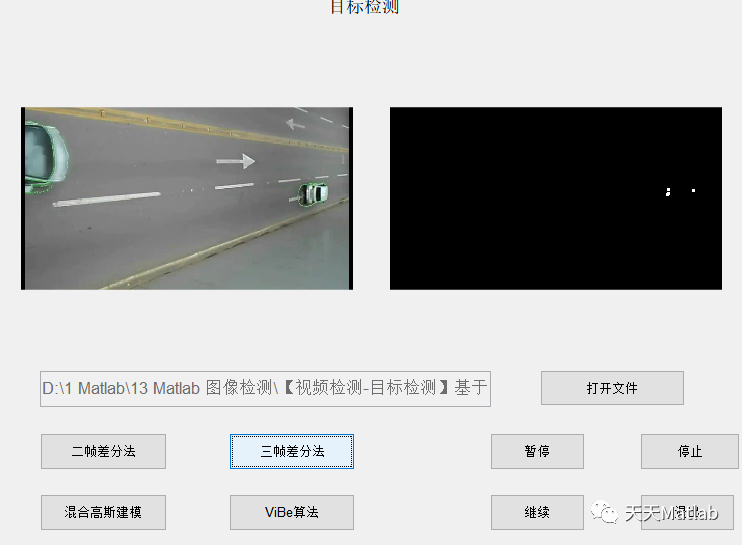
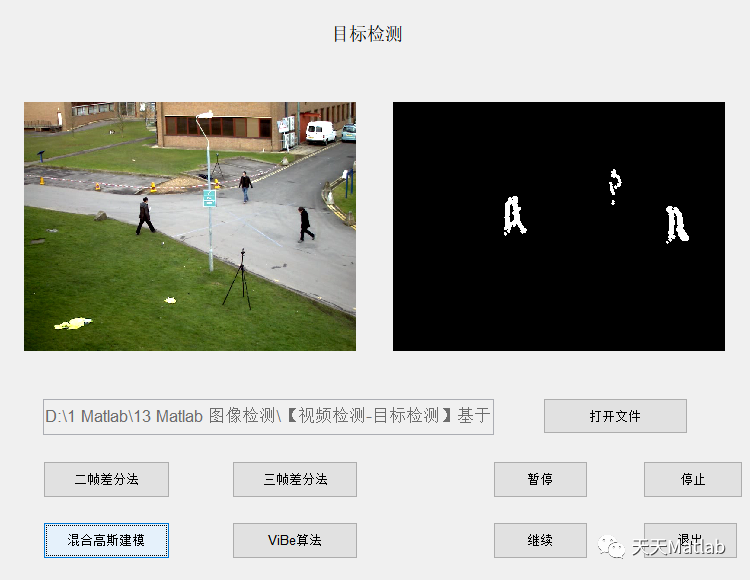
监控视频下的前景目标检测与追踪一直都是数字图像处理,机器视觉等领域的重点,也是难点.特别前景目标检测更是重中之重,是后续前景目标追踪和识别的基础,前景检测效果的好坏直接影响后期追踪和识别的效果.因此本文主要研究多环境下的前景目标检测算法、如帧差法,背景建模法和VIBE算法,对传统各类算法从原理上进行研究,并通过实验分析各自的优缺点。
2 部分代码
function varargout = object_detect(varargin)% OBJECT_DETECT MATLAB code for object_detect.fig% OBJECT_DETECT, by itself, creates a new OBJECT_DETECT or raises the existing% singleton*.%% H = OBJECT_DETECT returns the handle to a new OBJECT_DETECT or the handle to% the existing singleton*.%% OBJECT_DETECT('CALLBACK',hObject,eventData,handles,...) calls the local% function named CALLBACK in OBJECT_DETECT.M with the given input arguments.%% OBJECT_DETECT('Property','Value',...) creates a new OBJECT_DETECT or raises the% existing singleton*. Starting from the left, property value pairs are% applied to the GUI before object_detect_OpeningFcn gets called. An% unrecognized property name or invalid value makes property application% stop. All inputs are passed to object_detect_OpeningFcn via varargin.%% *See GUI Options on GUIDE's Tools menu. Choose "GUI allows only one% instance to run (singleton)".%% See also: GUIDE, GUIDATA, GUIHANDLES% Edit the above text to modify the response to help object_detect% Last Modified by GUIDE v2.5 16-May-2018 08:41:00% Begin initialization code - DO NOT EDITgui_Singleton = 1;gui_State = struct('gui_Name', mfilename, ...'gui_Singleton', gui_Singleton, ...'gui_OpeningFcn', @object_detect_OpeningFcn, ...'gui_OutputFcn', @object_detect_OutputFcn, ...'gui_LayoutFcn', [] , ...'gui_Callback', []);if nargin && ischar(varargin{1})gui_State.gui_Callback = str2func(varargin{1});endif nargout[varargout{1:nargout}] = gui_mainfcn(gui_State, varargin{:});elsegui_mainfcn(gui_State, varargin{:});end% End initialization code - DO NOT EDIT% --- Executes just before object_detect is made visible.function object_detect_OpeningFcn(hObject, eventdata, handles, varargin)% This function has no output args, see OutputFcn.% hObject handle to figure% eventdata reserved - to be defined in a future version of MATLAB% handles structure with handles and user data (see GUIDATA)% varargin command line arguments to object_detect (see VARARGIN)% Choose default command line output for object_detecthandles.output = hObject;% Update handles structureguidata(hObject, handles);% UIWAIT makes object_detect wait for user response (see UIRESUME)% uiwait(handles.figure1);% --- Outputs from this function are returned to the command line.function varargout = object_detect_OutputFcn(hObject, eventdata, handles)% varargout cell array for returning output args (see VARARGOUT);% hObject handle to figure% eventdata reserved - to be defined in a future version of MATLAB% handles structure with handles and user data (see GUIDATA)% Get default command line output from handles structurevarargout{1} = handles.output;% --- Executes on button press in pushbutton1.function pushbutton1_Callback(hObject, eventdata, handles)% hObject handle to pushbutton1 (see GCBO)% eventdata reserved - to be defined in a future version of MATLAB% handles structure with handles and user data (see GUIDATA)[filename, pathname] = uigetfile({'*.avi'; '*.mp4'},'打开视频');str = [pathname filename];set(handles.edit1, 'String', str);function edit1_Callback(hObject, eventdata, handles)release(videoSource);
3 仿真结果
4 参考文献
[1]白一帆, 李海芳, 扆梦楠. 基于Vibe和三帧差法的目标检测算法[J]. 湖南科技大学学报:自然科学版, 2018, 33(2):6.
博主简介:擅长智能优化算法、神经网络预测、信号处理、元胞自动机、图像处理、路径规划、无人机等多种领域的Matlab仿真,相关matlab代码问题可私信交流。
部分理论引用网络文献,若有侵权联系博主删除。





 扫一扫
扫一扫


 290
290


 被折叠的 条评论
为什么被折叠?
被折叠的 条评论
为什么被折叠?
 到【灌水乐园】发言




