


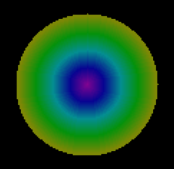
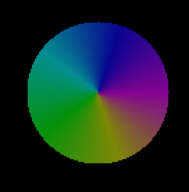
 这篇博客介绍了如何在Unity中通过代码创建并填充圆形和圆环,利用颜色列表进行渐变效果。首先,定义了半径并初始化纹理,然后遍历每个像素点设置透明,接着根据颜色个数和单位角度计算颜色分布,最后通过数学运算将颜色应用到从圆心到半径的像素上,实现颜色的平滑过渡。
记录下项目用到的小功能。
/// <summary>
    /// 圆形
    /// </summary>
    private Sprite ShowCircle()
    {
        if (selectedList.Count <= 0)//颜色个数  selectedList存的就是颜色列表
        {
            return null;
        }
        int radius = 50;//半径
        Texture2D texture2D = new Texture2D(100, 100);
        Vector2 center = new Vector2(50, 50);
        for (int i = 0; i < texture2D.width; i++)//把所有像素点设置成透明
        {
            for (int j = 0; j < texture2D.height; j++)
            {
                texture2D.SetPixel(i,j,new Color(0,0,0,0));
            }
        }
        int unitAngle = 360 / selectedList.Count;//单位角度
        int count = selectedList.Count;//颜色总个数
        int index = 0;
        Color color = Color.white;
        //Debug.Log("ShowCircle count=" + count + "  radius="+ radius+ "  unitAngle=" + unitAngle);
        for (float i = 0; i <= 360; i += 0.2f)//转圈设置颜色
        {
            for (int k = 1; k <= count; k++)//依据颜色个数平分角度
            {
                if (i <= k * unitAngle)//在单位角度内的设置颜色
                {
                    index = k - 1;
                    float change = (float)Math.Round((float)(i - (index * unitAngle)) / unitAngle, 2);
                    // Debug.Log("index=" + index + "   change=" + change);

                    if (index < selectedList.Count - 1)
                    {
                        if (selectedList[index].isLerpColor)//是否采用渐变色
                        {
                            color = Color.Lerp(selectedList[index].colorImage, selectedList[index + 1].colorImage, change);
                        }
                        else
                        {
                            color = selectedList[index].colorImage;
                        }
                    }
                    else //处理最后一个颜色连接第一个颜色
                    {
                        if (selectedList[index].isLerpColor)
                        {
                            color = Color.Lerp(selectedList[index].colorImage, selectedList[0].colorImage, change);
                        }
                        else
                        {
                            color = selectedList[index].colorImage;
                        }
                    }
                    break;
                }
            }
            for (int j = 0; j < radius; j++)//设置从圆心连线到最外圈(半径)的像素
            {
                float xx = center.x + j * Mathf.Cos(i * Mathf.Deg2Rad);
                float yy = center.y + j * Mathf.Sin(i * Mathf.Deg2Rad);
                texture2D.SetPixel((int)xx, (int)yy, color);
            }
        }
        texture2D.Apply();
        return Sprite.Create(texture2D, new Rect(0, 0, texture2D.width, texture2D.height), Vector2.zero);
    }
    /// <summary>
    /// 圆环
    /// </summary>
    /// <returns></returns>
    private Sprite ShowAnnulus()
    {
        if (selectedList.Count<=1)//颜色个数  selectedList存的就是颜色列表
        {
            return null;
        }
        int radius = 50;//半径
        Texture2D texture2D = new Texture2D(100, 100);
        Vector2 center = new Vector2(50, 50);
        for (int i = 0; i < texture2D.width; i++)//把所有像素点设置成透明
        {
            for (int j = 0; j < texture2D.height; j++)
            {
                texture2D.SetPixel(i, j, new Color(0, 0, 0, 0));
            }
        }
        int count = selectedList.Count;//颜色总个数
        int index = 0;
        Color color = Color.white;
        //Debug.Log("ShowCircle count=" + count + "  radius="+ radius+ "  unitAngle=" + unitAngle);
        for (float i = 0; i <= 360; i += 0.2f)//转圈设置像素
        {
            for (int j = 0; j < radius; j++)//设置从圆心连线到最外圈(半径)的像素
            {
                float xx = center.x + j * Mathf.Cos(i * Mathf.Deg2Rad);
                float yy = center.y + j * Mathf.Sin(i * Mathf.Deg2Rad);
                int unitCount = radius / (count-1);//依据颜色个数平分半径
                index = Mathf.Clamp((int)(j / unitCount), 0, count - 1);//计算使用颜色的索引
                if (selectedList[index].isLerpColor)//是否使用渐变色
                {
                    color= Color.Lerp(selectedList[index].colorImage, selectedList[Mathf.Min(index + 1,count-1)].colorImage,(float)(j - (index * unitCount)) / unitCount);
                }
                else
                {
                    color = selectedList[index].colorImage;
                }
                texture2D.SetPixel((int)xx, (int)yy, color);
            }
        }
        texture2D.Apply();
        return Sprite.Create(texture2D, new Rect(0, 0, texture2D.width, texture2D.height), Vector2.zero);
    }





 扫一扫
扫一扫


 2502
2502

 被折叠的 条评论
为什么被折叠?
被折叠的 条评论
为什么被折叠?
 到【灌水乐园】发言





