



使用 M A T L A B MATLAB MATLAB的界面做了一个 M A T L A B MATLAB MATLAB滤波工具箱 d e m o demo demo,本文章给出演示:自定义维度、滤波方法的例程演示与绘图、数据输出
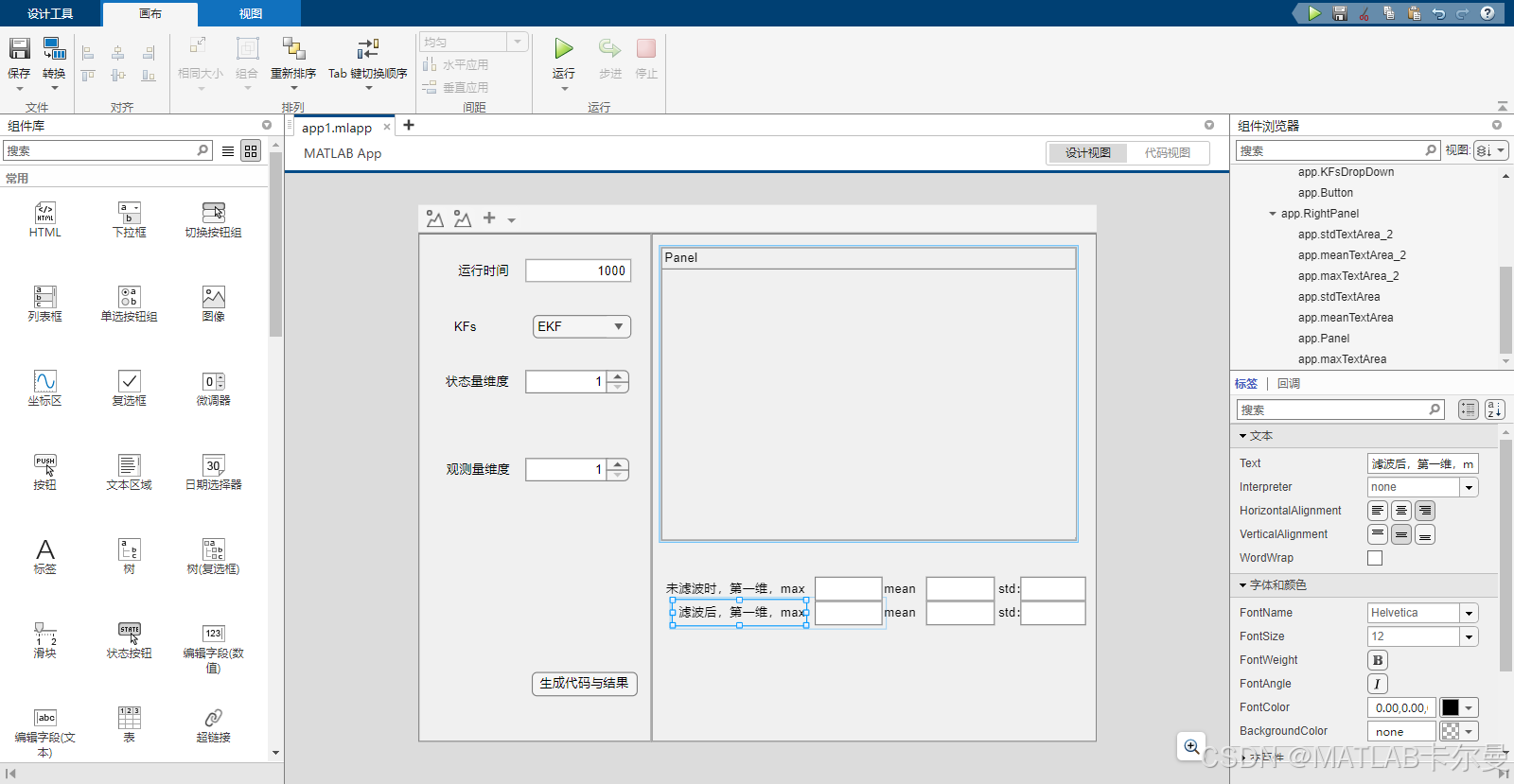
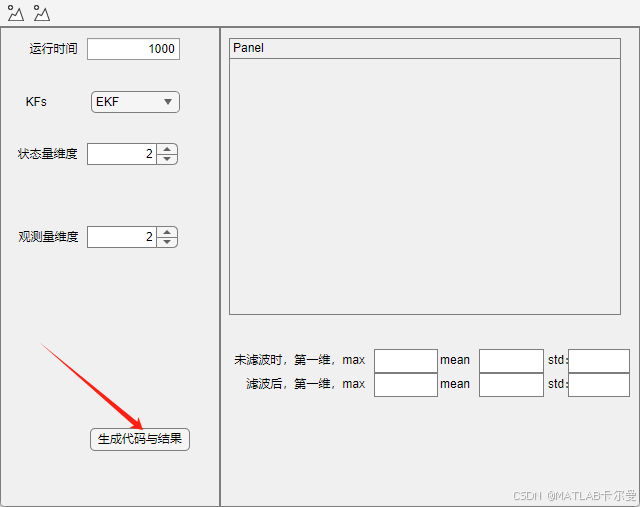
编辑界面
使用
M
A
T
L
A
B
MATLAB
MATLAB
A
p
p
App
App设计,代码原创,编辑界面如下:
使用方法
-
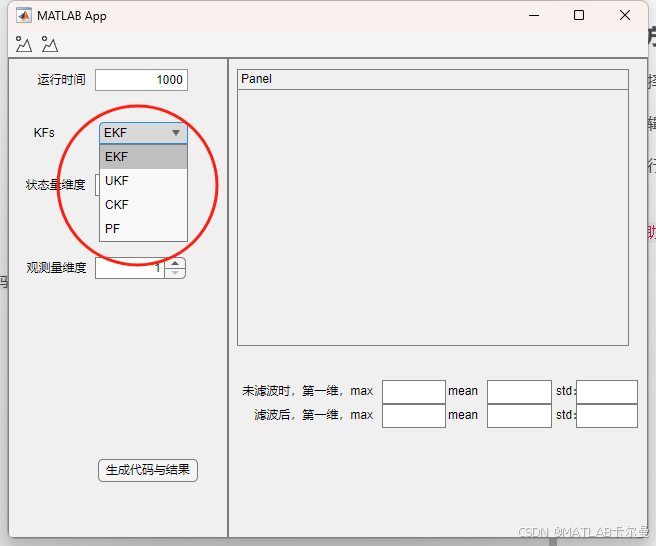
选择滤波方法
-
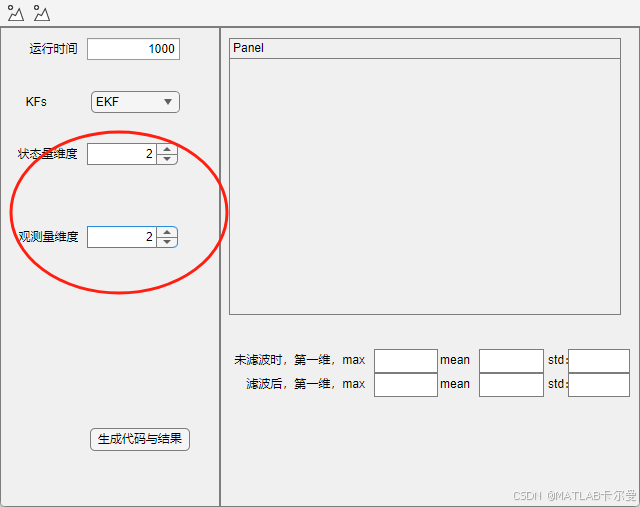
编辑滤波维度
- 运行程序
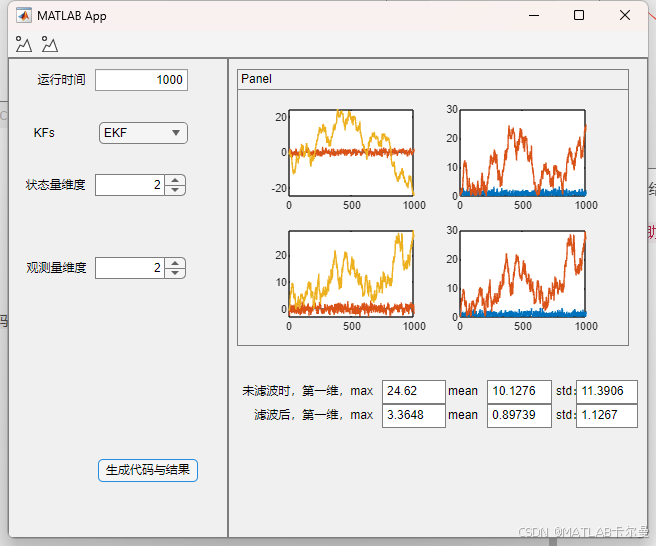
4. 查看结果
优势
- 可视化界面
- 维度可调
待改进点
- 状态噪声协方差Q、观测噪声协方差R等现在是固定的,后面会改成可输入的
- 状态方程和观测方程现在也是固定的,后面考虑修改成多种形式可选
部分代码
classdef app1 < matlab.apps.AppBase

    % Properties that correspond to app components
    properties (Access = public)
        UIFigure             matlab.ui.Figure
        Toolbar              matlab.ui.container.Toolbar
        PushTool             matlab.ui.container.toolbar.PushTool
        PushTool2            matlab.ui.container.toolbar.PushTool
        GridLayout           matlab.ui.container.GridLayout
        LeftPanel            matlab.ui.container.Panel
        EditField            matlab.ui.control.NumericEditField
        Label_4              matlab.ui.control.Label
        Spinner_2            matlab.ui.control.Spinner
        Label_3              matlab.ui.control.Label
        Spinner              matlab.ui.control.Spinner
        Label_2              matlab.ui.control.Label
        KFsDropDown          matlab.ui.control.DropDown
        KFsDropDownLabel     matlab.ui.control.Label
        Button               matlab.ui.control.Button
        RightPanel           matlab.ui.container.Panel
        stdTextArea_2        matlab.ui.control.TextArea
        stdTextArea_2Label   matlab.ui.control.Label
        meanTextArea_2       matlab.ui.control.TextArea
        meanTextArea_2Label  matlab.ui.control.Label
        maxTextArea_2        matlab.ui.control.TextArea
        maxLabel             matlab.ui.control.Label
        stdTextArea          matlab.ui.control.TextArea
        stdTextAreaLabel     matlab.ui.control.Label
        meanTextArea         matlab.ui.control.TextArea
        meanTextAreaLabel    matlab.ui.control.Label
        Panel                matlab.ui.container.Panel
        maxTextArea          matlab.ui.control.TextArea
        Label_5              matlab.ui.control.Label
    end

    % Properties that correspond to apps with auto-reflow
    properties (Access = private)
        onePanelWidth = 576;
    end

    % Callbacks that handle component events
    methods (Access = private)

        % Button pushed function: Button
        function ButtonPushed(app, event)
            % generate代码
            main_generate;


        end

        % Callback function: not associated with a component
        function TextAreaValueChanged(app, event)
            value = app.TextArea.Value;
            % 预览
                        fprintf('TextAreaValueChanged函数');

        end

        % Callback function: not associated with a component
        function TextAreaValueChanging(app, event)
            changingValue = event.Value;
            % 一旦预览代码输入东西,就运行这里代码

        end

        % Value changed function: KFsDropDown
        function KFsDropDownValueChanged(app, event)
            value = app.KFsDropDown.Value;
            % KF 后面
            display('已选择',value);
        end

        % Value changed function: Spinner
        function SpinnerValueChanged(app, event)
            value = app.Spinner.Value;
            % 状态量维度

        end

        % Value changed function: Spinner_2
        function Spinner_2ValueChanged(app, event)
            value = app.Spinner_2.Value;
            % 观测量维度

        end

        % Callback function: not associated with a component
        function UIAxesButtonDown(app, event)

        end

        % Value changed function: EditField
        function EditFieldValueChanged(app, event)
            value = app.EditField.Value;

        end

        % Callback function: not associated with a component
        function UIAxesButtonDown2(app, event)
%             figure;

        end

        % Button down function: Panel
        function PanelButtonDown(app, event)

        end

        % Value changed function: maxTextArea
        function maxTextAreaValueChanged(app, event)
            value = app.maxTextArea.Value;

        end

        % Changes arrangement of the app based on UIFigure width
        function updateAppLayout(app, event)
            currentFigureWidth = app.UIFigure.Position(3);
            if(currentFigureWidth <= app.onePanelWidth)
                % Change to a 2x1 grid
                app.GridLayout.RowHeight = {480, 480};
                app.GridLayout.ColumnWidth = {'1x'};
                app.RightPanel.Layout.Row = 2;
                app.RightPanel.Layout.Column = 1;
            else
                % Change to a 1x2 grid
                app.GridLayout.RowHeight = {'1x'};
                app.GridLayout.ColumnWidth = {220, '1x'};
                app.RightPanel.Layout.Row = 1;
                app.RightPanel.Layout.Column = 2;
            end
        end
    end

    % Component initialization
    methods (Access = private)

        % Create UIFigure and components
        function createComponents(app)

            % Create UIFigure and hide until all components are created
            app.UIFigure = uifigure('Visible', 'off');
            app.UIFigure.AutoResizeChildren = 'off';
            app.UIFigure.Position = [100 100 640 480];
            app.UIFigure.Name = 'MATLAB App';
            app.UIFigure.SizeChangedFcn = createCallbackFcn(app, @updateAppLayout, true);

            % Create Toolbar
            app.Toolbar = uitoolbar(app.UIFigure);

            % Create PushTool
            app.PushTool = uipushtool(app.Toolbar);

            % Create PushTool2
            app.PushTool2 = uipushtool(app.Toolbar);

            % Create GridLayout
            app.GridLayout = uigridlayout(app.UIFigure);
            app.GridLayout.ColumnWidth = {220, '1x'};
            app.GridLayout.RowHeight = {'1x'};
            app.GridLayout.ColumnSpacing = 0;
            app.GridLayout.RowSpacing = 0;
            app.GridLayout.Padding = [0 0 0 0];
            app.GridLayout.Scrollable = 'on';

            % Create LeftPanel
            app.LeftPanel = uipanel(app.GridLayout);
            app.LeftPanel.Layout.Row = 1;
            app.LeftPanel.Layout.Column = 1;

            % Create Button
            app.Button = uibutton(app.LeftPanel, 'push');
            app.Button.ButtonPushedFcn = createCallbackFcn(app, @ButtonPushed, true);
            app.Button.Position = [107 43 100 23];
            app.Button.Text = '生成代码与结果';

            % Create KFsDropDownLabel
            app.KFsDropDownLabel = uilabel(app.LeftPanel);
            app.KFsDropDownLabel.Position = [34 381 26 22];
            app.KFsDropDownLabel.Text = 'KFs';

            % Create KFsDropDown
            app.KFsDropDown = uidropdown(app.LeftPanel);
            app.KFsDropDown.Items = {'EKF', 'UKF', 'CKF', 'PF'};
            app.KFsDropDown.ValueChangedFcn = createCallbackFcn(app, @KFsDropDownValueChanged, true);
            app.KFsDropDown.Position = [108 381 93 22];
            app.KFsDropDown.Value = 'EKF';

            % Create Label_2
            app.Label_2 = uilabel(app.LeftPanel);
            app.Label_2.HorizontalAlignment = 'right';
            app.Label_2.Position = [21 329 65 22];
            app.Label_2.Text = '状态量维度';

            % Create Spinner
            app.Spinner = uispinner(app.LeftPanel);
            app.Spinner.Limits = [1 Inf];
            app.Spinner.ValueChangedFcn = createCallbackFcn(app, @SpinnerValueChanged, true);
            app.Spinner.Position = [101 329 100 22];
            app.Spinner.Value = 1;

            % Create Label_3
            app.Label_3 = uilabel(app.LeftPanel);
            app.Label_3.HorizontalAlignment = 'right';
            app.Label_3.Position = [22 246 65 22];
            app.Label_3.Text = '观测量维度';

            % Create Spinner_2
            app.Spinner_2 = uispinner(app.LeftPanel);
            app.Spinner_2.Limits = [1 Inf];
            app.Spinner_2.ValueChangedFcn = createCallbackFcn(app, @Spinner_2ValueChanged, true);
            app.Spinner_2.Position = [101 246 100 22];
            app.Spinner_2.Value = 1;

            % Create Label_4
            app.Label_4 = uilabel(app.LeftPanel);
            app.Label_4.HorizontalAlignment = 'right';
            app.Label_4.Position = [33 434 53 22];
            app.Label_4.Text = '运行时间';

            % Create EditField
            app.EditField = uieditfield(app.LeftPanel, 'numeric');
            app.EditField.ValueChangedFcn = createCallbackFcn(app, @EditFieldValueChanged, true);
            app.EditField.Position = [101 434 100 22];
            app.EditField.Value = 1000;

            % Create RightPanel
            app.RightPanel = uipanel(app.GridLayout);
            app.RightPanel.Layout.Row = 1;
            app.RightPanel.Layout.Column = 2;

            % Create Label_5
            app.Label_5 = uilabel(app.RightPanel);
            app.Label_5.HorizontalAlignment = 'right';
            app.Label_5.Position = [9 134 136 22];
            app.Label_5.Text = '未滤波时,第一维,max';

            % Create maxTextArea
            app.maxTextArea = uitextarea(app.RightPanel);
            app.maxTextArea.ValueChangedFcn = createCallbackFcn(app, @maxTextAreaValueChanged, true);
            app.maxTextArea.Position = [154 133 64 23];

            % Create Panel
            app.Panel = uipanel(app.RightPanel);
            app.Panel.AutoResizeChildren = 'off';
            app.Panel.Title = 'Panel';
            app.Panel.ButtonDownFcn = createCallbackFcn(app, @PanelButtonDown, true);
            app.Panel.Position = [9 190 392 277];

            % Create meanTextAreaLabel
            app.meanTextAreaLabel = uilabel(app.RightPanel);
            app.meanTextAreaLabel.HorizontalAlignment = 'right';
            app.meanTextAreaLabel.Position = [217 134 33 22];
            app.meanTextAreaLabel.Text = 'mean';

            % Create meanTextArea
            app.meanTextArea = uitextarea(app.RightPanel);
            app.meanTextArea.Position = [259 133 65 23];

            % Create stdTextAreaLabel
            app.stdTextAreaLabel = uilabel(app.RightPanel);
            app.stdTextAreaLabel.HorizontalAlignment = 'right';
            app.stdTextAreaLabel.Position = [316 134 40 22];
            app.stdTextAreaLabel.Text = 'std:';

            % Create stdTextArea
            app.stdTextArea = uitextarea(app.RightPanel);
            app.stdTextArea.Position = [348 133 62 23];

            % Create maxLabel
            app.maxLabel = uilabel(app.RightPanel);
            app.maxLabel.HorizontalAlignment = 'right';
            app.maxLabel.Position = [21 111 124 22];
            app.maxLabel.Text = '滤波后,第一维,max';

            % Create maxTextArea_2
            app.maxTextArea_2 = uitextarea(app.RightPanel);
            app.maxTextArea_2.Position = [154 110 64 23];

            % Create meanTextArea_2Label
            app.meanTextArea_2Label = uilabel(app.RightPanel);
            app.meanTextArea_2Label.HorizontalAlignment = 'right';
            app.meanTextArea_2Label.Position = [217 111 33 22];
            app.meanTextArea_2Label.Text = 'mean';

            % Create meanTextArea_2
            app.meanTextArea_2 = uitextarea(app.RightPanel);
            app.meanTextArea_2.Position = [259 110 65 23];

            % Create stdTextArea_2Label
            app.stdTextArea_2Label = uilabel(app.RightPanel);
            app.stdTextArea_2Label.HorizontalAlignment = 'right';
            app.stdTextArea_2Label.Position = [316 111 40 22];
            app.stdTextArea_2Label.Text = 'std:';

            % Create stdTextArea_2
            app.stdTextArea_2 = uitextarea(app.RightPanel);
            app.stdTextArea_2.Position = [348 110 62 23];

            % Show the figure after all components are created
            app.UIFigure.Visible = 'on';
        end
    end

    % App creation and deletion
    methods (Access = public)

        % Construct app
        function app = app1

            % Create UIFigure and components
            createComponents(app)

            % Register the app with App Designer
            registerApp(app, app.UIFigure)

            if nargout == 0
                clear app
            end
        end

        % Code that executes before app deletion
        function delete(app)

            % Delete UIFigure when app is deleted
            delete(app.UIFigure)
        end
    end
end
如需帮助,或有导航、定位滤波相关的代码定制需求,请点击下方卡片联系作者






 扫一扫
扫一扫


 5476
5476

 被折叠的 条评论
为什么被折叠?
被折叠的 条评论
为什么被折叠?
 到【灌水乐园】发言





