
TF2.0断点读序(2)

来源:北京大学Tensorflow2.0(B站搜)
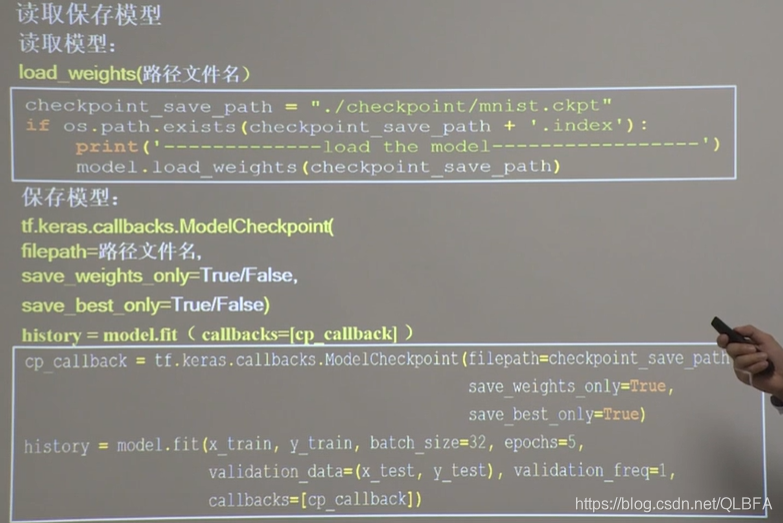
下面来演示mnist断点读序的方法:
在这里插入图片描述
代码:(位置请大家设置)

import tensorflow as tf
import os

mnist = tf.keras.datasets.mnist
(x_train, y_train), (x_test, y_test) = mnist.load_data()
x_train, x_test = x_train / 255.0, x_test / 255.0

model = tf.keras.models.Sequential([
    tf.keras.layers.Flatten(),
    tf.keras.layers.Dense(128, activation='relu'),
    tf.keras.layers.Dense(10, activation='softmax')
])

model.compile(optimizer='adam',
              loss=tf.keras.losses.SparseCategoricalCrossentropy(from_logits=False),
              metrics=['sparse_categorical_accuracy'])

checkpoint_save_path = "E:/path/f2.0_data/tf_board/save_one/mnist.ckpt"
if os.path.exists(checkpoint_save_path + '.index'):
    print('-------------load the model-----------------')
    model.load_weights(checkpoint_save_path)

#回调函数
cp_callback = tf.keras.callbacks.ModelCheckpoint(filepath=checkpoint_save_path,
                                                 save_weights_only=True,
                                                 save_best_only=True)

history = model.fit(x_train, y_train, batch_size=32, epochs=5, validation_data=(x_test, y_test), validation_freq=1,
                    callbacks=[cp_callback])
model.summary()

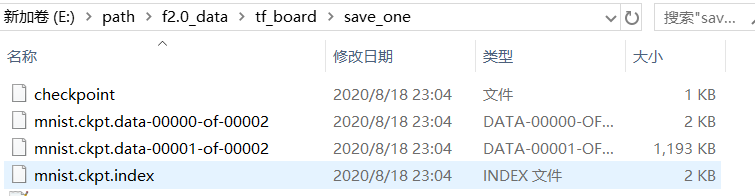
生成:再训练一次会在原来的基础上训练哦,回调函数在这里发挥重要作用
在这里插入图片描述
下面看训练的变量保存为txt文件看:

import tensorflow as tf
import os
import numpy as np
np.set_printoptions(threshold=np.inf)
mnist = tf.keras.datasets.mnist
(x_train, y_train), (x_test, y_test) = mnist.load_data()
x_train, x_test = x_train / 255.0, x_test / 255.0
model = tf.keras.models.Sequential([
    tf.keras.layers.Flatten(),
    tf.keras.layers.Dense(128, activation='relu'),
    tf.keras.layers.Dense(10, activation='softmax')
])
model.compile(optimizer='adam',
              loss=tf.keras.losses.SparseCategoricalCrossentropy(from_logits=False),
              metrics=['sparse_categorical_accuracy'])
checkpoint_save_path = "E:/path/f2.0_data/tf_board/save_one/mnist.ckpt"
if os.path.exists(checkpoint_save_path + '.index'):
    print('-------------load the model-----------------')
    model.load_weights(checkpoint_save_path)
cp_callback = tf.keras.callbacks.ModelCheckpoint(filepath=checkpoint_save_path,
                                                 save_weights_only=True,
                                                 save_best_only=True)
history = model.fit(x_train, y_train, batch_size=32, epochs=5, validation_data=(x_test, y_test), validation_freq=1,
                    callbacks=[cp_callback])
model.summary()
print(model.trainable_variables)
file = open('E:/path/f2.0_data/tf_board/save_one/weights.txt', 'w')
for v in model.trainable_variables:
    file.write(str(v.name) + '\n')
    file.write(str(v.shape) + '\n')
    file.write(str(v.numpy()) + '\n')
file.close()

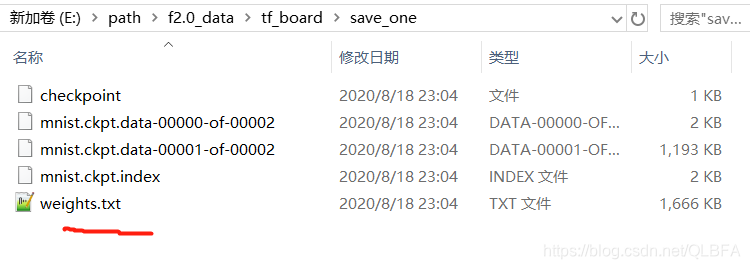
最后生成txt文件
在这里插入图片描述

<think>我们被要求解释`@tf.function`的含义。根据用户提供的引用,特别是引用[1]和引用[2],我们可以总结如下: `@tf.function`是TensorFlow 2.x中的一个装饰器,用于将Python函数转换为TensorFlow的计算图(Graph)。在TensorFlow 1.x中,用户需要手动构建计算图,然后通过会话(Session)执行。而在TensorFlow 2.x中,默认是动态图(Eager Execution)模式,虽然易于调试,但在性能上可能不如静态图。`@tf.function`的作用就是将函数内的代码转换成静态图,从而获得性能上的提升。 ### 主要作用: 1. **提升性能**:将函数转换为计算图后,TensorFlow可以对计算过程进行优化,例如操作融合、常量折叠等,从而加快计算速度。对于重复执行的小操作,这种加速效果尤其明显。 2. **跨平台部署**:计算图可以导出到不同的平台(如移动设备、服务器)运行,而不依赖于Python环境。 ### 使用注意事项(参考引用[1]): - 被`@tf.function`修饰的函数应尽可能使用TensorFlow中的函数而不是Python中的其他函数。例如: - 使用`tf.print`而不是`print` - 使用`tf.range`而不是`range` - 使用`tf.constant(True)`而不是`True` - 这是因为在构建计算图时,TensorFlow需要能够将Python操作转换为图操作。使用Python原生操作可能会导致每次调用都重新构建图(retracing),从而降低效率。 ### 调试技巧(参考引用[4]): 当使用`@tf.function`时,由于函数被编译成图,传统的Python调试工具(如pdb)可能无法直接使用。为了调试,可以临时启用Eager Execution: ```python tf.config.experimental_run_functions_eagerly(True) ``` 这样,函数将以Eager模式运行,可以设置断点进行调试。 ### 示例: ```python import tensorflow as tf # 使用@tf.function装饰器 @tf.function def my_func(x): # 使用TensorFlow操作 if tf.greater(x, 0): # 代替 if x > 0: x = x + 1 else: x = x - 1 return x # 调用函数 print(my_func(tf.constant(1))) # 输出 tf.Tensor(2, shape=(), dtype=int32) ``` ### 内部机制(引用[2]): 当第一次调用被`@tf.function`装饰的函数时,TensorFlow会执行以下步骤: 1. **跟踪(Tracing)**:执行函数,记录所有TensorFlow操作,构建计算图。 2. **构建计算图**:根据跟踪的操作构建一个计算图(静态图)。 3. **优化**:对计算图进行优化,提高执行效率。 4. **执行**:使用优化后的图执行计算。 注意:如果函数接收不同类型的参数(例如,不同的张量形状或数据类型),TensorFlow会生成多个计算图(称为多态),这可能会导致内存和性能开销。 ### 常见错误(引用[3]): 在TensorFlow 2.x中,如果试图在Session中运行被`@tf.function`装饰的函数,可能会遇到错误,因为2.x中已经不再需要显式创建Session。应该直接调用函数。 ### 总结: `@tf.function`是TensorFlow 2.x中用于提升性能的重要工具,它通过将Python函数转换为静态图来实现加速。使用时应注意使用TensorFlow的操作,并了解其调试方法。 §§相关问题§§ 1. 在TensorFlow中,如何避免使用`@tf.function`时的重复跟踪(retracing)问题? 2. `@tf.function`和TensorFlow 1.x中的计算图有何异同? 3. 如何查看由`@tf.function`生成的图结构? 4. 在什么情况下使用`@tf.function`会降低性能? 5. 如何为带有`@tf.function`的函数添加自定义梯度? </think> ### `@tf.function` 的含义与作用 `@tf.function` 是 TensorFlow 2.x 中的核心装饰器,用于将 Python 函数转换为**高性能计算图**。其核心作用是通过将动态代码编译为静态计算图,显著提升模型训练和推理效率[^2][^5]。 #### 关键特性解析: 1. **图模式转换** 将 Python 函数转换为 TensorFlow 计算图(Graph),其中: - 操作表示为节点 - 数据流通过边连接 - 支持自动并行化和优化 ```python @tf.function def my_func(x): return tf.square(x) + 1 ``` 2. **性能提升机制** - **自动优化**:融合操作、常量折叠等编译优化 - **硬件加速**:对 GPU/TPU 的本地支持 - **减少开销**:避免 Python 解释器调用成本 ```python # 动态执行 vs 图模式速度对比 dynamic_time = %timeit -o my_func(tf.constant(2.0)) # 慢 graph_time = %timeit -o tf.function(my_func)(tf.constant(2.0)) # 快2-10倍 ``` 3. **使用规范** 需遵循 TensorFlow 操作规范[^1]: ```python @tf.function def valid_func(x): # 正确:使用 TensorFlow 原生操作 y = tf.range(10) tf.print("Value:", x) # 替代 print() return x * tf.constant(2.0) # 替代 2.0 ``` 4. **调试方法** 调试时需临时禁用图模式[^4]: ```python tf.config.run_functions_eagerly(True) # 启用动态调试 my_func(tf.constant(1)) # 可设置断点 ``` #### 典型错误场景: ```python # 错误:使用 Python 原生操作 @tf.function def invalid_func(x): if x > 0: # 应改用 tf.cond return x + 1 else: return x - 1 ``` > **解决方案**:将控制流替换为 `tf.cond()` 或 `tf.while_loop()`[^1][^5] #### 技术原理: $$ \text{Python函数} \xrightarrow{\text{@tf.function}} \text{计算图} \xrightarrow{\text{XLA编译}} \text{优化机器码} $$ 首次调用时执行**自动追踪(AutoGraph)**,将 Python 代码转换为图操作,后续调用直接执行优化后的图结构[^2]。
评论
添加红包

请填写红包祝福语或标题

红包个数最小为10个

红包金额最低5元

当前余额3.43前往充值 >
需支付:10.00
成就一亿技术人!
领取后你会自动成为博主和红包主的粉丝 规则
hope_wisdom
发出的红包
实付
使用余额支付
点击重新获取
扫码支付
钱包余额 0

抵扣说明:

1.余额是钱包充值的虚拟货币,按照1:1的比例进行支付金额的抵扣。
2.余额无法直接购买下载,可以购买VIP、付费专栏及课程。

余额充值


