


 本文详细介绍了在Unity的FlowCanvas中如何处理Delegate和Event,包括Delegate的Combine和Remove,Custom Event的创建与发送,以及尝试制作通用的EventNode。通过测试代码和流程图,分析了在FlowCanvas中绑定和触发事件的挑战与解决方案。
FlowCanvas 很容易自定义节点
可以看官方文档 从 6.1. Creating Simplex Nodes 开始
http://www.paradoxnotion.com/files/flowcanvas/FlowCanvas%20Documentation.pdf
我之前说错了,FlowCanvas 中有 Delegate 的 += 和 -=,只是没有以运算符的形式给出来
FlowCanvas 中 += 为 Combine -= 为 Remove
Bilibili 上面倒是有一个简短的教程很实用,是一个大佬对自己的魔改版的教学视频,比如支持在 FlowScript 中使用 ToLua 啥的
https://www.bilibili.com/video/BV1Tt411X7mx
https://note.youdao.com/ynoteshare/index.html?id=6c6748dd043f124049a5b53ae281b950&type=note&_time=1649039338969
虽然我暂时还不会去想着魔改 FlowCanvas,但是看看别人的基础操作就好
1. FlowCanvas 中的 Delegate
1.1 += -=
测试代码
// ----------------------------------------------
// 作者: 廉价喵
// 创建于: 28/03/2022 17:43
// 最后一次修改于: 04/04/2022 9:08
// 版权所有: CheapMeowStudio
// 描述:
// ----------------------------------------------

using System;
using Sirenix.OdinInspector;
using UnityEngine;
using UnityEngine.Events;

namespace MeowFramework.Core
{
    public class ActorBase : SerializedMonoBehaviour
    {
        /// <summary>
        /// 血量
        /// </summary>
        [Tooltip("血量")]
        public ActorAttribute<float> HP = new ActorAttribute<float>();

        /// <summary>
        /// 最大血量
        /// </summary>
        [Tooltip("最大血量")]
        public ActorAttribute<float> MaxHP = new ActorAttribute<float>();

        public Action TestAction1;

        public Action TestAction2;

        public void Awake()
        {
            TestAction1 += () => { Debug.Log("Actor TestAction1!"); };
            TestAction2 += () => { Debug.Log("Actor TestAction2!"); };
        }
    }
}
测试 FlowScript

测试 FlowScript 运行结果


这确定了在 FlowCanvas 中,委托的 += 和 -= 是可行的
但是 Delegate Callback 的委托连出来了一个 null,也说明 FlowCanvas 中的 Delegate CallBack 并不是我想的那样简单,它是不能和一般的 Action 相加的
1.2 Delegate Callback
测试代码
		public void DoSomething(Action action)
        {
            action.Invoke();
        }
测试 FlowScript


所以 Delegate CallBack 似乎是专门用来传递给一个函数的 Action 参数的
如果这个函数的参数是 Action<T> 那么是连不上 Delegate CallBack 的
测试代码
		public void DoSomething(Action<float> action)
        {
            action.Invoke(1);
        }
测试 FlowScript

2. FlowCanvas 中的 Event
2.1 Custom Event,Event CallBack
FlowCanvas 中的事件节点很简单

新建事件用 Custom Event
发送事件用 Send Event
保证发送者的 Send Event 中填写的事件名就是接收者实现的 Custom Event 的事件名就好了
UnityEvent 的订阅和取消订阅可以通过 Flow 入口调用
CallBack 是执行内容的 Flow 入口
2.2 制作绑定指定类中指定委托的 EventNode
根据官方教程,事件节点的模板为

我现在有一个需求就是,要能够在 FlowCanvas 中绑定 C# 脚本中指定类中的指定委托
指定测试类
// ----------------------------------------------
// 作者: 廉价喵
// 创建于: 01/04/2022 14:32
// 最后一次修改于: 04/04/2022 0:05
// 版权所有: CheapMeowStudio
// 描述:
// ----------------------------------------------

using System;
using Sirenix.OdinInspector;
using UnityEngine;

namespace MeowFramework.Core
{
    /// <summary>
    /// 角色属性泛型
    /// </summary>
    public class ActorAttribute<T>
    {
        /// <summary>
        /// 是否使用字面值
        /// </summary>
        [Tooltip("是否使用字面值")]
        public bool IsLiteral = true;

        /// <summary>
        /// 角色属性的值
        /// </summary>
        [ShowIf("@IsLiteral")]
        [Tooltip("值")]
        private T value;

        /// <summary>
        /// 可资产化值
        /// </summary>
        [ShowIf("@!IsLiteral")]
        [ShowInInspector]
        [Tooltip("可资产化值")]
        private ScriptableGenericVariable<T> scriptableValue;

        public T Value
        {
            get => value;
            set
            {
                AfterSetValue(this.value, value);
                this.value = value;
            }
        }

        /// <summary>
        /// 设置值时进行的委托
        /// 同时承担验证验证值改变是否合法的功能
        /// </summary>
        [HideInInspector]
        public Action<T,T> AfterSetValue;
    }
}
依赖指定测试类的 Mono 脚本为
// ----------------------------------------------
// 作者: 廉价喵
// 创建于: 28/03/2022 17:43
// 最后一次修改于: 04/04/2022 0:02
// 版权所有: CheapMeowStudio
// 描述:
// ----------------------------------------------

using System;
using Sirenix.OdinInspector;
using UnityEngine;
using UnityEngine.Events;

namespace MeowFramework.Core
{
    public class ActorBase : SerializedMonoBehaviour
    {
        /// <summary>
        /// 血量
        /// </summary>
        [Tooltip("血量")]
        public ActorAttribute<float> HP = new ActorAttribute<float>();

        /// <summary>
        /// 最大血量
        /// </summary>
        [Tooltip("最大血量")]
        public ActorAttribute<float> MaxHP = new ActorAttribute<float>();
    }
}
新建的 FlowCanvas 事件节点为
// ----------------------------------------------
// 作者: 廉价喵
// 创建于: 03/04/2022 21:28
// 最后一次修改于: 03/04/2022 23:00
// 版权所有: CheapMeowStudio
// 描述:
// ----------------------------------------------

using MeowFramework.Core;
using ParadoxNotion.Design;

namespace FlowCanvas.Nodes{

    [Category("Event/MeowFramework")]
    public class OnSetAttributeValue<T> : EventNode
    {
        private FlowOutput raised;

        private ValueInput<ActorAttribute<T>> actorAttribute;

        private T oldValue;

        private T newValue;

        private ValueOutput<T> OldValue;

        private ValueOutput<T> NewValue;

        public override void OnGraphStarted()
        {
            // 订阅事件
            actorAttribute.value.AfterSetValue += EventRaised;
        }

        public override void OnGraphStoped()
        {
            // 取消订阅事件
            actorAttribute.value.AfterSetValue -= EventRaised;
        }

        //Register the output flow port or any other port
        protected override void RegisterPorts()
        {
            raised = AddFlowOutput("Out");
            actorAttribute = AddValueInput<ActorAttribute<T>>("ActorAttribute");
            OldValue = AddValueOutput<T>("OldValue", () => { return oldValue; });
            NewValue = AddValueOutput<T>("NewValue", () => { return newValue; });
        }

        //Fire output flow
        void EventRaised(T oldValue,T newValue)
        {
            // 从事件中获取参数
            this.oldValue = oldValue;
            this.newValue = newValue;

            // Flow 流程调用
            raised.Call(new Flow());
        }
    }
}
测试 FlowScript
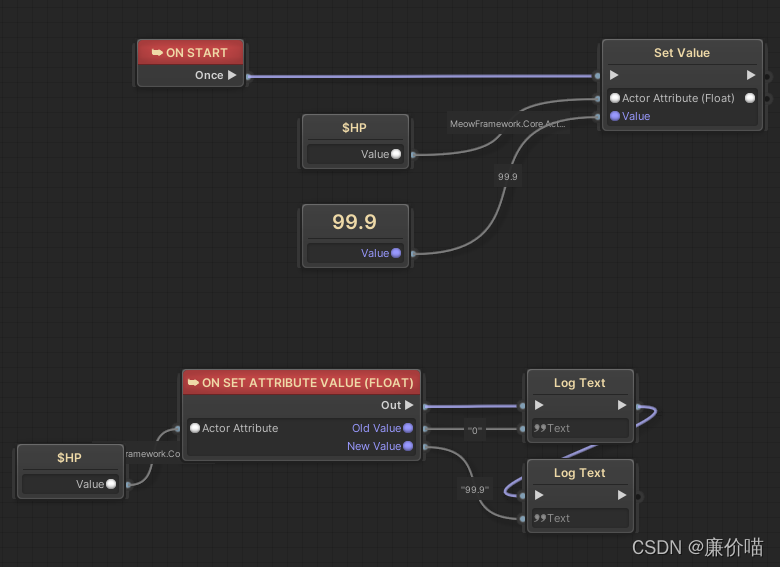
其实我也可以选择使用 BBParameter 接受输入参数,这样在 FlowScript 中可能会更简洁一点
但是我觉得还是把输入参数做个连线更清晰
显然,使用 OnGraphStarted() OnGraphStoped() 是很容易实现委托的 += -= 的,而这两个函数调用是 EventNode 类负责的,所以 EventNode 类其实就是一个简单的绑定委托的节点,
2.3 制作绑定任意输入委托的 EventNode
2.3.1 尝试方向:ValueInput.value += EventRaised
那么接下来我想做一个通用的事件节点,就是可以连接到任意 Action<T> 上,然后触发 FlowScript 里面的 Flow 出口
但是我不知道为什么 Action<T> 提示我没有 setter
试验脚本:
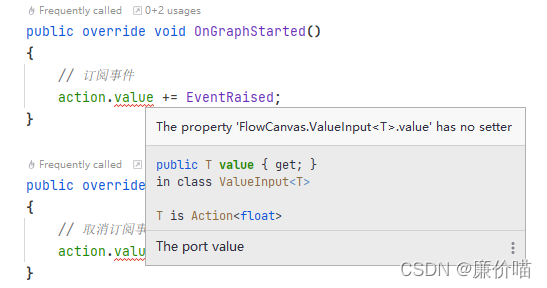
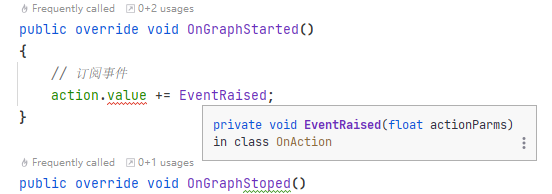
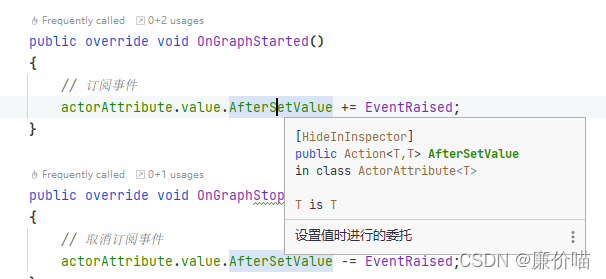
明明我之前做 Action<T,T> 都会有 setter
OnSetAttributeValue 脚本:
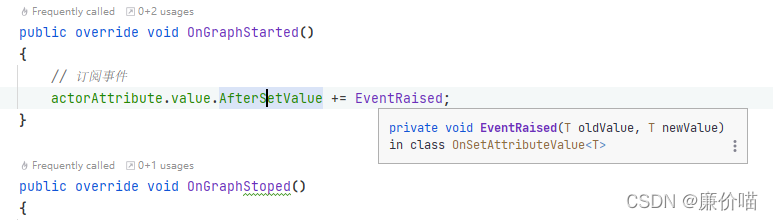
然后我就想,有没有可能 ValueInput 的 value 是一个特别的东西,比如,又封装了什么
试验脚本:
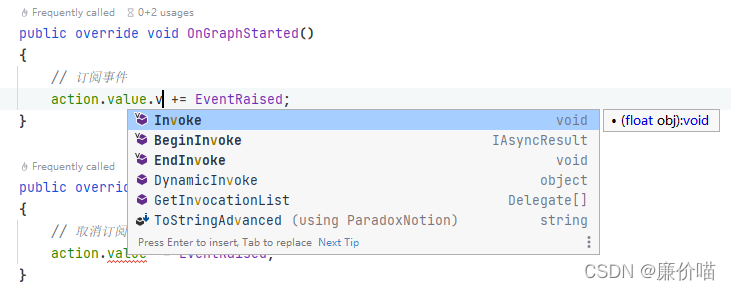
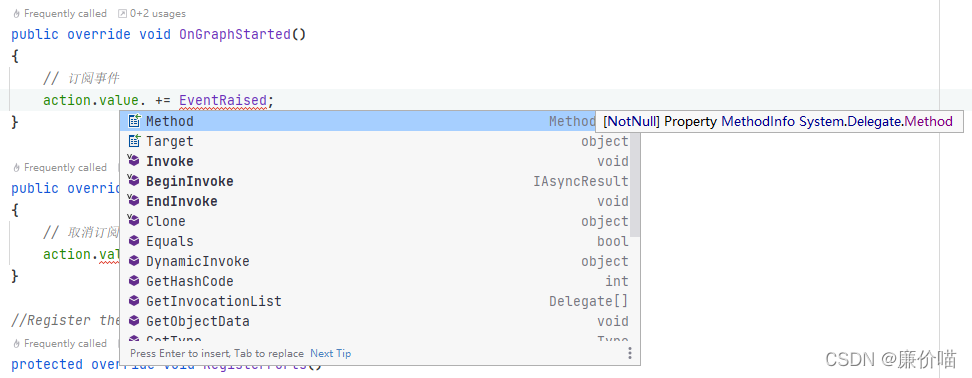
但是这看上去真的,ValueInput<T> 的 value 就是 T 类型的
给我整不会了
有没有一种可能,就是 value 是一个 get 属性,所以才会没有 setter
好吧我看到了,他就是一个 get 属性
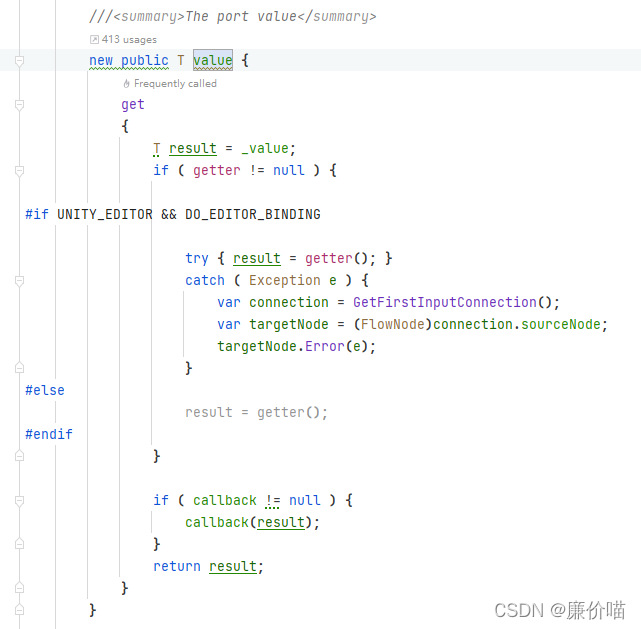
那这就很合理了,所以说还不能随便传入一个委托就拿来用
需要这个委托是一个 ValueInput 的成员而不是 ValueInput 本身
2.3.2 尝试方向:反射
那么接下来我还想做一个获取任意委托并转为事件的节点的话,那么这个事件节点就需要依赖具体的类了。比如我知道 ActorBase 中有委托,我想让 ActorBase 中的任意委托能够触发 FlowScript 中的 Flow 出口,那么我还需要在事件节点中写明一个 ActorBase 类型的 ValueInput,然后通过反射获取到这个 ActorBase 中所有委托,然后在 FlowCanvas 里面显示出一个长长的 Action 菜单。选择菜单中的一项,然后这被选择的 Action 会保存到一个变量中,在 OnGraphStarted() 中会绑定这个 Action,在 OnGraphStoped() 中会解绑这个 Action
这个我感觉有点难办,首先我不能在 EventNode 中使用 Odin 的 OnValueChange 的 Attribute
这样的话我本来是可以使用 OnValueChange 做出一个触发反射函数的效果的,但是在 EventNode 就很难了
C# 脚本中的反射示例
// ----------------------------------------------
// 作者: 廉价喵
// 创建于: 28/03/2022 17:43
// 最后一次修改于: 04/04/2022 15:25
// 版权所有: CheapMeowStudio
// 描述:
// ----------------------------------------------

using System;
using System.Collections.Generic;
using System.Reflection;
using Sirenix.OdinInspector;
using Sirenix.Utilities;
using UnityEngine;
using UnityEngine.Events;
using UnityEngine.UIElements;

namespace MeowFramework.Core
{
    public class ActorBase : SerializedMonoBehaviour
    {
        /// <summary>
        /// 血量
        /// </summary>
        [Tooltip("血量")]
        public ActorAttribute<float> HP = new ActorAttribute<float>();

        /// <summary>
        /// 最大血量
        /// </summary>
        [Tooltip("最大血量")]
        public ActorAttribute<float> MaxHP = new ActorAttribute<float>();

        private Action TestAction1;

        [OnValueChanged("GetDelegates")]
        public string ActionName;

        public List<Action> actions = new List<Action>();

        private void GetDelegates()
        {
            // 清空列表中已添加的 Action
            actions.Clear();

            // 首先获取委托所在类的 Type
            System.Type type = typeof(ActorBase);
            // 委托是字段
            FieldInfo[] fieldInfos = type.GetFields(BindingFlags.Public | BindingFlags.NonPublic | BindingFlags.Static | BindingFlags.Instance);
            //
            foreach (FieldInfo fieldInfo in fieldInfos)
            {
                // 判断是否是 Action
                if (fieldInfo.FieldType == typeof(Action))
                {
                    Debug.Log(fieldInfo.GetNiceName());
                    // 是则添加到列表中
                    actions.Add((Action)fieldInfo.GetValue(this));
                }

            }
        }
    }
}
总之对于 C# 脚本,使用 Odin,这很容易实现,但是 EventNode 没有相应的反射接口
一路找 EventNode 的继承关系到 Assets/ParadoxNotion/FlowCanvas/Modules/FlowGraphs/FlowNode.cs
虽然这里有一个 public override void OnPortConnected(Port port, Port otherPort) 可以用
比如在自己的 EventNode 中
        public override void OnPortConnected(Port port, Port otherPort)
        {
            Debug.Log("!!!!!!!!!!!!!!!");
        }
但是这只会在连线的时候生效
对于直接通过 BBParmater 选择的变量,他是不会触发的
直接通过 BBParmater 选择:
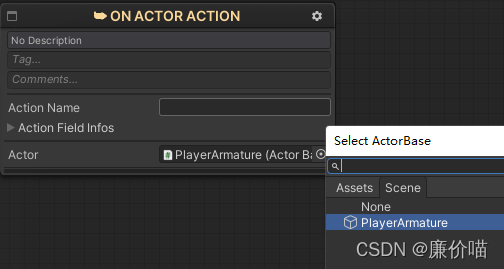
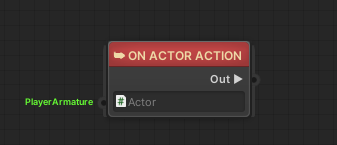
通过连线选择:
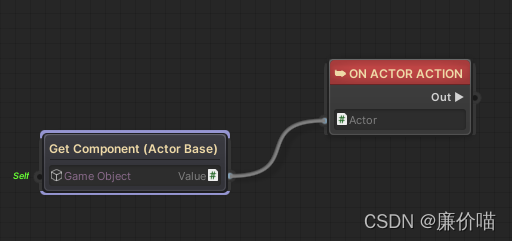
再从 FlowNode 找下去,根据 virtual 关键字找,还是没有值改变时触发的函数
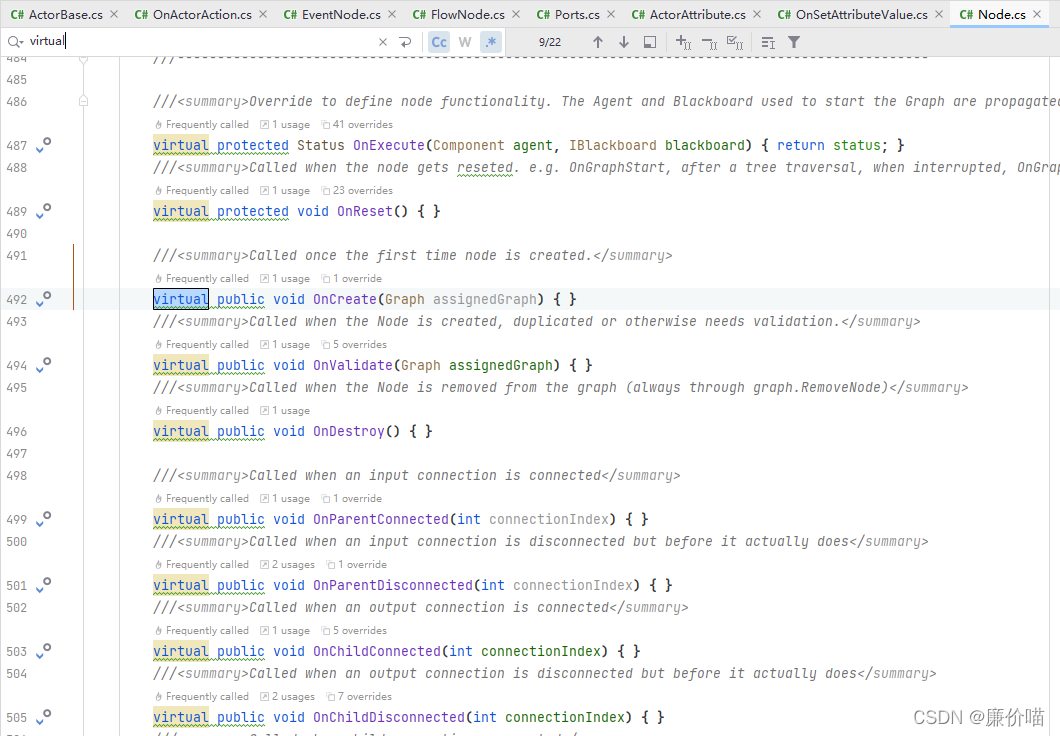
假设只能使用 BBParameter 的话,那么我希望这个事件是这么写的
// ----------------------------------------------
// 作者: 廉价喵
// 创建于: 04/04/2022 7:54
// 最后一次修改于: 04/04/2022 16:16
// 版权所有: CheapMeowStudio
// 描述:
// ----------------------------------------------

using System;
using System.Collections.Generic;
using System.Reflection;
using MeowFramework.Core;
using ParadoxNotion.Design;
using Sirenix.OdinInspector;
using UnityEngine;

namespace FlowCanvas.Nodes
{

    [Category("Events/MeowFramework")]
    public class OnActorAction : EventNode
    {
        private FlowOutput raised;

        private ValueInput<ActorBase> actor;

        public Dictionary<Action,bool> actorActions = new Dictionary<Action,bool>();

        public override void OnPortConnected(Port port, Port otherPort)
        {
            GetActorActions();
        }

        private void GetActorActions()
        {
            // 清空列表中已添加的 Action
            actorActions.Clear();

            // 首先获取委托所在类的 Type
            System.Type type = typeof(ActorBase);
            // 委托是字段
            FieldInfo[] fieldInfos = type.GetFields(BindingFlags.Public | BindingFlags.NonPublic | BindingFlags.Static | BindingFlags.Instance);
            //
            foreach (FieldInfo fieldInfo in fieldInfos)
            {
                // 判断是否是 Action
                if (fieldInfo.FieldType == typeof(Action))
                {
                    // 是则添加到列表中
                    actorActions.Add((Action)fieldInfo.GetValue(actor.value),false);
                }

            }
        }

        public override void OnGraphStarted()
        {
            foreach (KeyValuePair<Action,bool> keyValuePair in actorActions)
            {
                if (keyValuePair.Value == true)
                {
                    keyValuePair.Key += EventRaised;
                }
            }
        }

        public override void OnGraphStoped()
        {
            foreach (KeyValuePair<Action,bool> keyValuePair in actorActions)
            {
                if (keyValuePair.Value == true)
                {
                    keyValuePair.Key -= EventRaised;
                }
            }
        }

        //Register the output flow port or any other port
        protected override void RegisterPorts()
        {
            raised = AddFlowOutput("Out");
            actor = AddValueInput<ActorBase>("Actor");
        }

        //Fire output flow
        void EventRaised()
        {
            // Flow 流程调用
            raised.Call(new Flow());
        }
    }
}
在启动的时候通过判断字典
但是有一个问题是这个字典也是没有 setter 的,所以也用不了 += -=
就是说 KeyValuePair 是不可变的
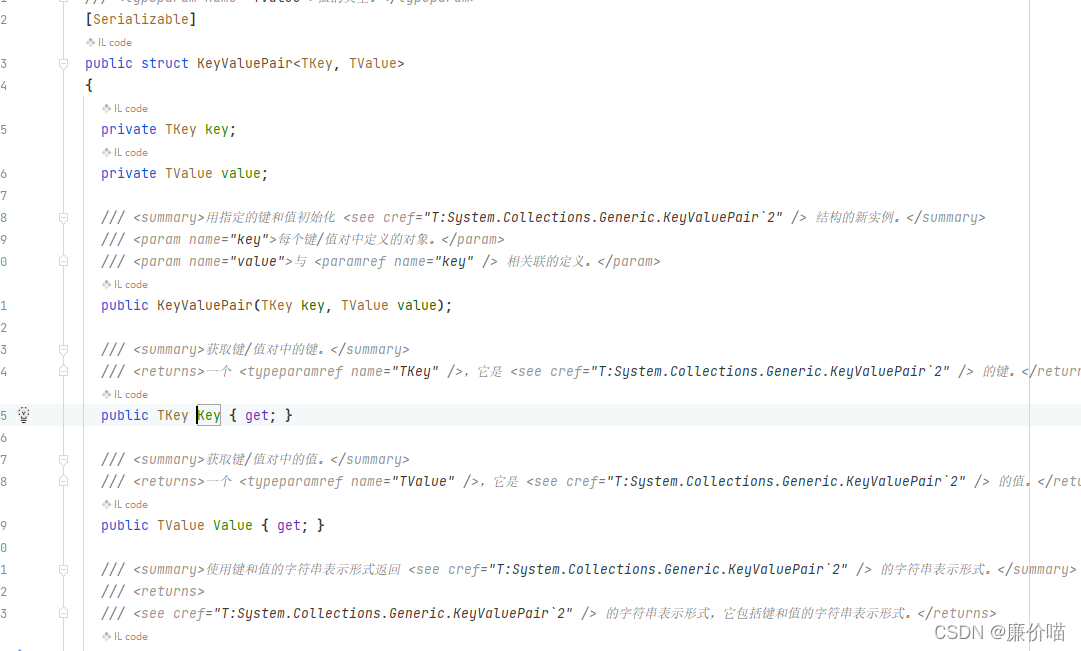
那么使用笨方法的话就是需要用别的触发函数了,比如 OnChildConnected
为了用这个函数,必须要先取消掉 sealed 的不可重载的限制
Assets/ParadoxNotion/FlowCanvas/Modules/FlowGraphs/FlowNode.cs
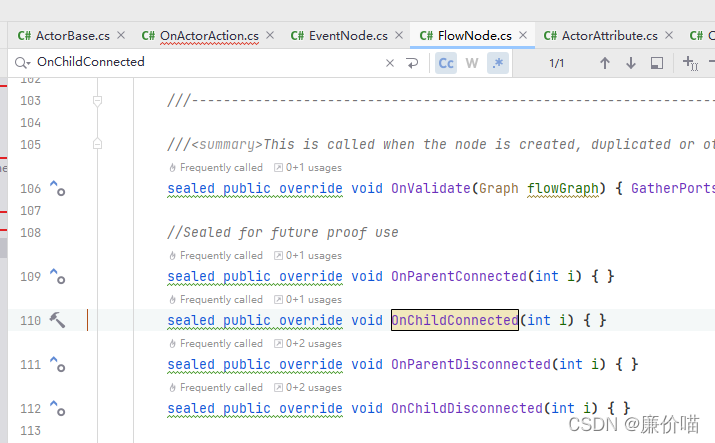
第一版我是这么考虑的,我是希望有一个字典能够让策划选择这个事件节点监听了哪些事件,然后我根据这些名字一个一个找
// ----------------------------------------------
// 作者: 廉价喵
// 创建于: 04/04/2022 7:54
// 最后一次修改于: 04/04/2022 16:51
// 版权所有: CheapMeowStudio
// 描述:
// ----------------------------------------------

using System;
using System.Collections.Generic;
using System.Reflection;
using MeowFramework.Core;
using ParadoxNotion;
using ParadoxNotion.Design;
using Sirenix.OdinInspector;
using UnityEngine;

namespace FlowCanvas.Nodes
{

    [Category("Events/MeowFramework")]
    public class OnActorAction : EventNode
    {
        private FlowOutput raised;

        private ValueInput<ActorBase> actor;

        public Dictionary<string,bool> actorActionNames = new Dictionary<string,bool>();

        private List<Action> actorActions = new List<Action>();

        public override void OnPortConnected(Port port, Port otherPort)
        {
            GetActorActions();
        }

        public override void OnPortDisconnected(Port port, Port otherPort)
        {
            // 清空列表中已添加的 Action
            actorActionNames.Clear();
            actorActions.Clear();
        }

        public override void OnChildConnected(int connectionIndex)
        {
            GetActorActions();
        }

        public override void OnChildDisconnected(int connectionIndex)
        {
            // 清空列表中已添加的 Action
            actorActionNames.Clear();
            actorActions.Clear();
        }

        /// <summary>
        /// 获得 ActorBase 的所有的
        /// </summary>
        private void GetActorActions()
        {
            // 清空列表中已添加的 Action
            actorActionNames.Clear();
            actorActions.Clear();

            // 如果是在刚开始添加的 actor,那么在 OnPortConnected 触发时,actor 还没有赋值
            if (actor.value == null)
                return;

            // 首先获取委托所在类的 Type
            System.Type type = typeof(ActorBase);
            // 委托是字段
            FieldInfo[] fieldInfos = type.GetFields(BindingFlags.Public | BindingFlags.NonPublic | BindingFlags.Static | BindingFlags.Instance);
            //
            foreach (FieldInfo fieldInfo in fieldInfos)
            {
                // 判断是否是 Action
                if (fieldInfo.FieldType == typeof(Action))
                {
                    // 添加到名称字典中
                    actorActionNames.Add(fieldInfo.FriendlyName(),false);
                    // 是则添加到列表中
                    actorActions.Add((Action)fieldInfo.GetValue(actor.value));
                }

            }
        }

        public override void OnGraphStarted()
        {
            foreach (KeyValuePair<string,bool> keyValuePair in actorActionNames)
            {
                if (keyValuePair.Value == true)
                {
                    for (int i = 0; i < actorActions.Count; ++i)
                    {
                        // 通过名称获得对应的 Action,绑定
                        if (actorActions[i].GetMethodInfo().FriendlyName() == keyValuePair.Key)
                        {
                            actorActions[i] += EventRaised;
                        }
                    }
                }
            }
        }

        public override void OnGraphStoped()
        {
            foreach (KeyValuePair<string,bool> keyValuePair in actorActionNames)
            {
                if (keyValuePair.Value == true)
                {
                    for (int i = 0; i < actorActions.Count; ++i)
                    {
                        // 通过名称获得对应的 Action,解绑
                        if (actorActions[i].GetMethodInfo().FriendlyName() == keyValuePair.Key)
                        {
                            actorActions[i] -= EventRaised;
                        }
                    }
                }
            }
        }

        //Register the output flow port or any other port
        protected override void RegisterPorts()
        {
            raised = AddFlowOutput("Out");
            actor = AddValueInput<ActorBase>("Actor");
        }

        //Fire output flow
        void EventRaised()
        {
            // Flow 流程调用
            raised.Call(new Flow());
        }
    }
}
但是我一开始还以为 ValueInput 是在连线的时候就赋值了,测试之后发现不是,实际上这个 ValueInput 是在 OnGraphStarted() 赋值的,这就导致如果我在连线的时候判断 actor.value == null 会一直为真
那么其实还不如取消字典,取消这一堆查找,直接就是让使用者输入一个 string,然后在 OnGraphStarted() 根据这个名称查找类的字段然后根据字段和 ValueInput 获得 ValueInput 的 Action
那这样的话还不如直接一个 Action 做一个事件,方便策划直接在右键菜单里面找,还省去了反射的时间
2.3.3 尝试方向:value += EventRaised
其实就是我第一次尝试的方向,但是当时我并没有意识到要取到 ValueInput<Action> 的值
写完这个文章之后几天突然想到
绑定委托的事件节点脚本
	[Category("MeowFramework/Events")]
    [Description("绑定 Action 的事件")]
    public class ActionEvent : EventNode
    {
        private FlowOutput raised;

        private Action action;

        private ValueInput<Action> actionInput;

        public override void OnGraphStarted()
        {
            // 订阅事件
            action = actionInput.value;
            action += EventRaised;
        }

        public override void OnGraphStoped()
        {
            // 取消订阅事件
            action = actionInput.value;
            action -= EventRaised;
        }

        //Register the output flow port or any other port
        protected override void RegisterPorts()
        {
            raised = AddFlowOutput("Out");
            actionInput = AddValueInput<Action>("Action");
        }

        //Fire output flow
        void EventRaised()
        {
            // Flow 流程调用
            raised.Call(new Flow());
        }
    }
测试 FlowScript
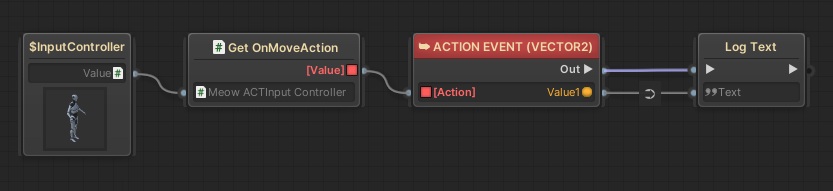
测试结果是完全没有输出
看了一下是 InputController 里面完全没有绑定到 Action
这才发现原来我传的是值类型
那么我就做一个函数把引用类型传出去
		public ref Action<Vector2> GetOnMoveActionReference()
		{
			return ref OnMoveAction;
		}
这个函数确实能够找到
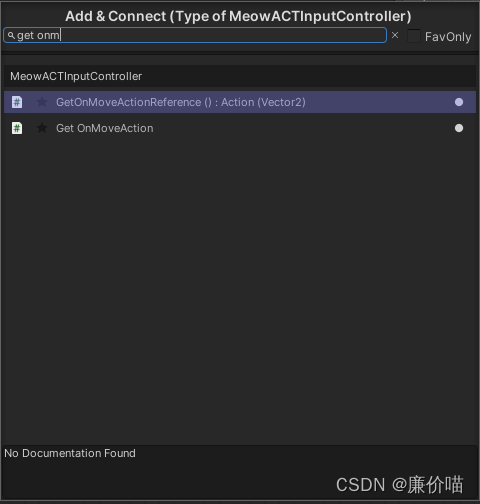
但是用的时候会报错
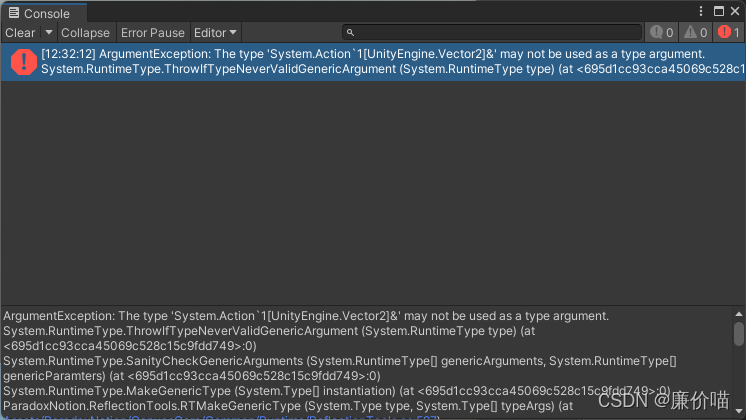
居然是不能使用引用类型
展开来看,这个调用堆栈也是很离谱
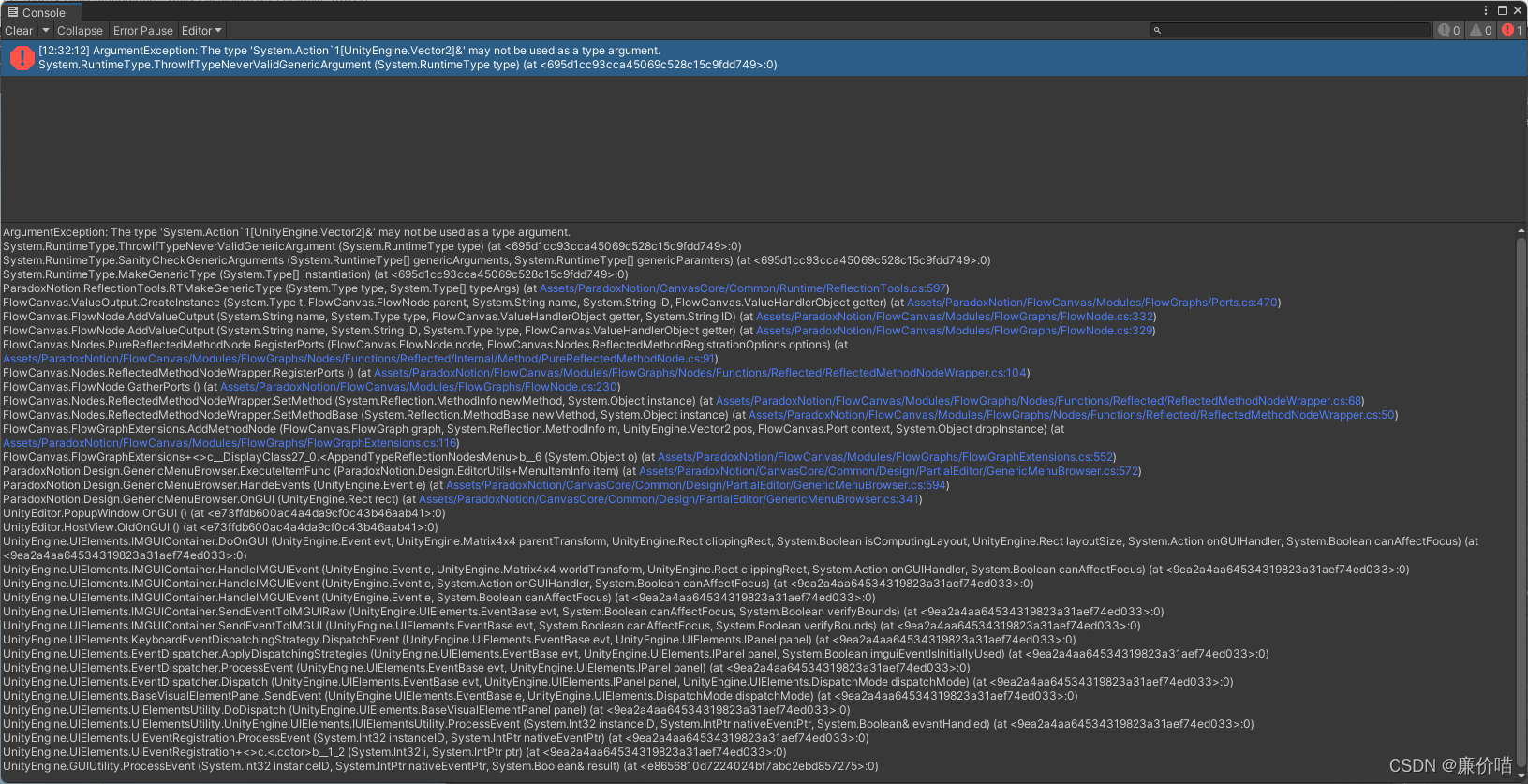
总的说来还是不能传递引用类型的变量
那就这样吧,一个 Action 做一个事件节点hhh





 扫一扫
扫一扫


 1490
1490

 被折叠的 条评论
为什么被折叠?
被折叠的 条评论
为什么被折叠?
 到【灌水乐园】发言





