



vector的介绍
vector的定义
| (constructor) 构造函数声明 | 接口说明 |
|---|---|
| vector () | 无参构造 |
| vector (size_type n, const value_type& val = value_type()) | 构造并初始化 n 个 val |
| vector (const vector& x); | 拷贝构造 |
| vector (InputIterator first, InputIterator last); | 使用迭代器进行初始化构造 |
void test_vector2()
{
	vector<int> v1(10, 1);
	for (auto e : v1)
	{
		cout << e << " ";
	}
	cout << endl;
	vector<int> v2(v1.begin(), v1.end());
	for (auto e : v2)
	{
		cout << e << " ";
	}
	cout << endl;
	string s1("12345");
	vector<int> v3(s1.begin(), s1.end());
	for (auto e : v3)
	{
		cout << e << " ";
	}
	cout << endl;
}
vector iterator 的使用
| iterator 的使用 | 接口说明 |
|---|---|
| begin+ end(重点) | 获取第一个数据位置的 iterator/const_iterator,获取最后一个数据的下一个位置的 iterator/const_iterator |
| rbegin+ rend | 获取最后一个数据位置的 reverse_iterator,获取第一个数据前一个位置的 reverse_iterator |
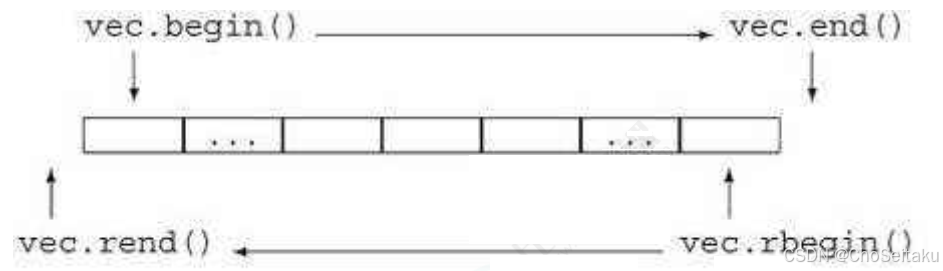
void test_vector1()
{
	vector<int> v;
	v.push_back(1);
	v.push_back(2);
	v.push_back(3);
	v.push_back(4);
	// vector<char>
	// string
	//
	for (size_t i = 0; i < v.size(); i++)
	{
		cout << v[i] << " ";
	}
	cout << endl;
	vector<int>::iterator it1 = v.begin();
	while (it1 != v.end())
	{
		cout << *it1 << " ";
		++it1;
	}
	cout << endl;
	for (auto e : v)
	{
		cout << e << " ";
	}
	cout << endl;
}
vector 空间增长问题
| 容量空间 | 接口说明 |
|---|---|
| size | 获取数据个数 |
| capacity | 获取容量大小 |
| empty | 判断是否为空 |
| resize(重点) | 改变 vector 的 size |
| reserve(重点) | 改变 vector 的 capacity |
- capacity的代码在vs和g++下分别运行会发现,vs下capacity是按1.5倍增长的,g++是按2倍增长的。这个问题经常会考察,不要固化的认为,vector增容都是2倍,具体增长多少是根据具体的需求定义的。vs是PJ版本STL,g++是SGI版本STL。
- reserve只负责开辟空间,如果确定知道需要用多少空间,reserve可以缓解vector增容的代价缺陷问题。
- resize在开空间的同时还会进行初始化,影响size。
// 测试vector的默认扩容机制
void TestVectorExpand()
{
	size_t sz;
	vector<int> v;
	sz = v.capacity();
	cout << "making v grow:\n";
	for (int i = 0; i < 100; ++i)
	{
		v.push_back(i);
		if (sz != v.capacity())
		{
			sz = v.capacity();
			cout << "capacity changed: " << sz << '\n';
		}
	}
}

vs:运行结果:vs下使用的STL基本是按照1.5倍方式扩容
making foo grow:
capacity changed: 1
capacity changed: 2
capacity changed: 3
capacity changed: 4
capacity changed: 6
capacity changed: 9
capacity changed: 13
capacity changed: 19
capacity changed: 28
capacity changed: 42
capacity changed: 63
capacity changed: 94
capacity changed: 141

g++运行结果:linux下使用的STL基本是按照2倍方式扩容
making foo grow:
capacity changed: 1
capacity changed: 2
capacity changed: 4
capacity changed: 8
capacity changed: 16
capacity changed: 32
capacity changed: 64
capacity changed: 128
// 如果已经确定vector中要存储元素大概个数,可以提前将空间设置足够
// 就可以避免边插入边扩容导致效率低下的问题了
void TestVectorExpandOP()
{
	vector<int> v;
	size_t sz = v.capacity();
	v.reserve(100); // 提前将容量设置好,可以避免一遍插入一遍扩容
	cout << "making bar grow:\n";
	for (int i = 0; i < 100; ++i)
	{
		v.push_back(i);
		if (sz != v.capacity())
		{
			sz = v.capacity();
			cout << "capacity changed: " << sz << '\n';
		}
	}
}
vector 增删查改
| vector 增删查改 | 接口说明 |
|---|---|
| push_back | 尾插 |
| pop_back | 尾删 |
| find | 查找。(注意这个是算法模块实现,不是 vector 的成员接口) |
| insert | 在 position 之前插入 val |
| erase | 删除 position 位置的数据 |
| swap | 交换两个 vector 的数据空间 |
| operator [] | 像数组一样访问 |
void test_vector4()
{
	vector<int> v;
	v.push_back(1);
	v.push_back(2);
	v.push_back(3);
	v.push_back(4);
	for (auto e : v)
	{
		cout << e << " ";
	}
	cout << endl;

	v.insert(v.begin(), 0);
	for (auto e : v)
	{
		cout << e << " ";
	}
	cout << endl;

	//vector<int>::iterator it = find(v.begin(), v.end(), 3);
	auto it = find(v.begin(), v.end(), 3);
	v.insert(it, 30);
	for (auto e : v)
	{
		cout << e << " ";
	}
	cout << endl;

	list<int> lt;
	lt.push_back(10);
	lt.push_back(20);
	lt.push_back(30);
	lt.push_back(40);

	auto lit = find(lt.begin(), lt.end(), 3);
	if (lit != lt.end())
	{
		lt.insert(lit, 300);
	}
	for (auto e : lt)
	{
		cout << e << " ";
	}
	cout << endl;

	vector<string> vstr;
	string s1("");
	vstr.push_back(s1);
	vstr.push_back(string(""));
	vstr.push_back("");
	for (const auto& e : vstr)
	{
		cout << e << " ";
	}
	cout << endl;

	cout << vstr[0][0] <<'z'<< endl;
	cout << vstr[0][3] << endl;
}
vector 迭代器失效问题
迭代器的主要作用就是让算法能够不用关心底层数据结构,其底层实际就是一个指针,或者是对指针进行了封装,比如:vector的迭代器就是原生态指针T* 。因此迭代器失效,实际就是迭代器底层对应指针所指向的空间被销毁了,而使用一块已经被释放的空间,造成的后果是程序崩溃(即如果继续使用已经失效的迭代器,程序可能会崩溃)。
对于vector可能会导致其迭代器失效的操作有:
- 会引起其底层空间改变的操作,都有可能是迭代器失效,比如:resize、reserve、insert、assign、push_back等。
#include <iostream>
using namespace std;
#include <vector>
int main()
{
	vector<int> v{1,2,3,4,5,6};
	auto it = v.begin();
	// 将有效元素个数增加到100个,多出的位置使用8填充,操作期间底层会扩容
	// v.resize(100, 8);
	// reserve的作用就是改变扩容大小但不改变有效元素个数,操作期间可能会引起底层容量改变
	// v.reserve(100);
	// 插入元素期间,可能会引起扩容,而导致原空间被释放
	// v.insert(v.begin(), 0);
	// v.push_back(8);
	// 给vector重新赋值,可能会引起底层容量改变
	v.assign(100, 8);
	/*
	出错原因:以上操作,都有可能会导致vector扩容,也就是说vector底层原理旧空间被释
	放掉,而在打印时,it还使用的是释放之间的旧空间,在对it迭代器操作时,实际操作的是一块
	已经被释放的空间,而引起代码运行时崩溃。
	解决方式:在以上操作完成之后,如果想要继续通过迭代器操作vector中的元素,只需给
	it重新赋值即可。
	*/
	while(it != v.end())
	{
		cout<< *it << " " ;
		++it;
	}
	cout<<endl;
	return 0;
}
- 指定位置元素的删除操作–erase
#include <iostream>
using namespace std;
#include <vector>

int main()
{
	int a[] = { 1, 2, 3, 4 };
	vector<int> v(a, a + sizeof(a) / sizeof(int));

	// 使用find查找3所在位置的iterator
	vector<int>::iterator pos = find(v.begin(), v.end(), 3);

	// 删除pos位置的数据,导致pos迭代器失效。
	v.erase(pos);
	cout << *pos << endl; // 此处会导致非法访问
	return 0;
}
erase删除pos位置元素后,pos位置之后的元素会往前搬移,没有导致底层空间的改变,理论上讲迭代器不应该会失效,但是:如果pos刚好是最后一个元素,删完之后pos刚好是end的位置,而end位置是没有元素的,那么pos就失效了。因此删除vector中任意位置上元素时,vs就认为该位置迭代器失效了。
以下代码的功能是删除vector中所有的偶数,请问那个代码是正确的,为什么?
#include <iostream>
using namespace std;
#include <vector>
int main()
{
	vector<int> v{ 1, 2, 3, 4 };
	auto it = v.begin();
	while (it != v.end())
	{
		if (*it % 2 == 0)
		v.erase(it);
		++it;
	}
	return 0;
}

int main()
{
	vector<int> v{ 1, 2, 3, 4 };
	auto it = v.begin();
	while (it != v.end())
	{
		if (*it % 2 == 0)
		it = v.erase(it);
		else
		++it;
	}
	return 0;
}
- 注意:Linux下,g++编译器对迭代器失效的检测并不是非常严格,处理也没有vs下极端。
// 1. 扩容之后,迭代器已经失效了,程序虽然可以运行,但是运行结果已经不对了
int main()
{
	vector<int> v{1,2,3,4,5};
	for(size_t i = 0; i < v.size(); ++i)
	cout << v[i] << " ";
	cout << endl;
	auto it = v.begin();
	cout << "扩容之前,vector的容量为: " << v.capacity() << endl;

	// 通过reserve将底层空间设置为100,目的是为了让vector的迭代器失效
	v.reserve(100);
	cout << "扩容之后,vector的容量为: " << v.capacity() << endl;
	// 经过上述reserve之后,it迭代器肯定会失效,在vs下程序就直接崩溃了,但是linux下不会
	// 虽然可能运行,但是输出的结果是不对的
	while(it != v.end())
	{
		cout << *it << " ";
		++it;
	}
	cout << endl;
	return 0;
}
程序输出:
1 2 3 4 5
扩容之前,vector的容量为: 5
扩容之后,vector的容量为: 100
0 2 3 4 5 409 1 2 3 4 5
// 2. erase删除任意位置代码后,linux下迭代器并没有失效
// 因为空间还是原来的空间,后序元素往前搬移了,it的位置还是有效的
#include <vector>
#include <algorithm>

int main()
{
	vector<int> v{1,2,3,4,5};
	vector<int>::iterator it = find(v.begin(), v.end(), 3);
	v.erase(it);
	cout << *it << endl;
	while(it != v.end())
	{
		cout << *it << " ";
		++it;
	}
	cout << endl;
	return 0;
}

程序可以正常运行,并打印:
4
4 5
// 3: erase删除的迭代器如果是最后一个元素,删除之后it已经超过end
// 此时迭代器是无效的,++it导致程序崩溃

int main()
{
	vector<int> v{1,2,3,4,5};
	// vector<int> v{1,2,3,4,5,6};
	auto it = v.begin();
	while(it != v.end())
	{
		if(*it % 2 == 0)
		v.erase(it);
		++it;
	}
	for(auto e : v)
	cout << e << " ";
	cout << endl;
	return 0;
}
========================================================
// 使用第一组数据时,程序可以运行
[sly@VM-0-3-centos 20220114]$ g++ testVector.cpp -std=c++11
[sly@VM-0-3-centos 20220114]$ ./a.out
1 3 5
=========================================================
// 使用第二组数据时,程序最终会崩溃
[sly@VM-0-3-centos 20220114]$ vim testVector.cpp
[sly@VM-0-3-centos 20220114]$ g++ testVector.cpp -std=c++11
[sly@VM-0-3-centos 20220114]$ ./a.out
Segmentation fault
从上述三个例子中可以看到:SGI STL中,迭代器失效后,代码并不一定会崩溃,但是运行结果肯定不对,如果it不在begin和end范围内,肯定会崩溃的。
4. 与vector类似,string在插入+扩容操作+erase之后,迭代器也会失效
#include <string>
void TestString()
{
	string s("hello");
	auto it = s.begin();
	// 放开之后代码会崩溃,因为resize到20会string会进行扩容
	// 扩容之后,it指向之前旧空间已经被释放了,该迭代器就失效了
	// 后序打印时,再访问it指向的空间程序就会崩溃
	//s.resize(20, '!');
	while (it != s.end())
	{
		cout << *it;
		++it;
	}
	cout << endl;
	it = s.begin();
	while (it != s.end())
	{
		it = s.erase(it);
		// 按照下面方式写,运行时程序会崩溃,因为erase(it)之后
		// it位置的迭代器就失效了
		// s.erase(it);
		++it;
	}
}
insert和erase形参pos都可能会失效
原则是insert和erase过的迭代器不要使用
迭代器失效解决办法:在使用前,对迭代器重新赋值即可。
vector 在OJ中的使用
class Solution {
public:
	int singleNumber(vector<int>& nums) {
		int value = 0;
		for(auto e : nums)
		{
			value ^= e;
		}

		return value;
	}
};
// 涉及resize / operator[]
// 核心思想:找出杨辉三角的规律,发现每一行头尾都是1,中间第[j]个数等于上一行[j-1]+[j]
class Solution {
public:
	vector<vector<int>> generate(int numRows) {
		vector<vector<int>> vv(numRows);
		for(int i = 0; i < numRows; ++i)
		{
			vv[i].resize(i+1, 1);
		}

		for(int i = 2; i < numRows; ++i)
		{
			for(int j = 1; j < i; ++j)
			{
				vv[i][j] = vv[i-1][j] + vv[i-1][j-1];
			}
		}
		return vv;
	}
};
26. 删除有序数组中的重复项 - 力扣(LeetCode)
137. 只出现一次的数字 II - 力扣(LeetCode)
260. 只出现一次的数字 III - 力扣(LeetCode)
数组中出现次数超过一半的数字_牛客题霸_牛客网
17. 电话号码的字母组合 - 力扣(LeetCode)
class Solution {
public:
	string _numToStr = {"", "", "abc", "def", "ghi", "jkl", "mno", "pqrs", "tuv", "wxyz"};

	void Combine(const string digits, int di, string cbStr, vector<string>& v){
		if (di == digits.size())
		{
			v.push_back(cbStr);
			return;
		}

	}

	vector<string> lettorCombinations(string digits){
		vector<string> v;

		if (digits.empty())
			return v;
		Combine(digits, 0, "", v);

		return v;
	}
};
![![[Pasted image 20260103231047.png]]](https://i-blog.csdnimg.cn/direct/cc08129e93e74605ba7727f3e4fbec96.png)





 扫一扫
扫一扫


 728
728

 被折叠的 条评论
为什么被折叠?
被折叠的 条评论
为什么被折叠?
 到【灌水乐园】发言





