



(1)
++
(2)以下开始成员函数 :

++

++
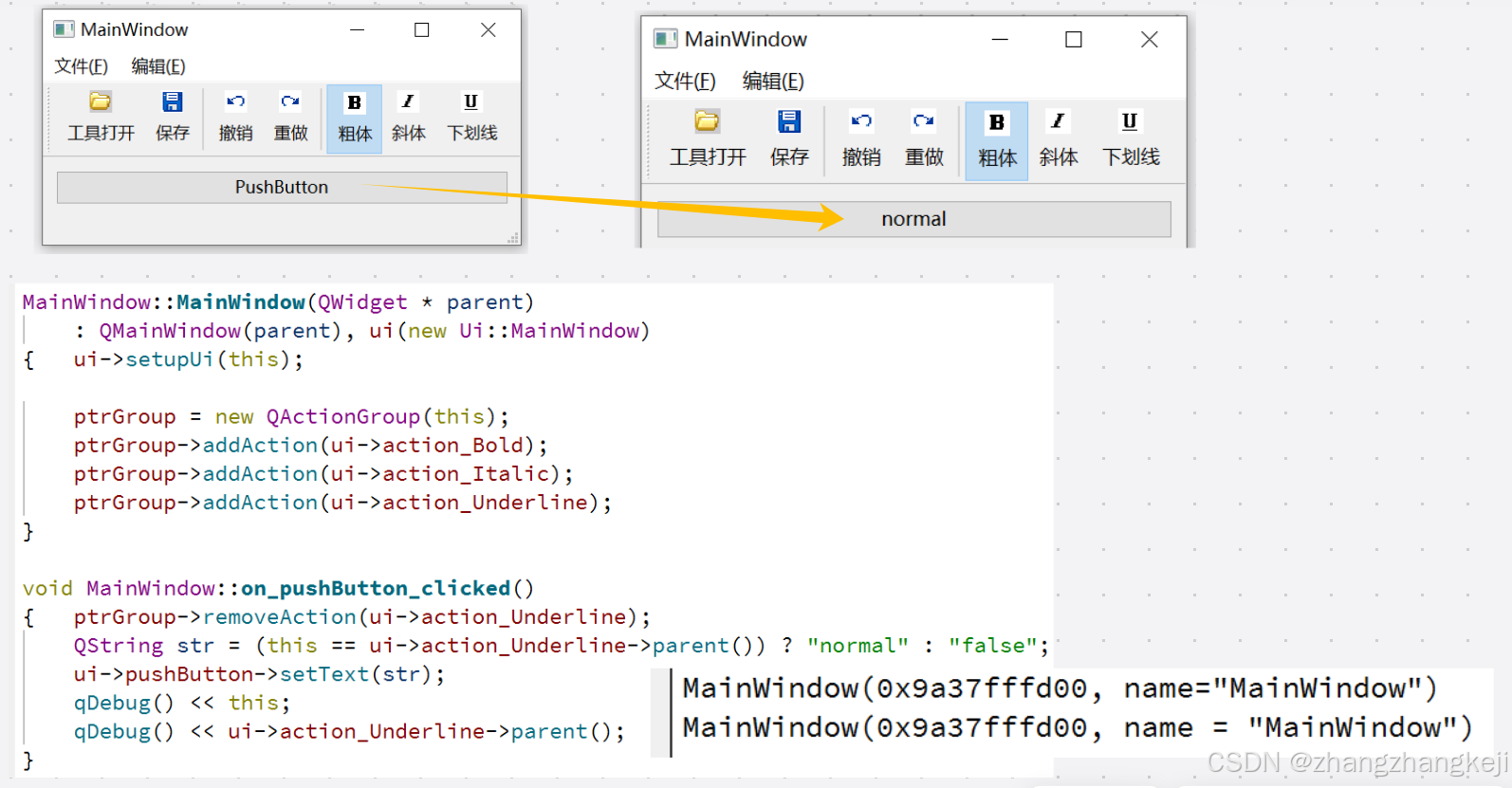
++给出测试,防止从group 里删除 action 后造成内存泄露 :
(3) 给出信号函数的测试 :
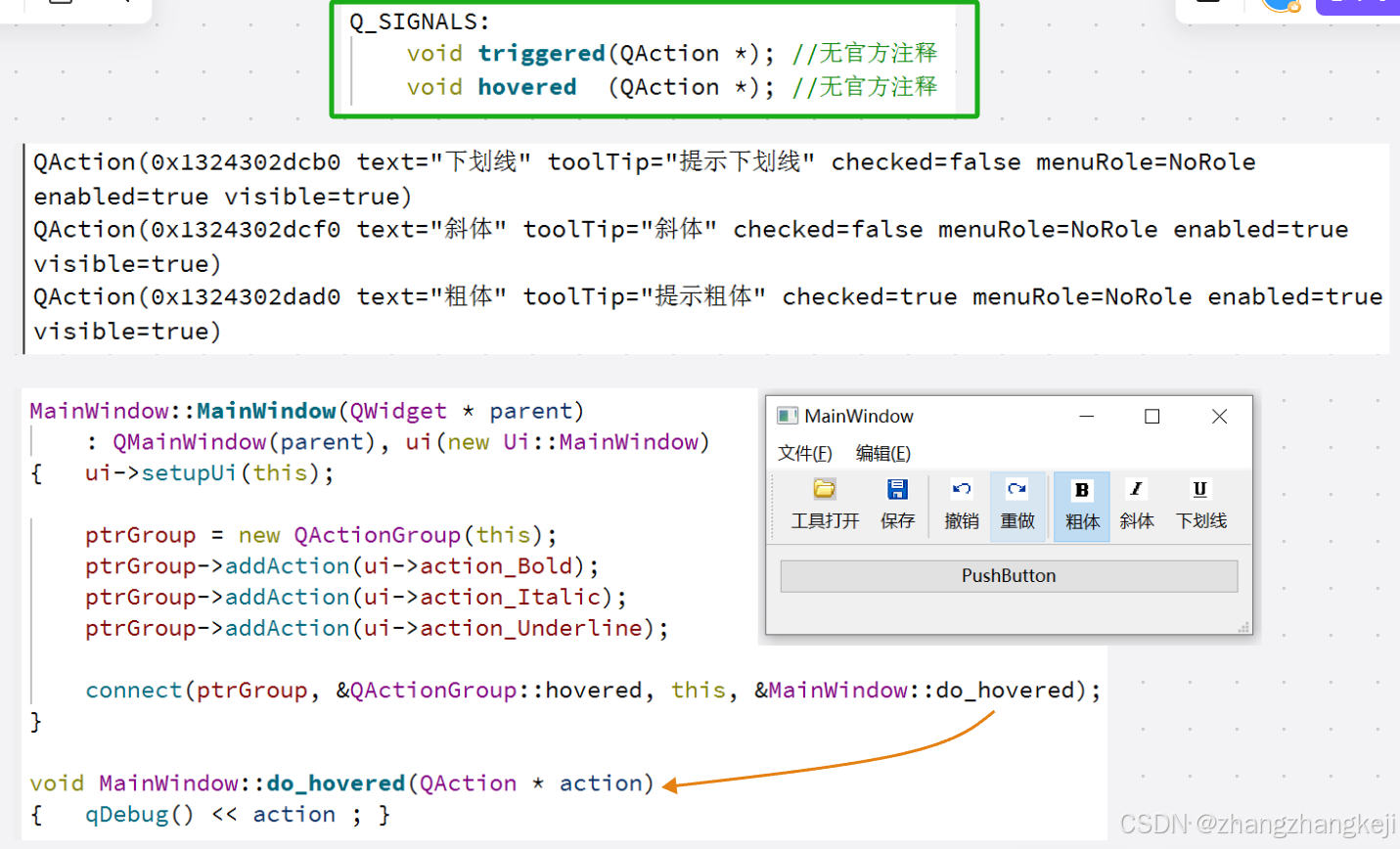
(4) 本源代码来自于头文件 qactiongroup . h :
#ifndef QACTIONGROUP_H
#define QACTIONGROUP_H

#include <QtGui/qtguiglobal.h>
#include <QtGui/qaction.h>

QT_REQUIRE_CONFIG(action);

QT_BEGIN_NAMESPACE //说明本类依然定义于 Qt的全局命名空间

class QActionGroupPrivate;

/*
The QActionGroup class groups actions together.

QActionGroup是一个基类,用于将继承自QAction对象的类分组在一起:
在某些情况下,将 QAction 对象分组是有用的。
例如,如果您有一个左对齐动作、一个右对齐动作。-个居中对齐动作和一个居中动作,
那么这些动作中只能有一个在任何时候处于活动状态。
实现这点的一种简单方法是将这些动作分组到一个动作组中,继承 OActionGroup。

这里说明可以创建本类的子类,子类也具有一样的分组功能。
*/

class Q_GUI_EXPORT QActionGroup : public QObject
{
    Q_OBJECT

    Q_DECLARE_PRIVATE(QActionGroup)

    //This property holds whether the action group is enabled。
    //Each action in the group will be enabled or disabled
    //  unless it has been explicitly disabled.
    Q_PROPERTY(bool enabled READ isEnabled WRITE setEnabled)

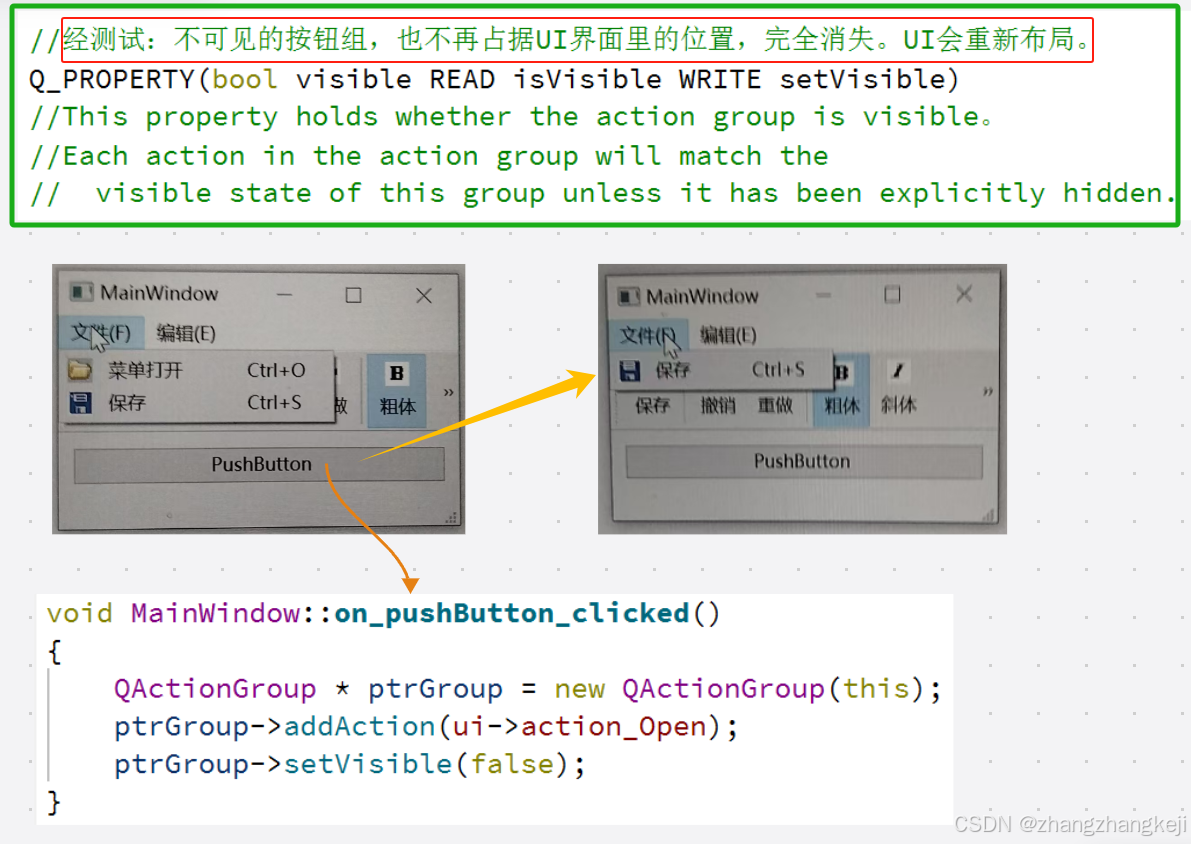
    //经测试:不可见的按钮组,也不再占据UI界面里的位置,完全消失。UI会重新布局。
    Q_PROPERTY(bool visible READ isVisible WRITE setVisible)
    //This property holds whether the action group is visible。
    //Each action in the action group will match the
    //  visible state of this group unless it has been explicitly hidden.

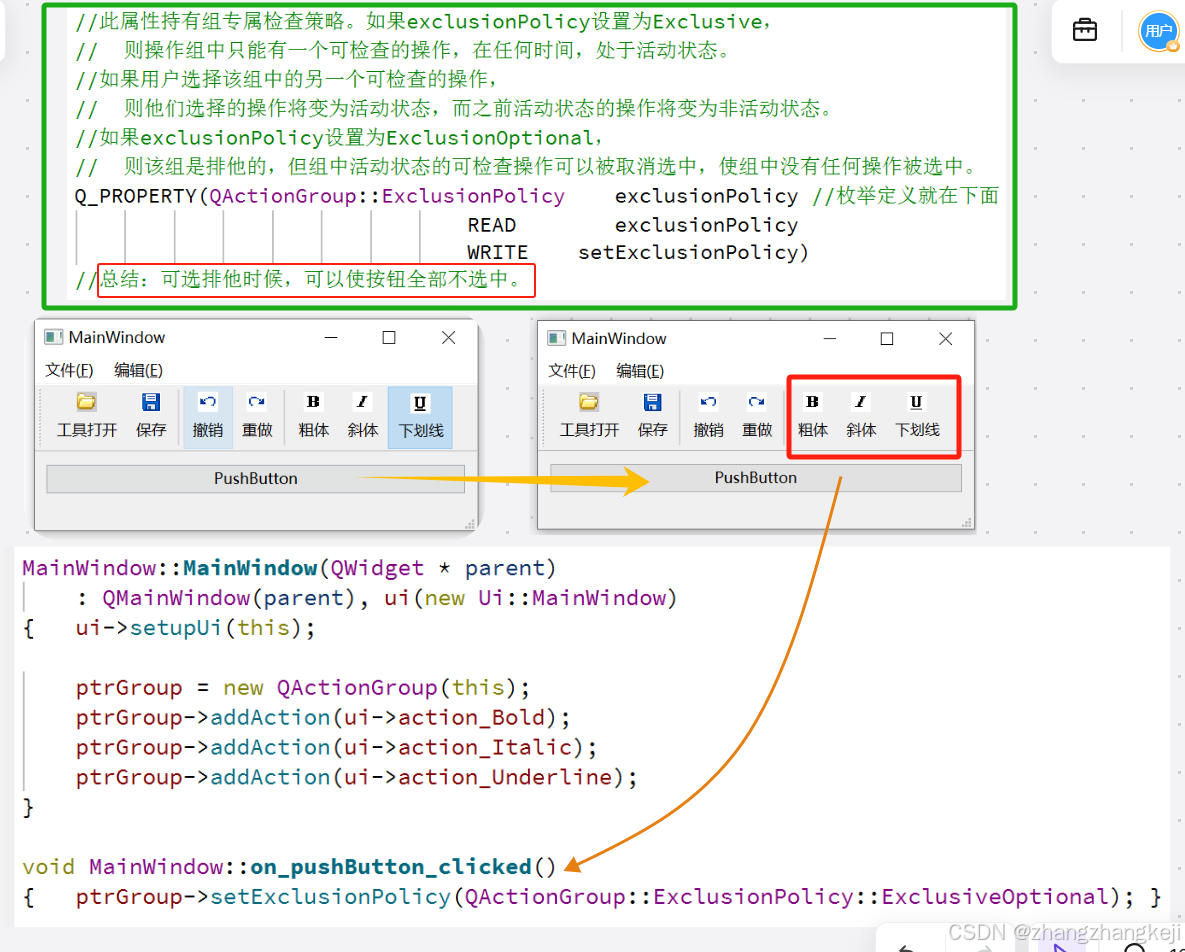
    //此属性持有组专属检查策略。如果exclusionPolicy设置为Exclusive,
    //  则操作组中只能有一个可检查的操作,在任何时间,处于活动状态。
    //如果用户选择该组中的另一个可检查的操作,
    //  则他们选择的操作将变为活动状态,而之前活动状态的操作将变为非活动状态。
    //如果exclusionPolicy设置为ExclusionOptional,
    //  则该组是排他的,但组中活动状态的可检查操作可以被取消选中,使组中没有任何操作被选中。
    Q_PROPERTY(QActionGroup::ExclusionPolicy    exclusionPolicy //枚举定义就在下面
                                    READ        exclusionPolicy
                                    WRITE    setExclusionPolicy)
    //总结:可选排他时候,可以使按钮全部不选中。


private Q_SLOTS:
    void _q_actionTriggered();
    void _q_actionHovered();
    void _q_actionChanged();

private:
    Q_DISABLE_COPY(QActionGroup)

protected:
    QActionGroup(QActionGroupPrivate & dd, QObject * parent);

public:

    //actionGroup = new QActionGroup(this); //this是窗体,QMainWindow
    explicit QActionGroup(QObject * parent);
    //Constructs an action group for the parent object.
    //默认情况下,动作组是排他的。要使动作组非排他,请调用setExclusive(false)。
    //要使组排他但允许取消选中活动动作,
    //请调用 setExclusionPolicy(QActionGroup::ExclusionPolicy::ExclusiveOptional)。

    ~QActionGroup();

//   Q_PROPERTY(bool    enabled   READ    isEnabled   WRITE   setEnabled)
                bool  isEnabled() const;
public Q_SLOTS:
                void setEnabled(bool);

public  :
//   Q_PROPERTY(bool    visible   READ    isVisible   WRITE   setVisible)
                bool  isVisible() const;
public Q_SLOTS:
                void setVisible(bool);

public  :
                enum class    ExclusionPolicy {
                    None     ,
                    Exclusive,
                    ExclusiveOptional
                };
                Q_ENUM(       ExclusionPolicy    )
//   Q_PROPERTY(QActionGroup::ExclusionPolicy    exclusionPolicy //枚举定义就在下面
//                READ        exclusionPolicy
//                WRITE    setExclusionPolicy)
        ExclusionPolicy       exclusionPolicy() const;
public Q_SLOTS:
    void setExclusionPolicy(ExclusionPolicy policy);

public  :
    //Returns true if the group is exclusive.
    //The group is exclusive if the
    //  ExclusionPolicy is either Exclusive or ExclusionOptional.
    bool isExclusive() const;

    //Returns the list of this groups's actions. This may be empty.
    QList<QAction *>        actions() const;

          QAction *  checkedAction () const;
    //Returns the currently checked action in the group,
    //  or nullptr if none are checked.


    QAction *    addAction(      QAction * a   );
    //Creates and returns an action with text.
    //The newly created action is a child of this action group.
    //Normally an action is added to a group by creating it with the group as parent,
    //so this function is not usually used.
    QAction *    addAction(const QString & text);
    QAction *    addAction(const QIcon   & icon, const QString & text); //本函也不常用
    //Creates and returns an action with text and an icon.
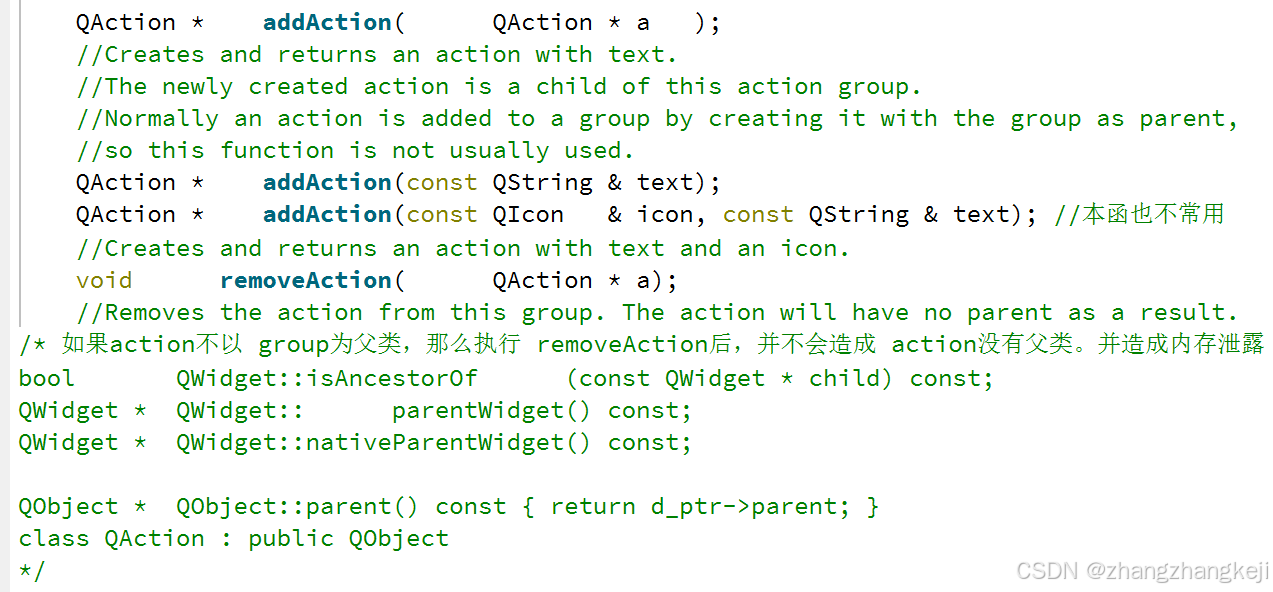
    void      removeAction(      QAction * a);
    //Removes the action from this group. The action will have no parent as a result.
/* 如果action不以 group为父类,那么执行 removeAction后,并不会造成 action没有父类。并造成内存泄露
bool       QWidget::isAncestorOf      (const QWidget * child) const;
QWidget *  QWidget::      parentWidget() const;
QWidget *  QWidget::nativeParentWidget() const;

QObject *  QObject::parent() const { return d_ptr->parent; }
class QAction : public QObject
*/


public Q_SLOTS:
    //void setEnabled(bool);
    inline void setDisabled(bool b) { setEnabled(!b); }
    //void setVisible(bool);
    void setExclusive(bool);
    //void setExclusionPolicy(ExclusionPolicy policy);

Q_SIGNALS:
    void triggered(QAction *); //无官方注释
    void hovered  (QAction *); //无官方注释

}; //完结 class QActionGroup : public QObject

QT_END_NAMESPACE

#endif // QACTIONGROUP_H
(5)
谢谢





 扫一扫
扫一扫


 1276
1276

 被折叠的 条评论
为什么被折叠?
被折叠的 条评论
为什么被折叠?
 到【灌水乐园】发言





