


组网图形
组网需求
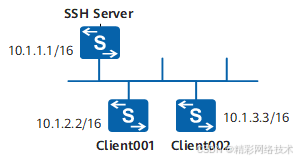
如图1所示,用户希望在服务器端和客户端进行安全的数据交互,配置两个登录用户为client001和client002,分别使用password认证方式和dsa认证方式登录SSH服务器。
使用STelnet V1协议存在安全风险,建议使用STelnet V2登录设备。
配置思路
采用如下的思路配置通过STelnet登录其他设备:
在SSH服务器端生成本地密钥对,实现在服务器端和客户端进行安全的数据交互。
在SSH服务器端配置SSH用户client001和client002分别使用不同的认证方式。
在SSH服务器端开启STelnet服务功能。
在SSH服务器端配置SSH用户client001和client002的服务方式为STelnet。
用户client001和client002分别以STelnet方式实现登录SSH服务器。
操作步骤
- 在服务器端生成本地密钥对
<HUAWEI> system-view
[HUAWEI] sysname SSH Server
[SSH Server] dsa local-key-pair create
Info: The key name will be: SSH Server_Host_DSA.
Info: The DSA host key named SSH Server_Host_DSA already exists.
Info: The key modulus can be any one of the following : 1024, 2048.
Info: If the key modulus is greater than 512, it may take a few minutes.
Please input the modulus [default=2048]:
Info: Generating keys........
Info: Succeeded in creating the DSA host keys.
- 在服务器端创建SSH用户
# 配置VTY用户界面。
[SSH Server] user-interface vty 0 4
[SSH Server-ui-vty0-4] authentication-mode aaa
[SSH Server-ui-vty0-4] protocol inbound ssh
[SSH Server-ui-vty0-4] quit
创建SSH用户client001。
# 新建用户名为client001的SSH用户,且认证方式为password。
[SSH Server] aaa
[SSH Server-aaa] local-user client001 password irreversible-cipher Example@123
[SSH Server-aaa] local-user client001 privilege level 3
[SSH Server-aaa] local-user client001 service-type ssh
[SSH Server-aaa] quit
[SSH Server] ssh user client001
[SSH Server] ssh user client001 authentication-type password
创建SSH用户client002。
# 新建用户名为client002的SSH用户,且认证方式为DSA。
[SSH Server] ssh user client002
[SSH Server] ssh user client002 authentication-type dsa
# 在STelnet客户端Client002生成客户端的本地密钥对。
<HUAWEI> system-view
[HUAWEI] sysname client002
[client002] dsa local-key-pair create
Info: The key name will be: SSH Server_Host_DSA.
Info: The DSA host key named SSH Server_Host_DSA already exists.
 最低0.47元/天 解锁文章






 扫一扫
扫一扫


 2071
2071

 被折叠的 条评论
为什么被折叠?
被折叠的 条评论
为什么被折叠?
 到【灌水乐园】发言





