


 本文介绍如何在Unity编辑器中实现动态给GameObject添加脚本,并实时展示和修改脚本的公开属性,涉及自定义编辑器、属性特性及反射等技术。
背景
近期需要完成一个扩展编辑器中的功能,即在Scene视图中任意选择某GameObject,然后给这个GameObject动态添加指定脚本,难点是需要让脚本的属性也同时暴露出来,让我们可以随时修改其中公共属性,并序列化下来。
实现效果
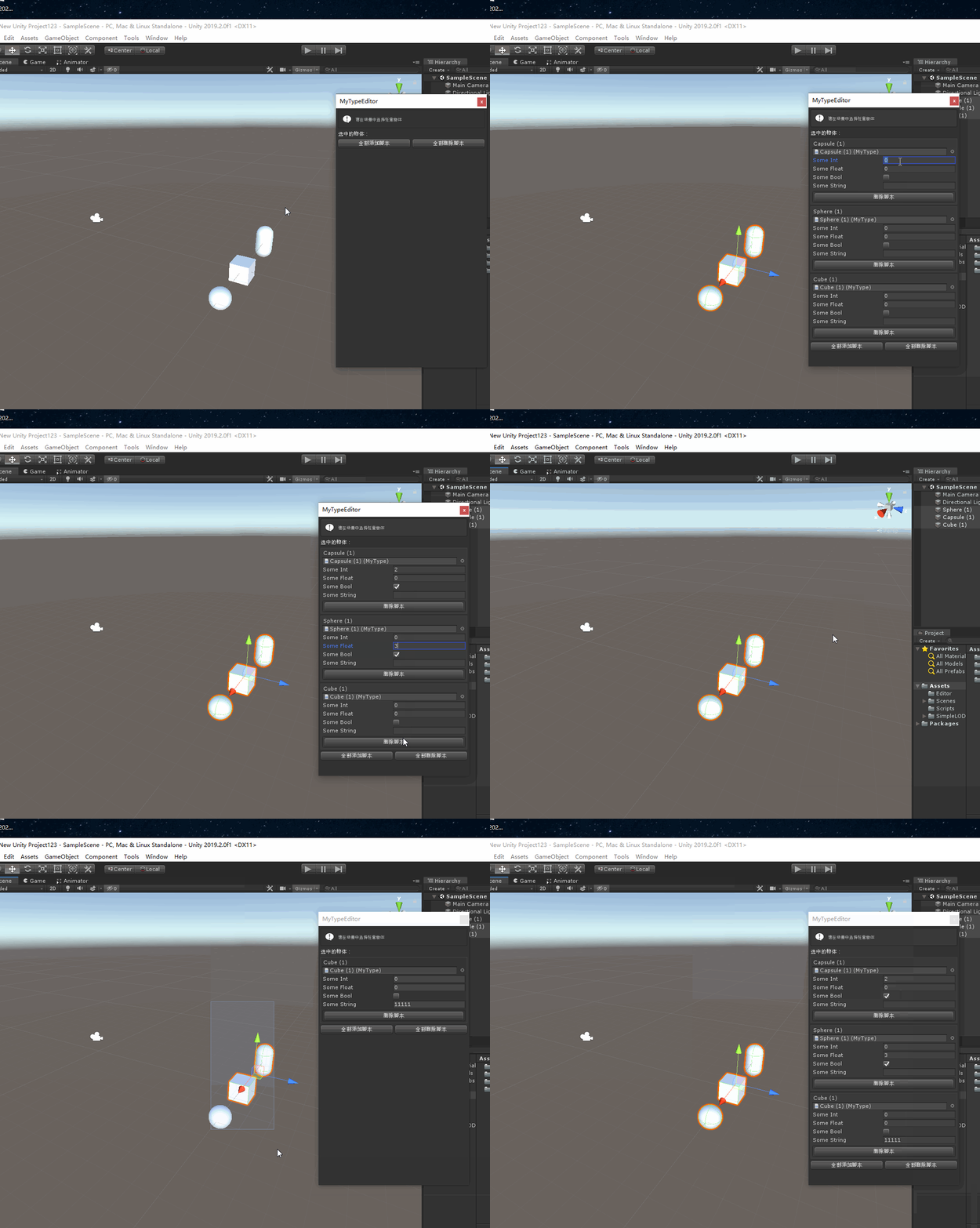
如上图所示,具体展示的功能就是可以给场景中任意物体附加指定的脚本,并且显示脚本想要序列化的属性。(这里我其实想将指定的脚本也做成可以随时拖动替换的,奈何技术不够,只能先将要拖动的脚本写在代码里。)
总体结构
为了实现这个功能,需要有以下几个脚本:
- ExposePropertyAttribute.cs:该脚本为特性申明类,注意该脚本不能放到Editor文件夹下
- ExposeProperties.cs:该脚本为特性实现类,是这个功能实现的核心脚本,需要放到Editor文件夹下
- MyType.cs:任意你需要显示修改属性的类
- MyTypeEditor.cs:你要实现扩展编辑器脚本
以上脚本中,也可以清楚地看出后两个脚本是自定义的,核心是实现前两个脚本。
代码
- ExposePropertyAttribute.cs
using System;

[AttributeUsage(AttributeTargets.Property)]
public class ExposePropertyAttribute : Attribute
{
}
- ExposeProperties.cs
using UnityEditor;
using UnityEngine;
using System;
using System.Collections.Generic;
using System.Reflection;

/*
    - Integer
    - Float
    - Boolean
    - String
    - Vector2
    - Vector3
    - Enum
    - UnityEngine.Object
    代码中支持以上几种形式的显示,还可以继续扩展
 */

public static class ExposeProperties
{
    public static void Expose(PropertyField[] properties)
    {

        GUILayoutOption[] emptyOptions = new GUILayoutOption[0];

        EditorGUILayout.BeginVertical(emptyOptions);

        foreach (PropertyField field in properties)
        {
            EditorGUILayout.BeginHorizontal(emptyOptions);
            switch (field.Type)
            {
                case SerializedPropertyType.Integer:
                    field.SetValue(EditorGUILayout.IntField(field.Name, (int)field.GetValue(), emptyOptions));
                    break;
                case SerializedPropertyType.Float:
                    field.SetValue(EditorGUILayout.FloatField(field.Name, (float)field.GetValue(), emptyOptions));
                    break;
                case SerializedPropertyType.Boolean:
                    field.SetValue(EditorGUILayout.Toggle(field.Name, (bool)field.GetValue(), emptyOptions));
                    break;
                case SerializedPropertyType.String:
                    field.SetValue(EditorGUILayout.TextField(field.Name, (String)field.GetValue(), emptyOptions));
                    break;
                case SerializedPropertyType.Vector2:
                    field.SetValue(EditorGUILayout.Vector2Field(field.Name, (Vector2)field.GetValue(), emptyOptions));
                    break;
                case SerializedPropertyType.Vector3:
                    field.SetValue(EditorGUILayout.Vector3Field(field.Name, (Vector3)field.GetValue(), emptyOptions));
                    break;
                case SerializedPropertyType.Enum:
                    field.SetValue(EditorGUILayout.EnumPopup(field.Name, (Enum)field.GetValue(), emptyOptions));
                    break;
                case SerializedPropertyType.ObjectReference:
                    field.SetValue(EditorGUILayout.ObjectField(field.Name, (UnityEngine.Object)field.GetValue(), field.GetPropertyType(), true, emptyOptions));
                    break;
                default:
                    break;
            }
            EditorGUILayout.EndHorizontal();
        }
        EditorGUILayout.EndVertical();
    }

    public static PropertyField[] GetProperties(System.Object obj)
    {
        List<PropertyField> fields = new List<PropertyField>();
        PropertyInfo[] infos = obj.GetType().GetProperties(BindingFlags.Public | BindingFlags.Instance);

        foreach (PropertyInfo info in infos)
        {
            if (!(info.CanRead && info.CanWrite))
                continue;
            object[] attributes = info.GetCustomAttributes(true);
            bool isExposed = false;
            foreach (object o in attributes)
            {
                if (o.GetType() == typeof(ExposePropertyAttribute))
                {
                    isExposed = true;
                    break;
                }
            }
            if (!isExposed)
                continue;
            SerializedPropertyType type = SerializedPropertyType.Integer;
            if (PropertyField.GetPropertyType(info, out type))
            {
                PropertyField field = new PropertyField(obj, info, type);
                fields.Add(field);
            }
        }
        return fields.ToArray();
    }
}

public class PropertyField
{
    System.Object m_Instance;
    PropertyInfo m_Info;
    SerializedPropertyType m_Type;

    MethodInfo m_Getter;
    MethodInfo m_Setter;

    public SerializedPropertyType Type
    {
        get
        {
            return m_Type;
        }
    }
    public String Name
    {
        get
        {
            return ObjectNames.NicifyVariableName(m_Info.Name);
        }
    }
    public PropertyField(System.Object instance, PropertyInfo info, SerializedPropertyType type)
    {

        m_Instance = instance;
        m_Info = info;
        m_Type = type;

        m_Getter = m_Info.GetGetMethod();
        m_Setter = m_Info.GetSetMethod();
    }
    public System.Object GetValue()
    {
        return m_Getter.Invoke(m_Instance, null);
    }
    public void SetValue(System.Object value)
    {
        m_Setter.Invoke(m_Instance, new System.Object[] { value });
    }
    public Type GetPropertyType()
    {
        return m_Info.PropertyType;
    }
    public static bool GetPropertyType(PropertyInfo info, out SerializedPropertyType propertyType)
    {

        propertyType = SerializedPropertyType.Generic;

        Type type = info.PropertyType;

        if (type == typeof(int))
        {
            propertyType = SerializedPropertyType.Integer;
            return true;
        }

        if (type == typeof(float))
        {
            propertyType = SerializedPropertyType.Float;
            return true;
        }

        if (type == typeof(bool))
        {
            propertyType = SerializedPropertyType.Boolean;
            return true;
        }

        if (type == typeof(string))
        {
            propertyType = SerializedPropertyType.String;
            return true;
        }

        if (type == typeof(Vector2))
        {
            propertyType = SerializedPropertyType.Vector2;
            return true;
        }

        if (type == typeof(Vector3))
        {
            propertyType = SerializedPropertyType.Vector3;
            return true;
        }

        if (type.IsEnum)
        {
            propertyType = SerializedPropertyType.Enum;
            return true;
        }
        // COMMENT OUT to NOT expose custom objects/types
        propertyType = SerializedPropertyType.ObjectReference;
        return true;

        //return false;

    }
}
- MyType.cs
using UnityEngine;

public class MyType : MonoBehaviour
{
    [HideInInspector] [SerializeField] int m_SomeInt;
    [HideInInspector] [SerializeField] float m_SomeFloat;
    [HideInInspector] [SerializeField] bool m_SomeBool;
    [HideInInspector] [SerializeField] string m_Etc;

    [ExposeProperty]
    public int SomeInt
    {
        get
        {
            return m_SomeInt;
        }
        set
        {
            m_SomeInt = value;
        }
    }

    [ExposeProperty]
    public float SomeFloat
    {
        get
        {
            return m_SomeFloat;
        }
        set
        {
            m_SomeFloat = value;
        }
    }

    [ExposeProperty]
    public bool SomeBool
    {
        get
        {
            return m_SomeBool;
        }
        set
        {
            m_SomeBool = value;
        }
    }

    [ExposeProperty]
    public string SomeString
    {
        get
        {
            return m_Etc;
        }
        set
        {
            m_Etc = value;
        }
    }
}
- MyTypeEditor.cs
using UnityEditor;
using UnityEngine;
using System.Collections;

[CustomEditor(typeof(MyType))]
public class MyTypeEditor : EditorWindow
{
    private PropertyField[] _fields;

    [MenuItem("Tools/Test")]
    static void CreateWindow()
    {
        var window = GetWindow(typeof(MyTypeEditor), true);
        window.Show();
    }
    private void OnGUI()
    {
        EditorGUILayout.HelpBox("请在场景中选择任意物体", MessageType.Info);
        EditorGUILayout.LabelField("选中的物体:");

        foreach (var item in Selection.gameObjects)
        {
            EditorGUILayout.BeginVertical("Box");
            GUILayout.Label(item.name);
            var sp = item.GetComponent<MyType>();
            if (sp != null)
            {
                sp = (MyType)EditorGUILayout.ObjectField(sp, typeof(MyType), true);
                _fields = ExposeProperties.GetProperties(sp);
                ExposeProperties.Expose(_fields);

                EditorGUILayout.BeginHorizontal("HelpBox");
                if (GUILayout.Button("删除脚本"))
                {
                    DestroyImmediate(sp);
                }
                EditorGUILayout.EndHorizontal();
            }
            else
            {
                if (GUILayout.Button("添加脚本"))
                {
                    item.AddComponent<MyType>();
                }
            }
            EditorGUILayout.EndVertical();
        }

        EditorGUILayout.BeginHorizontal();
        if (GUILayout.Button("全部添加脚本"))
        {
            foreach (var item in Selection.gameObjects)
            {
                item.GetOrAddComponent<MyType>();
            }
        }
        if (GUILayout.Button("全部删除脚本"))
        {
            foreach (var item in Selection.gameObjects)
            {
                var sp = item.GetComponent<MyType>();
                if (item != null)
                {
                    DestroyImmediate(sp);
                }
            }
        }
        EditorGUILayout.EndHorizontal();
    }
    private void OnInspectorUpdate()
    {
        this.Repaint();
    }
}
OK,以上就是实现该功能的所有源码啦,都比较简单。





 扫一扫
扫一扫


 3795
3795

 被折叠的 条评论
为什么被折叠?
被折叠的 条评论
为什么被折叠?
 到【灌水乐园】发言





