 Unity UI Manager 实现


unity初学者都会把UI摆在场景内激活隐藏,来实现UI的打开关闭,这样很容易引起,UI之间的耦合. 我们可以实现一个UIManager来管理所有UI,并加载已经摆好的UI预制体和脚本,UIManager中我们只需要实现2个方法
     Open
     <
     T
     >
     (
     params

     object
     [
     ]
      para
     )
     //打开T类型的面板 para是任意数量的参数


     Close
     (
     string
      name
     )
     /
     关闭T类型名字的面板
之前写过动态加载UI的manager但是脚本要UI脚本要挂在预制体上,最近在看罗培羽的《unity3d网络游戏开发》第2版这本书的时候发现他的ui脚本和预制体是分开的,果断不能忍,抄过来改了一下感觉比我原先写的好用。 主要解决4个问题 1.UI打开关闭的动画 2.从resoure文件夹下加载UI 3.用UIManager的管理来减少面板耦合 4.UI脚本和UI预制体的分离,使ui预制体像皮肤一样,可以N个皮肤对应一个UI脚本。 现在我就来分享一些这个UIManager,有2个脚本
BasePanel.cs
     using

     UnityEngine
     ;


     using

     System
     .
     Collections
     ;


     using

     DG
     .
     Tweening
     ;


     using

     UnityEngine
     .
     UI
     ;


     using

     System
     ;


     public

     class

     BasePanel

     :

     MonoBehaviour

     {


     //皮肤路径


     public

     string
      skinPath
     ;


     //皮肤


     public

     GameObject
      skin
     ;


     //层级


     public

     PanelManager
     .
     Layer
      layer
     =
      PanelManager
     .
     Layer
     .
     Layer4
     ;


     //初始化


     public

     void

     Init
     (
     )
     {


     //皮肤


     GameObject
      skinPrefab
     =
      Resources
     .
     Load
     <
     GameObject
     >
     (
     skinPath
     )
     ;

        skin
     =

     (
     GameObject
     )
     Instantiate
     (
     skinPrefab
     )
     ;


     }


     //关闭


     public

     void

     Close
     (
     )
     {


     string
      name
     =

     this
     .
     GetType
     (
     )
     .
     ToString
     (
     )
     ;

        PanelManager
     .
     Close
     (
     name
     )
     ;


     }


     //初始化时


     public

     virtual

     void

     OnInit
     (
     )
     {


     }


     //显示时


     public

     virtual

     void

     OnShow
     (
     params

     object
     [
     ]
      para
     )
     {


     }


     #
     region
      可以重写动画的方法


     //打开动画


     public

     virtual

     void

     OpenAnimation
     (
     )


     {


     OnShowing
     (
     )
     ;


     Sequence
      mySequence
     =
      DOTween
     .
     Sequence
     (
     )
     ;

        mySequence
     .
     Append
     (
     skin
     .
     transform
     .
     DOScale
     (
     1.1f
     ,

     0.3f
     )
     )
     .
     Append
     (
     skin
     .
     transform
     .
     DOScale
     (
     1f
     ,

     0.2f
     )
     )
     .
     AppendCallback
     (
     (
     )

     =>

     {

     OnShowed
     (
     )
     ;

     }
     )
     ;


     }


     //关闭动画


     public

     virtual

     void

     CloseAnimation
     (
     )


     {


     Sequence
      mySequence
     =
      DOTween
     .
     Sequence
     (
     )
     ;

        mySequence
     .
     Append
     (
     skin
     .
     transform
     .
     DOScale
     (
     0f
     ,

     0.5f
     )
     )
     .
     AppendCallback
     (
     (
     )

     =>

     {

     OnShowed
     (
     )
     ;

     DestroyThisPanelObj
     (
     )
     ;

     }
     )
     ;


     }


     #
     endregion


     //销毁当前面板


     public

     void

     DestroyThisPanelObj
     (
     )


     {


     string
      name
     =

     this
     .
     GetType
     (
     )
     .
     ToString
     (
     )
     ;


     BasePanel
      panel
     =
      PanelManager
     .
     panels
     [
     name
     ]
     ;


     //没有打开


     if

     (
     panel
     ==

     null
     )


     {


     return
     ;


     }


     //列表

        PanelManager
     .
     panels
     .
     Remove
     (
     name
     )
     ;


     //销毁

        GameObject
     .
     Destroy
     (
     panel
     .
     skin
     )
     ;

        Component
     .
     Destroy
     (
     panel
     )
     ;


     }


     #
     region
      面板的生命周期


     /// <summary>


     /// 显示面板动画播放前


     /// </summary>


     public

     virtual

     void

     OnShowing
     (
     )

     {

     }


     /// <summary>


     /// 显示面板动画播放后


     /// </summary>


     public

     virtual

     void

     OnShowed
     (
     )

     {

     }


     /// <summary>


     /// 帧更新


     /// </summary>


     public

     virtual

     void

     Update
     (
     )

     {

     }


     /// <summary>e


     /// 关闭动画播放前


     /// </summary>


     public

     virtual

     void

     OnClosing
     (
     )

     {

     }


     /// <summary>


     /// 关闭动画播放后


     /// </summary>


     public

     virtual

     void

     OnClosed
     (
     )

     {

     }


     #
     endregion


     /// <summary>


     /// 注册事件和动画


     /// </summary>


     /// <param name="button"></param>


     /// <param name="tweenCallback"></param>


     public

     virtual

     void

     OnClickEventForButton
     (
     Button
      button
     ,

     TweenCallback
      tweenCallback
     )


     {


     float
      ScaleX
     =
      button
     .
     transform
     .
     localScale
     .
     x
     ;

        button
     .
     onClick
     .
     AddListener
     (


     (
     )

     =>


     {


     Sequence
      mySequence
     =
      DOTween
     .
     Sequence
     (
     )
     ;

                mySequence
     .
     Append
     (
     button
     .
     transform
     .
     DOScale
     (
     ScaleX
     *

     0.9f
     ,

     0.1f
     )
     )
     .
     Append
     (
     button
     .
     transform
     .
     DOScale
     (
     ScaleX
     ,

     0.1f
     )
     )


     .
     AppendCallback
     (
     tweenCallback
     )
     ;


     }


     )
     ;


     }


     }
PanelManager.cs
     using

     UnityEngine
     ;


     using

     System
     .
     Collections
     ;


     using

     System
     .
     Collections
     .
     Generic
     ;


     public

     static

     class

     PanelManager
     {


     //Layer


     public

     enum

     Layer
     {

        Bottom
     ,

        Layer0
     ,

        Layer1
     ,

        Layer2
     ,

        Layer3
     ,

        Layer4
     ,

        Layer5
     ,

        Layer6
     ,

        Layer7
     ,

        Layer8
     ,

        Layer9
     ,

        Tip
     ,


     }


     //层级列表


     private

     static

     Dictionary
     <
     Layer
     ,
      Transform
     >
      layers
     =

     new

     Dictionary
     <
     Layer
     ,
      Transform
     >
     (
     )
     ;


     //面板列表


     public

     static

     Dictionary
     <
     string
     ,
      BasePanel
     >
      panels
     =

     new

     Dictionary
     <
     string
     ,
      BasePanel
     >
     (
     )
     ;


     //结构


     public

     static

     Transform
      root
     ;


     public

     static

     Transform
      canvas
     ;


     //初始化


     public

     static

     void

     Init
     (
     )
     {

        root
     =
      GameObject
     .
     Find
     (
     "Root"
     )
     .
     transform
     ;

        canvas
     =
      root
     .
     Find
     (
     "Canvas"
     )
     ;


     Transform
      Bottom
     =
      canvas
     .
     Find
     (
     "Bottom"
     )
     ;


     Transform
      tip
     =
      canvas
     .
     Find
     (
     "Tip"
     )
     ;

        layers
     .
     Add
     (
     Layer
     .
     Bottom
     ,
      Bottom
     )
     ;

        layers
     .
     Add
     (
     Layer
     .
     Tip
     ,
      tip
     )
     ;


     for

     (
     int
      i
     =

     0
     ;
      i
     <

     10
     ;
      i
     ++
     )


     {


     Transform
      Layer
     =
      canvas
     .
     Find
     (
     "Layer"

     +
      i
     )
     ;

            layers
     .
     Add
     (
     (
     Layer
     )
     (
     i
     +

     1
     )
     ,
      Layer
     )
     ;


     }


     }


     //打开面板


     public

     static

     void

     Open
     <
     T
     >
     (
     params

     object
     [
     ]
      para
     )

     where

     T
     :
     BasePanel
     {


     //已经打开


     string
      name
     =

     typeof
     (
     T
     )
     .
     ToString
     (
     )
     ;


     if

     (
     panels
     .
     ContainsKey
     (
     name
     )
     )
     {


     return
     ;


     }


     //组件


     BasePanel
      panel
     =
      root
     .
     gameObject
     .
     AddComponent
     <
     T
     >
     (
     )
     ;

        panel
     .
     OnInit
     (
     )
     ;

        panel
     .
     Init
     (
     )
     ;


     //父容器


     Transform
      layer
     =
      layers
     [
     panel
     .
     layer
     ]
     ;

        panel
     .
     skin
     .
     transform
     .
     SetParent
     (
     layer
     ,

     false
     )
     ;


     //列表

        panels
     .
     Add
     (
     name
     ,
      panel
     )
     ;


     //OnShow

        panel
     .
     OnShow
     (
     para
     )
     ;

        panel
     .
     OpenAnimation
     (
     )
     ;


     }


     //关闭面板


     public

     static

     void

     Close
     (
     string
      name
     )
     {


     BasePanel
      panel
     =
      panels
     [
     name
     ]
     ;


     //没有打开


     if

     (
     panel
     ==

     null
     )
     {


     return
     ;


     }

        panel
     .
     CloseAnimation
     (
     )
     ;


     }


     }
例子面板TipPanel.cs
     using

     System
     .
     Collections
     .
     Generic
     ;


     using

     UnityEngine
     ;


     using

     UnityEngine
     .
     UI
     ;


     public

     class

     TipPanel

     :

     BasePanel

     {


     //提示文本


     private

     Text
      text
     ;


     //确定按钮


     private

     Button
      okBtn
     ;


     //初始化


     public

     override

     void

     OnInit
     (
     )

     {

        skinPath
     =

     "Panel/TipPanel"
     ;

        layer
     =
      PanelManager
     .
     Layer
     .
     Tip
     ;


     }


     //显示


     public

     override

     void

     OnShow
     (
     params

     object
     [
     ]
      args
     )

     {


     //寻找组件

        text
     =
      skin
     .
     transform
     .
     Find
     (
     "Text"
     )
     .
     GetComponent
     <
     Text
     >
     (
     )
     ;

        okBtn
     =
      skin
     .
     transform
     .
     Find
     (
     "OkBtn"
     )
     .
     GetComponent
     <
     Button
     >
     (
     )
     ;


     //监听

        okBtn
     .
     onClick
     .
     AddListener
     (
     OnOkClick
     )
     ;


     //提示语


     if
     (
     args
     .
     Length
     ==

     1
     )
     {

            text
     .
     text
     =

     (
     string
     )
     args
     [
     0
     ]
     ;


     }


     }


     //关闭后


     public

     override

     void

     OnClosed
     (
     )


     {


     }


     //当按下确定按钮


     public

     void

     OnOkClick
     (
     )
     {


     Close
     (
     )
     ;


     }


     }
面板我们可以通过在子类中重写 ---面板的生命周期---中的 OnShowing() OnShowed() OnClosing() OnClosed() 方法来实现面板动画开始前和后要实现的方法
我们可以可以通过在子类中重写 OpenAnimation() CloseAnimation() 里面的动画来单独实现某个面板的打开关闭动画 也可以通过修改父类BasePanel的 OpenAnimation() CloseAnimation() 来批量修改面板的打开关闭动画 这里的动画插件我们使用dotween 不会的同学可以去泰课在线找教程学一学
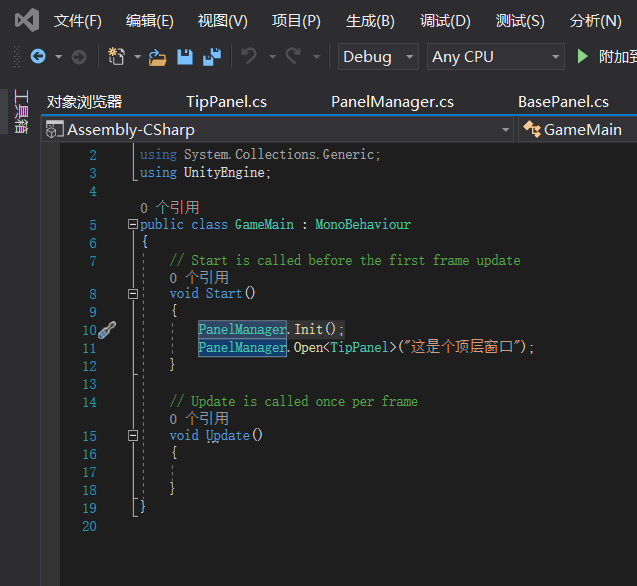
最重要的2个方法 Open<T>(params object[] para)//打开T类型的面板 para是任意数量的参数 Close(string name)/关闭T类型名字的面板 通过单例类 PanelManager.xxx调用就行了
###注意:调用PanelManager的方法前请调用一次PanelManager.Init()进行PanelManager的初始化
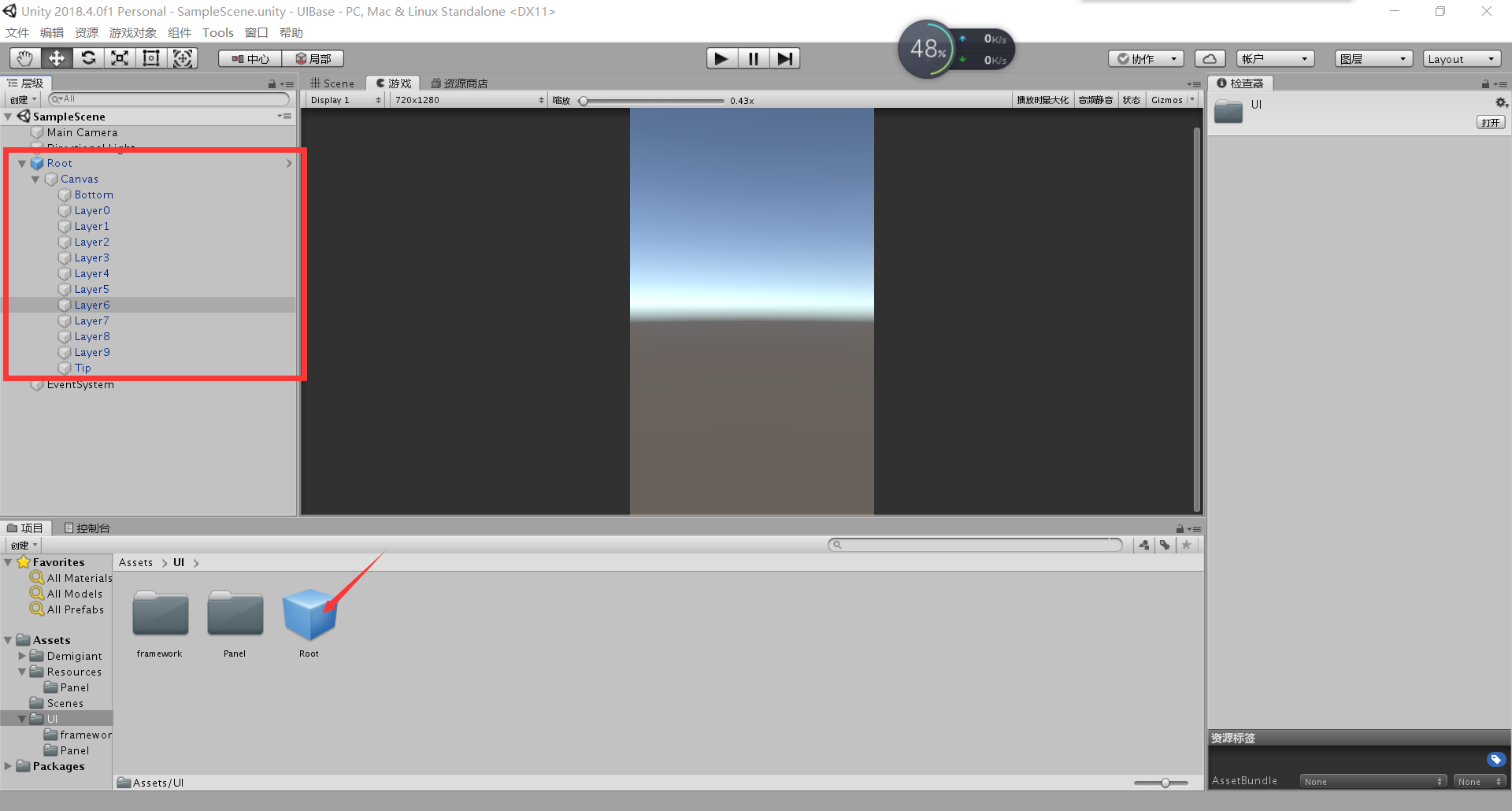
###UIroot请进行这样的布局如果您看不懂代码的话
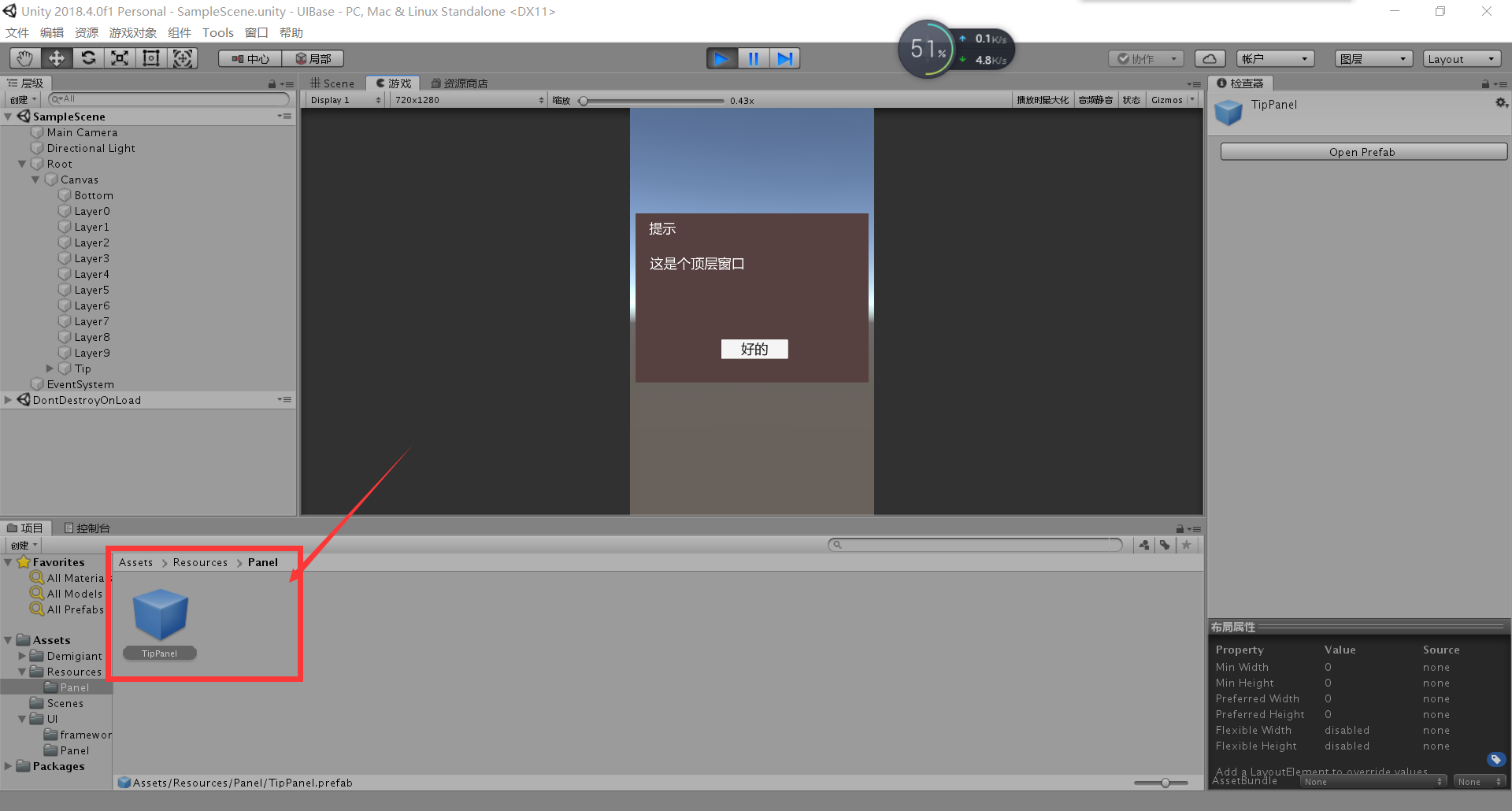
###UI预制体建议放在这个文件夹下
以下是我的例子代码拿过就可以用,也可以用来参考。
https://github.com/yicong1406410220/UIManagerExample





 扫一扫
扫一扫


 458
458

 被折叠的 条评论
为什么被折叠?
被折叠的 条评论
为什么被折叠?
 到【灌水乐园】发言





