


 本文详细介绍如何在Unity中通过配置文件动态设置UDP服务器的IP和端口号,实现客户端与服务器之间的UDP通信。包括创建配置文件、读取配置信息、实现UDP服务器功能及数据处理流程。
步骤
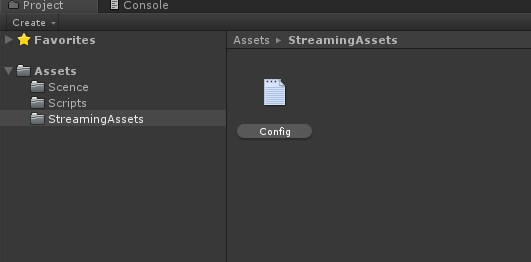
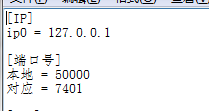
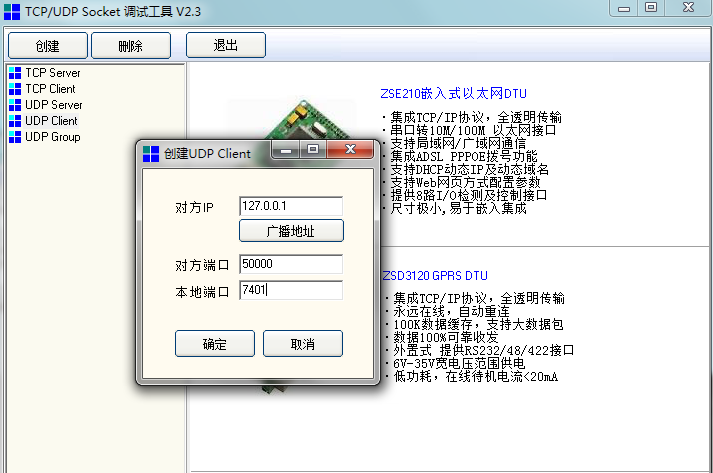
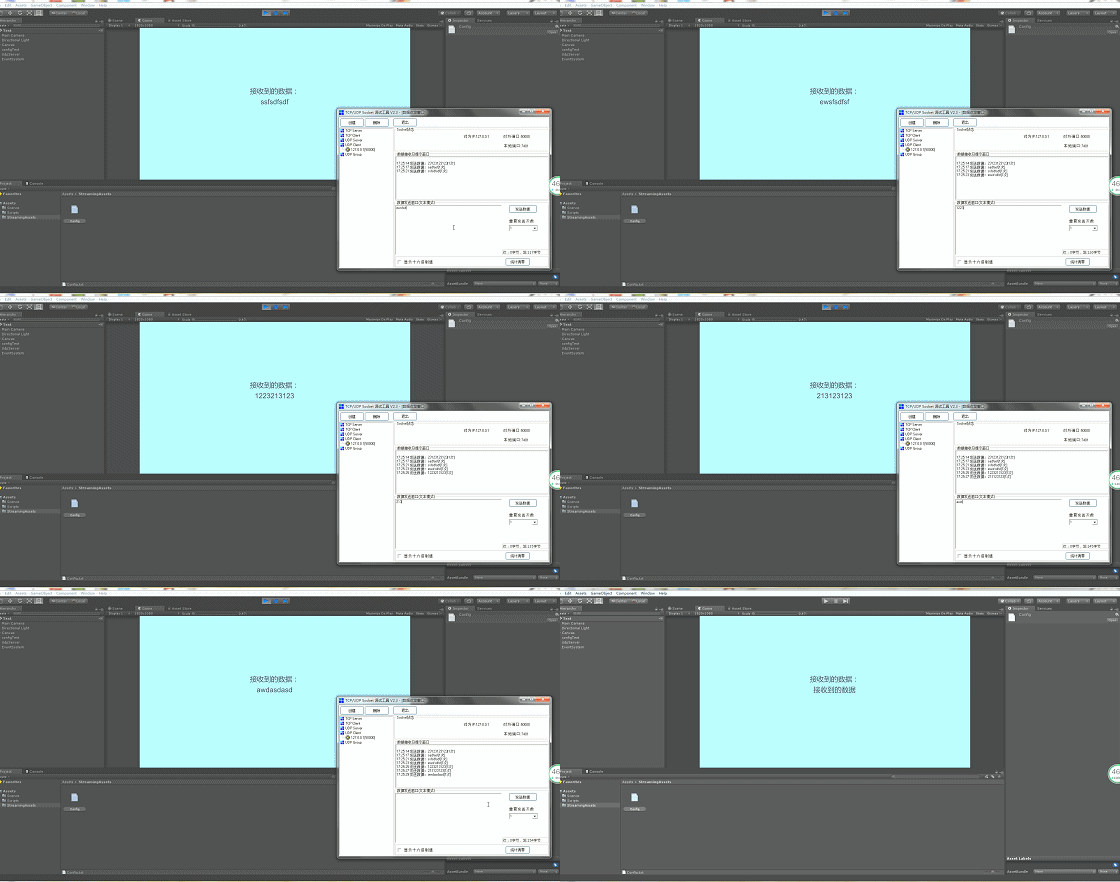
1.为了能够方便实现动态修改Udp服务端Ip和端口号功能,在这里首先加一个读取配置文件的功能,首先在工程中新建一个StreamingAssets文件夹,在里面新建一个Config.txt文件,切记要将其保存为UTF-8文件,如下图所示: 2.在Config.txt中输入如下内容,确定UdpServer和IP和端口号,以及客户端的端口号,如下图所示: 3.完成ComfigTest.cs脚本,将该脚本挂载到场景中的物体上,脚本代码如下所示: `using System.Collections; using System.Collections.Generic; using UnityEngine; using System.IO; using System;
public class ConfigTest : MonoBehaviour { private string configPath;
     public

     Dictionary
     <
     string
     ,
      Dictionary
     <
     string
     ,

     string
     >
     >
      dic
     ;


     // Use this for initialization


     void
      Awake
     (
     )


     {


     //读取配置文件(StreamingAssets)路径

    configPath
     =
      Path
     .
     Combine
     (
     Application
     .
     streamingAssetsPath
     ,
     "Config.txt"
     )
     ;


     if

     (
     dic
     ==

     null
     )


     {

        dic
     =

     new

     Dictionary
     <
     string
     ,
      Dictionary
     <
     string
     ,

     string
     >
     >
     (
     )
     ;


     LoadConfig
     (
     )
     ;


     }


     }


     /// <summary>


     /// 处理所有的数据


     /// </summary>


     private

     void

     LoadConfig
     (
     )


     {


     string
     [
     ]
      lines
     =

     null
     ;


     if

     (
     File
     .
     Exists
     (
     configPath
     )
     )


     {

        lines
     =
      File
     .
     ReadAllLines
     (
     configPath
     )
     ;


     BuildDic
     (
     lines
     )
     ;


     }


     }


     /// <summary>


     /// 处理所有的数据


     /// </summary>


     /// <param name="lines"></param>


     void

     BuildDic
     (
     string
     [
     ]
      lines
     )


     {


     string
      mainKey
     =

     null
     ;
     //主键


     string
      subKey
     =

     null
     ;
     //子键


     string
      subValue
     =

     null
     ;
     //值


     foreach

     (
     var
      item
     in
      lines
     )


     {


     string
      line
     =

     null
     ;

        line
     =
      item
     .
     Trim
     (
     )
     ;
     //去除空白行


     if

     (
     !
     string
     .
     IsNullOrEmpty
     (
     line
     )
     )


     {


     if

     (
     line
     .
     StartsWith
     (
     "["
     )
     )
     //取主键


     {

                mainKey
     =
      line
     .
     Substring
     (
     1
     ,
      line
     .
     IndexOf
     (
     "]"
     )

     -

     1
     )
     ;

                dic
     .
     Add
     (
     mainKey
     ,

     new

     Dictionary
     <
     string
     ,

     string
     >
     (
     )
     )
     ;


     }


     else
     //取子键


     {


     var
      configValue
     =
      line
     .
     Split
     (
     new

     char
     [
     ]

     {

     '='

     }
     ,
      StringSplitOptions
     .
     RemoveEmptyEntries
     )
     ;

                subKey
     =
      configValue
     [
     0
     ]
     .
     Trim
     (
     )
     ;

                subValue
     =
      configValue
     [
     1
     ]
     .
     Trim
     (
     )
     ;

                subValue
     =
      subValue
     .
     StartsWith
     (
     "\""
     )

     ?
      subValue
     .
     Substring
     (
     1
     )

     :
      subValue
     ;

                dic
     [
     mainKey
     ]
     .
     Add
     (
     subKey
     ,
     subValue
     )
     ;


     }


     }


     }


     }
}
4.接着实现UdpServer功能,首先创建UdpServer.cs脚本,脚本代码如下所示,完成后将此脚本挂载到场景中的物体上:
using System.Collections; using System.Collections.Generic; using UnityEngine; using System; using System.Net; using System.Net.Sockets; using UnityEngine.SceneManagement; using UnityEngine.UI; using System.Runtime.InteropServices;
namespace ImmerUDP { public class UdpServer : MonoBehaviour { [Header("本地端口"), SerializeField] private int localPort;
     [
     Header
     (
     "目标端口"
     )
     ,

     SerializeField
     ]


     private

     int
      endPort
     ;


     [
     Header
     (
     "打开接收功能"
     )
     ]


     public

     bool
      openReceive
     =

     true
     ;


     [
     Header
     (
     "打开发送功能"
     )
     ]


     public

     bool
      openSend
     =

     true
     ;


     //服务器Socket对象


     private

     Socket
      serverSocket
     ;


     //udp客户端socket


     private

     UdpClient
      client
     ;


     private

     EndPoint
      epSender
     ;


     private

     IPEndPoint
      endPoint
     ;


     //接收数据的字符串


     private

     byte
     [
     ]
      ReceiveData
     =

     new

     byte
     [
     1024
     ]
     ;


     //配置文件管理类


     public

     ConfigTest
      configTest
     ;


     //点击进入游戏的字符串


     private

     string
      ToGameString
     ;


     //显示接收的信号


     public

     string
      receiveString
     =

     ""
     ;


     //对应IP地址


     private

     string
      serverIP
     ;


     //是否可以接收字符串


     public

     bool
      isCanReceive
     =

     true
     ;


     //接收到的数据显示Text


     public

     Text
      reciveText
     ;


     // Use this for initialization


     void

     Start
     (
     )


     {


     BeginString
     (
     )
     ;


     StartCoroutine
     (
     ToBeginSocket0
     (
     )
     )
     ;


     }


     /// <summary>


     /// 初始化配置文件


     /// </summary>


     void

     BeginString
     (
     )


     {

        localPort
     =

     int
     .
     Parse
     (
     configTest
     .
     dic
     [
     "端口号"
     ]
     [
     "本地"
     ]
     )
     ;

        endPort
     =

     int
     .
     Parse
     (
     configTest
     .
     dic
     [
     "端口号"
     ]
     [
     "对应"
     ]
     )
     ;

        serverIP
     =
      configTest
     .
     dic
     [
     "IP"
     ]
     [
     "ip0"
     ]
     ;

        ToGameString
     =
      configTest
     .
     dic
     [
     "UDP"
     ]
     [
     "进入游戏"
     ]
     ;


     }


     /// <summary>


     /// 初始化Socket的协程


     /// </summary>


     /// <returns></returns>


     IEnumerator

     ToBeginSocket0
     (
     )


     {


     yield

     return

     new

     WaitForSeconds
     (
     0.1f
     )
     ;


     ToBeginSocket
     (
     )
     ;


     }


     /// <summary>


     /// 初始化Socket


     /// </summary>


     void

     ToBeginSocket
     (
     )


     {


     if

     (
     openReceive
     )


     {


     //服务器Socket对实例化

            serverSocket
     =

     new

     Socket
     (
     AddressFamily
     .
     InterNetwork
     ,
     SocketType
     .
     Dgram
     ,
     ProtocolType
     .
     Udp
     )
     ;


     //Socket对象服务器的IP和端口固定

            serverSocket
     .
     Bind
     (
     new

     IPEndPoint
     (
     IPAddress
     .
     Any
     ,
     localPort
     )
     )
     ;


     //监听的端口和地址

            epSender
     =

     (
     EndPoint
     )
     new

     IPEndPoint
     (
     IPAddress
     .
     Any
     ,
     0
     )
     ;


     //开始异步接收数据

            serverSocket
     .
     BeginReceiveFrom
     (
     ReceiveData
     ,
     0
     ,
     ReceiveData
     .
     Length
     ,
     SocketFlags
     .
     None
     ,
     ref
      epSender
     ,
     new

     AsyncCallback
     (
     ReceiveFromClients
     )
     ,
     epSender
     )
     ;


     }


     if

     (
     openSend
     )


     {

            client
     =

     new

     UdpClient
     (
     )
     ;


     //目标端口和地址

            endPoint
     =

     new

     IPEndPoint
     (
     IPAddress
     .
     Parse
     (
     serverIP
     )
     ,
     endPort
     )
     ;


     }


     }


     // Update is called once per frame


     void

     Update
     (
     )


     {


     UdpControl
     (
     )
     ;


     }


     /// <summary>


     /// 异步加载,处理数据


     /// </summary>


     /// <param name="iar"></param>


     void

     ReceiveFromClients
     (
     IAsyncResult
      iar
     )


     {


     int
      reve
     =
      serverSocket
     .
     EndReceiveFrom
     (
     iar
     ,
     ref
      epSender
     )
     ;


     //数据处理


     string
      str
     =
      System
     .
     Text
     .
     Encoding
     .
     UTF8
     .
     GetString
     (
     ReceiveData
     ,
     0
     ,
     reve
     )
     ;


     //把得到的数据传给数据处理中心

        serverSocket
     .
     BeginReceiveFrom
     (
     ReceiveData
     ,
     0
     ,
     ReceiveData
     .
     Length
     ,
     SocketFlags
     .
     None
     ,
     ref
      epSender
     ,
     new

     AsyncCallback
     (
     ReceiveFromClients
     )
     ,
     epSender
     )
     ;

        receiveString
     =
      str
     ;


     //BytesToStruct(iar,epSender);


     //reciveText.text = str;


     }


     /// <summary>


     /// 发送数据主函数


     /// </summary>


     /// <param name="dataStr"></param>


     void

     Send
     (
     string
      dataStr
     )


     {


     if

     (
     !
     openSend
     )


     return
     ;


     byte
     [
     ]
      SendData
     =
      System
     .
     Text
     .
     Encoding
     .
     UTF8
     .
     GetBytes
     (
     dataStr
     )
     ;

        client
     .
     Send
     (
     SendData
     ,
     SendData
     .
     Length
     ,
     endPoint
     )
     ;


     }


     /// <summary>


     /// 关闭Socket


     /// </summary>


     public

     void

     SocketQuit
     (
     )


     {


     if

     (
     serverSocket
     !=

     null
     )


     {

            serverSocket
     .
     Close
     (
     )
     ;


     }


     }


     /// <summary>


     /// 应用关闭时关闭Socket


     /// </summary>


     private

     void

     OnApplicationQuit
     (
     )


     {


     SocketQuit
     (
     )
     ;


     }


     /// <summary>


     /// 当关闭此对象时关闭Socket


     /// </summary>


     private

     void

     OnDisable
     (
     )


     {


     SocketQuit
     (
     )
     ;


     }


     /// <summary>


     /// 接收UDP控制函数


     /// </summary>


     public

     void

     UdpControl
     (
     )


     {


     if

     (
     isCanReceive
     )


     {

            reciveText
     .
     text
     =
      receiveString
     ;


     //BytesToStruct(receiveString);


     if

     (
     receiveString
     ==
      ToGameString
     )


     {


     //SceneManager.LoadScene("Loading");


     //gameControl.BeginGame();

                isCanReceive
     =

     false
     ;


     }


     }


     }


     }
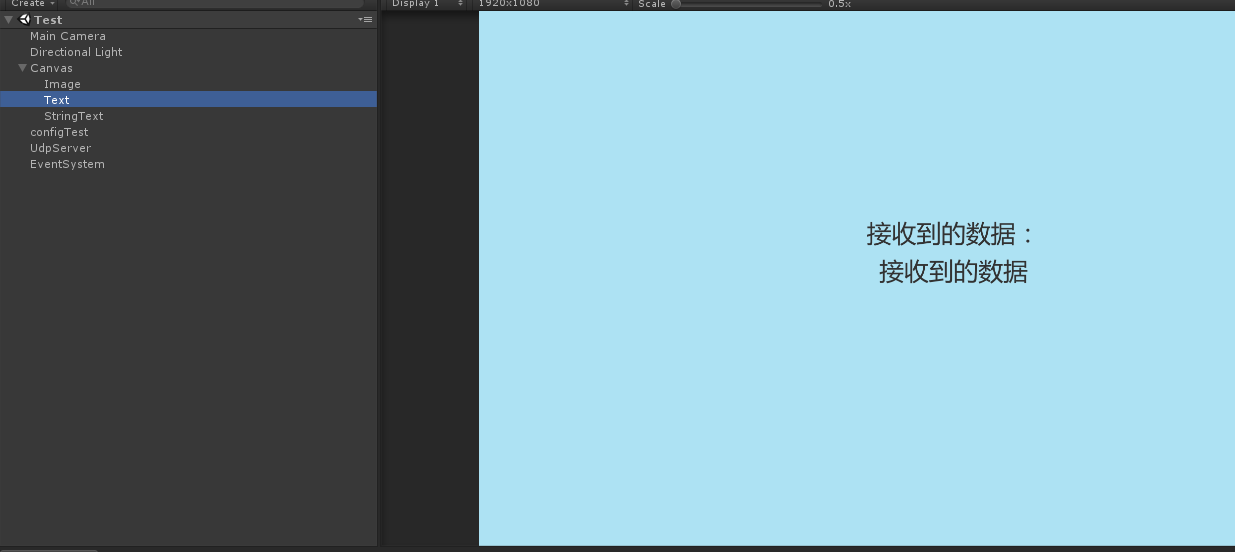
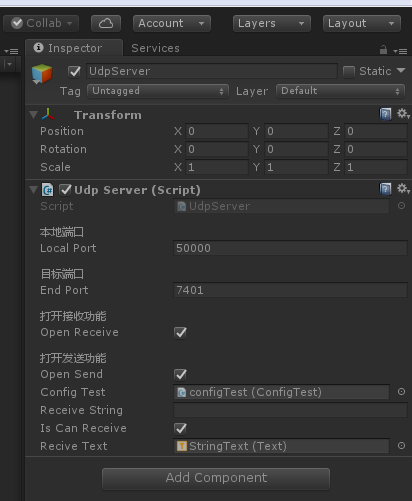
} ` 5.为了便于查看Udp客户端传来的数据,需要在场景中建立如下所示Text,用于显示udp客户端传进来的字符串: 6.将刚刚建立的text组件拖拽到挂载着udpServer的物体上,如下图所示: 7.打开网络测试工具,选择Udp客户端,配置如下图所示: 8.运行工程,在网络测试工具中发送信息,可以看到服务器端收到了信息,如下图所示: 9.项目各种连接:
项目Demo





 扫一扫
扫一扫


 252
252

 被折叠的 条评论
为什么被折叠?
被折叠的 条评论
为什么被折叠?
 到【灌水乐园】发言





