


 本文详细介绍了在Unity中实现Minecraft风格TNT爆炸效果的过程。通过自定义TNTBlockEntity类,利用协程控制爆炸延迟,并通过粒子系统和声音效果增强视觉冲击力。文章还展示了如何通过碰撞事件触发爆炸,以及如何处理爆炸范围内的方块破坏和实体受力。
项目地址:
https://github.com/Jin-Yuhan/MinecraftClone-Unity
由于内容过多,这里只大概介绍下Editor的方块编辑器与TNT爆炸的实现。(未来可能会写一系列教程,完整实现这个项目)
方块编辑器
使用方块编辑器可以快速地新建方块,仅通过Flags与其他参数的组合可以制作出许多具有不同行为的方块。复杂方块的逻辑通常只需要将其注册在预设的事件中。
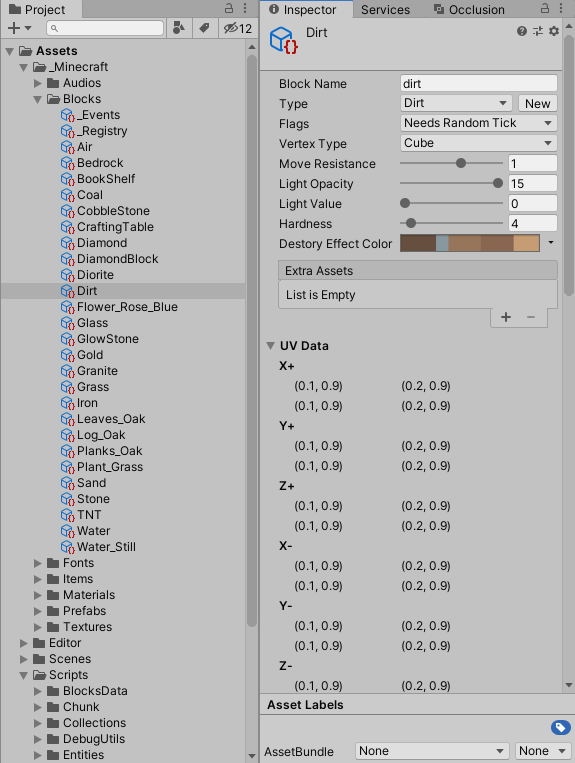
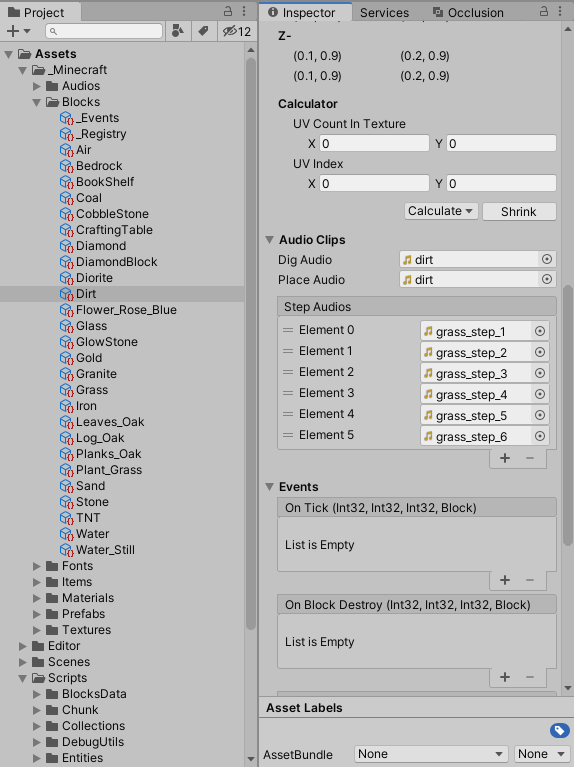
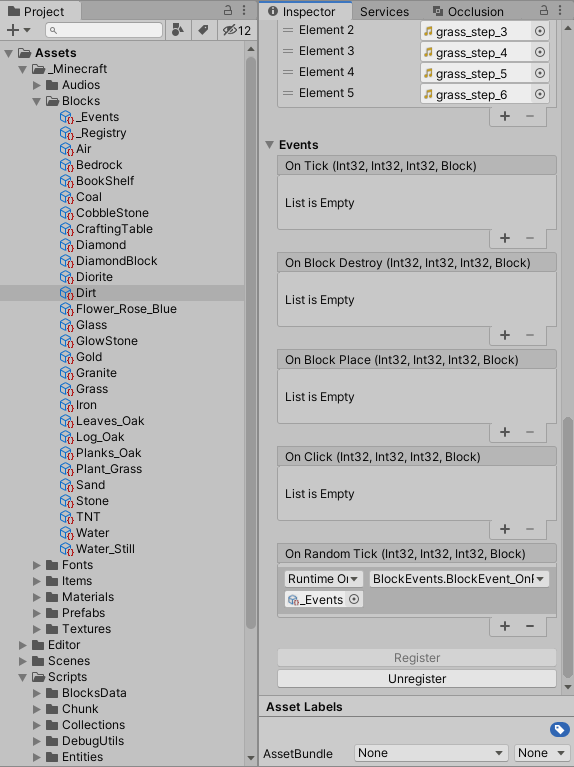
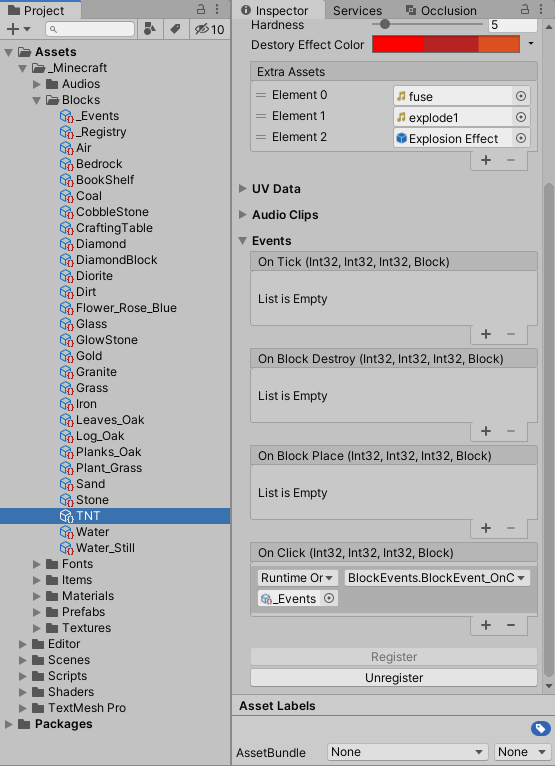
示例:TNT爆炸的实现
思路:在TNT被点击时,将TNT临时转换为方块实体,开启协程短暂延迟后爆炸。 首先,编写TNTBlockEntity,它继承于BlockEntity,其中BlockEntity编写了方块最基本的物理碰撞逻辑(基于AABB)。
     using

     Minecraft
     .
     BlocksData
     ;


     using

     System
     .
     Collections
     ;


     using

     UnityEngine
     ;


     using

     System
     .
     Collections
     .
     Generic
     ;


     namespace

     Minecraft


     {


     [
     DisallowMultipleComponent
     ]


     public

     sealed

     class

     TNTBlockEntity

     :

     BlockEntity


     {


     private

     MaterialPropertyBlock
      m_PropertyBlock
     ;


     private

     AudioSource
      m_AudioSource
     ;


     private

     bool
      m_Started
     ;


     private

     bool
      m_ShouldRenderBlock
     ;


     private

     AudioClip
      m_Fuse
     ;


     private

     AudioClip
      m_Explode
     ;


     private

     GameObject
      m_Effect
     ;


     protected

     override

     MaterialPropertyBlock
      MaterialPropertyBlock
     =>
      m_PropertyBlock
     ;


     protected

     override

     bool
      ShouldRenderBlock
     =>
      m_ShouldRenderBlock
     ;


     protected

     override

     void

     OnInitialize
     (
     )


     {

            m_PropertyBlock
     =

     new

     MaterialPropertyBlock
     (
     )
     ;

            m_AudioSource
     =
      gameObject
     .
     AddComponent
     <
     AudioSource
     >
     (
     )
     ;

            m_Started
     =

     false
     ;

            m_ShouldRenderBlock
     =

     true
     ;


            m_Fuse
     =
      Block
     .
     ExtraAssets
     [
     0
     ]

     as

     AudioClip
     ;

            m_Explode
     =
      Block
     .
     ExtraAssets
     [
     1
     ]

     as

     AudioClip
     ;

            m_Effect
     =

     Instantiate
     (
     Block
     .
     ExtraAssets
     [
     2
     ]
     )

     as

     GameObject
     ;


            m_AudioSource
     .
     clip
     =
      m_Fuse
     ;

            m_AudioSource
     .
     Play
     (
     )
     ;


     }


     private

     void

     OnDestroy
     (
     )


     {


     Destroy
     (
     m_Effect
     )
     ;


     }


     protected

     override

     void

     OnCollisions
     (
     CollisionFlags
      flags
     )


     {


     if

     (
     !
     m_Started
     )


     {

                m_Started
     =

     true
     ;


     StartCoroutine
     (
     Explode
     (
     )
     )
     ;


     }


     }


     private

     IEnumerator

     Explode
     (
     )


     {


     float
      time
     =

     0
     ;


     while

     (
     time
     <

     3
     )


     {

                time
     +=
      Time
     .
     deltaTime
     ;


     float
      t
     =
      Mathf
     .
     Sin
     (
     time
     *
      Mathf
     .
     PI
     *

     3
     )
     ;


     Color
      color
     =
      Color
     .
     Lerp
     (
     Color
     .
     grey
     ,
      Color
     .
     white
     ,
      t
     )
     ;

                m_PropertyBlock
     .
     SetColor
     (
     "_Color"
     ,
      color
     )
     ;


     yield

     return

     null
     ;


     }


     int
      radius
     =

     5
     ;


     WorldManager
      world
     =
      WorldManager
     .
     Active
     ;


     EntityManager
      entityManager
     =
      world
     .
     EntityManager
     ;


     Vector3Int
      pos
     =
      BlockPosition
     ;


     int
      x
     =
      pos
     .
     x
     ;


     int
      y
     =
      pos
     .
     y
     ;


     int
      z
     =
      pos
     .
     z
     ;


     for

     (
     int
      dx
     =

     -
     radius
     ;
      dx
     <=
      radius
     ;
      dx
     ++
     )


     {


     for

     (
     int
      dz
     =

     -
     radius
     ;
      dz
     <=
      radius
     ;
      dz
     ++
     )


     {


     for

     (
     int
      dy
     =

     -
     radius
     ;
      dy
     <=
      radius
     ;
      dy
     ++
     )


     {


     if

     (
     dx
     *
      dx
     +
      dy
     *
      dy
     +
      dz
     *
      dz
     <=
      radius
     *
      radius
     )


     {


     Block
      block
     =
      world
     .
     GetBlock
     (
     x
     +
      dx
     ,
      y
     +
      dy
     ,
      z
     +
      dz
     )
     ;


     if

     (
     block
     .
     HasAnyFlag
     (
     BlockFlags
     .
     IgnoreExplosions
     )
     )


     continue
     ;


                            world
     .
     SetBlockType
     (
     x
     +
      dx
     ,
      y
     +
      dy
     ,
      z
     +
      dz
     ,
      BlockType
     .
     Air
     )
     ;


     }


     }


     }


     }


     IEnumerator
     <
     Entity
     >
      iterator
     =
      entityManager
     .
     EnumerateEntities
     (
     )
     ;


     while

     (
     iterator
     .
     MoveNext
     (
     )
     )


     {


     Entity
      entity
     =
      iterator
     .
     Current
     ;


     Vector3
      dir
     =
      entity
     .
     transform
     .
     position
     -
      pos
     ;


     if

     (
     dir
     .
     sqrMagnitude
     <=
      radius
     *
      radius
     )


     {


     float
      vx
     =
      Random
     .
     Range
     (
     -
     10f
     ,

     10f
     )
     ;
     //[-10, 10]


     float
      vy
     =
      Random
     .
     Range
     (
     1
     ,

     10f
     )
     ;


     float
      vz
     =
      Random
     .
     Range
     (
     -
     10f
     ,

     10f
     )
     ;


                    entity
     .
     Velocity
     =

     new

     Vector3
     (
     vx
     ,
      vy
     ,
      vz
     )
     ;


     }


     }


            iterator
     .
     Dispose
     (
     )
     ;


     yield

     return

     null
     ;


            m_ShouldRenderBlock
     =

     false
     ;


            m_AudioSource
     .
     clip
     =
      m_Explode
     ;

            m_AudioSource
     .
     Play
     (
     )
     ;


     ParticleSystem
      particle
     =
      m_Effect
     .
     GetComponent
     <
     ParticleSystem
     >
     (
     )
     ;

            m_Effect
     .
     transform
     .
     position
     =
      transform
     .
     position
     ;

            particle
     .
     Play
     (
     )
     ;


     while

     (
     m_AudioSource
     .
     isPlaying
     ||
      particle
     )


     {


     yield

     return

     null
     ;


     }


            entityManager
     .
     DestroyEntity
     (
     this
     )
     ;


     }


     }


     }
实现方块的OnClick事件并注册
     public

     void

     BlockEvent_OnCick_TNT
     (
     int
      x
     ,

     int
      y
     ,

     int
      z
     ,

     Block
      block
     )


     {


     WorldManager
      world
     =
      WorldManager
     .
     Active
     ;

    world
     .
     SetBlockType
     (
     x
     ,
      y
     ,
      z
     ,
      BlockType
     .
     Air
     )
     ;


     TNTBlockEntity
      tnt
     =
      world
     .
     EntityManager
     .
     CreateEntity
     <
     TNTBlockEntity
     >
     (
     )
     ;

    tnt
     .
     Initialize
     (
     x
     ,
      y
     ,
      z
     ,
      block
     )
     ;


     }
最终效果 其他内容请移步Github查看源码。本项目没有使用ECS,物理、光照、网格计算都是手敲的,除了Entity以外其他对象基本都不是MonoBehavior(包括Chunk),渲染是通过Graphics.DrawMesh方法实现。





 扫一扫
扫一扫


 9522
9522

 被折叠的 条评论
为什么被折叠?
被折叠的 条评论
为什么被折叠?
 到【灌水乐园】发言





