





 本文详细介绍了如何搭建Repo管理环境,包括安装Repo、创建manifests.git、添加新仓库,以及使用<copyfile>和<linkfile>标签进行文件操作。Repo是基于Python的git仓库管理工具,简化了对多个Git仓库的管理。文章还提到了如何自定义repo源,管理仓库清单,以及批量操作git仓库的分支。
Repo是一个基于git的仓库管理工具,它由python语言实现,使用Repo,可以将很多的git仓库一起打包管理,做统一的git操作,完成仓库管理任务。Repo 并不是用来取代 Git的,它是使用 Python 对 Git 的一层封装,简化了对多个 Git 版本库的管理方式。Repo 主要是结合着 Gerrit 来使用,它以一个manifest.xml为中心,通过对项目结构化的描述,达到与 Submodule 同样的效果,但是比 Submodule 更加灵活和方便。
安装repo环境:
repo环境包括两部分,第一部分是repo命令本身,它是一个python可执行脚本文件,另一部分是一个名字叫做repo.git仓库。示意如下:
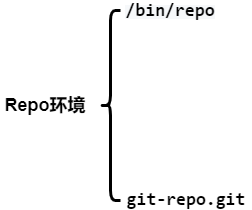
下面我们就逐步安装这两部分:
在root模式下,输入以下命令,安装repo工具:
curl https://storage.googleapis.com/git-repo-downloads/repo > /bin/repo
退出root用户,执行命令添加repo的可执行权限。

此时可以运行它以下,你会得到要给错误报告,这是因为我们还没完成第二步.

通过repo help也可以看出这一点:
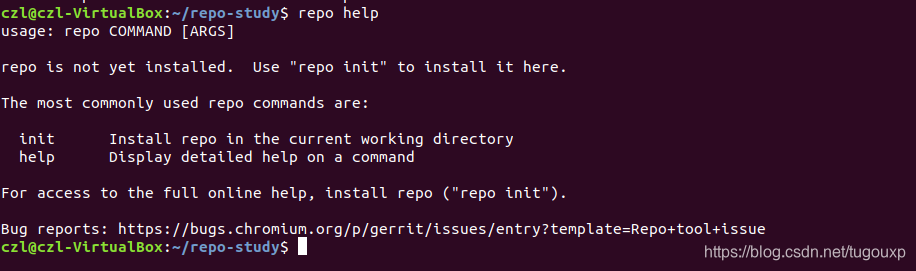
下一步,就是按照提示要求,执行"repo init"完成repo运行环境安装的第二步.
repo init
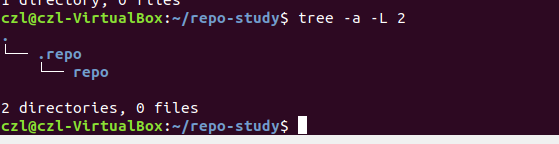
最后的错误和仓库清单描述文件相关,和git-repo.git仓库无关,暂时不用理会。git-repo.git仓库已经成功下载下来了,见下图的隐藏目录:

关于git-repo.git仓库的下载原理,为什么会去一个指定地址检出代码呢?答案肯定在repo脚本里,在repo里面会用到两个变量,打开/bin/repo文件,查看REPO_URL/REPO_REV的定义:
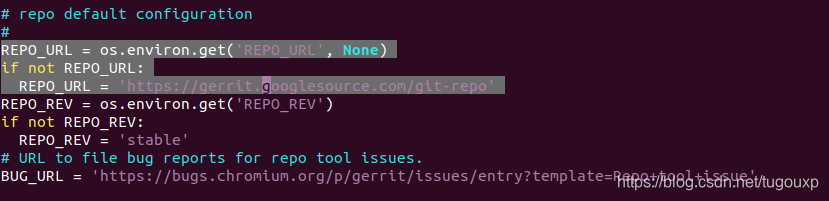
可以看到,REPO_URL/REPO_REV分别是repo.git仓库的url和检出的branch. 如果我们要想让repo来clone我们自己的repo.git,则修改上边的变量就可以了,在环境变量没有定义REPO_URL的情况下,repo工具将自动从谷歌的git-repo仓库下载。如果用户有自定义的实现,可以首先设置REPO_URL/REPO_REV环境变量。
再次执行repo help,可以看到命令多除了好多:
czl@czl-VirtualBox:~/repo-study$ repo help
usage: repo COMMAND [ARGS]
The most commonly used repo commands are:
  abandon        Permanently abandon a development branch
  branch         View current topic branches
  branches       View current topic branches
  checkout       Checkout a branch for development
  cherry-pick    Cherry-pick a change.
  diff           Show changes between commit and working tree
  diffmanifests  Manifest diff utility
  download       Download and checkout a change
  gitc-delete    Delete a GITC Client.
  gitc-init      Initialize a GITC Client.
  grep           Print lines matching a pattern
  info           Get info on the manifest branch, current branch or unmerged branches
  init           Initialize a repo client checkout in the current directory
  list           List projects and their associated directories
  overview       Display overview of unmerged project branches
  prune          Prune (delete) already merged topics
  rebase         Rebase local branches on upstream branch
  smartsync      Update working tree to the latest known good revision
  stage          Stage file(s) for commit
  start          Start a new branch for development
  status         Show the working tree status
  sync           Update working tree to the latest revision
  upload         Upload changes for code review
See 'repo help <command>' for more information on a specific command.
See 'repo help --all' for a complete list of recognized commands.
Bug reports: https://bugs.chromium.org/p/gerrit/issues/entry?template=Repo+tool+issue
czl@czl-VirtualBox:~/repo-study$
Repo运行环境搭建至此完成,是时候来一条华丽的分割线了。
此时我们只是有了repo工具,但是要想管理多个git仓库,还需要一个清单文件,来描述要管理那些git,从哪里拉去等等. 这个任务要依赖manifest.git了,正如之前提到的,在repo init的时候,要通过-u url来指定manifest.git的位置.
创建manifests.git
先看一条完整的repo init命令。
repo init -u ssh://$USER@xxx.xxx.com:$port/xxx/xxx/manifest.git -b $branch -m $dir/project1.xml命令中很多选项,根据help文档的解释
  Manifest options:
    -u URL, --manifest-url=URL
                        manifest repository location
    -b REVISION, --manifest-branch=REVISION
                        manifest branch or revision (use HEAD for default)
    -m NAME.xml, --manifest-name=NAME.xml
                        initial manifest file
-u:后面紧跟URL,指向一个manifest.git仓库地址,仓库中存储的是各类项目清单的描述文件
-b: 后面跟着manifest.git仓库的分支名称或者版本ID名称,tag等等。用于指定所使用manifest仓库的指定分支。
-m: 选择仓库指定目录下的指定xml文件作为仓库清单。
首先,在gitee上申请并创建manifest.git仓库:
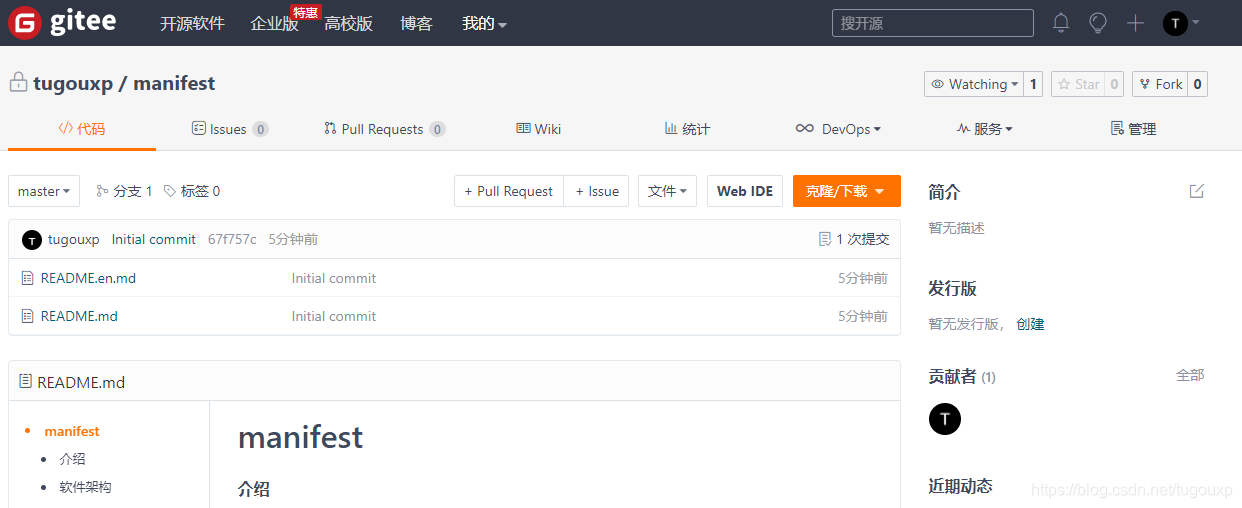
并将仓库下载到本地,基本的manifest的git裸仓库只包含了一个default.xml.可以在命令行repo init 中通过-m参数指定使用哪个xml.

编辑xml文件,随便选择一些项目生成第一个项目清单描述:
<?xml version="1.0" encoding="UTF-8"?>
<manifest>
  <remote  name="gitee"
           fetch="https://gitee.com/tugouxp" />
  <default revision="master"
           remote="gitee" sync-j="2" />
  <project path="sdk-cores" name="minix" groups="gitee" revision="master" />
</manifest>
可以看到,根元素manifest,里边定义了remote,default,project.
remote可以多个,每个定义了一个远程拉取仓库, fetch是仓库的url, 可以使用”..”表示使用repo init -u url里的url.或者相对于url的相对路径表示仓库清单中仓库的位置.
default则设置每个项目拉取的默认仓库和默认分支/默认版本.
project定义了一个项目,它指明一个远程仓库,和clone到本地来后的目录名称. name为项目的远程仓库名,以上代码拉取的项目。
revision:是manifest想要track的git branch的名称。这个属性理论上只能是git branch的名称,但是实际上可以是sha1或者是tag。
path:从该git下载下来的代码在本地的保存路径,相对于repo的根目录而言。如果不指定path属性,则会使用name属性。
name:最重要的一个属性,<project>的name属性会被用来和<remote>标签的<fetch>属性拼成该project最终的url。像下面这样
则以上xml定义的实际上是,拉取远程服务器https://gitee.com/tugouxp/(被重命名为gitee)下的子仓库"minix"项目,url为“https://gitee.com/tugouxp/minix",拉取分支是"master",并行两个线程拉取到本地,并且命名为 sdk-cores目录.编辑完成后,提交到服务器,此时manifest仓库的文件布局如下图:
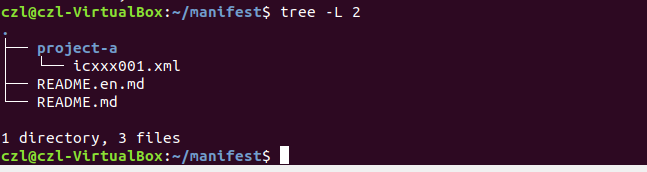
然后执行repo命令下载仓库,执行过程如下:
czl@czl-VirtualBox:~/WorkSpace/repo-study$ repo init -u https://gitee.com/tugouxp/manifest.git -b master -m project-a/icxxx001.xml
Downloading Repo source from https://gerrit.googlesource.com/git-repo
remote: Counting objects: 2, done
remote: Finding sources: 100% (45/45)
remote: Total 45 (delta 16), reused 45 (delta 16)
Unpacking objects: 100% (45/45), done.
Downloading manifest from https://gitee.com/tugouxp/manifest.git
Username for 'https://gitee.com': tugouxp
Password for 'https://tugouxp@gitee.com':
remote: Enumerating objects: 30, done.
remote: Counting objects: 100% (30/30), done.
remote: Compressing objects: 100% (24/24), done.
remote: Total 30 (delta 13), reused 0 (delta 0), pack-reused 0
Unpacking objects: 100% (30/30), done.

Your identity is: czl <caozilong@allwinnertech.com>
If you want to change this, please re-run 'repo init' with --config-name

repo has been initialized in /home/czl/WorkSpace/repo-study
czl@czl-VirtualBox:~/WorkSpace/repo-study$ repo sync
Username for 'https://gitee.com': tugouxp
Password for 'https://tugouxp@gitee.com':
Fetching: 100% (1/1), done in 30.857s
Garbage collecting: 100% (1/1), done in 0.007s
Checking out files: 100% (71064/71064), done.
Checking out: 100% (1/1), done in 26.127s
repo sync has finished successfully.
czl@czl-VirtualBox:~/WorkSpace/repo-study$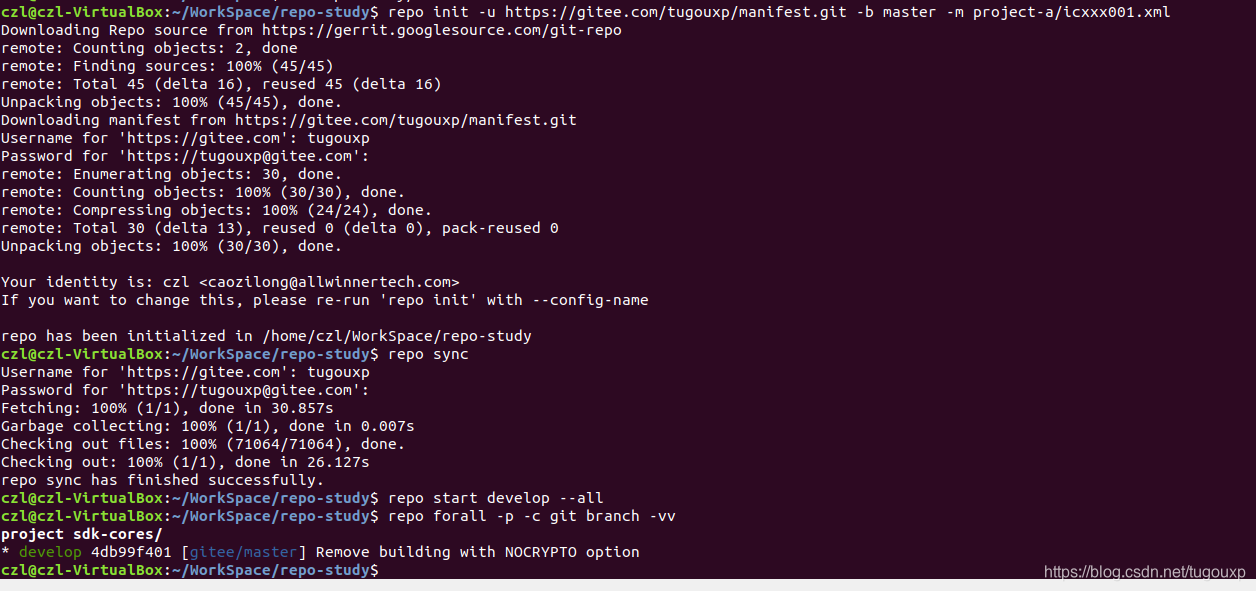
执行后,下载到本地的仓库目录结构:


在sync完代码后,所有git库默认都是在一个匿名分支上(no branch),很容易会由于误操作导致丢失代码修改。可以使用如下命令将所有的git库切换到开发分支, 进行批量分支切换到develop分支,干活的时候切换到一个新的分支是个好习惯。

最后,执行一把
repo start develop --all
使用如下命令查看每个仓库的状态,可以看到已经切换的develop分支,对应各自仓库的远程分支。
czl@czl-VirtualBox:~/repo-study$ repo forall -p -c git branch -vvv
project sdk-cores/
* develop 4db99f401 [gitee/master] Remove building with NOCRYPTO option
czl@czl-VirtualBox:~/repo-study$
repo start对仓库的当前分支进行重新命名,命名一个本地分支名字,指向远程分支,在执行命令期间,远程分支不变。
添加新的代码仓库
上面创建的manifest.xml文件只有一个待管理仓库,并没有发挥出repo多仓库管理的优势,下面再前文manifest.xml文件的基础上 ,再添加一个新的仓库,并且为了说明问题,选择一个不同源的,位于github上的仓库,修改manifest.xml文件如下:
<?xml version="1.0" encoding="UTF-8"?>
<manifest>
   <remote  name="gitee"
            fetch="https://gitee.com/tugouxp"
            autodotgit="true" />
   <remote  name="github"
            fetch="https://github.com/13824125580/"
            autodotgit="true" />
   <default revision="master"
            remote="gitee" sync-j="2" />
   <project path="sdk-cores/os1" name="minix" groups="gitee" revision="master" />
   <project remote="github" path="sdk-cores/os2" name="ucos" groups="github" revision="master" />
</manifest>
之后,执行命令列表:
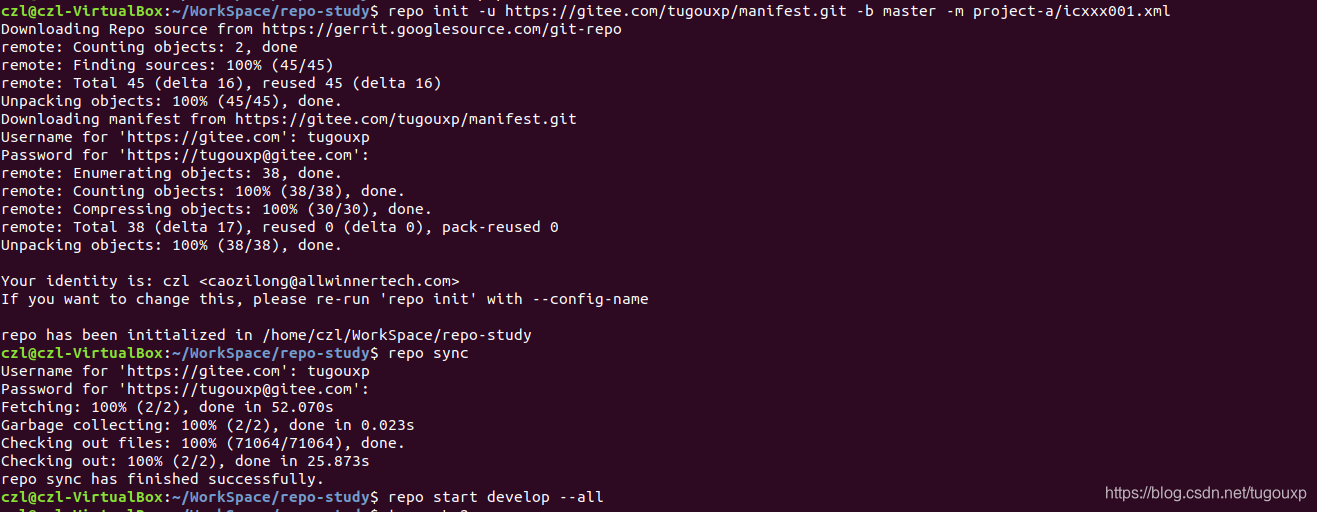
repo init -u https://gitee.com/tugouxp/manifest.git -b master -m project-a/icxxx001.xml
repo sync
repo start develop --all
czl@czl-VirtualBox:~/WorkSpace/repo-study$ repo init -u https://gitee.com/tugouxp/manifest.git -b master -m project-a/icxxx001.xml
Downloading Repo source from https://gerrit.googlesource.com/git-repo
remote: Counting objects: 2, done
remote: Finding sources: 100% (45/45)
remote: Total 45 (delta 16), reused 45 (delta 16)
Unpacking objects: 100% (45/45), done.
Downloading manifest from https://gitee.com/tugouxp/manifest.git
Username for 'https://gitee.com': tugouxp
Password for 'https://tugouxp@gitee.com':
remote: Enumerating objects: 38, done.
remote: Counting objects: 100% (38/38), done.
remote: Compressing objects: 100% (30/30), done.
remote: Total 38 (delta 17), reused 0 (delta 0), pack-reused 0
Unpacking objects: 100% (38/38), done.
Your identity is: czl <caozilong@allwinnertech.com>
If you want to change this, please re-run 'repo init' with --config-name
repo has been initialized in /home/czl/WorkSpace/repo-study
czl@czl-VirtualBox:~/WorkSpace/repo-study$ repo sync
Username for 'https://gitee.com': tugouxp
Password for 'https://tugouxp@gitee.com':
Fetching: 100% (2/2), done in 52.070s
Garbage collecting: 100% (2/2), done in 0.023s
Checking out files: 100% (71064/71064), done.
Checking out: 100% (2/2), done in 25.873s
repo sync has finished successfully.
czl@czl-VirtualBox:~/WorkSpace/repo-study$ repo start develop --all
czl@czl-VirtualBox:~/WorkSpace/repo-study$
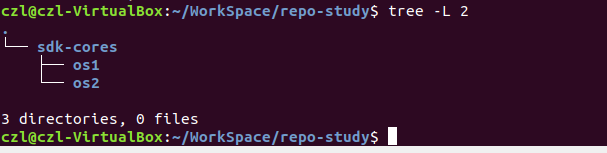
执行repo forall -p -c git branch -vvv查看各个仓库的分支信息:

执行repo forall -p -c git remote -v查看各个仓库的源信息:

<copyfile>标签:
可以作为<project>标签的子标签,每一个<copyfile>标签表明了在repo sync的时候从src把文件拷贝到dest,src相对于该project来说,dest相对于根目录来说。
修改xml文件如下,将minix目录下的build.sh拷贝到 config目录下:
<?xml version="1.0" encoding="UTF-8"?>

<manifest>

   <remote  name="gitee"

            fetch="https://gitee.com/tugouxp"

            autodotgit="true" />

   <remote  name="github"

            fetch="https://github.com/13824125580/"

            autodotgit="true" />

   <default revision="master"

            remote="gitee" sync-j="2" />

   <project path="sdk-cores/os1" name="minix" groups="gitee" revision="master" >

	    <copyfile src="build.sh" dest="sdk-cores/config/build.sh" />

   </project>

   <project remote="github" path="sdk-cores/os2" name="ucos" groups="github" revision="master" />

</manifest>
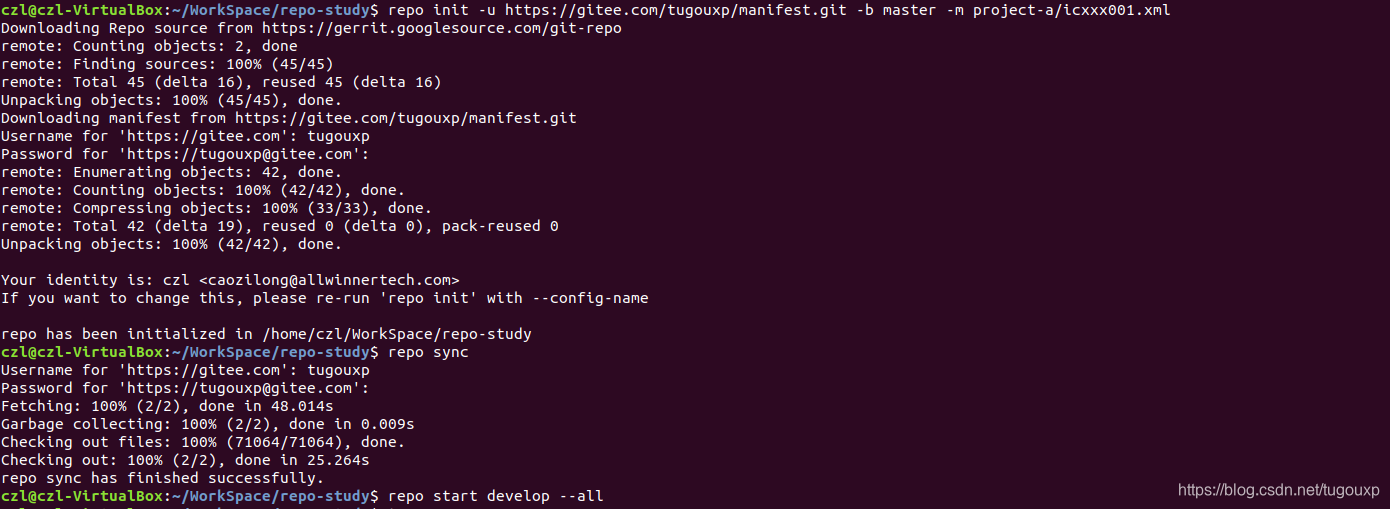
执行命令组后:
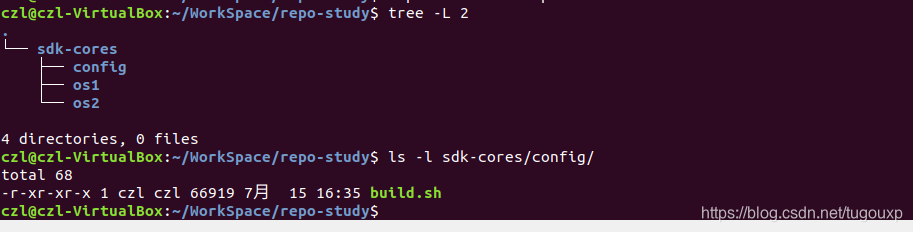
查看目录布局,可以看到多了config目录,并且目录下有build.sh文件。
copyfile支持拷贝单个文件,却不支持拷贝目录,测试如下,增加对os1目录下distrib目录的拷贝测试:
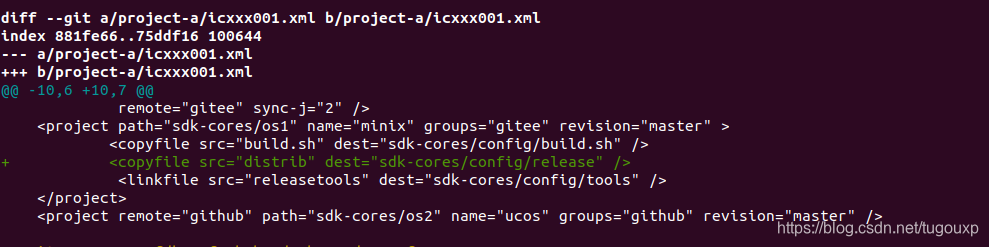
注意看截图中的报错信息,copying rom directory not supported!

<linkfile>标签:
和<copyfile>标签的作用类似,不过是不进行拷贝,而是进行一个符号链接,修改xml文件如下,建立从 config/tools/目录到os1/releasetools/目录的连接。
<?xml version="1.0" encoding="UTF-8"?>

<manifest>

   <remote  name="gitee"

            fetch="https://gitee.com/tugouxp"

            autodotgit="true" />

   <remote  name="github"

            fetch="https://github.com/13824125580/"

            autodotgit="true" />

   <default revision="master"

            remote="gitee" sync-j="2" />

   <project path="sdk-cores/os1" name="minix" groups="gitee" revision="master" >

	    <copyfile src="build.sh" dest="sdk-cores/config/build.sh" />

            <linkfile src="releasetools" dest="sdk-cores/config/tools" />

   </project>

   <project remote="github" path="sdk-cores/os2" name="ucos" groups="github" revision="master" />

</manifest>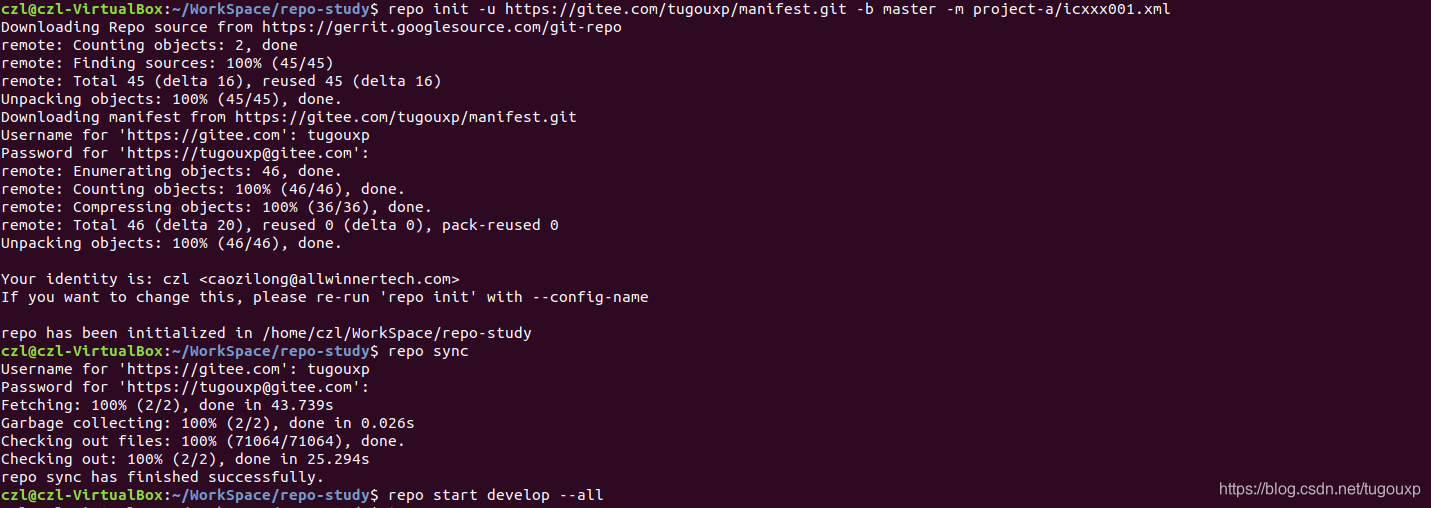
下载下来后,目录的布局如下,可以看到目录连接已经建立:
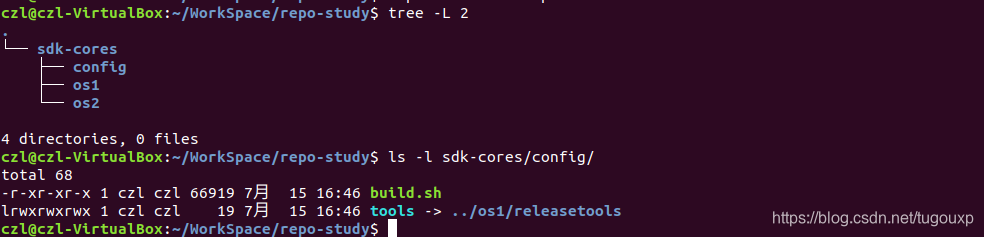
可以看出,copyfile不支持目录拷贝,但是linkfile可以支持目录连接,这也算是一个目录共享的解决方案吧。
访问Google仓库非常的不方便,我们可以把repo仓库放到gittee上,通过设置两个环境变量,让repo从新的地址下载仓库:
czl@czl-RedmiBook-14:export REPO_REV='stable'
czl@czl-RedmiBook-14:export REPO_URL=https://gitee.com/tugouxp/git-repo-final.git
czl@czl-RedmiBook-14:export REPO_REV='stable'
czl@czl-RedmiBook-14:export REPO_URL=https://gitee.com/tugouxp/git-repo-final.git
czl@czl-RedmiBook-14:~/Workspace/study$ repo init -u https://gitee.com/tugouxp/manifest.git -b master -m project-a/icxxx001.xml
Downloading Repo source from https://gitee.com/tugouxp/git-repo-final.git
Username for 'https://gitee.com': tugouxp
Password for 'https://tugouxp@gitee.com':
remote: Enumerating objects: 6734, done.
remote: Counting objects: 100% (6734/6734), done.
remote: Compressing objects: 100% (2985/2985), done.
remote: Total 6734 (delta 3819), reused 6595 (delta 3680), pack-reused 0
Receiving objects: 100% (6734/6734), 4.83 MiB | 457.00 KiB/s, done.
Resolving deltas: 100% (3819/3819), done.
Downloading manifest from https://gitee.com/tugouxp/manifest.git
Username for 'https://gitee.com': tugouxp
Password for 'https://tugouxp@gitee.com':
remote: Enumerating objects: 51, done.
remote: Counting objects: 100% (51/51), done.
remote: Compressing objects: 100% (40/40), done.
remote: Total 51 (delta 23), reused 0 (delta 0), pack-reused 0
Unpacking objects: 100% (51/51), done.
Your identity is: Your Name <you@example.com>
If you want to change this, please re-run 'repo init' with --config-name
repo has been initialized in /home/czl/Workspace/study
czl@czl-RedmiBook-14:~/Workspace/study$ repo sync
Username for 'https://gitee.com': tugouxp
Password for 'https://tugouxp@gitee.com':
Fetching: 100% (2/2), done in 8m5.372s
Garbage collecting: 100% (2/2), done in 0.007s
Checking out files: 100% (71064/71064), done.
Checking out: 100% (2/2), done in 3.612s
repo sync has finished successfully.
czl@czl-RedmiBook-14:~/Workspace/study$ repo forall -p -c git branch -vv
project sdk-cores/os1/
* (no branch) 4db99f401 Remove building with NOCRYPTO option
project sdk-cores/os2/
* (no branch) bcfe557 update'
czl@czl-RedmiBook-14:~/Workspace/study$ repo start develop --all
czl@czl-RedmiBook-14:~/Workspace/study$ repo forall -p -c git branch -vv
project sdk-cores/os1/
* develop 4db99f401 [gitee/master] Remove building with NOCRYPTO option
project sdk-cores/os2/
* develop bcfe557 [github/master] update'
czl@czl-RedmiBook-14:~/Workspace/study$
过程中需要注意,一定要把tag也提交上去,原因是repo工具中有可能会使用git describe命令确定版本信息,如果没有tag,git describe命令会执行不成功.
copy-link-files.json: 如果xml中有对copyfile和linkfile的描述,会生成这个文件,保存有src和 dst信息。
manifests:对应manifests仓库.
manifests.git: manifests仓库目录中.git目录的链接,保存有仓库git元数据信息。
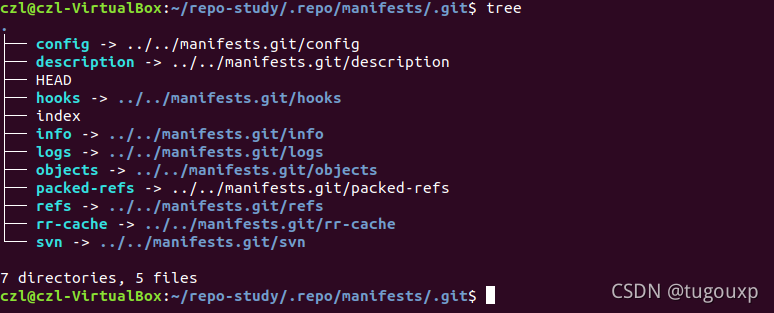
project.list:仓库清单.
project-objects:子仓库.git目录中对象的链接目标
projects:子仓库.git目录中.git元数据链接目标。
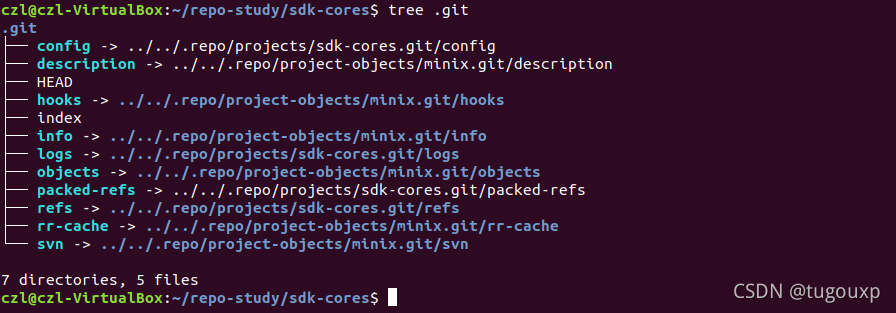
不明白为什么repo把各个子仓库的实际的.git内容都放到.repo目录下,可能这样把每个子仓库数据信息集中放在一起,方便管理,显得每个子仓库比较轻量,干净吧。
repo目录:就是我们前面介绍的repo管理代码了,主要是用python语言编写。
czl@czl-VirtualBox:~/WorkSpace/repo-study/.repo$ tree -L 1
.
├── copy-link-files.json
├── manifests
├── manifests.git
├── manifest.xml
├── project.list
├── project-objects
├── projects
└── repo

5 directories, 3 files
czl@czl-VirtualBox:~/WorkSpace/repo-study/.repo$





 扫一扫
扫一扫


 6163
6163

 被折叠的 条评论
为什么被折叠?
被折叠的 条评论
为什么被折叠?
 到【灌水乐园】发言





