简述
- 本例以插件形式测试
- 使用Lib引用,打包程序运行不用再拷贝lib文件
- 需要 lib 文件和 .h 头文件
lib部分的代码
UE4 插件代码
Plugin lib文件部署
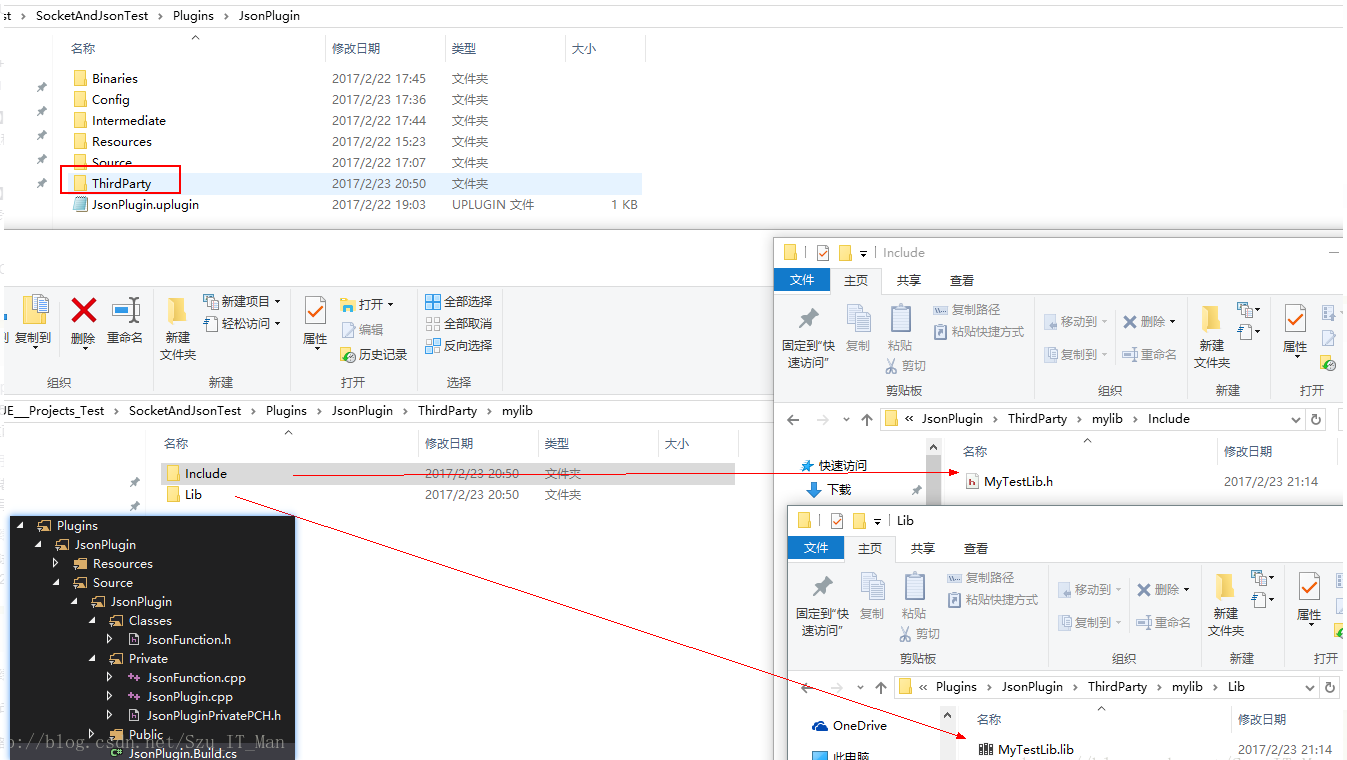
插件 build.cs设置
using System.IO;
namespace UnrealBuildTool.Rules
{
    public class JsonPlugin : ModuleRules
    {
        private string ModulePath
        {
            // get { return Path.GetDirectoryName(RulesCompiler.GetModuleFilename(this.GetType().Name)); }
            get { return ModuleDirectory; }
        }

        private string ThirdPartyPath
        {
            get { return Path.GetFullPath(Path.Combine(ModulePath, "../../ThirdParty/")); }
        }
        private string MyLibPath //第三方库MyTestLib的目录
        {
            get { return Path.GetFullPath(Path.Combine(ThirdPartyPath, "mylib")); }
        }

        public JsonPlugin(TargetInfo Target)
        {
            PublicIncludePaths.AddRange(
                new string[] {
                    "JsonPlugin/Public",
                    // ... add public include paths required here ...
                }
                );

            PrivateIncludePaths.AddRange(
                new string[] {
                    "JsonPlugin/Private",
                    // ... add other private include paths required here ...
                }
                );

            PublicDependencyModuleNames.AddRange(
                new string[]
                {
                    "Core",
                    "CoreUObject",
                    "Engine",
                    "HTTP",
                    "Json"
                    // ... add other public dependencies that you statically link with here ...
                }
                );

            PrivateDependencyModuleNames.AddRange(
                new string[]
                {
                    // ... add private dependencies that you statically link with here ...
                }
                );

            DynamicallyLoadedModuleNames.AddRange(
                new string[]
                {
                    // ... add any modules that your module loads dynamically here ...
                }
                );

            LoadThirdPartyLib(Target);
        }

        public bool LoadThirdPartyLib(TargetInfo Target)
        {
            bool isLibrarySupported = false;
            if ((Target.Platform == UnrealTargetPlatform.Win64) || (Target.Platform == UnrealTargetPlatform.Win32))//平台判断
            {
                isLibrarySupported = true;
                System.Console.WriteLine("----- isLibrarySupported true");
                //string PlatformSubPath = (Target.Platform == UnrealTargetPlatform.Win64) ? "Win64" : "Win32";
                string LibrariesPath = Path.Combine(MyLibPath, "Lib");
                PublicAdditionalLibraries.Add(Path.Combine(LibrariesPath,/* PlatformSubPath,*/ "MyTestLib.lib"));//加载第三方静态库.lib
            }

            if (isLibrarySupported) //成功加载库的情况下,包含第三方库的头文件
            {
                // Include path
                System.Console.WriteLine("----- PublicIncludePaths.Add true");
                PublicIncludePaths.Add(Path.Combine(MyLibPath, "Include"));
            }
            return isLibrarySupported;
        }
    }
}
调用
#include "../ThirdParty/mylib/Include/MyTestLib.h"

int UJsonFunction::MyOutput()
{
    int str = myPrint(100); //lib 里的函数
    return str;
}





 本文介绍如何在UE4中通过插件形式引入第三方库MyTestLib,包括.lib静态库的加载配置及调用示例。





 扫一扫
扫一扫


 2万+
2万+

 被折叠的 条评论
为什么被折叠?
被折叠的 条评论
为什么被折叠?
 到【灌水乐园】发言





