



 本文详细介绍如何在Unity WebGL项目中实现C#与JS的交互,包括定义JS函数、创建JS脚本、数据模型类的使用及JSON转换,以及如何在打包后的index页面进行测试。
Unity WebGl平台用C#跟JS交互
Unity WebGL
本人刚刚接触Unity的WebGL开发,不对的地方请指正,谢谢。
先贴上官方文档入口
https://docs.unity3d.com/2018.4/Documentation/Manual/webgl-interactingwithbrowserscripting.html链接
- 在你的项目里定义js前端响应事件(特性、关键词、返回值、函数名、参数)
// 定义JS函数
[DllImport("__Internal")]
private static extern void SetStudentData(string str);

[DllImport("__Internal")]
private static extern string GetStudentData();
- 在Plugins文件夹下面创建一个xxx.jslib脚本,注意一定按照啊官网添加unity内置函数如(Pointer_stringify()),否则数值会变成int类型的乱码,即unity分配的索引地址。
mergeInto(LibraryManager.library, {
  //上面是固定格式
  //这里的函数名要对应你在C#中使用extern关键词的函数名
  SetStudentData:function(x){
    unitySetStudentData(Pointer_stringify(x));
  },

  GetStudentData:function(){
    var returnStr  =  UnityGetStudentData();
    var bufferSize = lengthBytesUTF8(returnStr) + 1;
    var buffer = _malloc(bufferSize);
    stringToUTF8(returnStr, buffer, bufferSize);
    console.log("获取姓名:"+returnStr);
    return buffer;
  }
});
- 创建数据模型类并赋值
public class StudentData
{
    public int ID = 1;
    public string name = "张三";
}
- 使用UnityEngine的JsonUtility将模型类转化成Json串,并调用第一步中外部定义的JS方法
public static void SetStudentData_Unity()
{
   StudentData studentData = new StudentData();
   string jsonStr = JsonUtility.ToJson(studentData);
   Debug.Log(jsonStr);
   SetStudentData(jsonStr);
}
- 测试
如果JS中没有定义我们在步骤2里SetStudentData函数中调用的unitySetStudentData方法,调用时会报这个错误,记得定义
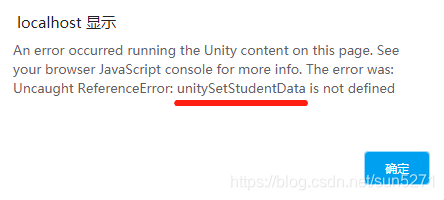
debug.log会在开发者工具的控制台中显示方便查看数据是否正确

打完包之后再index页面里添加临时方法测试
<script>
      var gameInstance = UnityLoader.instantiate("gameContainer", "Build/BPSQ-SolidState-V1.0-WebGL.json", {onProgress: UnityProgress});
	  function GetStudentData()
	  {
		alert("jsonData");
	  }
    </script>





 扫一扫
扫一扫


 417
417

 被折叠的 条评论
为什么被折叠?
被折叠的 条评论
为什么被折叠?
 到【灌水乐园】发言





