


1.ROS的介绍
ROS 是机器人操作系统(Robot Operating System)的英文缩写,虽然叫做操作系统,但并不是真正意义上的操作系统,而是一个面向机器人的开源的开发平台。
它提供了操作系统应有的服务,包括硬件抽象,底层设备控制,常用函数的实现,进程间消息传递,以及包管理。它也提供用于获取、编译、编写、和跨计算机运行代码所需的工具和库函数。
2.安装
2.1配置软件源和公钥
添加软件源-以便能够快速下载和更新
sudo sh -c 'echo "deb http://packages.ros.org/ros/ubuntu $(lsb_release -sc) main" > /etc/apt/sources.list.d/ros-latest.list'
公钥是 Ubuntu 系统的一种安全机制,配置公钥让系统信任。
sudo apt-key adv --keyserver 'hkp://keyserver.ubuntu.com:80' --recv-key C1CF6E31E6BADE8868B172B4F42ED6FBAB17C654
2.2安装ROS 20.04对应noetic
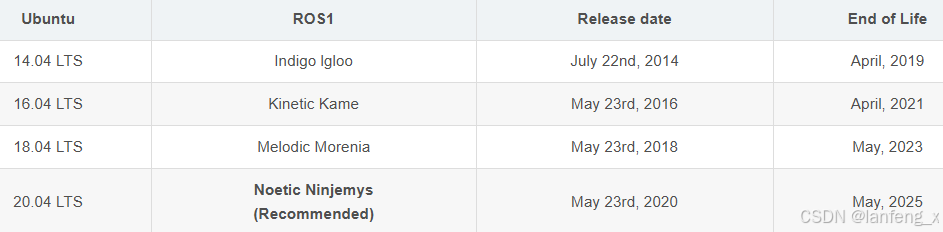
sudo apt update
sudo apt install ros-noetic-desktop-full
2.3 初始化rosdep
sudo rosdep init
rosdep update
报错1:sudo: rosdep:找不到命令
解决方法: sudo apt install python3-rosdep (noetic)
sudo apt-get install python-rosdep(其他版本)
报错2:
ERROR: cannot download default sources list from:
https://raw.githubusercontent.com/ros/rosdistro/master/rosdep/sources.list.d/20-default.list
Website may be down.
解决方法:添加网站IP
sudo gedit /etc/hosts
199.232.28.133 raw.githubusercontent.com
151.101.228.133 raw.github.com
报错3:ERROR: Rosdep experienced an error: The read operation timed out
解决方法:source ~/.bashrc
报错4:ERROR: default sources list file already exists:/etc/ros/rosdep/sources.list.d/20-default.list
解决办法:删除/etc/ros/rosdep/sources.list.d/20-default.list
2.4 设置环境变量
echo "source /opt/ros/noetic/setup.bash" >> ~/.bashrc
source ~/.bashrc
2.5 安装rosinstall
sudo apt install python3-rosinstall python3-rosinstall-generator python3-wstool build-essential
2.6 运行测试
打开第一个终端
roscore
第二个终端
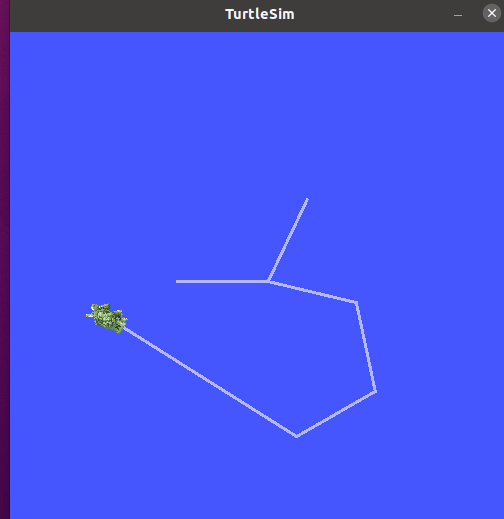
rosrun turtlesim turtlesim_node
第三个终端
rosrun turtlesim turtle_teleop_key
可通过上下左右按键控制海龟行动





 扫一扫
扫一扫


 23万+
23万+

 被折叠的 条评论
为什么被折叠?
被折叠的 条评论
为什么被折叠?
 到【灌水乐园】发言





