


继上:Qt项目捕捉鼠标事件1
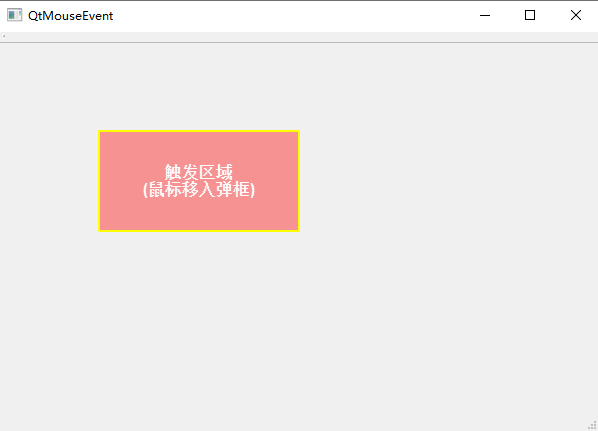
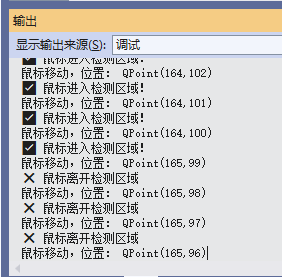
我们在主区域画一个框,鼠标进入框内,就提示,不在框内,提示内容不一样。
首先,我们检测区域的位置和颜色定一下:
// 定义指定检测区域(可根据需求调整)
#define POPUP_AREA_X      100    // 区域起始X坐标
#define POPUP_AREA_Y      100    // 区域起始Y坐标
#define POPUP_AREA_WIDTH  200    // 区域宽度
#define POPUP_AREA_HEIGHT 100    // 区域高度

// 检测区域绘制颜色(半透明红色,醒目且不遮挡内容)
#define AREA_DRAW_COLOR   QColor(255, 0, 0, 100)  // RGBA:红、绿、蓝、透明度(0-255)
#define AREA_BORDER_COLOR QColor(255, 255, 0, 255)// 边框颜色(黄色)
#define AREA_BORDER_WIDTH 2                       // 边框宽度
其次,为了区域可见,我们把检测区域画出来(方便调试),后面可以根据需要(画或不画)
在头文件内定义一个变量和增加一个函数:
private:
    Ui::QtMouseEventClass ui;
	bool m_isPressed = false; // 标记鼠标是否按下
	QPoint m_lastPos;         // 记录鼠标按下时的位置(用于移动窗口)
	QLabel* m_detectionAreaLabel;// 检测区域绘制层
protected:
	// 重写鼠标事件虚函数(protected 权限)
	void mousePressEvent(QMouseEvent* event) override;       // 鼠标按下
	void mouseReleaseEvent(QMouseEvent* event) override;     // 鼠标松开
	void mouseMoveEvent(QMouseEvent* event) override;        // 鼠标移动
	void mouseDoubleClickEvent(QMouseEvent* event) override; // 鼠标双击
	void wheelEvent(QWheelEvent* event) override;            // 鼠标滚轮
	// 绘制检测区域(可视化)
	void drawDetectionArea();
实现这个函数(drawDetectionArea):
// 绘制检测区域(可视化)
void QtMouseEvent::drawDetectionArea()
{
	// 创建一个和绘制层一样大的透明画布
	QPixmap pixmap(m_detectionAreaLabel->size());
	pixmap.fill(Qt::transparent); // 透明背景

	// 创建画家
	QPainter painter(&pixmap);
	painter.setRenderHint(QPainter::Antialiasing); // 抗锯齿

	// 设置画刷(填充色:半透明红)
	QBrush brush(AREA_DRAW_COLOR);
	painter.setBrush(brush);

	// 设置画笔(边框:黄色实线)
	QPen pen(AREA_BORDER_COLOR);
	pen.setWidth(AREA_BORDER_WIDTH);
	pen.setStyle(Qt::SolidLine);
	painter.setPen(pen);

	// 绘制检测区域矩形
	QRect detectionRect(POPUP_AREA_X, POPUP_AREA_Y, POPUP_AREA_WIDTH, POPUP_AREA_HEIGHT);
	painter.drawRect(detectionRect);

	// 可选:在区域内绘制文字提示
	painter.setPen(QColor(255, 255, 255)); // 白色文字
	painter.setFont(QFont("Arial", 12, QFont::Bold));
	painter.drawText(detectionRect, Qt::AlignCenter, "触发区域\n(鼠标移入弹框)");

	// 将绘制好的内容设置到标签上
	m_detectionAreaLabel->setPixmap(pixmap);
}
最后,在mouseMoveEvent函数内增加检测代码:
// 鼠标移动事件
void QtMouseEvent::mouseMoveEvent(QMouseEvent* event)
{
	// 如果左键按下,移动窗口
	if (m_isPressed && (event->buttons() & Qt::LeftButton))
	{
		this->move(event->globalPosition().toPoint() - m_lastPos);
		qDebug() << "窗口移动中,当前位置:" << this->pos();
	}
	else
	{
		qDebug() << "鼠标移动,位置:" << event->pos();
	}

	// 获取鼠标当前位置
	QPoint mousePos = event->pos();
	// 定义指定检测区域
	QRect popupArea(POPUP_AREA_X, POPUP_AREA_Y, POPUP_AREA_WIDTH, POPUP_AREA_HEIGHT);

	// 检测鼠标是否在指定区域内
	if (popupArea.contains(mousePos)) {
		qDebug() << "✅ 鼠标进入检测区域!";

	}
	else {
		qDebug() << "❌ 鼠标离开检测区域";
	}

	QMainWindow::mouseMoveEvent(event);
}
运行看结果吧:





 扫一扫
扫一扫


 72
72

 被折叠的 条评论
为什么被折叠?
被折叠的 条评论
为什么被折叠?
 到【灌水乐园】发言





