 使用C++和ANSI色彩在终端创建动态彩色甜甜圈


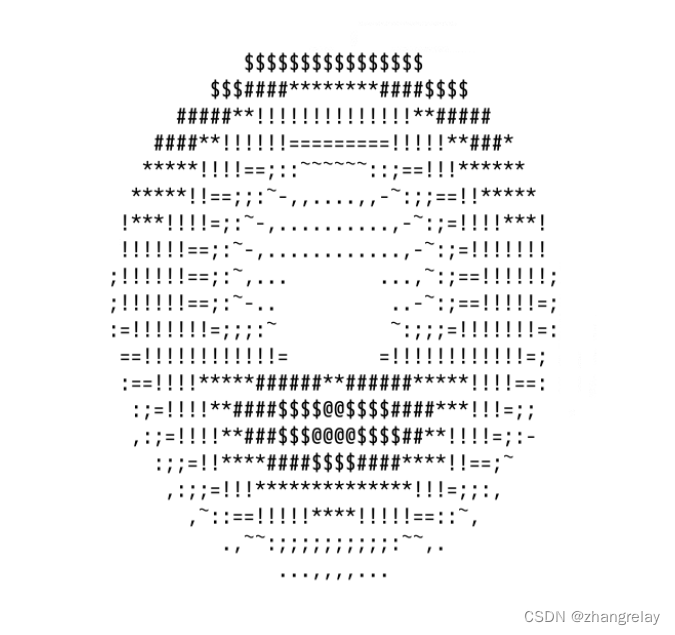
局部:
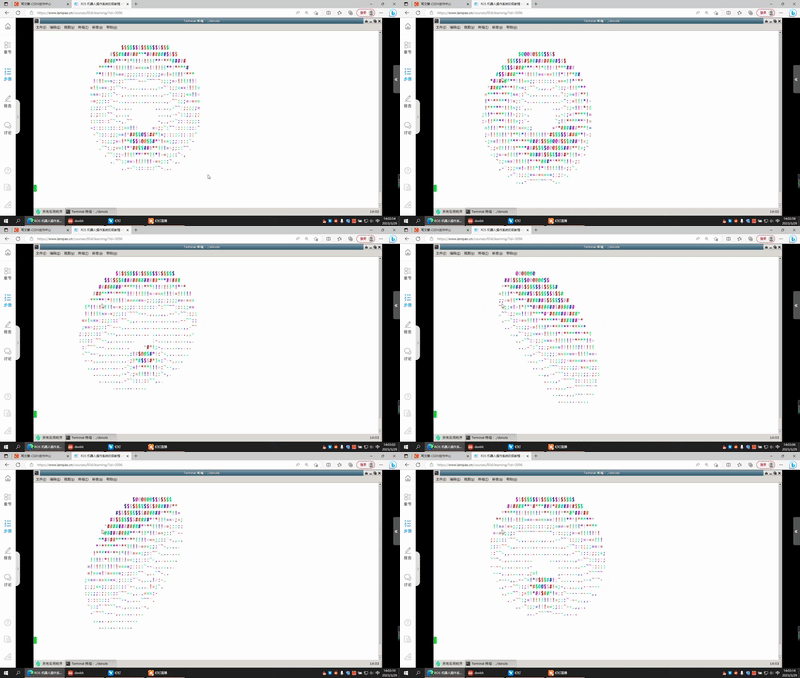
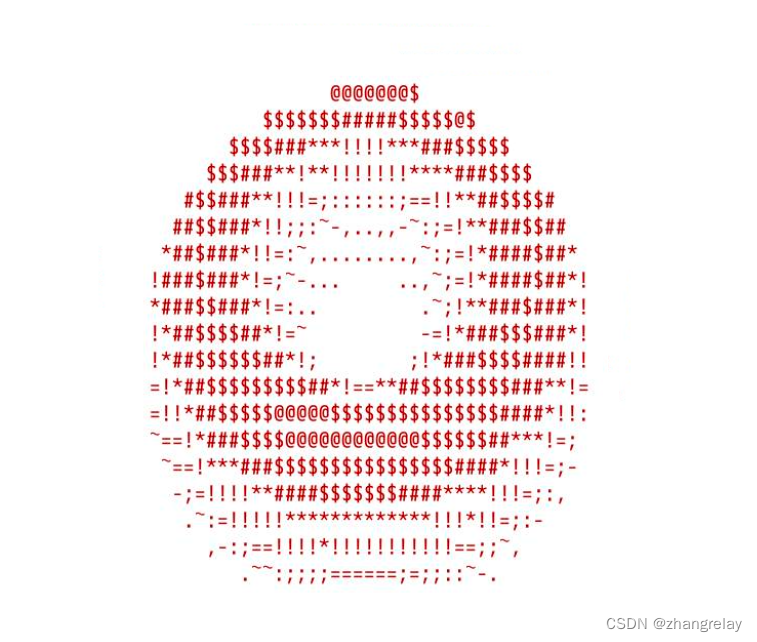
整体:
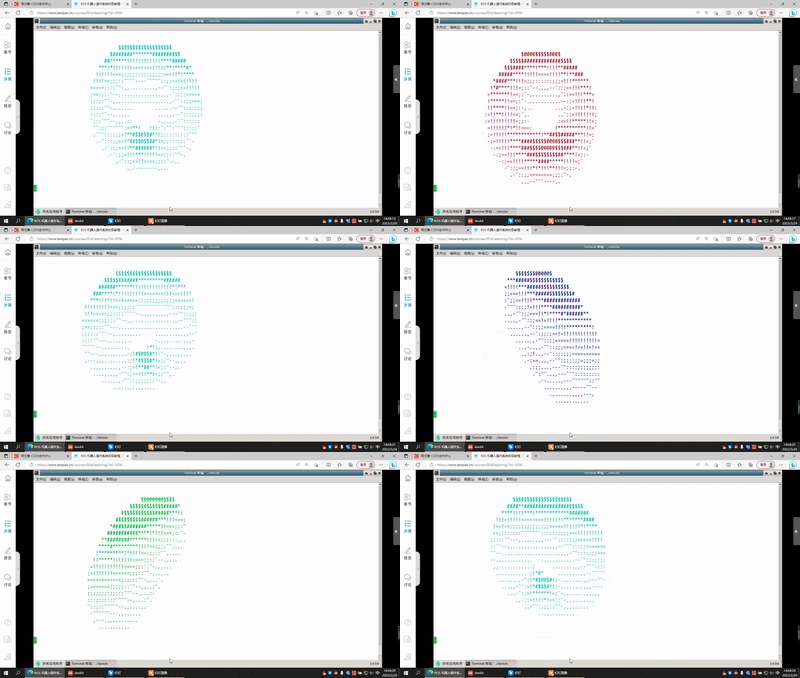
C++的Hello World代码如下:
#include <stdio.h>

int main() {
    printf("Hello world!\n");
    return 0;
}
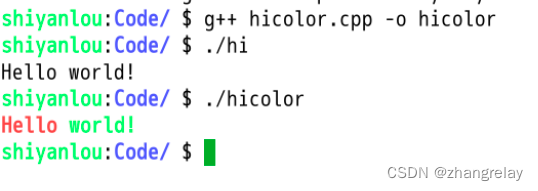
在C++语言中,可以使用ANSI转义码来输出彩色字符串。下面是一个输出彩色Hello world字符串的示例代码:
#include <stdio.h>

int main()
{
    printf("\033[1;31m"); // 设置颜色为红色
    printf("Hello ");
    printf("\033[1;32m"); // 设置颜色为绿色
    printf("world!\n");
    printf("\033[0m"); // 恢复默认颜色
    return 0;
}在上面的代码中,\033代表ANSI转义码的起始符号,[1;31m代表设置颜色为红色的代码,[1;32m代表设置颜色为绿色的代码,[0m代表恢复默认颜色的代码。在输出彩色字符串时,需要先设置颜色代码,然后输出字符串,最后恢复默认颜色。
在云课中试试看吧:
彩色甜甜圈呢?
#include <stdio.h>
#include <math.h>

#define PI 3.14159265

int main()
{
    int r = 10, x, y;
    int i, j;
    float angle = 0.0;
    char colors[7][8] = {"\033[31m", "\033[33m", "\033[32m", "\033[36m", "\033[34m", "\033[35m", "\033[37m"};

    for (i = -r; i <= r; i++)
    {
        for (j = -r; j <= r; j++)
        {
            angle = atan2(j, i) * 180.0 / PI;
            x = (int)(sqrt(i * i + j * j) + 0.5);
            y = (int)(angle / 10 + 0.5) % 7;

            if (x == r)
            {
                printf("%s", colors[y]);
                printf("O ");
                printf("\033[0m");
            }
            else
            {
                printf("  ");
            }
        }
        printf("\n");
    }

    return 0;
} 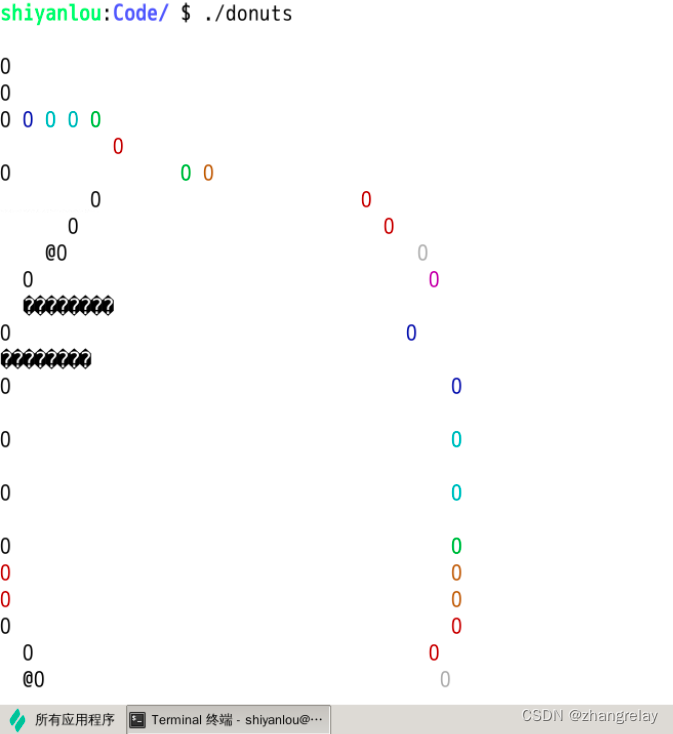
在这个代码中,我们使用了ANSI转义码来实现彩色输出。其中,colors数组保存了七种不同的颜色代码,分别对应不同的角度范围。在循环中,我们使用了数学函数来计算每个点的距离和角度,并根据距离和角度选择不同的颜色输出。最终的效果是一个彩色的甜甜圈。
#include <stdio.h>
#include <math.h>
#include <cstring>
#include <unistd.h>

int main() {
    float A = 0, B = 0;
    float i, j;
    int k;
    float z[1760];
    char b[1760];
    printf("\x1b[2J");
    for (;;) {
        memset(b, 32, 1760);
        memset(z, 0, 7040);
        for (j = 0; j < 6.28; j += 0.07) {
            for (i = 0; i < 6.28; i += 0.02) {
                float c = sin(i);
                float d = cos(j);
                float e = sin(A);
                float f = sin(j);
                float g = cos(A);
                float h = d + 2;
                float D = 1 / (c * h * e + f * g + 5);
                float l = cos(i);
                float m = cos(B);
                float n = sin(B);
                float t = c * h * g - f * e;
                int x = 40 + 30 * D * (l * h * m - t * n);
                int y = 12 + 15 * D * (l * h * n + t * m);
                int o = x + 80 * y;
                int N = 8 * ((f * e - c * d * g) * m - c * d * e - f * g - l * d * n);
                if (22 > y && y > 0 && x > 0 && 80 > x && D > z[o]) {
                    z[o] = D;
                    b[o] = ".,-~:;=!*#$@"[N > 0 ? N : 0];
                }
            }
        }
        printf("\x1b[H");
        for (k = 0; k < 1761; k++) {
            putchar(k % 80 ? b[k] : 10);
            A += 0.00004;
            B += 0.00002;
        }
        usleep(30000);
    }
    return 0;
} 
char colors[7][8] = {"\033[31m", "\033[33m", "\033[32m", "\033[36m", "\033[34m", "\033[35m", "\033[37m"};
printf("%s", colors[y]);
#include <stdio.h>
#include <math.h>
#include <cstring>
#include <unistd.h>
char colors[7][8] = {"\033[31m", "\033[33m", "\033[32m", "\033[36m", "\033[34m", "\033[35m", "\033[37m"};

int main() {
    float A = 0, B = 0;
    float i, j;
    int k;
    float z[1760];
    char b[1760];
    printf("\x1b[2J");
    for (;;) {
        memset(b, 32, 1760);
        memset(z, 0, 7040);
        for (j = 0; j < 6.28; j += 0.07) {
            for (i = 0; i < 6.28; i += 0.02) {
                float c = sin(i);
                float d = cos(j);
                float e = sin(A);
                float f = sin(j);
                float g = cos(A);
                float h = d + 2;
                float D = 1 / (c * h * e + f * g + 5);
                float l = cos(i);
                float m = cos(B);
                float n = sin(B);
                float t = c * h * g - f * e;
                int x = 40 + 30 * D * (l * h * m - t * n);
                int y = 12 + 15 * D * (l * h * n + t * m);
                int o = x + 80 * y;
                int N = 8 * ((f * e - c * d * g) * m - c * d * e - f * g - l * d * n);
                if (22 > y && y > 0 && x > 0 && 80 > x && D > z[o]) {
                    z[o] = D;
	                printf("%s", colors[N/2]);
                    b[o] = ".,-~:;=!*#$@"[N > 0 ? N : 0];
                }
            }
        }
        printf("\x1b[H");
        for (k = 0; k < 1761; k++) {
            putchar(k % 80 ? b[k] : 10);
            A += 0.00004;
            B += 0.00002;
        }
        usleep(100000);
    }
    return 0;
} 
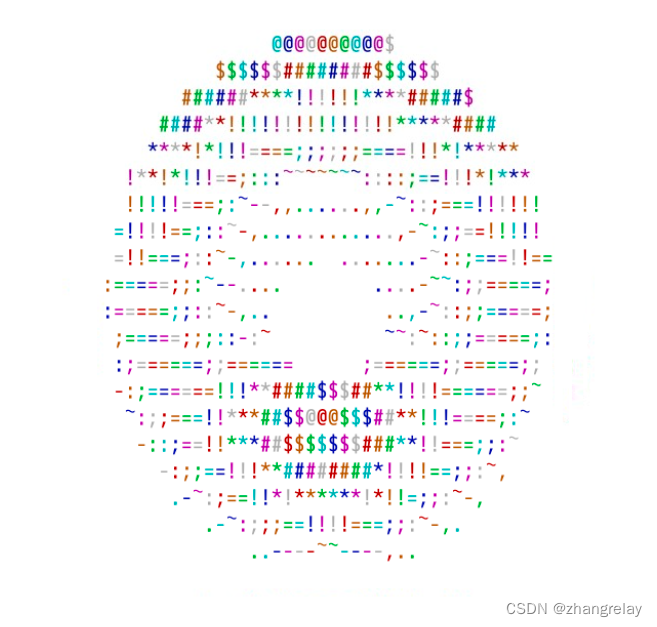
#include <stdio.h>
#include <math.h>
#include <cstring>
#include <unistd.h>
char colors[7][8] = {"\033[31m", "\033[33m", "\033[32m", "\033[36m", "\033[34m", "\033[35m", "\033[37m"};

int main() {
    float A = 0, B = 0;
    float i, j;
    int k;
    float z[1760];
    char b[1760];
    printf("\x1b[2J");
    for (;;) {
        memset(b, 32, 1760);
        memset(z, 0, 7040);
        for (j = 0; j < 6.28; j += 0.07) {
            for (i = 0; i < 6.28; i += 0.02) {
                float c = sin(i);
                float d = cos(j);
                float e = sin(A);
                float f = sin(j);
                float g = cos(A);
                float h = d + 2;
                float D = 1 / (c * h * e + f * g + 5);
                float l = cos(i);
                float m = cos(B);
                float n = sin(B);
                float t = c * h * g - f * e;
                int x = 40 + 30 * D * (l * h * m - t * n);
                int y = 12 + 15 * D * (l * h * n + t * m);
                int o = x + 80 * y;
                int N = 8 * ((f * e - c * d * g) * m - c * d * e - f * g - l * d * n);
                if (22 > y && y > 0 && x > 0 && 80 > x && D > z[o]) {
                    z[o] = D;
                    b[o] = ".,-~:;=!*#$@"[N > 0 ? N : 0];
                }
            }
        }
        printf("\x1b[H");
        for (k = 0; k < 1761; k++) {
            printf("%s", colors[k%7]);
            putchar(k % 80 ? b[k] : 10);
            A += 0.00004;
            B += 0.00002;
        }
        usleep(100000);
    }
    return 0;
} 
\033[0m 关闭所有属性
\033[1m 高亮
\033[2m 亮度减半
\033[3m 斜体
\033[4m 下划线
\033[5m 闪烁
\033[6m 快闪
\033[7m 反显
\033[8m 消隐
\033[9m 中间一道横线
10-19 关于字体的
21-29 基本与1-9正好相反
30-37 设置前景色
40-47 设置背景色
30:黑
31:红
32:绿
33:黄
34:蓝
35:紫
36:深
37:白
38 打开下划线,设置默认前景色
39 关闭下划线,设置默认前景色
40 黑色背景
41 红色背景
42 绿色背景
43 棕色背景
44 蓝色背景
45 品红背景
46 孔雀蓝背景
47 白色背景
48 不知道什么东西
49 设置默认背景色
50-89 没用
90-109 又是设置前景背景的,比之前的颜色浅
\033[nA 光标上移n行
\033[nB 光标下移n行
\033[nC 光标右移n行
\033[nD 光标左移n行
\033[y;xH设置光标位置
\033[2J 清屏
\033[K 清除从光标到行尾的内容
\033[s 保存光标位置
\033[u 恢复光标位置
\033[?25l 隐藏光标
\033[?25h 显示光标
- 安装ncurses库:ncurses是一个用于控制终端屏幕的库,可以用来实现动态彩色甜甜圈的显示。在Linux系统中,可以使用以下命令安装ncurses库:
sudo apt-get install libncurses5-dev libncursesw5-dev- 创建C程序:使用任何文本编辑器创建一个新的C程序,并将其保存为一个.c文件。在程序中,需要包含ncurses.h头文件,以便使用ncurses库中的函数和常量。例如:
#include <ncurses.h>

int main() {
    // 在此处编写程序
    return 0;
}- 初始化屏幕:在程序的开始处,需要调用initscr()函数来初始化终端屏幕。这个函数会打开终端屏幕,并启用ncurses库的各种特性。例如:
int main() {
    initscr();
    // 在此处编写程序
    endwin(); // 关闭终端屏幕
    return 0;
}- 设置颜色:使用start_color()函数来启用颜色模式,并使用init_pair()函数来创建颜色对。例如:
int main() {
    initscr();
    start_color();
    // 创建颜色对
    init_pair(1, COLOR_RED, COLOR_BLACK);
    init_pair(2, COLOR_GREEN, COLOR_BLACK);
    init_pair(3, COLOR_YELLOW, COLOR_BLACK);
    init_pair(4, COLOR_BLUE, COLOR_BLACK);
    init_pair(5, COLOR_MAGENTA, COLOR_BLACK);
    init_pair(6, COLOR_CYAN, COLOR_BLACK);
    // 在此处编写程序
    endwin();
    return 0;
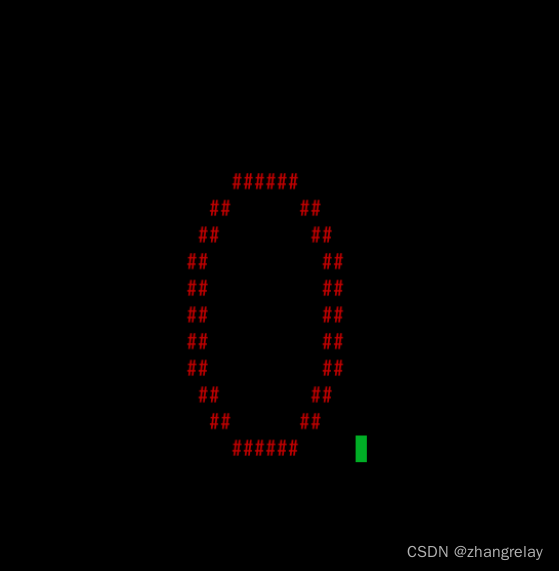
}- 绘制甜甜圈:使用mvprintw()函数来在终端屏幕上输出字符,并使用attron()函数来设置字符的颜色。例如:
int main() {
    initscr();
    start_color();
    // 创建颜色对
    init_pair(1, COLOR_RED, COLOR_BLACK);
    init_pair(2, COLOR_GREEN, COLOR_BLACK);
    init_pair(3, COLOR_YELLOW, COLOR_BLACK);
    init_pair(4, COLOR_BLUE, COLOR_BLACK);
    init_pair(5, COLOR_MAGENTA, COLOR_BLACK);
    init_pair(6, COLOR_CYAN, COLOR_BLACK);
    // 绘制甜甜圈
    attron(COLOR_PAIR(1));
    mvprintw(10, 30, "    ######     ");
    mvprintw(11, 30, "  ##      ##   ");
    mvprintw(12, 30, " ##        ##  ");
    mvprintw(13, 30, "##          ## ");
    mvprintw(14, 30, "##          ## ");
    mvprintw(15, 30, "##          ## ");
    mvprintw(16, 30, "##          ## ");
    mvprintw(17, 30, "##          ## ");
    mvprintw(18, 30, " ##        ##  ");
    mvprintw(19, 30, "  ##      ##   ");
    mvprintw(20, 30, "    ######     ");
    // 在此处编写程序
    endwin();
    return 0;
}- 添加动态效果:使用clear()函数来清空终端屏幕,并使用usleep()函数来添加延时效果。例如:
int main() {
    initscr();
    start_color();
    // 创建颜色对
    init_pair(1, COLOR_RED, COLOR_BLACK);
    init_pair(2, COLOR_GREEN, COLOR_BLACK);
    init_pair(3, COLOR_YELLOW, COLOR_BLACK);
    init_pair(4, COLOR_BLUE, COLOR_BLACK);
    init_pair(5, COLOR_MAGENTA, COLOR_BLACK);
    init_pair(6, COLOR_CYAN, COLOR_BLACK);
    // 绘制甜甜圈
    while (true) {
        clear();
        attron(COLOR_PAIR(1));
        mvprintw(10, 30, "    ######     ");
        mvprintw(11, 30, "  ##      ##   ");
        mvprintw(12, 30, " ##        ##  ");
        mvprintw(13, 30, "##          ## ");
        mvprintw(14, 30, "##          ## ");
        mvprintw(15, 30, "##          ## ");
        mvprintw(16, 30, "##          ## ");
        mvprintw(17, 30, "##          ## ");
        mvprintw(18, 30, " ##        ##  ");
        mvprintw(19, 30, "  ##      ##   ");
        mvprintw(20, 30, "    ######     ");
        refresh();
        usleep(100000);
    }
    endwin();
    return 0;
}- 编译和运行程序:使用gcc编译器将C程序编译为可执行文件,并使用./命令执行程序。例如:
gcc -o myprogram myprogram.c -lncurses
./myprogram
以上就是在Linux系统中使用C编程完成动态彩色甜甜圈显示的具体步骤。
g++ donuts.cpp -o donuts -lncurses





 扫一扫
扫一扫


 2900
2900

 被折叠的 条评论
为什么被折叠?
被折叠的 条评论
为什么被折叠?
 到【灌水乐园】发言





