string+cytoscape 构建PPI蛋白互作网络

string网站:https://cn.string-db.org/cgi/input.pl
genemania网站也可查看PPI:
http://genemania.org/

选multiple protein
分行输入基因名( by Names / Identifiers )

setting设置,exports输出
下载 as tabular text output 输出的文件(tsv)

cytoscape的用法
https://www.bilibili.com/video/BV1m34y1o7dK?spm_id_from=333.337.search-card.all.click
https://www.bilibili.com/video/BV1n34y1b7by?spm_id_from=333.880.my_history.page.click

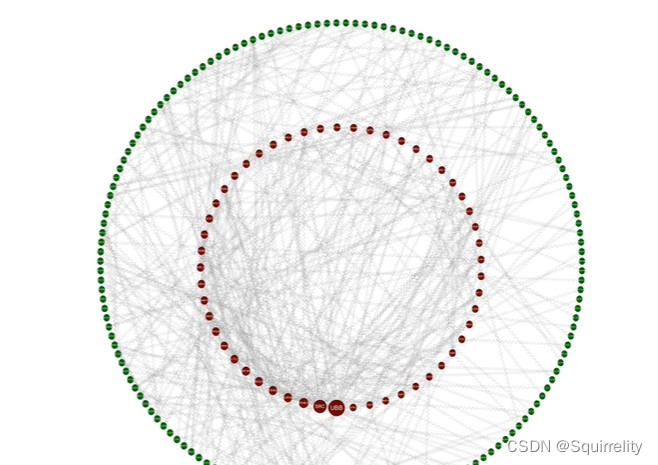
import file-layout-选circle layout
style调试参数
apps-下载cytoNACs-常选bc betweenness
线改成弯线
attribute circle layout选四分之一圆放进去(杂志不允许过多空白)
调整,exports
效果:
在这里插入图片描述

### PPI 蛋白网络构建与分析 #### 1. **PPI 网络基础** 蛋白质-蛋白质相用(Protein-Protein Interaction, PPI)是指两个或更多蛋白质分子之间发生的物理接触,这种接触通常具有生物学功能意义。在生物信息学领域,PPI 网络可以被看是一个图结构,其中节点代表蛋白质,边则表示它们之间的相用[^5]。 #### 2. **数据收集与预处理** 构建 PPI 网络的第一步是从公共数据库获取高质量的数据集。常用的资源包括 STRING、BioGRID 和 IntAct 等。这些平台提供了经过实验验证和预测得出的人类及其他物种间的蛋白动记录。下载完成后需要清洗原始文件去除冗余项以及低可信度链接以便后续计算更加精准可靠[^6]。 ```python import pandas as pd def load_ppi_data(file_path): """ Load and preprocess raw PPI interaction dataset into DataFrame format. Args: file_path (str): Path to tab-delimited text file containing protein interactions. Returns: pd.DataFrame: Cleaned dataframe consisting only high-confidence pairs. """ df = pd.read_csv(file_path, sep='\t') filtered_df = df[df['confidence_score'] >= 0.7] # Filter by confidence threshold return filtered_df[['proteinA', 'proteinB']] ``` #### 3. **网络可视化技术** 为了直观展示复杂的 PPI 关系网,研究人员经常借助专门软件工具如 Cytoscape 或 Gephi 来绘制图形化界面。Python 社区内也有相应库支持此类任务比如 NetworkX 可用于创建基本拓扑视图而 Matplotlib 则负责美化渲染效果[^7]。 ```python import networkx as nx import matplotlib.pyplot as plt def plot_network(interactions): """ Generate simple undirected graph representation from list of pairwise relations. Args: interactions (pd.DataFrame): Table holding source-target connections between proteins. Displays resulting figure inline within Jupyter Notebook environment automatically. """ g = nx.Graph() edges = [(row.proteinA, row.proteinB) for idx,row in interactions.iterrows()] g.add_edges_from(edges) pos=nx.spring_layout(g) nx.draw_networkx_nodes(g,pos,node_size=50,alpha=.8) nx.draw_networkx_edges(g,pos,width=1.0,alpha=0.5) plt.show() # Example Usage assuming we already have preprocessed ppi records stored inside variable named `clean_interacts`. plot_network(clean_interacts) ``` #### 4. **模块检测方法论** 识别潜在的功能模块是研究大规模 PPI 图谱的重要目标之一。社区发现算法能够帮助我们自动划分出紧密相连子群组从而推测共同参与某特定生理进程可能性较高的成员组合情况[^8]。 ---
评论
添加红包

请填写红包祝福语或标题

红包个数最小为10个

红包金额最低5元

当前余额3.43前往充值 >
需支付:10.00
成就一亿技术人!
领取后你会自动成为博主和红包主的粉丝 规则
hope_wisdom
发出的红包
实付
使用余额支付
点击重新获取
扫码支付
钱包余额 0

抵扣说明:

1.余额是钱包充值的虚拟货币,按照1:1的比例进行支付金额的抵扣。
2.余额无法直接购买下载,可以购买VIP、付费专栏及课程。

余额充值


