



 本文介绍了在Unity中处理大量帧动画的挑战,以及Unity自带的Sprite Packer和Sprite Atlas的解决方案。作者分享了一个自创的简单动画插件,该插件基于TexturePacker进行合图,方便动画管理。文章详细讲解了插件的使用步骤,包括文件命名规则、创建plistAnimation以及更新动画的方法,旨在简化图片更换时的工作流程。
有时候程序里要用到大量的帧动画,而且尺寸大、数量多 一般情况下是没问题 但是数量多了渲染就成问题了
于是,我抽时间写了一个简单的动画插件来扩展 文章后边会提到(仅供学习和参考)

解决方案:
1.系统方案:
unity 提供了两种解决方案sprite packer和 2017.4中最新出现的spriteAtias,
这两种网上都有详细赘述,在此就不多提.
sprite packer: https://blog.youkuaiyun.com/Paris_chenxin/article/details/74000323
sprite atias: https://blog.youkuaiyun.com/u010019717/article/details/76603629?locationNum=6&fps=1
这两种方式都是在运行或者打包的时候进行压缩 我找了了半天不能直接读到 图集文件(有可以直接读到的方法可以联系我互相学习),优点呢相当明显.编辑的时候很方便使用.缺点:如果存在大量的图片需要压缩就要耗费大量的时间.以我600M的资源为例,我压缩图片质量加合图大约要3个小时 电脑配置 
2.TexturePacker 合图
TexturePacker 合图存在一个问题图片比较大比较多会合很多张而我又比较懒.于是就出现以下情况 合不到一张 顺序还乱的

TexturePacker 的好处就是便于开发时候图集的管理 坏处是如果图片更换,动画重新托就比较麻烦了
好了说了那么多废话来介绍我的插件了
插件介绍:
1.TexturePacker 合图使用(软件版本4.6.1)

也可以用别的打包方式
要注意文件名开头就是动画名
单图命名方式 : 动画名 + 下划线(_) + 三位序号 (000) 例如 Fireworks_000.png Fireworks_001.png
2.导入项目如果动画存在相同字段最好放在不同目录下

3.右键创建一个 plistAnimation
4.数据详解

5.点击创建(Create plist animation)这样我们就生成了一个动画片了 (拖到指定的物体上就可以播放了)
这里我们动画播放我们用的是 sprite 2d 我并不推荐用image(会出问题)来做序列帧所以没写,有兴趣用到的可以自己补充

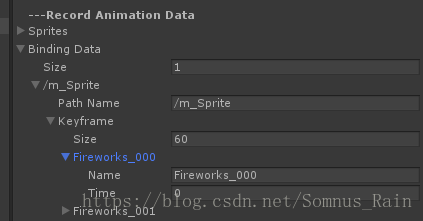
这样每次图片更换的时候只要找到指定的plist animation 点这两个更新就好了
更换前记录下(unity 关闭后缓存数据会被清空)

百度云地址:链接: https://pan.baidu.com/s/1Oy5Z7KODVmXzrnyPD4EDRA 密码: gb9p
来放个烟花庆祝下

每次重新打开都没有记录我加了个记录编辑显示的,有需要吗? 觉得没多大必要就没粘出来,有需要跟我说
代码:
using UnityEngine;
using System.Collections;
using System.IO;
using System.Collections.Generic;
using System.Linq;


#if UNITY_EDITOR
using UnityEditor;
#endif


#if UNITY_EDITOR
[CanEditMultipleObjects]
#endif
public class PlistAnimation : ScriptableObject
{
    [Header("---Plist Animation Config")]
    public AnimationClip Clip;
    public string AnimationName;
    public string AnimationPath;


#if UNITY_EDITOR
    [Header("---Create Plist Animation")]
    public string AnimationSpritePath;
    public int FrameRate = 30;
    public bool LoopTime = false;


    private Dictionary<string, Sprite> sprites = new Dictionary<string, Sprite>();
    private Dictionary<string, Dictionary<float, string>> bindingData = new Dictionary<string, Dictionary<float, string>>();


    public void FindAllSprites()
    {
        string[] guids = AssetDatabase.FindAssets(AnimationName, new string[] { AnimationPath });
        guids = DelRepeatData(guids);
        foreach (string guid in guids)
        {
            Texture2D texture2D = AssetDatabase.LoadAssetAtPath<Texture2D>(AssetDatabase.GUIDToAssetPath(guid));
            if (texture2D)
            {
                Object[] objs = AssetDatabase.LoadAllAssetsAtPath(AssetDatabase.GetAssetPath(texture2D));
                foreach (Object o in objs)
                {
                    if (o.GetType() == typeof(Sprite))
                    {
                        sprites[o.name] = o as Sprite;
                    }
                }
            }
        }
        //SaveAnimationClipBindings();
        //ReplaceAnimation();
    }
    public void CreatePlistAnimation()
    {
        FindAllSprites();
        if (!Clip)
        {
            Clip = new AnimationClip();
            string[] paths = AssetDatabase.GetAssetPath(this).Split('/');
            paths[paths.Length - 1] = "";
            AssetDatabase.CreateAsset(Clip, string.Join("/", paths) + "/" + AnimationName + ".anim");
        }
        EditorCurveBinding curveBinding = new EditorCurveBinding();
        curveBinding.type = typeof(SpriteRenderer);
        curveBinding.path = AnimationSpritePath;
        curveBinding.propertyName = "m_Sprite";
        ObjectReferenceKeyframe[] keyFrames = new ObjectReferenceKeyframe[sprites.Count];
        Clip.frameRate = FrameRate;
        for (int i =0;i< sprites.Count; i++)
        {
            ObjectReferenceKeyframe objectReferenceKeyframe = new ObjectReferenceKeyframe();
            objectReferenceKeyframe.time = (float)i/ (float)FrameRate;
            objectReferenceKeyframe.value = sprites[AnimationName+"_"+ i.ToString("000")];
            keyFrames[i] = objectReferenceKeyframe;
        }
        SerializedObject serializedClip = new SerializedObject(Clip);
        AnimationClipSettings clipSettings = new AnimationClipSettings(serializedClip.FindProperty("m_AnimationClipSettings"));
        clipSettings.loopTime = LoopTime;
        serializedClip.ApplyModifiedProperties();
        AnimationUtility.SetObjectReferenceCurve(Clip, curveBinding, keyFrames);
        AssetDatabase.SaveAssets();


    }
    public void ClearSpritesAndRecord() {
        bindingData.Clear();
        sprites.Clear();
    }
    public void SaveAnimationClipBindings()
    {
        EditorCurveBinding[] bindings = AnimationUtility.GetObjectReferenceCurveBindings(Clip);
        foreach (EditorCurveBinding binding in bindings)
        {
            if (binding.type == typeof(SpriteRenderer))
            {
                string pathName = binding.path + "/" + binding.propertyName;
                if (bindingData.ContainsKey(pathName))
                {
                    bindingData[pathName].Clear();
                }
                else
                {
                    bindingData[pathName] = new Dictionary<float, string>();
                }


                foreach (ObjectReferenceKeyframe o in AnimationUtility.GetObjectReferenceCurve(Clip, binding))
                {
                    bindingData[pathName].Add(o.time, o.value ? o.value.name : "");
                }
            }
        }
    }
    public void ReplaceAnimation()
    {
        EditorCurveBinding[] bindings = AnimationUtility.GetObjectReferenceCurveBindings(Clip);
        foreach (EditorCurveBinding binding in bindings)
        {
            if (binding.type == typeof(SpriteRenderer))
            {
                string pathName = binding.path + "/" + binding.propertyName;
                if (bindingData.ContainsKey(pathName))
                {
                    List<ObjectReferenceKeyframe> objectReferenceKeyframes = new List<ObjectReferenceKeyframe>();
                    foreach (float time in bindingData[pathName].Keys)
                    {
                        ObjectReferenceKeyframe objectReferenceKeyframe = new ObjectReferenceKeyframe();
                        objectReferenceKeyframe.time = time;
                        if (sprites.ContainsKey(bindingData[pathName][time]))
                        {
                            objectReferenceKeyframe.value = sprites[bindingData[pathName][time]];
                        }


                        objectReferenceKeyframes.Add(objectReferenceKeyframe);
                    }
                    AnimationUtility.SetObjectReferenceCurve(Clip, binding, objectReferenceKeyframes.ToArray());
                }


            }
        }


    }
    [MenuItem("Assets/Rain/PlistAnimation")]
    public static void CreateAsset()
    {


        ScriptableObjectUtility.CreateAsset<PlistAnimation>();
    }
    private string[] DelRepeatData(string[] array)
    {
        return array.GroupBy(p => p).Select(p => p.Key).ToArray();
    }
    private void OnValidate()
    {

    }
#endif
}


#if UNITY_EDITOR
[CustomEditor(typeof(PlistAnimation))]
class AudioEventEditor : Editor
{
    public override void OnInspectorGUI()
    {
        PlistAnimation ae = (PlistAnimation)target;


        if (GUILayout.Button("Update Animation Resources"))
        {
            ae.FindAllSprites();


        }
        if (GUILayout.Button("Create Plist Animation"))
        {
            ae.CreatePlistAnimation();


        }


        if (GUILayout.Button("Record Animation Data"))
        {
            ae.SaveAnimationClipBindings();
        }


        if (GUILayout.Button("Update Animation"))
        {
            if (ae.Clip)
            {
                ae.ReplaceAnimation();
            }
            else
            {
                Debug.LogError("Clip is null.");
            }

        }
        if (GUILayout.Button("Clear Record Data And Sprites"))
        {
            ae.ClearSpritesAndRecord();
        }
        DrawDefaultInspector();


    }
}


#endif


#if UNITY_EDITOR
class AnimationClipSettings
{
    SerializedProperty m_Property;


    private SerializedProperty Get(string property) { return m_Property.FindPropertyRelative(property); }


    public AnimationClipSettings(SerializedProperty prop) { m_Property = prop; }


    public float startTime { get { return Get("m_StartTime").floatValue; } set { Get("m_StartTime").floatValue = value; } }
    public float stopTime { get { return Get("m_StopTime").floatValue; } set { Get("m_StopTime").floatValue = value; } }
    public float orientationOffsetY { get { return Get("m_OrientationOffsetY").floatValue; } set { Get("m_OrientationOffsetY").floatValue = value; } }
    public float level { get { return Get("m_Level").floatValue; } set { Get("m_Level").floatValue = value; } }
    public float cycleOffset { get { return Get("m_CycleOffset").floatValue; } set { Get("m_CycleOffset").floatValue = value; } }


    public bool loopTime { get { return Get("m_LoopTime").boolValue; } set { Get("m_LoopTime").boolValue = value; } }
    public bool loopBlend { get { return Get("m_LoopBlend").boolValue; } set { Get("m_LoopBlend").boolValue = value; } }
    public bool loopBlendOrientation { get { return Get("m_LoopBlendOrientation").boolValue; } set { Get("m_LoopBlendOrientation").boolValue = value; } }
    public bool loopBlendPositionY { get { return Get("m_LoopBlendPositionY").boolValue; } set { Get("m_LoopBlendPositionY").boolValue = value; } }
    public bool loopBlendPositionXZ { get { return Get("m_LoopBlendPositionXZ").boolValue; } set { Get("m_LoopBlendPositionXZ").boolValue = value; } }
    public bool keepOriginalOrientation { get { return Get("m_KeepOriginalOrientation").boolValue; } set { Get("m_KeepOriginalOrientation").boolValue = value; } }
    public bool keepOriginalPositionY { get { return Get("m_KeepOriginalPositionY").boolValue; } set { Get("m_KeepOriginalPositionY").boolValue = value; } }
    public bool keepOriginalPositionXZ { get { return Get("m_KeepOriginalPositionXZ").boolValue; } set { Get("m_KeepOriginalPositionXZ").boolValue = value; } }
    public bool heightFromFeet { get { return Get("m_HeightFromFeet").boolValue; } set { Get("m_HeightFromFeet").boolValue = value; } }
    public bool mirror { get { return Get("m_Mirror").boolValue; } set { Get("m_Mirror").boolValue = value; } }
}


public static class ScriptableObjectUtility
{
    /// <summary>
    //	This makes it easy to create, name and place unique new ScriptableObject asset files.
    /// </summary>
    public static void CreateAsset<T>() where T : ScriptableObject
    {
        T asset = ScriptableObject.CreateInstance<T>();


        string path = AssetDatabase.GetAssetPath(Selection.activeObject);
        if (path == "")
        {
            path = "Assets";
        }
        else if (Path.GetExtension(path) != "")
        {
            path = path.Replace(Path.GetFileName(AssetDatabase.GetAssetPath(Selection.activeObject)), "");
        }


        string assetPathAndName = AssetDatabase.GenerateUniqueAssetPath(path + "/New " + typeof(T).ToString() + ".asset");


        AssetDatabase.CreateAsset(asset, assetPathAndName);


        AssetDatabase.SaveAssets();
        AssetDatabase.Refresh();
        EditorUtility.FocusProjectWindow();
        Selection.activeObject = asset;
    }
}
#endif
	This makes it easy to create, name and place unique new ScriptableObject asset files.
    /// </summary>
    public static void CreateAsset<T>() where T : ScriptableObject
    {
        T asset = ScriptableObject.CreateInstance<T>();


        string path = AssetDatabase.GetAssetPath(Selection.activeObject);
        if (path == "")
        {
            path = "Assets";
        }
        else if (Path.GetExtension(path) != "")
        {
            path = path.Replace(Path.GetFileName(AssetDatabase.GetAssetPath(Selection.activeObject)), "");
        }


        string assetPathAndName = AssetDatabase.GenerateUniqueAssetPath(path + "/New " + typeof(T).ToString() + ".asset");


        AssetDatabase.CreateAsset(asset, assetPathAndName);


        AssetDatabase.SaveAssets();
        AssetDatabase.Refresh();
        EditorUtility.FocusProjectWindow();
        Selection.activeObject = asset;
    }
}
#endif





 扫一扫
扫一扫


 2万+
2万+

 被折叠的 条评论
为什么被折叠?
被折叠的 条评论
为什么被折叠?
 到【灌水乐园】发言





