
ICC2 报错:Design has unresolved cell references..(ROPT-007)

问题背景

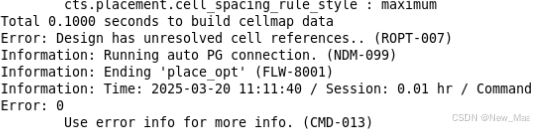
在跑opencores的某些设计的时候遇到报错。Design has unresolved cell references. 如下图所示。
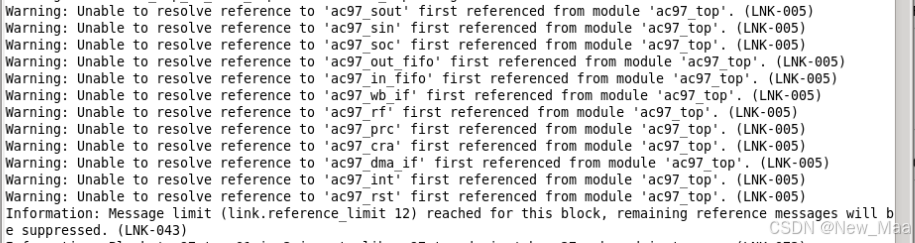
 向上翻找,发现如下的警告信息: Unable to resolve reference to 'ac97 sout' first referenced from module ‘xxxxxx’
尝试方法1:

在design compiler,脚本中analyze -format {所有的verilog文件}。这种方法可以保证Design Compiler 不报错。但是ICC2仍然报错。

尝试方法2:

修改顶层verilog代码,直接include所有的底层文件,然后在Design compiler中,只analyze顶层文件即可。这种方法在ICC2中可以没有warning,没有报错。

总结:

尽量在顶层verilog代码中include下面的子模块,避免多次analyze.

在不同的开发场景中,未解决引用(Unresolved references)问题有不同的解决方案: - **Android Studio出包未解决类或接口引用问题**:当出现 “Warning: there were 1 unresolved references to classes or interfaces.” 提示,可能需要添加缺失的库JAR文件或更新其版本。若代码在缺少这些类的情况下仍能正常工作,可使用 `-dontwarn` 选项来抑制警告,更多信息可参考 (http://proguard.sourceforge.net/manual/troubleshooting.html#unresolvedclass) [^1]。 - **编译未解决库类成员引用问题**:若编译出现 “Warning: there were 2 unresolved references to library class members.” 提示,可能需要更新库的版本,或者指定 `-dontskipnonpubliclibraryclassmembers` 选项。更多信息可参考 (http://proguard.sourceforge.net/manual/troubleshooting.html#unresolvedlibraryclassmember) [^2]。 - **Android XML文件中资源引用验证问题**:写Android代码,若出现 “Validates resource references inside Android XML files” 问题,通常是因为 `MainActivity.java` 和 `AndroidManifest.xml` 中的包名不同。将两个包名修改为一致即可解决问题 [^3]。 - **VS Code Python包导入未解决引用问题**:对于 “unresolved import” 问题,可在 `settings.json` 中设置Python路径,示例如下: ```json // Path to Python, you can use a custom version of Python // by modifying this setting to include the full path. "python.pythonPath": "python3", ``` [^4]
评论
成就一亿技术人!
拼手气红包6.0元
还能输入1000个字符
 
红包 添加红包
表情包 插入表情
 条评论被折叠 查看
添加红包

请填写红包祝福语或标题

红包个数最小为10个

红包金额最低5元

当前余额3.43前往充值 >
需支付:10.00
成就一亿技术人!
领取后你会自动成为博主和红包主的粉丝 规则
hope_wisdom
发出的红包
实付
使用余额支付
点击重新获取
扫码支付
钱包余额 0

抵扣说明:

1.余额是钱包充值的虚拟货币,按照1:1的比例进行支付金额的抵扣。
2.余额无法直接购买下载,可以购买VIP、付费专栏及课程。

余额充值


