



 本文深入讲解BehaviorTree.cpp库,涵盖不同版本API变动、节点类型及其功能特性,包括ControlNodes、DecoratorNodes、ActionNodes和ConditionNodes。同时,介绍数据交互方式,如key/value键值对的读写操作及Blackboard模式,帮助读者全面理解行为树的设计与应用。
一、简述
BehaviorTree_cpp_v3版本之间api存在改动,需注意版本问题
BehaviorTree.CPP has many interesting features, when compared to other implementations:
- It makes asynchronous Actions, i.e. non-blocking, a first-class citizen.
- It allows the creation of trees at run-time, using a textual representation (XML).
- You can link staticaly you custom TreeNodes or convert them into plugins which are loaded at run-time.
- It includes a logging/profiling infrastructure that allows the user to visualize, record, replay and analyze state transitions.
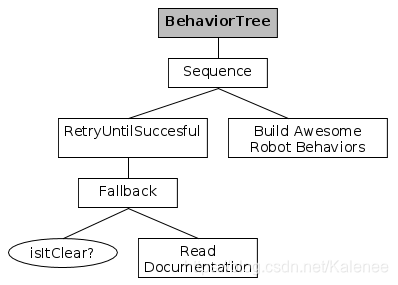
二、nodes基础
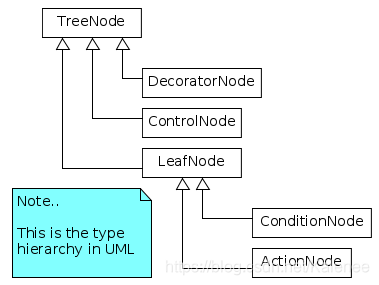
ControlNodes和DecoratorNodes主要用于控制执行节点,不会执行实际工作,一般直接在xml中调用就好
- ControlNodes:可以有1到N个子节点的节点,一旦收到tick,该tick可以传播给一个或多个子节点。
- DecoratorNodes:类似于ControlNode,但它只能有一个子节点。
ActionNodes和ConditionNodes都是执行节点,执行实际任务,不存在子节点,一般使用时继承ActionNodes编写功能节点
- ActionNodes:是叶子,没有子节点,用户应该实现自己的ActionNodes来执行实际任务。
- ConditionNodes:等效于ActionNodes,但它们始终是同步执行的子叶,即它们不能返回RUNNING,也不能改变系统的状态。
2.1 ControlNodes
Sequences
| Type of ControlNode | Child returns FAILURE | Child returns RUNNING |
|---|---|---|
| Sequence | Restart | Tick again |
| ReactiveSequence | Restart | Restart |
| SequenceStar | Tick again | Tick again |
Fallback
- Before ticking the first child, the node status becomes RUNNING.
- If a child returns FAILURE, the fallback ticks the next child.
- If the last child returns FAILURE too, all the children are halted and the sequence returns FAILURE.
- If a child returns SUCCESS, it stops and returns SUCCESS. All the children are halted.
The two versions of Fallback differ in the way they react when a child returns RUNNING:
- FallbackStar will return RUNNING and the next time it is ticked, it will tick the same child where it left off before.
- Plain old Fallback will return RUNNING and the index of the next child to execute is reset after each execution.
2.2 DecoratorNodes
-
InverterNode
Tick the child once and return SUCCESS if the child failed or FAILURE if the child succeeded.
If the child returns RUNNING, this node returns RUNNING too.
-
ForceSuccessNode
If the child returns RUNNING, this node returns RUNNING too.
Otherwise, it returns always SUCCESS.
-
ForceFailureNode
If the child returns RUNNING, this node returns RUNNING too.
Otherwise, it returns always FAILURE.
-
RepeatNode
Tick the child up to N times, where N is passed as a Input Port, as long as the child returns SUCCESS.
Interrupt the loop if the child returns FAILURE and, in that case, return FAILURE too.
If the child returns RUNNING, this node returns RUNNING too.
-
RetryNode
Tick the child up to N times, where N is passed as a Input Port, as long as the child returns FAILURE.
2.3 ActionNodes
Sync同步:串行执行(按顺序,一个等一个),阻塞模式。
Async异步:并行执行(没有顺序,同时做),非阻塞模式。
-
BT::ActionNodeBase: 基类 -
BT::AsyncActionNode: The AsyncActionNode a different thread where the action will be executed. 当节点处于运行状态时,默认返回running,当使用Sequence时,再次被tick时,会再次调用running节点。 -
BT::CoroActionNode: The CoroActionNode class is an ideal candidate for asynchronous actions which need to communicate with a service provider using an asynch request/reply interface (being a notable example ActionLib in ROS, MoveIt clients or move_base clients). -
BT::SimpleActionNode: The[SimpleActionNode provides an easy to use ActionNode. The user should simply provide a callback with this signature. -
BT::SyncActionNode: is an helper derived class that explicitly forbids the status RUNNING and doesn’t require an implementation of halt(). 该节点不存在running状态,执行会一直等待直到返回状态。
三、数据交互(dataflow)
Behaviortree的数据交互形式为key/value键值对,数据的写入与读出都可以使用键或者数值。
3.1 数据写入与读出
- 在ActionNode类中定义
static PortsList providedPorts()
// It is mandatory to define this static method.
static PortsList providedPorts()
{
    // Any port must have a name. The type is optional.
    return { BT::InputPort<std::string>("input_1"),
             BT::InputPort<Pose2D>("input_2"),
             BT::OutputPort<std::string>("output_1"),
             BT::OutputPort<std::string>("output_1")};
}
- 在
tick()函数中写入和读出数据,基础数据默认都是std::string
// 写入数据
Optional<std::string> msg = getInput<std::string>("input_1");
// Check if optional is valid. If not, throw its error
if (!msg)
    throw BT::RuntimeError("missing required input [message]: ",
                           msg.error());

// use the method value() to extract the valid message.
std::cout << "Robot says: " << msg.value() << std::endl;

// 读出数据
// the output may change at each tick(). Here we keep it simple.
setOutput("output_1", "The answer is 42" );
- 在
xml中进行数据的交互
- 直接进行数据交互
 <root>
     <BehaviorTree>
        <Sequence name="root">
            <get_data    input_1="start thinking..." />
            <send_data   output_1="{the_answer}"/>
            <get_data    input_1="{the_answer}" />
        </Sequence>
     </BehaviorTree>
 </root>
- 使用Blackboard
A Blackboard is a key/value storage shared by all the Nodes of a Tree.
 <root main_tree_to_execute = "MainTree" >
     <BehaviorTree ID="MainTree">
        <SequenceStar name="root">
            <SetBlackboard   output_key="input_text" value="start thinking..." />
            <get_data    input_1="{input_text}" />
            <send_data   output_1="{the_answer}"/>
            <get_data    input_1="{the_answer}" />
        </SequenceStar>
     </BehaviorTree>
 </root>
3.2 数据的预处理
若需要写入其他类型数据,需对数据进行解析,通过模板函数BT::convertFromString<Position2D>(StringView),对数据进行分割(splitString(str, ';')),然后再调用convertFromString<double>转换到double类型。
struct Position2D
{
  double x;
  double y;
};

// Template specialization to converts a string to Position2D.
namespace BT
{
    template <> inline Position2D convertFromString(StringView str)
    {
        // The next line should be removed...
        printf("Converting string: \"%s\"\n", str.data() );

        // We expect real numbers separated by semicolons
        auto parts = splitString(str, ';');
        if (parts.size() != 2)
        {
            throw RuntimeError("invalid input)");
        }
        else{
            Position2D output;
            output.x     = convertFromString<double>(parts[0]);
            output.y     = convertFromString<double>(parts[1]);
            return output;
        }
    }
} // end namespace BT






 扫一扫
扫一扫


 1739
1739

 被折叠的 条评论
为什么被折叠?
被折叠的 条评论
为什么被折叠?
 到【灌水乐园】发言





