点云数据通过pcl的kdtree搜索关键点某半径邻域内的区域

PCL KdTree邻域搜索
本文介绍如何使用PCL库中的KdTree进行点云数据的关键点邻域搜索,通过设定关键点和邻域半径,实现对点云中特定区域的筛选,并提供了完整的代码示例。

利用pcl中的kdtree可以做到搜索关键点某半径邻域内的区域.

主要步骤

1.读入点云数据
2.设置kdtree
3.设置关键点和邻域半径
4.执行搜索函数

附上代码

#include <iostream>
#include <pcl/point_types.h>
#include <pcl/io/pcd_io.h>
#include <pcl/io/ply_io.h>
#include <pcl/kdtree/kdtree_flann.h>
#include <vector>
using namespace std;

typedef pcl::PointXYZI PointType;
int main(int argc, char** argv)
{
    if(argc != 3)
    {
        cerr<<"输入参数数量不对!"<<endl;
        exit(1);
    }
    string input_filename = argv[1];
    string output_filename = argv[2];

    pcl::PointCloud<PointType>::Ptr cloud(new pcl::PointCloud<PointType>());

    std::string format = input_filename.substr(input_filename.length()-4, 4);
    //std::cout<<"pointcloud format:"<<format<<std::endl;
    if(format == ".ply")
    {
        if(pcl::io::loadPLYFile(input_filename, *cloud)==-1)
        {
            PCL_ERROR("error! \n");
            exit(1);
        }
    }
    else if(pcl::io::loadPCDFile(input_filename, *cloud)==-1)
    {
        PCL_ERROR("error! \n");
        exit(1);
    }

    //创建kdtree 结构
    pcl::KdTreeFLANN<PointType> kdtree;
    //传入点云
    kdtree.setInputCloud(cloud);

    pcl::PointCloud<PointType>::Ptr source_key_Neigh(new pcl::PointCloud<PointType>());

    //设置关键点
    PointType searchPoint;
    searchPoint.x = 0;
    searchPoint.y = 0;
    searchPoint.z = 0;

    // 创建两个向量,分别存放近邻的索引值、近邻的中心距
    std::vector<int> pointIdxRadiusSearch;
    std::vector<float> pointRadiusSquaredDistance;

    // 指定随机半径
    //float radius = 256.0f * rand () / (RAND_MAX + 1.0f);
    float radius = 15;

    std::cout << "Neighbors within radius search at (" << searchPoint.x
            << " " << searchPoint.y
            << " " << searchPoint.z
            << ") with radius=" << radius << std::endl;

    // kdtree.radiusSearch (searchPoint, radius, pointIdxRadiusSearch, pointRadiusSquaredDistance) 
    if ( kdtree.radiusSearch (searchPoint, radius, pointIdxRadiusSearch, pointRadiusSquaredDistance) > 0 )
    {
        cout<<"最近邻点数: "<<pointIdxRadiusSearch.size ()<<endl;
        for (size_t i = 0; i < pointIdxRadiusSearch.size (); ++i)
        {
//            std::cout << cloud->points[ pointIdxRadiusSearch[i] ].x
//                      << " " << cloud->points[ pointIdxRadiusSearch[i] ].y
//                      << " " << cloud->points[ pointIdxRadiusSearch[i] ].z
//                      << " (squared distance: " << pointRadiusSquaredDistance[i] << ")" << std::endl;
            source_key_Neigh->push_back(cloud->points[pointIdxRadiusSearch[i]]);
        }
        pcl::io::savePCDFile(output_filename, *source_key_Neigh);
    }
    else
        cout<<"找不到最近点"<<endl;

    cout<<"end"<<endl;
    return 0;
}

CMakeLists.txt

cmake_minimum_required(VERSION 2.8)

project(search_pc_neighbourhood)

set(CMAKE_CXX_FLAGS "${CMAKE_CXX_FLAGS} -std=c++11")

# pcl
find_package( PCL 1.7 REQUIRED)
include_directories( ${PCL_INCLUDE_DIRS} )
add_definitions( ${PCL_DEFINITIONS} )
#LINK_DIRECTORIES(${PCL_LIBRARY_DIRS}$)

list(REMOVE_ITEM PCL_LIBRARIES "vtkproj4")
add_executable(main "main.cpp")
target_link_libraries(main ${PCL_LIBRARIES})

效果展示
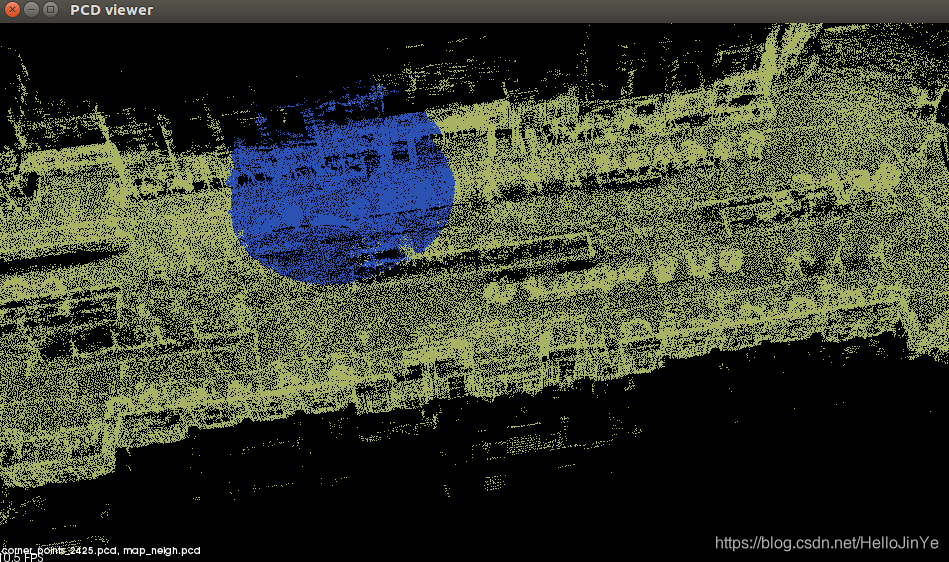
在这里插入图片描述

实现云的区域生长算法(Region Growing Segmentation)通常涉及以下几个关键步骤:选择种子、定义生长准则(如法线一致性、曲率、欧氏距离等)、生长区域并最终分割云。以下是一个基于PCL(Point Cloud Library)手动实现区域生长算法的基本流程: ### 1. 点云数据预处理 在进行区域生长之前,通常需要对点云数据进行预处理,包括去噪、计算法线和曲率信息等。PCL提供了相应的工具来完成这些任务。 #### 示例代码:计算云法线和曲率 ```cpp #include <pcl/point_types.h> #include <pcl/features/normal_3d.h> #include <pcl/features/curvature.h> // 定义云类型 typedef pcl::PointXYZ PointT; typedef pcl::PointCloud<PointT> PointCloudT; // 计算法线 pcl::NormalEstimation<PointT, pcl::Normal> ne; ne.setInputCloud(cloud); pcl::search::KdTree<PointT>::Ptr tree(new pcl::search::KdTree<PointT>()); ne.setSearchMethod(tree); pcl::PointCloud<pcl::Normal>::Ptr normals(new pcl::PointCloud<pcl::Normal>); ne.setRadiusSearch(0.03); // 设置搜索半径 ne.compute(*normals); // 计算曲率 pcl::CurvatureEstimation<PointT, pcl::Normal, pcl::PrincipalCurvatures> curvatureEstimation; curvatureEstimation.setInputCloud(cloud); curvatureEstimation.setInputNormals(normals); pcl::PointCloud<pcl::PrincipalCurvatures>::Ptr principalCurvatures(new pcl::PointCloud<pcl::PrincipalCurvatures>); curvatureEstimation.setSearchMethod(tree); curvatureEstimation.setRadiusSearch(0.03); curvatureEstimation.compute(*principalCurvatures); ``` ### 2. 选择种子 种子的选择通常基于云的几何特征,如曲率最小的。这些通常位于平滑区域,有助于提高分割效率。 #### 示例代码:选择曲率最小的作为种子 ```cpp #include <pcl/kdtree/kd_tree_flann.h> // 找到曲率最小的作为种子 float minCurvature = std::numeric_limits<float>::max(); int seedIndex = -1; for (size_t i = 0; i < principalCurvatures->points.size(); ++i) { float curvature = principalCurvatures->points[i].pc1; if (curvature < minCurvature) { minCurvature = curvature; seedIndex = i; } } ``` ### 3. 区域生长算法 区域生长算法的核心在于定义合适的生长准则,如法线一致性、曲率相似性和欧氏距离相似性。通过这些准则,逐步将加入到当前区域中。 #### 示例代码:实现区域生长算法 ```cpp #include <pcl/segmentation/region_growing.h> pcl::RegionGrowing<PointT, pcl::Normal> regionGrowing; regionGrowing.setInputCloud(cloud); regionGrowing.setInputNormals(normals); regionGrowing.setIndices(indices); // 可选:指定处理的云索引 regionGrowing.setMinClusterSize(100); // 设置最小聚类大小 regionGrowing.setMaxClusterSize(100000); // 设置最大聚类大小 regionGrowing.setNumberOfNeighbours(8); // 设置数 regionGrowing.setCurvatureThreshold(0.03); // 设置曲率阈值 regionGrowing.setSmoothnessThreshold(3.0 / 180.0 * M_PI); // 设置平滑度阈值 std::vector<pcl::PointIndices> clusters; regionGrowing.extract(clusters); ``` ### 4. 可视化分割结果 分割完成后,可以使用PCL的可视化工具将不同区域云以不同颜色显示。 #### 示例代码:可视化分割结果 ```cpp #include <pcl/visualization/cloud_viewer.h> pcl::visualization::PCLVisualizer viewer("PCL Viewer"); viewer.setBackgroundColor(0, 0, 0); viewer.addText("Region Growing Segmentation", 10, 10, "text"); // 为每个簇分配不同颜色 for (size_t i = 0; i < clusters.size(); ++i) { pcl::PointCloud<PointT>::Ptr cluster(new pcl::PointCloud<PointT>); pcl::copyPointCloud(*cloud, clusters[i].indices, *cluster); pcl::visualization::PointCloudColorHandlerCustom<PointT> colorHandler(cluster, rand() % 256, rand() % 256, rand() % 256); viewer.addPointCloud(cluster, colorHandler, "cluster" + std::to_string(i)); } while (!viewer.wasStopped()) { viewer.spinOnce(); } ``` ### 5. 调整参数以优化结果 为了获得更精确的分割结果,可以根据具体应用场景调整以下参数: - **曲率阈值**:控制区域生长的曲率相似性[^2]。 - **平滑度阈值**:控制法线一致性,影响区域的平滑程度。 - **数**:影响生长过程中搜索范围。 - **最小和最大聚类大小**:控制分割区域的大小范围。 通过合理选择种子和调整生长准则,可以获得更精确的分割结果。PCL库提供了丰富的工具来实现这些功能,用户可以根据具体需求进行调整和优化。 --- ###
评论 1
成就一亿技术人!
拼手气红包6.0元
还能输入1000个字符
 
红包 添加红包
表情包 插入表情
 条评论被折叠 查看
添加红包

请填写红包祝福语或标题

红包个数最小为10个

红包金额最低5元

当前余额3.43前往充值 >
需支付:10.00
成就一亿技术人!
领取后你会自动成为博主和红包主的粉丝 规则
hope_wisdom
发出的红包
实付
使用余额支付
点击重新获取
扫码支付
钱包余额 0

抵扣说明:

1.余额是钱包充值的虚拟货币,按照1:1的比例进行支付金额的抵扣。
2.余额无法直接购买下载,可以购买VIP、付费专栏及课程。

余额充值