



 本文介绍如何使用ROS与MAVROS包实现对开源飞行控制器的高级命令控制,包括安装配置过程及常见问题解决办法。
原文:https://404warehouse.net/2015/12/20/autopilot-offboard-control-using-mavros-package-on-ros/
Overview
Recently opensource autopilots have become reliable by various failsafe functions integrated by the opensource community. Developing different softwares for each application can be time consuming and hard to verify the reliablility of the software. An alternative to modifying the autopilot software, is to use an onboard computer to command the autopilot using high level commands. This way, the developer can use a reliable autopilot software which is still reliable and capable of staying in the air and use a software developed for the developer’s own purpose.
This article is to introduce how easy and practical it is to connect a PC, using ROS to control the autopilot running onbaord an onboard PC. A nice tutorial is up on the PX4 website but is a little unfriendly and I wanted to share some of the troubleshooting experiences while I was implementing the system.

what is ROS?
ROS is a framework for incorporating various modules of robotics by configuring modules as a TCP network. The ROS community is currently growing in a very fast pace both in the community and industry. The ROS wiki has great tutorials in understanding the framework. Please get used to using ROS following tutorials 1.~9. in the tutorials page.
Introduction to MAVROS
MAVROS is a ROS package which enables ROS to interact with autopilot software using the MAVLink protocol. MAVlink consists of 17 bytes and includes the message ID, target ID and data. The message ID shows what the data is. Message IDs can be seen in the messageID command set.
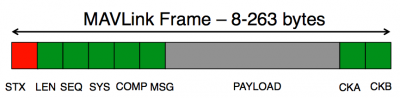
This enables MAVLink to be able to get information from multiple UAVs if messages are transferred in the same channel. Messages can either be transmitted through wireless signals.

Installing MAVROS
MAVROS can be installed using the source in the mavros repository. The default dialect of MAVROS is apm. As we are installing px4 on the pixhawk flight controller, MAVROS should be built from source, by configuring mavros by the command below.
catkin config --cmake-args -DMAVLINK_DIALECT=commonConfiguring PX4 for ROS
For the companion computer to communicate with the flight controller, a USB2TTL converter is needed to convert the voltage of the communication levels. A brief overview of configuring the companion computer with the pixhawk is shown in this link.

It is recommended that the offboard control is done through the TELEM2 port. Telem2 port can be activated usign the SYS_COMPANION parameter. This can be done by modifying the parameter on qgroundcontrol.
SYS_COMPANION 921600Configuring MAVROS for PX4
To launch MAVROS, the easiest way is to use the launch file
roslaunch mavros px4.launchLaunching MAVROS, it may not work on the first time. Do not panic!
Some parameters should be modified to be able to talk with the flight controller. The device name and baudrate should be configured to be able to talk to the autopilot.
|
1
2
3
4
5
6
7
8
9
10
11
12
|
<
node
name
=
"mavros"
pkg
=
"mavros"
type
=
"mavros_node"
output
=
"screen"
>
<
param
name
=
"fcu_url"
value
=
"$(arg fcu_url)"
/>
<
param
name
=
"gcs_url"
value
=
"$(arg gcs_url)"
/>
<
param
name
=
"target_system_id"
value
=
"$(arg tgt_system)"
/>
<
param
name
=
"target_component_id"
value
=
"$(arg tgt_component)"
/>
<!-- enable heartbeat send and reduce timeout -->
<
param
name
=
"conn_heartbeat"
value
=
"5.0"
/>
<
param
name
=
"conn_timeout"
value
=
"5.0"
/>
<!-- automatically start mavlink on USB -->
<
param
name
=
"startup_px4_usb_quirk"
value
=
"true"
/>
</
node
>
|
Setting Setpoints
Setpoints should be sent to the flight controller with a 0.5s time out. This is a safety factor so that the control should converge to a specific objective. Otherwise the flight controller will not Go into offboard mode. Setpoints that can be used are as below.
- Position Setpoints
- Velocity Setpoints
- Attitude Setpoints
- Acceleration Setpoints
- Actuator Control
An example node written in cpp is shown below. The node publishes setpoint_poistion_local message.
Integrating Companion Computer to quadrotor
The quadrotor is based on a F330 frame and the current integration follows as below. 330 frame feeled a little small for an onboard computer. For future integration, 450 frame should be more appropriate.

Position Control Example
For position control, external position estimation using the Vicon motion capture system was used for more precise position measurement. The block diagram visualized using rtq_graph is shown as below.





 扫一扫
扫一扫


 1818
1818

 被折叠的 条评论
为什么被折叠?
被折叠的 条评论
为什么被折叠?
 到【灌水乐园】发言





